


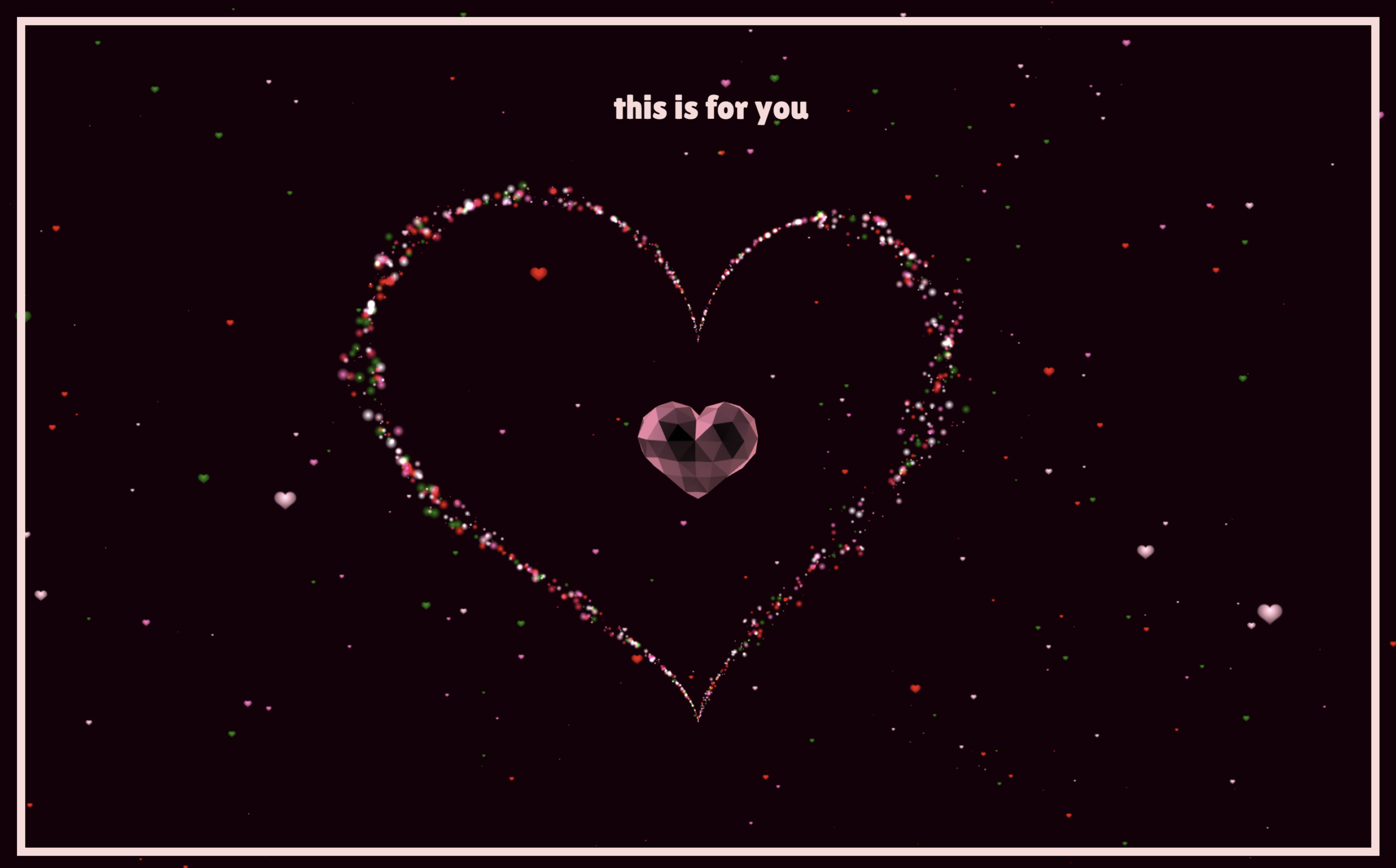
Let’s create a Crystal Heart Animation using HTML, CSS, and JavaScript. This project will feature a glowing 3D crystal heart with smooth particle animations that create a magical and visually stunning effect on your web page.
We’ll use:
- HTML to structure the page and add the canvas where the 3D animation will appear.
- CSS to style the layout, background, and text while keeping the design clean and aesthetic.
- JavaScript with Three.js to create the 3D crystal heart model, animate particles around it, and control movement and interactions.
This project is perfect for developers who want to experiment with creative WebGL animations and 3D effects while building something unique for their website. Let’s get started and bring this beautiful crystal heart animation to life with code! ❤️✨
HTML :
This HTML creates an animated 3D crystal heart scene using WebGL. The <canvas class="webgl"> is where the 3D animation is rendered, while the text “this is for you” and the music button appear on top of it. The code loads styles and then defines custom GLSL shaders (vertex and fragment shaders) that control how particles move and look. The vertex shaders calculate positions using math formulas and time (uTime) to make particles move in a heart-shaped animation, while the fragment shaders control the colors, glow, and texture of those particles. Finally, script.js runs the WebGL/Three.js logic that updates the animation and renders the heart continuously on the canvas.
<!DOCTYPE html>
<html lang="en">

<head>
  <meta charset="UTF-8">
  <title>Crystal Heart Animation | @coding.stella</title>
  <meta name="viewport" content="width=device-width, initial-scale=1">
  <link rel="stylesheet" href="https://use.typekit.net/trt3ngp.css">
  <link rel="stylesheet" href="./style.css">
</head>

<body>

  <canvas class="webgl"></canvas>
  <h1 class="h1text">this is for you</h1>
  <button id="play-music" type="button" aria-label="Play music">
    <svg fill="currentColor" viewBox="0 0 512 512" width="100" title="music">
      <path
        d="M470.38 1.51L150.41 96A32 32 0 0 0 128 126.51v261.41A139 139 0 0 0 96 384c-53 0-96 28.66-96 64s43 64 96 64 96-28.66 96-64V214.32l256-75v184.61a138.4 138.4 0 0 0-32-3.93c-53 0-96 28.66-96 64s43 64 96 64 96-28.65 96-64V32a32 32 0 0 0-41.62-30.49z"
      />
    </svg>
  </button>
  <script type="x-shader/x-vertex" id="vertexShader">
      #define M_PI 3.1415926535897932384626433832795
    uniform float uTime;
    uniform float uSize;
    attribute float aScale;
    attribute vec3 aColor;
    attribute float random;
    attribute float random1;
    attribute float aSpeed;
    varying vec3 vColor;
    varying vec2 vUv;

    void main() {
      float sign = 2.0* (step(random, 0.5) -.5);
      float t = sign*mod(-uTime *  aSpeed* 0.005  + 10.0*aSpeed*aSpeed, M_PI);
      float a = pow(t, 2.0) * pow((t - sign * M_PI), 2.0);
      float radius = 0.14;
      vec3 myOffset =
          vec3(t,  1.0, 0.0);
      myOffset = vec3(radius *16.0 * pow(sin(t), 2.0) * sin(t), radius * (13.0 * cos(t) - 5.0 * cos(2.0 * t) - 2.0 * cos(3.0 * t) - cos(4.0 * t)), .15*(a*(random1 - .5))*sin(abs(10.0*(sin(.2*uTime + .2*random)))*t));
      vec3 displacedPosition = myOffset;
      vec4 modelPosition = modelMatrix * vec4(displacedPosition.xyz, 1.0);

      vec4 viewPosition = viewMatrix * modelPosition;
      viewPosition.xyz += position * aScale * uSize * pow(a, .5) * .5;
      gl_Position = projectionMatrix * viewPosition;

      vColor = aColor;
      vUv = uv;
    }
  </script>

  <script type="x-shader/x-fragment" id="fragmentShader">
      varying vec3 vColor;
    varying vec2 vUv;

    void main() {
      vec2 uv = vUv;
      vec3 color = vColor;
      float strength = distance(uv, vec2(0.5));
      strength *= 2.0;
      strength = 1.0 - strength;
      gl_FragColor = vec4(strength * color, 1.0);
    }
  </script>
  <script type="x-shader/x-vertex" id="vertexShader1">
      #define M_PI 3.1415926535897932384626433832795


    uniform float uTime;
    uniform float uSize;
    attribute float aScale;
    attribute vec3 aColor;
    attribute float phi;
    attribute float random;
    attribute float random1;
    varying vec3 vColor;
    varying vec2 vUv;

    void main() {
      float t = 0.01 * uTime + 12.0;
      float angle = phi;

      t = mod((-uTime + 100.0) * 0.06* random1 + random *2.0 * M_PI , 2.0 * M_PI);
      vec3 myOffset = vec3(5.85*cos(angle * (t )), 2.0*(t - M_PI), 3.0*sin(angle * (t )/t));
    vec4 modelPosition = modelMatrix * vec4(myOffset, 1.0);
      vec4 viewPosition = viewMatrix * modelPosition;
      viewPosition.xyz += position * aScale * uSize;
      gl_Position = projectionMatrix * viewPosition;

      vColor = aColor;
      vUv = uv;
    }
  </script>

  <script type="x-shader/x-fragment" id="fragmentShader1">
      uniform sampler2D uTex;
    varying vec3 vColor;
    varying vec2 vUv;

    void main() {
      vec2 uv = vUv;
      vec3 color = vColor;
      float strength = distance(uv, vec2(0.5, .65));
      strength *= 2.0;
      strength = 1.0 - strength;
      vec3 texture = texture2D(uTex, uv).rgb;
      gl_FragColor = vec4(texture * color * (strength + .3), 1.);
    }
  </script>
  <script type="module" src="./script.js"></script>
</body>


</html>
CSS :
This CSS styles the page for the 3D heart animation interface. It removes default spacing, sets a dark background, and imports the Lilita One font for the text. The .webgl canvas is fixed to cover the entire screen so the Three.js animation fills the viewport. The heading is positioned near the top with a styled font and light pink color to match the theme. A decorative border is added using body::before, and the music button is centered on the screen with a transparent background and clickable SVG icon. Overall, the CSS focuses on minimal UI while letting the WebGL animation stay full screen and visually dominant.
@import url('https://fonts.googleapis.com/css2?family=Lilita+One&display=swap');

* {
  margin: 0;
  padding: 0;
  box-sizing: border-box;
}

html,
body {
  overflow: hidden;
  background: #16000a;
}

body {
  -webkit-font-smoothing: antialiased;
  color: #ffdada;
}

.h1text {
  font-family: "Lilita One", sans-serif;
  font-weight: 100;
  font-size: 2rem;
  font-style: normal;
}

.webgl {
  position: fixed;
  width: 100vw;
  height: 100vh;
  top: 0;
  left: 0;
  outline: none;
}

body::before {
  content: "";
  position: absolute;
  border: 8px solid;
  inset: 1rem;
  z-index: 100;
  pointer-events: none;
}

h1 {
  position: absolute;
  top: 10vh;
  left: 2.5rem;
  right: 1rem;
  text-align: center;
  font-family: ador-hairline, sans-serif;
  font-weight: 900;
  font-size: max(1rem, 3vh);
}

button {
  position: absolute;
  left: 0;
  top: 0;
  bottom: 0;
  height: 12vh;
  width: 12vh;
  transform: translateY(2vh);
  right: 0;
  margin: auto;
  -webkit-appearance: none;
  background: transparent;
  color: inherit;
  border: none;
  cursor: pointer;
}

svg {
  width: 3.5vh;
}
JavaScript :
This JavaScript uses Three.js to create an interactive 3D animated crystal heart scene. It sets up a WebGL scene with a camera, renderer, and background, then loads a 3D heart model (.glb) and thousands of small particle planes that move using custom shaders to form glowing heart shapes and floating particles. The GSAP library is used for smooth animations like scaling the heart and moving the camera. A music button loads and plays audio, and the animation reacts to the sound using an audio analyser so the heart and particles move based on the music frequency. The render loop continuously updates time, camera motion, particle shaders, and model rotation, while also handling mouse movement and screen resizing for interactive viewing.
/* Poly Heart model by Quaternius [CC0] (https://creativecommons.org/publicdomain/zero/1.0/) via Poly Pizza (https://poly.pizza/m/1yCRUwFnwX)
 */

import * as THREE from "https://cdn.skypack.dev/three@0.135.0";
import { gsap } from "https://cdn.skypack.dev/gsap@3.8.0";
import { GLTFLoader } from "https://cdn.skypack.dev/three@0.135.0/examples/jsm/loaders/GLTFLoader";
class World {
  constructor({
    canvas,
    width,
    height,
    cameraPosition,
    fieldOfView = 75,
    nearPlane = 0.1,
    farPlane = 100 }) {
    this.parameters = {
      count: 1500,
      max: 12.5 * Math.PI,
      a: 2,
      c: 4.5
    };

    this.textureLoader = new THREE.TextureLoader();
    this.scene = new THREE.Scene();
    this.scene.background = new THREE.Color(0x16000a);
    this.clock = new THREE.Clock();
    this.data = 0;
    this.time = { current: 0, t0: 0, t1: 0, t: 0, frequency: 0.0005 };
    this.angle = { x: 0, z: 0 };
    this.width = width || window.innerWidth;
    this.height = height || window.innerHeight;
    this.aspectRatio = this.width / this.height;
    this.fieldOfView = fieldOfView;
    this.camera = new THREE.PerspectiveCamera(
      fieldOfView,
      this.aspectRatio,
      nearPlane,
      farPlane);

    this.camera.position.set(
      cameraPosition.x,
      cameraPosition.y,
      cameraPosition.z);

    this.scene.add(this.camera);
    this.renderer = new THREE.WebGLRenderer({
      canvas,
      antialias: true
    });

    this.pixelRatio = Math.min(window.devicePixelRatio, 2);
    this.renderer.setPixelRatio(this.pixelRatio);
    this.renderer.setSize(this.width, this.height);
    this.timer = 0;
    this.addToScene();
    this.addButton();

    this.render();
    this.listenToResize();
    this.listenToMouseMove();
  }
  start() { }
  render() {
    this.renderer.render(this.scene, this.camera);
    this.composer && this.composer.render();
  }
  loop() {
    this.time.elapsed = this.clock.getElapsedTime();
    this.time.delta = Math.min(
      60,
      (this.time.current - this.time.elapsed) * 1000);

    if (this.analyser && this.isRunning) {
      this.time.t = this.time.elapsed - this.time.t0 + this.time.t1;
      this.data = this.analyser.getAverageFrequency();
      this.data *= this.data / 2000;
      this.angle.x += this.time.delta * 0.001 * 0.63;
      this.angle.z += this.time.delta * 0.001 * 0.39;
      const justFinished = this.isRunning && !this.sound.isPlaying;
      if (justFinished) {
        this.time.t1 = this.time.t;
        this.audioBtn.disabled = false;
        this.isRunning = false;
        const tl = gsap.timeline();
        this.angle.x = 0;
        this.angle.z = 0;
        tl.to(this.camera.position, {
          x: 0,
          z: 4.5,
          duration: 4,
          ease: "expo.in"
        });

        tl.to(this.audioBtn, {
          opacity: () => 1,
          duration: 1,
          ease: "power1.out"
        });

      } else {
        this.camera.position.x = Math.sin(this.angle.x) * this.parameters.a;
        this.camera.position.z = Math.min(
          Math.max(Math.cos(this.angle.z) * this.parameters.c, 1.75),
          6.5);

      }
    }
    this.camera.lookAt(this.scene.position);
    if (this.heartMaterial) {
      this.heartMaterial.uniforms.uTime.value +=
        this.time.delta * this.time.frequency * (1 + this.data * 0.2);
    }
    if (this.model) {
      this.model.rotation.y -= 0.0005 * this.time.delta * (1 + this.data);
    }
    if (this.snowMaterial) {
      this.snowMaterial.uniforms.uTime.value +=
        this.time.delta * 0.0004 * (1 + this.data);
    }
    this.render();

    this.time.current = this.time.elapsed;
    requestAnimationFrame(this.loop.bind(this));
  }
  listenToResize() {
    window.addEventListener("resize", () => {
      // Update sizes
      this.width = window.innerWidth;
      this.height = window.innerHeight;

      // Update camera
      this.camera.aspect = this.width / this.height;
      this.camera.updateProjectionMatrix();
      this.renderer.setSize(this.width, this.height);
    });
  }
  listenToMouseMove() {
    window.addEventListener("mousemove", e => {
      const x = e.clientX;
      const y = e.clientY;
      gsap.to(this.camera.position, {
        x: gsap.utils.mapRange(0, window.innerWidth, 0.2, -0.2, x),
        y: gsap.utils.mapRange(0, window.innerHeight, 0.2, -0.2, -y)
      });

    });
  }
  addHeart() {
    this.heartMaterial = new THREE.ShaderMaterial({
      fragmentShader: document.getElementById("fragmentShader").textContent,
      vertexShader: document.getElementById("vertexShader").textContent,
      uniforms: {
        uTime: { value: 0 },
        uSize: { value: 0.2 },
        uTex: {
          value: new THREE.TextureLoader().load(
            "https://assets.codepen.io/74321/heart.png")
        }
      },


      depthWrite: false,
      blending: THREE.AdditiveBlending,
      transparent: true
    });

    const count = this.parameters.count; //2000
    const scales = new Float32Array(count * 1);
    const colors = new Float32Array(count * 3);
    const speeds = new Float32Array(count);
    const randoms = new Float32Array(count);
    const randoms1 = new Float32Array(count);
    const colorChoices = [
      "white",
      "red",
      "pink",
      "crimson",
      "hotpink",
      "green"];


    const squareGeometry = new THREE.PlaneGeometry(1, 1);
    this.instancedGeometry = new THREE.InstancedBufferGeometry();
    Object.keys(squareGeometry.attributes).forEach(attr => {
      this.instancedGeometry.attributes[attr] = squareGeometry.attributes[attr];
    });
    this.instancedGeometry.index = squareGeometry.index;
    this.instancedGeometry.maxInstancedCount = count;

    for (let i = 0; i < count; i++) {
      const phi = Math.random() * Math.PI * 2;
      const i3 = 3 * i;
      randoms[i] = Math.random();
      randoms1[i] = Math.random();
      scales[i] = Math.random() * 0.35;
      const colorIndex = Math.floor(Math.random() * colorChoices.length);
      const color = new THREE.Color(colorChoices[colorIndex]);
      colors[i3 + 0] = color.r;
      colors[i3 + 1] = color.g;
      colors[i3 + 2] = color.b;
      speeds[i] = Math.random() * this.parameters.max;
    }
    this.instancedGeometry.setAttribute(
      "random",
      new THREE.InstancedBufferAttribute(randoms, 1, false));

    this.instancedGeometry.setAttribute(
      "random1",
      new THREE.InstancedBufferAttribute(randoms1, 1, false));

    this.instancedGeometry.setAttribute(
      "aScale",
      new THREE.InstancedBufferAttribute(scales, 1, false));

    this.instancedGeometry.setAttribute(
      "aSpeed",
      new THREE.InstancedBufferAttribute(speeds, 1, false));

    this.instancedGeometry.setAttribute(
      "aColor",
      new THREE.InstancedBufferAttribute(colors, 3, false));

    this.heart = new THREE.Mesh(this.instancedGeometry, this.heartMaterial);
    console.log(this.heart);
    this.scene.add(this.heart);
  }
  addToScene() {
    this.addModel();
    this.addHeart();
    this.addSnow();
  }
  async addModel() {
    this.model = await this.loadObj(
      "https://assets.codepen.io/74321/heart.glb");

    this.model.scale.set(0.01, 0.01, 0.01);
    this.model.material = new THREE.MeshMatcapMaterial({
      matcap: this.textureLoader.load(
        "https://assets.codepen.io/74321/3.png",
        () => {
          gsap.to(this.model.scale, {
            x: 0.35,
            y: 0.35,
            z: 0.35,
            duration: 1.5,
            ease: "Elastic.easeOut"
          });

        }),

      color: "#ff89aC"
    });

    this.scene.add(this.model);
  }
  addButton() {
    this.audioBtn = document.querySelector("button");
    this.audioBtn.addEventListener("click", () => {
      this.audioBtn.disabled = true;
      if (this.analyser) {
        this.sound.play();
        this.time.t0 = this.time.elapsed;
        this.data = 0;
        this.isRunning = true;
        gsap.to(this.audioBtn, {
          opacity: 0,
          duration: 1,
          ease: "power1.out"
        });

      } else {
        this.loadMusic().then(() => {
          console.log("music loaded");
        });
      }
    });
  }
  loadObj(path) {
    const loader = new GLTFLoader();
    return new Promise(resolve => {
      loader.load(
        path,
        response => {
          resolve(response.scene.children[0]);
        },
        xhr => { },
        err => {
          console.log(err);
        });

    });
  }
  loadMusic() {
    return new Promise(resolve => {
      const listener = new THREE.AudioListener();
      this.camera.add(listener);
      // create a global audio source
      this.sound = new THREE.Audio(listener);
      const audioLoader = new THREE.AudioLoader();
      audioLoader.load(
        "https://assets.codepen.io/74321/ukulele.mp3",
        buffer => {
          this.sound.setBuffer(buffer);
          this.sound.setLoop(false);
          this.sound.setVolume(0.5);
          this.sound.play();
          this.analyser = new THREE.AudioAnalyser(this.sound, 32);
          // get the average frequency of the sound
          const data = this.analyser.getAverageFrequency();
          this.isRunning = true;
          this.t0 = this.time.elapsed;
          resolve(data);
        },
        progress => {
          gsap.to(this.audioBtn, {
            opacity: () => 1 - progress.loaded / progress.total,
            duration: 1,
            ease: "power1.out"
          });

        },

        error => {
          console.log(error);
        });

    });
  }
  addSnow() {
    this.snowMaterial = new THREE.ShaderMaterial({
      fragmentShader: document.getElementById("fragmentShader1").textContent,
      vertexShader: document.getElementById("vertexShader1").textContent,
      uniforms: {
        uTime: { value: 0 },
        uSize: { value: 0.3 },
        uTex: {
          value: new THREE.TextureLoader().load(
            "https://assets.codepen.io/74321/heart.png")
        }
      },


      depthWrite: false,
      blending: THREE.AdditiveBlending,
      transparent: true
    });

    const count = 550;
    const scales = new Float32Array(count * 1);
    const colors = new Float32Array(count * 3);
    const phis = new Float32Array(count);
    const randoms = new Float32Array(count);
    const randoms1 = new Float32Array(count);
    const colorChoices = ["red", "pink", "hotpink", "green"];

    const squareGeometry = new THREE.PlaneGeometry(1, 1);
    this.instancedGeometry = new THREE.InstancedBufferGeometry();
    Object.keys(squareGeometry.attributes).forEach(attr => {
      this.instancedGeometry.attributes[attr] = squareGeometry.attributes[attr];
    });
    this.instancedGeometry.index = squareGeometry.index;
    this.instancedGeometry.maxInstancedCount = count;

    for (let i = 0; i < count; i++) {
      const phi = (Math.random() - 0.5) * 10;
      const i3 = 3 * i;
      phis[i] = phi;
      randoms[i] = Math.random();
      randoms1[i] = Math.random();
      scales[i] = Math.random() * 0.35;
      const colorIndex = Math.floor(Math.random() * colorChoices.length);
      const color = new THREE.Color(colorChoices[colorIndex]);
      colors[i3 + 0] = color.r;
      colors[i3 + 1] = color.g;
      colors[i3 + 2] = color.b;
    }
    this.instancedGeometry.setAttribute(
      "phi",
      new THREE.InstancedBufferAttribute(phis, 1, false));

    this.instancedGeometry.setAttribute(
      "random",
      new THREE.InstancedBufferAttribute(randoms, 1, false));

    this.instancedGeometry.setAttribute(
      "random1",
      new THREE.InstancedBufferAttribute(randoms1, 1, false));

    this.instancedGeometry.setAttribute(
      "aScale",
      new THREE.InstancedBufferAttribute(scales, 1, false));

    this.instancedGeometry.setAttribute(
      "aColor",
      new THREE.InstancedBufferAttribute(colors, 3, false));

    this.snow = new THREE.Mesh(this.instancedGeometry, this.snowMaterial);
    this.scene.add(this.snow);
  }
}


const world = new World({
  canvas: document.querySelector("canvas.webgl"),
  cameraPosition: { x: 0, y: 0, z: 4.5 }
});


world.loop();
In conclusion, this Crystal Heart Animation project shows how powerful HTML, CSS, and JavaScript can be when combined with modern tools like Three.js to create stunning visual effects on the web. By structuring the page with HTML, styling it with CSS, and controlling the animation using JavaScript and WebGL, we can build smooth and interactive 3D experiences directly in the browser ❤️✨
If you encounter any difficulties while working on your glowing cards, fear not. You can freely obtain the source code files for this project. Simply click the Download button to kickstart your journey. Enjoy coding!
