


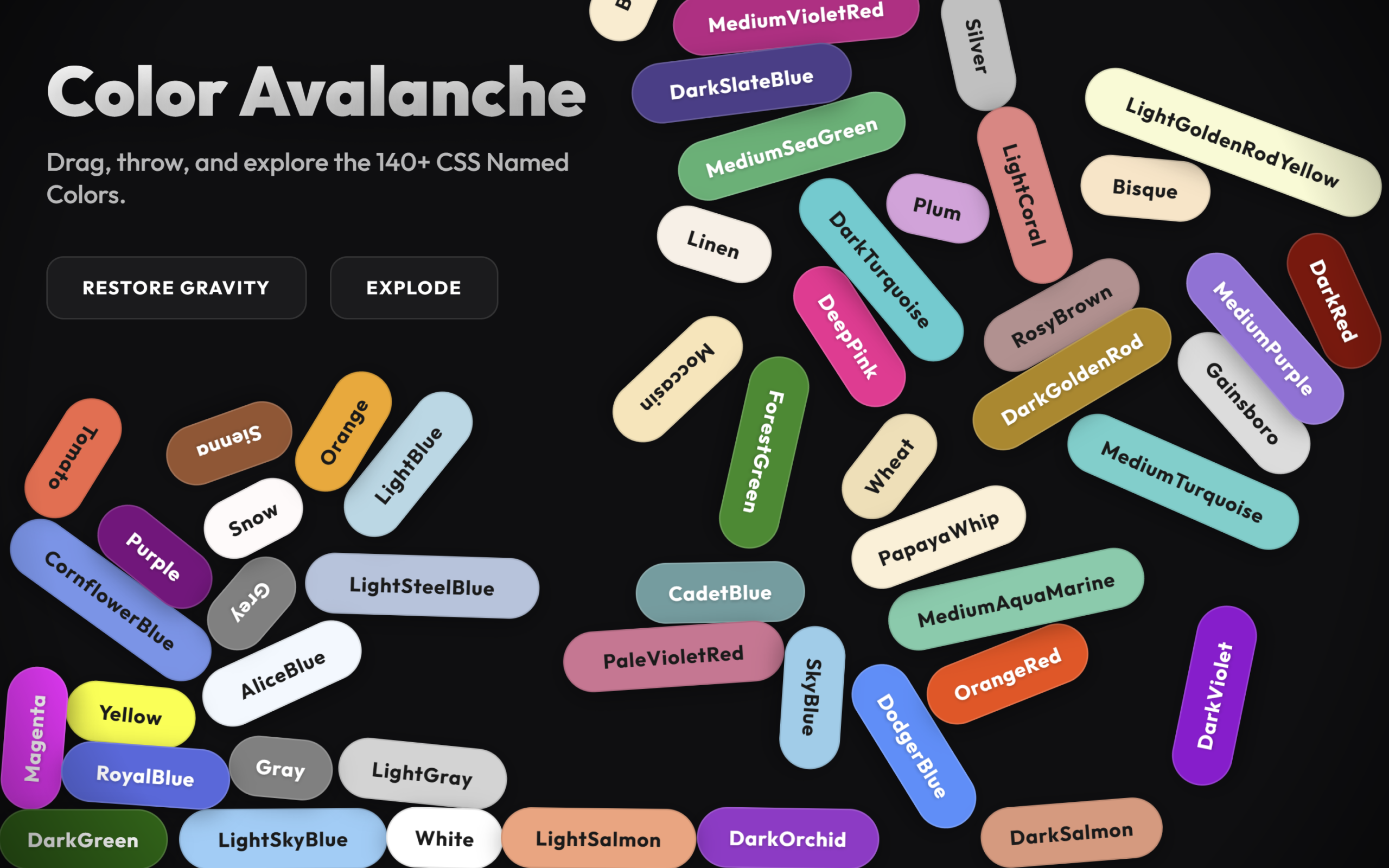
Let’s build an Interactive Animated Footer using HTML, CSS & JavaScript.
In this project, we’ll create a modern, dynamic footer section that reacts to user interaction with smooth animations, hover effects, and engaging visual elements. The footer won’t just sit at the bottom – it will feel alive and interactive.
We’ll use:
- HTML to structure the footer layout, including links, social icons, headings, and copyright text.
- CSS to design a stylish layout with gradients, glass effects, smooth transitions, and responsive behavior across devices.
- JavaScript to power interactive animations like hover reveals, animated highlights, dynamic year updates, scroll effects, and subtle motion enhancements.
This project is perfect for developers who want to improve UI design skills, master smooth animations, and create visually impressive website footers that stand out. Let’s build a footer that actually feels interactive and modern.
HTML :
This HTML builds the structure for the Color Avalanche project. It loads the Outfit font and external CSS, then creates a UI layer with a title, short description, and two buttons to control gravity and explosion effects. Below that, a container is added where the animated color elements will appear. A hidden unordered list stores all 140+ CSS named colors, which JavaScript later reads to generate the falling color pills dynamically. At the bottom, it loads the project scripts along with the Matter.js physics library that powers the movement, collisions, and interactions.
<!DOCTYPE html>
<html lang="en">

<head>
	<meta charset="UTF-8">
	<title>Interactive Animated Footer | @coding.stella</title>
	<link rel="preconnect" href="https://fonts.googleapis.com">
	<link rel="preconnect" href="https://fonts.gstatic.com" crossorigin>
	<link href="https://fonts.googleapis.com/css2?family=Outfit:wght@500;700;900&display=swap" rel="stylesheet">
	<link rel="stylesheet" href="./style.css">
</head>

<body>
	<!-- UI Overlay -->
	<div class="ui-layer">
		<h1>Color Avalanche</h1>
		<p>Drag, throw, and explore the 140+ CSS Named Colors.</p>
		<div class="controls">
			<button id="btn-gravity">Zero Gravity</button>
			<button id="btn-explode">Explode</button>
		</div>
	</div>

	<!-- Container for the physics elements -->
	<div id="scene-container"></div>

	<!-- Hidden list to act as data source (preserving the template spirit) -->
	<ul id="color-source" style="display: none;">
		<li>AliceBlue</li>
		<li>AntiqueWhite</li>
		<li>Aqua</li>
		<li>Aquamarine</li>
		<li>Azure</li>
		<li>Beige</li>
		<li>Bisque</li>
		<li>Black</li>
		<li>BlanchedAlmond</li>
		<li>Blue</li>
		<li>BlueViolet</li>
		<li>Brown</li>
		<li>BurlyWood</li>
		<li>CadetBlue</li>
		<li>Chartreuse</li>
		<li>Chocolate</li>
		<li>Coral</li>
		<li>CornflowerBlue</li>
		<li>Cornsilk</li>
		<li>Crimson</li>
		<li>Cyan</li>
		<li>DarkBlue</li>
		<li>DarkCyan</li>
		<li>DarkGoldenRod</li>
		<li>DarkGray</li>
		<li>DarkGrey</li>
		<li>DarkGreen</li>
		<li>DarkKhaki</li>
		<li>DarkMagenta</li>
		<li>DarkOliveGreen</li>
		<li>DarkOrange</li>
		<li>DarkOrchid</li>
		<li>DarkRed</li>
		<li>DarkSalmon</li>
		<li>DarkSeaGreen</li>
		<li>DarkSlateBlue</li>
		<li>DarkSlateGray</li>
		<li>DarkSlateGrey</li>
		<li>DarkTurquoise</li>
		<li>DarkViolet</li>
		<li>DeepPink</li>
		<li>DeepSkyBlue</li>
		<li>DimGray</li>
		<li>DimGrey</li>
		<li>DodgerBlue</li>
		<li>FireBrick</li>
		<li>FloralWhite</li>
		<li>ForestGreen</li>
		<li>Fuchsia</li>
		<li>Gainsboro</li>
		<li>GhostWhite</li>
		<li>Gold</li>
		<li>GoldenRod</li>
		<li>Gray</li>
		<li>Grey</li>
		<li>Green</li>
		<li>GreenYellow</li>
		<li>HoneyDew</li>
		<li>HotPink</li>
		<li>IndianRed</li>
		<li>Indigo</li>
		<li>Ivory</li>
		<li>Khaki</li>
		<li>Lavender</li>
		<li>LavenderBlush</li>
		<li>LawnGreen</li>
		<li>LemonChiffon</li>
		<li>LightBlue</li>
		<li>LightCoral</li>
		<li>LightCyan</li>
		<li>LightGoldenRodYellow</li>
		<li>LightGray</li>
		<li>LightGrey</li>
		<li>LightGreen</li>
		<li>LightPink</li>
		<li>LightSalmon</li>
		<li>LightSeaGreen</li>
		<li>LightSkyBlue</li>
		<li>LightSlateGray</li>
		<li>LightSlateGrey</li>
		<li>LightSteelBlue</li>
		<li>LightYellow</li>
		<li>Lime</li>
		<li>LimeGreen</li>
		<li>Linen</li>
		<li>Magenta</li>
		<li>Maroon</li>
		<li>MediumAquaMarine</li>
		<li>MediumBlue</li>
		<li>MediumOrchid</li>
		<li>MediumPurple</li>
		<li>MediumSeaGreen</li>
		<li>MediumSlateBlue</li>
		<li>MediumSpringGreen</li>
		<li>MediumTurquoise</li>
		<li>MediumVioletRed</li>
		<li>MidnightBlue</li>
		<li>MintCream</li>
		<li>MistyRose</li>
		<li>Moccasin</li>
		<li>NavajoWhite</li>
		<li>Navy</li>
		<li>OldLace</li>
		<li>Olive</li>
		<li>OliveDrab</li>
		<li>Orange</li>
		<li>OrangeRed</li>
		<li>Orchid</li>
		<li>PaleGoldenRod</li>
		<li>PaleGreen</li>
		<li>PaleTurquoise</li>
		<li>PaleVioletRed</li>
		<li>PapayaWhip</li>
		<li>PeachPuff</li>
		<li>Peru</li>
		<li>Pink</li>
		<li>Plum</li>
		<li>PowderBlue</li>
		<li>Purple</li>
		<li>RebeccaPurple</li>
		<li>Red</li>
		<li>RosyBrown</li>
		<li>RoyalBlue</li>
		<li>SaddleBrown</li>
		<li>Salmon</li>
		<li>SandyBrown</li>
		<li>SeaGreen</li>
		<li>SeaShell</li>
		<li>Sienna</li>
		<li>Silver</li>
		<li>SkyBlue</li>
		<li>SlateBlue</li>
		<li>SlateGray</li>
		<li>SlateGrey</li>
		<li>Snow</li>
		<li>SpringGreen</li>
		<li>SteelBlue</li>
		<li>Tan</li>
		<li>Teal</li>
		<li>Thistle</li>
		<li>Tomato</li>
		<li>Turquoise</li>
		<li>Violet</li>
		<li>Wheat</li>
		<li>White</li>
		<li>WhiteSmoke</li>
		<li>Yellow</li>
		<li>YellowGreen</li>
	</ul>

	<script src="index.js"></script>
	<script src='https://cdnjs.cloudflare.com/ajax/libs/matter-js/0.19.0/matter.min.js'></script>
	<script src="./script.js"></script>

</body>
</html>
CSS :
This CSS styles a full screen dark themed physics playground. It defines global colors using CSS variables, makes the body fill the entire screen, and hides overflow. The #scene-container holds the floating color pills and stays behind the UI, while each .color-body is styled like a rounded pill with bold text, shadow, border, and a grab effect when clicked. The .ui-layer sits on top with a soft radial gradient, large gradient heading, description text, and glass style buttons with blur and hover animations. The Matter.js canvas is hidden by setting opacity to 0 because the visual movement is handled by styled DOM elements instead of the default wireframe rendering.
:root {
	--bg-color: #0f0f11;
	--text-color: #ffffff;
	--glass-bg: rgba(255, 255, 255, 0.05);
	--glass-border: rgba(255, 255, 255, 0.1);
}

body {
	margin: 0;
	padding: 0;
	overflow: hidden;
	background-color: var(--bg-color);
	font-family: "Outfit", sans-serif;
	color: var(--text-color);
	width: 100vw;
	height: 100vh;
}

/* Container for our physics divs */
#scene-container {
	position: absolute;
	top: 0;
	left: 0;
	width: 100%;
	height: 100%;
	pointer-events: none;
	/* Let clicks pass through to Matter.js mouse constraint if needed, but we'll handle events differently */
	z-index: 1;
}

/* The individual color "pills" */
.color-body {
	position: absolute;
	display: flex;
	justify-content: center;
	align-items: center;
	border-radius: 999px;
	/* Pill shape */
	font-weight: 700;
	font-size: 14px;
	letter-spacing: 0.5px;
	box-shadow: 0 4px 15px rgba(0, 0, 0, 0.3);
	cursor: grab;
	user-select: none;
	will-change: transform;
	pointer-events: auto;
	/* Enable interaction */
	text-shadow: 0 1px 2px rgba(0, 0, 0, 0.2);
	border: 1px solid rgba(255, 255, 255, 0.15);
	transition: box-shadow 0.1s;
}

.color-body:active {
	cursor: grabbing;
	box-shadow: 0 8px 25px rgba(0, 0, 0, 0.5);
	transform: scale(1.05);
	/* Slight pop on grab */
}

/* UI Layer */
.ui-layer {
	position: absolute;
	top: 0;
	left: 0;
	width: 100%;
	height: 100%;
	pointer-events: none;
	z-index: 10;
	padding: 2rem;
	box-sizing: border-box;
	background: radial-gradient(circle at 50% 50%,
			transparent 80%,
			rgba(0, 0, 0, 0.4) 100%);
}

h1 {
	font-size: 3rem;
	font-weight: 900;
	margin: 0;
	background: linear-gradient(135deg, #fff 0%, #a5a5a5 100%);
	-webkit-background-clip: text;
	-webkit-text-fill-color: transparent;
	text-shadow: 0 10px 30px rgba(0, 0, 0, 0.5);
}

p {
	font-size: 1.1rem;
	opacity: 0.7;
	margin-top: 0.5rem;
	max-width: 400px;
}

.controls {
	margin-top: 2rem;
	display: flex;
	gap: 1rem;
	pointer-events: auto;
}

button {
	background: var(--glass-bg);
	border: 1px solid var(--glass-border);
	color: white;
	padding: 0.8rem 1.5rem;
	border-radius: 12px;
	font-family: inherit;
	font-weight: 600;
	cursor: pointer;
	backdrop-filter: blur(10px);
	transition: all 0.2s ease;
	text-transform: uppercase;
	font-size: 0.8rem;
	letter-spacing: 1px;
}

button:hover {
	background: rgba(255, 255, 255, 0.15);
	transform: translateY(-2px);
	box-shadow: 0 5px 15px rgba(0, 0, 0, 0.3);
}

button:active {
	transform: translateY(0);
}

/* Canvas generated by Matter.js (hidden or debug) */
canvas {
	position: absolute;
	top: 0;
	left: 0;
	opacity: 0;
	/* We hide the raw physics wireframes to show only our DOM elements */
	pointer-events: auto;
	/* Needs to catch mouse events for the physics engine */
}
JavaScript :
This code creates a fun physics animation using Matter.js where colored boxes fall, collide, and bounce around the screen. It sets up a physics engine, walls, gravity, and mouse control so you can drag items. It randomly selects 50 color names from a list, creates matching colored boxes for each one, and syncs their physics positions with DOM elements so they visually move and rotate. When boxes collide, a small sound plays based on impact speed. There are also buttons to toggle gravity on or off and to trigger an explosion effect that pushes all boxes outward with force and sound.
// Setup Matter.js
const Engine = Matter.Engine,
	Render = Matter.Render,
	Runner = Matter.Runner,
	Bodies = Matter.Bodies,
	Composite = Matter.Composite,
	Events = Matter.Events,
	Mouse = Matter.Mouse,
	MouseConstraint = Matter.MouseConstraint,
	Common = Matter.Common;

// Create engine
const engine = Engine.create();
const world = engine.world;

// Create renderer
const render = Render.create({
	element: document.body,
	engine: engine,
	options: {
		width: window.innerWidth,
		height: window.innerHeight,
		wireframes: false,
		background: "transparent"
	}
});

Render.run(render);

// Create runner
const runner = Runner.create();
Runner.run(runner, engine);

// Data Source
const colorListItems = document.querySelectorAll("#color-source li");
const colors = Array.from(colorListItems).map((li) => li.textContent.trim());

const sceneContainer = document.getElementById("scene-container");
const bodiesDOM = [];

// Sound Synthesis
const audioCtx = new (window.AudioContext || window.webkitAudioContext)();

function playCollisionSound(velocity) {
	if (audioCtx.state === "suspended") audioCtx.resume();

	// Volume based on impact velocity
	const intensity = Math.max(0, Math.min(velocity / 15, 1)); // Normalized 0-1
	if (intensity < 0.1) return; // Ignore soft bumps

	const osc = audioCtx.createOscillator();
	const gainNode = audioCtx.createGain();

	osc.connect(gainNode);
	gainNode.connect(audioCtx.destination);

	// Organic "clacking" sound
	// Randomize pitch slightly for variety
	const baseFreq = 300 + Math.random() * 200;
	osc.frequency.setValueAtTime(baseFreq, audioCtx.currentTime);
	osc.type = "sine";

	// Short envelope
	const now = audioCtx.currentTime;
	gainNode.gain.setValueAtTime(0, now);
	gainNode.gain.linearRampToValueAtTime(intensity * 0.3, now + 0.01); // Attack
	gainNode.gain.exponentialRampToValueAtTime(0.001, now + 0.1); // Decay

	osc.start(now);
	osc.stop(now + 0.15);
}

Events.on(engine, "collisionStart", (event) => {
	const pairs = event.pairs;
	// Limit sounds per frame
	if (pairs.length > 8) return;

	for (let i = 0; i < pairs.length; i++) {
		const pair = pairs[i];
		// Estimate impact
		const speedA = pair.bodyA.velocity
			? Math.hypot(pair.bodyA.velocity.x, pair.bodyA.velocity.y)
			: 0;
		const speedB = pair.bodyB.velocity
			? Math.hypot(pair.bodyB.velocity.x, pair.bodyB.velocity.y)
			: 0;
		const impact = speedA + speedB;

		playCollisionSound(impact);
	}
});

// Wall creation wrapper
function createWalls() {
	const thickness = 100;
	const width = window.innerWidth;
	const height = window.innerHeight;
	const spawnHeight = 4000; // Extra height for the funnel

	// Remove existing walls first if any (for resize)
	const existing = Composite.allBodies(world).filter(
		(b) => b.label === "wall" || b.label === "floor"
	);
	Composite.remove(world, existing);

	const walls = [
		// Floor: Top edge at exactly window height
		Bodies.rectangle(width / 2, height + thickness / 2, width, thickness, {
			isStatic: true,
			label: "floor",
			friction: 0.5
		}),

		// Left Wall: Extends way up
		Bodies.rectangle(
			0 - thickness / 2,
			height - (height + spawnHeight) / 2,
			thickness,
			height + spawnHeight,
			{
				isStatic: true,
				label: "wall",
				friction: 0
			}
		),

		// Right Wall
		Bodies.rectangle(
			width + thickness / 2,
			height - (height + spawnHeight) / 2,
			thickness,
			height + spawnHeight,
			{
				isStatic: true,
				label: "wall",
				friction: 0
			}
		)
	];

	Composite.add(world, walls);
}

// Spawning the Colors (Limited Selection)
function spawnColors() {
	const width = window.innerWidth;
	const padding = 50;

	// Shuffle and pick 50 colors randomly to avoid clutter
	const shuffled = colors.sort(() => 0.5 - Math.random());
	const selectedColors = shuffled.slice(0, 50);

	selectedColors.forEach((colorName, index) => {
		// Random position, strictly within screen width
		const x = Math.random() * (width - padding * 2) + padding;
		const y = -Math.random() * 2000 - 200; // Adjusted height for fewer items

		const charWidth = 9;
		const boxPad = 34;
		const boxWidth = colorName.length * charWidth + boxPad;
		const boxHeight = 40;

		// Physics Body
		const body = Bodies.rectangle(x, y, boxWidth, boxHeight, {
			angle: Math.random() * 0.5 - 0.25,
			restitution: 0.5,
			friction: 0.05,
			label: colorName
		});

		// DOM Element
		const elem = document.createElement("div");
		elem.classList.add("color-body");
		elem.textContent = colorName;
		elem.style.width = `${boxWidth}px`;
		elem.style.height = `${boxHeight}px`;
		elem.style.backgroundColor = colorName;

		sceneContainer.appendChild(elem);

		// Contrast Check
		requestAnimationFrame(() => {
			const computedColor = window.getComputedStyle(elem).backgroundColor;
			const rgb = computedColor.match(/\d+/g);
			if (rgb) {
				const brightness = Math.round(
					(parseInt(rgb[0]) * 299 +
						parseInt(rgb[1]) * 587 +
						parseInt(rgb[2]) * 114) /
					1000
				);
				if (brightness > 140) {
					elem.style.color = "#1a1a1a";
					elem.style.textShadow = "none";
					elem.style.border = "1px solid rgba(0,0,0,0.1)";
				} else {
					elem.style.color = "#ffffff";
				}
			}
		});

		bodiesDOM.push({ body, elem });
		Composite.add(world, body);
	});
}

// Sync Loop
function updateLoop() {
	bodiesDOM.forEach((pair) => {
		const { body, elem } = pair;
		const { position, angle } = body;

		// Optimization: Don't render if way off screen (optional, but good)
		// For now, render all to ensure we see them falling
		elem.style.transform = `translate(${position.x - elem.offsetWidth / 2}px, ${position.y - elem.offsetHeight / 2
			}px) rotate(${angle}rad)`;
	});

	requestAnimationFrame(updateLoop);
}

// Mouse Control
const mouse = Mouse.create(render.canvas);
const mouseConstraint = MouseConstraint.create(engine, {
	mouse: mouse,
	constraint: {
		stiffness: 0.2,
		render: { visible: false }
	}
});

render.canvas.style.zIndex = 5;

Composite.add(world, mouseConstraint);

// Init
createWalls();
spawnColors();
updateLoop();

// Resize
window.addEventListener("resize", () => {
	render.canvas.width = window.innerWidth;
	render.canvas.height = window.innerHeight;
	createWalls();
});

// Controls
const btnGravity = document.getElementById("btn-gravity");
const btnExplode = document.getElementById("btn-explode");

let gravityOn = true;
btnGravity.addEventListener("click", () => {
	gravityOn = !gravityOn;
	engine.gravity.y = gravityOn ? 1 : 0;
	btnGravity.textContent = gravityOn ? "Zero Gravity" : "Restore Gravity";

	if (!gravityOn) {
		bodiesDOM.forEach(({ body }) => {
			Matter.Body.applyForce(body, body.position, {
				x: (Math.random() - 0.5) * 0.005,
				y: (Math.random() - 0.5) * 0.005
			});
		});
	}
});

btnExplode.addEventListener("click", () => {
	// Add audio feedback for explosion
	if (audioCtx.state === "suspended") audioCtx.resume();
	const osc = audioCtx.createOscillator();
	const g = audioCtx.createGain();
	osc.connect(g);
	g.connect(audioCtx.destination);
	osc.frequency.setValueAtTime(100, audioCtx.currentTime);
	osc.frequency.exponentialRampToValueAtTime(0.01, audioCtx.currentTime + 0.5);
	g.gain.setValueAtTime(0.5, audioCtx.currentTime);
	g.gain.exponentialRampToValueAtTime(0.01, audioCtx.currentTime + 0.5);
	osc.start();
	osc.stop(audioCtx.currentTime + 0.5);

	bodiesDOM.forEach(({ body }) => {
		const forceMagnitude = 0.05 * body.mass;
		const angle = Math.random() * Math.PI * 2;
		Matter.Body.applyForce(body, body.position, {
			x: Math.cos(angle) * forceMagnitude,
			y: Math.sin(angle) * forceMagnitude
		});
	});
});
In conclusion, this Interactive Animated Footer project helps you go beyond a basic static layout and turn an ordinary footer into a visually engaging and dynamic section of your website. By combining clean HTML structure, modern CSS styling, and subtle JavaScript interactions, you create a polished user experience that feels smooth and professional.
If you encounter any difficulties while working on your glowing cards, fear not. You can freely obtain the source code files for this project. Simply click the Download button to kickstart your journey. Enjoy coding!
