


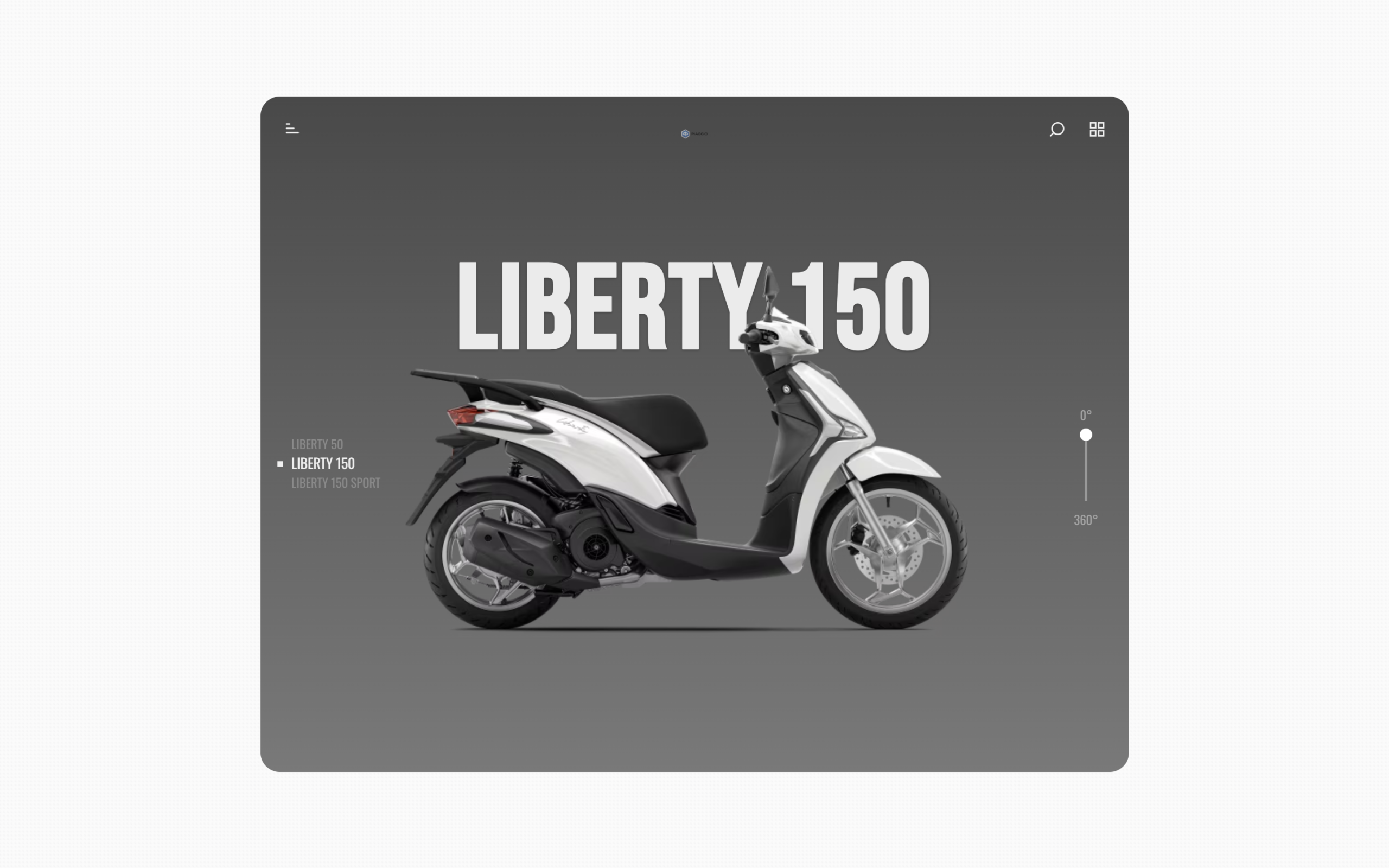
Let’s create a Scooter Bike Animation Scroll using HTML, CSS, and JavaScript. In this project, a cute scooter or bike will move or animate as the user scrolls the page, making the experience fun and interactive.
We’ll use:
- HTML to set up the road, scooter or bike, and sections of the page
- CSS to style the scene and add smooth animation effects
- JavaScript to link the scroll position with the scooter or bike movement
This project is great for learning how scroll based animations work on a website. Whether you are a beginner or already know some coding, building a Scooter Bike Animation Scroll will help you understand how to make web pages feel more alive and interactive. 🚲
HTML :
This HTML builds a scooter showcase page with different sections like header icons, an intro title, the scooter image, model list, rotation indicator, engine specs, characteristics, and a final price section. The layout is wrapped in containers so GSAP animations can control scrolling effects. SVG icons are used for visuals, images show the logo and scooter, and two description lists display technical details. A clipPath mask and background div help create smooth scroll animations, while external GSAP and ScrollTrigger scripts handle all motion and transitions.
<!DOCTYPE html>
<html lang="en">
<head>
<meta charset="UTF-8">
<title> Scooter Animation | @coding.stella </title>
<link rel="stylesheet" href="./style.css">
</head>
<body>
<div class="container" id="container">
<div class="wrapper" id="wrapper">
<div class="header">
<svg version="1.1" viewBox="0 0 24 24">
<line x1="12" y1="20" x2="12" y2="10"></line>
<line x1="18" y1="20" x2="18" y2="4"></line>
<line x1="6" y1="20" x2="6" y2="16"></line>
</svg>
<div>
<svg version="1.1" viewBox="0 0 24 24">
<circle cx="11" cy="11" r="8"></circle>
<line x1="21" y1="21" x2="16.65" y2="16.65"></line>
</svg>
<svg version="1.1" viewBox="0 0 24 24">
<rect x="3" y="3" width="7" height="7"></rect>
<rect x="14" y="3" width="7" height="7"></rect>
<rect x="14" y="14" width="7" height="7"></rect>
<rect x="3" y="14" width="7" height="7"></rect>
</svg>
</div>
</div>
<div class="panel">
<div class="intro" id="intro">
<img id="logo" src="/Image/logo.png" alt="piaggio logo svg">
<h1 id="intro-h1">Ready to Cruise</h1>
<h3 id="intro-h3">Relax and enjoy the ride</h3>
</div>
<img id="liberty" src="/Image/scooter.png" alt="liberty 150 png">
<h1 id="panel-h1">Liberty 150</h1>
<ul class="models">
<li>Liberty 50</li>
<li>Liberty 150</li>
<li>Liberty 150 Sport</li>
</ul>
<div class="rotator">
<p>0°</p>
<svg version="1.1" viewBox="0 0 10 30">
<path d="M5 5.663V40" fill="none" stroke="#999" stroke-width=".92"
transform="matrix(1 0 0 1.16492 0 -6.597)" />
<circle cx="7.423" cy="7.159" r="2.577" fill="#fff" transform="translate(-2.423 -4.582)" />
</svg>
<p>360°</p>
</div>
<div class="specs">
<h2>Engine</h2>
<dl>
<dt>Bore x Stroke</dt>
<dd>58mm x 58.6mm</dd>
<dt>Clutch</dt>
<dd>Automatic centrifugal dry clutch</dd>
<dt>Consumption</dt>
<dd>36.8 Km/I (WMTC cycle)</dd>
<dt>Cooling</dt>
<dd>Air</dd>
<dt>CO2 Emissions</dt>
<dd>65 g/Km</dd>
<dt>Distribution</dt>
<dd>Single overhead camshaft, 3 valves (2 input, 1 output)</dd>
<dt>Engine</dt>
<dd>Single cylinder 4-stroke -i-get</dd>
</dl>
<dl>
<dt>Engine Capacity</dt>
<dd>155c</dd>
<dt>Fuel system</dt>
<dd>Electronic injection</dd>
<dt>Lubrication</dt>
<dd>Oil with wet sump</dd>
<dt>Max Power</dt>
<dd>12.9hp (9.6kW) @ 7,750 rpm</dd>
<dt>Max Torque</dt>
<dd>9.58 ft-lbs (13 Nm) @ 5250 rpm</dd>
<dt>Transmission</dt>
<dd>Automatic CVT</dd>
<dt>Starter</dt>
<dd>Electric</dd>
</dl>
</div>
<div class="chars">
<h2>Characteristics</h2>
<dl>
<dt>Frame</dt>
<dd>High resistance tubular steel</dd>
<dt>Front tyre</dt>
<dd>Tubeless 90/80 - 16", 51J</dd>
<dt>Rear brake</dt>
<dd>Tamburo 140mm</dd>
<dt>Seat height</dt>
<dd>31.1" (790mm)</dd>
<dt>Front suspension</dt>
<dd>Telescopic hydraulic fork, 76mm stroke</dd>
<dt>Rear tyre</dt>
<dd>Tubeless 100/80 - 14", 54J</dd>
<dt>ABS</dt>
<dd>Front wheel standard ABS</dd>
</dl>
<dl>
<dt>Fuel Tank Capacity</dt>
<dd>1.58 gal (6 liters)</dd>
<dt>Rear suspension</dt>
<dd>Single hydraulic shock absorber with 5-position preload adjustment</dd>
<dt>Front brake</dt>
<dd>Single disk 240mm</dd>
<dt>Length/Width/Wheelbase</dt>
<dd>76.5" / 27.1" / 52.7"</dd>
<dt>Emission compliance</dt>
<dd>EPA, CARB, Transport Canada</dd>
</dl>
</div>
<div class="outro">
<h2>Piaggio Liberty 150</h2>
<p>$2999.00</p>
<button>Learn More</button>
</div>
</div>
<div class="bkg"></div>
</div>
<svg version="1.1" id="mask">
<defs>
<clipPath id="wrapMask">
<rect id="wrapWin" width="1000" height="800" fill="black" />
</clipPath>
</defs>
</svg>
</div>
<script src='https://cdnjs.cloudflare.com/ajax/libs/gsap/3.3.4/gsap.min.js'></script>
<script src='https://s3-us-west-2.amazonaws.com/s.cdpn.io/16327/ScrollTrigger.min.js'></script>
<script src="./script.js"></script>
<script src="./script.js"></script>
</body>
</html>
CSS :
This CSS sets the whole scooter page layout and styling: it imports two fonts, hides the scrollbar, applies a background image, and uses a centered grid container. The wrapper holds all content with rounded corners and an overlay background clipped by an SVG mask. The header icons sit at the top, the scooter image and title are positioned in the middle, and the intro, model list, and rotation indicator float around it. The specs and characteristics sections use two-column grids, and the outro shows the price and button at the bottom. Colors, shadows, and sizes create a clean showroom look, while absolute positioning lets GSAP animate everything smoothly.
@import url("https://fonts.googleapis.com/css2?family=Bebas+Neue&family=Oswald&display=swap");

* {
  margin: 0;
  padding: 0;
  box-sizing: border-box;
}

body {
  height: 100vh;
  font-family: "Oswald", sans-serif;
  background-color: #ffffff;
  background-image: url("/Image/bg.png");
  -ms-overflow-style: none;
  scrollbar-width: none;
}

::-webkit-scrollbar {
  width: 0;
  height: 0;
}

h1,
h2,
h3 {
  font-family: "Bebas Neue", sans-serif;
  text-transform: uppercase;
  color: #f0f0f0;
  letter-spacing: 2px;
  text-shadow: 0px 1px 3px rgba(0, 0, 0, 0.3);
}

ul {
  list-style: none;
}

.container {
  width: 100%;
  height: 100%;
  display: grid;
  place-items: center;
}

.wrapper {
  width: 90%;
  max-width: 900px;
  height: 100%;
  max-height: 700px;
  overflow: hidden;
  border-radius: 20px;
  position: relative;
  background: #f0f0f0;
}

.bkg {
  width: 100%;
  height: 100%;
  background: #a4a4a4;
  background: linear-gradient(0deg, #797979, #494949 100%);
  position: absolute;
  top: 0;
  left: 0;
  z-index: 1;
  -webkit-clip-path: url("#wrapMask");
  clip-path: url("#wrapMask");
}

.header {
  position: absolute;
  left: 0;
  top: 0;
  z-index: 4;
  width: 100%;
  padding: 1.5em;
  display: grid;
  grid-template-columns: 1fr 16%;
}

.header svg {
  width: 18px;
  stroke: #f0f0f0;
  stroke-width: 2;
  fill: none;
  stroke-linecap: round;
}

.header svg:nth-child(1) {
  transform: rotateZ(90deg);
}

.header div {
  text-align: right;
}

.header div svg {
  margin-left: 20px;
}

.panel {
  width: 100%;
  height: 100%;
  display: grid;
  place-items: center;
  position: relative;
}

.panel img#liberty {
  width: 95%;
  position: absolute;
  z-index: 10;
  left: 50%;
  bottom: -250px;
  transform: translateX(-50%);
}

.panel h1#panel-h1 {
  width: 100%;
  text-align: center;
  position: absolute;
  z-index: 9;
  top: 140px;
  font-size: 8rem;
  left: 50%;
  transform: translateX(-50%);
}

.intro {
  z-index: 6;
  text-align: center;
  transform: translateY(-60px);
}

.intro h1 {
  font-size: 4rem;
}

.intro h3 {
  font-size: 2.4rem;
  margin-top: -16px;
}

.intro img {
  width: 50px;
  opacity: 0.6;
}

.models {
  position: absolute;
  top: 50%;
  left: 2em;
  z-index: 11;
}

.models li {
  text-transform: uppercase;
  font-size: 0.8rem;
  color: #8a8a8a;
}

.models li:nth-child(2) {
  color: #f0f0f0;
  font-size: 0.9rem;
  list-style-type: square;
}

.rotator {
  position: absolute;
  top: 45%;
  right: 2em;
  z-index: 12;
}

.rotator p {
  text-align: center;
  font-size: 0.8rem;
  color: #a4a4a4;
  text-transform: uppercase;
  padding: 5px 0;
}

.specs,
.chars {
  position: absolute;
  top: 15%;
  width: 50%;
  z-index: 20;
  padding: 1em;
  display: grid;
  grid-template-columns: 1fr 1fr;
  grid-template-rows: 10% 1fr;
}

.specs h2,
.chars h2 {
  grid-column: 1/3;
  grid-row: 1/2;
  color: #4b4b4b;
  text-shadow: none;
}

.specs dl:nth-child(0),
.chars dl:nth-child(0) {
  grid-column: 1/2;
  grid-row: 2/3;
}

.specs dl:nth-child(1),
.chars dl:nth-child(1) {
  grid-column: 2/3;
  grid-row: 2/3;
}

.specs dl dt,
.chars dl dt {
  text-transform: uppercase;
  margin-bottom: 5px;
}

.specs dl dd,
.chars dl dd {
  margin-bottom: 10px;
  font-size: 0.9rem;
  color: #717171;
}

.outro {
  width: 100%;
  position: absolute;
  bottom: 0;
  left: 50%;
  transform: translateX(-50%);
  z-index: 30;
  text-align: center;
  padding: 1em;
}

.outro h2 {
  font-size: 3rem;
}

.outro p {
  font-size: 1.7rem;
  color: #f0f0f0;
  text-shadow: 0px 1px 3px rgba(0, 0, 0, 0.3);
}

.outro button {
  margin: 20px 0;
  border: 1px solid #9b9b9b;
  background: #646464;
  padding: 5px 10px;
  outline: none;
  cursor: pointer;
  color: #d7d7d7;
  font-size: 1.2rem;
  font-family: "Bebas Neue", sans-serif;
}

#mask {
  display: block;
  position: absolute;
  z-index: 40;
}

@-moz-document url-prefix() {
  .rotator svg {
    width: 100%;
    height: 60px;
  }
}
JavaScript:
This script uses GSAP and ScrollTrigger to animate the entire scooter page as the user scrolls. It creates multiple timelines (intro, part1 to part5, and outro), each controlling different stages of the showcase. First, elements like specs, models, and text are set to hidden or moved off-screen. As you scroll, the scooter image scales and moves, titles fade in and out, model options slide in, tech specs appear line by line, characteristics fade in, and finally the outro section rises with price and button. Each animation is tied to scroll positions using scrub, so everything moves smoothly and reacts to scrolling. All timelines are combined into one main scene to play in order from start to finish.
gsap.registerPlugin("ScrollTrigger");

let scene = gsap.timeline();
let intro_tl = gsap.timeline();
let part1_tl = gsap.timeline();
let part2_tl = gsap.timeline();
let part3_tl = gsap.timeline();
let part4_tl = gsap.timeline();
let part5_tl = gsap.timeline();
let outro_tl = gsap.timeline();

ScrollTrigger.create({
  trigger: "#container",
  pin: true,
  start: "top top",
  end: "+=5700"
});

gsap.set(".specs", {
  x: -160,
  opacity: 0
});
gsap.set(".chars", {
  x: 260
});
part2_tl.set(".models li", {
  opacity: 0
});
part3_tl.set(".specs dt", {
  opacity: 0
});
part3_tl.set(".specs dd", {
  opacity: 0
});
part4_tl.set(".chars h2", {
  opacity: 0
});
part4_tl.set(".chars dt", {
  opacity: 0
});
part4_tl.set(".chars dd", {
  opacity: 0
});

// TIMELINE: Intro
intro_tl
  .fromTo(
    "#wrapWin",
    {
      height: 80
    },
    {
      height: 800,
      duration: 0.1
    }
  )
  .fromTo(
    "#liberty",
    {
      scale: 0.8,
      y: -300
    },
    {
      scale: 1,
      y: 0,
      duration: 0.1
    }
  )
  .to("#logo", {
    scrollTrigger: {
      start: 300,
      end: 500,
      scrub: 0.5
    },
    y: -190,
    scale: 0.6,
    duration: 0.6,
    ease: "expo.out"
  })
  .to("#intro-h1", {
    scrollTrigger: {
      start: 500,
      end: 700,
      scrub: 0.5
    },
    scale: 0,
    duration: 0.6,
    ease: "expo.out"
  })
  .to("#intro-h3", {
    scrollTrigger: {
      start: 550,
      end: 750,
      scrub: 0.5
    },
    scale: 0,
    duration: 0.6,
    ease: "expo.out"
  });

// TIMELINE: Part 1
part1_tl
  .fromTo(
    "#liberty",
    {
      scale: 1,
      y: 0
    },
    {
      scale: 0.8,
      y: -300,
      duration: 1,
      ease: "sine.out",
      scrollTrigger: {
        start: 1000,
        end: 1200,
        scrub: 0.5
      }
    }
  )
  .from("#panel-h1", {
    scrollTrigger: {
      start: 1300,
      end: 1500,
      scrub: 0.5
    },
    scale: 0,
    opacity: 0,
    duration: 1,
    ease: "sine.out"
  })
  .from(".models li", {
    scrollTrigger: {
      start: 1250,
      end: 1450,
      scrub: 1
    },
    opacity: 0,
    x: -20,
    duration: 1,
    stagger: 0.3,
    ease: "sine.out"
  })
  .from(".rotator", {
    scrollTrigger: {
      start: 1250,
      end: 1450,
      scrub: 1
    },
    opacity: 0,
    scale: 0,
    duration: 1,
    ease: "sine.out"
  });

// TIMELINE: Part 2
part2_tl
  .from("#panel-h1", {
    scrollTrigger: {
      start: 2000,
      end: 2200,
      scrub: 1
    },
    scale: 1,
    duration: 1,
    ease: "sine.out"
  })
  .fromTo(
    ".models li",
    {
      x: 0,
      opacity: 1
    },
    {
      x: -20,
      opacity: 0,
      duration: 1,
      stagger: 0.3,
      ease: "sine.out",
      scrollTrigger: {
        start: 2000,
        end: 2200,
        scrub: 1
      }
    }
  )
  .from(".rotator", {
    scrollTrigger: {
      start: 2000,
      end: 2200,
      scrub: 1
    },
    scale: 1,
    duration: 1,
    ease: "sine.out"
  });

// TIMELINE: Part 3
part3_tl
  .fromTo(
    "#wrapWin",
    {
      height: 800
    },
    {
      scrollTrigger: {
        start: 2500,
        end: 2700,
        scrub: 1
      },
      height: 80,
      duration: 2,
      ease: "sine.out"
    }
  )
  .to("#liberty", {
    scrollTrigger: {
      start: 2600,
      end: 2800,
      scrub: 1
    },
    x: 400,
    duration: 2,
    ease: "sine.out"
  })
  .to(".specs", {
    scrollTrigger: {
      start: 2600,
      end: 2800,
      scrub: 1
    },
    opacity: 1,
    duration: 2,
    ease: "sine.out"
  })
  .from(".specs h2", {
    duration: 1,
    opacity: 0,
    x: -30,
    scrollTrigger: {
      start: 2600,
      end: 2800,
      scrub: 1
    }
  })
  .from(".specs dt", {
    duration: 1,
    opacity: 0,
    stagger: 0.3,
    x: -30,
    scrollTrigger: {
      start: 2600,
      end: 2800,
      scrub: 2
    }
  })
  .from(
    ".specs dd",
    {
      duration: 1,
      opacity: 0,
      stagger: 0.3,
      x: -30,
      scrollTrigger: {
        start: 2600,
        end: 2800,
        scrub: 2
      }
    },
    "-=.5"
  )
  .from(
    ".specs dd",
    {
      duration: 1,
      opacity: 1,
      stagger: 0.3,
      x: 0,
      scrollTrigger: {
        start: 3200,
        end: 3400,
        scrub: 1
      }
    },
    "-=.5"
  )
  .from(".specs dt", {
    duration: 1,
    opacity: 1,
    stagger: 0.3,
    x: 0,
    scrollTrigger: {
      start: 3200,
      end: 3400,
      scrub: 1
    }
  })
  .from(".specs h2", {
    duration: 1,
    opacity: 1,
    x: 0,
    scrollTrigger: {
      start: 3200,
      end: 3400,
      scrub: 1
    }
  })
  .fromTo(
    "#liberty",
    {
      x: 400
    },
    {
      scrollTrigger: {
        start: 3500,
        end: 3800,
        scrub: 1
      },
      x: -360,
      duration: 3,
      ease: "sine.out"
    }
  );

// TIMELINE: Part 4
part4_tl
  .from(".chars h2", {
    duration: 1,
    opacity: 0,
    x: 30,
    scrollTrigger: {
      start: 3800,
      end: 4000,
      scrub: 1
    }
  })
  .from(".chars dt", {
    duration: 1,
    opacity: 0,
    stagger: 0.3,
    x: 30,
    scrollTrigger: {
      start: 3800,
      end: 4000,
      scrub: 2
    }
  })
  .from(
    ".chars dd",
    {
      duration: 1,
      opacity: 0,
      stagger: 0.3,
      x: 30,
      scrollTrigger: {
        start: 3800,
        end: 4000,
        scrub: 2
      }
    },
    "-=.5"
  );

// TIMELINE: Part 5
part5_tl
  .fromTo(
    ".chars h2",
    {
      opacity: 1,
      x: 0
    },
    {
      duration: 1,
      opacity: 0,
      x: 30,
      scrollTrigger: {
        start: 4200,
        end: 4400,
        scrub: 1
      }
    }
  )
  .fromTo(
    ".chars dt",
    {
      opacity: 1,
      x: 0
    },
    {
      duration: 1,
      opacity: 0,
      stagger: 0.3,
      x: 30,
      scrollTrigger: {
        start: 4200,
        end: 4400,
        scrub: 2
      }
    }
  )
  .fromTo(
    ".chars dd",
    {
      opacity: 1,
      x: 0
    },
    {
      duration: 1,
      opacity: 0,
      stagger: 0.3,
      x: 30,
      scrollTrigger: {
        start: 4200,
        end: 4400,
        scrub: 2
      }
    },
    "-=.5"
  )
  .fromTo(
    "#liberty",
    {
      x: -360
    },
    {
      scrollTrigger: {
        start: 4400,
        end: 4600,
        scrub: 1
      },
      x: 0,
      duration: 3,
      ease: "sine.out"
    }
  );

// TIMELINE: Outro
outro_tl
  .fromTo(
    "#wrapWin",
    {
      height: 80
    },
    {
      scrollTrigger: {
        start: 5000,
        end: 5200,
        scrub: 1
      },
      height: 800,
      duration: 2,
      ease: "sine.out"
    }
  )
  .fromTo(
    "#liberty",
    {
      scale: 0.8,
      y: -300
    },
    {
      scrollTrigger: {
        start: 5200,
        end: 5400,
        scrub: 1
      },
      x: 0,
      scale: 0.7,
      y: -340,
      duration: 3,
      ease: "sine.out"
    }
  )
  .from(".outro h2", {
    scrollTrigger: {
      start: 5300,
      end: 5400,
      scrub: 1
    },
    duration: 1,
    y: 30,
    opacity: 0
  })
  .from(".outro p", {
    scrollTrigger: {
      start: 5400,
      end: 5500,
      scrub: 1
    },
    duration: 1,
    y: 30,
    opacity: 0
  })
  .from(".outro button", {
    scrollTrigger: {
      start: 5500,
      end: 5600,
      scrub: 1
    },
    duration: 1,
    y: 30,
    opacity: 0
  });

// TIMELINE: Main
scene
  .set("#liberty", {
    x: 0
  })
  .add(intro_tl)
  .add(part1_tl)
  .add(part2_tl)
  .add(part3_tl)
  .add(part4_tl)
  .add(part5_tl)
  .add(outro_tl);
In conclusion, making a Scooter Bike Animation Scroll using HTML, CSS, and JavaScript is a fun way to learn scroll animations. By combining layout, styling, and a bit of JavaScript, you can create a smooth and playful effect that reacts to user scrolling.
If you run into any problems with your project, worry not. The remedy is just a click away – Download the source code and confront your coding challenges with enthusiasm. Enjoy your coding adventure!
