


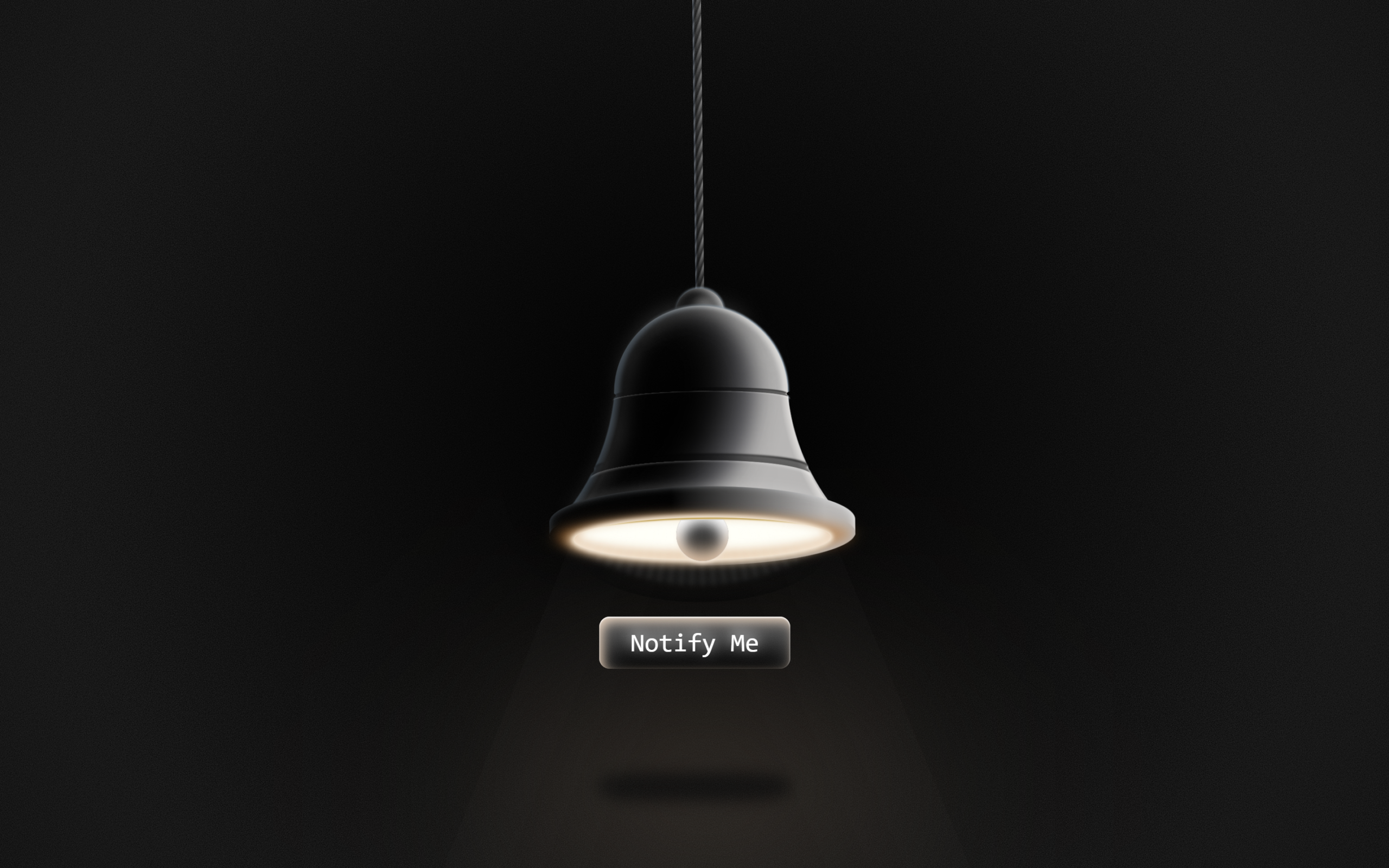
Let’s create an Animated Glowing Bell Button using HTML and CSS.
This project will help you design a swinging bell with glowing effects, light rays, and a soft 3D look using only div elements.
We’ll use:
- HTML to structure the bell into multiple divs for parts like the rope, top, base, glow, and ring.
- CSS to design the shapes, apply gradients and shadows, and add keyframe animations for swinging, glowing, and light rays.
This project is perfect for practicing advanced CSS visuals and animations and for developers who want to build impressive UI effects using only HTML and CSS. Let’s start building a beautiful glowing bell button! 🔔✨
HTML :
This HTML creates an animated glowing bell button. The main bell is built using many divs, each representing a visual part like the rope, top, base, glow, rings, shadows, and rays, which are styled and animated using CSS. Clicking the bell toggles the “off” class to turn the animation on or off. The “Notify Me” div acts as a label button, and the grain div adds a texture effect.
<!DOCTYPE html>
<html lang="en">

<head>
	<meta charset="UTF-8">
	<title>Animated Glowing Bell Button | @coding.stella</title>
	<link rel="stylesheet" href="./style.css">
</head>

<body>
	<div class="bell-container off" onclick="this.classList.toggle('off')">
		<div class="rope"></div>
		<div class="bell-top"></div>

		<div class="bell-base"></div>
		<div class="bell-base"></div>
		<div class="shadow-l1"></div>
		<div class="shadow-l2"></div>
		<div class="left-glow"></div>
		<div class="left-glow2"></div>
		<div class="r-glow"></div>
		<div class="r-glow2"></div>
		<div class="mid-ring"></div>
		<div class="mid-ring small"></div>

		<div class="glow"></div>
		<div class="glow2"></div>

		<div class="bell-buff-t"></div>
		<div class="bell-buff"></div>

		<div class="bell-btm"></div>
		<div class="bell-btm2"></div>

		<div class="bell-ring-container">
			<div class="bell-ring"></div>
			<div class="bell-rays"></div>
		</div>

		<div class="volumetric">
			<div class="vl"></div>
			<div class="vr"></div>
		</div>

	</div>
	<div class="button">Notify Me</div>
	<div class="grain"></div>

</body>
</html>
CSS :
This CSS builds and animates a glowing bell using only divs, gradients, shadows, and blur effects. The bell swings with a keyframe animation, has layered glows, highlights, shadows, and rays for a 3D glowing look, and a ringing light effect. The .off class dims the glow, hides rays, and disables effects when toggled. A grain overlay adds texture, and the “Notify Me” button has a soft glowing animation to match the bell.
* {
	box-sizing: border-box;
}

html,
body {
	height: 100%;
	overflow: hidden;
}

body {
	display: flex;
	flex-direction: row;
	flex-wrap: wrap;
	justify-content: center;
	align-items: center;
	margin: 0;
	background: #000;

	font-size: calc(var(--_size) * 0.01);
	--_size: min(min(600px, 50vh), 50vw);
	--base-clr: #b7b5b4;
	--degofrot: 0.8;
}

.bell-container {
	width: 80em;
	height: 80em;
	opacity: 1;
	cursor: pointer;

	transform-origin: 50% -50vh;
	animation: 5s ease-in-out infinite bell;
}

@keyframes bell {
	0% {
		rotate: calc(1deg * var(--degofrot));
	}

	50% {
		rotate: calc(-1deg * var(--degofrot));
	}

	100% {
		rotate: calc(1deg * var(--degofrot));
	}
}

* {
	transition: filter 0.4s ease-in-out, box-shadow 0.4s ease-in-out,
		opacity 0.4s ease-in-out, color 0.4s ease-in-out, background 0.4s ease-in-out,
		text-shadow 0.4s ease-in-out;

	&::before,
	&::after {
		transition: filter 0.4s ease-in-out, box-shadow 0.4s ease-in-out,
			opacity 0.4s ease-in-out, color 0.4s ease-in-out, background 0.4s ease-in-out,
			text-shadow 0.4s ease-in-out;
	}
}

.bell-container,
.bell-container * {
	position: absolute;
	left: 0;
	right: 0;
	top: 0;
	bottom: 0;
	margin: auto;
}

.rope {
	height: 50vh;
	width: 2em;
	translate: 0 -52%;
	background: linear-gradient(90deg, #2d54744d 0%, #000b 30%, transparent 100%),
		repeating-linear-gradient(-70deg, #252525, #888 2%, #3a3a3a 3%);
}

.bell-top {
	width: 14%;
	height: 14%;
	border-radius: 50%;
	translate: 0 -28em;
	background: var(--base-clr);
	box-shadow: inset -1em -0.5em 2em 0.5em #fff, inset 1em -1em 2em 3em #000,
		0 -0.1em 0.4em 0.3em #c6eaffa8;
}

.bell-base {
	width: 50%;
	height: 50%;
	border-radius: 50%;
	translate: 0 -24%;
	background: var(--base-clr);
	box-shadow: 0 -0.1em 0.4em 0.2em #c6eaffa8;
}

.bell-base:before {
	content: "";
	background-image: radial-gradient(circle at -80% -12%,
			transparent 50em,
			var(--base-clr) 50em);
	position: absolute;
	translate: -18em 20em;
	width: 100%;
	height: 80%;
}

.bell-base:after {
	content: "";
	background-image: radial-gradient(circle at -80% -12%,
			transparent 50.1em,
			#cacaca 50.3em,
			var(--base-clr) 50.5em);
	position: absolute;
	translate: 18em 20em;
	width: 100%;
	height: 80%;
	transform: rotateY(180deg);
}

.bell-base:nth-child(2) {
	filter: brightness(3) blur(1em);
	scale: 0.74 0.84;
	translate: 0em -11em;
}

.shadow-l1 {
	width: 30em;
	height: 42em;
	border-radius: 50%;
	rotate: 12deg;
	translate: -3em -6em;
	filter: blur(2em);
	background: #797a80;
}

.shadow-l2 {
	width: 130%;
	height: 90%;
	filter: blur(5em);
	translate: -6em 9em;
}

.shadow-l2::before {
	display: block;
	content: "";
	width: 68%;
	height: 64%;
	border-radius: 50%;
	rotate: -54deg;
	translate: -8em 2em;
	scale: 1;
	background: red;
	background: #000000;
}

.glow {
	width: 100%;
	height: 100%;
	filter: brightness(2) blur(2em);
}

.glow::before {
	clip-path: polygon(9% 83%,
			12% 79%,
			15% 74%,
			18% 68%,
			20% 62%,
			22% 56%,
			23% 50%,
			24% 43%,
			25% 38%,
			25% 34%,
			26% 29%,
			26% 26%,
			27% 22%,
			29% 19%,
			30% 15%,
			32% 13%,
			34% 10%,
			37% 7%,
			41% 5%,
			44% 4%,
			47% 3%,
			51% 3%,
			55% 3%,
			58% 5%,
			62% 6%,
			73% 29%,
			72% 25%,
			70% 20%,
			67% 16%,
			63% 12%,
			60% 9%,
			58% 8%,
			55% 7%,
			52% 6%,
			48% 6%,
			44% 8%,
			41% 9%,
			37% 12%,
			36% 14%,
			33% 16%,
			31% 20%,
			30% 23%,
			29% 26%,
			28% 31%,
			27% 36%,
			27% 39%,
			26% 44%,
			26% 48%,
			26% 52%,
			25% 56%,
			23% 61%,
			22% 65%,
			21% 69%,
			19% 72%,
			17% 75%,
			15% 78%,
			13% 81%);
	width: 100%;
	height: 80%;
	translate: 0 6em;
	scale: 0.94 0.94;
	background: #fff3;
	display: block;
	content: "";
}

.glow2 {
	width: 100%;
	height: 100%;
	filter: brightness(1) blur(0.3em);
	opacity: 0.1;
}

.glow2::before {
	clip-path: polygon(9.21% 83%,
			12.28% 79%,
			15.35% 74%,
			18.41% 68%,
			20.46% 62%,
			22.51% 56%,
			23.53% 50%,
			24.55% 43%,
			25.58% 34%,
			26.6% 29%,
			27.62% 22%,
			29.16% 18.5%,
			30.95% 15.75%,
			32.74% 13%,
			34.78% 10%,
			37.85% 7%,
			41.94% 5%,
			45.01% 4%,
			48.08% 3%,
			52.17% 3%,
			56.27% 3%,
			64.01% 6.36%,
			55.75% 4.5%,
			47.83% 4.75%,
			42.84% 5.88%,
			39.51% 7.88%,
			36.45% 10.38%,
			33.38% 14.88%,
			30.69% 19%,
			29.67% 22.5%,
			28.8% 26.72%,
			28.21% 31.36%,
			26.92% 38.44%,
			26.57% 43.67%,
			25.51% 48.34%,
			25% 54.34%,
			23.4% 60.69%,
			21.23% 65.38%,
			18.41% 71.5%,
			16.88% 74.75%,
			12.28% 80.5%);
	width: 100%;
	height: 84%;
	translate: -1em 8.4em;
	scale: 1;
	background: #fff3;
	display: block;
	content: "";
}

.left-glow {
	--lgc: #5d819666;
	width: 50%;
	height: 50%;
	border-radius: 50%;
	translate: 0 -24%;
	background: transparent;
	box-shadow: inset 1em 0em 1em 0.2em var(--lgc);
	clip-path: polygon(0 0, 100% 0, 100% 50%, 0 50%);
}

.left-glow2 {
	--lgc2: #5d819666;
	width: 49%;
	height: 50%;
	background-image: radial-gradient(circle at -80% -12%,
			transparent 50em,
			var(--lgc2) 50.3em,
			transparent 52em);
	position: absolute;
	translate: -19em 10.35em;
	clip-path: polygon(0 0, 100% 0, 100% 78%, 0 78%);
}

.r-glow {
	--lgc: #fffaf680;
	width: 50%;
	height: 50%;
	border-radius: 50%;
	translate: 0 -24%;
	background: transparent;
	box-shadow: inset 1em 0em 1em 0.2em var(--lgc);
	clip-path: polygon(0 0, 100% 0, 100% 50%, 0 50%);
	transform: rotateY(180deg);
}

.r-glow2 {
	--lgc2: #fffaf680;
	width: 49%;
	height: 50%;
	background-image: radial-gradient(circle at -80% -12%,
			transparent 50em,
			var(--lgc2) 50.3em,
			transparent 52em);
	position: absolute;
	translate: 18.2em 10.35em;
	clip-path: polygon(0 0, 100% 0, 100% 78%, 0 78%);
	transform: rotateY(180deg) rotateZ(-2deg);
}

.mid-ring.small {
	translate: 0.04em -8em;
	scale: 0.8 0.5;
}

.mid-ring {
	width: 64%;
	height: 10%;
	border-radius: 50%;
	translate: -0.1em 10em;
	box-shadow: inset -0.3em 1.3em 0.4em -1em #fff5,
		-0.2em -1.2em 0.4em -0.4em #505050, -0.1em -1.8em 0.4em -0.4em #fff5,
		0 -2.5em 0.4em -1em #000000;
	mix-blend-mode: hard-light;
	filter: brightness(0.8);
}

.mid-ring::before,
.mid-ring::after {
	content: "";
	display: block;
	background: #000;
	width: 2em;
	height: 2em;
	top: 10%;
	border-radius: 50%;
	position: absolute;
}

.mid-ring::after {
	right: -2%;
}

.mid-ring::before {
	left: -2%;
}

.bell-buff-t {
	background: #fff2;
	width: 72%;
	height: 12%;
	border-radius: 50%;
	translate: 0 16em;
	filter: blur(1em);
}

.bell-buff {
	background: linear-gradient(90deg, black 40%, var(--base-clr) 90%);
	width: 88%;
	height: 20%;
	border-radius: 50% 50% 50% 50% / 50% 50% 30% 30%;
	translate: 0 20em;
	box-shadow: inset 1em 0 2em -1em #5d819666, inset -1em 0 2em -1em #fff;
}

.bell-btm {
	width: 88%;
	height: 18%;
	border-radius: 50%;
	translate: 0 23em;
	background: linear-gradient(90deg, black 40%, var(--base-clr) 90%);
}

.bell-btm2 {
	width: 74%;
	height: 12%;
	border-radius: 50%;
	translate: 0 24em;
	background: #fffff6;
	box-shadow: 0 0 1em 0.6em #ffe9d4, -0.8em 0.2em 2em 1em #cca37f,
		-5.4em -0.6em 3em -1em #ce6e1abb, 6em -0.6em 3em -1em #ce6e1abb,
		inset 0em 30.3em 0.3em -30em #c7962d, inset 0 -2em 2em -2em #ffe9d4,
		inset 0em -1em 2em 1em #ce6e1a66;
	filter: brightness(1);
}

.off .bell-btm2 {
	filter: brightness(0.02);
}

.bell-ring-container {
	width: 74%;
	height: 24%;
	border-radius: 50% 50% 50% 50% / 25% 25% 0% 0%;
	translate: 0 29.2em;
	overflow: hidden;
}

.bell-ring {
	width: 12em;
	height: 12em;
	background: #fff;
	border-radius: 50%;
	translate: 0 -6em;
	box-shadow: 0 0.8em 1em -0.3em #f8e1d0, inset 0 -6em 4em -4em #e3b695,
		inset 0 1em 3em 1em #fff4, inset 0 2em 3em 1em #fff,
		inset 0 100em 0 100em #2c2c2c;
}

.off .bell-ring {
	background: #000;
	box-shadow: 0 0.8em 1em -0.3em #f8e1d000, inset 0 -6em 4em -4em #e3b69500,
		inset 0 1em 3em 1em #fff0, inset 0 -2em 3em 1em #fff2,
		inset 0 100em 0 100em #000;
}

.bell-rays {
	mix-blend-mode: soft-light;
	box-shadow: inset 0 -21em 4em -20em #000;
	width: 100%;
	height: 140%;
	translate: 0 -4em;
	border-radius: 50%;
}

.bell-rays::before {
	content: "";
	display: block;
	width: 100em;
	height: 100em;
	transform-origin: 50% 50%;
	position: absolute;
	left: -21em;
	top: -77em;
	border-radius: 100%;
	filter: blur(0.6em);
	background: repeating-conic-gradient(at 50% 50%,
			#fff2 0%,
			transparent 0.6%,
			#fff2 0.8%);
	animation: radiate 1s linear infinite;
}

.off .bell-rays {
	opacity: 0;
}

@keyframes radiate {
	0% {
		rotate: 0deg;
	}

	100% {
		rotate: 6deg;
	}
}

.volumetric {
	width: 98%;
	height: 224%;
	translate: 0 124em;
	opacity: 0.2;

	.vl {
		width: 100%;
		height: 100%;
		transform-origin: 50% 20em;
		rotate: 22deg;
		box-shadow: inset 40em 0 20em -20em #fff1;
	}

	.vr {
		width: 100%;
		height: 100%;
		transform-origin: 50% 20em;
		rotate: -22deg;
		box-shadow: inset -40em 0 20em -20em #fff1;
	}
}

.off .volumetric {
	opacity: 0;
}

.grain {
	z-index: 10;
	position: absolute;
	pointer-events: none;
	width: 100%;
	height: 100%;
	top: 0;
	bottom: 0;
	margin: auto;
	background: radial-gradient(circle at 50% 50%, #000, #0000),
		url("data:image/svg+xml,%3Csvg viewBox='0 0 600 600' xmlns='http://www.w3.org/2000/svg'%3E%3Cfilter id='noiseFilter'%3E%3CfeTurbulence type='fractalNoise' baseFrequency='2' numOctaves='3' stitchTiles='stitch'/%3E%3C/filter%3E%3Crect width='100%25' height='100%25' filter='url(%23noiseFilter)'/%3E%3C/svg%3E");
	filter: contrast(100%) brightness(200%) grayscale(1) opacity(0.168);
	mix-blend-mode: screen;
}

.button {
	position: relative;
	font-size: 6em;
	font-family: monospace;
	background: #000;
	top: 8em;
	width: fit-content;
	height: fit-content;
	color: #000;
	cursor: pointer;
	padding: 0.4em 1.2em;
	border-radius: 0.4em;
	text-shadow: 0 -1px 3px #fff0;
	box-shadow: inset 0 0.04em 0.06em 0 #fff, inset 0 1em 1em 0 #fff5,
		inset 0 0.2em 0.2em 0 #e3b695;
	animation: 5s ease-in-out infinite lumenbtn;

	&:hover {
		color: #fff;
		text-shadow: 0 -1px 3px #fff;
		transition: all 0.16s ease-in-out;
	}

	&::before,
	&::after {
		content: "";
		display: block;
		width: 100%;
		height: 54%;
		position: absolute;
		top: 6em;
		left: 0;
		right: 0;
	}

	&::before {
		background: #e3b695;
		scale: 2;
		z-index: -2;
		filter: blur(12px);
		border-radius: 100%;
		animation: 5s ease-in-out infinite lumen;
	}

	&::after {
		background: #000c;
		z-index: -1;
		filter: blur(0.3em);
		border-radius: 30%;
	}
}

@keyframes lumenbtn {
	0% {
		box-shadow: inset 0 0.04em 0.06em 0 #fff,
			inset calc(-0.2em * var(--degofrot)) 1em 1em 0 #fff5,
			inset calc(-0.2em * var(--degofrot)) 0.2em 0.4em 0 #e3b695;
	}

	50% {
		box-shadow: inset 0 0.04em 0.06em 0 #fff,
			inset calc(0.2em * var(--degofrot)) 1em 1em 0 #fff5,
			inset calc(0.2em * var(--degofrot)) 0.2em 0.4em 0 #e3b695;
	}

	100% {
		box-shadow: inset 0 0.04em 0.06em 0 #fff,
			inset calc(-0.2em * var(--degofrot)) 1em 1em 0 #fff5,
			inset calc(-0.2em * var(--degofrot)) 0.2em 0.4em 0 #e3b695;
	}
}

@keyframes lumen {
	0% {
		translate: calc(-0.8em * var(--degofrot));
	}

	50% {
		translate: calc(0.8em * var(--degofrot));
	}

	100% {
		translate: calc(-0.8em * var(--degofrot));
	}
}

.off+.button {
	opacity: 0;
	pointer-events: none;
}
In conclusion, this Animated Glowing Bell Button shows how powerful HTML and CSS can be for creating rich, interactive visuals without JavaScript. By combining layered div elements, gradients, shadows, blur effects, and keyframe animations, you can build a realistic swinging bell with glowing light effects.
If your project has problems, don’t worry. Just click to download the source code and face your coding challenges with excitement. Have fun coding!
