


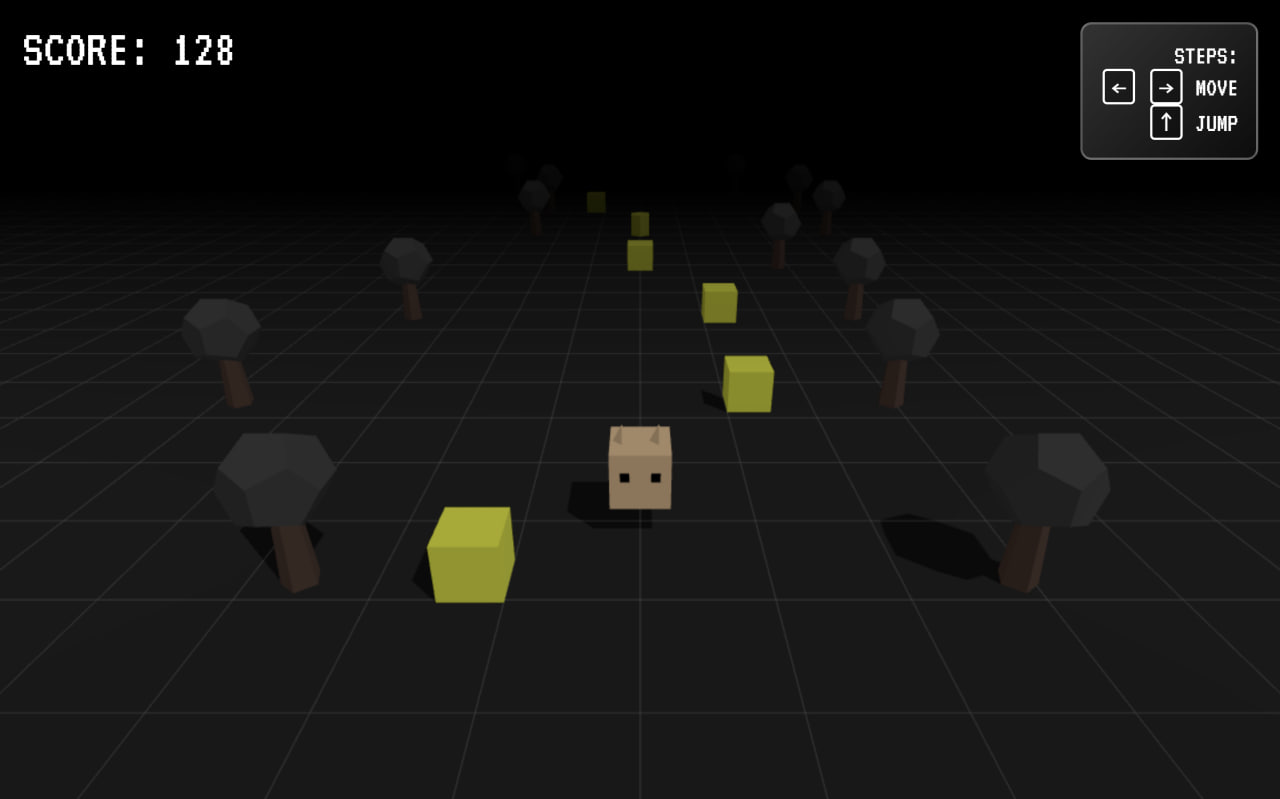
Let’s build Super Hopper, a fast-paced 3D endless runner game using HTML, CSS, JavaScript, and Three.js. In this game, you control a cute animated character that runs forward automatically while you switch lanes, jump over obstacles, and survive as long as possible to increase your score.
We’ll use:
- HTML to create the game structure, UI screens, score display, and control instructions.
- CSS to design the retro pixel-style interface with smooth button effects, glass panels, and layered UI over the 3D scene.
- JavaScript with Three.js to create the 3D world, player, obstacles, random themes, smooth lane movement, jump physics, collision detection, and increasing difficulty.
This project is perfect for developers who want to explore basic 3D game development, animation loops, and real-time game logic in the browser. Let’s hop, dodge, and survive as long as we can! 🚀🎮
HTML :
This HTML file creates the basic structure of your Super Hopper game: it sets up the page with a title, loads a custom Google font and external CSS for styling, and creates main sections like the game container, score display, instructions, start screen, and game over screen using divs and buttons. It also uses an import map to load Three.js as an ES module from a CDN, then connects your main game logic through script.js, where all the 3D rendering and gameplay mechanics are handled.
<!DOCTYPE html>
<html lang="en">
<head>
<meta charset="UTF-8" />
<title>SUBWAY SUPER HOPPER GAME | @coding.stella</title>
<link rel="stylesheet" href="https://fonts.googleapis.com/css2?family=VT323&display=swap" />
<link rel="stylesheet" href="./style.css" />
</head>
<body>
<div id="game-container"></div>
<div id="ui-layer">
<div id="score-display" class="hidden">
SCORE: <span id="score">0</span>
</div>
<div id="instructions">
STEPS:<br />
<span class="key">←</span> <span class="key">→</span> MOVE<br />
<span class="key">↑</span> JUMP
</div>
<div id="start-screen" class="center-screen">
<h1 class="title">SUPER HOPPER</h1>
<p class="subtitle">MY CUTE ADVENTURE</p>
<button id="start-btn">PRESS START</button>
</div>
<div id="game-over-screen" class="center-screen hidden">
<h1 class="title">GAME OVER</h1>
<p class="subtitle">SCORE: <span id="final-score">0</span></p>
<button id="restart-btn">TRY AGAIN</button>
</div>
</div>
<!-- Scripts -->
<!-- Using ES Modules for Three.js -->
<script type="importmap">
{
"imports": {
"three": "https://unpkg.com/three@0.160.0/build/three.module.js"
}
}
</script>
<script type="module" src="./script.js"></script>
</body>
</html>
CSS :
This CSS styles the full game interface: it defines global theme colors and a pixel-style font, removes default spacing, and makes the canvas fill the whole screen. The UI layer sits above the 3D game and includes centered start and game over panels with a glass blur effect, bold retro titles, and animated buttons with press effects. It also styles the instructions box, keyboard key visuals, and score display, while the .hidden class is used to show or hide screens during gameplay.
:root {
	--primary-color: #ff6b6b;
	--secondary-color: #4ecdc4;
	--text-color: #ffffff;
	--pixel-font: "VT323", monospace;
}

* {
	margin: 0;
	padding: 0;
	box-sizing: border-box;
	user-select: none;
}

body {
	overflow: hidden;
	background-color: #222;
	font-family: var(--pixel-font);
}

#game-container {
	position: absolute;
	top: 0;
	left: 0;
	width: 100vw;
	height: 100vh;
	z-index: 1;
}

#ui-layer {
	position: absolute;
	top: 0;
	left: 0;
	width: 100%;
	height: 100%;
	z-index: 10;
	pointer-events: none;
	/* Let clicks pass through except on buttons */
}

/* Enable pointer events on interactive elements */
button {
	pointer-events: auto;
}

.center-screen {
	position: absolute;
	top: 50%;
	left: 50%;
	transform: translate(-50%, -50%);
	text-align: center;
	background: rgba(0, 0, 0, 0.4);
	padding: 2rem 4rem;
	border-radius: 1rem;
	backdrop-filter: blur(4px);
	border: 4px solid #fff;
	box-shadow: 0 10px 0 rgba(0, 0, 0, 0.2);
}

.title {
	font-size: 6rem;
	color: #ffd700;
	text-shadow: 4px 4px #ff6b6b;
	margin-bottom: 0.5rem;
	line-height: 1;
}

.subtitle {
	font-size: 2.5rem;
	color: #fff;
	margin-bottom: 2rem;
	text-transform: uppercase;
}

button {
	background: #fff;
	color: #222;
	border: none;
	padding: 1rem 2rem;
	font-size: 2.5rem;
	font-family: var(--pixel-font);
	cursor: pointer;
	transition: transform 0.1s, box-shadow 0.1s;
	box-shadow: 0 6px 0 #999;
}

button:active {
	transform: translateY(6px);
	box-shadow: 0 0 0 #999;
}

button:hover {
	background: #f0f0f0;
}

#instructions {
	position: absolute;
	top: 20px;
	right: 20px;
	background: linear-gradient(135deg,
			rgba(255, 255, 255, 0.2),
			rgba(255, 255, 255, 0.05));
	padding: 1rem;
	border-radius: 10px;
	color: #fff;
	font-size: 1.5rem;
	text-align: right;
	backdrop-filter: blur(4px);
	border: 2px solid rgba(255, 255, 255, 0.3);
}

.key {
	display: inline-block;
	border: 2px solid #fff;
	border-radius: 4px;
	padding: 0 6px;
	margin: 0 2px;
	font-weight: bold;
	background: rgba(0, 0, 0, 0.3);
}

#score-display {
	position: absolute;
	top: 20px;
	left: 20px;
	font-size: 3rem;
	color: #fff;
	text-shadow: 2px 2px #000;
}

.hidden {
	display: none !important;
}
JavaScript :
This JavaScript file builds the full 3D endless runner game using Three.js: it sets game settings in CONFIG, tracks gameplay data in state, and creates the scene, camera, lights, floor, player, obstacles, and decorations. When the game starts, it picks a random theme, resets score and speed, and continuously runs the animate loop where the player can move lanes, jump with gravity physics, and the world objects move toward the camera to simulate running. Obstacles spawn randomly, collision is checked using simple distance logic, score increases over time, and if the player hits an obstacle the game stops and shows the game over screen.
import * as THREE from "three";

// --- CONFIG ---
const CONFIG = {
	laneWidth: 2.5,
	cameraOffset: { x: 0, y: 7, z: 10 },
	gravity: 0.015,
	jumpPower: 0.35,
	baseSpeed: 0.2,
	speedInc: 0.0001,
	floorLength: 400,
	fogDensity: 0.02
};

// --- STATE ---
let state = {
	isPlaying: false,
	score: 0,
	speed: CONFIG.baseSpeed,
	lane: 0, // -1, 0, 1
	currentLaneX: 0,
	isJumping: false,
	jumpVel: 0,
	playerY: 0,
	theme: null
};

// --- DOM ELEMENTS ---
const elScore = document.getElementById("score");
const elScoreFinal = document.getElementById("final-score");
const uiScore = document.getElementById("score-display");
const uiStart = document.getElementById("start-screen");
const uiGameOver = document.getElementById("game-over-screen");

// --- THREE.JS GLOBALS ---
let scene,
	camera,
	renderer,
	player,
	floorGroups = [];
let decorationMeshType, obstacleMeshType;

// --- THEMES ---
const THEMES = [
	{
		name: "Candy",
		sky: 0xffd1dc,
		ground: 0xfff0f5,
		obstacle: 0xff6b6b,
		decor: 0x98fb98
	},
	{
		name: "Neon",
		sky: 0x1a1a2e,
		ground: 0x16213e,
		obstacle: 0xe94560,
		decor: 0x0f3460
	},
	{
		name: "Sunset",
		sky: 0xff9a8b,
		ground: 0xff6a88,
		obstacle: 0x2c3e50,
		decor: 0xf9ca24
	},
	{
		name: "Mint",
		sky: 0xe0f7fa,
		ground: 0xffffff,
		obstacle: 0x009688,
		decor: 0x80cbc4
	},
	{
		name: "Midnight",
		sky: 0x000000,
		ground: 0x222222,
		obstacle: 0xffff00,
		decor: 0x444444
	}
];

// --- INIT ---
function init() {
	// Scene
	scene = new THREE.Scene();

	// Camera
	camera = new THREE.PerspectiveCamera(
		60,
		window.innerWidth / window.innerHeight,
		0.1,
		100
	);
	camera.position.set(
		CONFIG.cameraOffset.x,
		CONFIG.cameraOffset.y,
		CONFIG.cameraOffset.z
	);
	camera.lookAt(0, 0, -5);

	// Renderer
	renderer = new THREE.WebGLRenderer({ alpha: true, antialias: true });
	renderer.setSize(window.innerWidth, window.innerHeight);
	renderer.shadowMap.enabled = true;
	renderer.shadowMap.type = THREE.PCFSoftShadowMap;
	document.getElementById("game-container").appendChild(renderer.domElement);

	// Lights
	const ambientLight = new THREE.AmbientLight(0xffffff, 0.6);
	scene.add(ambientLight);

	const dirLight = new THREE.DirectionalLight(0xffffff, 0.8);
	dirLight.position.set(10, 20, 10);
	dirLight.castShadow = true;
	dirLight.shadow.mapSize.width = 1024;
	dirLight.shadow.mapSize.height = 1024;
	scene.add(dirLight);

	// Initial Render
	renderer.render(scene, camera);

	// Resize Handler
	window.addEventListener("resize", onWindowResize, false);

	// Input Handler
	document.addEventListener("keydown", handleInput);

	// UI Handlers
	document.getElementById("start-btn").addEventListener("click", startGame);
	document.getElementById("restart-btn").addEventListener("click", startGame);
}

function onWindowResize() {
	camera.aspect = window.innerWidth / window.innerHeight;
	camera.updateProjectionMatrix();
	renderer.setSize(window.innerWidth, window.innerHeight);
}

// --- GAME LOGIC ---

function randomTheme() {
	return THEMES[Math.floor(Math.random() * THEMES.length)];
}

function createPlayer() {
	if (player) scene.remove(player);

	const group = new THREE.Group();

	// Random Animal Features
	const animalColors = [0xffffff, 0xaaaaaa, 0xffcc99, 0x333333];
	const color = animalColors[Math.floor(Math.random() * animalColors.length)];

	// Material
	const mat = new THREE.MeshStandardMaterial({
		color: color,
		flatShading: true
	});

	// Body
	const bodyGeo = new THREE.BoxGeometry(1, 1, 1);
	const body = new THREE.Mesh(bodyGeo, mat);
	body.position.y = 0.5;
	body.castShadow = true;
	group.add(body);

	// Eyes
	const eyeMat = new THREE.MeshBasicMaterial({ color: 0x000000 });
	const eyeGeo = new THREE.BoxGeometry(0.15, 0.15, 0.05);

	const leftEye = new THREE.Mesh(eyeGeo, eyeMat);
	leftEye.position.set(-0.25, 0.6, 0.5);
	group.add(leftEye);

	const rightEye = new THREE.Mesh(eyeGeo, eyeMat);
	rightEye.position.set(0.25, 0.6, 0.5);
	group.add(rightEye);

	// Ears (Random Shape)
	const earType = Math.floor(Math.random() * 3);
	const earGeo =
		earType === 0
			? new THREE.BoxGeometry(0.2, 0.5, 0.2) // Long (Bunny)
			: earType === 1
				? new THREE.BoxGeometry(0.3, 0.3, 0.1) // Roundish (Bear)
				: new THREE.ConeGeometry(0.2, 0.4, 4); // Pointy (Cat)

	const leftEar = new THREE.Mesh(earGeo, mat);
	leftEar.position.set(-0.3, 1.1, 0);
	if (earType !== 2) leftEar.castShadow = true;
	group.add(leftEar);

	const rightEar = new THREE.Mesh(earGeo, mat);
	rightEar.position.set(0.3, 1.1, 0);
	if (earType !== 2) rightEar.castShadow = true;
	group.add(rightEar);

	scene.add(group);
	return group;
}

function createObstacleMesh() {
	// Randomize obstacle shape per game
	const type = Math.floor(Math.random() * 3);
	const geo =
		type === 0
			? new THREE.ConeGeometry(0.5, 1, 6) // Spike
			: type === 1
				? new THREE.BoxGeometry(1, 1, 1) // Cube
				: new THREE.CylinderGeometry(0.5, 0.5, 1, 6); // Barrel

	const mat = new THREE.MeshStandardMaterial({
		color: state.theme.obstacle,
		flatShading: true
	});
	const mesh = new THREE.Mesh(geo, mat);
	mesh.castShadow = true;
	mesh.receiveShadow = true;
	return mesh;
}

function createDecorationMesh() {
	// Trees or Pillars
	const group = new THREE.Group();
	const trunkMat = new THREE.MeshStandardMaterial({
		color: 0x5d4037,
		flatShading: true
	});
	const trunkGeo = new THREE.CylinderGeometry(0.2, 0.3, 1.5, 5);
	const trunk = new THREE.Mesh(trunkGeo, trunkMat);
	trunk.position.y = 0.75;
	trunk.castShadow = true;
	group.add(trunk);

	const leavesMat = new THREE.MeshStandardMaterial({
		color: state.theme.decor,
		flatShading: true
	});
	const leavesGeo = new THREE.DodecahedronGeometry(0.8);
	const leaves = new THREE.Mesh(leavesGeo, leavesMat);
	leaves.position.y = 1.8;
	leaves.castShadow = true;
	group.add(leaves);

	return group;
}

function generateWorldChunk(zPos) {
	// Create a row (chunk)
	// We recycle logic here: simpler to just managing list of objects
	// But for performance in JS, let's keep it simple: List of objects with Z > -50
}

// SIMPLIFIED APPROACH:
// We will have a loop that spawns rows at regular Z intervals ahead of the player?
// No, player is static at Z=0. Objects move towards player (+Z).
// Spawner is at Z = -80.
// Removal at Z = 10.

let worldObjects = [];
let spawnTimer = 0;
let lastObstacleLane = -99;

function spawnRow() {
	// Spawn row at far Z (-60)
	const zStart = -60;

	// Ground segment (Visual only, to give speed feeling if striped, or just endless plane)
	// To make it feel fast, we can use a grid helper or moving stripes.
	// Let's spawn "Décor" on sides always.

	// Left Decor
	if (Math.random() > 0.3) {
		const dL = createDecorationMesh(); // Clone?
		// Optimization: clone geometry
		// For this simple game, recreating is fine or simple helpers.
		dL.position.set(-5 - Math.random() * 5, 0, zStart);
		scene.add(dL);
		worldObjects.push({ mesh: dL, type: "decor" });
	}

	// Right Decor
	if (Math.random() > 0.3) {
		const dR = createDecorationMesh();
		dR.position.set(5 + Math.random() * 5, 0, zStart);
		scene.add(dR);
		worldObjects.push({ mesh: dR, type: "decor" });
	}

	// Obstacle Logic
	// Chance to spawn obstacle
	if (Math.random() > 0.3) {
		// 70% chance of empty or obstacle
		// Pick lane
		let lane = Math.floor(Math.random() * 3) - 1; // -1, 0, 1

		// Don't block impossible (3 obstacles in a row is unfair if too fast, but simple logic for now)
		// Avoid placing obstacle in same lane immediately?

		const obs = createObstacleMesh();
		obs.position.set(lane * CONFIG.laneWidth, 0.5, zStart);
		scene.add(obs);
		worldObjects.push({ mesh: obs, type: "obstacle", lane: lane, passed: false });
	}
}

function startGame() {
	if (state.isPlaying) return;

	// Reset State
	state = {
		isPlaying: true,
		score: 0,
		speed: CONFIG.baseSpeed,
		lane: 0,
		currentLaneX: 0,
		isJumping: false,
		jumpVel: 0,
		playerY: 0,
		theme: randomTheme()
	};

	// UI
	uiStart.classList.add("hidden");
	uiGameOver.classList.add("hidden");
	uiScore.classList.remove("hidden");
	elScore.innerText = "0";

	// Environment Setup
	scene.background = new THREE.Color(state.theme.sky);
	scene.fog = new THREE.Fog(state.theme.sky, 10, 50);

	// Floor
	// Remove old floor if any
	floorGroups.forEach((f) => scene.remove(f));
	floorGroups = [];

	// Add Infinite Floor Plane
	const planeGeo = new THREE.PlaneGeometry(100, 200);
	const planeMat = new THREE.MeshStandardMaterial({
		color: state.theme.ground,
		roughness: 1,
		shading: THREE.FlatShading
	});
	const floor = new THREE.Mesh(planeGeo, planeMat);
	floor.rotation.x = -Math.PI / 2;
	floor.position.z = -50;
	floor.receiveShadow = true;
	scene.add(floor);
	floorGroups.push(floor);

	// Grid Helper for speed sensation
	const grid = new THREE.GridHelper(200, 100, 0xffffff, 0xffffff);
	grid.position.y = 0.01;
	grid.position.z = -50;
	grid.material.opacity = 0.1;
	grid.material.transparent = true;
	scene.add(grid);
	floorGroups.push(grid);

	// Player
	player = createPlayer();
	player.position.set(0, 0, 0);

	// Clear Objects
	worldObjects.forEach((obj) => scene.remove(obj.mesh));
	worldObjects = [];

	// Loop
	lastTime = Date.now();
	animate();
}

function gameOver() {
	state.isPlaying = false;
	uiGameOver.classList.remove("hidden");
	uiScore.classList.add("hidden");
	elScoreFinal.innerText = Math.floor(state.score);
}

function handleInput(e) {
	if (!state.isPlaying) {
		if (e.code === "Space" || e.code === "Enter") startGame(); // Optional helper
		return;
	}

	if (e.code === "ArrowLeft") {
		if (state.lane > -1) state.lane--;
	} else if (e.code === "ArrowRight") {
		if (state.lane < 1) state.lane++;
	} else if (e.code === "ArrowUp") {
		if (!state.isJumping) {
			state.isJumping = true;
			state.jumpVel = CONFIG.jumpPower;
		}
	}
}

let lastTime = 0;

function animate() {
	if (!state.isPlaying) return;

	requestAnimationFrame(animate);

	// Delta Time? simplified fixed step kinda
	// const now = Date.now();
	// const dt = (now - lastTime) / 1000;
	// lastTime = now;

	// Update Score and Speed
	state.score += state.speed;
	state.speed += CONFIG.speedInc;
	elScore.innerText = Math.floor(state.score);

	// Player Movement (Lane Lerp)
	const targetX = state.lane * CONFIG.laneWidth;
	state.currentLaneX += (targetX - state.currentLaneX) * 0.15; // Smooth slide
	player.position.x = state.currentLaneX;

	// Player Jump Physics
	if (state.isJumping) {
		state.playerY += state.jumpVel;
		state.jumpVel -= CONFIG.gravity;
		if (state.playerY <= 0) {
			state.playerY = 0;
			state.isJumping = false;
		}
	} else {
		// Run Bounce
		state.playerY = Math.abs(Math.sin(Date.now() * 0.015)) * 0.1;
	}
	player.position.y = state.playerY + 0.5; // +0.5 is visual center offset

	// Player Rotation (Tilt into turn)
	player.rotation.z = (state.currentLaneX - player.position.x) * -0.1;
	player.rotation.x = state.isJumping ? -0.2 : 0; // Lean forward jump

	// Spawn World
	spawnTimer += state.speed;
	if (spawnTimer > 3) {
		// Distance between rows
		spawnRow();
		spawnTimer = 0;
	}

	// Move World Objects
	for (let i = worldObjects.length - 1; i >= 0; i--) {
		const obj = worldObjects[i];
		obj.mesh.position.z += state.speed * 2; // Move towards camera

		// Screen shake or effect? nah keep simple

		// Collision Detection
		if (obj.type === "obstacle") {
			// Check bounding box overlaps
			// Player is at Z=0 (approx radius 0.5)
			// Obstacle is at obj.mesh.position

			// Z Check
			if (obj.mesh.position.z > -0.8 && obj.mesh.position.z < 0.8) {
				// X Check
				// If simple lane check:
				// if (obj.lane === state.lane) ...
				// But we are lerping X, so let's do distance check for precision
				const dx = Math.abs(player.position.x - obj.mesh.position.x);
				const dy = Math.abs(player.position.y - obj.mesh.position.y);

				// Hitbox size approx 0.8 width
				if (dx < 0.8 && dy < 0.8) {
					gameOver();
				}
			}
		}

		// Cleanup
		if (obj.mesh.position.z > 10) {
			scene.remove(obj.mesh);
			worldObjects.splice(i, 1);
		}
	}

	renderer.render(scene, camera);
}

// Start
init();
In conclusion, Super Hopper is a fun and practical 3D browser game that combines design, animation, and real-time logic into one complete project. It helps you understand game loops, physics like gravity and jumping, collision detection, object spawning, and scene management using Three.js 🎮🚀
If you encounter any difficulties while working on your glowing cards, fear not. You can freely obtain the source code files for this project. Simply click the Download button to kickstart your journey. Enjoy coding!
