


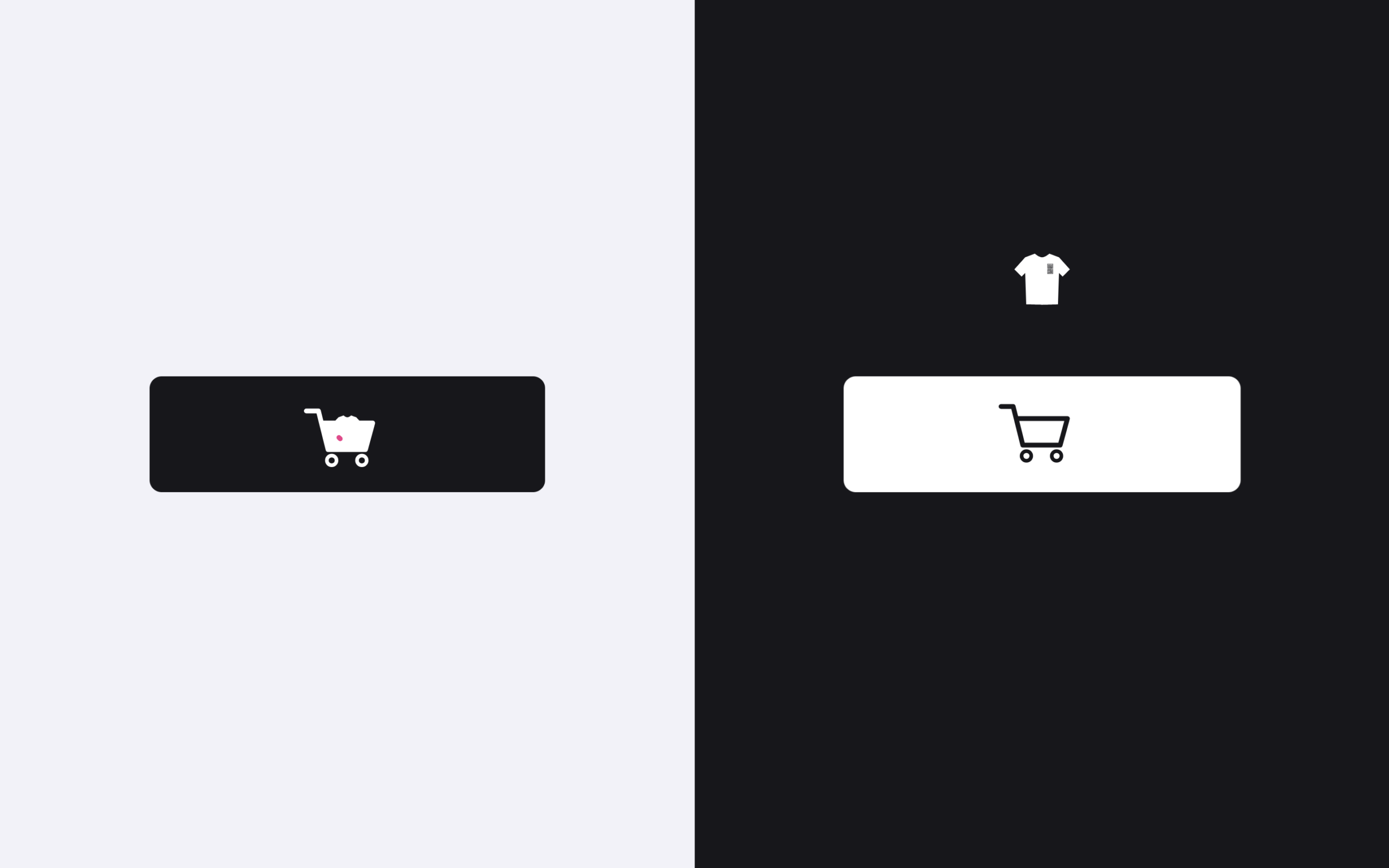
Let’s create an Animated Add to Cart Button using HTML, CSS, and JavaScript. This project features a smooth and interactive animation that makes the shopping experience feel more modern and engaging.
We’ll use:
- HTML to structure the button, icons, and elements like the cart and product animation.
- CSS to style the button and control the animation using variables, transitions, and positioning.
- JavaScript (with GSAP) to trigger the animation when the button is clicked, making the product move into the cart and showing a success checkmark.
This project is great for learning how to combine animations and interactivity to improve user experience in e-commerce interfaces. Whether you’re a beginner or an experienced developer, this Animated Add to Cart Button adds a professional and dynamic touch to your UI. Let’s build it step by step and bring the button to life! 🛒✨
HTML :
This HTML code creates an animated “Add to Cart” button with SVG graphics and GSAP animations. The page loads a reset CSS, the Inter font, and a custom stylesheet, then displays two versions of the button inside light (white) and dark (dark) sections. Each button contains text, a morphing SVG line, a shirt icon animation, and a shopping cart icon with wheels and a tick mark. The SVG paths draw the shapes of the shirt and cart, which will be animated when the button is clicked. At the end, the code loads GSAP and MorphSVG plugins along with a custom script.js file that controls the animations like morphing shapes and moving elements to create the add-to-cart effect.
<!DOCTYPE html>
<html lang="en">
<head>
<meta charset="UTF-8">
<title>Animated Add to cart button | @coding.stella</title>
<link rel="stylesheet" href="https://public.codepenassets.com/css/reset-2.0.min.css">
<link rel='stylesheet' href='https://fonts.googleapis.com/css?family=Inter:400,500,600,700&display=swap'>
<link rel="stylesheet" href="./style.css">
</head>
<body>
<div class="white">
<button class="add-to-cart">
<span>Add to cart</span>
<svg class="morph" viewBox="0 0 64 13">
<path d="M0 12C6 12 17 12 32 12C47.9024 12 58 12 64 12V13H0V12Z" />
</svg>
<div class="shirt">
<svg class="first" viewBox="0 0 24 24">
<path
d="M4.99997 3L8.99997 1.5C8.99997 1.5 10.6901 3 12 3C13.3098 3 15 1.5 15 1.5L19 3L22.5 8L19.5 10.5L19 9.5L17.1781 18.6093C17.062 19.1901 16.778 19.7249 16.3351 20.1181C15.4265 20.925 13.7133 22.3147 12 23C10.2868 22.3147 8.57355 20.925 7.66487 20.1181C7.22198 19.7249 6.93798 19.1901 6.82183 18.6093L4.99997 9.5L4.5 10.5L1.5 8L4.99997 3Z" />
<g>
<path d="M16.3516 9.65383H14.3484V7.83652H14.1742V9.8269H16.5258V7.83652H16.3516V9.65383Z" />
<path
d="M14.5225 6.01934V7.66357H14.6967V7.4905H14.8186V7.66357H14.9928V6.01934H14.8186V7.31742H14.6967V6.01934H14.5225Z" />
<path d="M14.1742 5.67319V7.66357H14.3484V5.84627H16.3516V7.66357H16.5258V5.67319H14.1742Z" />
<path
d="M15.707 9.48071H15.8812V9.28084L16.0032 9.4807V9.48071H16.1774V7.83648H16.0032V9.14683L15.8812 8.94697V7.83648H15.707V9.48071Z" />
<path d="M15.5852 6.01931H15.1149V6.19238H15.5852V6.01931Z" />
<path
d="M15.707 6.01934V7.66357H15.8812V7.46371L16.0032 7.66357H16.1774V6.01934H16.0032V7.32969L15.8812 7.12984V6.01934H15.707Z" />
<path
d="M15.411 7.31742H15.2891V6.53857H15.411V7.31742ZM15.1149 7.66357H15.2891V7.4905H15.411V7.66357H15.5852V6.3655H15.1149V7.66357Z" />
<path
d="M14.5225 8.69756L14.8186 9.18291V9.30763H14.6967V9.13455H14.5225V9.48071H14.9928V9.13456V9.13455L14.6967 8.64917V8.00956H14.8186V8.6586H14.9928V7.83648H14.5225V8.69756Z" />
<path
d="M15.411 9.30763H15.2891V8.00956H15.411V9.30763ZM15.1149 9.48071H15.5852V7.83648H15.1149V9.48071Z" />
</g>
</svg>
<svg class="second" viewBox="0 0 24 24">
<path
d="M4.99997 3L8.99997 1.5C8.99997 1.5 10.6901 3 12 3C13.3098 3 15 1.5 15 1.5L19 3L22.5 8L19.5 10.5L19 9.5L17.1781 18.6093C17.062 19.1901 16.778 19.7249 16.3351 20.1181C15.4265 20.925 13.7133 22.3147 12 23C10.2868 22.3147 8.57355 20.925 7.66487 20.1181C7.22198 19.7249 6.93798 19.1901 6.82183 18.6093L4.99997 9.5L4.5 10.5L1.5 8L4.99997 3Z" />
<g>
<path d="M16.3516 9.65383H14.3484V7.83652H14.1742V9.8269H16.5258V7.83652H16.3516V9.65383Z" />
<path
d="M14.5225 6.01934V7.66357H14.6967V7.4905H14.8186V7.66357H14.9928V6.01934H14.8186V7.31742H14.6967V6.01934H14.5225Z" />
<path d="M14.1742 5.67319V7.66357H14.3484V5.84627H16.3516V7.66357H16.5258V5.67319H14.1742Z" />
<path
d="M15.707 9.48071H15.8812V9.28084L16.0032 9.4807V9.48071H16.1774V7.83648H16.0032V9.14683L15.8812 8.94697V7.83648H15.707V9.48071Z" />
<path d="M15.5852 6.01931H15.1149V6.19238H15.5852V6.01931Z" />
<path
d="M15.707 6.01934V7.66357H15.8812V7.46371L16.0032 7.66357H16.1774V6.01934H16.0032V7.32969L15.8812 7.12984V6.01934H15.707Z" />
<path
d="M15.411 7.31742H15.2891V6.53857H15.411V7.31742ZM15.1149 7.66357H15.2891V7.4905H15.411V7.66357H15.5852V6.3655H15.1149V7.66357Z" />
<path
d="M14.5225 8.69756L14.8186 9.18291V9.30763H14.6967V9.13455H14.5225V9.48071H14.9928V9.13456V9.13455L14.6967 8.64917V8.00956H14.8186V8.6586H14.9928V7.83648H14.5225V8.69756Z" />
<path
d="M15.411 9.30763H15.2891V8.00956H15.411V9.30763ZM15.1149 9.48071H15.5852V7.83648H15.1149V9.48071Z" />
</g>
</svg>
</div>
<div class="cart">
<svg viewBox="0 0 36 26">
<path d="M1 2.5H6L10 18.5H25.5L28.5 7.5L7.5 7.5" class="shape" />
<path
d="M11.5 25C12.6046 25 13.5 24.1046 13.5 23C13.5 21.8954 12.6046 21 11.5 21C10.3954 21 9.5 21.8954 9.5 23C9.5 24.1046 10.3954 25 11.5 25Z"
class="wheel" />
<path
d="M24 25C25.1046 25 26 24.1046 26 23C26 21.8954 25.1046 21 24 21C22.8954 21 22 21.8954 22 23C22 24.1046 22.8954 25 24 25Z"
class="wheel" />
<path d="M14.5 13.5L16.5 15.5L21.5 10.5" class="tick" />
</svg>
</div>
</button>
</div>
<div class="dark">
<button class="add-to-cart">
<span>Add to cart</span>
<svg class="morph" viewBox="0 0 64 13">
<path d="M0 12C6 12 17 12 32 12C47.9024 12 58 12 64 12V13H0V12Z" />
</svg>
<div class="shirt">
<svg class="first" viewBox="0 0 24 24">
<path
d="M4.99997 3L8.99997 1.5C8.99997 1.5 10.6901 3 12 3C13.3098 3 15 1.5 15 1.5L19 3L22.5 8L19.5 10.5L19 9.5L17.1781 18.6093C17.062 19.1901 16.778 19.7249 16.3351 20.1181C15.4265 20.925 13.7133 22.3147 12 23C10.2868 22.3147 8.57355 20.925 7.66487 20.1181C7.22198 19.7249 6.93798 19.1901 6.82183 18.6093L4.99997 9.5L4.5 10.5L1.5 8L4.99997 3Z" />
<g>
<path d="M16.3516 9.65383H14.3484V7.83652H14.1742V9.8269H16.5258V7.83652H16.3516V9.65383Z" />
<path
d="M14.5225 6.01934V7.66357H14.6967V7.4905H14.8186V7.66357H14.9928V6.01934H14.8186V7.31742H14.6967V6.01934H14.5225Z" />
<path d="M14.1742 5.67319V7.66357H14.3484V5.84627H16.3516V7.66357H16.5258V5.67319H14.1742Z" />
<path
d="M15.707 9.48071H15.8812V9.28084L16.0032 9.4807V9.48071H16.1774V7.83648H16.0032V9.14683L15.8812 8.94697V7.83648H15.707V9.48071Z" />
<path d="M15.5852 6.01931H15.1149V6.19238H15.5852V6.01931Z" />
<path
d="M15.707 6.01934V7.66357H15.8812V7.46371L16.0032 7.66357H16.1774V6.01934H16.0032V7.32969L15.8812 7.12984V6.01934H15.707Z" />
<path
d="M15.411 7.31742H15.2891V6.53857H15.411V7.31742ZM15.1149 7.66357H15.2891V7.4905H15.411V7.66357H15.5852V6.3655H15.1149V7.66357Z" />
<path
d="M14.5225 8.69756L14.8186 9.18291V9.30763H14.6967V9.13455H14.5225V9.48071H14.9928V9.13456V9.13455L14.6967 8.64917V8.00956H14.8186V8.6586H14.9928V7.83648H14.5225V8.69756Z" />
<path
d="M15.411 9.30763H15.2891V8.00956H15.411V9.30763ZM15.1149 9.48071H15.5852V7.83648H15.1149V9.48071Z" />
</g>
</svg>
<svg class="second" viewBox="0 0 24 24">
<path
d="M4.99997 3L8.99997 1.5C8.99997 1.5 10.6901 3 12 3C13.3098 3 15 1.5 15 1.5L19 3L22.5 8L19.5 10.5L19 9.5L17.1781 18.6093C17.062 19.1901 16.778 19.7249 16.3351 20.1181C15.4265 20.925 13.7133 22.3147 12 23C10.2868 22.3147 8.57355 20.925 7.66487 20.1181C7.22198 19.7249 6.93798 19.1901 6.82183 18.6093L4.99997 9.5L4.5 10.5L1.5 8L4.99997 3Z" />
<g>
<path d="M16.3516 9.65383H14.3484V7.83652H14.1742V9.8269H16.5258V7.83652H16.3516V9.65383Z" />
<path
d="M14.5225 6.01934V7.66357H14.6967V7.4905H14.8186V7.66357H14.9928V6.01934H14.8186V7.31742H14.6967V6.01934H14.5225Z" />
<path d="M14.1742 5.67319V7.66357H14.3484V5.84627H16.3516V7.66357H16.5258V5.67319H14.1742Z" />
<path
d="M15.707 9.48071H15.8812V9.28084L16.0032 9.4807V9.48071H16.1774V7.83648H16.0032V9.14683L15.8812 8.94697V7.83648H15.707V9.48071Z" />
<path d="M15.5852 6.01931H15.1149V6.19238H15.5852V6.01931Z" />
<path
d="M15.707 6.01934V7.66357H15.8812V7.46371L16.0032 7.66357H16.1774V6.01934H16.0032V7.32969L15.8812 7.12984V6.01934H15.707Z" />
<path
d="M15.411 7.31742H15.2891V6.53857H15.411V7.31742ZM15.1149 7.66357H15.2891V7.4905H15.411V7.66357H15.5852V6.3655H15.1149V7.66357Z" />
<path
d="M14.5225 8.69756L14.8186 9.18291V9.30763H14.6967V9.13455H14.5225V9.48071H14.9928V9.13456V9.13455L14.6967 8.64917V8.00956H14.8186V8.6586H14.9928V7.83648H14.5225V8.69756Z" />
<path
d="M15.411 9.30763H15.2891V8.00956H15.411V9.30763ZM15.1149 9.48071H15.5852V7.83648H15.1149V9.48071Z" />
</g>
</svg>
</div>
<div class="cart">
<svg viewBox="0 0 36 26">
<path d="M1 2.5H6L10 18.5H25.5L28.5 7.5L7.5 7.5" class="shape" />
<path
d="M11.5 25C12.6046 25 13.5 24.1046 13.5 23C13.5 21.8954 12.6046 21 11.5 21C10.3954 21 9.5 21.8954 9.5 23C9.5 24.1046 10.3954 25 11.5 25Z"
class="wheel" />
<path
d="M24 25C25.1046 25 26 24.1046 26 23C26 21.8954 25.1046 21 24 21C22.8954 21 22 21.8954 22 23C22 24.1046 22.8954 25 24 25Z"
class="wheel" />
<path d="M14.5 13.5L16.5 15.5L21.5 10.5" class="tick" />
</svg>
</div>
</button>
</div>
<script src='https://cdnjs.cloudflare.com/ajax/libs/gsap/3.4.0/gsap.min.js'></script>
<script src='https://s3-us-west-2.amazonaws.com/s.cdpn.io/16327/MorphSVGPlugin3.min.js'></script>
<script src="./script.js"></script>
</body>
</html>
CSS :
This CSS styles and controls the animation look of the “Add to Cart” button. It first sets global box sizing and smooth font rendering, then centers the content using flexbox. The .add-to-cart button uses many CSS variables (like colors, positions, scale, rotation) that will later change during animation. A :before pseudo element creates the button background, while the span styles the button text. SVG elements are used for the morph line, shirt icon, and shopping cart, and their colors, sizes, and positions are controlled using variables. The shirt and cart are absolutely positioned so they can move and scale during the animation, while the cart also includes wheels and a tick mark that appears after adding the item. Finally, .white and .dark sections create light and dark theme versions of the same button by changing the CSS variables.
html {
  box-sizing: border-box;
  -webkit-font-smoothing: antialiased;
}

* {
  box-sizing: inherit;
}

*:before,
*:after {
  box-sizing: inherit;
}

body {
  min-height: 100vh;
  display: flex;
  font-family: "Inter", Arial;
  background: #F2F2F9;
}

.add-to-cart {
  --background-default: #17171B;
  --background-hover: #0A0A0C;
  --background-scale: 1;
  --text-color: #fff;
  --text-o: 1;
  --text-x: 12px;
  --cart: #fff;
  --cart-x: -48px;
  --cart-y: 0px;
  --cart-rotate: 0deg;
  --cart-scale: .75;
  --cart-clip: 0px;
  --cart-clip-x: 0px;
  --cart-tick-offset: 10px;
  --cart-tick-color: #FF328B;
  --shirt-y: -16px;
  --shirt-scale: 0;
  --shirt-color: #17171B;
  --shirt-logo: #fff;
  --shirt-second-y: 24px;
  --shirt-second-color: #fff;
  --shirt-second-logo: #17171B;
  -webkit-tap-highlight-color: transparent;
  -webkit-appearance: none;
  outline: none;
  background: none;
  border: none;
  padding: 12px 0;
  width: 164px;
  margin: 0;
  cursor: pointer;
  position: relative;
  font-family: inherit;
}

.add-to-cart:before {
  content: "";
  display: block;
  position: absolute;
  top: 0;
  right: 0;
  bottom: 0;
  left: 0;
  border-radius: 5px;
  transition: background 0.25s;
  background: var(--background, var(--background-default));
  transform: scaleX(var(--background-scale)) translateZ(0);
}

.add-to-cart:not(.active):hover {
  --background: var(--background-hover);
}

.add-to-cart span {
  display: block;
  text-align: center;
  position: relative;
  z-index: 1;
  font-size: 14px;
  font-weight: 600;
  line-height: 24px;
  color: var(--text-color);
  opacity: var(--text-o);
  transform: translateX(var(--text-x)) translateZ(0);
}

.add-to-cart svg {
  display: block;
  width: var(--svg-width, 24px);
  height: var(--svg-height, 24px);
  position: var(--svg-position, relative);
  left: var(--svg-left, 0);
  top: var(--svg-top, 0);
  stroke-linecap: round;
  stroke-linejoin: round;
}

.add-to-cart svg path {
  fill: var(--svg-fill, none);
  stroke: var(--svg-stroke, none);
  stroke-width: var(--svg-stroke-width, 2);
}

.add-to-cart .morph {
  --svg-width: 64px;
  --svg-height: 13px;
  --svg-left: 50%;
  --svg-top: -12px;
  --svg-position: absolute;
  --svg-fill: var(--background, var(--background-default));
  transition: fill 0.25s;
  pointer-events: none;
  margin-left: -32px;
}

.add-to-cart .shirt,
.add-to-cart .cart {
  pointer-events: none;
  position: absolute;
  left: 50%;
}

.add-to-cart .shirt {
  margin: -12px 0 0 -12px;
  top: 0;
  transform-origin: 50% 100%;
  transform: translateY(var(--shirt-y)) scale(var(--shirt-scale));
}

.add-to-cart .shirt svg {
  --svg-fill: var(--shirt-color);
}

.add-to-cart .shirt svg g {
  --svg-fill: var(--svg-g-fill, var(--shirt-logo));
}

.add-to-cart .shirt svg.second {
  --svg-fill: var(--shirt-second-color);
  --svg-g-fill: var(--shirt-second-logo);
  --svg-position: absolute;
  -webkit-clip-path: polygon(0 var(--shirt-second-y), 24px var(--shirt-second-y), 24px 24px, 0 24px);
  clip-path: polygon(0 var(--shirt-second-y), 24px var(--shirt-second-y), 24px 24px, 0 24px);
}

.add-to-cart .cart {
  --svg-width: 36px;
  --svg-height: 26px;
  --svg-stroke: var(--cart);
  top: 10px;
  margin-left: -18px;
  transform: translate(var(--cart-x), var(--cart-y)) rotate(var(--cart-rotate)) scale(var(--cart-scale)) translateZ(0);
}

.add-to-cart .cart:before {
  content: "";
  display: block;
  width: 22px;
  height: 12px;
  position: absolute;
  left: 7px;
  top: 7px;
  background: var(--cart);
  -webkit-clip-path: polygon(0 0, 22px 0, calc(22px - var(--cart-clip-x)) var(--cart-clip), var(--cart-clip-x) var(--cart-clip));
  clip-path: polygon(0 0, 22px 0, calc(22px - var(--cart-clip-x)) var(--cart-clip), var(--cart-clip-x) var(--cart-clip));
}

.add-to-cart .cart path.wheel {
  --svg-stroke-width: 1.5;
}

.add-to-cart .cart path.tick {
  --svg-stroke: var(--cart-tick-color);
  stroke-dasharray: 10px;
  stroke-dashoffset: var(--cart-tick-offset);
}

.white,
.dark {
  width: 100%;
  display: flex;
  justify-content: center;
  align-items: center;
}

.dark {
  background: #17171B;
}

.dark .add-to-cart {
  --background-default: #fff;
  --background-hover: #F2F2F9;
  --text-color: #17171B;
  --cart: #17171B;
  --cart-tick-color: #FF328B;
  --shirt-color: #fff;
  --shirt-logo: #17171B;
  --shirt-second-color: #17171B;
  --shirt-second-logo: #fff;
}
JavaScript:
This JavaScript uses GSAP and MorphSVG to create the full animation when the Add to Cart button is clicked. It first enables the MorphSVG plugin and selects every .add-to-cart button, then listens for pointerdown and click events. When clicked, the script prevents multiple clicks, adds an active class, and runs several GSAP animations that change the CSS variables controlling scale, position, rotation, and opacity. During the animation the shirt icon pops up and drops into the cart, the cart moves and shows a tick mark, the button text fades out and back in, and SVG shapes morph to create smooth motion effects. After the animation finishes, the styles reset and the button becomes clickable again.
gsap.registerPlugin(MorphSVGPlugin)

document.querySelectorAll('.add-to-cart').forEach(button => {
    let morph = button.querySelector('.morph path'),
        shirt = button.querySelectorAll('.shirt svg > path')
    button.addEventListener('pointerdown', e => {
        if (button.classList.contains('active')) {
            return
        }
        gsap.to(button, {
            '--background-scale': .97,
            duration: .15
        })
    })
    button.addEventListener('click', e => {
        e.preventDefault()
        if (button.classList.contains('active')) {
            return
        }
        button.classList.add('active')
        gsap.to(button, {
            keyframes: [{
                '--background-scale': .97,
                duration: .15
            }, {
                '--background-scale': 1,
                delay: .125,
                duration: 1.2,
                ease: 'elastic.out(1, .6)'
            }]
        })
        gsap.to(button, {
            keyframes: [{
                '--shirt-scale': 1,
                '--shirt-y': '-42px',
                '--cart-x': '0px',
                '--cart-scale': 1,
                duration: .4,
                ease: 'power1.in'
            }, {
                '--shirt-y': '-40px',
                duration: .3
            }, {
                '--shirt-y': '16px',
                '--shirt-scale': .9,
                duration: .25,
                ease: 'none'
            }, {
                '--shirt-scale': 0,
                duration: .3,
                ease: 'none'
            }]
        })
        gsap.to(button, {
            '--shirt-second-y': '0px',
            delay: .835,
            duration: .12
        })
        gsap.to(button, {
            keyframes: [{
                '--cart-clip': '12px',
                '--cart-clip-x': '3px',
                delay: .9,
                duration: .06
            }, {
                '--cart-y': '2px',
                duration: .1
            }, {
                '--cart-tick-offset': '0px',
                '--cart-y': '0px',
                duration: .2,
                onComplete() {
                    button.style.overflow = 'hidden'
                }
            }, {
                '--cart-x': '52px',
                '--cart-rotate': '-15deg',
                duration: .2
            }, {
                '--cart-x': '104px',
                '--cart-rotate': '0deg',
                duration: .2,
                clearProps: true,
                onComplete() {
                    button.style.overflow = 'hidden'
                    button.style.setProperty('--text-o', 0)
                    button.style.setProperty('--text-x', '0px')
                    button.style.setProperty('--cart-x', '-104px')
                }
            }, {
                '--text-o': 1,
                '--text-x': '12px',
                '--cart-x': '-48px',
                '--cart-scale': .75,
                duration: .25,
                clearProps: true,
                onComplete() {
                    button.classList.remove('active')
                }
            }]
        })
        gsap.to(button, {
            keyframes: [{
                '--text-o': 0,
                duration: .3
            }]
        })
        gsap.to(morph, {
            keyframes: [{
                morphSVG: 'M0 12C6 12 20 10 32 0C43.9024 9.99999 58 12 64 12V13H0V12Z',
                duration: .25,
                ease: 'power1.out'
            }, {
                morphSVG: 'M0 12C6 12 17 12 32 12C47.9024 12 58 12 64 12V13H0V12Z',
                duration: .15,
                ease: 'none'
            }]
        })
        gsap.to(shirt, {
            keyframes: [{
                morphSVG: 'M4.99997 3L8.99997 1.5C8.99997 1.5 10.6901 3 12 3C13.3098 3 15 1.5 15 1.5L19 3L23.5 8L20.5 11L19 9.5L18 22.5C18 22.5 14 21.5 12 21.5C10 21.5 5.99997 22.5 5.99997 22.5L4.99997 9.5L3.5 11L0.5 8L4.99997 3Z',
                duration: .25,
                delay: .25
            }, {
                morphSVG: 'M4.99997 3L8.99997 1.5C8.99997 1.5 10.6901 3 12 3C13.3098 3 15 1.5 15 1.5L19 3L23.5 8L20.5 11L19 9.5L18.5 22.5C18.5 22.5 13.5 22.5 12 22.5C10.5 22.5 5.5 22.5 5.5 22.5L4.99997 9.5L3.5 11L0.5 8L4.99997 3Z',
                duration: .85,
                ease: 'elastic.out(1, .5)'
            }, {
                morphSVG: 'M4.99997 3L8.99997 1.5C8.99997 1.5 10.6901 3 12 3C13.3098 3 15 1.5 15 1.5L19 3L22.5 8L19.5 10.5L19 9.5L17.1781 18.6093C17.062 19.1901 16.778 19.7249 16.3351 20.1181C15.4265 20.925 13.7133 22.3147 12 23C10.2868 22.3147 8.57355 20.925 7.66487 20.1181C7.22198 19.7249 6.93798 19.1901 6.82183 18.6093L4.99997 9.5L4.5 10.5L1.5 8L4.99997 3Z',
                duration: 0,
                delay: 1.25
            }]
        })
    })
})
In conclusion, the Animated Add to Cart Button is a great way to make your website feel more interactive and modern. By combining HTML for structure, CSS for styling and animations, and JavaScript with GSAP for smooth motion, you can create a visually engaging shopping interaction. Small UI animations like this improve user experience, make actions clearer, and add a professional touch to your web projects 🚀
If your project has problems, don’t worry. Just click to download the source code and face your coding challenges with excitement. Have fun coding!
