


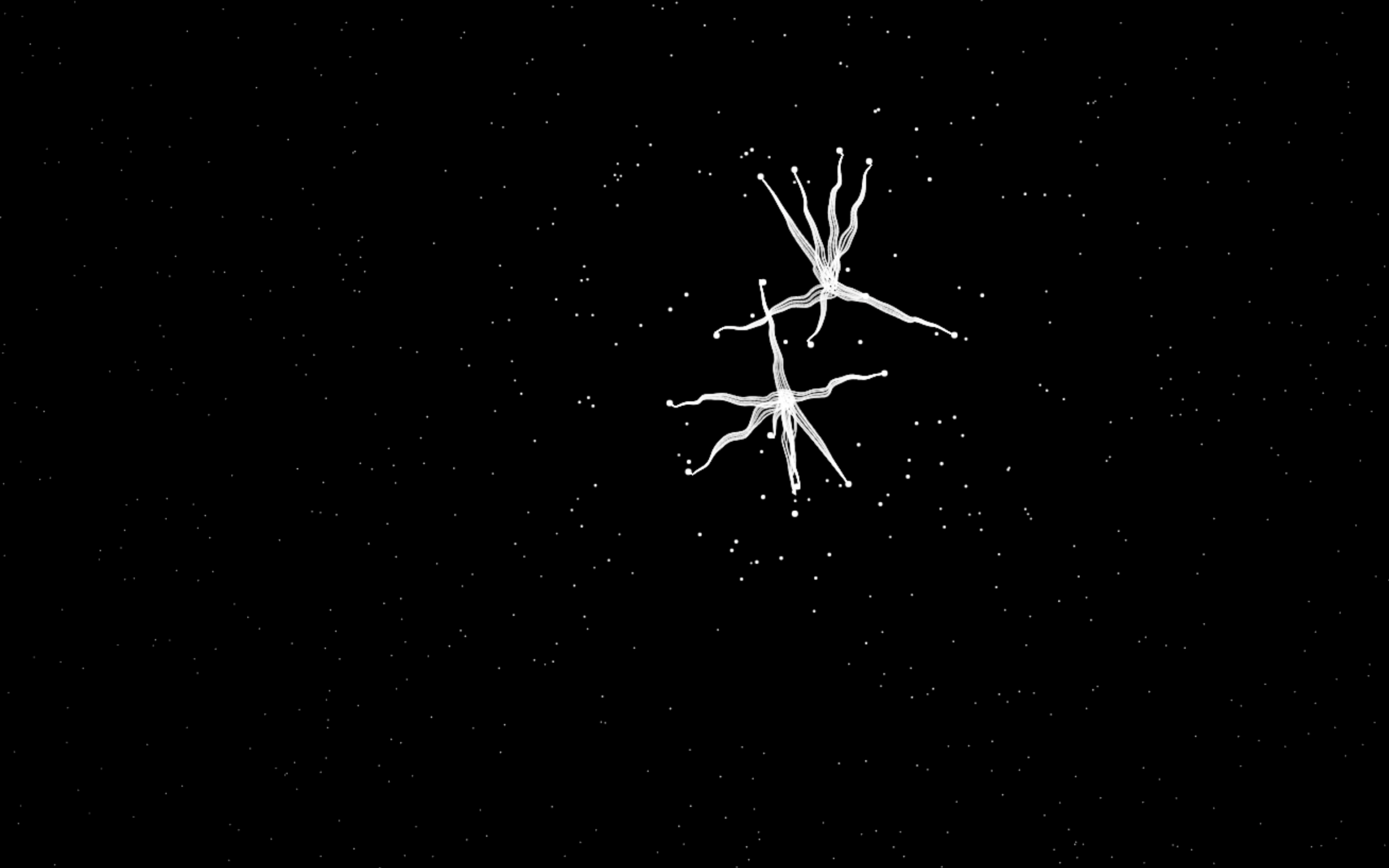
Let’s create a Spider Cursor Animation using HTML, CSS, and JavaScript. This creative project adds a spooky and fun spider that follows the mouse cursor, making your website feel interactive and playful.
We’ll use:
- HTML to structure the spider and page elements.
- CSS to style the spider, add smooth animations, and give it a creepy look.
- JavaScript to track the mouse movement and make the spider smoothly follow the cursor.
This project is perfect for experimenting with cursor-based animations and interactive effects. Whether you’re a beginner or an experienced developer, it’s a fun way to learn motion, positioning, and user interaction in web design. Let’s bring the spider to life! 🕷️✨
HTML :
This HTML file sets up a basic webpage for a spider cursor animation. It defines the page structure, sets the language and character encoding, and gives the page a title. The <canvas> element is used as a drawing area where the animation is rendered, while the external CSS file handles styling and the JavaScript file controls the animation logic and cursor movement.
<!DOCTYPE html>
<html lang="en">

<head>
  <meta charset="UTF-8">
  <title>Spider Cursor Animation</title>
  <link rel="stylesheet" href="./style.css">

</head>

<body>
  <canvas id="canvas"><canvas>
    <script src="./script.js"></script>

</body>

</html>
CSS :
This CSS removes all default spacing from the page and hides any content that goes outside the screen. It ensures the animation stays full screen without showing scrollbars.
body {
    overflow: hidden;
    margin: 0;
}
JavaScript :
This JavaScript creates an animated spider effect on a canvas that follows the mouse cursor. It spawns multiple spider objects made of many points and legs, smoothly moving toward the cursor with a natural walking motion using math functions like sine and cosine. Each frame clears the canvas, updates spider positions, and redraws their bodies and wiggly legs using noise and interpolation, creating a smooth, organic animation that reacts in real time to pointer movement.
let w, h;
const ctx = canvas.getContext("2d");
const { sin, cos, PI, hypot, min, max } = Math;


function spawn() {

    const pts = many(333, () => {
        return {
            x: rnd(innerWidth),
            y: rnd(innerHeight),
            len: 0,
            r: 0
        };
    });

    const pts2 = many(9, (i) => {
        return {
            x: cos((i / 9) * PI * 2),
            y: sin((i / 9) * PI * 2)
        };
    });

    let seed = rnd(100)
    let tx = rnd(innerWidth);
    let ty = rnd(innerHeight);
    let x = rnd(innerWidth)
    let y = rnd(innerHeight)
    let kx = rnd(0.5, 0.5)
    let ky = rnd(0.5, 0.5)
    let walkRadius = pt(rnd(50, 50), rnd(50, 50))
    let r = innerWidth / rnd(100, 150);

    function paintPt(pt) {
        pts2.forEach((pt2) => {
            if (!pt.len)
                return
            drawLine(
                lerp(x + pt2.x * r, pt.x, pt.len * pt.len),
                lerp(y + pt2.y * r, pt.y, pt.len * pt.len),
                x + pt2.x * r,
                y + pt2.y * r
            );
        });
        drawCircle(pt.x, pt.y, pt.r);
    }

    return {
        follow(x, y) {
            tx = x;
            ty = y;
        },

        tick(t) {

            const selfMoveX = cos(t * kx + seed) * walkRadius.x
            const selfMoveY = sin(t * ky + seed) * walkRadius.y
            let fx = tx + selfMoveX;
            let fy = ty + selfMoveY;

            x += min(innerWidth / 100, (fx - x) / 10)
            y += min(innerWidth / 100, (fy - y) / 10)

            let i = 0
            pts.forEach((pt) => {
                const dx = pt.x - x,
                    dy = pt.y - y;
                const len = hypot(dx, dy);
                let r = min(2, innerWidth / len / 5);
                pt.t = 0;
                const increasing = len < innerWidth / 10
                    && (i++) < 8;
                let dir = increasing ? 0.1 : -0.1;
                if (increasing) {
                    r *= 1.5;
                }
                pt.r = r;
                pt.len = max(0, min(pt.len + dir, 1));
                paintPt(pt)
            });


        }
    }
}

const spiders = many(2, spawn)

addEventListener("pointermove", (e) => {
    spiders.forEach(spider => {
        spider.follow(e.clientX, e.clientY)
    })
});

requestAnimationFrame(function anim(t) {
    if (w !== innerWidth) w = canvas.width = innerWidth;
    if (h !== innerHeight) h = canvas.height = innerHeight;
    ctx.fillStyle = "#000";
    drawCircle(0, 0, w * 10);
    ctx.fillStyle = ctx.strokeStyle = "#fff";
    t /= 1000
    spiders.forEach(spider => spider.tick(t))
    requestAnimationFrame(anim);
});

function recalc(X, Y) {
    tx = X;
    ty = Y;
}

function rnd(x = 1, dx = 0) {
    return Math.random() * x + dx;
}

function drawCircle(x, y, r, color) {
    //console.log(x,y,r)
    // ctx.fillStyle = color;
    ctx.beginPath();
    ctx.ellipse(x, y, r, r, 0, 0, PI * 2);
    ctx.fill();
}

function drawLine(x0, y0, x1, y1) {
    ctx.beginPath();
    ctx.moveTo(x0, y0);

    many(100, (i) => {
        i = (i + 1) / 100;
        let x = lerp(x0, x1, i);
        let y = lerp(y0, y1, i);
        let k = noise(x / 5 + x0, y / 5 + y0) * 2;
        ctx.lineTo(x + k, y + k);
    });

    ctx.stroke();
}

function many(n, f) {
    return [...Array(n)].map((_, i) => f(i));
}

function lerp(a, b, t) {
    return a + (b - a) * t;
}

function noise(x, y, t = 101) {
    let w0 = sin(0.3 * x + 1.4 * t + 2.0 +
        2.5 * sin(0.4 * y + -1.3 * t + 1.0));
    let w1 = sin(0.2 * y + 1.5 * t + 2.8 +
        2.3 * sin(0.5 * x + -1.2 * t + 0.5));
    return w0 + w1;
}

function pt(x, y) {
    return { x, y }
}
In conclusion, building a Spider Cursor Animation with HTML, CSS, and JavaScript is a fun and creative way to explore interactive web effects. By combining mouse tracking with smooth animations, you can create a unique experience that instantly grabs attention 🕸️💻
If your project has problems, don’t worry. Just click to download the source code and face your coding challenges with excitement. Have fun coding!
