


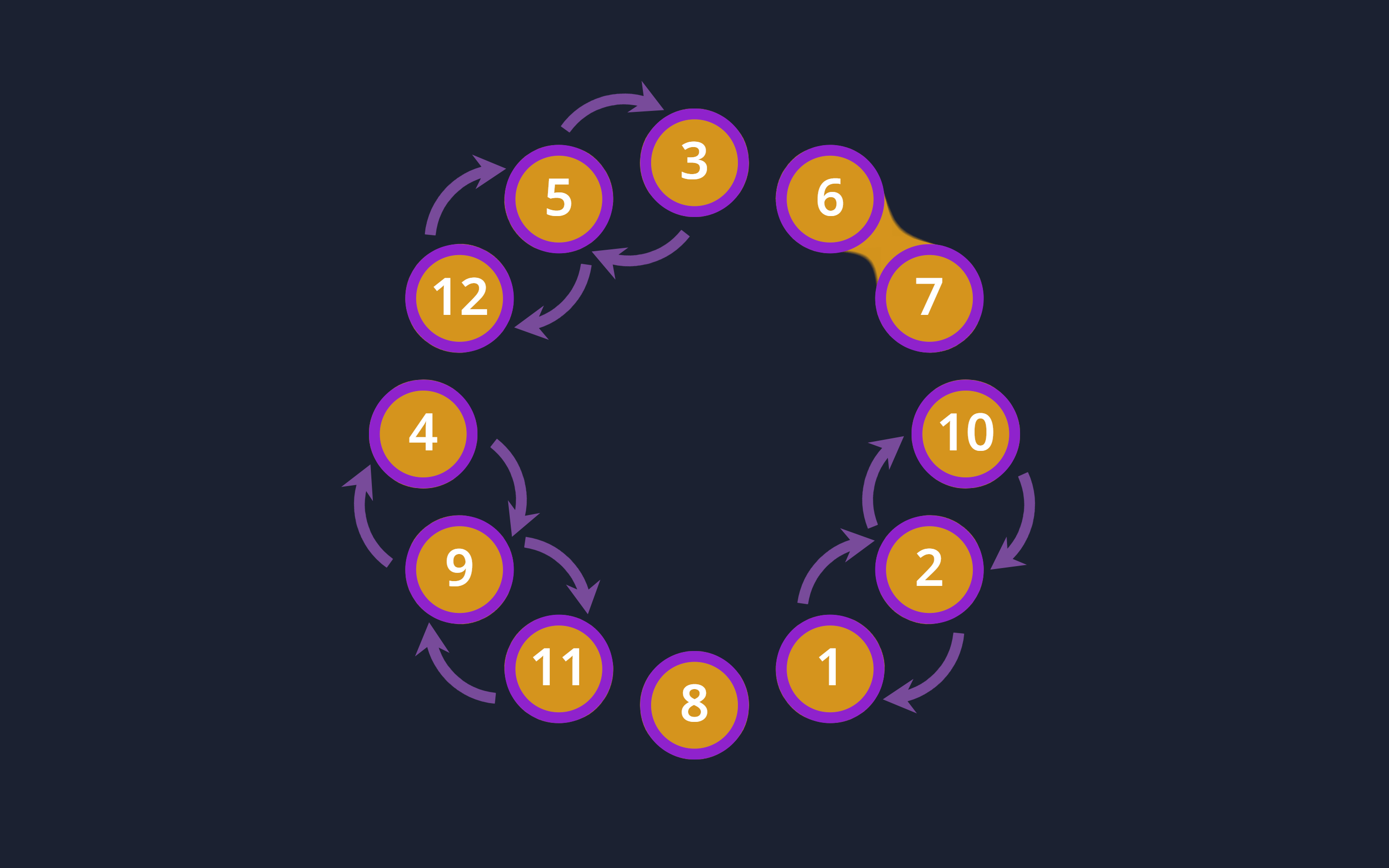
Let’s create a “Sort the Bubble Clock” using HTML, CSS, and JavaScript. This project will feature a clock where the bubbles representing the time digits will animate into place, creating a visually engaging effect.
We’ll use HTML to structure the clock, CSS for styling and animations, and JavaScript to handle the logic for displaying and animating the time.
Let’s get started on building the “Sort the Bubble Clock”. Whether you’re a beginner or an experienced developer, this project offers a fun way to practice your web development skills and create an interactive and dynamic clock. Let’s dive in!
HTML :
This HTML structure defines an interactive clock visualization with SVG (Scalable Vector Graphics). It includes elements representing the clock’s numbers and hands, as well as interactive areas for swapping the positions of these numbers. The <defs> and <marker> elements are used for defining reusable graphics and arrow markers.
<!DOCTYPE html>
<html lang="en">
<head>
    <meta charset="UTF-8">
    <meta name="viewport" content="width=device-width, initial-scale=1.0">
    <link rel="stylesheet" href="./style.css">
    <title>Sort the bubble clock</title>
</head>
<body>

  <!-- SVG container for the clock -->
  <svg viewBox="-80 -80 160 160" xmlns="http://www.w3.org/2000/svg">
    <!-- Filter for blob effect -->
    <filter id="blob" style="color-interpolation-filters:sRGB">
      <feGaussianBlur stdDeviation="4"/>
      <feComponentTransfer result="cutoff">
        <feFuncR tableValues="0.83" type="discrete"/>
        <feFuncG tableValues="0.58" type="discrete"/>
        <feFuncB tableValues="0.11" type="discrete"/>
        <feFuncA intercept="-9" slope="19" type="linear"/>
      </feComponentTransfer>
      <feComposite operator="over" in="SourceGraphic" in2="cutoff"/>
    </filter>

    <!-- Marker for arrow -->
    <marker id="arrow" markerUnits="strokeWidth" orient="auto">
      <path d="M -1,0 L -2,1.6 L 1,0 L-2,-1.6 z" />
    </marker>

    <!-- Definitions for reusable elements -->
    <defs>
      <g id="swap">
        <path d="M -8.5,-60.4 A 14,15 0 0 1 8.5,-60.4"/>
        <path d="M 8,-36.2 A 14,15 0 0 1 -8,-36.2"/>
        <circle r="15" cy="-50"/>
      </g>
    </defs>

    <!-- Group for swap buttons -->
    <g id="swapper">
      <use href="#swap" transform="rotate(15)"/>
      <use href="#swap" transform="rotate(45)"/>
      <use href="#swap" transform="rotate(75)"/>
      <use href="#swap" transform="rotate(105)"/>
      <use href="#swap" transform="rotate(135)"/>
      <use href="#swap" transform="rotate(165)"/>
      <use href="#swap" transform="rotate(195)"/>
      <use href="#swap" transform="rotate(225)"/>
      <use href="#swap" transform="rotate(255)"/>
      <use href="#swap" transform="rotate(285)"/>
      <use href="#swap" transform="rotate(315)"/>
      <use href="#swap" transform="rotate(345)"/>
    </g>

    <!-- Group for clock numbers -->
    <g id="outer">
      <g id="at1"><path/><text y="-47">1</text><circle/></g>
      <g id="at2"><path/><text y="-47">2</text><circle/></g>
      <g id="at3"><path/><text y="-47">3</text><circle/></g>
      <g id="at4"><path/><text y="-47">4</text><circle/></g>
      <g id="at5"><path/><text y="-47">5</text><circle/></g>
      <g id="at6"><path/><text y="-47">6</text><circle/></g>
      <g id="at7"><path/><text y="-47">7</text><circle/></g>
      <g id="at8"><path/><text y="-47">8</text><circle/></g>
      <g id="at9"><path/><text y="-47">9</text><circle/></g>
      <g id="at10"><path/><text y="-47">10</text><circle/></g>
      <g id="at11"><path/><text y="-47">11</text><circle/></g>
      <g id="at12"><path/><text y="-47">12</text><circle/></g>
    </g>

    <!-- Group for clock hands -->
    <g id="clock">
      <path class="hours" style="stroke-width:3" d="M0,4 0,-24"/>
      <path class="minutes" d="M0,4 0,-36"/>
    </g>
  </svg>

<script src="./script.js"></script>
</body>
</html>
CSS :
The CSS styles the clock visualization, including the appearance and animations of the clock hands and the number bubbles. It sets up the layout, colors, and transitions for interactive elements. The @keyframes round animation makes the clock hands rotate continuously to simulate the passage of time. Classes like .before, .after, and .finished modify the path and appearance of the number bubbles based on their state.
@import url('https://fonts.googleapis.com/css2?family=Noto+Sans:wght@600&display=swap');

body {
  margin: 0;
  height: 100vh;
  display: flex;
  align-items: center;
  justify-content: center;
  background: #1b2131;
}

svg {
  width: 100%;
  height: 100%;
}

svg.passive * {
  transition: none !important;
}

marker {
  fill: #a05cc6;
  overflow: visible;
}

#swap {
  fill: none;
  stroke: #a05cc6;
  stroke-width: 2;
  marker-end: url(#arrow);
}

#swap circle {
  opacity: 0;
}

#swapper use {
  transform-origin: 0px 0px;
  opacity: 0;
  pointer-events: none;
}

#swapper use[data-low] {
  opacity: 0.7;
  pointer-events: all;
  cursor: pointer;
}

#swapper use[data-low]:hover {
  opacity: 1;
}

#outer {
  filter: url(#blob);
}

#outer > g {
  transform-origin: 0px 0px;
  transition: transform 0.5s ease-in-out;
}

#outer circle {
  r: 9px;
  cy: -50px;
  fill: rgb(0 0 0 / 0);
  stroke: #8f22cc;
  stroke-width: 2;
}

#outer path {
  d: path('M0-60C3.3-60 6.1-58.4 8-56 9.6-54.1 10.2-51.5 10-49 9.8-47.2 9.1-45.4 8-44 6.1-41.6 3.3-40 0-40-3.3-40-6.1-41.6-8-44-9.1-45.4-9.8-47.2-10-49-10.2-51.5-9.6-54.1-8-56-6.1-58.4-3.3-60 0-60z');
  fill: #d4941c;
  transition: d 0.3s 0.1s ease-in-out;
}

#outer .before path {
  d: path('M0-60C3.3-60 6.1-58.4 8-56 9.6-54.1 14.2-50.6 13.5-48.2 13-46.5 9.1-45.4 8-44 6.1-41.6 3.3-40 0-40-3.3-40-6.1-41.6-8-44-9.1-45.4-9.8-47.2-10-49-10.2-51.5-9.6-54.1-8-56-6.1-58.4-3.3-60 0-60z');
}

#outer .after path {
  d: path('M0-60C3.3-60 6.1-58.4 8-56 9.6-54.1 10.2-51.5 10-49 9.8-47.2 9.1-45.4 8-44 6.1-41.6 3.3-40 0-40-3.3-40-6.1-41.6-8-44-9.1-45.4-13-46.5-13.5-48.2-14.2-50.6-9.6-54.1-8-56-6.1-58.4-3.3-60 0-60z');
}

#outer .before.after path {
  d: path('M0-60C3.3-60 6.1-58.4 8-56 9.6-54.1 14.2-50.6 13.5-48.2 13-46.5 9.1-45.4 8-44 6.1-41.6 3.3-40 0-40-3.3-40-6.1-41.6-8-44-9.1-45.4-13-46.5-13.5-48.2-14.2-50.6-9.6-54.1-8-56-6.1-58.4-3.3-60 0-60z');
}

#outer text {
  fill: white;
  font-family: 'Noto Sans';
  font-size: 9.5px;
  text-anchor: middle;
  transform-origin: 0px -50px;
  transition: transform 0.5s ease-in-out;
}

svg #clock {
  stroke: #fff;
  stroke-width: 2;
  stroke-linecap: round;
  opacity: 0;
  transition: opacity 1s ease-in;
}

svg.finished #clock {
  opacity: 1;
}

@keyframes round {
  from {
    transform: rotate(0deg)
  }
  to {
    transform: rotate(360deg)
  }
}
JavaScript:
The JavaScript code adds interactivity to the clock. It shuffles the positions of the numbers randomly, rotates elements to align them correctly, and allows users to swap positions by clicking. Functions like shuffle, rotate, and connect manage the positioning and transitions of the elements. The clock hands are animated based on the current time, continuously updating their rotation to match real-world time. The script ensures that the sorting process completes and updates the visualization accordingly.
// Parses the text content of an element to an integer
const number = (el) => parseInt(el.querySelector('text').textContent, 10);

// Compares the positions of two elements
const round = (e1, e2) => {
  const r1 = parseInt(e1.dataset.position, 10);
  const r2 = parseInt(e2.dataset.position, 10);

  return r1 - r2;
}

// Rotates an element and updates its position
const rotate = (el, i) => {
  el.style.transform = `rotate(${i * 30}deg)`; // Rotate the element
  el.dataset.position = i; // Update the position in dataset
  el.querySelector('text').style.transform = `rotate(${i * -30}deg)`; // Rotate the text inside the element
}

// Selects all dot elements and swap elements
const dots = [...document.querySelectorAll('#outer>g')];
const swaps = [...document.querySelectorAll('#swapper use')];
const svg = document.querySelector('svg');

// Shuffle the positions of the dots randomly
function shuffle () {
  const order = [];
  order[0] = 1 + (Math.random() * 11) | 0;
  order[11] = (order[0] + 1 + (Math.random() * (12 - order[0])) | 0) % 12;

  let i = 1;
  while (i < 11) {
    let no = (Math.random() * 12) | 0;

    if (order.indexOf(no) < 0) {
      order[i++] = no;
    }
  }

  // Apply the shuffled order to the dots
  order.forEach((no, k) => rotate(dots[k], no));
}

// Check if the puzzle is solved
function testEnd () {
  if (swaps.some(el => el.dataset.low)) return;

  // Align the clock to the 12 o'clock position
  document.querySelector('#clock').style.transform = document.querySelector('#at12').style.transform;

  // Mark the puzzle as finished
  svg.classList.add('finished');
}

// Update the swap elements based on the current positions
function connect () {
  const pos = dots.toSorted(round);

  pos.forEach((el, i) => {
    const self = number(el);
    const classList = [];

    delete el.dataset.changeDown;
    delete el.dataset.changeUp;

    const before = number(pos[(i + 11) % 12]);
    if ((self - before + 12) % 12 === 1) {
      classList.push('after');
    }

    const after = number(pos[(i + 1) % 12]);
    if ((after - self + 12) % 12 === 1) {
      classList.push('before');
    }
    if (after < self && !(after == 1 && self == 12)) {
      swaps[i].dataset.low = el.id;
      swaps[i].dataset.high = pos[(i + 1) % 12].id;
    } else {
      delete swaps[i].dataset.low;
      delete swaps[i].dataset.high;
    }

    el.setAttribute('class', classList.join(' '));
  });

  testEnd();
}

// Handle swap button clicks
document.querySelector('#swapper').addEventListener('click', event => {
  const target = [...event.currentTarget.childNodes].find(el => el.contains(event.target));
  const {low, high} = target.dataset;

  const el1 = document.querySelector('#' + low);
  const el2 = document.querySelector('#' + high);

  if (el1.style.transform == 'rotate(330deg)' && el2.style.transform == 'rotate(0deg)') {
    // Swap elements if they are in the specific positions
    el1.style.transform = 'rotate(360deg)';
    el1.querySelector('text').style.transform = 'rotate(-360deg)';
    el1.dataset.position = 0;

    el2.style.transform = 'rotate(-30deg)';
    el2.querySelector('text').style.transform = 'rotate(30deg)';
    el2.dataset.position = 11;

    setTimeout(() => {
      el1.style.transform = 'rotate(0deg)';
      el1.querySelector('text').style.transform = 'rotate(0deg)';

      el2.style.transform = 'rotate(330deg)';
      el2.querySelector('text').style.transform = 'rotate(-330deg)';

      svg.classList.toggle('passive', true);

      connect();

      setTimeout(() => {
        svg.classList.toggle('passive', false);
      }, 200);
    }, 500);
  } else {
    // Swap elements if they are not in the specific positions
    const trans = el1.dataset.position;
    rotate(el1, el2.dataset.position);
    rotate(el2, trans);

    setTimeout(connect, 500);
  }
});

// Initialize the clock animations based on the current time
(() => {
  const now = new Date();
  const hour = now.getHours();
  const minute = now.getMinutes();
  const second = now.getSeconds();

  document.querySelector('#clock .hours').style.animation = `round 43200s -${hour*3600 + minute*60 + second}s linear infinite`;
  document.querySelector('#clock .minutes').style.animation = `round 3600s -${minute*60 + second}s linear infinite`;
})();

shuffle();
connect();
In conclusion, creating the “Sort the Bubble Clock” using HTML, CSS, and JavaScript has been an exciting and educational project. By combining HTML for structure, CSS for styling and animations, and JavaScript for time logic, we’ve crafted a visually engaging clock with animated bubbles representing the time digits.
If your project has problems, don’t worry. Just click to download the source code and face your coding challenges with excitement. Have fun coding!
