


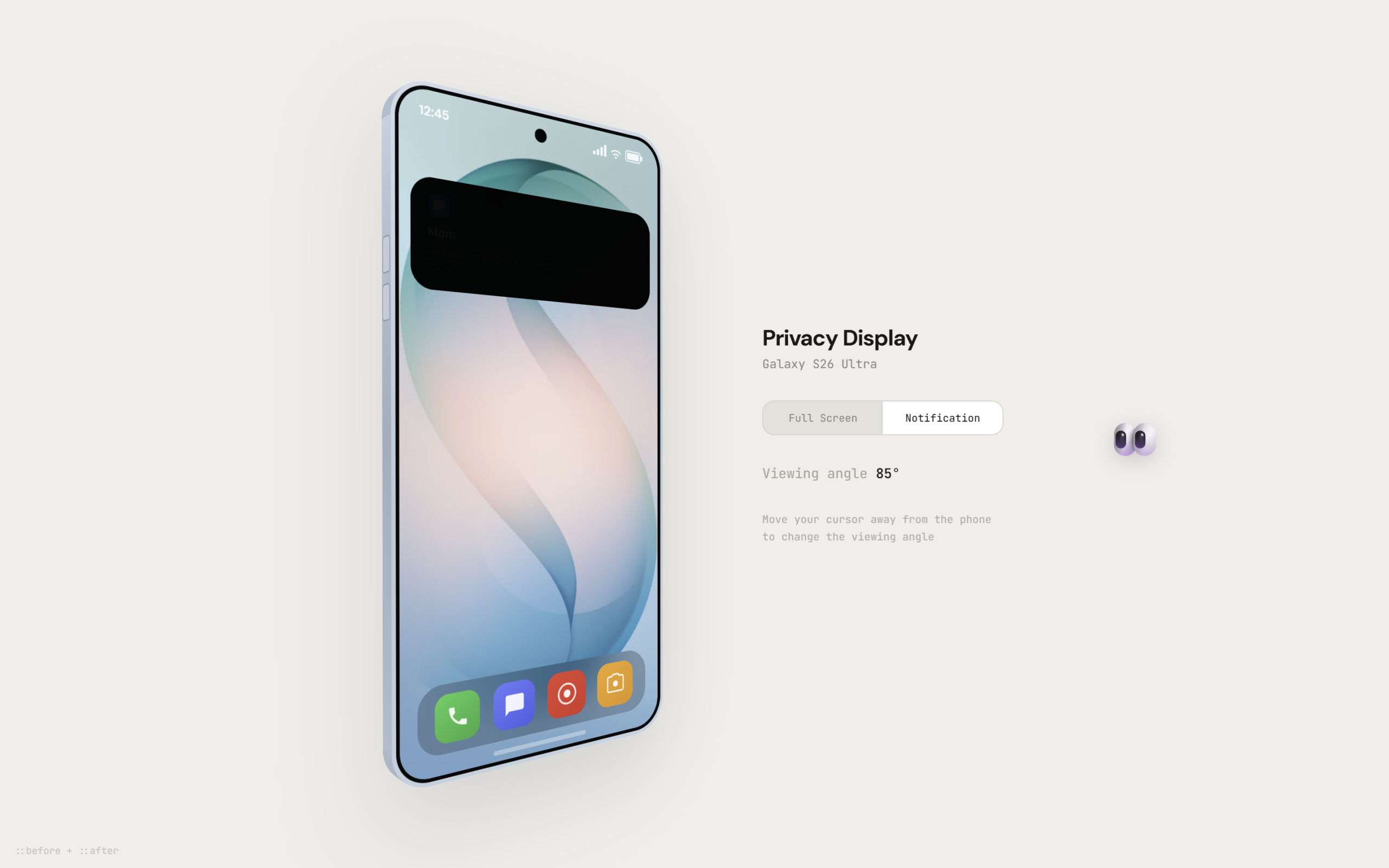
Let’s create a Samsung S26 Ultra Privacy Display Animation using HTML, CSS, and JavaScript – an interactive UI where a 3D phone reacts to viewing angles and applies a dynamic privacy blur effect.
- HTML:
Structure the phone UI with screen, notification, edges, and control buttons for switching modes, plus an angle display. - CSS:
Design a realistic 3D phone using transforms, shadows, and gradients, and control the privacy blur using CSS variables for smooth transitions. - JavaScript:
Handle mouse movement to rotate the phone, update privacy blur based on angle, switch modes on click, and use animation for smooth, real-time interaction.
This project helps you understand advanced UI animation, 3D transforms, and real-time DOM updates while building a visually impressive and interactive privacy display effect.
HTML :
The HTML builds the full phone UI structure like screen, notification, dock icons, and control panel. It also includes elements like buttons to switch modes and a text to show viewing angle, basically setting up all parts that will be styled and controlled later.
<!DOCTYPE html>
<html lang="en">
<head>
<meta charset="UTF-8">
<title>Galaxy S26 Ultra Privacy Display | @coding.stella</title>
<link rel='stylesheet' href='https://fonts.googleapis.com/css2?family=Honk:MORF@15&display=swap'>
<link rel="stylesheet" href="./style.css">
</head>
<body>
<div class="scene">
<div class="phone" id="phone">
<div class="back"></div>
<div class="edge edge-r"></div>
<div class="edge edge-l"></div>
<div class="edge edge-t"></div>
<div class="edge edge-b"></div>
<div class="bezel">
<div class="inner">
<div class="screen" id="screen">
<div class="wallpaper"></div>
<div class="status-bar">
<span class="time">12:45</span>
<div class="status-icons">
<svg width="14" height="10" viewBox="0 0 14 10" fill="none">
<rect x="0" y="7" width="2.5" height="3" rx="0.5" fill="rgba(255,255,255,0.9)" />
<rect x="3.8" y="5" width="2.5" height="5" rx="0.5" fill="rgba(255,255,255,0.9)" />
<rect x="7.6" y="2.5" width="2.5" height="7.5" rx="0.5" fill="rgba(255,255,255,0.9)" />
<rect x="11.4" y="0" width="2.5" height="10" rx="0.5" fill="rgba(255,255,255,0.9)" />
</svg>
<svg width="12" height="10" viewBox="0 0 12 10" fill="none">
<circle cx="6" cy="9" r="1" fill="rgba(255,255,255,0.9)" />
<path d="M3.5 6.8a4.2 4.2 0 015 0" stroke="rgba(255,255,255,0.9)" stroke-width="1.2"
stroke-linecap="round" fill="none" />
<path d="M1.5 4.5a7 7 0 019 0" stroke="rgba(255,255,255,0.9)" stroke-width="1.2"
stroke-linecap="round" fill="none" />
</svg>
<svg width="20" height="10" viewBox="0 0 20 10" fill="none">
<rect x="0.5" y="0.5" width="16" height="9" rx="2" stroke="rgba(255,255,255,0.85)" stroke-width="1" />
<rect x="2" y="2" width="13" height="6" rx="1" fill="rgba(255,255,255,0.85)" />
<rect x="17" y="3" width="2" height="4" rx="0.8" fill="rgba(255,255,255,0.85)" />
</svg>
</div>
</div>
<div class="notification" id="notif">
<div class="notif-header">
<div class="notif-icon">
<svg width="11" height="11" viewBox="0 0 24 24" fill="rgba(255,255,255,0.9)">
<path d="M20 2H4c-1.1 0-2 .9-2 2v18l4-4h14c1.1 0 2-.9 2-2V4c0-1.1-.9-2-2-2z" />
</svg>
</div>
<span class="notif-app">Messages</span>
<span class="notif-when">now</span>
</div>
<a class="notif-title" href="https://calculatequick.com" target="_blank" rel="noopener">Mom</a>
<div class="notif-body">Did you remember to change your underwear today?!?!</div>
</div>
<div class="dock">
<a class="dock-icon di-phone" href="https://calculatequick.com" target="_blank" rel="noopener"
aria-label="Phone">
<svg width="20" height="20" viewBox="0 0 24 24" fill="rgba(255,255,255,0.92)">
<path
d="M6.62 10.79a15.05 15.05 0 006.59 6.59l2.2-2.2a1 1 0 011.01-.24c1.12.37 2.33.57 3.58.57.55 0 1 .45 1 1V20a1 1 0 01-1 1A17 17 0 013 4a1 1 0 011-1h3.5a1 1 0 011 1c0 1.25.2 2.46.57 3.58a1 1 0 01-.24 1.01l-2.2 2.2z" />
</svg>
</a>
<a class="dock-icon di-msg" href="https://calculatequick.com" target="_blank" rel="noopener"
aria-label="Messages">
<svg width="20" height="20" viewBox="0 0 24 24" fill="rgba(255,255,255,0.92)">
<path d="M20 2H4c-1.1 0-2 .9-2 2v18l4-4h14c1.1 0 2-.9 2-2V4c0-1.1-.9-2-2-2z" />
</svg>
</a>
<a class="dock-icon di-chrome" href="https://calculatequick.com" target="_blank" rel="noopener"
aria-label="Browser">
<svg width="20" height="20" viewBox="0 0 24 24" fill="none">
<circle cx="12" cy="12" r="10" stroke="rgba(255,255,255,0.92)" stroke-width="1.8" fill="none" />
<circle cx="12" cy="12" r="4" fill="rgba(255,255,255,0.92)" />
</svg>
</a>
<a class="dock-icon di-cam" href="https://calculatequick.com" target="_blank" rel="noopener"
aria-label="Camera">
<svg width="20" height="20" viewBox="0 0 24 24" fill="rgba(255,255,255,0.92)">
<path d="M12 15.2a3.2 3.2 0 100-6.4 3.2 3.2 0 000 6.4z" />
<path
d="M9 2L7.17 4H4c-1.1 0-2 .9-2 2v12c0 1.1.9 2 2 2h16c1.1 0 2-.9 2-2V6c0-1.1-.9-2-2-2h-3.17L15 2H9z"
fill="none" stroke="rgba(255,255,255,0.92)" stroke-width="1.5" />
</svg>
</a>
</div>
<div class="home-bar"></div>
</div>
</div>
</div>
</div>
<div class="panel">
<div>
<div class="panel-title">Privacy Display</div>
<div class="panel-sub">Galaxy S26 Ultra</div>
</div>
<div class="mode-toggle">
<button class="mode-btn active" data-mode="full">Full Screen</button>
<button class="mode-btn" data-mode="notif">Notification</button>
</div>
<div class="angle-readout">Viewing angle <span class="angle-val" id="angleVal">0°</span></div>
<div class="hint">Move your cursor away from the phone to change the viewing angle</div>
</div>
</div>
<div class="refs">
<a class="ref" href="https://calculatequick.com" target="_blank" rel="noopener">calculatequick.com</a>
<span class="ref">::before + ::after</span>
</div>
<div id="snooper">👀</div>
<script src="./script.js"></script>
</body>
</html>
CSS :
The CSS creates the realistic 3D phone look using gradients, shadows, and transforms, and styles everything like screen, edges, notification, and buttons. It also uses custom properties (like opacity variables) to control the privacy blur effect and smooth visual transitions.
@import url('https://fonts.googleapis.com/css2?family=DM+Sans:opsz,wght@9..40,300;9..40,400;9..40,500;9..40,600;9..40,700&family=JetBrains+Mono:wght@400;500&display=swap');

*,
*::before,
*::after {
  margin: 0;
  padding: 0;
  box-sizing: border-box;
}

body {
  background: #f0eeeb;
  min-height: 100vh;
  display: grid;
  place-items: center;
  -webkit-font-smoothing: antialiased;
  font-family: 'DM Sans', sans-serif;
  color: #1a1816;
  overflow: hidden;
  cursor: none;
}

.scene {
  perspective: 800px;
  display: flex;
  align-items: center;
  gap: 3.5rem;
}

.phone {
  width: 256px;
  height: 537px;
  position: relative;
  transform-style: preserve-3d;
  border-radius: 30px;
  box-shadow: 0 30px 80px rgba(0, 0, 0, 0.12);
}

.back {
  position: absolute;
  inset: 0;
  background: linear-gradient(160deg, #c0d0de, #a8bcd0, #b4c4d4);
  border-radius: 30px;
  transform: translateZ(-16px);
}

.edge {
  position: absolute;
  background: linear-gradient(180deg, #c8d8e5, #a8b8ca, #b8c8d6);
}

.edge-r {
  top: 30px;
  bottom: 30px;
  right: 0;
  width: 16px;
  transform-origin: right center;
  transform: rotateY(-90deg);
}

.edge-l {
  top: 30px;
  bottom: 30px;
  left: 0;
  width: 16px;
  transform-origin: left center;
  transform: rotateY(90deg);
}

.edge-t {
  left: 30px;
  right: 30px;
  top: 0;
  height: 16px;
  transform-origin: center top;
  transform: rotateX(-90deg);
  background: linear-gradient(90deg, #c0d0de, #b0c2d2, #c4d4e2);
}

.edge-b {
  left: 30px;
  right: 30px;
  bottom: 0;
  height: 16px;
  transform-origin: center bottom;
  transform: rotateX(90deg);
  background: linear-gradient(90deg, #b0c0d0, #a0b0c2, #b8c8d6);
}

.corner {
  position: absolute;
  width: 30px;
  height: 30px;
  transform-style: preserve-3d;
}

.corner-tl {
  top: 0;
  left: 0;
}

.corner-tr {
  top: 0;
  right: 0;
}

.corner-bl {
  bottom: 0;
  left: 0;
}

.corner-br {
  bottom: 0;
  right: 0;
}

.c-layer {
  position: absolute;
  inset: 0;
}

.corner-tl .c-layer {
  border-top: 2px solid #b3c3d3;
  border-left: 2px solid #b3c3d3;
  border-radius: 30px 0 0 0;
}

.corner-tr .c-layer {
  border-top: 2px solid #b3c3d3;
  border-right: 2px solid #b3c3d3;
  border-radius: 0 30px 0 0;
}

.corner-bl .c-layer {
  border-bottom: 2px solid #b3c3d3;
  border-left: 2px solid #b3c3d3;
  border-radius: 0 0 0 30px;
}

.corner-br .c-layer {
  border-bottom: 2px solid #b3c3d3;
  border-right: 2px solid #b3c3d3;
  border-radius: 0 0 30px 0;
}

.edge-r::before {
  content: '';
  position: absolute;
  top: 110px;
  left: 2px;
  right: 2px;
  height: 36px;
  background: #cdd8e4;
  border-radius: 2px;
  transform: translateZ(1px);
  box-shadow: 0 0 0 1px #90a1b3;
}

.edge-l::before {
  content: '';
  position: absolute;
  top: 90px;
  left: 2px;
  right: 2px;
  height: 26px;
  background: #cdd8e4;
  border-radius: 2px;
  transform: translateZ(1px);
  box-shadow: 0 0 0 1px #90a1b3;
}

.edge-l::after {
  content: '';
  position: absolute;
  top: 126px;
  left: 2px;
  right: 2px;
  height: 26px;
  background: #cdd8e4;
  border-radius: 2px;
  transform: translateZ(1px);
  box-shadow: 0 0 0 1px #90a1b3;
}

.edge-b::before {
  content: '';
  position: absolute;
  left: 50%;
  top: 50%;
  transform: translate(-50%, -50%) translateZ(-1px);
  width: 20px;
  height: 7px;
  background: #3a4650;
  border-radius: 3.5px;
  box-shadow: inset 0 1px 3px rgba(0, 0, 0, 0.5), inset 0 -0.5px 1px rgba(0, 0, 0, 0.2);
}

.edge-b::after {
  content: '';
  position: absolute;
  left: 50%;
  top: 50%;
  transform: translate(calc(-50% + 22px), -50%);
  width: 2px;
  height: 2px;
  background: #4a5a68;
  border-radius: 50%;
  box-shadow: 4px 0 0 #4a5a68, 8px 0 0 #4a5a68, -44px 0 0 #4a5a68, -48px 0 0 #4a5a68, -52px 0 0 #4a5a68;
}

.bezel {
  width: 100%;
  height: 100%;
  background: linear-gradient(160deg, #d0dde8, #b8cad8, #c4d4e2);
  border-radius: 30px;
  padding: 3px;
  position: relative;
  transform: translateZ(1px);
}

.inner {
  width: 100%;
  height: 100%;
  background: #080808;
  border-radius: 27px;
  padding: 3px;
}

.screen {
  width: 100%;
  height: 100%;
  border-radius: 24px;
  overflow: hidden;
  position: relative;
  background: #080808;
  -webkit-mask-image: -webkit-radial-gradient(white, black);
}

.screen::before {
  content: '';
  position: absolute;
  inset: 0;
  background: #000;
  opacity: var(--priv-opacity, 0);
  z-index: 20;
  pointer-events: none;
  border-radius: inherit;
}

.screen::after {
  content: '';
  position: absolute;
  top: 10px;
  left: 50%;
  transform: translateX(-50%);
  width: 11px;
  height: 11px;
  border-radius: 50%;
  background: #060606;
  z-index: 30;
  box-shadow: inset 0 0 2px rgba(30, 30, 60, 0.6), 0 0 0 0.5px rgba(255, 255, 255, 0.04);
}

.wallpaper {
  position: absolute;
  inset: 0;
  z-index: 1;
  border-radius: inherit;
  background: radial-gradient(ellipse 55% 45% at 60% 35%, rgba(100, 210, 200, 0.9), transparent 70%), radial-gradient(ellipse 50% 55% at 35% 60%, rgba(80, 190, 180, 0.7), transparent 65%), radial-gradient(ellipse 40% 30% at 50% 50%, rgba(140, 220, 210, 0.5), transparent), linear-gradient(155deg, #1a6b6a 0%, #2a9a98 25%, #48c4b8 45%, #3aada5 55%, #1a7a78 75%, #155858 100%);
}

.wallpaper::before {
  content: '';
  position: absolute;
  inset: 0;
  background: url('https://wallpapercg.com/media/ts_orig/33793.webp') center/cover no-repeat;
  z-index: 1;
  border-radius: inherit;
}

.status-bar {
  display: flex;
  justify-content: space-between;
  align-items: center;
  padding: 4px 16px 0;
  position: relative;
  z-index: 10;
  height: 28px;
}

.status-bar svg {
  display: block;
}

.time {
  font-size: 0.62rem;
  font-weight: 600;
  color: rgba(255, 255, 255, 0.92);
}

.status-icons {
  display: flex;
  gap: 4px;
  align-items: center;
}

.notification {
  margin: 38px 9px 0;
  background: rgba(18, 16, 26, 0.72);
  backdrop-filter: blur(24px);
  -webkit-backdrop-filter: blur(24px);
  border-radius: 18px;
  padding: 12px 14px;
  position: relative;
  z-index: 10;
}

.notification::before {
  content: '';
  position: absolute;
  inset: 0;
  background: #000;
  opacity: var(--notif-priv, 0);
  z-index: 15;
  border-radius: 18px;
  pointer-events: none;
}

.notif-header {
  display: flex;
  align-items: center;
  gap: 6px;
  margin-bottom: 5px;
}

.notif-icon {
  width: 18px;
  height: 18px;
  border-radius: 5px;
  background: #3b82f6;
  display: grid;
  place-items: center;
  flex-shrink: 0;
}

.notif-icon svg {
  display: block;
}

.notif-app {
  font-size: 0.5rem;
  color: rgba(255, 255, 255, 0.4);
}

.notif-when {
  font-size: 0.46rem;
  color: rgba(255, 255, 255, 0.25);
  margin-left: auto;
}

.notif-title {
  display: block;
  font-size: 0.6rem;
  font-weight: 600;
  color: rgba(255, 255, 255, 0.9);
  margin-bottom: 2px;
  text-decoration: none;
}

.notif-body {
  font-size: 0.52rem;
  color: rgba(255, 255, 255, 0.48);
  line-height: 1.45;
}

.dock {
  position: absolute;
  bottom: 16px;
  left: 50%;
  transform: translateX(-50%);
  display: flex;
  gap: 12px;
  z-index: 10;
  background: rgba(0, 0, 0, 0.22);
  backdrop-filter: blur(16px);
  -webkit-backdrop-filter: blur(16px);
  border-radius: 20px;
  padding: 8px 14px;
}

.dock-icon {
  width: 38px;
  height: 38px;
  border-radius: 11px;
  display: grid;
  place-items: center;
  text-decoration: none;
}

.dock-icon svg {
  display: block;
}

.di-phone {
  background: linear-gradient(145deg, #34d058, #22a847);
}

.di-msg {
  background: linear-gradient(145deg, #5b7cf7, #3b5ce4);
}

.di-chrome {
  background: linear-gradient(145deg, #ea4335, #dd3327);
}

.di-cam {
  background: linear-gradient(145deg, #f5a623, #e8931a);
}

.home-bar {
  position: absolute;
  bottom: 5px;
  left: 50%;
  transform: translateX(-50%);
  width: 88px;
  height: 3.5px;
  background: rgba(255, 255, 255, 0.35);
  border-radius: 2px;
  z-index: 10;
}

.panel {
  display: flex;
  flex-direction: column;
  gap: 1.5rem;
  max-width: 200px;
}

.panel-title {
  font-size: 1.15rem;
  font-weight: 700;
  letter-spacing: -0.03em;
}

.panel-sub {
  font-size: 0.62rem;
  color: #8a8880;
  font-family: 'JetBrains Mono', monospace;
  margin-top: 0.2rem;
}

.mode-toggle {
  display: flex;
  background: #e4e1dc;
  border-radius: 10px;
  overflow: hidden;
  border: 1px solid #d8d5d0;
}

.mode-btn {
  flex: 1;
  padding: 0.5rem 0.5rem;
  font-family: 'JetBrains Mono', monospace;
  font-size: 0.54rem;
  background: transparent;
  color: #8a8880;
  border: none;
  cursor: pointer;
  transition: background 0.25s, color 0.25s;
  text-align: center;
  white-space: nowrap;
}

.mode-btn.active {
  background: #fff;
  color: #1a1816;
  box-shadow: 0 1px 4px rgba(0, 0, 0, 0.06);
}

.angle-readout {
  font-family: 'JetBrains Mono', monospace;
  font-size: 0.7rem;
  color: #a8a49c;
}

.angle-val {
  color: #1a1816;
  font-weight: 500;
}

.hint {
  font-size: 0.55rem;
  color: #b0aca4;
  font-family: 'JetBrains Mono', monospace;
  line-height: 1.6;
}

.refs {
  position: fixed;
  bottom: 0.6rem;
  left: 0;
  right: 0;
  display: flex;
  justify-content: space-between;
  padding: 0 0.75rem;
  pointer-events: none;
}

.ref {
  font-size: 0.5rem;
  font-family: 'JetBrains Mono', monospace;
  color: #c8c4bc;
  text-decoration: none;
  pointer-events: auto;
  transition: color 0.2s;
}

.ref:hover {
  color: #6a6860;
}

@media (max-width: 640px) {
  .scene {
    flex-direction: column;
    gap: 1.5rem;
    padding: 1rem;
  }

  .panel {
    max-width: 262px;
    align-items: center;
    text-align: center;
  }

  .phone {
    width: 224px;
    height: 469px;
  }
}

#snooper {
  position: fixed;
  top: 0;
  left: 0;
  font-size: 2.2rem;
  pointer-events: none;
  z-index: 9999;
  transform: translate(-50%, -50%);
  filter: drop-shadow(0 4px 8px rgba(0, 0, 0, 0.15));
  opacity: 0;
  transition: opacity 0.3s;
}

body:hover #snooper {
  opacity: 1;
}
JavaScript:
The JS adds interactivity by rotating the phone based on mouse movement, switching modes, and updating the privacy effect dynamically. It uses animation (requestAnimationFrame) and smooth interpolation to make movements realistic and updates the viewing angle and blur effect in real time.
const phone = document.getElementById('phone');
const screen = document.getElementById('screen');
const notif = document.getElementById('notif');
const angleVal = document.getElementById('angleVal');
const modeBtns = document.querySelectorAll('.mode-btn');
const snooper = document.getElementById('snooper');

const corners = ['tl', 'tr', 'bl', 'br'];
corners.forEach(c => {
  const cornerEl = document.createElement('div');
  cornerEl.className = `corner corner-${c}`;
  for (let i = 1; i <= 16; i++) {
    const layer = document.createElement('div');
    layer.className = 'c-layer';
    layer.style.transform = `translateZ(-${i}px)`;
    cornerEl.appendChild(layer);
  }
  phone.appendChild(cornerEl);
});

let mode = 'full';

modeBtns.forEach(btn => {
  btn.addEventListener('click', () => {
    modeBtns.forEach(b => b.classList.remove('active'));
    btn.classList.add('active');
    mode = btn.dataset.mode;
  });
});

let targetRx = 0, targetRy = 0, targetPriv = 0;
let rx = 0, ry = 0, priv = 0;
let hasInteracted = false;
let time = 0;

function lerp(a, b, t) { return a + (b - a) * t; }

function tick() {
  if (!hasInteracted) {
    time += 0.015;
    targetRy = Math.sin(time) * 25;
    targetRx = Math.cos(time * 0.8) * 15;

    let dist = Math.sqrt(targetRx * targetRx + targetRy * targetRy);
    let maxTilt = 40;
    let normDist = Math.min(dist / maxTilt, 1);

    targetPriv = Math.pow(normDist, 1.3) * 0.95;
    angleVal.textContent = Math.round(normDist * 85) + '\u00B0';
  }

  rx = lerp(rx, targetRx, 0.08);
  ry = lerp(ry, targetRy, 0.08);
  priv = lerp(priv, targetPriv, 0.1);

  phone.style.transform = 'rotateX(' + rx + 'deg) rotateY(' + ry + 'deg)';

  if (mode === 'full') {
    screen.style.setProperty('--priv-opacity', priv);
    notif.style.setProperty('--notif-priv', 0);
  } else {
    screen.style.setProperty('--priv-opacity', 0);
    notif.style.setProperty('--notif-priv', priv);
  }

  requestAnimationFrame(tick);
}

tick();

document.addEventListener('mousemove', function (e) {
  snooper.style.transform = `translate(${e.clientX}px, ${e.clientY}px) translate(-50%, -50%)`;
  hasInteracted = true;
  var rect = phone.getBoundingClientRect();
  var cx = rect.left + rect.width / 2;
  var cy = rect.top + rect.height / 2;

  var dx = e.clientX - cx;
  var dy = e.clientY - cy;

  var maxDist = Math.min(window.innerWidth, window.innerHeight) * 0.45;
  var dist = Math.sqrt(dx * dx + dy * dy);
  var normDist = Math.min(dist / maxDist, 1);

  var maxTilt = 40;
  targetRy = (dx / maxDist) * maxTilt;
  targetRx = -(dy / maxDist) * maxTilt;
  targetRy = Math.max(-maxTilt, Math.min(maxTilt, targetRy));
  targetRx = Math.max(-maxTilt, Math.min(maxTilt, targetRx));

  var angle = Math.round(normDist * 85);
  targetPriv = Math.pow(normDist, 1.3) * 0.95;

  angleVal.textContent = angle + '\u00B0';
});

document.addEventListener('mouseleave', function () {
  targetRx = 0;
  targetRy = 0;
  targetPriv = 0;
  angleVal.textContent = '0\u00B0';
});

document.addEventListener('touchstart', function () {
  hasInteracted = true;
}, { passive: true });
This project shows how you can combine HTML, CSS, and JavaScript to build a cool and interactive UI. You learn how to create a 3D phone, add smooth animations, and make the screen react to user movement with a privacy effect. Overall, it’s a great project to improve your frontend skills and create something that looks impressive and realistic.
If your project has problems, don’t worry. Just click to download the source code and face your coding challenges with excitement. Have fun coding!
