


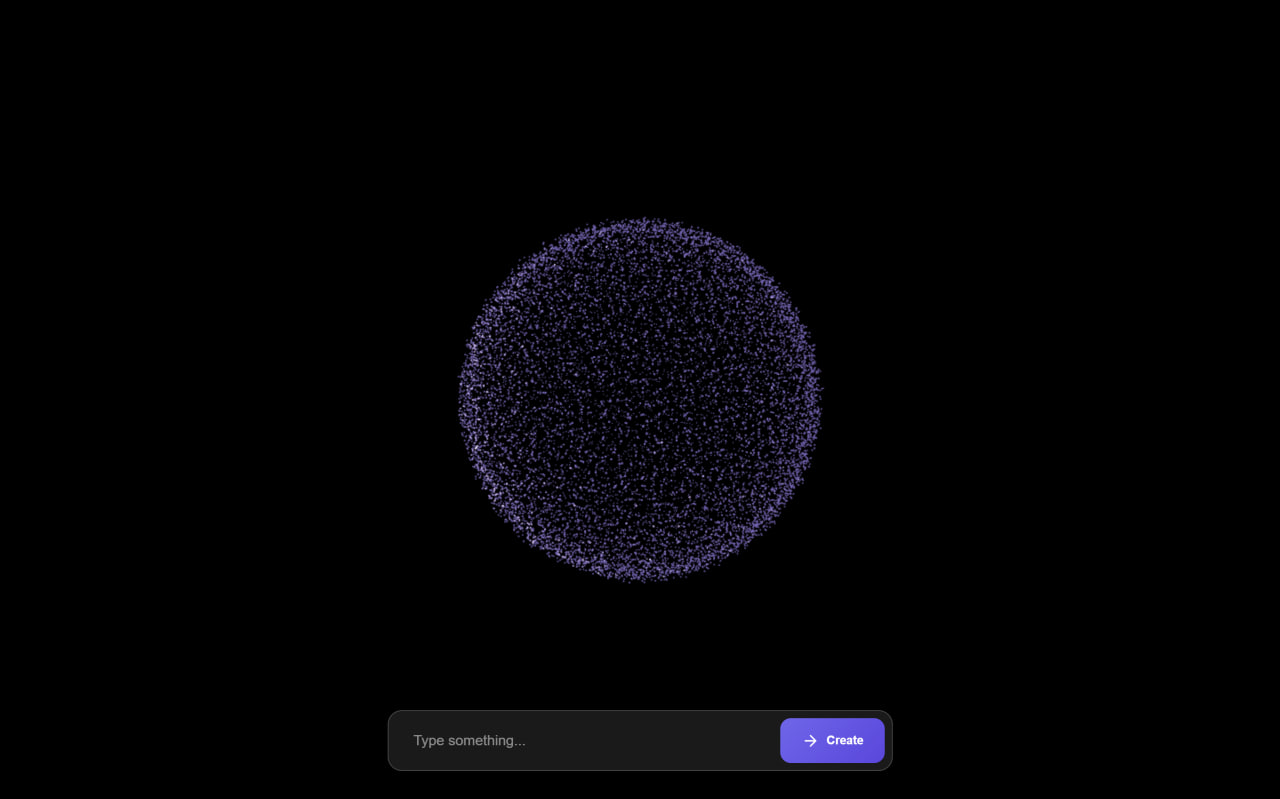
Let’s create a Particle to 3D Text Animation using HTML, CSS, and JavaScript. This interactive project turns thousands of particles into a rotating 3D sphere that morphs into any text you type, making the effect visually stunning and fun to use.
We’ll use:
- HTML to structure the page, input field, and animation container.
- CSS to style the UI, add glassmorphism effects, and smooth transitions.
- JavaScript with Three.js and GSAP to render particles, handle text input, and animate smooth morphing between shapes.
Whether you’re a beginner or an experienced developer, this project is a great way to practice 3D graphics, animations, and interactivity in web design. Let’s bring particles to life and turn text into 3D magic. ✨
HTML :
This HTML sets up a page for a particle-to-3D text animation by loading styles, Google fonts, and external libraries like Three.js for 3D rendering and GSAP for animations. It creates a container for the animation, an input box to type text, and a button to trigger the effect, while script.js handles the actual animation logic.
<!DOCTYPE html>
<html lang="en">

<head>
    <meta charset="UTF-8">
    <title>Particle to 3D Text Animation | @coding.stella</title>
    <link rel="stylesheet" href="./style.css">
</head>

<body>
    <link rel="preconnect" href="https://fonts.googleapis.com">
    <link rel="preconnect" href="https://fonts.gstatic.com" crossorigin>
    <link href="https://fonts.googleapis.com/css2?family=Inter:wght@400;500;600;700&display=swap" rel="stylesheet">
    <script src="https://cdnjs.cloudflare.com/ajax/libs/three.js/r128/three.min.js"></script>
    <script src="https://cdnjs.cloudflare.com/ajax/libs/gsap/3.7.1/gsap.min.js"></script>
    <div id="container"></div>

    <div class="input-container">
        <div class="input-wrapper">
            <input type="text" id="morphText" placeholder="Type something..." maxlength="20">
            <button id="typeBtn">
                <span class="button-content">
                    <svg width="24" height="24" viewBox="0 0 24 24" fill="none" xmlns="http://www.w3.org/2000/svg">
                        <path d="M5 12H19M19 12L12 5M19 12L12 19" stroke="currentColor" stroke-width="2"
                            stroke-linecap="round" stroke-linejoin="round" />
                    </svg>
                    <span>Create</span>
                </span>
            </button>
        </div>
    </div>
    <script src="./script.js"></script>

</body>
</html>
CSS :
This CSS styles a dark full-screen 3D animation page with a fixed canvas container, floating headers, color scheme buttons, and smooth animated controls. It adds glassmorphism effects, gradients, hover transitions, and responsive input UI for typing text, making everything look modern, interactive, and mobile-friendly.
* {
    margin: 0;
    padding: 0;
    box-sizing: border-box;
}

body {
    background: #000;
    overflow: hidden;
    font-family: 'Inter', sans-serif;
    color: white;
}

#container {
    position: fixed;
    top: 0;
    left: 0;
    width: 100%;
    height: 100%;
}

.header {
    position: fixed;
    top: 2rem;
    left: 2rem;
    text-align: left;
    z-index: 1;
    mix-blend-mode: difference;
}

.header h1 {
    font-size: 2.5rem;
    font-weight: 900;
    line-height: 1;
    text-transform: uppercase;
    background: linear-gradient(45deg, #ff6e7f, #bfe9ff);
    -webkit-background-clip: text;
    background-clip: text;
    color: transparent;
    opacity: 0.9;
    letter-spacing: -1px;
    filter: drop-shadow(0 0 15px rgba(255, 255, 255, 0.3));
}

.color-controls {
    position: fixed;
    top: 2rem;
    right: 2rem;
    z-index: 10;
    background: rgba(0, 0, 0, 0.3);
    padding: 1rem;
    border-radius: 15px;
    backdrop-filter: blur(10px);
    box-shadow: 0 0 20px rgba(0, 0, 0, 0.3);
}

.color-scheme {
    display: flex;
    flex-direction: column;
    gap: 0.5rem;
}

.color-scheme button {
    display: flex;
    align-items: center;
    gap: 0.5rem;
    background: rgba(255, 255, 255, 0.1);
    border: 1px solid rgba(255, 255, 255, 0.2);
    padding: 0.5rem 1rem;
    color: white;
    border-radius: 8px;
    cursor: pointer;
    transition: all 0.3s ease;
    font-size: 0.9rem;
    min-width: 120px;
}

.color-scheme button:hover {
    background: rgba(255, 255, 255, 0.2);
}

.color-scheme button.active {
    background: rgba(255, 255, 255, 0.3);
    border-color: rgba(255, 255, 255, 0.5);
}

.color-preview {
    width: 20px;
    height: 20px;
    border-radius: 50%;
    border: 2px solid rgba(255, 255, 255, 0.3);
}

.color-preview.cosmic {
    background: linear-gradient(45deg, #ff6e7f, #bfe9ff);
}

.color-preview.neon {
    background: linear-gradient(45deg, #00ff87, #60efff);
}

.color-preview.sunset {
    background: linear-gradient(45deg, #ff8c37, #ff427a);
}

.color-preview.ocean {
    background: linear-gradient(45deg, #0082c8, #00b4db);
}

.controls {
    position: fixed;
    bottom: 2rem;
    left: 50%;
    transform: translateX(-50%);
    display: flex;
    gap: 1rem;
    z-index: 10;
    background: rgba(0, 0, 0, 0.3);
    padding: 1rem;
    border-radius: 50px;
    backdrop-filter: blur(10px);
    box-shadow: 0 0 20px rgba(0, 0, 0, 0.3);
}

.controls button {
    background: rgba(255, 255, 255, 0.1);
    border: 1px solid rgba(255, 255, 255, 0.2);
    padding: 0.8rem 1.5rem;
    color: white;
    border-radius: 25px;
    cursor: pointer;
    transition: all 0.3s ease;
    text-transform: uppercase;
    letter-spacing: 1px;
    font-size: 0.9rem;
    font-weight: 500;
    min-width: 120px;
}

.controls button:hover {
    background: rgba(255, 255, 255, 0.2);
    transform: translateY(-2px);
    box-shadow: 0 5px 15px rgba(0, 0, 0, 0.3);
}

.controls button.active {
    background: linear-gradient(45deg, #ff6e7f, #bfe9ff);
    border: none;
    color: #000;
}

@keyframes float {
    0% {
        transform: translate(-50%, -50%);
    }

    50% {
        transform: translate(-50%, -52%);
    }

    100% {
        transform: translate(-50%, -50%);
    }
}

.content {
    animation: float 4s ease-in-out infinite;
}

.input-container {
    position: fixed;
    bottom: 2rem;
    left: 50%;
    transform: translateX(-50%);
    z-index: 10;
    width: 90%;
    max-width: 600px;
    padding: 0 1rem;
}

.input-wrapper {
    background: rgba(255, 255, 255, 0.1);
    backdrop-filter: blur(10px);
    border: 1px solid rgba(255, 255, 255, 0.2);
    border-radius: 16px;
    padding: 0.5rem;
    display: flex;
    gap: 0.5rem;
    box-shadow: 0 4px 24px -1px rgba(0, 0, 0, 0.2);
    transition: all 0.3s ease;
}

.input-wrapper:hover {
    background: rgba(255, 255, 255, 0.15);
    border-color: rgba(255, 255, 255, 0.3);
    box-shadow: 0 4px 30px -1px rgba(0, 0, 0, 0.3);
}

input {
    flex: 1;
    background: transparent;
    border: none;
    padding: 1rem 1.25rem;
    color: white;
    font-size: 1rem;
    font-weight: 500;
}

input:focus {
    outline: none;
}

input::placeholder {
    color: rgba(255, 255, 255, 0.5);
}

button {
    background: linear-gradient(135deg, #6366f1 0%, #4f46e5 100%);
    border: none;
    padding: 0.75rem 1.5rem;
    color: white;
    border-radius: 12px;
    font-weight: 600;
    cursor: pointer;
    transition: all 0.3s ease;
    display: flex;
    align-items: center;
    gap: 0.5rem;
}

button:hover {
    transform: translateY(-1px);
    box-shadow: 0 4px 20px -2px rgba(79, 70, 229, 0.5);
}

button:active {
    transform: translateY(1px);
}

.button-content {
    display: flex;
    align-items: center;
    gap: 0.5rem;
}

.button-content svg {
    width: 20px;
    height: 20px;
    transition: transform 0.3s ease;
}

button:hover .button-content svg {
    transform: translateX(3px);
}

@media (max-width: 640px) {
    .input-container {
        bottom: 1.5rem;
        padding: 0 0.75rem;
    }

    button {
        padding: 0.75rem 1.25rem;
    }

    .button-content span {
        display: none;
    }
}
JavaScript:
This JavaScript uses Three.js to create thousands of particles arranged in a rotating 3D sphere, then morphs them into typed text using a hidden canvas and GSAP animations. When you enter text, particles smoothly move to form the letters, then return back to the sphere, with colors and motion updated in real time.
let scene, camera, renderer, particles;
const count = 12000;
let currentState = 'sphere';

function init() {
    scene = new THREE.Scene();
    camera = new THREE.PerspectiveCamera(75, window.innerWidth / window.innerHeight, 0.1, 1000);
    renderer = new THREE.WebGLRenderer({ antialias: true });
    renderer.setSize(window.innerWidth, window.innerHeight);
    renderer.setClearColor(0x000000);
    document.getElementById('container').appendChild(renderer.domElement);

    camera.position.z = 25;

    createParticles();
    setupEventListeners();
    animate();
}

function createParticles() {
    const geometry = new THREE.BufferGeometry();
    const positions = new Float32Array(count * 3);
    const colors = new Float32Array(count * 3);

    function sphericalDistribution(i) {
        const phi = Math.acos(-1 + (2 * i) / count);
        const theta = Math.sqrt(count * Math.PI) * phi;

        return {
            x: 8 * Math.cos(theta) * Math.sin(phi),
            y: 8 * Math.sin(theta) * Math.sin(phi),
            z: 8 * Math.cos(phi)
        };
    }

    for (let i = 0; i < count; i++) {
        const point = sphericalDistribution(i);

        positions[i * 3] = point.x + (Math.random() - 0.5) * 0.5;
        positions[i * 3 + 1] = point.y + (Math.random() - 0.5) * 0.5;
        positions[i * 3 + 2] = point.z + (Math.random() - 0.5) * 0.5;

        const color = new THREE.Color();
        const depth = Math.sqrt(point.x * point.x + point.y * point.y + point.z * point.z) / 8;
        color.setHSL(0.5 + depth * 0.2, 0.7, 0.4 + depth * 0.3);

        colors[i * 3] = color.r;
        colors[i * 3 + 1] = color.g;
        colors[i * 3 + 2] = color.b;
    }

    geometry.setAttribute('position', new THREE.BufferAttribute(positions, 3));
    geometry.setAttribute('color', new THREE.BufferAttribute(colors, 3));

    const material = new THREE.PointsMaterial({
        size: 0.08,
        vertexColors: true,
        blending: THREE.AdditiveBlending,
        transparent: true,
        opacity: 0.8,
        sizeAttenuation: true
    });

    if (particles) scene.remove(particles);
    particles = new THREE.Points(geometry, material);
    particles.rotation.x = 0;
    particles.rotation.y = 0;
    particles.rotation.z = 0;
    scene.add(particles);
}

function setupEventListeners() {
    const typeBtn = document.getElementById('typeBtn');
    const input = document.getElementById('morphText');

    typeBtn.addEventListener('click', () => {
        const text = input.value.trim();
        if (text) {
            morphToText(text);
        }
    });

    input.addEventListener('keypress', (e) => {
        if (e.key === 'Enter') {
            const text = input.value.trim();
            if (text) {
                morphToText(text);
            }
        }
    });
}

function createTextPoints(text) {
    const canvas = document.createElement('canvas');
    const ctx = canvas.getContext('2d');
    const fontSize = 100;
    const padding = 20;

    ctx.font = `bold ${fontSize}px Arial`;
    const textMetrics = ctx.measureText(text);
    const textWidth = textMetrics.width;
    const textHeight = fontSize;

    canvas.width = textWidth + padding * 2;
    canvas.height = textHeight + padding * 2;

    ctx.fillStyle = 'white';
    ctx.font = `bold ${fontSize}px Arial`;
    ctx.textBaseline = 'middle';
    ctx.textAlign = 'center';
    ctx.fillText(text, canvas.width / 2, canvas.height / 2);

    const imageData = ctx.getImageData(0, 0, canvas.width, canvas.height);
    const pixels = imageData.data;
    const points = [];
    const threshold = 128;

    for (let i = 0; i < pixels.length; i += 4) {
        if (pixels[i] > threshold) {
            const x = (i / 4) % canvas.width;
            const y = Math.floor((i / 4) / canvas.width);

            if (Math.random() < 0.3) {
                points.push({
                    x: (x - canvas.width / 2) / (fontSize / 10),
                    y: -(y - canvas.height / 2) / (fontSize / 10)
                });
            }
        }
    }

    return points;
}

function morphToText(text) {
    currentState = 'text';
    const textPoints = createTextPoints(text);
    const positions = particles.geometry.attributes.position.array;
    const targetPositions = new Float32Array(count * 3);

    gsap.to(particles.rotation, {
        x: 0,
        y: 0,
        z: 0,
        duration: 0.5
    });

    for (let i = 0; i < count; i++) {
        if (i < textPoints.length) {
            targetPositions[i * 3] = textPoints[i].x;
            targetPositions[i * 3 + 1] = textPoints[i].y;
            targetPositions[i * 3 + 2] = 0;
        } else {
            const angle = Math.random() * Math.PI * 2;
            const radius = Math.random() * 20 + 10;
            targetPositions[i * 3] = Math.cos(angle) * radius;
            targetPositions[i * 3 + 1] = Math.sin(angle) * radius;
            targetPositions[i * 3 + 2] = (Math.random() - 0.5) * 10;
        }
    }

    for (let i = 0; i < positions.length; i += 3) {
        gsap.to(particles.geometry.attributes.position.array, {
            [i]: targetPositions[i],
            [i + 1]: targetPositions[i + 1],
            [i + 2]: targetPositions[i + 2],
            duration: 2,
            ease: "power2.inOut",
            onUpdate: () => {
                particles.geometry.attributes.position.needsUpdate = true;
            }
        });
    }

    setTimeout(() => {
        morphToCircle();
    }, 4000);
}

function morphToCircle() {
    currentState = 'sphere';
    const positions = particles.geometry.attributes.position.array;
    const targetPositions = new Float32Array(count * 3);
    const colors = particles.geometry.attributes.color.array;

    function sphericalDistribution(i) {
        const phi = Math.acos(-1 + (2 * i) / count);
        const theta = Math.sqrt(count * Math.PI) * phi;

        return {
            x: 8 * Math.cos(theta) * Math.sin(phi),
            y: 8 * Math.sin(theta) * Math.sin(phi),
            z: 8 * Math.cos(phi)
        };
    }

    for (let i = 0; i < count; i++) {
        const point = sphericalDistribution(i);

        targetPositions[i * 3] = point.x + (Math.random() - 0.5) * 0.5;
        targetPositions[i * 3 + 1] = point.y + (Math.random() - 0.5) * 0.5;
        targetPositions[i * 3 + 2] = point.z + (Math.random() - 0.5) * 0.5;

        const depth = Math.sqrt(point.x * point.x + point.y * point.y + point.z * point.z) / 8;
        const color = new THREE.Color();
        color.setHSL(0.5 + depth * 0.2, 0.7, 0.4 + depth * 0.3);

        colors[i * 3] = color.r;
        colors[i * 3 + 1] = color.g;
        colors[i * 3 + 2] = color.b;
    }

    for (let i = 0; i < positions.length; i += 3) {
        gsap.to(particles.geometry.attributes.position.array, {
            [i]: targetPositions[i],
            [i + 1]: targetPositions[i + 1],
            [i + 2]: targetPositions[i + 2],
            duration: 2,
            ease: "power2.inOut",
            onUpdate: () => {
                particles.geometry.attributes.position.needsUpdate = true;
            }
        });
    }

    for (let i = 0; i < colors.length; i += 3) {
        gsap.to(particles.geometry.attributes.color.array, {
            [i]: colors[i],
            [i + 1]: colors[i + 1],
            [i + 2]: colors[i + 2],
            duration: 2,
            ease: "power2.inOut",
            onUpdate: () => {
                particles.geometry.attributes.color.needsUpdate = true;
            }
        });
    }
}

function animate() {
    requestAnimationFrame(animate);

    if (currentState === 'sphere') {
        particles.rotation.y += 0.002;
    }

    renderer.render(scene, camera);
}

window.addEventListener('resize', () => {
    camera.aspect = window.innerWidth / window.innerHeight;
    camera.updateProjectionMatrix();
    renderer.setSize(window.innerWidth, window.innerHeight);
});

init();
In conclusion, this Particle to 3D Text Animation project shows how powerful and fun web animations can be when you combine HTML, CSS, and JavaScript. By using Three.js for 3D rendering and GSAP for smooth transitions, you can create stunning visual effects that react to user input in real time.
If your project has problems, don’t worry. Just click to download the source code and face your coding challenges with excitement. Have fun coding!
