


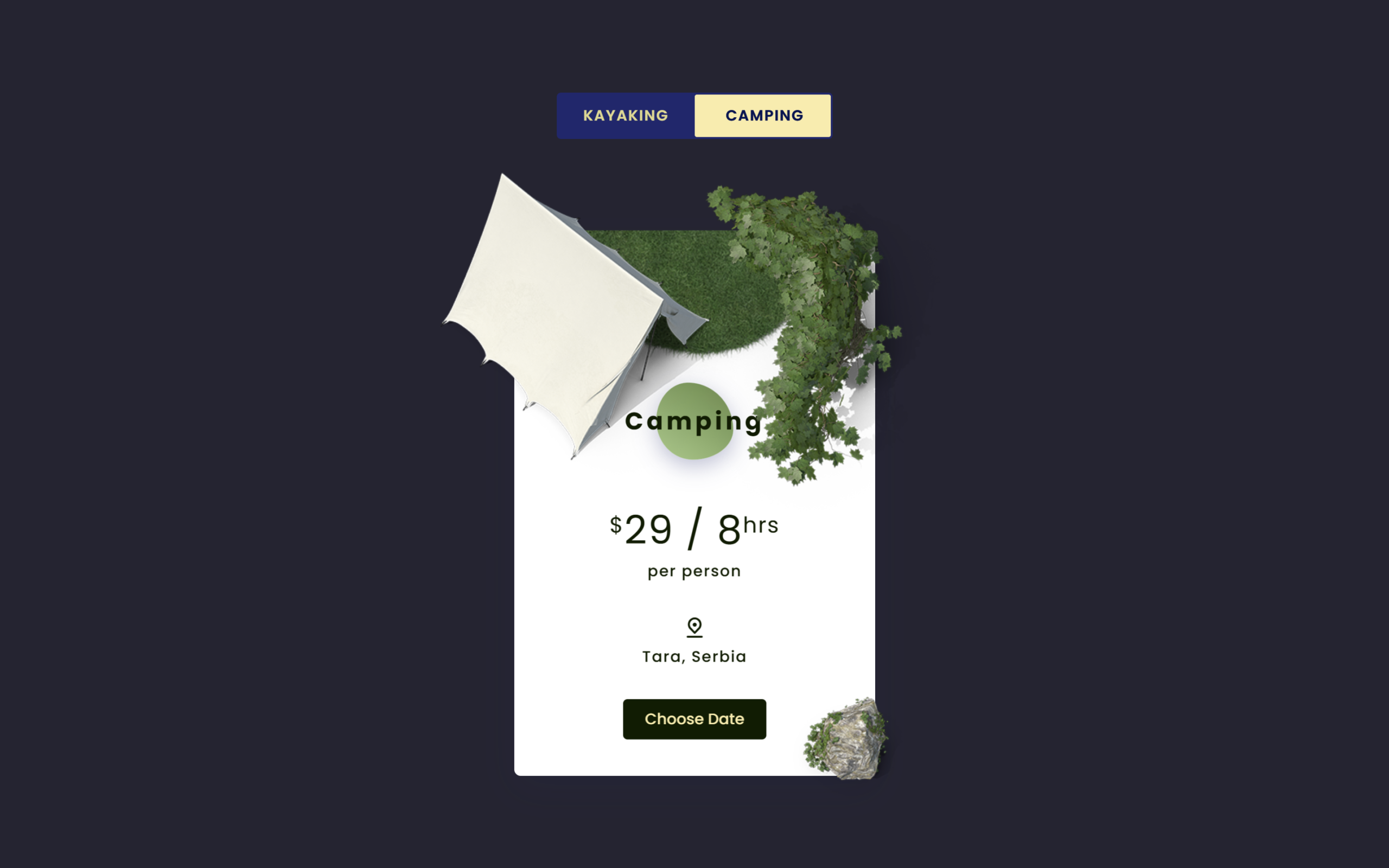
Hey folks! Today, let’s build an eye-catching 3D Pricing Card Effect using just HTML and CSS. This project is perfect if you want to level up your UI skills and create something interactive and modern for your website.
We’ll use simple HTML for structure and pure CSS for styling and animations – no JavaScript needed. The cool part? A smooth 3D flip effect that switches between two pricing plans, giving your design a premium feel.
Join me in this fun project and learn how to create depth, animations, and interactive cards that actually stand out. Ready to make your UI look next-level? Let’s get started! 🚀
HTML :
This code creates a stylish 3D flipping pricing card using HTML structure. A hidden checkbox (input.pricing) acts as a toggle switch, and when clicked, it flips the card between two sides using CSS (front = Kayaking, back = Camping). The layout is built with Bootstrap for centering and spacing, while different div layers like card-3d-wrap, card-front, and card-back handle the 3D effect. Each side contains pricing info, location, button, and multiple image layers (img-wrap) that are positioned with CSS to create a depth/animated look.
<!DOCTYPE html>
<html lang="en">

<head>
	<meta charset="UTF-8" />
	<title>3D Pricing Card Effect | @coding.stella</title>
	<link rel="stylesheet"
		href="https://cdnjs.cloudflare.com/ajax/libs/twitter-bootstrap/4.5.0/css/bootstrap.min.css" />
	<link rel="stylesheet" href="https://unicons.iconscout.com/release/v2.1.9/css/unicons.css" />
	<link rel="stylesheet" href="./style.css" />
</head>

<body>

<div class="section over-hide">
  <div class="container">
    <div class="row full-height justify-content-center">
      <div class="col-12 text-center align-self-center py-5">
        <div class="section text-center py-5 py-md-0">
          <input class="pricing" type="checkbox" id="pricing" name="pricing" />
          <label for="pricing"
            ><span class="block-diff"
              >kayaking<span class="float-right">camping</span></span
            ></label
          >
          <div class="card-3d-wrap mx-auto">
            <div class="card-3d-wrapper">
              <div class="card-front">
                <div class="pricing-wrap">
                  <h4 class="mb-5">Kayaking</h4>
                  <h2 class="mb-2"><sup>$</sup>39 / 4<sup>hrs</sup></h2>
                  <p class="mb-4">per person</p>
                  <p class="mb-1">
                    <i class="uil uil-location-pin-alt size-22"></i>
                  </p>
                  <p class="mb-4">Drina, Serbia</p>
                  <a href="#0" class="link">Choose Date</a>
                  <div class="img-wrap img-2">
                    <img src="./Img/sea.png" alt="" />
                  </div>
                  <div class="img-wrap img-1">
                    <img src="./Img/kayak.png" alt="" />
                  </div>
                  <div class="img-wrap img-3">
                    <img src="./Img/water.png" alt="" />
                  </div>
                  <div class="img-wrap img-6">
                    <img src="./Img/Stone.png" alt="" />
                  </div>
                </div>
              </div>
              <div class="card-back">
                <div class="pricing-wrap">
                  <h4 class="mb-5">Camping</h4>
                  <h2 class="mb-2"><sup>$</sup>29 / 8<sup>hrs</sup></h2>
                  <p class="mb-4">per person</p>
                  <p class="mb-1">
                    <i class="uil uil-location-pin-alt size-22"></i>
                  </p>
                  <p class="mb-4">Tara, Serbia</p>
                  <a href="#0" class="link">Choose Date</a>
                  <div class="img-wrap img-2">
                    <img src="./Img/grass.png" alt="" />
                  </div>
                  <div class="img-wrap img-4">
                    <img src="./Img/camp.png" alt="" />
                  </div>
                  <div class="img-wrap img-5">
                    <img src="./Img/Ivy.png" alt="" />
                  </div>
                  <div class="img-wrap img-7">
                    <img src="./Img/IvyRock.png" alt="" />
                  </div>
                </div>
              </div>
            </div>
          </div>
        </div>
      </div>
    </div>
  </div>
</div>


</body>
</html>
CSS :
This CSS creates the full 3D Flipping pricing card effect by styling layout, animations, and transitions. It hides the checkbox and uses it as a trigger, so when checked, the card rotates (rotateY(180deg)) to show the back side, while smooth transitions control the flip animation. The .card-3d-wrap adds perspective for depth, and .card-front & .card-back use backface-visibility to hide the reverse side. Text and buttons are styled cleanly, while multiple .img-* classes position images in layers using translate3d to create a realistic 3D depth effect, and they animate (fade, move, scale) during the flip to enhance the visual experience
@import url("https://fonts.googleapis.com/css?family=Poppins:400,500,600,700,800,900");

:root {
  font-size: 20px;
}

body {
  font-family: "Poppins", sans-serif;
  font-weight: 500;
  font-size: 15px;
  line-height: 1.7;
  color: #102770;
  background-color: #252432;
  overflow-x: hidden;
}

a {
  cursor: pointer;
  transition: all 200ms linear;
}

a:hover {
  text-decoration: none;
}

.link {
  color: #c4c3ca;
}

.link:hover {
  color: #ffeba7;
}

.over-hide {
  overflow: hidden;
}

.size-22 {
  font-size: 22px;
}

.section {
  position: relative;
  width: 100%;
  z-index: 1;
  display: block;
}

.full-height {
  min-height: 100vh;
}

[type="checkbox"]:checked,
[type="checkbox"]:not(:checked) {
  position: absolute;
  left: -9999px;
}

.pricing:checked+label,
.pricing:not(:checked)+label {
  position: relative;
  display: block;
  text-align: center;
  width: 260px;
  height: 44px;
  border-radius: 4px;
  padding: 0;
  margin: 0 auto;
  cursor: pointer;
  font-family: "Poppins", sans-serif;
  font-weight: 600;
  text-transform: uppercase;
  font-size: 14px;
  letter-spacing: 1px;
  line-height: 44px;
  padding: 0 25px;
  padding-right: 27px;
  overflow: hidden;
  color: #fff;
  text-align: left;
}

.pricing:checked+label:before,
.pricing:not(:checked)+label:before {
  position: absolute;
  content: "";
  z-index: -2;
  background-color: #102770;
  width: 100%;
  height: 100%;
  display: block;
  top: 0;
  left: 0;
}

.pricing:checked+label:after,
.pricing:not(:checked)+label:after {
  position: absolute;
  content: "";
  z-index: -1;
  background-color: #ffeba7;
  width: 128px;
  height: 40px;
  display: block;
  top: 2px;
  left: 2px;
  border-radius: 2px;
  transition: left 300ms linear;
}

.pricing:checked+label:after {
  left: 130px;
}

.block-diff {
  display: block;
  mix-blend-mode: difference;
}

.card-3d-wrap {
  position: relative;
  width: 340px;
  max-width: calc(100% - 20px);
  height: 510px;
  -webkit-transform-style: preserve-3d;
  transform-style: preserve-3d;
  perspective: 1000px;
  margin-top: 90px;
}

.card-3d-wrapper {
  width: 100%;
  height: 100%;
  position: absolute;
  top: 0;
  left: 0;
  -webkit-transform-style: preserve-3d;
  transform-style: preserve-3d;
  transition: transform 700ms 400ms ease-out;
}

.card-front,
.card-back {
  width: 100%;
  height: 100%;
  background-color: rgba(255, 255, 255, 1);
  position: absolute;
  border-radius: 6px;
  left: 0;
  top: 0;
  -webkit-transform-style: preserve-3d;
  transform-style: preserve-3d;
  -webkit-backface-visibility: hidden;
  -moz-backface-visibility: hidden;
  -o-backface-visibility: hidden;
  backface-visibility: hidden;
  box-shadow: 0 12px 35px 0 rgba(16, 39, 112, 0.07);
}

.card-back {
  transform: rotateY(180deg);
}

.pricing:checked~.card-3d-wrap .card-3d-wrapper {
  transform: rotateY(180deg);
  transition: transform 700ms 400ms ease-out;
}

.pricing-wrap {
  position: relative;
  padding-top: 160px;
  width: 100%;
  display: block;
  z-index: 1;
  -webkit-transform-style: preserve-3d;
  transform-style: preserve-3d;
  -webkit-backface-visibility: hidden;
  -moz-backface-visibility: hidden;
  -o-backface-visibility: hidden;
  backface-visibility: hidden;
}

.pricing-wrap h4 {
  position: relative;
  width: 100%;
  display: block;
  text-align: center;
  font-family: "Poppins", sans-serif;
  font-weight: 700;
  letter-spacing: 3px;
  font-size: 22px;
  line-height: 1.7;
  color: #102770;
  transform: translate3d(0, 0, 35px) perspective(100px);
}

.pricing-wrap h4:before {
  position: absolute;
  content: "";
  z-index: -1;
  background: linear-gradient(217deg, #448ad5, #b8eaf9);
  width: 70px;
  height: 70px;
  display: block;
  top: 50%;
  left: 50%;
  transform: translate(-50%, -50%);
  box-shadow: 0 6px 20px 0 rgba(16, 39, 112, 0.3);
  animation: border-transform 6s linear infinite;
}

.card-back .pricing-wrap h4:before {
  background: linear-gradient(217deg, #648946, #a3c984);
}

@keyframes border-transform {

  0%,
  100% {
    border-radius: 63% 37% 54% 46% / 55% 48% 52% 45%;
  }

  14% {
    border-radius: 40% 60% 54% 46% / 49% 60% 40% 51%;
  }

  28% {
    border-radius: 54% 46% 38% 62% / 49% 70% 30% 51%;
  }

  42% {
    border-radius: 61% 39% 55% 45% / 61% 38% 62% 39%;
  }

  56% {
    border-radius: 61% 39% 67% 33% / 70% 50% 50% 30%;
  }

  70% {
    border-radius: 50% 50% 34% 66% / 56% 68% 32% 44%;
  }

  84% {
    border-radius: 46% 54% 50% 50% / 35% 61% 39% 65%;
  }
}

.pricing-wrap h2 {
  position: relative;
  width: 100%;
  display: block;
  text-align: center;
  font-family: "Poppins", sans-serif;
  font-weight: 400;
  letter-spacing: 1px;
  font-size: 36px;
  line-height: 1.1;
  color: #102770;
  transform: translate3d(0, 0, 30px) perspective(100px);
}

.pricing-wrap h2 sup {
  font-size: 20px;
}

.pricing-wrap p {
  position: relative;
  width: 100%;
  display: block;
  text-align: center;
  font-family: "Poppins", sans-serif;
  font-weight: 500;
  font-size: 14px;
  line-height: 1.2;
  letter-spacing: 1px;
  color: #102770;
  transform: translate3d(0, 0, 30px) perspective(100px);
}

.card-back h2,
.card-back p,
.card-back h4 {
  color: #0c1c00;
}

.link {
  position: relative;
  padding: 10px 20px;
  border-radius: 4px;
  display: inline-block;
  text-align: center;
  color: #ffeba7;
  background-color: #102770;
  transition: all 200ms linear;
  font-family: "Poppins", sans-serif;
  font-weight: 500;
  font-size: 14px;
  line-height: 1.2;
  transform: translate3d(0, 0, 30px) perspective(100px);
}

.link:hover {
  color: #102770;
  background-color: #ffeba7;
}

.card-back .link {
  background-color: #0c1c00;
}

.card-back .link:hover {
  color: #0c1c00;
  background-color: #ffeba7;
}

.img-wrap img {
  width: 100%;
  height: auto;
  display: block;
}

.img-1 {
  position: absolute;
  display: block;
  left: -160px;
  top: -50px;
  z-index: 5;
  width: calc(80% + 160px);
  transform: translate3d(0, 0, 45px) perspective(100px);
  opacity: 1;
  pointer-events: auto;
  transition: transform 400ms 1200ms ease, opacity 400ms 1200ms ease;
}

.pricing:checked~.card-3d-wrap .card-3d-wrapper .img-1 {
  opacity: 0;
  transform: translate3d(-50px, 25px, 45px) perspective(100px);
  pointer-events: none;
  transition: transform 400ms ease, opacity 200ms 150ms ease;
}

.img-2 {
  position: absolute;
  display: block;
  left: 0;
  top: 0;
  z-index: 1;
  border-top-left-radius: 6px;
  border-top-right-radius: 6px;
  overflow: hidden;
  width: 100%;
  transform: translate3d(0, 0, 15px) perspective(100px);
}

.img-3 {
  position: absolute;
  display: block;
  right: -20px;
  top: -40px;
  z-index: 5;
  width: calc(60% + 20px);
  transform: translate3d(0, 0, 55px) perspective(100px) scale(1);
  opacity: 1;
  pointer-events: auto;
  transition: transform 300ms 1300ms ease, opacity 200ms 1300ms ease;
}

.pricing:checked~.card-3d-wrap .card-3d-wrapper .img-3 {
  opacity: 0;
  transform: translate3d(-50px, 5px, 55px) perspective(100px) scale(0.4);
  pointer-events: none;
  transition: transform 400ms ease, opacity 200ms 150ms ease;
}

.img-6 {
  position: absolute;
  display: block;
  right: -20px;
  bottom: -55px;
  z-index: 5;
  width: calc(20% + 30px);
  transform: translate3d(0, 0, 25px) perspective(100px) scale(1);
  opacity: 1;
  pointer-events: auto;
  transition: transform 300ms 1300ms ease, opacity 200ms 1300ms ease;
}

.pricing:checked~.card-3d-wrap .card-3d-wrapper .img-6 {
  opacity: 0;
  transform: translate3d(0, 0, 25px) perspective(100px) scale(0.4);
  pointer-events: none;
  transition: transform 400ms ease, opacity 200ms 150ms ease;
}

.img-4 {
  position: absolute;
  display: block;
  left: -60px;
  top: -60px;
  z-index: 5;
  width: calc(65% + 60px);
  transform: translate3d(0, 0, 45px) perspective(100px) scale(0.5);
  opacity: 0;
  pointer-events: none;
  transition: transform 400ms ease, opacity 200ms 150ms ease;
}

.pricing:checked~.card-3d-wrap .card-3d-wrapper .img-4 {
  opacity: 1;
  pointer-events: auto;
  transform: translate3d(0, 0, 45px) perspective(100px) scale(1);
  transition: transform 400ms 1200ms ease, opacity 300ms 1200ms ease;
}

.img-5 {
  position: absolute;
  display: block;
  right: -70px;
  top: -50px;
  z-index: 6;
  width: calc(60% + 70px);
  transform: translate3d(0, 0, 35px) perspective(100px) scale(0.5) rotate(0deg);
  opacity: 0;
  pointer-events: none;
  transition: transform 400ms 100ms ease, opacity 200ms 250ms ease;
}

.pricing:checked~.card-3d-wrap .card-3d-wrapper .img-5 {
  opacity: 1;
  pointer-events: auto;
  transform: translate3d(0, 0, 35px) perspective(100px) scale(1) rotate(10deg);
  transition: transform 400ms 1300ms ease, opacity 300ms 1300ms ease;
}

.img-7 {
  position: absolute;
  display: block;
  right: -30px;
  bottom: -65px;
  z-index: 6;
  width: calc(25% + 30px);
  transform: translate3d(0, 0, 35px) perspective(100px) scale(0.5);
  opacity: 0;
  pointer-events: none;
  transition: transform 400ms 100ms ease, opacity 200ms 250ms ease;
}

.pricing:checked~.card-3d-wrap .card-3d-wrapper .img-7 {
  opacity: 1;
  pointer-events: auto;
  transform: translate3d(0, 0, 35px) perspective(100px) scale(1);
  transition: transform 400ms 1300ms ease, opacity 300ms 1300ms ease;
}

.logo {
  position: fixed;
  top: 30px;
  right: 30px;
  display: block;
  z-index: 100;
  transition: all 250ms linear;
}

.logo img {
  height: 26px;
  width: auto;
  display: block;
}
That’s it! You’ve successfully created a sleek 3D Pricing Card Effect using just HTML and CSS. This project shows how powerful CSS can be when it comes to animations and modern UI design, without needing any JavaScript 🚀
Facing any problems in your project journey? Stay confident! Click Download, obtain the source code, and tackle your coding issues with determination. May your coding experience be smooth and rewarding!
