


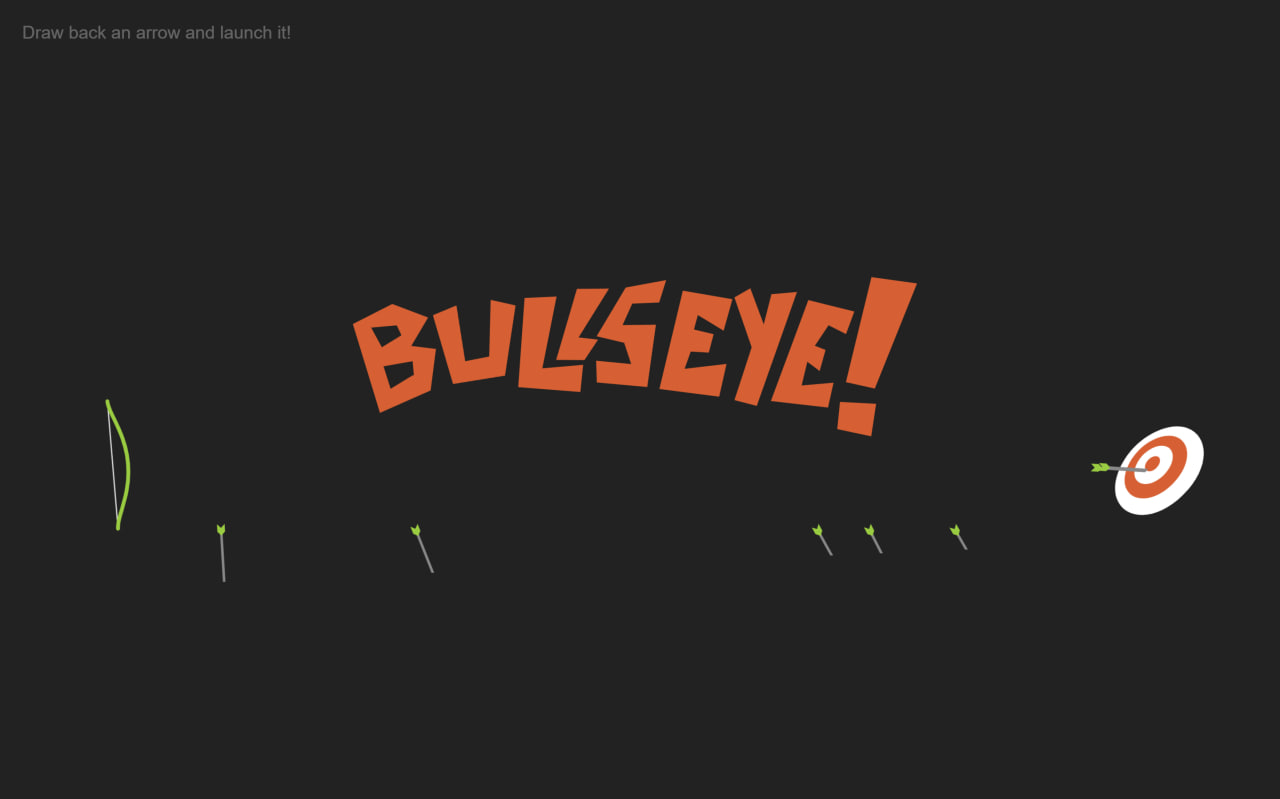
Let’s create an Archery Bullseye Game using HTML, CSS, and JavaScript, where a simple static layout turns into an interactive game with smooth bow animations, realistic arrow motion, and hit detection logic.
We’ll use:
- HTML to build the structure of the game using SVG, including the bow, arrow, target (bullseye), and text elements for hit, miss, and bullseye feedback.
- CSS to design the dark game environment, position the SVG full-screen, style the bow and target, and add subtle UI touches like smooth visuals and minimal text styling.
- JavaScript to make the game interactive by tracking mouse movements to aim the bow, calculating angle and distance for realistic shooting, animating the arrow using GSAP along a curved path, detecting collisions with the target using line intersection logic, and displaying dynamic results like hit, miss, or bullseye with smooth animations.
This project is perfect for learning how to combine SVG graphics, animation libraries, and real-time user interaction to build a fun and visually engaging browser game 🎯🔥
HTML :
This HTML creates a modern animated clock and calendar UI where the center dial shows analog clock hands (hour, minute, second), and surrounding circular rings display day name, month, and date; additional side sections show weather (icon + temperature) and weekly activity bars, while external CSS handles styling/animations and JavaScript (with jQuery and lettering.js) controls dynamic updates like rotating rings and moving clock hands.
<!DOCTYPE html>
<html lang="en">

<head>
	<meta charset="UTF-8">
	<title>Archery Bullseye Game</title>
	<link rel="stylesheet" href="./style.css">
</head>

<body>
	<svg id="game" xmlns="http://www.w3.org/2000/svg" viewBox="0 0 1000 400" overflow="visible">
		<linearGradient id="ArcGradient">
			<stop offset="0" stop-color="#fff" stop-opacity=".2" />
			<stop offset="50%" stop-color="#fff" stop-opacity="0" />
		</linearGradient>
		<path id="arc" fill="none" stroke="url(#ArcGradient)" stroke-width="4" d="M100,250c250-400,550-400,800,0"
			pointer-events="none" />
		<defs>
			<g id="arrow">
				<line x2="60" fill="none" stroke="#888" stroke-width="2" />
				<polygon fill="#888" points="64 0 58 2 56 0 58 -2" />
				<polygon fill="#88ce02" points="2 -3 -4 -3 -1 0 -4 3 2 3 5 0" />
			</g>
		</defs>
		<g id="target">
			<path fill="#FFF"
				d="M924.2,274.2c-21.5,21.5-45.9,19.9-52,3.2c-4.4-12.1,2.4-29.2,14.2-41c11.8-11.8,29-18.6,41-14.2 C944.1,228.3,945.7,252.8,924.2,274.2z" />
			<path fill="#F4531C"
				d="M915.8,265.8c-14.1,14.1-30.8,14.6-36,4.1c-4.1-8.3,0.5-21.3,9.7-30.5s22.2-13.8,30.5-9.7 C930.4,235,929.9,251.7,915.8,265.8z" />
			<path fill="#FFF"
				d="M908.9,258.9c-8,8-17.9,9.2-21.6,3.5c-3.2-4.9-0.5-13.4,5.6-19.5c6.1-6.1,14.6-8.8,19.5-5.6 C918.1,241,916.9,250.9,908.9,258.9z" />
			<path fill="#F4531C"
				d="M903.2,253.2c-2.9,2.9-6.7,3.6-8.3,1.7c-1.5-1.8-0.6-5.4,2-8c2.6-2.6,6.2-3.6,8-2 C906.8,246.5,906.1,250.2,903.2,253.2z" />
		</g>
		<g id="bow" fill="none" stroke-linecap="round" vector-effect="non-scaling-stroke" pointer-events="none">
			<polyline fill="none" stroke="#ddd" stroke-linecap="round" points="88,200 88,250 88,300" />
			<path fill="none" stroke="#88ce02" stroke-width="3" stroke-linecap="round"
				d="M88,300 c0-10.1,12-25.1,12-50s-12-39.9-12-50" />
		</g>
		<g class="arrow-angle">
			<use x="100" y="250" xlink:href="#arrow" />
		</g>
		<clipPath id="mask">
			<polygon opacity=".5" points="0,0 1500,0 1500,200 970,290 950,240 925,220 875,280 890,295 920,310 0,350"
				pointer-events="none" />
		</clipPath>
		<g class="arrows" clip-path="url(#mask)" pointer-events="none">
		</g>
		<g class="miss" fill="#aaa" opacity="0" transform="translate(0, 100)">
			<path
				d="M358 194L363 118 386 120 400 153 416 121 440 119 446 203 419 212 416 163 401 180 380 160 381 204" />
			<path d="M450 120L458 200 475 192 474 121" />
			<path
				d="M537 118L487 118 485 160 515 162 509 177 482 171 482 193 529 199 538 148 501 146 508 133 537 137" />
			<path
				d="M540 202L543 178 570 186 569 168 544 167 546 122 590 116 586 142 561 140 560 152 586 153 586 205" />
			<path d="M595,215l5-23l31,0l-5,29L595,215z M627,176l13-70l-41-0l-0,70L627,176z" />
		</g>
		<g class="bullseye" fill="#F4531C" opacity="0">
			<path
				d="M322,159l15-21l-27-13l-32,13l15,71l41-14l7-32L322,159z M292,142h20l3,8l-16,8 L292,142z M321,182l-18,9l-4-18l23-2V182z" />
			<path d="M340 131L359 125 362 169 381 167 386 123 405 129 392 183 351 186z" />
			<path d="M413 119L402 188 450 196 454 175 422 175 438 120z" />
			<path d="M432 167L454 169 466 154 451 151 478 115 453 113z" />
			<path
				d="M524 109L492 112 466 148 487 155 491 172 464 167 463 184 502 191 513 143 487 141 496 125 517 126z" />
			<path
				d="M537 114L512 189 558 199 566 174 533 175 539 162 553 164 558 150 543 145 547 134 566 148 575 124z" />
			<path d="M577 118L587 158 570 198 587 204 626 118 606 118 598 141 590 112z" />
			<path
				d="M635 122L599 198 643 207 649 188 624 188 630 170 639 178 645 162 637 158 649 143 662 151 670 134z" />
			<path d="M649,220l4-21l28,4l-6,25L649,220z M681,191l40-79l-35-8L659,184L681,191z" />
		</g>
		<g class="hit" fill="#ffcc00" opacity="0" transform="translate(180, -80) rotate(12) ">
			<path
				d="M383 114L385 195 407 191 406 160 422 155 418 191 436 189 444 112 423 119 422 141 407 146 400 113" />
			<path d="M449 185L453 113 477 112 464 186" />
			<path d="M486 113L484 130 506 130 481 188 506 187 520 131 540 135 545 119" />
			<path d="M526,195l5-20l22,5l-9,16L526,195z M558,164l32-44l-35-9l-19,51L558,164z" />
		</g>
		<!-- 	<line x1= "875", y1= "280", x2= "925", y2= "220" stroke="red"/>

<circle class="point" r="7" fill="purple" opacity=".4"/> -->
	</svg>

	<span>Draw back an arrow and launch it!</span>
	<script src='https://cdnjs.cloudflare.com/ajax/libs/gsap/1.19.1/TweenMax.min.js'></script>
	<script src='//s3-us-west-2.amazonaws.com/s.cdpn.io/16327/MorphSVGPlugin.min.js'></script>
	<script src="./script.js"></script>

</body>
</html>
CSS :
This CSS styles the whole clock UI by positioning everything in the center, creating circular dials (clock, day, month) using border-radius, and placing text in a circular shape using rotate transforms on each character; it also designs clock hands, weather and step sections, adds colors to bars for each day, and uses transitions and opacity to smoothly animate elements like rotating rings and moving hands.
body {
	margin: 0;
	background: #222;

	margin: 20px;
}

svg {
	width: 100%;
	height: 100%;
	position: fixed;
	top: 0;
	left: 0;
}

span {
	color: white;
	font-family: sans-serif;
	opacity: .3;
}
JavaScript:
This jQuery code initializes the clock UI by getting the current date and time, then animating everything step by step: it rotates circular rings to highlight the current day, date, and month, fades elements in/out for a smooth transition, generates random height bars for weekly activity, and continuously updates the clock hands every second using rotation based on real time.
var svg = document.querySelector("svg");
var cursor = svg.createSVGPoint();
var arrows = document.querySelector(".arrows");
var randomAngle = 0;

// center of target
var target = {
	x: 900,
	y: 249.5
};

// target intersection line segment
var lineSegment = {
	x1: 875,
	y1: 280,
	x2: 925,
	y2: 220
};

// bow rotation point
var pivot = {
	x: 100,
	y: 250
};
aim({
	clientX: 320,
	clientY: 300
});

// set up start drag event
window.addEventListener("mousedown", draw);

function draw(e) {
	// pull back arrow
	randomAngle = (Math.random() * Math.PI * 0.03) - 0.015;
	TweenMax.to(".arrow-angle use", 0.3, {
		opacity: 1
	});
	window.addEventListener("mousemove", aim);
	window.addEventListener("mouseup", loose);
	aim(e);
}

function aim(e) {
	// get mouse position in relation to svg position and scale
	var point = getMouseSVG(e);
	point.x = Math.min(point.x, pivot.x - 7);
	point.y = Math.max(point.y, pivot.y + 7);
	var dx = point.x - pivot.x;
	var dy = point.y - pivot.y;
	// Make it more difficult by adding random angle each time
	var angle = Math.atan2(dy, dx) + randomAngle;
	var bowAngle = angle - Math.PI;
	var distance = Math.min(Math.sqrt((dx * dx) + (dy * dy)), 50);
	var scale = Math.min(Math.max(distance / 30, 1), 2);
	TweenMax.to("#bow", 0.3, {
		scaleX: scale,
		rotation: bowAngle + "rad",
		transformOrigin: "right center"
	});
	var arrowX = Math.min(pivot.x - ((1 / scale) * distance), 88);
	TweenMax.to(".arrow-angle", 0.3, {
		rotation: bowAngle + "rad",
		svgOrigin: "100 250"
	});
	TweenMax.to(".arrow-angle use", 0.3, {
		x: -distance
	});
	TweenMax.to("#bow polyline", 0.3, {
		attr: {
			points: "88,200 " + Math.min(pivot.x - ((1 / scale) * distance), 88) + ",250 88,300"
		}
	});

	var radius = distance * 9;
	var offset = {
		x: (Math.cos(bowAngle) * radius),
		y: (Math.sin(bowAngle) * radius)
	};
	var arcWidth = offset.x * 3;

	TweenMax.to("#arc", 0.3, {
		attr: {
			d: "M100,250c" + offset.x + "," + offset.y + "," + (arcWidth - offset.x) + "," + (offset.y + 50) + "," + arcWidth + ",50"
		},
		autoAlpha: distance / 60
	});

}

function loose() {
	// release arrow
	window.removeEventListener("mousemove", aim);
	window.removeEventListener("mouseup", loose);

	TweenMax.to("#bow", 0.4, {
		scaleX: 1,
		transformOrigin: "right center",
		ease: Elastic.easeOut
	});
	TweenMax.to("#bow polyline", 0.4, {
		attr: {
			points: "88,200 88,250 88,300"
		},
		ease: Elastic.easeOut
	});
	// duplicate arrow
	var newArrow = document.createElementNS("http://www.w3.org/2000/svg", "use");
	newArrow.setAttributeNS('http://www.w3.org/1999/xlink', 'href', "#arrow");
	arrows.appendChild(newArrow);

	// animate arrow along path
	var path = MorphSVGPlugin.pathDataToBezier("#arc");
	TweenMax.to([newArrow], 0.5, {
		force3D: true,
		bezier: {
			type: "cubic",
			values: path,
			autoRotate: ["x", "y", "rotation"]
		},
		onUpdate: hitTest,
		onUpdateParams: ["{self}"],
		onComplete: onMiss,
		ease: Linear.easeNone
	});
	TweenMax.to("#arc", 0.3, {
		opacity: 0
	});
	//hide previous arrow
	TweenMax.set(".arrow-angle use", {
		opacity: 0
	});
}

function hitTest(tween) {
	// check for collisions with arrow and target
	var arrow = tween.target[0];
	var transform = arrow._gsTransform;
	var radians = transform.rotation * Math.PI / 180;
	var arrowSegment = {
		x1: transform.x,
		y1: transform.y,
		x2: (Math.cos(radians) * 60) + transform.x,
		y2: (Math.sin(radians) * 60) + transform.y
	}

	var intersection = getIntersection(arrowSegment, lineSegment);
	if (intersection.segment1 && intersection.segment2) {
		tween.pause();
		var dx = intersection.x - target.x;
		var dy = intersection.y - target.y;
		var distance = Math.sqrt((dx * dx) + (dy * dy));
		var selector = ".hit";
		if (distance < 7) {
			selector = ".bullseye"
		}
		showMessage(selector);
	}

}

function onMiss() {
	// Damn!
	showMessage(".miss");
}

function showMessage(selector) {
	// handle all text animations by providing selector
	TweenMax.killTweensOf(selector);
	TweenMax.killChildTweensOf(selector);
	TweenMax.set(selector, {
		autoAlpha: 1
	});
	TweenMax.staggerFromTo(selector + " path", .5, {
		rotation: -5,
		scale: 0,
		transformOrigin: "center"
	}, {
		scale: 1,
		ease: Back.easeOut
	}, .05);
	TweenMax.staggerTo(selector + " path", .3, {
		delay: 2,
		rotation: 20,
		scale: 0,
		ease: Back.easeIn
	}, .03);
}


function getMouseSVG(e) {
	// normalize mouse position within svg coordinates
	cursor.x = e.clientX;
	cursor.y = e.clientY;
	return cursor.matrixTransform(svg.getScreenCTM().inverse());
}

function getIntersection(segment1, segment2) {
	// find intersection point of two line segments and whether or not the point is on either line segment
	var dx1 = segment1.x2 - segment1.x1;
	var dy1 = segment1.y2 - segment1.y1;
	var dx2 = segment2.x2 - segment2.x1;
	var dy2 = segment2.y2 - segment2.y1;
	var cx = segment1.x1 - segment2.x1;
	var cy = segment1.y1 - segment2.y1;
	var denominator = dy2 * dx1 - dx2 * dy1;
	if (denominator == 0) {
		return null;
	}
	var ua = (dx2 * cy - dy2 * cx) / denominator;
	var ub = (dx1 * cy - dy1 * cx) / denominator;
	return {
		x: segment1.x1 + ua * dx1,
		y: segment1.y1 + ua * dy1,
		segment1: ua >= 0 && ua <= 1,
		segment2: ub >= 0 && ub <= 1
	};
}
In conclusion, the Archery Bullseye Game shows how powerful HTML, CSS, and JavaScript can be when combined to create interactive experiences. By using SVG for graphics, CSS for styling, and JavaScript for real-time animations and logic, you can turn a simple idea into a dynamic game with smooth motion and user control 🎯🔥
If your project has problems, don’t worry. Just click to download the source code and face your coding challenges with excitement. Have fun coding!
