


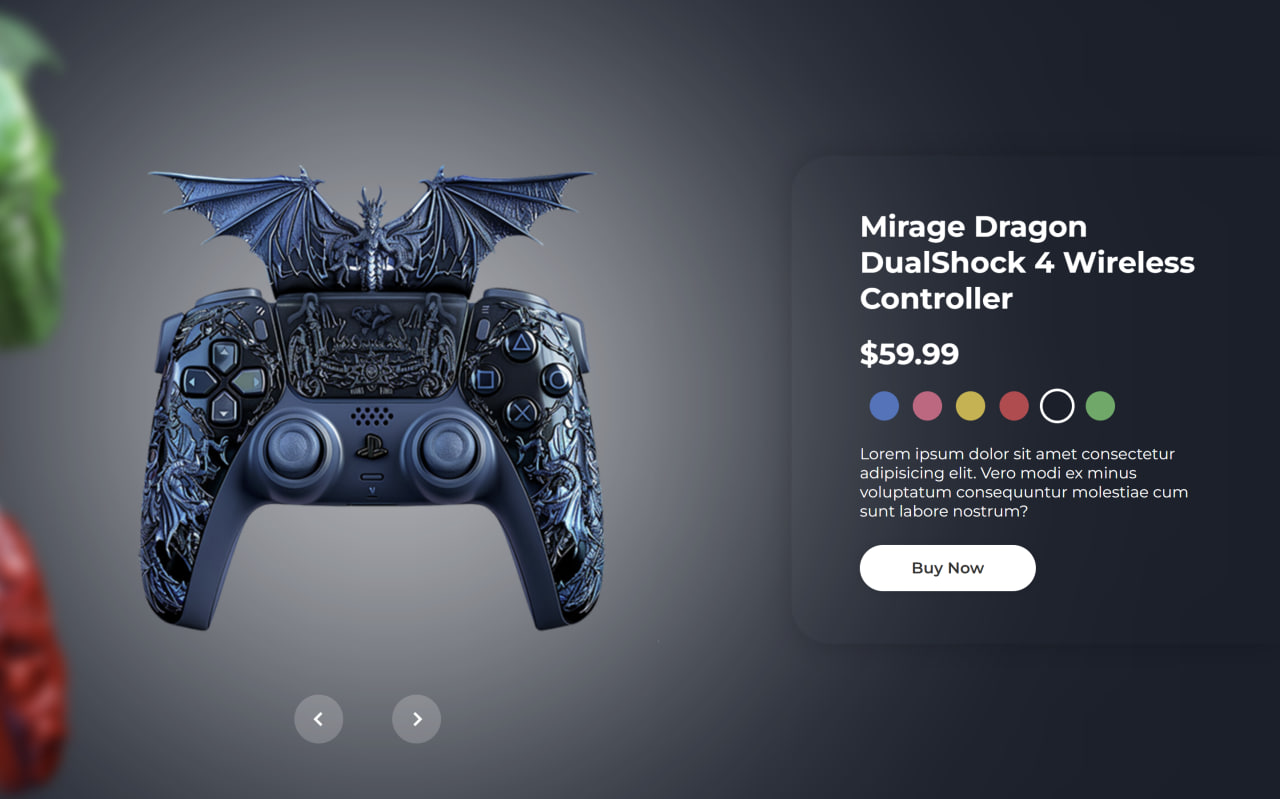
Let’s create an Interactive Gaming Product Card using HTML, CSS, and JavaScript to build a modern and visually engaging product showcase with smooth animations and dynamic transitions. In this project, we’ll design a stylish gaming controller product card where users can interact with different product variations using animated sliders, rotating product displays, glowing backgrounds, and smooth navigation controls.
We’ll use:
- HTML : To create the gaming product card structure including product images, titles, prices, color options, descriptions, buttons, and navigation controls.
- CSS : To design the futuristic gaming UI using gradients, glassmorphism effects, smooth transitions, rotations, blur effects, shadows, responsive layouts, and animated product switching.
- JavaScript : To handle slider functionality, active product changes, rotating animations, background color updates, button interactions, and smooth dynamic transitions between products.
This project is perfect for improving your frontend animation skills, understanding CSS transforms and transitions, mastering interactive JavaScript logic, and learning how to combine modern UI effects with animations to create a professional and eye-catching gaming product showcase.
HTML :
The HTML creates an animated gaming product carousel with controller images, product details, color options, and navigation buttons. It uses different sections like .img-box for images, .info-box for product information, and .navigation for next/previous controls. Each product card contains a title, price, description, and button, while the active class shows the currently selected product.
<!DOCTYPE html>
<html lang="en">

<head>
    <meta charset="UTF-8">
    <meta http-equiv="X-UA-Compatible" content="IE=edge">
    <meta name="viewport" content="width=device-width, initial-scale=1.0">
    <title>Interactive Gaming Product Card | @coding.stella</title>
    <link rel="stylesheet" href="style.css">
    <link href='https://unpkg.com/boxicons@2.1.4/css/boxicons.min.css' rel='stylesheet'>
</head>

<body>

    <div class="carousel">
        <div class="img-box">
            <div class="img-list">
                <div class="img-slider">
                    <div class="img-item active" style="--i:1;">
                        <div class="item">
                            <img src="images/img1.png">
                        </div>
                    </div>
                    <div class="img-item" style="--i:2;">
                        <div class="item">
                            <img src="images/img2.png">
                        </div>
                    </div>
                    <div class="img-item" style="--i:3;">
                        <div class="item">
                            <img src="images/img3.png">
                        </div>
                    </div>
                    <div class="img-item" style="--i:4;">
                        <div class="item">
                            <img src="images/img4.png">
                        </div>
                    </div>
                    <div class="img-item" style="--i:5;">
                        <div class="item">
                            <img src="images/img5.png">
                        </div>
                    </div>
                    <div class="img-item" style="--i:6;">
                        <div class="item">
                            <img src="images/img6.png">
                        </div>
                    </div>
                </div>
            </div>
        </div>

        <div class="info-box">
            <div class="info-item active">
                <h2>Bluish Dragon DualShock 4 Wireless Controller</h2>
                <h2>$59.99</h2>
                <div class="colors">
                    <span class="active"></span>
                    <span></span>
                    <span></span>
                    <span></span>
                    <span></span>
                    <span></span>
                </div>
                <p>Lorem ipsum dolor sit amet consectetur adipisicing elit. Vero modi ex minus voluptatum consequuntur
                    molestiae cum sunt labore nostrum?</p>
                <a href="#" class="btn">Buy Now</a>
            </div>

            <div class="info-item">
                <h2>Rosa Dragon DualShock 4 Wireless Controller</h2>
                <h2>$59.99</h2>
                <div class="colors">
                    <span></span>
                    <span class="active"></span>
                    <span></span>
                    <span></span>
                    <span></span>
                    <span></span>
                </div>
                <p>Lorem ipsum dolor sit amet consectetur adipisicing elit. Vero modi ex minus voluptatum consequuntur
                    molestiae cum sunt labore nostrum?</p>
                <a href="#" class="btn">Buy Now</a>
            </div>

            <div class="info-item">
                <h2>Turmeric Dragon DualShock 4 Wireless Controller</h2>
                <h2>$59.99</h2>
                <div class="colors">
                    <span></span>
                    <span></span>
                    <span class="active"></span>
                    <span></span>
                    <span></span>
                    <span></span>
                </div>
                <p>Lorem ipsum dolor sit amet consectetur adipisicing elit. Vero modi ex minus voluptatum consequuntur
                    molestiae cum sunt labore nostrum?</p>
                <a href="#" class="btn">Buy Now</a>
            </div>

            <div class="info-item">
                <h2>Reddish Dragon DualShock 4 Wireless Controller</h2>
                <h2>$59.99</h2>
                <div class="colors">
                    <span></span>
                    <span></span>
                    <span></span>
                    <span class="active"></span>
                    <span></span>
                    <span></span>
                </div>
                <p>Lorem ipsum dolor sit amet consectetur adipisicing elit. Vero modi ex minus voluptatum consequuntur
                    molestiae cum sunt labore nostrum?</p>
                <a href="#" class="btn">Buy Now</a>
            </div>

            <div class="info-item">
                <h2>Mirage Dragon DualShock 4 Wireless Controller</h2>
                <h2>$59.99</h2>
                <div class="colors">
                    <span></span>
                    <span></span>
                    <span></span>
                    <span></span>
                    <span class="active"></span>
                    <span></span>
                </div>
                <p>Lorem ipsum dolor sit amet consectetur adipisicing elit. Vero modi ex minus voluptatum consequuntur
                    molestiae cum sunt labore nostrum?</p>
                <a href="#" class="btn">Buy Now</a>
            </div>

            <div class="info-item">
                <h2>Algae Dragon DualShock 4 Wireless Controller</h2>
                <h2>$59.99</h2>
                <div class="colors">
                    <span></span>
                    <span></span>
                    <span></span>
                    <span></span>
                    <span></span>
                    <span class="active"></span>
                </div>
                <p>Lorem ipsum dolor sit amet consectetur adipisicing elit. Vero modi ex minus voluptatum consequuntur
                    molestiae cum sunt labore nostrum?</p>
                <a href="#" class="btn">Buy Now</a>
            </div>
        </div>

        <div class="navigation">
            <span class="prev-btn">
                <i class="bx bx-chevron-left"></i>
            </span>
            <span class="next-btn">
                <i class="bx bx-chevron-right"></i>
            </span>
        </div>

    </div>

    <script src="script.js"></script>
</body>
</html>
CSS :
The CSS styles the whole carousel with smooth animations, rotating images, blur effects, colorful backgrounds, and responsive positioning. It uses transitions for smooth movement, transform for rotating/scaling images, and active classes to highlight the selected product. The design also includes glowing background effects, rounded info cards, styled buttons, and circular navigation controls for a modern UI look.
@import url('https://fonts.googleapis.com/css2?family=Montserrat:wght@300;400;500;600;700;800;900&display=swap');

* {
    font-family: 'Montserrat', sans-serif;
    margin: 0;
    padding: 0;
    box-sizing: border-box;
}

:root {
    --all-transition: 1s ease;
    --opacity-transition: .3s ease;
}

body {
    background: #3674be;
    min-height: 100vh;
    overflow: hidden;
    transition: var(--all-transition);
}

body::before {
    content: '';
    position: absolute;
    left: 3.5%;
    top: 50%;
    transform: translateY(-50%);
    width: 700px;
    height: 700px;
    background: rgba(255, 255, 255, .8);
    border-radius: 50%;
    filter: blur(200px);

}

.img-box {
    left: -72%;
    position: absolute;
    top: 50%;
    transform: translateY(-50%);
    width: 1300px;
    height: 1300px;
}

.img-box .img-list {
    height: inherit;
    transform: rotate(-120deg);
}

.img-list .img-slider {
    height: inherit;
    transition: var(--all-transition);
}

.img-slider .img-item {
    position: absolute;
    left: 0;
    top: 50%;
    transform: translateY(-50%) rotate(calc(-360deg / 6 * var(--i))) scale(.8);
    transform-origin: 650px;
    transition: var(--all-transition);
}

.img-slider .img-item.active {
    transform: translateY(-50%) rotate(calc(-360deg / 6 * var(--i))) scale(0.9) translateX(-65%);
    z-index: 1;
}

.img-item .item {
    display: flex;
    justify-content: center;
    align-items: center;
    transition: var(--all-transition);
}

.img-item .item img {
    transform: rotate(calc(360deg / 6 * var(--i))) rotate(120deg);
    filter: blur(8px);
    transition: var(--all-transition);
}

.img-item.active .item img {
    filter: blur(0);
}

.info-box {
    position: absolute;
    right: 0;
    top: 50%;
    transform: translateY(-50%);
    width: 500px;
    height: 500px;
}

.info-box .info-item {
    position: absolute;
    width: 100%;
    height: 100%;
    border-radius: 40px 0 0 40px;
    padding: 0 70px;
    color: #fff;
    display: flex;
    flex-direction: column;
    justify-content: center;
    transform: translateX(100%);
    opacity: 0;
    box-shadow: none;
    transition: transform var(--all-transition), opacity var(--opacity-transition), box-shaow var(--all-transition);
}

.info-box .info-item.active {
    transform: translateX(0);
    opacity: 1;
    box-shadow: 0 0 30px rgba(0, 0, 0, .2);
}

.info-item h2 {
    font-size: 30px;
}

.info-item h2:nth-child(2) {
    margin: 20px 0;
}

.colors span {
    display: inline-block;
    width: 30px;
    height: 30px;
    border-radius: 50%;
    margin-left: 10px;
}

.colors span.active {
    outline: 3px solid #fff;
}

.colors span:nth-child(1) {
    background: #3674be;
}

.colors span:nth-child(2) {
    background: #d26181;
}

.colors span:nth-child(3) {
    background: #ceb13d;
}

.colors span:nth-child(4) {
    background: #c6414c;
}

.colors span:nth-child(5) {
    background: #171f2b;
}

.colors span:nth-child(6) {
    background: #50aa61;
}

.info-item p {
    font-size: 16px;
    margin: 20px 0 25px;
}

.info-item .btn {
    display: inline-flex;
    justify-content: center;
    align-items: center;
    width: 180px;
    height: 47px;
    background: #fff;
    border-radius: 40px;
    box-shadow: 0 0 10px rgba(0, 0, 0, .1);
    font-size: 16px;
    color: #333;
    text-decoration: none;
    font-weight: 600;
}

.navigation {
    position: absolute;
    left: 23%;
    bottom: 7%;
    width: 150px;
    display: flex;
    justify-content: space-between;
    z-index: 100;
}

.navigation span {
    display: inline-flex;
    justify-content: center;
    align-items: center;
    width: 50px;
    height: 50px;
    background: rgba(255, 255, 255, .2);
    border-radius: 50%;
    cursor: pointer;
    font-size: 30px;
    color: #fff;
}
JavaScript:
The JavaScript controls the slider functionality by changing images, product details, and background colors when the next or previous buttons are clicked. It rotates the image slider, updates the active image and info card, and changes the page background color using an array of colors. The slider() function handles all updates dynamically to create a smooth interactive carousel effect.
const imgSlider = document.querySelector('.img-slider');
const items = document.querySelectorAll('.item');
const imgItems = document.querySelectorAll('.img-item');
const infoItems = document.querySelectorAll('.info-item');

const nextBtn = document.querySelector('.next-btn');
const prevBtn = document.querySelector('.prev-btn');

let colors = ['#3674be', '#d26181', '#ceb13d', '#c6414c', '#171f2b', '#50aa61']
let indexSlider = 0;
let index = 0;

const slider = () => {
    imgSlider.style.transform = `rotate(${indexSlider * 60}deg)`;

    items.forEach(item => {
        item.style.transform = `rotate(${indexSlider * -60}deg)`;
    });

    document.querySelector('.img-item.active').classList.remove('active');
    imgItems[index].classList.add('active');

    document.querySelector('.info-item.active').classList.remove('active');
    infoItems[index].classList.add('active');

    document.body.style.background = colors[index]
}

nextBtn.addEventListener('click', () => {
    indexSlider++;
    index++;
    if (index > imgItems.length - 1) {
        index = 0;
    }

    slider();
});

prevBtn.addEventListener('click', () => {
    indexSlider--;
    index--;
    if (index < 0) {
        index = imgItems.length - 1;
    }

    slider();
});
In conclusion, this Interactive Gaming Product Card project helps you learn how to combine HTML, CSS, and JavaScript to build a modern and animated product showcase with smooth user interactions. This project is a great way to practice creating visually appealing and professional web interfaces that enhance user experience and make product presentations more engaging.
If your project has problems, don’t worry. Just click to download the source code and face your coding challenges with excitement. Have fun coding!
