


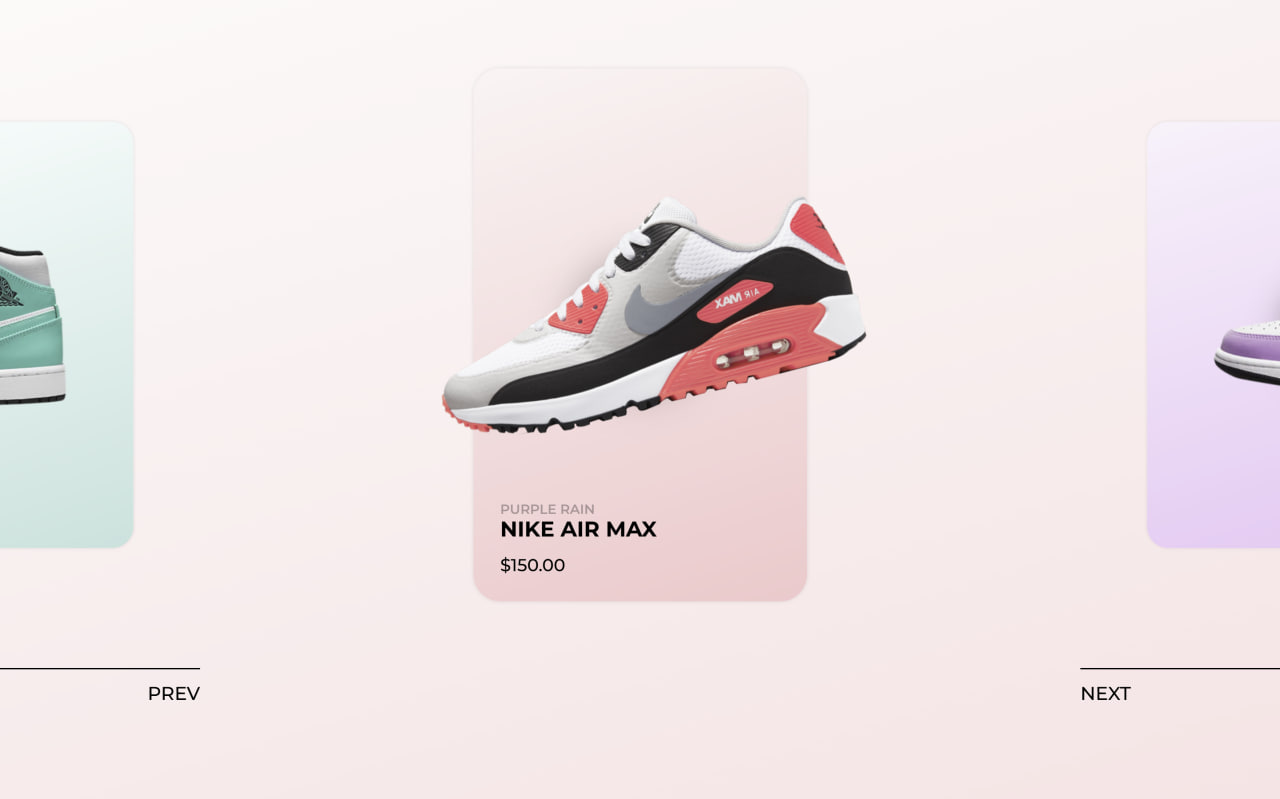
Let’s create a Nike Shoes Animation using HTML, CSS, and JavaScript, where a stylish slider showcases different shoes with smooth transitions, hover effects, and dynamic animations for a modern UI feel.
We’ll use:
- HTML to structure the layout, including the main carousel container, individual slides, and card elements that hold the shoe image, name, and price so everything is organized for animation.
- CSS to design the cards with gradients, shadows, and positioning, along with transitions and transforms to create smooth scaling, movement, and visual effects for an engaging look.
- JavaScript (with Swiper.js) to handle the slider functionality, navigation buttons, and advanced animations like moving, rotating, and scaling the shoes based on slide progress, making the interaction feel smooth and dynamic.
This project is perfect for learning how to combine layout, animation, and interactivity to build eye-catching UI components for modern web design 🚀
HTML :
This code builds a Nike shoe slider using Swiper.js, where each slide shows a shoe with its image, name, and price, styled with CSS and controlled by JavaScript for smooth sliding, animations, and navigation buttons.
<!DOCTYPE html>
<html lang="en">

<head>
  <meta charset="UTF-8">
  <title>Nike Shoe Animation | @coding.stella</title>
  <link rel="preconnect" href="https://fonts.googleapis.com">
  <link rel="preconnect" href="https://fonts.gstatic.com" crossorigin>
  <link href="https://fonts.googleapis.com/css2?family=Montserrat:wght@500;600;700&display=swap" rel="stylesheet">
  <link rel="stylesheet" href="https://public.codepenassets.com/css/normalize-5.0.0.min.css">
  <link rel='stylesheet' href='https://cdn.jsdelivr.net/npm/swiper@12/swiper-bundle.min.css'>
  <link rel="stylesheet" href="./style.css">
</head>

<body>
  <div class="co-carousel-wrap">
    <div class="swiper co-carousel">
      <!-- Additional required wrapper -->
      <div class="swiper-wrapper">
        <!-- Slides -->
        <div class="swiper-slide co-carousel__slide">
          <div class="co-card">
            <div class="co-card__shoe">
              <img class="co-card__shoe-img" src="./Img/nike1.png"
                alt="" />
              <span class="co-card__shoe-shadow"></span>
            </div>
            <div class="co-card__info">
              <div class="co-card__collection text-mask">
                <span>Men's Original</span>
              </div>
              <div class="co-card__title text-mask">
                <span>Nike Air Force</span>
              </div>
              <div class="co-card__price text-mask"><span>$150.00</span></div>
            </div>
          </div>
        </div>
        <div class="swiper-slide co-carousel__slide">
          <div class="co-card co-card--style-1">
            <div class="co-card__shoe">
              <img class="co-card__shoe-img" src="./Img/nike2.png"
                alt="" />
              <span class="co-card__shoe-shadow"></span>
            </div>
            <div class="co-card__info">
              <div class="co-card__collection text-mask">
                <span>Jordans</span>
              </div>
              <div class="co-card__title text-mask">
                <span>Nike Air Jordan</span>
              </div>
              <div class="co-card__price text-mask"><span>$249.99</span></div>
            </div>
          </div>
        </div>
        <div class="swiper-slide co-carousel__slide">
          <div class="co-card co-card--style-2">
            <div class="co-card__shoe">
              <img class="co-card__shoe-img" src="./Img/nike3.png"
                alt="" />
              <span class="co-card__shoe-shadow"></span>
            </div>
            <div class="co-card__info">
              <div class="co-card__collection text-mask">
                <span>Purple Rain</span>
              </div>
              <div class="co-card__title text-mask">
                <span>Nike Air Max</span>
              </div>
              <div class="co-card__price text-mask"><span>$150.00</span></div>
            </div>
          </div>
        </div>
        <div class="swiper-slide co-carousel__slide">
          <div class="co-card co-card--style-3">
            <div class="co-card__shoe">
              <img class="co-card__shoe-img" src="./Img/nike4.png"
                alt="" />
              <span class="co-card__shoe-shadow"></span>
            </div>
            <div class="co-card__info">
              <div class="co-card__collection text-mask">
                <span>Men's Original</span>
              </div>
              <div class="co-card__title text-mask">
                <span>Nike Air Force</span>
              </div>
              <div class="co-card__price text-mask"><span>$150.00</span></div>
            </div>
          </div>
        </div>
      </div>
    </div>
    <div class="co-carousel__nav-buttons">
      <div class="co-carousel__nav-button prev">
        <span>Prev</span>
      </div>
      <div class="co-carousel__nav-button next">
        <span>Next</span>
      </div>
    </div>
  </div>

  <div class="co-background co-background--style-0"></div>
  <div class="co-background co-background--style-1"></div>
  <div class="co-background co-background--style-2"></div>
  <div class="co-background co-background--style-3"></div>
  <script type="module" src="./script.js"></script>

</body>
</html>
CSS :
This code builds a clean animated shoe slider where each card shows a Nike shoe with its image, name, and price, and you can switch slides using buttons powered by Swiper.js. The HTML structures the cards, while the CSS styles everything like colors, shadows, gradients, and layout to make it look modern and smooth .
@charset "UTF-8";

:root {
  /* theme variable */
  --codocular-color-hex: #e34c26;
  --codocular-color: 227, 76, 38;
  --background-color: #000;
  --main-font-color: #000;
}

* {
  box-sizing: border-box;
}

html {
  height: 100%;
  -moz-font-smoothing: antialiased;
  -webkit-font-smoothing: antialiased;
  font-smoothing: antialiased;
  text-rendering: optimizeLegibility !important;
  font-size: 62.5%;
}

body {
  height: 100%;
  margin: 0;
  margin: 0;
  font-size: 1.6rem;
  font-family: "Montserrat", arial, sans-serif;
  min-height: 100%;
  display: flex;
  flex-direction: column;
  background-color: #fff;
  color: #000;
}

.co-btn {
  cursor: pointer;
  display: flex;
  align-items: center;
  padding: 7px 10px;
  font-weight: 600;
  font-size: 10px;
  text-transform: uppercase;
  border: 1px solid var(--main-font-color);
  border-radius: 5px;
  background: transparent;
  text-decoration: none;
  color: var(--main-font-color);
  transition: 0.3s;
  box-shadow: 0 0 0px 0px rgba(var(--codocular-color), 0.8);
}

.co-btn:hover {
  box-shadow: 0 0 15px 0px rgba(var(--codocular-color), 0.8);
  border-color: rgb(var(--codocular-color));
}

.co-btn:active {
  transition: 0.1s;
  box-shadow: 0 0 15px 3px rgba(var(--codocular-color), 0.8);
}

.co-btn--link {
  border: 0;
  text-decoration: underline;
}

.co-btn--link:hover {
  border: 0;
  box-shadow: none;
  color: rgb(var(--codocular-color));
}

.co-btn--link:after {
  text-decoration: none;
  font-weight: 500;
  content: " ↗";
}

.co-carousel-wrap {
  flex-grow: 1;
  position: relative;
  z-index: 9;
  overflow: hidden;
  display: flex;
  flex-direction: column;
  align-items: center;
  justify-content: center;
}

.co-carousel {
  margin: 0 auto;
  width: 50%;
  height: 400px;
  overflow: visible;
}

.co-carousel__slide {
  display: flex;
  align-items: center;
  justify-content: center;
}

.co-carousel__nav-buttons {
  margin-top: 40px;
  width: 100%;
  display: flex;
  justify-content: space-between;
}

.co-carousel__nav-button {
  padding: 10px 0;
  width: 150px;
  position: relative;
  display: flex;
  flex-direction: column;
  cursor: pointer;
}

.co-carousel__nav-button.prev {
  align-items: flex-end;
}

.co-carousel__nav-button.next {
  align-items: flex-start;
}

.co-carousel__nav-button.swiper-button-disabled {
  opacity: 0.3;
}

.co-carousel__nav-button:hover:not(.swiper-button-disabled).prev span {
  transform: translate3d(-10px, 0, 0);
}

.co-carousel__nav-button:hover:not(.swiper-button-disabled).next span {
  transform: translate3d(10px, 0, 0);
}

.co-carousel__nav-button:before {
  display: block;
  content: "";
  width: 100%;
  height: 1px;
  background-color: #000;
}

.co-carousel__nav-button span {
  font-size: 14px;
  text-transform: uppercase;
  padding: 10px 0;
  transition: cubic-bezier(0.22, 0.74, 0.46, 0.97) 0.3s;
}

.co-card {
  position: relative;
  display: flex;
  align-items: center;
  justify-content: center;
  height: 400px;
  width: 250px;
  border-radius: 20px;
  box-shadow: 0 0 3px rgba(0, 0, 0, 0.1);
  background: #fdf3ea;
  background: linear-gradient(163deg, #fdf3ea 0%, #fbe5cc 100%);
}

.co-card--style-1 {
  background: #f7fdfc;
  background: linear-gradient(163deg, #f7fdfc 0%, #c3e3dd 100%);
}

.co-card--style-2 {
  background: #fcf4f4;
  background: linear-gradient(163deg, #fcf4f4 0%, #f6c8cb 100%);
}

.co-card--style-3 {
  background: #f9f2fb;
  background: linear-gradient(163deg, #f9f2fb 0%, #eac7f5 100%);
}

.co-card__shoe {
  position: relative;
  width: 130%;
  flex-shrink: 0;
  top: -20px;
}

.co-card__shoe-img {
  -webkit-user-select: none;
  -moz-user-select: none;
  -ms-user-select: none;
  user-select: none;
  position: relative;
  width: 100%;
  display: block;
  z-index: 9;
}

.co-card__shoe-shadow {
  position: absolute;
  top: 80px;
  left: 0;
  right: 0;
  margin-left: auto;
  margin-right: auto;
  display: block;
  border-radius: 50%;
  width: 20px;
  height: 20px;
  opacity: 0.3;
  background-color: black;
  box-shadow: 0 0 30px 40px black;
}

.co-card__info {
  position: absolute;
  left: 0;
  right: 0;
  bottom: 0;
  padding: 20px;
  display: table;
}

.co-card__title {
  font-weight: 700;
  font-size: 1.6rem;
  text-transform: uppercase;
}

.co-card__collection {
  font-weight: 600;
  font-size: 1rem;
  text-transform: uppercase;
  opacity: 0.3;
}

.co-card__price {
  margin-top: 10px;
  font-weight: 500;
  font-size: 1.3rem;
}

.text-mask {
  overflow: hidden;
}

.text-mask span {
  display: inline-flex;
}

.co-background {
  top: 0;
  left: 0;
  position: fixed;
  width: 100%;
  height: 100%;
  opacity: 0;
}

.co-background--style-0 {
  background: #fdf3ea;
  background: linear-gradient(163deg, #fdf3ea 0%, #fbe5cc 100%);
}

.co-background--style-1 {
  background: #f7fdfc;
  background: linear-gradient(163deg, #f7fdfc 0%, #c3e3dd 100%);
}

.co-background--style-2 {
  background: #fcf4f4;
  background: linear-gradient(163deg, #fcf4f4 0%, #f6c8cb 100%);
}

.co-background--style-3 {
  background: #f9f2fb;
  background: linear-gradient(163deg, #f9f2fb 0%, #eac7f5 100%);
}
JavaScript:
This JavaScript uses Swiper.js to control the shoe slider and add smooth animations. It initializes the slider, handles next/prev buttons, and dynamically changes speed based on swipe speed. As you slide, it animates each card by moving, rotating, scaling the shoe image, fading backgrounds, and shifting text for a cool effect, while keeping all transitions smooth and responsive.
import Swiper from 'https://cdn.jsdelivr.net/npm/swiper@12/swiper-bundle.min.mjs';


document.addEventListener("DOMContentLoaded", () => {
  const backgroundWrapper = document.querySelectorAll(".co-background");

  const swiper = new Swiper(".swiper", {
    loop: false,
    watchSlidesProgress: true, // allows to use each slide progress: this.slides[i].progress
    speed: 1000,
    grabCursor: true,
    //loopAdditionalSlides: 1, needed if loop is true

    navigation: {
      nextEl: ".co-carousel__nav-button.next",
      prevEl: ".co-carousel__nav-button.prev",
    },

    on: {
      touchEnd: function (swiper) {
        const time = Date.now() - swiper.touchEventsData.touchStartTime;
        const distance = Math.abs(swiper.touches.diff);
        const velocity = distance / time;
        let newSpeed = 1000 - (velocity * 800);
        swiper.params.speed = Math.max(200, Math.min(1000, newSpeed));
      },
      progress: function (swiper) {
        swiper.slides.forEach((slide, index) => {
          const progress = slide.progress;

          //-1 = right, 1 = left, 0 = middle
          if (progress >= -1 && progress <= 1) {
            const rotateShoeMax = 15;
            const scaleMax = 1.3;
            const progressPositive = Math.abs(progress);

            const translateX = progress * -100;
            const rotateShoe = progressPositive * rotateShoeMax - rotateShoeMax;
            const rotateCard = progress * -15;
            const textMaskY = progressPositive * 50;
            const scale = 1 - progressPositive * 0.2;
            const opacity = 0.5 - progressPositive * 0.5; // opacity between 0.5 and 0

            //slide.querySelector('.co-card').style.transform = `perspective(800px) scale(${scale}) rotateY(${rotateCard}deg) `;
            slide.querySelector(".co-card").style.transform = `scale(${scale})`;
            slide.querySelector(".co-card__shoe-img").style.transform =
              `translate3d(${translateX}px, 0,0) rotate(${rotateShoe}deg)`;
            slide.querySelector(".co-card__shoe-shadow").style.transform =
              `translate3d(${translateX / 2}px, 0,0)`;
            backgroundWrapper[index].style.opacity = opacity.toFixed(2);

            const textsMask = slide.querySelectorAll(".text-mask span");
            textsMask.forEach((t, i) => {
              t.style.transform = `translate3d(0,${textMaskY * (i + 1)}px,0)`;
            });
          }
        });
      },
      setTransition: function (swiper, speed) {
        swiper.slides.forEach((slide, index) => {
          slide.querySelector(".co-card").style.transition = `${speed}ms`;
          slide.querySelector(".co-card__shoe-img").style.transition =
            `${speed}ms`;
          slide.querySelector(".co-card__shoe-shadow").style.transition =
            `${speed}ms`;
          backgroundWrapper[index].style.transition = `${speed}ms`;

          const textsMask = slide.querySelectorAll(".text-mask span");
          textsMask.forEach((t) => {
            t.style.transition = `${speed}ms`;
          });
        });
      },
      transitionEnd: function (swiper, speed) {
        swiper.params.speed = 1000;
      }
    },
  });
});
In conclusion, this Nike Shoes Animation project shows how HTML, CSS, and JavaScript can work together to create a modern, interactive UI. By combining clean layout, smooth animations, and dynamic behavior using Swiper.js, you can build visually engaging components that enhance user experience and make your designs stand out.
If your project has problems, don’t worry. Just click to download the source code and face your coding challenges with excitement. Have fun coding!
