


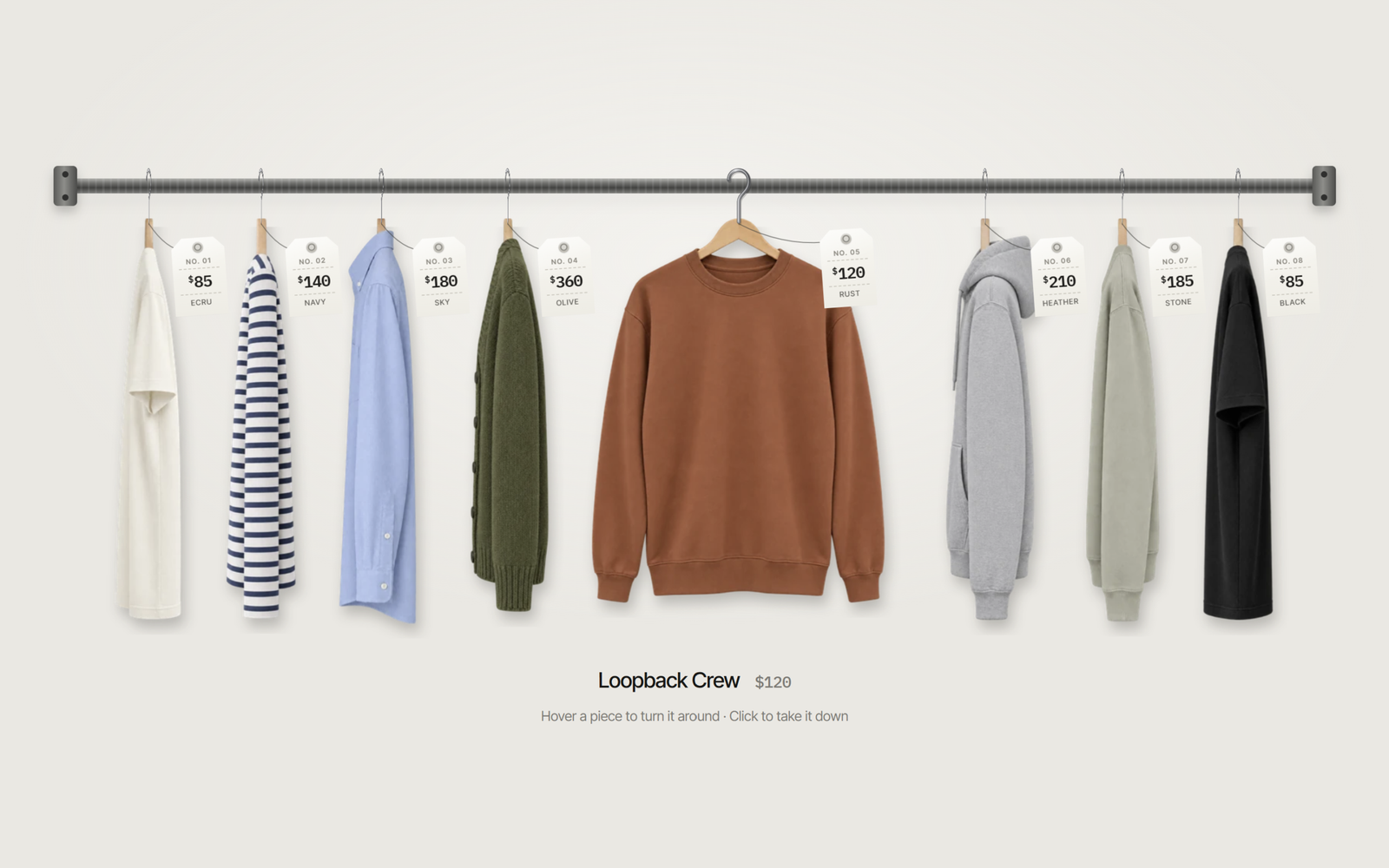
Let’s create an Interactive Wardrobe Rail using HTML, CSS, and JavaScript – a clothes rail where each piece hangs sideways on its hanger, turns to face you when you hover over it, and lifts off the rail into a full product view when you click it.
- HTML: Create the rail, the empty area where the garments are added, a caption for the piece in front, and the product view with its info card, Front and Back toggle, size buttons and the hanging garment.
- CSS: Style the metal rail and brackets, the paper price tags with metal eyelets, the soft wall background, the info card with a serif title, the sliding pill toggle, round size chips and the 3D flip between the front and back photos.
- JavaScript: Build every hanger from one data list, run spring animations so pieces turn and slide smoothly, make the clothes sway when you move the cursor along the rail, and fly a garment from the rail into the product view and back.
This project teaches how to build an interactive wardrobe rail using HTML, CSS, and JavaScript by combining 3D CSS transforms, simple spring physics in a requestAnimationFrame loop, the FLIP animation technique, and the Web Animations API.
HTML :
HTML: Creates the structure of the wardrobe rail, including the metal rail with its brackets, the caption under the rail, and the product view with the info card, Front and Back toggle, sizes, details list, Add to bag button, arrows and the hanging garment.
<!DOCTYPE html>
<!-- © 2026 @coding.stella. All rights reserved. -->
<html lang="en">
<head>
<meta charset="UTF-8" />
<meta name="viewport" content="width=device-width, initial-scale=1.0" />
<title>Wardrobe Rail · Officially created by @coding.stella</title>
<meta name="author" content="@coding.stella" />
<link rel="preconnect" href="https://fonts.googleapis.com" />
<link rel="preconnect" href="https://fonts.gstatic.com" crossorigin />
<link href="https://fonts.googleapis.com/css2?family=Instrument+Serif&family=Inter+Tight:wght@400;500;600&family=IBM+Plex+Mono:wght@500;600&display=swap" rel="stylesheet" />
<link rel="stylesheet" href="style.css" />
</head>
<body>
<section class="rack-section">
<div class="stage-wrap" id="stageWrap">
<div class="stage" id="stage">
<div class="rail"><span class="bracket left"></span><span class="bracket right"></span></div>
<div class="items" id="items"></div>
</div>
</div>
<div class="caption" id="caption">
<span id="capName"></span>
<span class="cap-price" id="capPrice"></span>
</div>
<p class="hint">Hover a piece to turn it around · Click to take it down</p>
<p class="credit">© 2026 @coding.stella · All rights reserved</p>
</section>
<section class="detail" id="detail" aria-hidden="true">
<button class="close" id="close" type="button" aria-label="Back to the rail">
<svg viewBox="0 0 24 24" width="18" height="18" aria-hidden="true"><path d="M6 6l12 12M18 6L6 18" stroke="currentColor" stroke-width="1.6" stroke-linecap="round"/></svg>
</button>
<div class="d-info">
<div class="card-label" id="dCard">
<div class="cl-head">
<span>No. <b id="dIdx"></b> / <span id="dCount"></span></span>
<span class="cl-price" id="dPrice"></span>
</div>
<h2 class="cl-title" id="dName"></h2>
<p class="cl-desc" id="dDesc"></p>
<div class="cl-row">
<div class="seg" id="seg" data-v="front" role="tablist">
<button type="button" class="seg-btn on" data-view="front" role="tab" aria-selected="true">Front</button>
<button type="button" class="seg-btn" data-view="back" role="tab" aria-selected="false">Back</button>
</div>
<div class="swatch"><i id="dSwatch"></i><span id="dColour"></span></div>
</div>
<p class="cl-label">Choose a size</p>
<div class="sizes" id="dSizes"></div>
<dl class="specs" id="dSpecs"></dl>
<button class="add" id="add" type="button">
<span id="addText">Add to bag</span>
<span class="add-end">
<span id="dAddPrice"></span>
<svg viewBox="0 0 24 24" width="18" height="18" aria-hidden="true"><path d="M5 12h13M13 6l6 6-6 6" fill="none" stroke="currentColor" stroke-width="1.6" stroke-linecap="round" stroke-linejoin="round"/></svg>
</span>
</button>
</div>
<div class="pager">
<button type="button" id="prev" aria-label="Previous piece">←</button>
<span id="pagerText"></span>
<button type="button" id="next" aria-label="Next piece">→</button>
</div>
</div>
<div class="d-stage">
<span class="d-num" id="dNum" aria-hidden="true"></span>
<div class="d-hang" id="dHang">
<div class="wire" id="wire"></div>
<div class="d-hook" id="dHook"></div>
<div class="d-imgs" id="dImgs">
<img class="d-front" id="dFront" alt="" />
<img class="d-back" id="dBack" alt="" />
</div>
</div>
</div>
</section>
<script src="script.js"></script>
</body>
</html>
CSS :
CSS: Styles the rail, hangers, price tags and product view, adds the 3D perspective used for turning and flipping the clothes, staggers the info card animation, and adjusts the layout for small screens.
/* © 2026 @coding.stella. All rights reserved. */


* {
  margin: 0;
  padding: 0;
  box-sizing: border-box;
}

:root {
  --wall: #ebe8e2;
  --ink: #161614;
  --muted: #7d7a74;
  --ease: cubic-bezier(0.22, 0.9, 0.24, 1);
}

body {
  min-height: 100vh;
  display: grid;
  grid-template-columns: minmax(0, 1fr);
  place-items: center;
  font-family: "Inter Tight", system-ui, sans-serif;
  color: var(--ink);
  background:
    radial-gradient(ellipse 70% 60% at 50% 30%, #f4f2ee 0%, transparent 70%),
    var(--wall);
  overflow-x: hidden;
}

button { font: inherit; color: inherit; }


.rack-section {
  width: 100%;
  padding: 40px 16px 48px;
  display: flex;
  flex-direction: column;
  align-items: center;
  transition: opacity 0.5s var(--ease), transform 0.7s var(--ease);
}

body.is-open .rack-section {
  opacity: 0;
  transform: scale(0.97);
  pointer-events: none;
}

.stage-wrap {
  width: 100%;
  min-width: 0;
  display: flex;
  justify-content: center;
}

.stage {
  position: relative;
  width: 1200px;
  height: 500px;
  flex: none;
  transform-origin: top center;
}

.rail {
  position: absolute;
  top: 40px;
  left: 0;
  right: 0;
  height: 14px;
  border-radius: 7px;
  background:
    repeating-linear-gradient(90deg, rgba(255, 255, 255, 0.08) 0 2px, transparent 2px 7px),
    linear-gradient(#b3b3af, #737370 30%, #424240 62%, #7e7e7b);
  box-shadow: 0 10px 14px -6px rgba(0, 0, 0, 0.25);
  z-index: 2;
}

.bracket {
  position: absolute;
  top: -12px;
  width: 22px;
  height: 38px;
  border-radius: 4px;
  background: linear-gradient(90deg, #5a5a57, #8e8e8a 45%, #4b4b49);
  box-shadow: 0 6px 10px rgba(0, 0, 0, 0.2);
}
.bracket.left { left: -4px; }
.bracket.right { right: -4px; }
.bracket::before,
.bracket::after {
  content: "";
  position: absolute;
  left: 8px;
  width: 6px;
  height: 6px;
  border-radius: 50%;
  background: #2f2f2e;
}
.bracket::before { top: 5px; }
.bracket::after { bottom: 5px; }

.items {
  position: absolute;
  top: 47px;
  left: 0;
  width: 100%;
  z-index: 3;
}

.item {
  position: absolute;
  top: 0;
  left: 0;
  height: 430px;
  background: none;
  border: 0;
  cursor: pointer;
  will-change: transform;
  -webkit-tap-highlight-color: transparent;
}
.item:focus-visible { outline: 2px dashed #777; outline-offset: 4px; }
.item.taken { visibility: hidden; }

.swing {
  position: absolute;
  top: 0;
  left: 50%;
  width: 0;
  height: 0;
  will-change: transform;
}


.hook-wrap {
  position: absolute;
  top: -16px;
  left: -20px;
  width: 40px;
  height: 50px;
  perspective: 300px;
  z-index: 3;
}
.hook {
  display: block;
  overflow: visible;
  will-change: transform;
}

.views {
  position: absolute;
  top: 31px;
  left: 0;
  perspective: 900px;
}

.views img {
  position: absolute;
  top: 0;
  display: block;
  backface-visibility: hidden;
  transform-origin: 50% 0;
  will-change: transform, opacity;
  user-select: none;
  -webkit-user-drag: none;
  pointer-events: none;
}


.string {
  position: absolute;
  top: 0;
  left: 0;
  width: 1px;
  height: 1px;
  overflow: visible;
  pointer-events: none;
}
.string path {
  fill: none;
  stroke: #3b3a37;
  stroke-opacity: 0.55;
  stroke-width: 0.9;
}

.tag {
  position: absolute;
  top: 0;
  left: 0;
  width: 0;
  height: 0;
  transform-origin: 0 0;
  will-change: transform;
  pointer-events: none;
}

.card {
  position: absolute;
  top: -9px;
  left: -25px;
  width: 50px;
  padding: 18px 0 8px;
  display: flex;
  flex-direction: column;
  align-items: center;
  gap: 3px;
  color: #1d1c1a;
  background:
    linear-gradient(160deg, rgba(255, 255, 255, 0.7), rgba(255, 255, 255, 0) 45%),
    linear-gradient(#f8f6f0, #efece4);
  clip-path: polygon(10px 0, calc(100% - 10px) 0, 100% 10px, 100% 100%, 0 100%, 0 10px);
  filter: drop-shadow(0 4px 6px rgba(0, 0, 0, 0.16));
}

.eyelet {
  position: absolute;
  top: 4px;
  left: 50%;
  width: 10px;
  height: 10px;
  margin-left: -5px;
  border-radius: 50%;
  background: radial-gradient(circle, #d9d6cf 0 2.2px, #8d8a83 2.6px 3.2px, #c9c5bc 3.6px, #a19d94 100%);
  box-shadow: inset 0 1px 1px rgba(255, 255, 255, 0.6), 0 0.5px 1px rgba(0, 0, 0, 0.3);
}

.card .no {
  font-size: 6.5px;
  font-weight: 600;
  letter-spacing: 0.14em;
  text-transform: uppercase;
  color: #8a867d;
}

.card .price {
  font-family: "IBM Plex Mono", monospace;
  font-weight: 600;
  font-size: 15px;
  line-height: 1;
  letter-spacing: -0.04em;
  padding: 4px 0;
  width: 38px;
  text-align: center;
  border-top: 1px dashed #cfcac0;
  border-bottom: 1px dashed #cfcac0;
}

.card .price sup {
  font-size: 8px;
  vertical-align: 5px;
  margin-right: 1px;
}

.card .meta {
  font-size: 7px;
  font-weight: 500;
  letter-spacing: 0.08em;
  text-transform: uppercase;
  color: #5e5b55;
}

.caption {
  display: flex;
  gap: 14px;
  align-items: baseline;
  min-height: 28px;
  font-size: 20px;
  font-weight: 500;
  letter-spacing: -0.02em;
  transition: opacity 0.3s ease, transform 0.3s ease;
}
.caption.swap { opacity: 0; transform: translateY(6px); }

.cap-price {
  font-family: "IBM Plex Mono", monospace;
  font-size: 15px;
  color: var(--muted);
}

.hint {
  margin-top: 10px;
  font-size: 13px;
  color: var(--muted);
}

.credit {
  margin-top: 28px;
  font-family: "IBM Plex Mono", monospace;
  font-size: 11px;
  letter-spacing: 0.08em;
  color: #a5a29b;
}


.detail {
  position: fixed;
  inset: 0;
  z-index: 50;
  display: grid;
  grid-template-columns: minmax(0, 0.9fr) minmax(0, 1.1fr);
  align-items: center;
  visibility: hidden;
  overflow-x: hidden;
  overflow-y: auto;
}

.detail.flying { overflow: visible; }


.detail::before {
  content: "";
  position: fixed;
  inset: 0;
  z-index: -1;
  background:
    radial-gradient(ellipse 45% 60% at 68% 50%, #f5f3ef 0%, transparent 70%),
    #e6e2da;
  opacity: 0;
  transition: opacity 0.45s var(--ease);
}
body.is-open .detail::before { opacity: 1; }


.close {
  position: absolute;
  top: 24px;
  left: 24px;
  z-index: 2;
  width: 46px;
  height: 46px;
  display: grid;
  place-items: center;
  border-radius: 50%;
  border: 1px solid #cdc8be;
  background: rgba(255, 255, 255, 0.45);
  color: var(--ink);
  cursor: pointer;
  opacity: 0;
  transform: scale(0.8) rotate(-45deg);
  transition: opacity 0.3s, transform 0.4s var(--ease), background 0.2s;
}
body.is-open .close {
  opacity: 1;
  transform: none;
  transition: opacity 0.4s 0.35s, transform 0.6s 0.35s var(--ease), background 0.2s;
}
body.is-open .close:hover { background: #fff; transform: rotate(90deg); transition-delay: 0s; }


.d-stage {
  position: relative;
  height: 100vh;
  min-height: 640px;

}


.d-num {
  position: absolute;
  top: 50%;
  left: 50%;
  transform: translate(-50%, -46%);
  font-family: "Instrument Serif", serif;
  font-size: min(46vh, 30vw);
  line-height: 1;
  color: transparent;
  -webkit-text-stroke: 1.5px rgba(40, 36, 30, 0.2);
  letter-spacing: -0.04em;
  user-select: none;
  pointer-events: none;
  opacity: 0;
  transition: opacity 0.6s var(--ease);
}
body.is-open .d-num { opacity: 1; transition-delay: 0.3s; }

.d-hang {
  position: absolute;
  top: 21vh;
  left: 50%;
  transform-origin: 0 0;
  will-change: transform;
}

.wire {
  position: absolute;
  left: -1px;
  width: 2px;
  height: 100vh;
  background: linear-gradient(90deg, #4a4a48, #8a8a87 50%, #3d3d3b);
  transform-origin: 50% 0;
}

.d-hook { position: absolute; }

.d-imgs {
  position: absolute;
  top: 0;
  left: 0;
  transform-style: preserve-3d;
  transition: transform 0.9s var(--ease);
}
.d-imgs.show-back { transform: rotateY(180deg); }

.d-imgs img {
  position: absolute;
  top: 0;
  display: block;
  backface-visibility: hidden;
  -webkit-backface-visibility: hidden;
  user-select: none;
  -webkit-user-drag: none;
}
.d-imgs .d-back { transform: rotateY(180deg); }


.d-info {
  justify-self: end;
  width: min(440px, 100%);
  margin: 90px 0 60px 48px;
}

.card-label {
  position: relative;
  padding: 30px 32px 32px;
  background:
    linear-gradient(170deg, rgba(255, 255, 255, 0.75), rgba(255, 255, 255, 0.35)),
    #f7f5f0;
  border: 1px solid #dcd6cb;
  border-radius: 18px;
  box-shadow: 0 30px 60px -30px rgba(60, 50, 35, 0.35);
  opacity: 0;
  transform: translateX(-24px);
  transition: opacity 0.3s, transform 0.4s;
}
body.is-open .card-label {
  opacity: 1;
  transform: none;
  transition: opacity 0.5s 0.15s var(--ease), transform 0.8s 0.15s var(--ease);
}


.card-label > *,
.pager {
  opacity: 0;
  transform: translateY(14px);
  transition: opacity 0.25s, transform 0.4s;
}
body.is-open .card-label > *,
body.is-open .pager {
  opacity: 1;
  transform: none;
  transition: opacity 0.6s var(--ease), transform 0.8s var(--ease);
}
body.is-open .card-label > *:nth-child(1) { transition-delay: 0.28s; }
body.is-open .card-label > *:nth-child(2) { transition-delay: 0.33s; }
body.is-open .card-label > *:nth-child(3) { transition-delay: 0.38s; }
body.is-open .card-label > *:nth-child(4) { transition-delay: 0.43s; }
body.is-open .card-label > *:nth-child(5) { transition-delay: 0.48s; }
body.is-open .card-label > *:nth-child(6) { transition-delay: 0.52s; }
body.is-open .card-label > *:nth-child(7) { transition-delay: 0.56s; }
body.is-open .card-label > *:nth-child(8) { transition-delay: 0.6s; }
body.is-open .pager { transition-delay: 0.66s; }

.cl-head {
  display: flex;
  justify-content: space-between;
  align-items: baseline;
  padding-bottom: 14px;
  border-bottom: 1px dashed #d3cdc1;
  font-family: "IBM Plex Mono", monospace;
  font-size: 12px;
  letter-spacing: 0.06em;
  text-transform: uppercase;
  color: var(--muted);
}
.cl-head b { color: var(--ink); font-weight: 600; }
.cl-price {
  font-size: 18px;
  font-weight: 600;
  color: var(--ink);
  letter-spacing: -0.02em;
}

.cl-title {
  margin: 22px 0 12px;
  font-family: "Instrument Serif", serif;
  font-weight: 400;
  font-size: clamp(38px, 3.6vw, 54px);
  line-height: 0.98;
  letter-spacing: -0.015em;
}

.cl-desc {
  font-size: 15px;
  line-height: 1.65;
  color: #6c6963;
  margin-bottom: 24px;
}

.cl-row {
  display: flex;
  align-items: center;
  justify-content: space-between;
  gap: 16px;
  margin-bottom: 24px;
}


.seg {
  position: relative;
  display: grid;
  grid-template-columns: 1fr 1fr;
  padding: 4px;
  border-radius: 999px;
  background: #e8e4dc;
}
.seg::before {
  content: "";
  position: absolute;
  top: 4px;
  bottom: 4px;
  left: 4px;
  width: calc(50% - 4px);
  border-radius: 999px;
  background: #fff;
  box-shadow: 0 2px 6px rgba(0, 0, 0, 0.1);
  transition: transform 0.45s var(--ease);
}
.seg[data-v="back"]::before { transform: translateX(100%); }
.seg-btn {
  position: relative;
  z-index: 1;
  padding: 8px 20px;
  border: 0;
  background: none;
  font-size: 13px;
  font-weight: 600;
  color: var(--muted);
  cursor: pointer;
  transition: color 0.25s;
}
.seg-btn.on { color: var(--ink); }

.swatch {
  display: flex;
  align-items: center;
  gap: 9px;
  font-size: 14px;
  font-weight: 500;
}
.swatch i {
  width: 18px;
  height: 18px;
  border-radius: 50%;
  box-shadow: inset 0 0 0 1px rgba(0, 0, 0, 0.15), 0 0 0 3px #f7f5f0, 0 0 0 4px #cfc9be;
}

.cl-label {
  font-family: "IBM Plex Mono", monospace;
  font-size: 11.5px;
  letter-spacing: 0.08em;
  text-transform: uppercase;
  color: var(--muted);
  margin-bottom: 12px;
}


.sizes {
  display: flex;
  gap: 8px;
  margin-bottom: 26px;
}
.size {
  width: 46px;
  height: 46px;
  border-radius: 50%;
  border: 1px solid #d3cdc1;
  background: transparent;
  font-size: 13px;
  font-weight: 600;
  cursor: pointer;
  transition: border-color 0.2s, background 0.2s, color 0.2s, transform 0.2s;
}
.size:hover { border-color: var(--ink); transform: translateY(-2px); }
.size.on { background: var(--ink); border-color: var(--ink); color: #f6f4ef; }
.size:disabled {
  cursor: not-allowed;
  color: #b3afa7;
  border-style: dashed;
  background: linear-gradient(135deg, transparent calc(50% - 0.6px), #c4bfb5 50%, transparent calc(50% + 0.6px));
}
.size:disabled:hover { transform: none; border-color: #d3cdc1; }


.specs {
  margin-bottom: 26px;
  font-size: 13.5px;
}
.specs div {
  display: flex;
  justify-content: space-between;
  gap: 16px;
  padding: 9px 0;
  border-top: 1px dashed #d8d2c6;
}
.specs div:last-child { border-bottom: 1px dashed #d8d2c6; }
.specs dt {
  font-family: "IBM Plex Mono", monospace;
  font-size: 11.5px;
  letter-spacing: 0.08em;
  text-transform: uppercase;
  color: var(--muted);
}
.specs dd { text-align: right; }


.add {
  width: 100%;
  height: 58px;
  display: flex;
  align-items: center;
  justify-content: space-between;
  padding: 0 10px 0 26px;
  border: 0;
  border-radius: 999px;
  background: var(--ink);
  color: #f6f4ef;
  font-size: 15px;
  font-weight: 600;
  cursor: pointer;
  transition: background 0.25s, transform 0.15s;
}
.add:hover { background: #2c2b27; }
.add:active { transform: scale(0.985); }
.add-end {
  display: flex;
  align-items: center;
  gap: 12px;
  height: 40px;
  padding: 0 14px 0 16px;
  border-radius: 999px;
  background: rgba(255, 255, 255, 0.12);
  font-family: "IBM Plex Mono", monospace;
  font-weight: 500;
}
.add-end svg { transition: transform 0.3s var(--ease); }
.add:hover .add-end svg { transform: translateX(4px); }


.pager {
  display: flex;
  align-items: center;
  justify-content: center;
  gap: 18px;
  margin-top: 18px;
  font-family: "IBM Plex Mono", monospace;
  font-size: 12px;
  letter-spacing: 0.1em;
  color: var(--muted);
}
.pager button {
  width: 38px;
  height: 38px;
  border-radius: 50%;
  border: 1px solid #cdc8be;
  background: transparent;
  font-size: 15px;
  cursor: pointer;
  transition: background 0.2s, border-color 0.2s;
}
.pager button:hover { background: #fff; border-color: var(--ink); }

@media (max-width: 860px) {
  .detail { grid-template-columns: 1fr; align-items: start; }
  .d-stage { order: -1; height: 68vh; min-height: 460px; }
  .d-hang { top: 14vh; }
  .d-info { justify-self: center; margin: 0 16px 48px; width: auto; }
  .close { top: 14px; left: 14px; }
}

@media (prefers-reduced-motion: reduce) {
  .rack-section, .detail::before, .d-imgs, .card-label, .card-label > *, .pager, .close, .d-num {
    transition-duration: 0.01s !important;
    transition-delay: 0s !important;
  }
}
JavaScript:
JavaScript: Handles the garment data, builds the hangers and swing tags, runs the spring animation loop for turning, sliding and swaying, and controls opening, browsing and closing the product view.
/* © 2026 @coding.stella. All rights reserved. */

const PIECES = [
  {
    name: "Heavyweight Tee", price: 85, color: "Ecru", swatch: "#e6e0d2", soldOut: ["XL"],
    desc: "Dense 280gsm cotton jersey, garment-washed for a broken-in hand. A dropped shoulder and a ribbed neck that keeps its shape wash after wash.",
    fabric: "100% cotton, 280gsm", fit: "Relaxed", care: "30° wash, dry flat",
    front: [428, 537, 388], side: [129, 544, 89],
  },
  {
    name: "Breton Long Sleeve", price: 140, color: "Navy", swatch: "#2e3a5c", soldOut: ["XS"],
    desc: "Tightly knit cotton in a classic stripe. A wide boat neck, a straight body and long sleeves made to be pushed up.",
    fabric: "100% cotton jersey", fit: "Regular", care: "30° wash",
    front: [413, 529, 373], side: [133, 543, 93],
  },
  {
    name: "Oxford Shirt", price: 180, color: "Sky", swatch: "#a9c2e2", soldOut: [],
    desc: "Soft-washed oxford cloth with a button-down collar, a single chest pocket and a curved hem that sits well tucked or out.",
    fabric: "100% cotton oxford", fit: "Regular", care: "40° wash, warm iron",
    front: [418, 531, 378], side: [151, 549, 111],
  },
  {
    name: "Lambswool Cardigan", price: 360, color: "Olive", swatch: "#5f6b3b", soldOut: ["XS", "S"],
    desc: "Brushed lambswool in a chunky knit. A deep V-neck, five corozo buttons and ribbed cuffs that hold their shape.",
    fabric: "100% lambswool", fit: "Relaxed", care: "Hand wash cold",
    front: [425, 538, 385], side: [148, 534, 108],
  },
  {
    name: "Loopback Crew", price: 120, color: "Rust", swatch: "#a6603f", soldOut: ["XS"],
    desc: "Loopback cotton fleece with a dry, slightly raw handle. Dropped shoulders, ribbed trims and a body cut a little roomy.",
    fabric: "100% cotton loopback", fit: "Roomy", care: "30° wash",
    front: [425, 522, 385], side: [139, 537, 99],
  },
  {
    name: "Fleece Hoodie", price: 210, color: "Heather", swatch: "#b7b8ba", soldOut: ["L"],
    desc: "Heavy brushed fleece, soft on the inside. A double-layer hood, flat drawcords and a deep kangaroo pocket.",
    fabric: "80% cotton, 20% recycled poly", fit: "Relaxed", care: "30° wash",
    front: [425, 545, 385], side: [189, 545, 149],
  },
  {
    name: "Garment-Dyed Crew", price: 185, color: "Stone", swatch: "#c9c8b8", soldOut: [],
    desc: "Dyed after sewing, so every seam takes the colour a little differently. Mid-weight fleece with ribbed trims.",
    fabric: "100% cotton fleece", fit: "Regular", care: "30° wash, inside out",
    front: [422, 537, 382], side: [139, 547, 99],
  },
  {
    name: "Boxy Tee", price: 85, color: "Black", swatch: "#1f1f20", soldOut: ["XS"],
    desc: "A wide, cropped tee in heavyweight jersey. Boxy through the body with a slightly raised neckline.",
    fabric: "100% cotton, 260gsm", fit: "Boxy, cropped", care: "30° wash",
    front: [420, 529, 380], side: [134, 545, 94],
  },
];

const SIZES = ["XS", "S", "M", "L", "XL"];
const K = 0.72;
const GAP = 40;
const STAGE_W = 1200;
const STAGE_H = 500;
const HOVER_DELAY = 90;
const EASE = "cubic-bezier(.22,.9,.24,1)";

const $ = (id) => document.getElementById(id);
const clamp = (v, a, b) => Math.min(b, Math.max(a, v));
const lerp = (a, b, t) => a + (b - a) * t;
const smooth = (a, b, t) => { const x = clamp((t - a) / (b - a), 0, 1); return x * x * (3 - 2 * x); };
const pad = (n) => String(n).padStart(2, "0");
const reduce = matchMedia("(prefers-reduced-motion: reduce)").matches;

let hookId = 0;
function hookSVG(w = 40, h = 50) {
  const id = "hk" + hookId++;
  const d = "M20 50V31C20 24 29.5 21.5 29.5 12.5C29.5 5 24.8 1.2 19.8 1.2C14.3 1.2 10.6 5 10.6 10.4";
  return `
  <svg class="hook" viewBox="0 0 40 50" width="${w}" height="${h}" aria-hidden="true">
    <defs>
      <linearGradient id="${id}" x2="1">
        <stop offset="0" stop-color="#5d5e61"/><stop offset=".35" stop-color="#d9dadd"/>
        <stop offset=".55" stop-color="#8c8d91"/><stop offset="1" stop-color="#4c4d50"/>
      </linearGradient>
    </defs>
    <g fill="none" stroke-linecap="round">
      <path d="${d}" stroke="rgba(0,0,0,.18)" stroke-width="3.6" transform="translate(.8 1.2)"/>
      <path d="${d}" stroke="#56575a" stroke-width="3.4"/>
      <path d="${d}" stroke="url(#${id})" stroke-width="2.4"/>
      <path d="${d}" stroke="#f4f5f7" stroke-opacity=".75" stroke-width=".7" transform="translate(-.5 -.3)"/>
    </g>
  </svg>`;
}

const items = PIECES.map((p, i) => {
  const n = i + 1;
  const [fw, fh, fBody] = p.front;
  const [sw, sh, sBody] = p.side;

  const el = document.createElement("button");
  el.className = "item";
  el.type = "button";
  el.style.zIndex = 20 - i;
  el.setAttribute("aria-label", `${p.name}, $${p.price}`);
  el.innerHTML = `
    <div class="swing">
      <div class="hook-wrap">${hookSVG()}</div>
      <div class="views">
        <img class="side"  src="images/side-${n}.webp"  alt="" width="${sw * K}" height="${sh * K}" style="left:${(-sw * K) / 2}px">
        <img class="front" src="images/front-${n}.webp" alt="" width="${fw * K}" height="${fh * K}" style="left:${(-fw * K) / 2}px">
      </div>
      <svg class="string" aria-hidden="true"><path d=""/></svg>
      <div class="tag">
        <div class="card">
          <i class="eyelet"></i>
          <span class="no">No. ${pad(n)}</span>
          <span class="price"><sup>$</sup>${p.price}</span>
          <span class="meta">${p.color}</span>
        </div>
      </div>
    </div>`;
  $("items").appendChild(el);
  el.addEventListener("click", () => openDetail(i));
  el.addEventListener("focus", () => setActive(i));

  return {
    el,
    swing: el.querySelector(".swing"),
    hook: el.querySelector(".hook"),
    side: el.querySelector(".side"),
    front: el.querySelector(".front"),
    tag: el.querySelector(".tag"),
    str: el.querySelector(".string path"),
    sideW: sBody * K,
    frontW: fBody * K,
    p: 0, pv: 0,
    x: 0, xv: 0, tx: 0,
    a: 0, av: 0,
    ta: -4, tav: 0,
    last: "",
  };
});

let active = -1;
let captionTimer = 0;
function setActive(i) {
  if (i === active) return;
  active = i;
  items.forEach((it, j) => it.el.setAttribute("aria-pressed", String(j === i)));
  $("caption").classList.add("swap");
  clearTimeout(captionTimer);
  captionTimer = setTimeout(() => {
    $("capName").textContent = PIECES[i].name;
    $("capPrice").textContent = `$${PIECES[i].price}`;
    $("caption").classList.remove("swap");
  }, 180);
}

let pending = -1;
let pendingTimer = 0;
document.addEventListener("pointermove", (e) => {
  if (open !== -1 || (!e.movementX && !e.movementY)) return;
  const el = e.target.closest?.(".item");
  const idx = el ? items.findIndex((it) => it.el === el) : -1;
  if (idx === -1 || idx === active) {
    pending = -1;
    clearTimeout(pendingTimer);
  } else if (idx !== pending) {
    pending = idx;
    clearTimeout(pendingTimer);
    pendingTimer = setTimeout(() => { setActive(pending); pending = -1; }, HOVER_DELAY);
  }
});

document.addEventListener("keydown", (e) => {
  const step = e.key === "ArrowRight" ? 1 : e.key === "ArrowLeft" ? -1 : 0;
  if (open !== -1) {
    if (e.key === "Escape") closeDetail();
    if (step) switchTo(open + step);
  } else if (step) {
    setActive((active + step + items.length) % items.length);
  }
});

const stage = $("stage");
let scale = 1;
let running = true;
let prev = performance.now();

function layoutTargets() {
  const widths = items.map((it) => lerp(it.sideW, it.frontW, clamp(it.p, 0, 1)) + GAP);
  let x = (STAGE_W - widths.reduce((s, w) => s + w, 0)) / 2;
  items.forEach((it, i) => {
    it.slot = widths[i];
    it.tx = x + widths[i] / 2;
    x += widths[i];
  });
}

let lastX = null;
stage.addEventListener("pointermove", (e) => {
  const mx = (e.clientX - stage.getBoundingClientRect().left) / scale;
  const dx = lastX === null ? 0 : clamp(mx - lastX, -30, 30);
  lastX = mx;
  items.forEach((it) => {
    const near = 1 - Math.abs(mx - it.x) / Math.max(50, it.slot / 2);
    if (near > 0) it.av += dx * 0.006 * near;
  });
});
stage.addEventListener("pointerleave", () => (lastX = null));

function frame(now) {
  const steps = Math.min(4, Math.round((now - prev) / 16.67) || 1);
  prev = now;

  for (let s = 0; s < steps; s++) {
    items.forEach((it, i) => {
      it.pv = (it.pv + ((i === active ? 1 : 0) - it.p) * 0.08) * 0.72;
      it.p += it.pv;
    });
    layoutTargets();
    items.forEach((it) => {
      const before = it.xv;
      it.xv = (it.xv + (it.tx - it.x) * 0.07) * 0.76;
      it.x += it.xv;
      it.av = (it.av - (it.xv - before) * 0.03 - it.a * 0.03) * 0.9;
      it.a = clamp(it.a + it.av, -5, 5);
      it.tav = (it.tav + (-it.a * 0.5 - 4 - it.ta) * 0.06) * 0.84;
      it.ta = clamp(it.ta + it.tav, -20, 20);
    });
  }
  items.forEach(render);
  if (running) requestAnimationFrame(frame);
}

function render(it) {
  const e = clamp(it.p, 0, 1.05);
  const t = clamp(e, 0, 1);
  const ang = reduce ? 0 : it.a;

  const key = `${it.x.toFixed(2)}|${e.toFixed(4)}|${ang.toFixed(3)}|${it.ta.toFixed(3)}`;
  if (key === it.last) return;
  it.last = key;

  const w = lerp(it.sideW, it.frontW, t);
  it.el.style.width = `${w}px`;
  it.el.style.transform = `translate3d(${it.x - w / 2}px,0,0)`;
  it.swing.style.transform = `rotate(${ang}deg)`;

  const fade = smooth(0.18, 0.72, e);
  it.side.style.transform = `rotateY(${e * 75}deg)`;
  it.side.style.opacity = 1 - fade;
  it.front.style.transform = `rotateY(${(1 - e) * -75}deg)`;
  it.front.style.opacity = fade;
  it.hook.style.transform = `rotateY(${(1 - t) * 78}deg)`;

  const ex = lerp(it.sideW / 2 + 14, it.frontW * 0.3 + 18, t);
  const ey = lerp(58, 50, t);
  it.tag.style.transform = `translate3d(${ex}px,${ey}px,0) rotate(${reduce ? -4 : it.ta}deg)`;
  it.str.setAttribute("d", `M0 36Q${ex / 2} ${Math.max(36, ey) + 12} ${ex} ${ey}`);
}

const detail = $("detail");
const dHang = $("dHang");
const dImgs = $("dImgs");
const dFront = $("dFront");
const dBack = $("dBack");
const dSizes = $("dSizes");
const wire = $("wire");
const segBtns = [...document.querySelectorAll(".seg-btn")];
let open = -1;
let shown = false;
let switching = false;

function sizeDetail(i) {
  const [fw, fh] = PIECES[i].front;
  const H = Math.round(Math.min(innerHeight * (innerWidth <= 860 ? 0.5 : 0.62), 620));
  const r = H / (fh * K);
  const frontW = (fw / fh) * H;
  const backW = dBack.naturalWidth ? (dBack.naturalWidth / dBack.naturalHeight) * H : frontW;
  dFront.style.cssText = `height:${H}px;width:${frontW}px;left:${-frontW / 2}px`;
  dBack.style.cssText = `height:${H}px;width:${backW}px;left:${-backW / 2}px`;
  $("dHook").innerHTML = hookSVG(40 * r, 50 * r);
  $("dHook").style.cssText = `left:${-20 * r}px;top:${-47 * r}px`;
  wire.style.top = `calc(${-46 * r}px - 100vh)`;
}

function fillDetail(i) {
  const p = PIECES[i];
  dFront.src = `images/front-${i + 1}.webp`;
  dBack.src = `images/back-${i + 1}.webp`;
  $("dIdx").textContent = pad(i + 1);
  $("dNum").textContent = pad(i + 1);
  $("dCount").textContent = pad(PIECES.length);
  $("pagerText").textContent = `${pad(i + 1)} / ${pad(PIECES.length)}`;
  $("dName").textContent = p.name;
  $("dPrice").textContent = `$${p.price}`;
  $("dAddPrice").textContent = `$${p.price}`;
  $("dDesc").textContent = p.desc;
  $("dColour").textContent = p.color;
  $("dSwatch").style.background = p.swatch;
  $("dSpecs").innerHTML = [["Fabric", p.fabric], ["Fit", p.fit], ["Care", p.care]]
    .map(([k, v]) => `<div><dt>${k}</dt><dd>${v}</dd></div>`).join("");
  dSizes.innerHTML = SIZES.map((s) => p.soldOut.includes(s)
    ? `<button type="button" class="size" disabled aria-label="${s}, sold out">${s}</button>`
    : `<button type="button" class="size">${s}</button>`
  ).join("");
  $("addText").textContent = "Add to bag";
  setView("front", true);
}

function setView(v, instant) {
  segBtns.forEach((b) => {
    b.classList.toggle("on", b.dataset.view === v);
    b.setAttribute("aria-selected", String(b.dataset.view === v));
  });
  $("seg").dataset.v = v;
  if (instant) dImgs.style.transition = "none";
  dImgs.classList.toggle("show-back", v === "back");
  if (instant) { dImgs.offsetWidth; dImgs.style.transition = ""; }
}
segBtns.forEach((b) => b.addEventListener("click", () => setView(b.dataset.view)));

dSizes.addEventListener("click", (e) => {
  const b = e.target.closest(".size");
  if (b && !b.disabled) dSizes.querySelectorAll(".size").forEach((x) => x.classList.toggle("on", x === b));
});

$("add").addEventListener("click", () => {
  const picked = dSizes.querySelector(".size.on");
  if (picked) {
    $("addText").textContent = `Added: size ${picked.textContent}`;
    return;
  }
  $("addText").textContent = "Pick a size first";
  dSizes.animate(
    [{ transform: "none" }, { transform: "translateX(-6px)" }, { transform: "translateX(6px)" }, { transform: "none" }],
    { duration: 300, easing: "ease-in-out" }
  );
});

function flight(railRect, viewRect, toRail, duration) {
  const s = railRect.width / viewRect.width;
  const dx = railRect.left + railRect.width / 2 - (viewRect.left + viewRect.width / 2);
  const dy = railRect.top - viewRect.top;
  const onRail = { transform: `translate(${dx}px,${dy}px) scale(${s})` };
  const inView = { transform: "none" };
  return dHang.animate(toRail ? [inView, onRail] : [onRail, inView],
    { duration, easing: EASE, fill: toRail ? "forwards" : "none" });
}

function openDetail(i) {
  if (open !== -1) return;
  open = i;
  setActive(i);
  const it = items[i];

  setTimeout(() => {
    if (open !== i) return;
    shown = true;
    fillDetail(i);
    const railRect = it.front.getBoundingClientRect();

    detail.style.visibility = "visible";
    detail.setAttribute("aria-hidden", "false");
    detail.scrollTop = 0;
    document.body.classList.add("is-open");
    sizeDetail(i);
    it.el.classList.add("taken");

    if (!reduce) {
      flight(railRect, dFront.getBoundingClientRect(), false, 950);
      wire.animate([{ transform: "scaleY(0)" }, { transform: "scaleY(1)" }],
        { duration: 700, delay: 150, easing: EASE, fill: "backwards" });
      dHang.animate(
        [{ rotate: "0deg" }, { rotate: "1.2deg" }, { rotate: "-.5deg" }, { rotate: "0deg" }],
        { duration: 1100, delay: 850, easing: "ease-out", composite: "add" });
    }
    running = false;
    $("close").focus({ preventScroll: true });
  }, it.p > 0.85 ? 0 : 320);
}

function closeDetail() {
  if (open === -1) return;
  if (!shown) { open = -1; return; }
  shown = false;
  const it = items[open];
  setView("front", true);
  running = true;
  prev = performance.now();
  requestAnimationFrame(frame);

  const viewRect = dFront.getBoundingClientRect();
  document.body.classList.remove("is-open");
  detail.setAttribute("aria-hidden", "true");

  requestAnimationFrame(() => {
    detail.classList.add("flying");
    const anim = reduce ? null : flight(it.front.getBoundingClientRect(), viewRect, true, 750);
    const wireAnim = reduce ? null : wire.animate(
      [{ transform: "scaleY(1)", opacity: 1 }, { transform: "scaleY(0)", opacity: 0 }],
      { duration: 380, easing: "ease-in", fill: "forwards" });

    let finished = false;
    const done = () => {
      if (finished) return;
      finished = true;
      it.el.classList.remove("taken");
      detail.style.visibility = "hidden";
      detail.classList.remove("flying");
      anim?.cancel();
      wireAnim?.cancel();
      open = -1;
    };
    if (anim) {
      anim.onfinish = done;
      setTimeout(done, 900);
    } else {
      done();
    }
  });
}
$("close").addEventListener("click", closeDetail);

function switchTo(j) {
  if (!shown || switching) return;
  j = (j + items.length) % items.length;
  if (j === open) return;
  switching = true;
  const dir = j > open ? 1 : -1;

  items[open].el.classList.remove("taken");
  items[j].el.classList.add("taken");
  setActive(j);
  items.forEach((it, k) => { it.p = k === j ? 1 : 0; it.pv = 0; });
  layoutTargets();
  items.forEach((it) => { it.x = it.tx; it.xv = 0; it.last = ""; render(it); });
  open = j;

  const card = $("dCard");
  const out = dHang.animate(
    [{ opacity: 1, translate: "0 0" }, { opacity: 0, translate: `${-60 * dir}px 0` }],
    { duration: 260, easing: "ease-in", fill: "forwards" });
  const dim = card.animate([{ opacity: 1 }, { opacity: 0.35 }], { duration: 200, fill: "forwards" });

  const next = new Image();
  next.src = `images/front-${j + 1}.webp`;
  Promise.all([out.finished, next.decode().catch(() => {})]).then(() => {
    fillDetail(j);
    sizeDetail(j);
    out.cancel();
    dim.cancel();
    dHang.animate([{ opacity: 0, translate: `${70 * dir}px 0` }, { opacity: 1, translate: "0 0" }],
      { duration: 520, easing: EASE });
    card.animate([{ opacity: 0.35 }, { opacity: 1 }], { duration: 350 });
    switching = false;
  });
}
$("prev").addEventListener("click", () => switchTo(open - 1));
$("next").addEventListener("click", () => switchTo(open + 1));

function fit() {
  const wrap = $("stageWrap");
  scale = Math.min(1, (wrap.parentElement.clientWidth - 32) / STAGE_W);
  stage.style.transform = `scale(${scale})`;
  wrap.style.height = `${STAGE_H * scale}px`;
  if (shown) sizeDetail(open);
}
addEventListener("resize", fit);
fit();

const params = new URLSearchParams(location.search);
const startPiece = clamp((parseInt(params.get("piece"), 10) || 1) - 1, 0, items.length - 1);
const skipIntro = reduce || params.has("shot");

Promise.all([...document.querySelectorAll(".views img")].map((im) => im.decode().catch(() => {})))
  .then(() => {
    setActive(startPiece);
    items.forEach((it, i) => { it.p = params.has("shot") && i === startPiece ? 1 : 0; });
    layoutTargets();
    items.forEach((it, i) => { it.x = it.tx + (skipIntro ? 0 : 600 + i * 50); });
    requestAnimationFrame((t) => { prev = t; frame(t); });
  });
This project demonstrates how HTML, CSS, and JavaScript can work together to turn a simple list of products into a playful shopping rail. With 3D transforms, small spring animations and the FLIP technique, the interactive wardrobe rail feels like browsing a real clothes rack, and you can reuse the same ideas for product galleries, portfolios or any hover-to-reveal design.
If your project has problems, don’t worry. Just click to download the source code and face your coding challenges with excitement. Have fun coding!
