


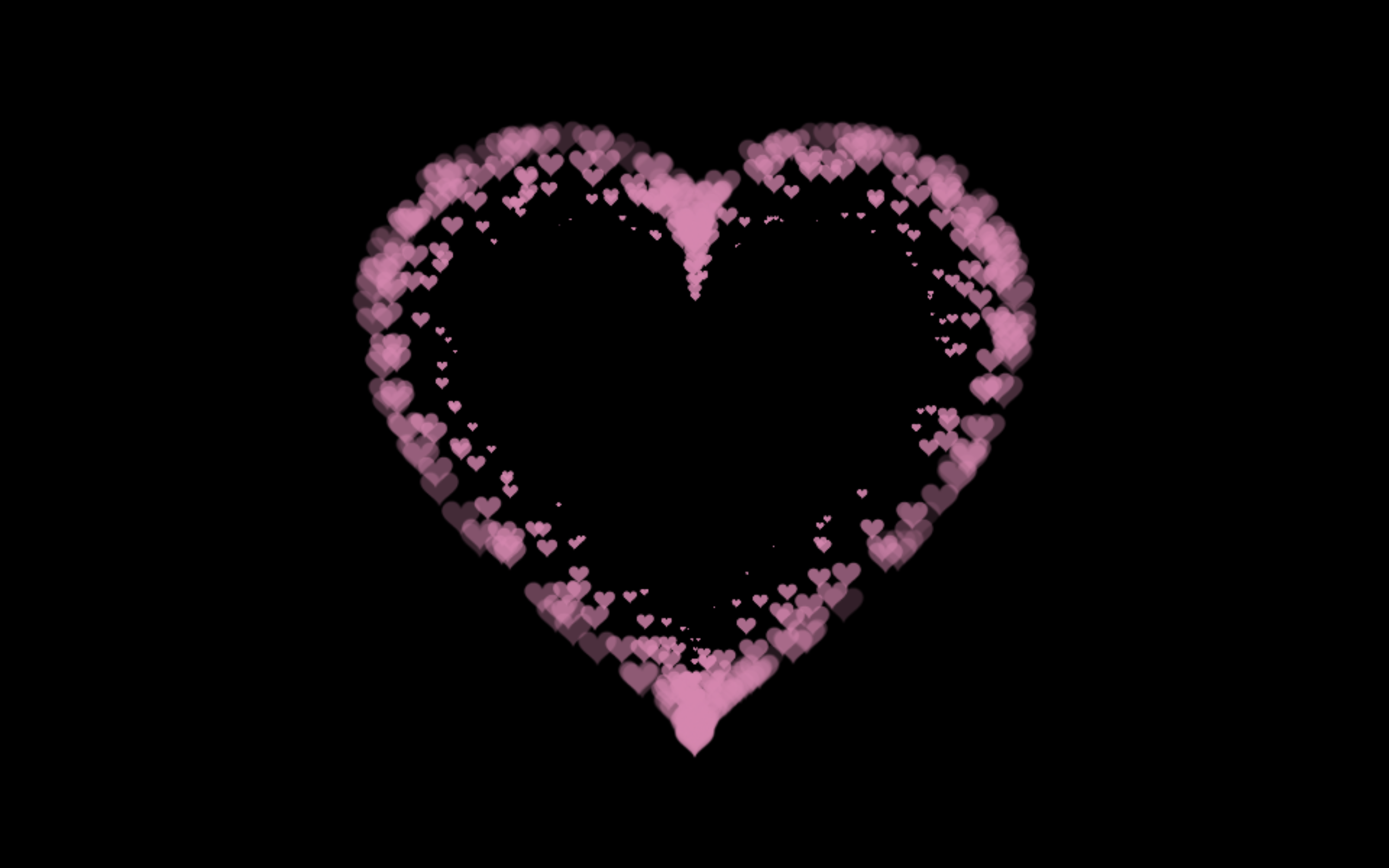
Let’s create Heart Animation Part 2 using HTML, CSS, and JavaScript with a canvas particle system. In this version, the heart shape is created using mathematical curves and animated particles, making the motion smooth, fluid, and visually rich. The particles continuously flow, fade, and move outward from the heart, giving it a glowing and alive effect.
We’ll use:
- HTML to set up a full-screen canvas where the animation runs.
- CSS to style the page, remove spacing, and keep the canvas fullscreen with a dark background for better contrast.
- JavaScript to create and control particles, handle movement, fading, and smooth animation using
requestAnimationFrame.
This project is great for learning canvas animations, particle systems, and smooth rendering techniques. It helps you practice math-based shapes, animation loops, and visual effects while building something beautiful and eye-catching.
HTML :
This HTML file sets up a basic page for the heart animation by loading required styles, creating a full-page canvas element, and linking the JavaScript file. The <canvas> with id pinkboard is where the animation is drawn, while style.css handles layout and styling, and script.js runs the particle-based heart animation logic.
<!DOCTYPE html>
<html lang="en">

<head>
  <meta charset="UTF-8">
  <title>Heart Animation | @coding.stella</title>
  <link rel="stylesheet" href="https://public.codepenassets.com/css/reset-2.0.min.css">
  <link rel="stylesheet" href="./style.css">
</head>

<body>

  <canvas id="pinkboard"></canvas>
  <script src="./script.js"></script>

</body>
</html>
CSS :
This CSS makes the page fill the entire screen with a black background and removes default spacing, then stretches the canvas to cover the full viewport so the animation always appears fullscreen.
html,
body {
  height: 100%;
  padding: 0;
  margin: 0;
  background: #000;
}

canvas {
  position: absolute;
  width: 100%;
  height: 100%;
}
JavaScript:
This code creates an animated heart made of particles on an HTML canvas: it first defines particle settings like count, speed, size, and lifetime, adds browser support for smooth animations, then builds small particle objects with position, velocity, and fade-out behavior. A pool reuses particles for performance, while a math function generates heart-shaped points. On every animation frame, new particles are emitted from the heart shape, move outward with easing and transparency, and are continuously updated and redrawn to form a smooth glowing heart animation.
let settings = {
  particles: {
    length: 500,
    duration: 2,
    velocity: 100,
    effect: -0.75,
    size: 30
  }
};

(function () {
  let b = 0;
  let c = ["ms", "moz", "webkit", "o"];
  for (let a = 0; a < c.length && !window.requestAnimationFrame; ++a) {
    window.requestAnimationFrame = window[c[a] + "RequestAnimationFrame"];
    window.cancelAnimationFrame =
      window[c[a] + "CancelAnimationFrame"] ||
      window[c[a] + "CancelRequestAnimationFrame"];
  }
  if (!window.requestAnimationFrame) {
    window.requestAnimationFrame = function (h) {
      let d = new Date().getTime();
      let f = Math.max(0, 16 - (d - b));
      let g = window.setTimeout(function () {
        h(d + f);
      }, f);
      b = d + f;
      return g;
    };
  }
  if (!window.cancelAnimationFrame) {
    window.cancelAnimationFrame = function (d) {
      clearTimeout(d);
    };
  }
})();

let Point = (function () {
  function Point(x, y) {
    this.x = typeof x !== "undefined" ? x : 0;
    this.y = typeof y !== "undefined" ? y : 0;
  }
  Point.prototype.clone = function () {
    return new Point(this.x, this.y);
  };
  Point.prototype.length = function (length) {
    if (typeof length == "undefined")
      return Math.sqrt(this.x * this.x + this.y * this.y);
    this.normalize();
    this.x *= length;
    this.y *= length;
    return this;
  };
  Point.prototype.normalize = function () {
    var length = this.length();
    this.x /= length;
    this.y /= length;
    return this;
  };
  return Point;
})();

let Particle = (function () {
  function Particle() {
    this.position = new Point();
    this.velocity = new Point();
    this.acceleration = new Point();
    this.age = 0;
  }
  Particle.prototype.initialize = function (x, y, dx, dy) {
    this.position.x = x;
    this.position.y = y;
    this.velocity.x = dx;
    this.velocity.y = dy;
    this.acceleration.x = dx * settings.particles.effect;
    this.acceleration.y = dy * settings.particles.effect;
    this.age = 0;
  };
  Particle.prototype.update = function (deltaTime) {
    this.position.x += this.velocity.x * deltaTime;
    this.position.y += this.velocity.y * deltaTime;
    this.velocity.x += this.acceleration.x * deltaTime;
    this.velocity.y += this.acceleration.y * deltaTime;
    this.age += deltaTime;
  };
  Particle.prototype.draw = function (context, image) {
    function ease(t) {
      return --t * t * t + 1;
    }
    let size = image.width * ease(this.age / settings.particles.duration);
    context.globalAlpha = 1 - this.age / settings.particles.duration;
    context.drawImage(
      image,
      this.position.x - size / 2,
      this.position.y - size / 2,
      size,
      size
    );
  };
  return Particle;
})();

let ParticlePool = (function () {
  let particles,
    firstActive = 0,
    firstFree = 0,
    duration = settings.particles.duration;

  function ParticlePool(length) {
    particles = new Array(length);
    for (let i = 0; i < particles.length; i++) particles[i] = new Particle();
  }
  ParticlePool.prototype.add = function (x, y, dx, dy) {
    particles[firstFree].initialize(x, y, dx, dy);
    firstFree++;
    if (firstFree == particles.length) firstFree = 0;
    if (firstActive == firstFree) firstActive++;
    if (firstActive == particles.length) firstActive = 0;
  };
  ParticlePool.prototype.update = function (deltaTime) {
    let i;
    if (firstActive < firstFree) {
      for (i = firstActive; i < firstFree; i++) particles[i].update(deltaTime);
    }
    if (firstFree < firstActive) {
      for (i = firstActive; i < particles.length; i++)
        particles[i].update(deltaTime);
      for (i = 0; i < firstFree; i++) particles[i].update(deltaTime);
    }
    while (particles[firstActive].age >= duration && firstActive != firstFree) {
      firstActive++;
      if (firstActive == particles.length) firstActive = 0;
    }
  };
  ParticlePool.prototype.draw = function (context, image) {
    if (firstActive < firstFree) {
      for (i = firstActive; i < firstFree; i++)
        particles[i].draw(context, image);
    }
    if (firstFree < firstActive) {
      for (i = firstActive; i < particles.length; i++)
        particles[i].draw(context, image);
      for (i = 0; i < firstFree; i++) particles[i].draw(context, image);
    }
  };
  return ParticlePool;
})();

(function (canvas) {
  let context = canvas.getContext("2d"),
    particles = new ParticlePool(settings.particles.length),
    particleRate = settings.particles.length / settings.particles.duration,
    time;

  function pointOnHeart(t) {
    return new Point(
      160 * Math.pow(Math.sin(t), 3),
      130 * Math.cos(t) -
        50 * Math.cos(2 * t) -
        20 * Math.cos(3 * t) -
        10 * Math.cos(4 * t) +
        25
    );
  }

  let image = (function () {
    let canvas = document.createElement("canvas"),
      context = canvas.getContext("2d");
    canvas.width = settings.particles.size;
    canvas.height = settings.particles.size;

    function to(t) {
      let point = pointOnHeart(t);
      point.x =
        settings.particles.size / 2 + (point.x * settings.particles.size) / 350;
      point.y =
        settings.particles.size / 2 - (point.y * settings.particles.size) / 350;
      return point;
    }

    context.beginPath();
    let t = -Math.PI;
    let point = to(t);
    context.moveTo(point.x, point.y);
    while (t < Math.PI) {
      t += 0.01;
      point = to(t);
      context.lineTo(point.x, point.y);
    }
    context.closePath();
    context.fillStyle = "#ea80b0";
    context.fill();

    let image = new Image();
    image.src = canvas.toDataURL();
    return image;
  })();

  function render() {
    requestAnimationFrame(render);
    let newTime = new Date().getTime() / 1000,
      deltaTime = newTime - (time || newTime);
    time = newTime;

    context.clearRect(0, 0, canvas.width, canvas.height);

    let amount = particleRate * deltaTime;
    for (let i = 0; i < amount; i++) {
      let pos = pointOnHeart(Math.PI - 2 * Math.PI * Math.random());
      let dir = pos.clone().length(settings.particles.velocity);
      particles.add(
        canvas.width / 2 + pos.x,
        canvas.height / 2 - pos.y,
        dir.x,
        -dir.y
      );
    }

    particles.update(deltaTime);
    particles.draw(context, image);
  }

  function onResize() {
    canvas.width = canvas.clientWidth;
    canvas.height = canvas.clientHeight;
  }
  window.onresize = onResize;

  setTimeout(function () {
    onResize();
    render();
  }, 10);
})(document.getElementById("pinkboard"));
In conclusion, building Heart Animation Part 2 with HTML, CSS, and JavaScript using a canvas particle system is an excellent way to improve your animation skills. By combining math-driven shapes, smooth updates, and reusable particles, you can create a dynamic and expressive heart animation ❤️✨
If your project has problems, don’t worry. Just click to download the source code and face your coding challenges with excitement. Have fun coding!
