


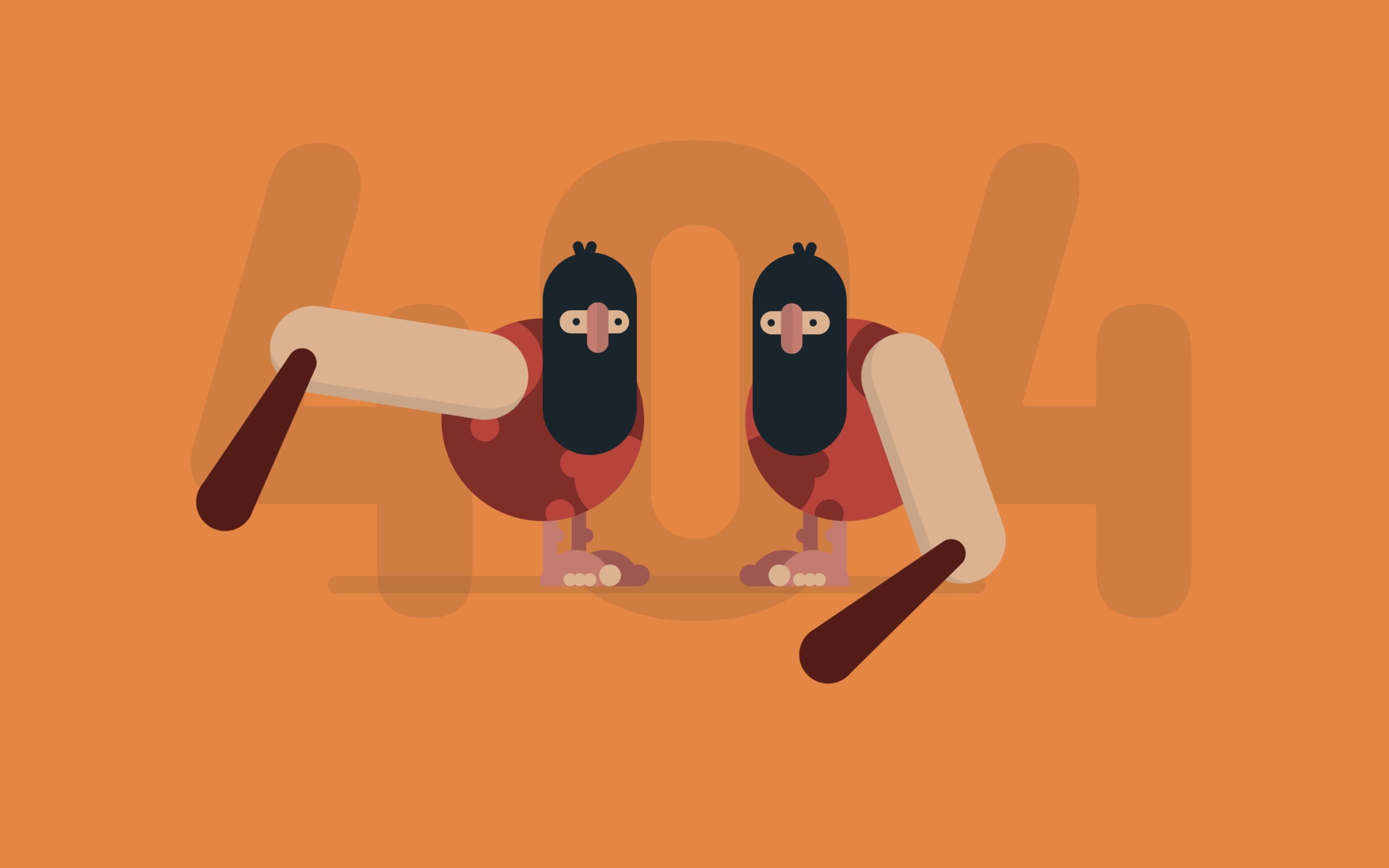
Let’s create an Animated Caveman 404 Page using HTML and CSS. In this project, we build a fun and creative error page where two cavemen appear with simple animations, making the “404” page more engaging instead of boring.
We’ll use:
- HTML to create the structure like the big “404” text and different parts of the caveman (head, legs, arms, etc.) using simple
<div>elements. - CSS to design and animate everything by adding colors, shaping elements using border-radius, and using
@keyframesto move parts like arms, head, and eyes.
This project is perfect for beginners and front-end developers who want to practice CSS animations and learn how to create complex designs using only HTML and CSS. Let’s build a fun and eye-catching 404 page! 🚀
HTML :
This HTML creates a fun 404 error page layout where a big “404” text is shown in the center, and below it there are two caveman characters made using multiple nested <div> elements like head, legs, arms, eyes, etc. Each caveman is built by combining small parts (like shapes and circles) so CSS can style them into a full character. It also links external files like Google Fonts for styling text, a CSS file for design, Font Awesome for the icon, and a JS file (optional for extra behavior), while the bottom link is just a credit section to view more designs.
<!DOCTYPE html>
<html lang="en">

<head>
  <meta charset="UTF-8">
  <title>Animated Caveman 404 Page</title>
  <link href="https://fonts.googleapis.com/css?family=Concert+One" rel="stylesheet">
  <link rel="stylesheet" href="./style.css">
</head>

<body>
  <div class="text">
    <p>404</p>
  </div>
  <div class="container">
    <!-- caveman left -->
    <div class="caveman">
      <div class="leg">
        <div class="foot">
          <div class="fingers"></div>
        </div>
      </div>
      <div class="leg">
        <div class="foot">
          <div class="fingers"></div>
        </div>
      </div>
      <div class="shape">
        <div class="circle"></div>
        <div class="circle"></div>
      </div>
      <div class="head">
        <div class="eye">
          <div class="nose"></div>
        </div>
        <div class="mouth"></div>
      </div>
      <div class="arm-right">
        <div class="club"></div>
      </div>
    </div>
    <!-- caveman right -->
    <div class="caveman">
      <div class="leg">
        <div class="foot">
          <div class="fingers"></div>
        </div>
      </div>
      <div class="leg">
        <div class="foot">
          <div class="fingers"></div>
        </div>
      </div>
      <div class="shape">
        <div class="circle"></div>
        <div class="circle"></div>
      </div>
      <div class="head">
        <div class="eye">
          <div class="nose"></div>
        </div>
        <div class="mouth"></div>
      </div>
      <div class="arm-right">
        <div class="club"></div>
      </div>
    </div>
  </div>
  <script src="./script.js"></script>

</body>

</html>
CSS :
The CSS styles everything by giving colors, sizes, and positions to each part of the caveman, using tricks like border-radius to make shapes (head, body, eyes, etc.) and position: absolute to place them correctly. It also creates animations using @keyframes so the cavemen move (arms rotate, head bounces, eyes blink, and shadow changes), making the page look alive. The background is orange, the “404” text is huge and faded behind, and everything is centered using transform: translate, while small details like fingers, club, and shadows are also designed using pure CSS without images
body {
  background-color: #FF7F2E;
  font-family: "Concert One", cursive;
  margin: 0;
  overflow: hidden;
  padding: 0;
}

/*/////////////////// rules */
/*/////////////////// scene */
.text {
  left: 50%;
  position: absolute;
  top: 50%;
  transform: translate(-50%, -50%);
  color: rgba(19, 36, 44, 0.1);
  font-size: 30em;
  text-align: center;
  top: 40%;
}

.container {
  left: 50%;
  position: absolute;
  top: 50%;
  transform: translate(-50%, -50%);
  height: 300px;
  width: 500px;
}

.container:after {
  position: absolute;
  content: "";
  background-color: rgba(19, 36, 44, 0.1);
  border-radius: 12px;
  bottom: 40px;
  height: 12px;
  left: 80px;
  width: 350px;
  z-index: -1;
}

/*/////////////////// caveman */
.caveman {
  height: 300px;
  position: absolute;
  width: 250px;
}

.caveman:nth-child(1) {
  right: 20px;
}

.caveman:nth-child(2) {
  left: 20px;
  transform: rotateY(180deg);
}

.head {
  position: absolute;
  background-color: #13242C;
  border-radius: 50px;
  height: 140px;
  left: 60px;
  top: 25px;
  width: 65px;
}

.head:after,
.head:before {
  content: "";
  position: absolute;
  background-color: #13242C;
  border-radius: 10px;
  height: 20px;
  width: 7px;
}

.head:after {
  left: 35px;
  top: -8px;
  transform: rotate(20deg);
}

.head:before {
  left: 30px;
  top: -8px;
  transform: rotate(-20deg);
}

.head .eye {
  left: 50%;
  position: absolute;
  transform: translateX(-50%);
  background-color: #EAB08C;
  border-radius: 50px;
  height: 16px;
  left: 45%;
  top: 40px;
  width: 48px;
}

.head .eye:after,
.head .eye:before {
  content: "";
  position: absolute;
  top: 50%;
  transform: translateY(-50%);
  background-color: #13242C;
  border-radius: 50%;
  height: 5px;
  width: 5px;
}

.head .eye:after {
  left: 5px;
}

.head .eye:before {
  right: 9px;
}

.head .eye .nose {
  left: 50%;
  position: absolute;
  top: 50%;
  transform: translate(-50%, -50%);
  background-color: #D9766C;
  border-left: 8px solid rgba(19, 36, 44, 0.1);
  border-radius: 10px;
  box-sizing: border-box;
  height: 35px;
  left: 45%;
  top: 12px;
  width: 15px;
}

.shape {
  left: 50%;
  position: absolute;
  transform: translateX(-50%);
  border-radius: 50%;
  height: 140px;
  overflow: hidden;
  top: 70px;
  width: 140px;
}

.shape .circle {
  position: absolute;
  border-radius: 50%;
  height: 60px;
  width: 60px;
}

.shape .circle:after,
.shape .circle:before {
  content: "";
  position: absolute;
  border-radius: 50%;
  height: 20px;
  width: 20px;
}

.shape .circle:after {
  left: 50px;
  top: 10px;
}

.shape .circle:before {
  left: 60px;
  top: 45px;
}

.shape .circle:nth-child(1) {
  left: -12px;
  top: 80px;
}

.shape .circle:nth-child(2) {
  right: 10px;
  top: 0px;
  transform: rotate(90deg);
}

.shape .circle:nth-child(2):after {
  left: 65px;
  top: 10px;
}

.shape .circle:nth-child(2):before {
  display: none;
}

.caveman:nth-child(1) .shape {
  background-color: #D13433;
}

.caveman:nth-child(1) .shape .circle {
  background-color: #932422;
}

.caveman:nth-child(1) .shape .circle:after,
.caveman:nth-child(1) .shape .circle:before {
  background-color: #932422;
}

.caveman:nth-child(2) .shape {
  background-color: #932422;
}

.caveman:nth-child(2) .shape .circle {
  background-color: #D13433;
}

.caveman:nth-child(2) .shape .circle:after,
.caveman:nth-child(2) .shape .circle:before {
  background-color: #D13433;
}

.arm-right {
  position: absolute;
  background-color: #EAB08C;
  border-left: 8px solid rgba(19, 36, 44, 0.1);
  border-radius: 50px;
  box-sizing: border-box;
  height: 180px;
  left: 135px;
  top: 80px;
  transform-origin: 30px 30px;
  width: 60px;
  z-index: 1;
}

.arm-right .club {
  position: absolute;
  border-bottom: 110px solid #601513;
  border-left: 10px solid transparent;
  border-right: 10px solid transparent;
  height: 0;
  left: -60px;
  top: 120px;
  transform: rotate(70deg);
  width: 20px;
}

.arm-right .club:after,
.arm-right .club:before {
  position: absolute;
  content: "";
  background-color: #601513;
  border-radius: 50%;
  left: 0;
}

.arm-right .club:after {
  height: 20px;
  width: 20px;
  top: -10px;
}

.arm-right .club:before {
  height: 40px;
  width: 40px;
  left: -10px;
  top: 90px;
}

.leg {
  position: absolute;
  border-radius: 10px;
  height: 55px;
  top: 200px;
  width: 10px;
}

.leg:after {
  position: absolute;
  content: "";
  border-radius: 50%;
  height: 10px;
  left: -5px;
  top: 15px;
  width: 10px;
}

.leg .foot {
  position: absolute;
  border-radius: 25px 25px 0 0;
  height: 25px;
  left: -38px;
  top: 30px;
  width: 50px;
}

.leg .foot:after,
.leg .foot:before,
.leg .foot .fingers,
.leg .foot .fingers:after {
  position: absolute;
  background-color: #EAB08C;
  border-radius: 50%;
  bottom: 0px;
  height: 15px;
  transform-origin: bottom;
  width: 15px;
}

.leg .foot:after {
  left: -6px;
  content: "";
}

.leg .foot:before {
  left: 8px;
  transform: scale(0.6);
  content: "";
}

.leg .foot .fingers {
  left: 15px;
  transform: scale(0.6);
}

.leg .foot .fingers:after {
  left: 11px;
  content: "";
}

.leg:nth-child(1) {
  background-color: #B2524D;
  left: 95px;
}

.leg:nth-child(1):after {
  background-color: #B2524D;
}

.leg:nth-child(1) .foot {
  background-color: #B2524D;
}

.leg:nth-child(1) .foot:after {
  background-color: #B2524D;
}

.leg:nth-child(1) .foot:before {
  display: none;
}

.leg:nth-child(2) {
  background-color: #D9766C;
  left: 115px;
}

.leg:nth-child(2):after {
  background-color: #D9766C;
}

.leg:nth-child(2) .foot {
  background-color: #D9766C;
}

/*/////////////////// animation */
.caveman:nth-child(1) .arm-right {
  animation: arm-anima 1.2s infinite cubic-bezier(0.55, 0.01, 0.16, 1.34);
}

.caveman:nth-child(2) .arm-right {
  animation: arm-anima 1.2s infinite cubic-bezier(0.55, 0.01, 0.16, 1.34);
  animation-delay: 0.6s;
}

@keyframes arm-anima {
  0% {
    transform: rotate(0);
  }

  100% {
    transform: rotate(-360deg);
  }
}

.caveman:nth-child(2) .head {
  animation: head-anima 1.2s infinite cubic-bezier(0.55, 0.01, 0.16, 1.34);
}

.caveman:nth-child(1) .head {
  animation: head-anima 1.2s infinite cubic-bezier(0.55, 0.01, 0.16, 1.34);
  animation-delay: 0.6s;
}

@keyframes head-anima {
  0% {
    top: 25px;
  }

  42% {
    top: 25px;
  }

  45% {
    top: 50px;
  }

  100% {
    top: 25px;
  }
}

.caveman:nth-child(2) .eye:after,
.caveman:nth-child(2) .eye:before {
  animation: eye-anima 1.2s infinite cubic-bezier(0.55, 0.01, 0.16, 1.34);
}

.caveman:nth-child(1) .eye:after,
.caveman:nth-child(1) .eye:before {
  animation: eye-anima 1.2s infinite cubic-bezier(0.55, 0.01, 0.16, 1.34);
  animation-delay: 0.6s;
}

@keyframes eye-anima {
  0% {
    height: 5px;
  }

  42% {
    height: 5px;
  }

  45% {
    height: 1px;
  }

  100% {
    height: 5px;
  }
}

.container:after {
  animation: shadow-anima 1.2s infinite cubic-bezier(0.55, 0.01, 0.16, 1.34);
  animation-delay: 0.1s;
}

@keyframes shadow-anima {
  0% {
    width: 350px;
    left: 80px;
  }

  25% {
    width: 450px;
    left: 80px;
  }

  50% {
    width: 350px;
    left: 80px;
  }

  75% {
    width: 450px;
    left: 0px;
  }

  100% {
    width: 350px;
    left: 80px;
  }
}

/*/////////////////////// credit ////*/
#link {
  bottom: 20px;
  color: #000;
  opacity: 0.2;
  display: flex;
  align-items: center;
  position: absolute;
  left: 50%;
  transform: translateX(-50%);
}

#link p {
  margin: 0;
  margin-left: 5px;
}

#link:hover {
  opacity: 1;
}
In conclusion, this Animated Caveman 404 Page shows how you can turn a simple error page into something fun and engaging using only HTML and CSS. By combining basic elements and animations, you can create unique designs without images or complex tools. It’s a great way to practice creativity, improve your animation skills, and make your website stand out 🚀
If your project has problems, don’t worry. Just click to download the source code and face your coding challenges with excitement. Have fun coding!
