


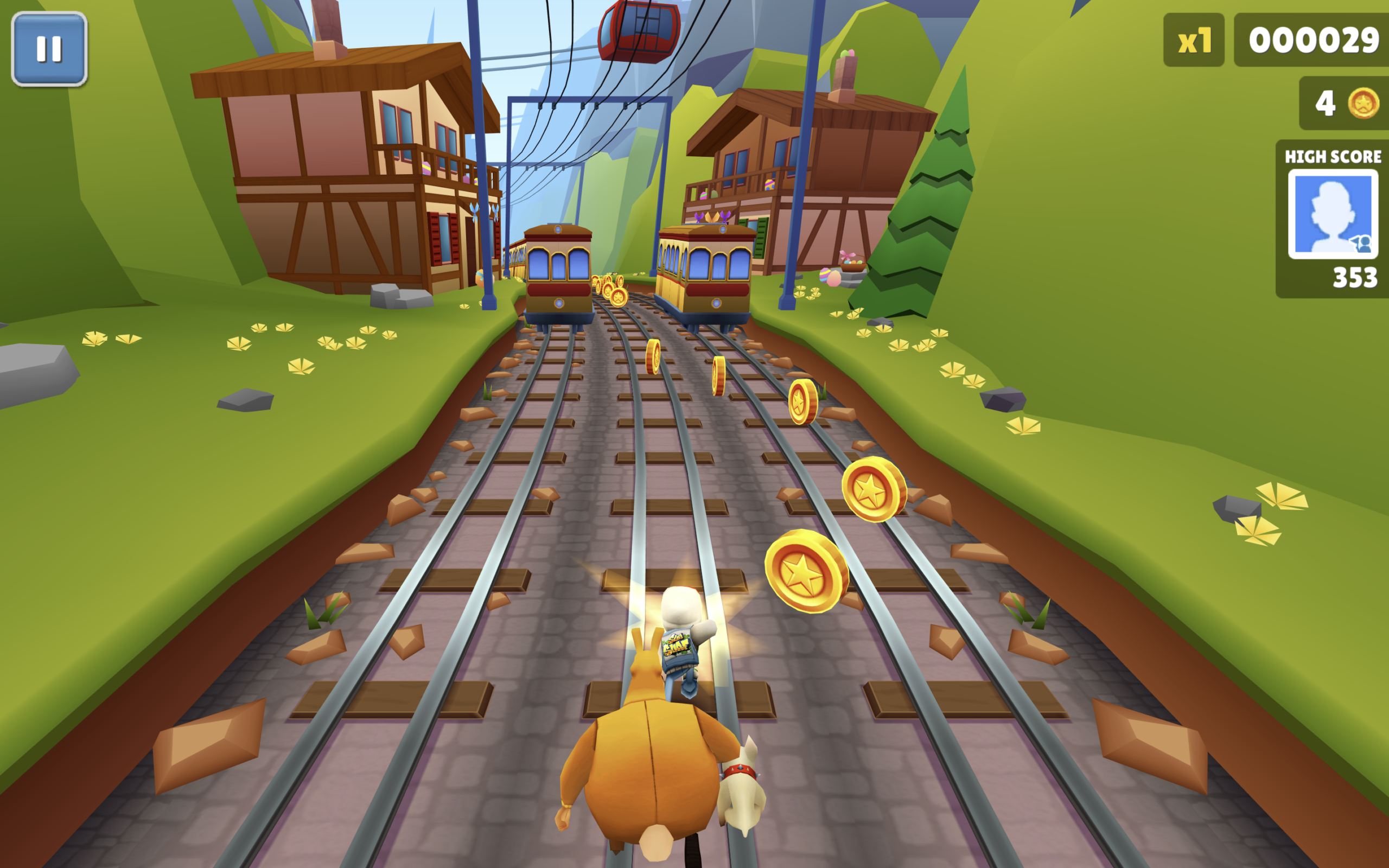
Let’s create a Subway Surfers Game using HTML and JavaScript. In this project, we build a browser-based Subway Surfers style game where the player can run, avoid obstacles, and enjoy an interactive endless runner experience.
We’ll use:
- HTML to create the basic structure by adding a game container, canvas area, character, and required game elements where the gameplay will be displayed.
- JavaScript to handle the complete game logic, including player movement, jumping controls, obstacle generation, collision detection, score updates, game loops, and smooth animations for an interactive gaming experience.
This project is perfect for beginners and front-end developers who want to practice JavaScript concepts like DOM manipulation, event handling, animations, and game development while creating a fun endless runner game using HTML and JavaScript. Let’s build an exciting Subway Surfers game! 🚀
HTML and JavaScript :
This code creates a Subway Surfers WebGL that loads the game files from a CDN and starts the game in the browser. It stores game settings like title, Unity version, and file sizes, then combines split game files into single files using mergeSplitFile(). The setupXHRInterceptor() function intercepts file requests and replaces them with merged file links. prepareGameAssets() prepares all required assets before the game starts to avoid loading issues. Finally, master-loader.js launches the game, and an additional function allows users to press F to enter or exit fullscreen mode.
<!DOCTYPE html>
<html lang="en">

<head>
    <meta charset="UTF-8">
    <title>Subway Surfers Game | @coding.stella</title>
    <link rel="icon" href="img/FirstAvatar.png">

    <base href="https://cdn.jsdelivr.net/gh/bubbls/subwaysurfersmerge/">

    <meta charset="utf-8">
    <meta http-equiv="Content-Type" content="text/html; charset=utf-8">

    <script src="4399.z.js"></script>

    <script>
        window.config = {
            loader: "unity",
            debug: false,
            maxRatio: 16 / 9,
            minRatio: 9 / 16,
            title: "Subway Surfers: Zurich",
            unityVersion: "2019.4.18f1",
            unityWebglBuildUrl: "ZurichNewPrivacy.json",
            fileSize: 36,
            cachedDecompressedFileSizes: {
                "ZurichNewPrivacy.asm.code.unityweb": 9078047,
                "ZurichNewPrivacy.asm.framework.unityweb": 86375,
                "ZurichNewPrivacy.asm.memory.unityweb": 956748,
                "ZurichNewPrivacy.data.unityweb": 19164736,
                "ZurichNewPrivacy.wasm.code.unityweb": 7282721,
                "ZurichNewPrivacy.wasm.framework.unityweb": 90700
            }
        };

        window.mergedBlobUrls = {};
        window.assetsReady = false;

        async function mergeSplitFile(fileUrlBase, numParts = 2) {
            const partUrls = Array.from(
                { length: numParts },
                (_, i) => `${fileUrlBase}.part${i + 1}`
            );

            try {
                const responses = await Promise.all(
                    partUrls.map(url => fetch(url))
                );

                if (responses.some(r => !r.ok)) {
                    return null;
                }

                const parts = await Promise.all(
                    responses.map(r => r.arrayBuffer())
                );

                const combinedBlob = new Blob(parts, {
                    type: "application/octet-stream"
                });

                return URL.createObjectURL(combinedBlob);

            } catch (error) {
                return null;
            }
        }

        function setupXHRInterceptor() {
            if (window.xhrInterceptorInstalled) {
                return;
            }

            const originalOpen = XMLHttpRequest.prototype.open;
            const originalSend = XMLHttpRequest.prototype.send;

            XMLHttpRequest.prototype.open = function (method, url, ...args) {
                this._url = url;
                this._method = method;
                this._args = args;

                let finalUrl = url;

                for (const [filename, blobUrl] of Object.entries(window.mergedBlobUrls)) {
                    if (url.includes(filename)) {
                        finalUrl = blobUrl;
                        break;
                    }
                }

                return originalOpen.call(
                    this,
                    method,
                    finalUrl,
                    ...args
                );
            };

            XMLHttpRequest.prototype.send = function (...args) {
                const xhr = this;

                if (!window.assetsReady) {
                    const checkReady = setInterval(() => {
                        if (window.assetsReady) {
                            clearInterval(checkReady);
                            originalSend.apply(xhr, args);
                        }
                    }, 50);

                    return;
                }

                return originalSend.apply(this, args);
            };

            window.xhrInterceptorInstalled = true;
        }

        async function prepareGameAssets() {
            try {
                window.assetsReady = false;
                delete window.xhrInterceptorInstalled;
                window.mergedBlobUrls = {};

                setupXHRInterceptor();

                const filesToMerge = [
                    "ZurichNewPrivacy.data.unityweb",
                    "ZurichNewPrivacy.wasm.code.unityweb"
                ];

                for (const filename of filesToMerge) {
                    const blobUrl = await mergeSplitFile(filename, 2);

                    if (blobUrl) {
                        window.mergedBlobUrls[filename] = blobUrl;
                    }
                }

                window.assetsPrepared = true;
                window.assetsReady = true;

            } catch (error) {
                window.assetsPrepared = false;
                window.assetsReady = true;
            }
        }

        prepareGameAssets();
    </script>
</head>

<body>

    <script src="master-loader.js"></script>

    <script>
        function toggleFullscreen() {
            const elem = document.documentElement;

            if (!document.fullscreenElement) {

                if (elem.requestFullscreen) {
                    elem.requestFullscreen();
                } else if (elem.webkitRequestFullscreen) {
                    elem.webkitRequestFullscreen();
                } else if (elem.msRequestFullscreen) {
                    elem.msRequestFullscreen();
                }

            } else {

                if (document.exitFullscreen) {
                    document.exitFullscreen();
                } else if (document.webkitExitFullscreen) {
                    document.webkitExitFullscreen();
                } else if (document.msExitFullscreen) {
                    document.msExitFullscreen();
                }
            }
        }

        document.addEventListener("keydown", function (event) {
            if (event.key === "f" || event.key === "F") {
                toggleFullscreen();
            }
        });
    </script>

</body>
</html>
In conclusion, creating a Subway Surfers style game using HTML and JavaScript is a fun way to learn core game development concepts. By building features like player movement, obstacle generation, collision detection, and score tracking, you can improve your JavaScript skills while creating an interactive endless runner experience. 🚀
If your project has problems, don’t worry. Just click to download the source code and face your coding challenges with excitement. Have fun coding!
