


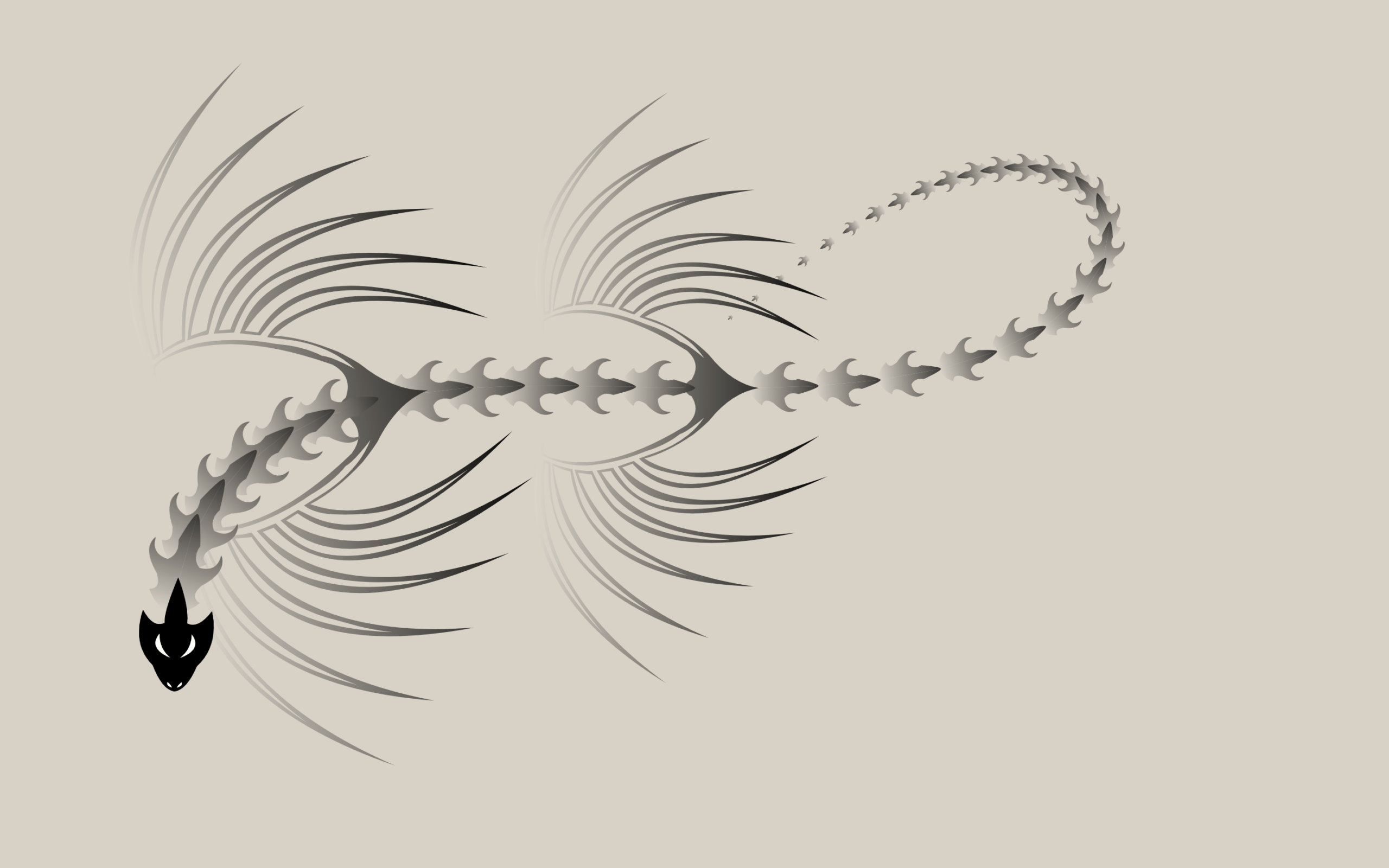
Let’s build an Interactive Dragon Cursor Animation using HTML, CSS, and JavaScript. This creative project replaces the normal cursor with a dynamic dragon that smoothly follows your mouse, creating a magical and eye-catching effect across the screen.
We’ll use:
- HTML to define the dragon using SVG elements like the head, wings, and spine.
- CSS to style the background, control layout, and enhance the visual feel with filters and full-screen positioning.
- JavaScript to track mouse movement, animate multiple dragon segments, and create smooth flowing motion as the dragon follows the pointer.
This project is perfect for practicing SVG manipulation, motion animation, and real-time interaction while building something visually impressive. Let’s bring the dragon to life and turn your cursor into a flying creature. 🐉
HTML :
This HTML creates an interactive dragon cursor effect by defining a detailed dragon shape using SVG. Inside the <svg>, it uses <defs> to store reusable parts like the head, wings, and spine with paths and gradient colors for styling. These shapes are not shown directly but are prepared to be controlled and animated later using JavaScript from script.js, while the design and layout are handled in style.css. Basically, this file sets up the dragon graphics structure, and the CSS and JS make it move and follow the cursor.
<!DOCTYPE html>
<html lang="en">

<head>
  <meta charset="UTF-8">
  <meta name="viewport" content="width=device-width, initial-scale=1.0">
  <link rel="stylesheet" href="./style.css">
  <title>Interactive Dragon Cursor | @coding.stella</title>
</head>

<body>
  <svg>
    <defs>
      <g id="Cabeza" transform="matrix(1, 0, 0, 1, 0, 0)">
        <path style="fill:#FFFFFF;fill-opacity:1"
          d="M-28.9,-1.1L-28.55 -1.95Q-28.1 -3.1 -27.25 -2.95L-26.7 -2.95Q-27.7 -1.65 -28.9 -1.1M-18.35,-1.8Q-15.1 -10.3 -9.6 -6.05Q-15.1 -6.2 -18.35 -1.8M-18.35,1.1Q-15.1 5.45 -9.6 5.35Q-15.1 9.55 -18.35 1.1M-26.7,2.2L-27.25 2.25Q-28.1 2.4 -28.55 1.2L-28.9 0.35Q-27.7 0.9 -26.7 2.2" />
        <path style="fill:#000000;fill-opacity:1"
          d="M-21.05,-8.25Q-13.6 -15.95 -1.3 -12.1Q-7.85 -8.5 -5.85 -4.35Q-2.3 -4.85 10.5 0.15Q0 4.35 -5.85 3.65Q-7.85 7.75 -1.25 12.45Q-13.6 15.2 -21.05 7.5Q-29.55 4.05 -30.2 -0.35Q-29.55 -4.8 -21.05 -8.25M-26.7,-2.95L-27.25 -2.95Q-28.1 -3.1 -28.55 -1.95L-28.9 -1.1Q-27.7 -1.65 -26.7 -2.95M-9.6,-6.05Q-15.1 -10.3 -18.35 -1.8Q-15.1 -6.2 -9.6 -6.05M-9.6,5.35Q-15.1 5.45 -18.35 1.1Q-15.1 9.55 -9.6 5.35M-28.9,0.35L-28.55 1.2Q-28.1 2.4 -27.25 2.25L-26.7 2.2Q-27.7 0.9 -28.9 0.35" />
      </g>
      <g id="Aletas" transform="matrix(1, 0, 0, 1, 0, 0)">
        <linearGradient id="LinearGradID_1" gradientUnits="userSpaceOnUse"
          gradientTransform="matrix(0.0935974, 0, 0, 0.188782, -20.55, 0)" spreadMethod="pad" x1="-819.2" y1="0"
          x2="819.2" y2="0">
          <stop offset="0" style="stop-color:#CCCCCC;stop-opacity:1" />
          <stop offset="1" style="stop-color:#000000;stop-opacity:1" />
        </linearGradient>
        <path style="fill:url(#LinearGradID_1) "
          d="M29.75,-36.85Q-17.75 -61.45 -42.05 -40.95L-45.35 -38.35L-53.7 -41.15L-51.15 -44.85Q-34.85 -68.4 21 -57.8Q-32.2 -72.1 -50.25 -50Q-53.85 -45.65 -56.05 -41.95L-64.7 -43.35L-60.6 -50.3Q-45.9 -75.55 5.1 -79.35Q-2.2 -79.8 -9.45 -79.15Q-16.2 -78.55 -22.85 -77.15Q-29.85 -75.65 -36.5 -73Q-43.05 -70.4 -48.8 -66.85Q-54.55 -63.35 -56.8 -60.3L-60.5 -55.4Q-62.95 -52.1 -67 -43.55L-70.55 -43.55L-76.35 -42.95Q-74.6 -49.1 -71.85 -54.85Q-68.9 -61.25 -64.8 -67.1Q-60.8 -73 -55.45 -77.55Q-49.9 -82.35 -43.65 -85.85L-30.6 -92.7Q-24.05 -95.95 -17 -98.25Q-63.75 -86.35 -73.65 -57.1Q-75.75 -50.75 -77.45 -42.75Q-82.9 -41.75 -88 -39.65Q-87.65 -46.65 -86.3 -53.05Q-79.8 -89.8 -36.65 -117.2Q-80.65 -94.5 -87.55 -59.55Q-88.65 -54.15 -88.95 -39.4L-89.8 -38.85L-92.7 -37.6Q-93.75 -44.35 -94.1 -51.15Q-94.4 -58.2 -93.25 -65.1Q-92.15 -72.5 -90.05 -79.65Q-88.05 -86.55 -85 -93Q-82.1 -99.3 -78.45 -105.15Q-74.6 -111.35 -70.25 -117.25Q-65.95 -123.1 -61.1 -128.55Q-70.3 -119.35 -77.9 -108.7Q-86 -97.3 -90.8 -84.05Q-95.8 -70.5 -96 -56.15Q-96.1 -46 -94.05 -36.05L-93.25 -31.55Q-93.5 -35.65 -92.35 -36Q-79.85 -42 -66.6 -40.45Q-52.45 -38.85 -39.2 -33.25Q-28.3 -29.9 -21.25 -24.15Q-17.8 -23.3 -8.6 -15.6Q-12.1 -20.75 -16.75 -24.5Q-24.55 -30.7 -34.25 -34.05L-42.55 -37Q-38.9 -41.25 -31.5 -43.25Q-24.05 -45.3 -16.2 -46.3Q-8.35 -47.35 -1 -46Q5.95 -44.75 12.75 -42.85Q19.85 -40.9 29.75 -36.85M-92.45,-27.35L-94.95 -36.25Q-109.7 -105 -27.95 -154.65Q-98.65 -103.8 -91.75 -39.4L-89.95 -40.2Q-92.2 -105.25 -5.6 -130.9Q-78.8 -99.95 -87.45 -40.9Q-83.15 -42.95 -78.45 -43.95Q-70 -101.3 17.65 -103.8Q-56.9 -93.4 -74.5 -44.55L-67.4 -45.45Q-49.1 -94.95 39.25 -75.65Q-36.75 -84.35 -62.25 -44.25L-57.3 -43.6Q-31.65 -86.5 56.15 -46.05Q-20.3 -73.35 -51.35 -41.7L-45.95 -39.75Q-17.85 -71.35 51.85 -24.8Q-8.7 -56.4 -39.75 -37.05Q-28.15 -34.05 -14.25 -24.45Q-8.6 -19.85 -5.8 -16.95Q5.95 -2.4 20 0Q5.95 2.4 -5.8 16.95Q-8.6 19.85 -14.25 24.45Q-28.15 34.05 -39.75 37.05Q-8.7 56.4 51.85 24.8Q-17.85 71.35 -45.95 39.75L-51.35 41.7Q-20.3 73.35 56.15 46.1Q-31.65 86.5 -57.3 43.65L-62.25 44.3Q-36.75 84.35 39.25 75.7Q-49.1 94.95 -67.4 45.5L-74.5 44.6Q-56.9 93.4 17.65 103.85Q-70 101.3 -78.45 43.95Q-83.15 42.95 -87.45 40.9Q-78.8 99.95 -5.6 130.9Q-92.2 105.25 -89.95 40.25L-91.75 39.4Q-98.65 103.8 -27.95 154.65Q-109.7 105 -94.95 36.3L-92.45 27.35Q-93.05 33.9 -92.05 34.75Q-91.1 35.55 -88.95 36.7L-87.95 37Q-83.7 38.25 -79.05 38.8L-77.25 38.95Q-72.55 39.3 -67.5 38.85L-65.45 38.65Q-44.4 36.05 -17.8 19.6Q-9.9 12.8 -15.15 4.4Q-18.15 3.15 -19 0Q-18.15 -3.15 -15.15 -4.4Q-9.9 -12.8 -17.8 -19.6L-17.8 -19.55Q-44.4 -36.05 -65.45 -38.6L-67.5 -38.8Q-72.55 -39.3 -77.25 -38.95L-79.05 -38.75Q-83.7 -38.25 -87.95 -36.95L-88.95 -36.65Q-91.1 -35.55 -92.05 -34.7Q-93.05 -33.9 -92.45 -27.35M-8.6,15.6Q-17.8 23.3 -21.25 24.2Q-28.3 29.9 -39.2 33.3Q-52.45 38.85 -66.6 40.5Q-79.85 42 -92.35 36Q-93.5 35.65 -93.25 31.55L-94.05 36.1Q-96.1 46.05 -96 56.15Q-95.8 70.5 -90.8 84.1Q-86 97.3 -77.9 108.75Q-70.3 119.35 -61.1 128.6Q-65.95 123.1 -70.25 117.25Q-74.6 111.35 -78.45 105.15Q-82.1 99.3 -85 93Q-88.05 86.55 -90.05 79.7Q-92.15 72.5 -93.25 65.1Q-94.4 58.2 -94.1 51.2Q-93.75 44.35 -92.7 37.6L-89.8 38.9L-88.95 39.45Q-88.65 54.15 -87.55 59.55Q-80.65 94.5 -36.65 117.25Q-79.8 89.8 -86.3 53.1Q-87.65 46.65 -88 39.65Q-82.9 41.75 -77.45 42.75Q-75.75 50.75 -73.65 57.15Q-63.75 86.35 -17 98.3Q-24.05 95.95 -30.6 92.75L-43.65 85.9Q-49.9 82.35 -55.45 77.6Q-60.8 73 -64.8 67.15Q-68.9 61.25 -71.85 54.85Q-74.6 49.1 -76.35 42.95L-70.55 43.6L-67 43.6Q-62.95 52.1 -60.5 55.4L-56.8 60.35Q-54.55 63.35 -48.8 66.9Q-43.05 70.4 -36.5 73Q-29.85 75.65 -22.85 77.15Q-16.2 78.55 -9.45 79.15Q-2.2 79.8 5.1 79.35Q-45.9 75.55 -60.6 50.3L-64.7 43.4L-56.05 41.95Q-53.85 45.65 -50.25 50Q-32.2 72.1 21 57.85Q-34.85 68.4 -51.15 44.85L-53.7 41.2L-45.35 38.35L-42.05 40.95Q-17.75 61.45 29.75 36.85Q19.85 40.9 12.75 42.9Q5.95 44.75 -1 46Q-8.35 47.35 -16.2 46.35Q-24.05 45.3 -31.5 43.3Q-38.9 41.25 -42.55 37.05L-34.25 34.05Q-24.55 30.7 -16.75 24.5Q-12.1 20.75 -8.6 15.6" />
      </g>
      <g id="Espina" transform="matrix(1, 0, 0, 1, 0, 0)">
        <linearGradient id="LinearGradID_2" gradientUnits="userSpaceOnUse"
          gradientTransform="matrix(0.0229492, 0, 0, -0.0152893, 0, 0.05)" spreadMethod="pad" x1="-819.2" y1="0"
          x2="819.2" y2="0">
          <stop offset="0" style="stop-color:#CCCCCC;stop-opacity:1" />
          <stop offset="1" style="stop-color:#333333;stop-opacity:1" />
        </linearGradient>
        <path style="fill:url(#LinearGradID_2) "
          d="M-18.8,0Q-17.85 -5.7 -12.3 -9.6Q-11.2 -5.35 -6.5 -8.25L-6.45 -8.2L-6.2 -8.3Q1.25 -16.25 6.65 -12.4Q0.05 -12.55 0 -5.95Q2.7 -2.4 7.75 -4.1Q18 -1.45 18.8 0L-18.8 0" />
        <linearGradient id="LinearGradID_3" gradientUnits="userSpaceOnUse"
          gradientTransform="matrix(0.0229492, 0, 0, 0.0152893, 0, -0.05)" spreadMethod="pad" x1="-819.2" y1="0"
          x2="819.2" y2="0">
          <stop offset="0" style="stop-color:#CCCCCC;stop-opacity:1" />
          <stop offset="1" style="stop-color:#333333;stop-opacity:1" />
        </linearGradient>
        <path style="fill:url(#LinearGradID_3) "
          d="M18.8,0Q18 1.45 7.75 4.1Q2.7 2.4 0 5.95Q0.05 12.55 6.65 12.4Q1.25 16.25 -6.2 8.35Q-6.35 8.25 -6.45 8.25L-6.5 8.25Q-11.2 5.35 -12.3 9.6Q-17.85 5.7 -18.8 0L18.8 0" />
      </g>
    </defs>
    <g id="screen" />
  </svg>

  <script src="script.js"></script>

</body>
</html>
CSS :
This CSS makes the whole page fill the screen by setting html and body to 100% width and height with no margin or padding, hides scrollbars using overflow: hidden, and adds a blue background while disabling default touch gestures. The svg is also stretched to cover the full screen, positioned absolutely, given a light gray background, a pointer cursor for interaction, and a slight sepia filter to give it a warm toned effect.
body,
html {
	position: absolute;
	margin: 0;
	padding: 0;
	width: 100%;
	height: 100%;
	overflow: hidden;
	background: rgb(60, 97, 153);
	touch-action: none;
}

svg {
	position: absolute;
	width: 100%;
	height: 100%;
	background: #c9c9c9;
	cursor: pointer;
	filter: sepia(20%);
}
JavaScript :
This JavaScript creates a smooth animated dragon that follows the mouse using SVG parts. It tracks the pointer position, generates 40 connected SVG segments head, wings, and spine using <use>, and continuously updates their positions with requestAnimationFrame. Each segment follows the one before it with slight delay and rotation, creating a flowing snake-like movement, while scaling and angle calculations make the dragon bend naturally. Over time, it also adds a small circular motion effect and gently pulls the dragon back to the center when idle.
"use strict";

const screen = document.getElementById("screen");
const xmlns = "http://www.w3.org/2000/svg";
const xlinkns = "http://www.w3.org/1999/xlink";

window.addEventListener(
	"pointermove",
	(e) => {
		pointer.x = e.clientX;
		pointer.y = e.clientY;
		rad = 0;
	},
	false
);

const resize = () => {
	width = window.innerWidth;
	height = window.innerHeight;
};

let width, height;
window.addEventListener("resize", () => resize(), false);
resize();

const prepend = (use, i) => {
	const elem = document.createElementNS(xmlns, "use");
	elems[i].use = elem;
	elem.setAttributeNS(xlinkns, "xlink:href", "#" + use);
	screen.prepend(elem);
};

const N = 40;

const elems = [];
for (let i = 0; i < N; i++) elems[i] = { use: null, x: width / 2, y: 0 };
const pointer = { x: width / 2, y: height / 2 };
const radm = Math.min(pointer.x, pointer.y) - 20;
let frm = Math.random();
let rad = 0;

for (let i = 1; i < N; i++) {
	if (i === 1) prepend("Cabeza", i);
	else if (i === 8 || i === 14) prepend("Aletas", i);
	else prepend("Espina", i);
}

const run = () => {
	requestAnimationFrame(run);
	let e = elems[0];
	const ax = (Math.cos(3 * frm) * rad * width) / height;
	const ay = (Math.sin(4 * frm) * rad * height) / width;
	e.x += (ax + pointer.x - e.x) / 10;
	e.y += (ay + pointer.y - e.y) / 10;
	for (let i = 1; i < N; i++) {
		let e = elems[i];
		let ep = elems[i - 1];
		const a = Math.atan2(e.y - ep.y, e.x - ep.x);
		e.x += (ep.x - e.x + (Math.cos(a) * (100 - i)) / 5) / 4;
		e.y += (ep.y - e.y + (Math.sin(a) * (100 - i)) / 5) / 4;
		const s = (162 + 4 * (1 - i)) / 50;
		e.use.setAttributeNS(
			null,
			"transform",
			`translate(${(ep.x + e.x) / 2},${(ep.y + e.y) / 2}) rotate(${(180 / Math.PI) * a
			}) translate(${0},${0}) scale(${s},${s})`
		);
	}
	if (rad < radm) rad++;
	frm += 0.003;
	if (rad > 60) {
		pointer.x += (width / 2 - pointer.x) * 0.05;
		pointer.y += (height / 2 - pointer.y) * 0.05;
	}
};

run();
In conclusion, the Interactive Dragon Cursor Animation is a fun and creative way to combine SVG graphics, smooth animations, and real-time mouse interaction into one impressive project. It helps you understand how JavaScript controls movement, how CSS enhances visuals, and how SVG elements can be animated dynamically.
If your project has problems, don’t worry. Just click to download the source code and face your coding challenges with excitement. Have fun coding!
