


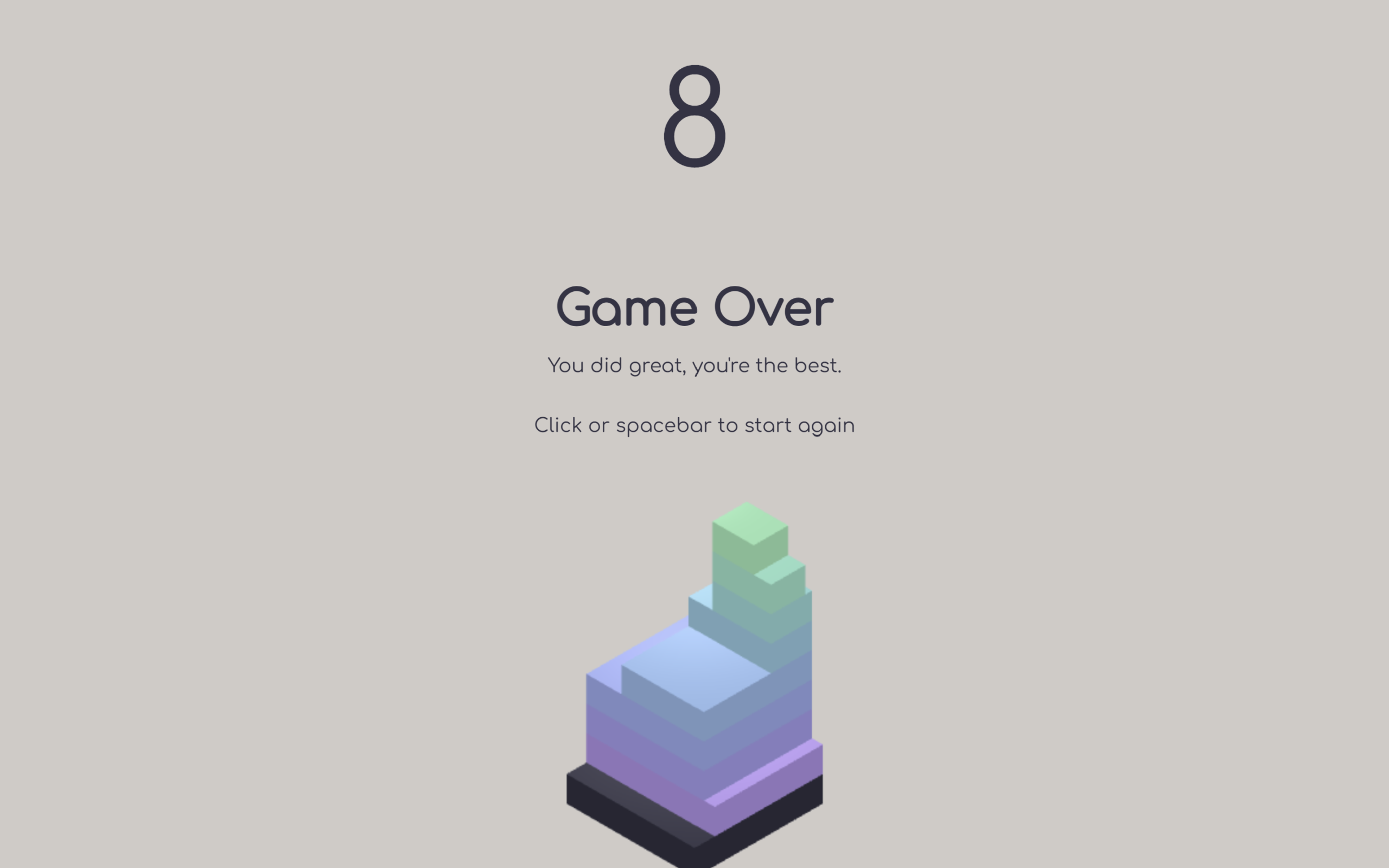
Let’s create an awesome Tower Block Game using HTML, CSS, and JavaScript. In this project, we’ll build a fun 3D tower stacking game where moving blocks must be placed perfectly on top of each other. Every successful placement makes the tower taller, while inaccurate placements cut the blocks into smaller pieces, making the game more challenging as you progress.
We’ll use:
- HTML: To create the game layout, including the game container, score counter, start button, instructions, and game over screen.
- CSS: To design the full-screen game interface, style the UI elements, create smooth transitions, and manage different game states like start, playing, and game over.
- JavaScript: To build the 3D game using Three.js, generate moving blocks, detect perfect and missed placements, animate falling block pieces with GSAP, update the score, control camera movement, and handle the complete gameplay and restart logic.
This project is perfect for learning Three.js, GSAP animations, game development fundamentals, collision detection, camera movement, 3D rendering, and creating interactive web games using HTML, CSS, and JavaScript.
HTML :
The HTML creates the structure of the Tower Blocks game. It contains the main game container, a score display, game instructions, a Game Over screen, and a Start button. It also links the CSS file for styling, loads the Three.js library for 3D graphics, GSAP for animations, and the JavaScript file that controls the game logic.
<!DOCTYPE html>
<html lang="en">

<head>
	<meta charset="UTF-8">
	<title>Tower Blocks | @coding.stella </title>
	<link rel="stylesheet" href="./style.css">
</head>

<body>
	<meta name="viewport" content="width=device-width,user-scalable=no">

	<div id="container">
		<div id="game"></div>
		<div id="score">0</div>
		<div id="instructions">Click (or press the spacebar) to place the block</div>
		<div class="game-over">
			<h2>Game Over</h2>
			<p>You did great, you're the best.</p>
			<p>Click or spacebar to start again</p>
		</div>
		<div class="game-ready">
			<div id="start-button">Start</div>
			<div></div>
		</div>
	</div>
	<script src='https://cdnjs.cloudflare.com/ajax/libs/three.js/r83/three.min.js'></script>
	<script src='https://cdnjs.cloudflare.com/ajax/libs/gsap/latest/TweenMax.min.js'></script>
	<script src="./script.js"></script>

</body>

</html>
CSS :
The CSS styles the entire game interface. It makes the game fill the whole screen, centers the score and messages, styles the Start button, and creates smooth animations for showing and hiding elements like the score, instructions, and Game Over screen. It also changes the appearance based on different game states such as ready, playing, and ended.
@import url("https://fonts.googleapis.com/css?family=Comfortaa");

html,
body {
  margin: 0;
  overflow: hidden;
  height: 100%;
  width: 100%;
  position: relative;
  font-family: "Comfortaa", cursive;
}

#container {
  width: 100%;
  height: 100%;
}

#container #score {
  position: absolute;
  top: 20px;
  width: 100%;
  text-align: center;
  font-size: 10vh;
  transition: transform 0.5s ease;
  color: #333344;
  transform: translatey(-200px) scale(1);
}

#container #game {
  position: absolute;
  top: 0;
  right: 0;
  bottom: 0;
  left: 0;
}

#container .game-over {
  position: absolute;
  top: 0;
  left: 0;
  width: 100%;
  height: 85%;
  display: flex;
  flex-direction: column;
  align-items: center;
  justify-content: center;
}

#container .game-over * {
  transition: opacity 0.5s ease, transform 0.5s ease;
  opacity: 0;
  transform: translatey(-50px);
  color: #333344;
}

#container .game-over h2 {
  margin: 0;
  padding: 0;
  font-size: 40px;
}

#container .game-ready {
  position: absolute;
  top: 0;
  left: 0;
  width: 100%;
  height: 100%;
  display: flex;
  flex-direction: column;
  align-items: center;
  justify-content: space-around;
}

#container .game-ready #start-button {
  transition: opacity 0.5s ease, transform 0.5s ease;
  opacity: 0;
  transform: translatey(-50px);
  border: 3px solid #333344;
  padding: 10px 20px;
  background-color: transparent;
  color: #333344;
  font-size: 30px;
}

#container #instructions {
  position: absolute;
  width: 100%;
  top: 16vh;
  left: 0;
  text-align: center;
  transition: opacity 0.5s ease, transform 0.5s ease;
  opacity: 0;
}

#container #instructions.hide {
  opacity: 0 !important;
}

#container.playing #score,
#container.resetting #score {
  transform: translatey(0px) scale(1);
}

#container.playing #instructions {
  opacity: 1;
}

#container.ready .game-ready #start-button {
  opacity: 1;
  transform: translatey(0);
}

#container.ended #score {
  transform: translatey(6vh) scale(1.5);
}

#container.ended .game-over * {
  opacity: 1;
  transform: translatey(0);
}

#container.ended .game-over p {
  transition-delay: 0.3s;
}
JS :
The JavaScript handles the complete game functionality. It creates the 3D scene using Three.js, generates moving blocks, detects whether each block is placed correctly, cuts off the extra part when the placement is imperfect, updates the score, moves the camera upward as the tower grows, plays animations with GSAP, detects game over when a block completely misses, and allows the player to restart the game.
"use strict";
console.clear();
class Stage {
    constructor() {
        // container
        this.render = function () {
            this.renderer.render(this.scene, this.camera);
        };
        this.add = function (elem) {
            this.scene.add(elem);
        };
        this.remove = function (elem) {
            this.scene.remove(elem);
        };
        this.container = document.getElementById('game');
        // renderer
        this.renderer = new THREE.WebGLRenderer({
            antialias: true,
            alpha: false
        });
        this.renderer.setSize(window.innerWidth, window.innerHeight);
        this.renderer.setClearColor('#D0CBC7', 1);
        this.container.appendChild(this.renderer.domElement);
        // scene
        this.scene = new THREE.Scene();
        // camera
        let aspect = window.innerWidth / window.innerHeight;
        let d = 20;
        this.camera = new THREE.OrthographicCamera(-d * aspect, d * aspect, d, -d, -100, 1000);
        this.camera.position.x = 2;
        this.camera.position.y = 2;
        this.camera.position.z = 2;
        this.camera.lookAt(new THREE.Vector3(0, 0, 0));
        //light
        this.light = new THREE.DirectionalLight(0xffffff, 0.5);
        this.light.position.set(0, 499, 0);
        this.scene.add(this.light);
        this.softLight = new THREE.AmbientLight(0xffffff, 0.4);
        this.scene.add(this.softLight);
        window.addEventListener('resize', () => this.onResize());
        this.onResize();
    }
    setCamera(y, speed = 0.3) {
        TweenLite.to(this.camera.position, speed, { y: y + 4, ease: Power1.easeInOut });
        TweenLite.to(this.camera.lookAt, speed, { y: y, ease: Power1.easeInOut });
    }
    onResize() {
        let viewSize = 30;
        this.renderer.setSize(window.innerWidth, window.innerHeight);
        this.camera.left = window.innerWidth / -viewSize;
        this.camera.right = window.innerWidth / viewSize;
        this.camera.top = window.innerHeight / viewSize;
        this.camera.bottom = window.innerHeight / -viewSize;
        this.camera.updateProjectionMatrix();
    }
}
class Block {
    constructor(block) {
        // set size and position
        this.STATES = { ACTIVE: 'active', STOPPED: 'stopped', MISSED: 'missed' };
        this.MOVE_AMOUNT = 12;
        this.dimension = { width: 0, height: 0, depth: 0 };
        this.position = { x: 0, y: 0, z: 0 };
        this.targetBlock = block;
        this.index = (this.targetBlock ? this.targetBlock.index : 0) + 1;
        this.workingPlane = this.index % 2 ? 'x' : 'z';
        this.workingDimension = this.index % 2 ? 'width' : 'depth';
        // set the dimensions from the target block, or defaults.
        this.dimension.width = this.targetBlock ? this.targetBlock.dimension.width : 10;
        this.dimension.height = this.targetBlock ? this.targetBlock.dimension.height : 2;
        this.dimension.depth = this.targetBlock ? this.targetBlock.dimension.depth : 10;
        this.position.x = this.targetBlock ? this.targetBlock.position.x : 0;
        this.position.y = this.dimension.height * this.index;
        this.position.z = this.targetBlock ? this.targetBlock.position.z : 0;
        this.colorOffset = this.targetBlock ? this.targetBlock.colorOffset : Math.round(Math.random() * 100);
        // set color
        if (!this.targetBlock) {
            this.color = 0x333344;
        }
        else {
            let offset = this.index + this.colorOffset;
            var r = Math.sin(0.3 * offset) * 55 + 200;
            var g = Math.sin(0.3 * offset + 2) * 55 + 200;
            var b = Math.sin(0.3 * offset + 4) * 55 + 200;
            this.color = new THREE.Color(r / 255, g / 255, b / 255);
        }
        // state
        this.state = this.index > 1 ? this.STATES.ACTIVE : this.STATES.STOPPED;
        // set direction
        this.speed = -0.1 - (this.index * 0.005);
        if (this.speed < -4)
            this.speed = -4;
        this.direction = this.speed;
        // create block
        let geometry = new THREE.BoxGeometry(this.dimension.width, this.dimension.height, this.dimension.depth);
        geometry.applyMatrix(new THREE.Matrix4().makeTranslation(this.dimension.width / 2, this.dimension.height / 2, this.dimension.depth / 2));
        this.material = new THREE.MeshToonMaterial({ color: this.color, shading: THREE.FlatShading });
        this.mesh = new THREE.Mesh(geometry, this.material);
        this.mesh.position.set(this.position.x, this.position.y + (this.state == this.STATES.ACTIVE ? 0 : 0), this.position.z);
        if (this.state == this.STATES.ACTIVE) {
            this.position[this.workingPlane] = Math.random() > 0.5 ? -this.MOVE_AMOUNT : this.MOVE_AMOUNT;
        }
    }
    reverseDirection() {
        this.direction = this.direction > 0 ? this.speed : Math.abs(this.speed);
    }
    place() {
        this.state = this.STATES.STOPPED;
        let overlap = this.targetBlock.dimension[this.workingDimension] - Math.abs(this.position[this.workingPlane] - this.targetBlock.position[this.workingPlane]);
        let blocksToReturn = {
            plane: this.workingPlane,
            direction: this.direction
        };
        if (this.dimension[this.workingDimension] - overlap < 0.3) {
            overlap = this.dimension[this.workingDimension];
            blocksToReturn.bonus = true;
            this.position.x = this.targetBlock.position.x;
            this.position.z = this.targetBlock.position.z;
            this.dimension.width = this.targetBlock.dimension.width;
            this.dimension.depth = this.targetBlock.dimension.depth;
        }
        if (overlap > 0) {
            let choppedDimensions = { width: this.dimension.width, height: this.dimension.height, depth: this.dimension.depth };
            choppedDimensions[this.workingDimension] -= overlap;
            this.dimension[this.workingDimension] = overlap;
            let placedGeometry = new THREE.BoxGeometry(this.dimension.width, this.dimension.height, this.dimension.depth);
            placedGeometry.applyMatrix(new THREE.Matrix4().makeTranslation(this.dimension.width / 2, this.dimension.height / 2, this.dimension.depth / 2));
            let placedMesh = new THREE.Mesh(placedGeometry, this.material);
            let choppedGeometry = new THREE.BoxGeometry(choppedDimensions.width, choppedDimensions.height, choppedDimensions.depth);
            choppedGeometry.applyMatrix(new THREE.Matrix4().makeTranslation(choppedDimensions.width / 2, choppedDimensions.height / 2, choppedDimensions.depth / 2));
            let choppedMesh = new THREE.Mesh(choppedGeometry, this.material);
            let choppedPosition = {
                x: this.position.x,
                y: this.position.y,
                z: this.position.z
            };
            if (this.position[this.workingPlane] < this.targetBlock.position[this.workingPlane]) {
                this.position[this.workingPlane] = this.targetBlock.position[this.workingPlane];
            }
            else {
                choppedPosition[this.workingPlane] += overlap;
            }
            placedMesh.position.set(this.position.x, this.position.y, this.position.z);
            choppedMesh.position.set(choppedPosition.x, choppedPosition.y, choppedPosition.z);
            blocksToReturn.placed = placedMesh;
            if (!blocksToReturn.bonus)
                blocksToReturn.chopped = choppedMesh;
        }
        else {
            this.state = this.STATES.MISSED;
        }
        this.dimension[this.workingDimension] = overlap;
        return blocksToReturn;
    }
    tick() {
        if (this.state == this.STATES.ACTIVE) {
            let value = this.position[this.workingPlane];
            if (value > this.MOVE_AMOUNT || value < -this.MOVE_AMOUNT)
                this.reverseDirection();
            this.position[this.workingPlane] += this.direction;
            this.mesh.position[this.workingPlane] = this.position[this.workingPlane];
        }
    }
}
class Game {
    constructor() {
        this.STATES = {
            'LOADING': 'loading',
            'PLAYING': 'playing',
            'READY': 'ready',
            'ENDED': 'ended',
            'RESETTING': 'resetting'
        };
        this.blocks = [];
        this.state = this.STATES.LOADING;
        this.stage = new Stage();
        this.mainContainer = document.getElementById('container');
        this.scoreContainer = document.getElementById('score');
        this.startButton = document.getElementById('start-button');
        this.instructions = document.getElementById('instructions');
        this.scoreContainer.innerHTML = '0';
        this.newBlocks = new THREE.Group();
        this.placedBlocks = new THREE.Group();
        this.choppedBlocks = new THREE.Group();
        this.stage.add(this.newBlocks);
        this.stage.add(this.placedBlocks);
        this.stage.add(this.choppedBlocks);
        this.addBlock();
        this.tick();
        this.updateState(this.STATES.READY);
        document.addEventListener('keydown', e => {
            if (e.keyCode == 32)
                this.onAction();
        });
        document.addEventListener('click', e => {
            this.onAction();
        });
        document.addEventListener('touchstart', e => {
            e.preventDefault();
            // this.onAction();
            // ☝️ this triggers after click on android so you
            // insta-lose, will figure it out later.
        });
    }
    updateState(newState) {
        for (let key in this.STATES)
            this.mainContainer.classList.remove(this.STATES[key]);
        this.mainContainer.classList.add(newState);
        this.state = newState;
    }
    onAction() {
        switch (this.state) {
            case this.STATES.READY:
                this.startGame();
                break;
            case this.STATES.PLAYING:
                this.placeBlock();
                break;
            case this.STATES.ENDED:
                this.restartGame();
                break;
        }
    }
    startGame() {
        if (this.state != this.STATES.PLAYING) {
            this.scoreContainer.innerHTML = '0';
            this.updateState(this.STATES.PLAYING);
            this.addBlock();
        }
    }
    restartGame() {
        this.updateState(this.STATES.RESETTING);
        let oldBlocks = this.placedBlocks.children;
        let removeSpeed = 0.2;
        let delayAmount = 0.02;
        for (let i = 0; i < oldBlocks.length; i++) {
            TweenLite.to(oldBlocks[i].scale, removeSpeed, { x: 0, y: 0, z: 0, delay: (oldBlocks.length - i) * delayAmount, ease: Power1.easeIn, onComplete: () => this.placedBlocks.remove(oldBlocks[i]) });
            TweenLite.to(oldBlocks[i].rotation, removeSpeed, { y: 0.5, delay: (oldBlocks.length - i) * delayAmount, ease: Power1.easeIn });
        }
        let cameraMoveSpeed = removeSpeed * 2 + (oldBlocks.length * delayAmount);
        this.stage.setCamera(2, cameraMoveSpeed);
        let countdown = { value: this.blocks.length - 1 };
        TweenLite.to(countdown, cameraMoveSpeed, { value: 0, onUpdate: () => { this.scoreContainer.innerHTML = String(Math.round(countdown.value)); } });
        this.blocks = this.blocks.slice(0, 1);
        setTimeout(() => {
            this.startGame();
        }, cameraMoveSpeed * 1000);
    }
    placeBlock() {
        let currentBlock = this.blocks[this.blocks.length - 1];
        let newBlocks = currentBlock.place();
        this.newBlocks.remove(currentBlock.mesh);
        if (newBlocks.placed)
            this.placedBlocks.add(newBlocks.placed);
        if (newBlocks.chopped) {
            this.choppedBlocks.add(newBlocks.chopped);
            let positionParams = { y: '-=30', ease: Power1.easeIn, onComplete: () => this.choppedBlocks.remove(newBlocks.chopped) };
            let rotateRandomness = 10;
            let rotationParams = {
                delay: 0.05,
                x: newBlocks.plane == 'z' ? ((Math.random() * rotateRandomness) - (rotateRandomness / 2)) : 0.1,
                z: newBlocks.plane == 'x' ? ((Math.random() * rotateRandomness) - (rotateRandomness / 2)) : 0.1,
                y: Math.random() * 0.1,
            };
            if (newBlocks.chopped.position[newBlocks.plane] > newBlocks.placed.position[newBlocks.plane]) {
                positionParams[newBlocks.plane] = '+=' + (40 * Math.abs(newBlocks.direction));
            }
            else {
                positionParams[newBlocks.plane] = '-=' + (40 * Math.abs(newBlocks.direction));
            }
            TweenLite.to(newBlocks.chopped.position, 1, positionParams);
            TweenLite.to(newBlocks.chopped.rotation, 1, rotationParams);
        }
        this.addBlock();
    }
    addBlock() {
        let lastBlock = this.blocks[this.blocks.length - 1];
        if (lastBlock && lastBlock.state == lastBlock.STATES.MISSED) {
            return this.endGame();
        }
        this.scoreContainer.innerHTML = String(this.blocks.length - 1);
        let newKidOnTheBlock = new Block(lastBlock);
        this.newBlocks.add(newKidOnTheBlock.mesh);
        this.blocks.push(newKidOnTheBlock);
        this.stage.setCamera(this.blocks.length * 2);
        if (this.blocks.length >= 5)
            this.instructions.classList.add('hide');
    }
    endGame() {
        this.updateState(this.STATES.ENDED);
    }
    tick() {
        this.blocks[this.blocks.length - 1].tick();
        this.stage.render();
        requestAnimationFrame(() => { this.tick(); });
    }
}
let game = new Game();
In this project, we created a stunning 3D logo animation using HTML, CSS, JavaScript, Anime.js, and Three.js. We learned how to convert an SVG into a 3D model, add smooth animations, camera movements, lighting, and visual effects to create a modern and interactive web experience. This project is a great way to improve your animation skills and understand the basics of 3D graphics on the web.
If your project has problems, don’t worry. Just click to download the source code and face your coding challenges with excitement. Have fun coding!
