


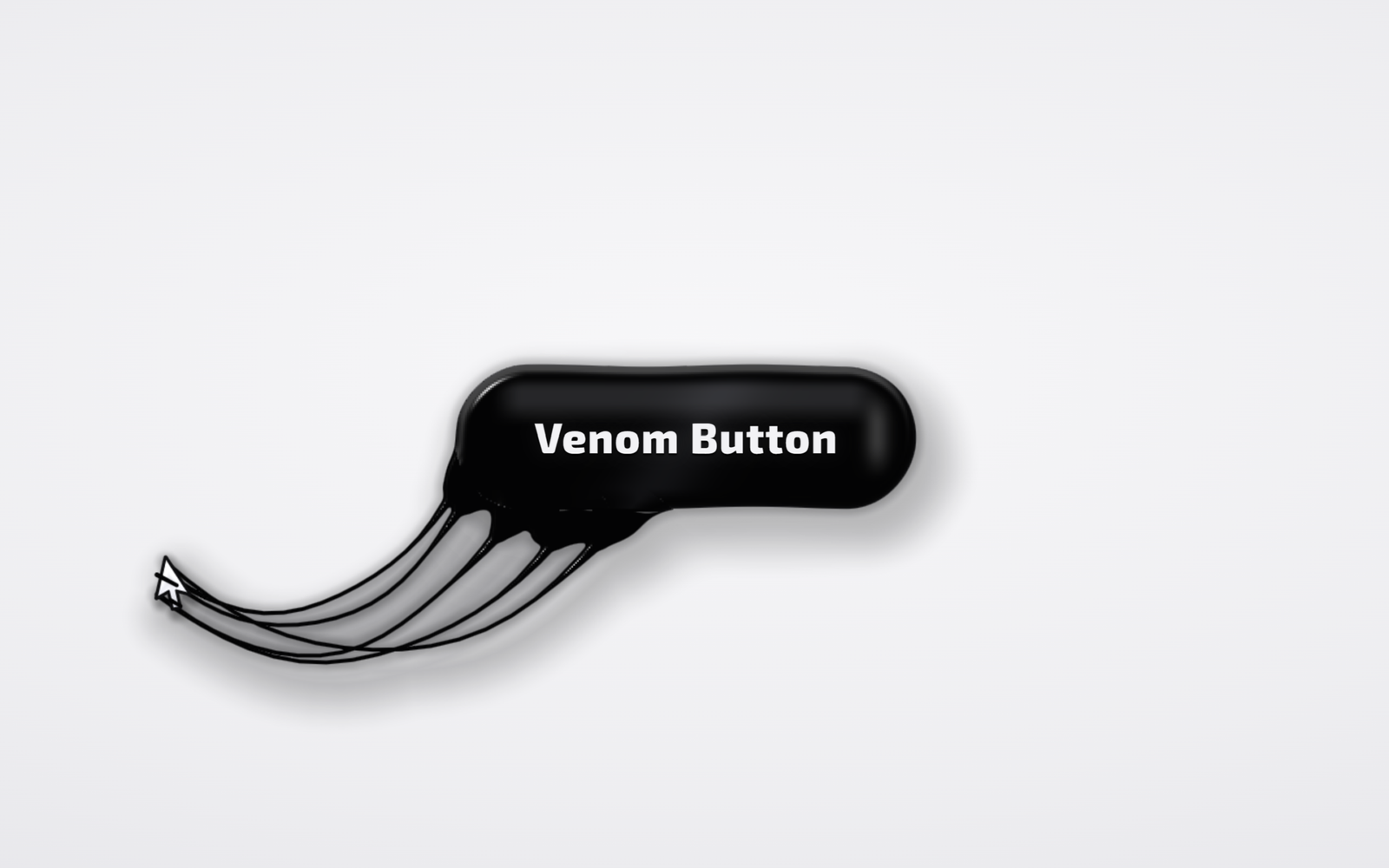
Let’s create a Venom Button Animation using HTML, CSS, and JavaScript – a glossy black slime button that comes alive when your cursor gets close. It reaches out with tendrils, grabs the cursor with sticky strands, holds on while you pull away, and finally tears loose with flying droplets and a springy wobble.
- HTML: Create a full-screen
<canvas>for the slime and a real<button>with a text label on top, so the button stays clickable and keyboard friendly. - CSS: Style the light page background, the invisible pill-shaped hit area and the bold Exo 2 label. It also adds an optional dark theme with a dot grid, hides the normal cursor, and gives a plain glossy fallback when WebGL2 is not available.
- JavaScript: Control the whole effect with raw WebGL2 and zero libraries. A fragment shader draws the button, strands, tendrils and a custom arrow cursor from one signed-distance field, while verlet rope physics make the strands stretch, sag and snap.
This project teaches how to build a living, slime-like button using HTML, CSS, and JavaScript by combining WebGL2 shaders, signed-distance fields with smooth blending, verlet rope physics and a custom drawn cursor.
HTML :
HTML: Creates the structure of the venom button, with a full-screen canvas where the shader paints the slime and a real button with its label sitting on top.
<!DOCTYPE html>
<html lang="en">
<head>
  <meta charset="UTF-8" />
  <meta name="viewport" content="width=device-width, initial-scale=1.0" />
  <title>Venom Button Animation | @coding.stella</title>
  <link rel="preconnect" href="https://fonts.googleapis.com" />
  <link rel="stylesheet" href="https://fonts.googleapis.com/css2?family=Exo+2:wght@700;800&display=swap" />
  <link rel="stylesheet" href="style.css" />
</head>
<body>
  <canvas id="gl"></canvas>

  <button class="venom" id="venom">
    <span class="label" id="label">Venom Button</span>
  </button>

  <script src="script.js"></script>
</body>
</html>
CSS :
CSS: Styles the page background, the transparent pill-shaped button and its label, and adds the dark theme (open the page with ?dark), the hidden system cursor and a simple fallback button for browsers without WebGL2.
* {
  margin: 0;
  padding: 0;
  box-sizing: border-box;
}

html,
body {
  height: 100%;
}

body {
  display: grid;
  place-items: center;
  overflow: hidden;
  background: radial-gradient(120% 90% at 50% 42%, #f7f7f9 0%, #eeeef1 55%, #e2e2e7 100%);
}

#gl {
  position: fixed;
  inset: 0;
  width: 100%;
  height: 100%;
  pointer-events: none;
  z-index: 1;
}

/* invisible hit area, the shader paints the body */
.venom {
  position: relative;
  z-index: 2;
  width: 272px;
  height: 84px;
  border: none;
  border-radius: 42px;
  background: transparent;
  cursor: pointer;
  outline: none;
}

.venom:focus-visible {
  box-shadow: 0 0 0 3px #f7f7f9, 0 0 0 6px #6d6df5;
}

.label {
  display: inline-block;
  color: #f2f2f5;
  font: 800 25px/1 "Exo 2", "Segoe UI", system-ui, sans-serif;
  letter-spacing: 0.03em;
  text-shadow: 0 1px 1px rgba(0, 0, 0, 0.9), 0 0 12px rgba(255, 255, 255, 0.08);
  pointer-events: none;
  will-change: transform;
}

/* dark theme: open with ?dark */
html.dark body {
  background:
    radial-gradient(circle, rgba(255, 255, 255, 0.07) 1px, transparent 1.3px) 0 0 / 22px 22px,
    radial-gradient(110% 85% at 50% 45%, #10111a 0%, #08090d 60%, #050608 100%);
}

@media (pointer: fine) {
  html.custom-cursor,
  html.custom-cursor * {
    cursor: none !important;
  }
}

/* fallback when WebGL2 is not available */
html.no-gl .venom {
  background: radial-gradient(120% 90% at 20% 10%, #3a3a3f, #0a0a0c 55%);
  box-shadow: 0 14px 28px -10px rgba(0, 0, 0, 0.5);
}
JavaScript:
JavaScript: Handles the venom button animation. It sets up WebGL2, simulates five sticky strands as verlet ropes, grows tendrils toward the mouse, draws a custom cursor that gets held by slime bands, and adds droplets, a body lean and a wobble when the strands tear or the button is clicked.
const canvas = document.getElementById("gl");
const btn = document.getElementById("venom");
const label = document.getElementById("label");
const root = document.documentElement;

const gl = canvas.getContext("webgl2", { antialias: false });
if (/dark/.test(location.search + location.hash)) root.classList.add("dark");
const DARK = root.classList.contains("dark") ? 1 : 0;
root.classList.add(gl ? "custom-cursor" : "no-gl");

const NS = 5;      // strands
const NP = 20;     // points per strand
const NX = 40;     // extra capsules (tendrils, bulge, droplets)
const SENSE = 210; // tendrils start reaching inside this distance
const GRAB = 85;   // strands latch on inside this distance
const SNAP = 400;  // and tear loose beyond this one
const GRIP = [[0, 2], [0, 20], [11, 25], [15.5, 16], [6, 10]]; // where strands stick on the arrow cursor

const clamp = (v, a = 0, b = 1) => Math.max(a, Math.min(b, v));
const lerp = (a, b, t) => a + (b - a) * t;
const smooth = (e0, e1, x) => { const t = clamp((x - e0) / (e1 - e0)); return t * t * (3 - 2 * t); };

const VERT = `#version 300 es
in vec2 pos;
void main(){ gl_Position = vec4(pos, 0., 1.); }`;

const FRAG = `#version 300 es
precision highp float;
#define NS ${NS}
#define NP ${NP}
#define NX ${NX}
uniform vec2  uRes, uC, uHalf;
uniform float uDpr, uTime, uWob;
uniform vec3  uS[NS * NP];  // strand points: x, y, radius
uniform vec4  uSB[NS];      // strand bounds + pinned flag
uniform vec4  uX[NX];
uniform vec2  uXR[NX];
uniform int   uXN;
uniform vec4  uBox;
uniform vec2  uCur;
uniform float uCurRot, uCurS, uHold;
uniform vec4  uW[2];        // slime bands over the cursor
uniform vec2  uWR[2];
uniform float uDark;
out vec4 outColor;

float smin(float a, float b, float k){
  float h = max(k - abs(a - b), 0.) / k;
  return min(a, b) - h * h * k * .25;
}
float sdCap(vec2 p, vec2 a, vec2 b, float ra, float rb){
  vec2 pa = p - a, ba = b - a;
  float h = clamp(dot(pa, ba) / max(dot(ba, ba), 1e-4), 0., 1.);
  return length(pa - ba * h) - mix(ra, rb, h);
}
float sdPill(vec2 q, float hx, float r){
  q.x = max(abs(q.x) - hx, 0.);
  return length(q) - r;
}

// one distance field for the body, strands and extras so they melt together
vec2 map(vec2 p){
  vec2 q = p - uC;
  float hx = uHalf.x * (1. + .07 * uWob), r = uHalf.y * (1. - .06 * uWob);
  float body = sdPill(q, hx, r);
  body += sin(q.x * .05 + uTime * 1.3) * sin(q.y * .11 - uTime * .9) * .7;
  float d = body;

  float line = 1e5;
  for (int s = 0; s < NS; s++){
    vec4 b = uSB[s];
    if (b.z <= 0. || length(p - b.xy) - b.z > d + 8.) continue;
    for (int j = 0; j < NP - 1; j++){
      vec3 a = uS[s * NP + j], c = uS[s * NP + j + 1];
      float sc = sdCap(p, a.xy, c.xy, a.z, c.z);
      if (j < 2) d = smin(d, sc, 10. + 12. * max(b.w - 1., 0.));
      else line = min(line, sc);
    }
  }
  d = smin(d, line, 2.5);
  for (int i = 0; i < NX; i++){
    if (i >= uXN) break;
    d = smin(d, sdCap(p, uX[i].xy, uX[i].zw, uXR[i].x, uXR[i].y), 5.);
  }
  return vec2(d, body);
}

// thin membrane between neighbouring strands
float cross2(vec2 a, vec2 b){ return a.x * b.y - a.y * b.x; }
bool inTri(vec2 p, vec2 a, vec2 b, vec2 c){
  float d1 = cross2(b - a, p - a), d2 = cross2(c - b, p - b), d3 = cross2(a - c, p - c);
  return !((d1 < 0. || d2 < 0. || d3 < 0.) && (d1 > 0. || d2 > 0. || d3 > 0.));
}
float web(vec2 p){
  float w = 0.;
  for (int s = 0; s < NS - 1; s++){
    if (uSB[s].w < .5 || uSB[s + 1].w < .5) continue;
    for (int j = 1; j < NP - 2; j++){
      float k = float(j) / float(NP - 1);
      vec2 a = uS[s * NP + j].xy, b = uS[s * NP + j + 1].xy;
      vec2 c = uS[(s + 1) * NP + j + 1].xy, e = uS[(s + 1) * NP + j].xy;
      if (inTri(p, a, b, c) || inTri(p, a, c, e)) w = max(w, .55 + .45 * sin(k * 3.14159));
    }
  }
  return w;
}

float sdArrow(vec2 p){
  vec2 v[7] = vec2[7](vec2(0., 0.), vec2(0., 22.), vec2(5.5, 17.), vec2(9.6, 25.6),
                      vec2(13.2, 24.), vec2(9.3, 15.8), vec2(16.5, 16.));
  float d = dot(p - v[0], p - v[0]), s = 1.;
  int j = 6;
  for (int i = 0; i < 7; i++){
    vec2 e = v[j] - v[i], w = p - v[i];
    vec2 b = w - e * clamp(dot(w, e) / dot(e, e), 0., 1.);
    d = min(d, dot(b, b));
    bvec3 c = bvec3(p.y >= v[i].y, p.y < v[j].y, e.x * w.y > e.y * w.x);
    if (all(c) || all(not(c))) s *= -1.;
    j = i;
  }
  return s * sqrt(d);
}
float sdCursor(vec2 p){
  float c = cos(uCurRot), s = sin(uCurRot);
  vec2 q = mat2(c, -s, s, c) * (p - uCur) / uCurS;
  return (sdArrow(q) - 1.1) * uCurS;
}
float wraps(vec2 p){
  return smin(sdCap(p, uW[0].xy, uW[0].zw, uWR[0].x, uWR[0].y),
              sdCap(p, uW[1].xy, uW[1].zw, uWR[1].x, uWR[1].y), 2.5);
}

// wet black slime lighting
vec3 shade(float d, float T){
  float h = clamp(-d / T, 0., 1.);
  h = sqrt(1. - (1. - h) * (1. - h));
  vec3 n = normalize(vec3(-dFdx(h) * uDpr * T, -dFdy(h) * uDpr * T, 1.));
  vec3 L  = normalize(vec3(-.42, .58, .7));
  vec3 Rf = reflect(-L, n);
  float spec  = pow(max(Rf.z, 0.), 46.) * smoothstep(.4, 1.8, -d);
  float slope = smoothstep(.02, .25, 1. - n.z);
  float env   = smoothstep(.45, .95, dot(n, normalize(vec3(-.2, .62, .76)))) * slope;
  float fres  = pow(1. - n.z, 3.);
  vec3 col = vec3(.013, .013, .016);
  float gloss = T < 5. ? smoothstep(.8, 2.8, -d) : 1.;
  return col + (vec3(.95) * spec * .9 + vec3(.78) * env * (.32 + .18 * uDark) + mix(vec3(.6, .62, .68), vec3(.62, .66, .95), uDark) * fres * (.22 + .45 * uDark)) * gloss;
}

vec4 over(vec4 top, vec4 under){ return top + under * (1. - top.a); }

void main(){
  vec2 p = vec2(gl_FragCoord.x, uRes.y - gl_FragCoord.y) / uDpr;
  bool inBox  = !(p.x < uBox.x || p.y < uBox.y || p.x > uBox.z || p.y > uBox.w);
  bool nearCur = uCurS > .01 && length(p - uCur) < 52. * uCurS;
  if (!inBox && !nearCur){ outColor = vec4(0.); return; }

  // slime body and strands
  vec2 m = inBox ? map(p) : vec2(1e5);
  float d = m.x;
  float fw = clamp(fwidth(d), 1e-4, 1.5);
  float a = clamp(.5 - d / fw, 0., 1.);
  vec3 col = shade(d, m.y < 2. ? 9. : 3.2);

  // highlights on the top of the button
  vec2 q = p - uC;
  float r = uHalf.y, hx = uHalf.x;
  float inBody = 1. - smoothstep(-.5, .5, m.y);
  float topZone = smoothstep(4., 13., -d) * inBody;
  float band = smoothstep(-r * .92, -r * .62, q.y) * (1. - smoothstep(-r * .52, -r * .12, q.y))
             * (1. - smoothstep(hx + r * .05, hx + r * .55, abs(q.x)));
  col += vec3(.85, .86, .9) * band * topZone * .16;
  float sweep = exp(-pow((q.x + q.y * .7 - sin(uTime * .45) * hx * 1.4) / 24., 2.));
  col += vec3(.7, .72, .8) * sweep * topZone * .08;
  float capR = exp(-pow((q.x - hx - r * .45) / 7., 2.)) * smoothstep(r * .7, r * .1, abs(q.y + r * .05));
  col += vec3(.9) * capR * topZone * .22;

  // shadow (light theme) or soft backlight (dark theme), plus the web
  float dsh = inBox ? map(p - vec2(9., 13.) * (1. - uDark)).x : 1e5;
  float sh = (1. - smoothstep(-8., 30., dsh)) * mix(.24, .16, uDark) + (1. - smoothstep(0., 7., d)) * .14 * (1. - uDark);
  float wb = inBox ? web(p) * mix(.13, .09, uDark) : 0.;
  float ua = clamp(sh + wb, 0., .55);
  vec3 shadeCol = mix(vec3(0.), vec3(.40, .45, .85), uDark);
  vec3 webCol = mix(vec3(.08, .08, .11), vec3(.62, .65, .82), uDark);
  vec3 urgb = mix(shadeCol, webCol, wb / max(ua, 1e-3));

  vec4 o = over(vec4(col * a, a), vec4(urgb * ua, ua));

  // custom cursor on top, with slime bands holding it
  if (uCurS > .01){
    float dcs = sdCursor(p - vec2(2., 3.5));
    float csa = (1. - smoothstep(-2., 6., dcs)) * .26;
    o = over(vec4(0., 0., 0., csa), o);

    float dc = sdCursor(p);
    float cfw = 1. / uDpr;
    float ca = clamp(.5 - dc / cfw, 0., 1.);
    float inner = clamp(.5 - (dc + 1.7 * uCurS) / cfw, 0., 1.);
    float g = clamp((p.y - uCur.y) / (26. * uCurS), 0., 1.);
    vec3 fill = mix(vec3(1.), vec3(.84, .85, .89), g);
    fill += .25 * smoothstep(-6., -1., dc) * (1. - g);
    vec3 cc = mix(vec3(.05, .05, .06), fill, inner);
    o = over(vec4(cc * ca, ca), o);

    if (uHold > .01){
      float dw = wraps(p);
      float wa = clamp(.5 - dw * uDpr, 0., 1.) * uHold;
      o = over(vec4(shade(dw, 3.) * wa, wa), o);
    }
  }
  outColor = o;
}`;

const U = {};
if (gl) {
  const compile = (type, src) => {
    const s = gl.createShader(type);
    gl.shaderSource(s, src);
    gl.compileShader(s);
    if (!gl.getShaderParameter(s, gl.COMPILE_STATUS)) throw new Error(gl.getShaderInfoLog(s));
    return s;
  };
  const prog = gl.createProgram();
  gl.attachShader(prog, compile(gl.VERTEX_SHADER, VERT));
  gl.attachShader(prog, compile(gl.FRAGMENT_SHADER, FRAG));
  gl.linkProgram(prog);
  if (!gl.getProgramParameter(prog, gl.LINK_STATUS)) throw new Error(gl.getProgramInfoLog(prog));
  gl.useProgram(prog);

  // one big triangle covering the screen
  gl.bindBuffer(gl.ARRAY_BUFFER, gl.createBuffer());
  gl.bufferData(gl.ARRAY_BUFFER, new Float32Array([-1, -1, 3, -1, -1, 3]), gl.STATIC_DRAW);
  const loc = gl.getAttribLocation(prog, "pos");
  gl.enableVertexAttribArray(loc);
  gl.vertexAttribPointer(loc, 2, gl.FLOAT, false, 0, 0);

  ["uRes", "uC", "uHalf", "uDpr", "uTime", "uWob", "uS", "uSB", "uX", "uXR", "uXN", "uBox", "uCur", "uCurRot", "uCurS", "uHold", "uW", "uWR", "uDark"]
    .forEach((n) => (U[n] = gl.getUniformLocation(prog, n)));
}

let H = 0, DPR = 1;
const pill = { x: 0, y: 0, half: 0, r: 0 };

function resize() {
  DPR = Math.min(devicePixelRatio || 1, 1.75);
  H = innerHeight;
  canvas.width = Math.round(innerWidth * DPR);
  canvas.height = Math.round(H * DPR);
  if (gl) gl.viewport(0, 0, canvas.width, canvas.height);
}
addEventListener("resize", resize);
resize();

function measure() {
  const b = btn.getBoundingClientRect();
  pill.x = b.left + b.width / 2;
  pill.y = b.top + b.height / 2;
  pill.r = b.height / 2;
  pill.half = b.width / 2 - pill.r;
}

function pillDist(x, y) {
  const qx = Math.max(Math.abs(x - pill.x) - pill.half, 0);
  return Math.hypot(qx, y - pill.y) - pill.r;
}

// nearest point on the pill outline (pushed slightly inside) and its outward normal
function pillEdge(x, y, inset = 3) {
  const cx = pill.x + clamp(x - pill.x, -pill.half, pill.half);
  let dx = x - cx, dy = y - pill.y;
  const d = Math.hypot(dx, dy) || 1;
  dx /= d;
  dy /= d;
  return { x: cx + dx * (pill.r - inset), y: pill.y + dy * (pill.r - inset), nx: dx, ny: dy };
}

const mouse = { x: -9999, y: -9999, active: false };
const cur = { x: -9999, y: -9999, rot: 0, s: 0, hold: 0, shown: false };
let pressed = false, overBtn = false, touch = false;

function trackPointer(e) {
  mouse.x = e.clientX;
  mouse.y = e.clientY;
  mouse.active = true;
  touch = e.pointerType === "touch";
}
addEventListener("pointermove", trackPointer);
addEventListener("pointerdown", (e) => { trackPointer(e); pressed = true; });
addEventListener("pointerup", () => (pressed = false));
document.addEventListener("pointerleave", () => (mouse.active = false));
addEventListener("blur", () => (mouse.active = false));
btn.addEventListener("pointerenter", () => (overBtn = true));
btn.addEventListener("pointerleave", () => (overBtn = false));

// cursor-local point to screen point
function toWorld(lx, ly) {
  const c = Math.cos(cur.rot), s = Math.sin(cur.rot);
  return { x: cur.x + (c * lx - s * ly) * cur.s, y: cur.y + (s * lx + c * ly) * cur.s };
}

// strands are verlet ropes from the button edge to the cursor
const strands = Array.from({ length: NS }, (_, i) => ({
  i, active: false, pinned: false, rest: 0, base: 5, tip: 1.6, L0: 100, tension: 0,
  anchor: { x: 0, y: 0, nx: 0, ny: 1 }, grip: GRIP[i],
  pts: Array.from({ length: NP }, () => ({ x: 0, y: 0, px: 0, py: 0 })),
}));
const drops = [];
let grabbed = false;

function anchorCenter() {
  return {
    x: strands.reduce((a, s) => a + s.anchor.x, 0) / NS,
    y: strands.reduce((a, s) => a + s.anchor.y, 0) / NS,
  };
}

function grab() {
  const e = pillEdge(mouse.x, mouse.y);
  const tx = -e.ny, ty = e.nx;
  strands.forEach((s, i) => {
    const off = (i - (NS - 1) / 2) * 34 + (Math.random() - 0.5) * 10;
    s.anchor = pillEdge(e.x + tx * off, e.y + ty * off, 4);
    s.active = s.pinned = true;
    s.base = 4.2 + Math.random() * 2.2;
    s.tip = 1.1 + Math.random() * 0.8;
    const g = toWorld(s.grip[0], s.grip[1]);
    s.pts.forEach((p, j) => {
      const k = j / (NP - 1);
      p.x = p.px = lerp(s.anchor.x, g.x, k);
      p.y = p.py = lerp(s.anchor.y, g.y, k);
    });
    const len = Math.hypot(g.x - s.anchor.x, g.y - s.anchor.y);
    s.rest = len / (NP - 1);
    s.L0 = Math.max(70, len);
  });
  grabbed = true;
}

function release(kick) {
  strands.forEach((s) => {
    if (s.pinned && s.active) {
      // droplets fly off each torn strand
      [0.55, 0.85].forEach((k) => {
        const p = s.pts[Math.floor(k * (NP - 1))];
        drops.push({
          x: p.x, y: p.y,
          vx: (p.x - p.px) * 0.8 + (Math.random() - 0.5) * 2,
          vy: (p.y - p.py) * 0.8 - 1.5 - Math.random() * 2,
          r: 1.8 + Math.random() * 1.8, life: 1,
        });
      });
    }
    s.pinned = false;
  });
  while (drops.length > 10) drops.shift();
  grabbed = false;
  wobKick = Math.max(wobKick, kick);
  wobT = 0;
}

function stepRopes(t) {
  strands.forEach((s) => {
    if (!s.active) return;
    const end = s.pts[NP - 1];
    const g = toWorld(s.grip[0], s.grip[1]);
    const D = Math.hypot(g.x - s.anchor.x, g.y - s.anchor.y);
    if (s.pinned) s.rest = lerp(s.rest, (D / (NP - 1)) * 1.14, 0.18); // a little slack so it sags
    else s.rest *= 0.84; // whip back into the body

    for (let j = 1; j < NP; j++) {
      const p = s.pts[j];
      const vx = (p.x - p.px) * 0.975, vy = (p.y - p.py) * 0.975;
      p.px = p.x;
      p.py = p.y;
      const wr = Math.sin(t * 3.2 + j * 0.65 + s.i * 1.9) * 0.05;
      p.x += vx + wr;
      p.y += vy + 0.2 + wr;
    }
    for (let it = 0; it < 14; it++) {
      s.pts[0].x = s.anchor.x;
      s.pts[0].y = s.anchor.y;
      if (s.pinned) { end.x = g.x; end.y = g.y; }
      for (let j = 0; j < NP - 1; j++) {
        const a = s.pts[j], b = s.pts[j + 1];
        const dx = b.x - a.x, dy = b.y - a.y, d = Math.hypot(dx, dy) || 1e-4;
        const diff = (d - s.rest) / d;
        const wa = j === 0 ? 0 : 0.5, wb = j === 0 ? 1 : 0.5;
        a.x += dx * diff * wa; a.y += dy * diff * wa;
        b.x -= dx * diff * wb; b.y -= dy * diff * wb;
      }
    }
    if (!s.pinned && s.rest < 0.25) s.active = false;
  });
}

// extra capsules: tendrils, bulge and droplets
const X = new Float32Array(NX * 4), XR = new Float32Array(NX * 2);
let xn = 0;
function cap(ax, ay, bx, by, ra, rb) {
  if (xn >= NX || ra < 0.25) return;
  X.set([ax, ay, bx, by], xn * 4);
  XR.set([ra, rb], xn * 2);
  xn++;
}

// small curly hairs that peek out while idle
function hairs(e, t, amount) {
  const count = 3, spread = 7, maxLen = 26, SEG = 4;
  const tx = -e.ny, ty = e.nx;
  for (let i = 0; i < count; i++) {
    const off = (i - (count - 1) / 2) * spread;
    let ang = Math.atan2(e.ny, e.nx) + (i - (count - 1) / 2) * 0.12;
    const len = maxLen * amount * (0.6 + 0.4 * Math.sin(i * 2.3 + 1)) * (0.88 + 0.12 * Math.sin(t * 4 + i));
    const bend = Math.sin(t * 2.6 + i * 1.9) * 0.32;
    let px = e.x + tx * off - Math.cos(ang) * 3, py = e.y + ty * off - Math.sin(ang) * 3;
    let r = 1.9 * Math.min(1, amount * 1.4);
    for (let k = 0; k < SEG; k++) {
      ang += bend;
      const nx = px + Math.cos(ang) * len / SEG, ny = py + Math.sin(ang) * len / SEG;
      cap(px, py, nx, ny, r, r * 0.74);
      px = nx; py = ny; r *= 0.74;
    }
  }
}

// tapered limb with a gentle wave
function limb(bx, by, ang, len, r0, r1, t, phase, segs) {
  let px = bx, py = by, r = r0;
  for (let k = 0; k < segs; k++) {
    const u = (k + 1) / segs;
    const a = ang + Math.sin(t * 2.4 + phase + u * 3.2) * 0.22 * u;
    const nx = px + Math.cos(a) * len / segs, ny = py + Math.sin(a) * len / segs;
    const nr = lerp(r0, r1, Math.pow(u, 0.8));
    cap(px, py, nx, ny, r, nr);
    px = nx; py = ny; r = nr;
  }
}

// one main limb and two side tendrils reaching for the mouse
function reachOut(t, amount) {
  const e = pillEdge(mouse.x, mouse.y, 6);
  const base = Math.atan2(e.ny, e.nx);
  const toM = Math.atan2(mouse.y - e.y, mouse.x - e.x);
  const ang = base + Math.atan2(Math.sin(toM - base), Math.cos(toM - base)) * 0.75;
  const dist = Math.hypot(mouse.x - e.x, mouse.y - e.y);
  const len = Math.min(dist - 16, 62) * amount * (0.92 + 0.08 * Math.sin(t * 3));
  if (len < 4) return;
  const tx = -e.ny, ty = e.nx;
  limb(e.x, e.y, ang, len, 10 * amount + 2, 2.2, t, 0, 6);
  limb(e.x + tx * 16, e.y + ty * 16, ang - 0.35, len * 0.5, 5 * amount + 1, 1.4, t, 2.1, 4);
  limb(e.x - tx * 16, e.y - ty * 16, ang + 0.35, len * 0.42, 4.5 * amount + 1, 1.3, t, 4.2, 4);
}

const S = new Float32Array(NS * NP * 3), SB = new Float32Array(NS * 4);
let reachAmt = 0, time = 0, last = performance.now(), reach = 0;
let wob = 0, wobKick = 0, wobT = 10, peekT = 2;
const lean = { x: 0, y: 0 };

btn.addEventListener("click", () => release(1));

function update(dt) {
  time += dt;
  const f = dt * 60;

  // cursor follows the mouse, but gets pulled back and shakes while held
  let tx = mouse.x, ty = mouse.y, rotT = 0;
  if (grabbed) {
    const a = anchorCenter();
    const dx = a.x - mouse.x, dy = a.y - mouse.y;
    const k = clamp((Math.hypot(dx, dy) - 40) / 900, 0, 0.16);
    tx += dx * k;
    ty += dy * k;
    rotT = clamp(dx / 900, -0.22, 0.22) + Math.sin(time * 11) * 0.03 + Math.sin(time * 17.3) * 0.015;
  }
  if (!cur.shown && mouse.active) { cur.x = tx; cur.y = ty; cur.shown = true; }
  const follow = grabbed ? 0.3 : 0.9;
  cur.x = lerp(cur.x, tx, Math.min(1, follow * f));
  cur.y = lerp(cur.y, ty, Math.min(1, follow * f));
  cur.rot = lerp(cur.rot, rotT, 0.15 * f);
  const sT = mouse.active && !touch ? (overBtn || grabbed ? 1.12 : 1) * (pressed ? 0.86 : 1) : 0;
  cur.s = lerp(cur.s, sT, 0.25 * f);
  cur.hold = lerp(cur.hold, grabbed ? 1 : 0, 0.2 * f);

  // body leans toward the cursor
  const want = grabbed ? 1 : reach * 0.4;
  lean.x = lerp(lean.x, clamp((mouse.x - pill.x) / 55, -5, 5) * want, 0.12 * f);
  lean.y = lerp(lean.y, clamp((mouse.y - pill.y) / 55, -3.5, 3.5) * want, 0.12 * f);
  btn.style.translate = `${lean.x.toFixed(2)}px ${lean.y.toFixed(2)}px`;
  measure();

  const edge = mouse.active ? pillDist(mouse.x, mouse.y) : 1e9;
  if (!grabbed && edge < GRAB && !strands.some((s) => s.active)) grab();
  if (grabbed && (edge > SNAP || !mouse.active)) release(0.8);
  for (let k = 0, n = Math.max(1, Math.round(f)); k < n; k++) stepRopes(time);
  reach = lerp(reach, grabbed ? 1 : smooth(SENSE, GRAB, edge), 0.14 * f);

  // springy wobble after a click or a tear
  wobT += dt;
  wob = wobKick * Math.sin(wobT * 26) * Math.exp(-wobT * 5);
  if (wobT > 1.5) wobKick = 0;
  label.style.transform = `scale(${(1 + 0.05 * wob).toFixed(3)}, ${(1 - 0.05 * wob).toFixed(3)})`;

  // pack strands for the shader: stretched strands get thinner, slack ones fatter
  strands.forEach((s, i) => {
    let minX = 1e9, minY = 1e9, maxX = -1e9, maxY = -1e9;
    const fade = s.pinned ? 1 : clamp(s.rest / 5, 0.15, 1);
    const span = Math.hypot(s.pts[NP - 1].x - s.anchor.x, s.pts[NP - 1].y - s.anchor.y);
    const stretch = s.pinned ? span / s.L0 : 1;
    const thick = clamp(1 / Math.sqrt(Math.max(stretch, 0.05)), 0.42, 1.65);
    s.tension = s.pinned ? clamp((stretch - 1) / 3, 0, 1) : 0;
    s.pts.forEach((p, j) => {
      const k = j / (NP - 1);
      const mid = Math.sin(Math.PI * k);
      let r = lerp(s.base * (0.75 + 0.25 * thick) * (1 + 0.35 * s.tension), s.tip, smooth(0, 0.32, k)) + smooth(0.86, 1, k) * 0.3;
      r *= lerp(1, thick, 0.35 + 0.65 * mid);
      r = Math.max(r, s.pinned ? 1.15 : 0);
      r *= fade;
      const o = (i * NP + j) * 3;
      S[o] = p.x; S[o + 1] = p.y; S[o + 2] = s.active ? r : 0;
      minX = Math.min(minX, p.x - r); maxX = Math.max(maxX, p.x + r);
      minY = Math.min(minY, p.y - r); maxY = Math.max(maxY, p.y + r);
    });
    if (s.active) SB.set([(minX + maxX) / 2, (minY + maxY) / 2, Math.hypot(maxX - minX, maxY - minY) / 2 + 2, s.pinned ? 1 + s.tension : 0], i * 4);
    else SB.set([-1e5, -1e5, 0, 0], i * 4);
  });

  xn = 0;
  reachAmt = lerp(reachAmt, grabbed ? 0 : reach, 0.12 * f);
  if (mouse.active && reachAmt > 0.08) reachOut(time, reachAmt);

  // bulge where the body is being pulled
  if (grabbed) {
    const a = anchorCenter();
    const e = pillEdge(a.x, a.y, 0);
    const pull = strands.reduce((acc, s) => acc + s.tension, 0) / NS;
    cap(e.x - e.nx * 6, e.y - e.ny * 6, e.x + e.nx * (5 + 14 * pull), e.y + e.ny * (5 + 14 * pull), 15 + 4 * pull, 6);
  }

  for (let i = drops.length - 1; i >= 0; i--) {
    const d = drops[i];
    d.vy += 0.35 * f;
    d.x += d.vx * f;
    d.y += d.vy * f;
    d.life -= dt * 1.1;
    if (d.life <= 0 || d.y > H + 20) { drops.splice(i, 1); continue; }
    cap(d.x, d.y - d.vy * 0.6, d.x, d.y, d.r * 0.6 * d.life, d.r * d.life);
  }

  // idle: hairs peek out every few seconds
  peekT += dt;
  if (!grabbed && reach < 0.05) {
    const k = Math.sin(clamp((peekT % 4.5) / 1.6) * Math.PI);
    if (k > 0.01) {
      const u = Math.floor(peekT / 4.5);
      const ang = -Math.PI / 2 + Math.sin(u * 12.9898) * 1.2;
      hairs(pillEdge(pill.x + Math.cos(ang) * 300, pill.y + Math.sin(ang) * 300), time, k * 0.8);
    }
  }
}

function render() {
  if (!gl) return;
  gl.clearColor(0, 0, 0, 0);
  gl.clear(gl.COLOR_BUFFER_BIT);
  gl.uniform2f(U.uRes, canvas.width, canvas.height);
  gl.uniform2f(U.uC, pill.x, pill.y);
  gl.uniform2f(U.uHalf, pill.half, pill.r);
  gl.uniform1f(U.uDpr, DPR);
  gl.uniform1f(U.uTime, time);
  gl.uniform1f(U.uWob, wob);
  gl.uniform3fv(U.uS, S);
  gl.uniform4fv(U.uSB, SB);
  gl.uniform4fv(U.uX, X);
  gl.uniform2fv(U.uXR, XR);
  gl.uniform1i(U.uXN, xn);

  // only shade the area that can hold slime or shadow
  let x0 = pill.x - pill.half - pill.r, x1 = pill.x + pill.half + pill.r, y0 = pill.y - pill.r, y1 = pill.y + pill.r;
  for (let i = 0; i < NS; i++) if (SB[i * 4 + 2] > 0) {
    x0 = Math.min(x0, SB[i * 4] - SB[i * 4 + 2]); x1 = Math.max(x1, SB[i * 4] + SB[i * 4 + 2]);
    y0 = Math.min(y0, SB[i * 4 + 1] - SB[i * 4 + 2]); y1 = Math.max(y1, SB[i * 4 + 1] + SB[i * 4 + 2]);
  }
  for (let i = 0; i < xn; i++) {
    const r = XR[i * 2];
    x0 = Math.min(x0, X[i * 4] - r, X[i * 4 + 2] - r); x1 = Math.max(x1, X[i * 4] + r, X[i * 4 + 2] + r);
    y0 = Math.min(y0, X[i * 4 + 1] - r, X[i * 4 + 3] - r); y1 = Math.max(y1, X[i * 4 + 1] + r, X[i * 4 + 3] + r);
  }
  gl.uniform4f(U.uBox, x0 - 30, y0 - 30, x1 + 50, y1 + 55);

  gl.uniform2f(U.uCur, cur.x, cur.y);
  gl.uniform1f(U.uCurRot, cur.rot);
  gl.uniform1f(U.uCurS, cur.s);
  gl.uniform1f(U.uHold, cur.hold);
  gl.uniform1f(U.uDark, DARK);

  // two slime bands across the arrow, in cursor-local coords
  const w1 = Math.sin(time * 5) * 0.8, w2 = Math.sin(time * 4.3 + 1) * 0.8;
  const bands = [
    [-2.5, 10 + w1 * 0.6, 9, 13 - w1 * 0.6, 1.25, 1.0],
    [7.5, 21.5, 13.5, 23.5 + w2 * 0.5, 1.15, 0.9],
  ];
  const Wv = new Float32Array(8), WR = new Float32Array(4);
  bands.forEach(([ax, ay, bx, by, ra, rb], i) => {
    const a = toWorld(ax, ay), b = toWorld(bx, by);
    Wv.set([a.x, a.y, b.x, b.y], i * 4);
    WR.set([ra * cur.s, rb * cur.s], i * 2);
  });
  gl.uniform4fv(U.uW, Wv);
  gl.uniform2fv(U.uWR, WR);
  gl.drawArrays(gl.TRIANGLES, 0, 3);
}

function loop(now) {
  const dt = Math.min((now - last) / 1000, 1 / 20);
  last = now;
  update(dt);
  render();
  requestAnimationFrame(loop);
}

measure();
requestAnimationFrame(loop);
This project demonstrates how HTML, CSS, and JavaScript can work together to turn a simple button into a living creature. The button stays a normal, accessible HTML element, CSS keeps the page clean, and JavaScript with a WebGL2 shader and rope physics makes the black slime reach out, grab your cursor and snap back with a satisfying wobble.
If your project has problems, don’t worry. Just click to download the source code and face your coding challenges with excitement. Have fun coding!
