


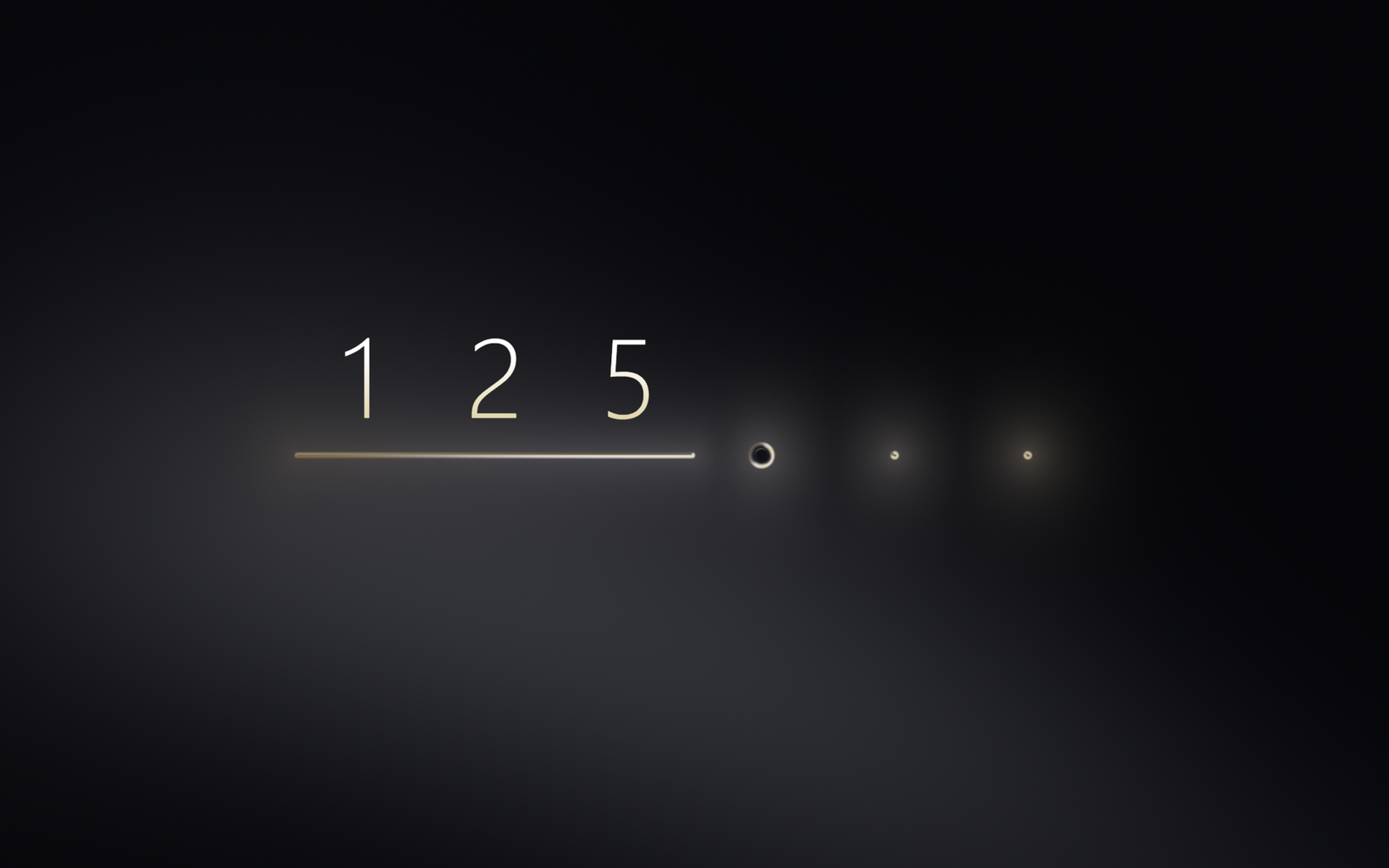
Want to build an OTP input animation that looks premium? In this project, we’ll create a Liquid Glass OTP Input Animation using HTML, CSS, and JavaScript: a modern OTP verification UI where each digit rises in with a smooth flip, while a liquid gold thread flows beneath the numbers. When the code is correct, the thread melts into a glowing ring and draws a tick.
HTML: Build the OTP Input Structure
Create a minimal page with a full-screen canvas for the liquid effects, a 6-digit OTP input row with one hidden input field, and a status line for the “Verified” or “Incorrect code” message. The hidden input means copy-paste and SMS autofill work out of the box.
CSS: Style the OTP Verification Screen
Style the page with a dark background, thin white-to-gold gradient digits, and gold and red status colours. Use responsive sizing so the OTP input design scales to mobile, tablet, and desktop screens, and add a fallback style for browsers without WebGL.
JavaScript: Add the Liquid Animation and OTP Validation
Build the liquid gold thread, beads, ring, and tick with a WebGL fragment shader, and move every shape with custom spring physics inside a requestAnimationFrame loop. Animate each digit in with the Web Animations API, then check the code once all six digits are entered:
- Correct OTP: the thread reels into a gold ring and draws a tick.
- Wrong OTP: the liquid turns red, the row shakes, and the input clears automatically.
The shader also adds a cursor-following light and a ripple each time a digit lands.
HTML :
This is the skeleton of the page. It holds just three things: a <canvas> where all the liquid gold is drawn, a row containing one invisible <input> that catches your typing (which is why pasting and SMS autofill still work), and a status line for “Verified” or “Incorrect code”. The six digit slots aren’t written here; the JavaScript creates them when the page loads.
<!doctype html>
<html lang="en">
<head>
<meta charset="utf-8">
<meta name="viewport" content="width=device-width, initial-scale=1">
<title>Liquid Glass OTP Input Animation | @coding.stella</title>
<link rel="stylesheet" href="style.css">
</head>
<body>
<canvas id="gl"></canvas>

<main class="row" id="row">
  <input id="code" type="text" inputmode="numeric" autocomplete="one-time-code" maxlength="6" aria-label="6 digit code">
</main>
<p class="status" id="status" role="status"></p>

<script src="script.js"></script>
</body>
</html>
CSS :
This is the look and layout. It sets the dark background, centres everything, and sizes the digits so they shrink on small screens. It also makes the numbers thin and gives them a white-to-gold gradient, colours the status message gold or red, and hides the real input box so you only see the digits. It doesn’t draw the gold thread, ring or tick; those come from the shader in the JavaScript.
:root {
  --bg: #05060a;
  --text: #ffffff;
  --muted: #b7bbcc;
  --good: #e6cf9a;
  --bad: #ff7a85;
  --cell: clamp(44px, 12.5vw, 76px);
  --gap: clamp(8px, 2.2vw, 16px);
}

* {
  box-sizing: border-box;
  margin: 0;
}

html,
body {
  height: 100%;
}

body {
  display: flex;
  flex-direction: column;
  align-items: center;
  justify-content: center;
  padding: 16px;
  overflow: hidden;
  background: var(--bg);
  color: var(--text);
  font-family: "Segoe UI", system-ui, -apple-system, sans-serif;
}

#gl {
  position: fixed;
  inset: 0;
  width: 100%;
  height: 100%;
}

.row {
  position: relative;
  display: flex;
  gap: var(--gap);
  perspective: 500px;
}

.slot {
  position: relative;
  flex: none;
  width: var(--cell);
  height: calc(var(--cell) * 1.3);
  display: grid;
  place-items: center;
  font-size: calc(var(--cell) * 1.02);
  font-weight: 300;
  font-variant-numeric: tabular-nums;
  line-height: 1;
  transform-style: preserve-3d;
}

.slot span {
  grid-area: 1 / 1;
  background: linear-gradient(#fff 35%, #e6cf9a);
  -webkit-background-clip: text;
  background-clip: text;
  color: transparent;
  will-change: transform, opacity, filter;
}

.row.bad .slot span {
  background: linear-gradient(#fff 10%, var(--bad));
  -webkit-background-clip: text;
  background-clip: text;
}

.no-gl .slot {
  border-bottom: 2px solid var(--muted);
}

.row input {
  position: absolute;
  inset: 0;
  z-index: 2;
  width: 100%;
  height: 100%;
  opacity: 0;
  border: 0;
  font-size: 16px;
  cursor: text;
}

.status {
  height: 26px;
  margin-top: 60px;
  font-size: 16px;
  font-weight: 600;
  letter-spacing: .02em;
  color: var(--muted);
}

.status span {
  display: inline-block;
  white-space: pre;
}

.status.good {
  color: var(--good);
}

.status.bad {
  color: var(--bad);
}
JavaScript:
This is the brain and the animation, in three parts.
- Shader: the long text at the top runs on your graphics card and draws every pixel of the liquid gold: the thread, beads, ring, tick, reflections and the glowing background.
- Spring physics: the middle section moves every shape like a real spring, so the thread stretches, swells and settles smoothly.
- Input logic: the bottom section reads what you type, animates each digit in, checks it against
123456, and plays either the gold ring and tick or the red shake and “Incorrect code”.
const FRAGMENT_SHADER = `
precision highp float;
uniform vec2 res;
uniform float dpr, time, heat, sweep;
uniform vec2 light;
uniform vec4 boxes[7];
uniform vec4 ripple;
uniform vec4 seal;

float segment(vec2 p, vec2 a, vec2 b) {
  vec2 pa = p - a, ba = b - a;
  return length(pa - ba * clamp(dot(pa, ba) / max(dot(ba, ba), 0.001), 0.0, 1.0));
}

float smin(float a, float b, float k) {
  float h = max(k - abs(a - b), 0.0) / k;
  return min(a, b) - h * h * k * 0.25;
}

float scene(vec2 p) {
  float d = 1e5;
  for (int i = 0; i < 7; i++) {
    vec4 b = boxes[i];
    if (b.z < 0.5) continue;
    float r = min(min(b.z, b.w), 20.0);
    vec2 q = abs(p - b.xy) - b.zw + r;
    d = smin(d, length(max(q, 0.0)) + min(max(q.x, q.y), 0.0) - r, 12.0);
  }
  if (seal.z > 0.5) {
    vec2 c = p - seal.xy;
    d = min(d, abs(length(c) - seal.z) - 1.6);
    if (seal.w > 0.01) {
      vec2 a = vec2(-0.42, 0.02) * seal.z, b = vec2(-0.12, 0.32) * seal.z, e = vec2(0.46, -0.32) * seal.z;
      d = min(d, segment(c, a, mix(a, b, clamp(seal.w * 3.0, 0.0, 1.0))) - 1.8);
      if (seal.w > 0.33) d = min(d, segment(c, b, mix(b, e, (seal.w - 0.33) / 0.67)) - 1.8);
    }
  }
  return d;
}

vec3 palette(float t) {
  return vec3(0.86, 0.72, 0.54) + vec3(0.3, 0.3, 0.36) * cos(6.2831 * (t + vec3(0.0, 0.04, 0.12)));
}

vec3 accent(vec3 base) {
  return mix(base, vec3(1.0, 0.2, 0.26) * (0.5 + dot(base, vec3(0.5))), heat);
}

vec3 aurora(vec2 q) {
  q *= 0.0017;
  float t = time * 0.12;
  float a = sin(q.x * 2.1 + t + 1.6 * sin(q.y * 2.7 - t * 1.3));
  float b = sin(q.y * 3.1 - t * 0.8 + 1.4 * sin(q.x * 1.9 + t));
  vec3 c = mix(palette(q.x * 0.25 + a * 0.12 + t * 0.2), vec3(0.62, 0.66, 0.74), 0.8);
  return accent(c) * pow(0.5 + 0.25 * (a + b), 3.0) * 0.17;
}

float noise(vec2 p) { return fract(sin(dot(p, vec2(12.9898, 78.233))) * 43758.5453); }

void main() {
  vec2 p = vec2(gl_FragCoord.x, res.y - gl_FragCoord.y) / dpr;
  float d = scene(p);
  vec2 grad = vec2(scene(p + vec2(1.0, 0.0)) - d, scene(p + vec2(0.0, 1.0)) - d);
  grad /= max(length(grad), 0.001);

  vec2 toRipple = p - ripple.xy;
  float rippleDist = length(toRipple);
  float wave = exp(-pow((rippleDist - ripple.z) / 46.0, 2.0)) * ripple.w;
  vec2 bend = toRipple / max(rippleDist, 1.0) * wave * 34.0;

  vec2 centre = res / dpr * 0.5;
  float vignette = 1.0 - smoothstep(0.1, 1.1, length((p - centre) / res * dpr) * 1.5);
  vec3 background = vec3(0.012, 0.014, 0.024) + aurora(p + bend) * (0.45 + vignette);
  background += accent(palette(0.4)) * wave * 0.1;
  background += accent(palette(time * 0.03 + p.x * 0.001)) * exp(-max(d, 0.0) / 26.0) * 0.16;

  float t = clamp(-d / 5.0, 0.0, 1.0);
  float slope = (1.0 - t) * (1.0 - t);
  vec3 n = normalize(vec3(grad * slope * 4.0, 1.0));
  vec3 r = vec3(n.xy * 2.0 * n.z, 2.0 * n.z * n.z - 1.0);

  float fresnel = pow(1.0 - n.z, 1.6);
  float stripes = sin(r.x * 2.5 + r.y * 1.5 + time * 0.55 + p.x * 0.005);
  vec3 env = accent(palette(0.5 + stripes * 0.28 + time * 0.035 + p.x * 0.0012))
    * (0.4 + 0.6 * smoothstep(-0.5, 0.8, stripes));

  vec3 toLight = normalize(vec3((light - p) / 420.0, 1.0));
  float spec = pow(max(dot(n, normalize(toLight + vec3(0.0, 0.0, 1.0))), 0.0), 80.0) * (1.0 - t);

  vec3 glass = vec3(0.02, 0.022, 0.04) + aurora((p + n.xy * 90.0) * 1.4) * 0.5;
  glass += env * fresnel * 2.6 + vec3(spec) * 1.3;
  glass += accent(palette(0.3 + p.x * 0.002)) * exp(-abs(p.x - sweep) / 34.0) * (0.14 + fresnel * 2.0);

  vec3 col = mix(background, glass, smoothstep(1.0, -1.0, d));
  col = 1.0 - exp(-col * 1.5);
  col += (noise(gl_FragCoord.xy + time) - 0.5) / 180.0;
  gl_FragColor = vec4(col, 1.0);
}
`;

const LENGTH = 6;
const HEAD = LENGTH;
const SECRET = "123456";
const reduced = matchMedia("(prefers-reduced-motion: reduce)").matches;

const row = document.getElementById("row");
const input = document.getElementById("code");
const statusEl = document.getElementById("status");
const canvas = document.getElementById("gl");

const slots = Array.from({ length: LENGTH }, () => {
  const slot = document.createElement("div");
  slot.className = "slot";
  slot.setAttribute("aria-hidden", "true");
  row.insertBefore(slot, input);
  return slot;
});

class Spring {
  constructor(value, stiffness, damping) {
    Object.assign(this, { value, target: value, velocity: 0, stiffness, damping });
  }
  step(dt) {
    if (reduced) { this.value = this.target; this.velocity = 0; return; }
    this.velocity += (this.stiffness * (this.target - this.value) - this.damping * this.velocity) * dt;
    this.value += this.velocity * dt;
  }
}

// 0-5 are the slots, 6 is the bead that marks the current slot
const shapes = Array.from({ length: LENGTH + 1 }, () => ({
  x: new Spring(0, 200, 23),
  y: new Spring(0, 200, 23),
  w: new Spring(0, 300, 20),
  h: new Spring(0, 300, 20),
}));
const fx = {
  ring: new Spring(0, 80, 13),
  tick: new Spring(0, 60, 15.5),
  heat: new Spring(0, 70, 17),
  shake: new Spring(0, 520, 15),
  lightX: new Spring(innerWidth * 0.3, 40, 12),
  lightY: new Spring(innerHeight * 0.25, 40, 12),
};
const all = [...shapes.flatMap(s => [s.x, s.y, s.w, s.h]), ...Object.values(fx)];

let ripple = { x: 0, y: 0, radius: 9999, power: 0 };
let sweepX = -9999;

function pulse(px, py, power) {
  if (!reduced) ripple = { x: px, y: py, radius: 0, power };
}

let previous = "";
let locked = false;
let merged = false;
let cell = 60, cellH = 78, cx = 0, cy = 0, baseY = 0;
const slotX = [];

function measure() {
  const dpr = Math.min(devicePixelRatio || 1, 1.5);
  canvas.width = innerWidth * dpr;
  canvas.height = innerHeight * dpr;
  if (gl) gl.viewport(0, 0, canvas.width, canvas.height);
  const shift = fx.shake.value;
  slots.forEach((slot, i) => {
    const rect = slot.getBoundingClientRect();
    slotX[i] = rect.left + rect.width / 2 - shift;
    cy = rect.top + rect.height / 2;
    cell = rect.width;
    cellH = rect.height;
  });
  cx = (slotX[0] + slotX[LENGTH - 1]) / 2;
  baseY = cy + cellH / 2 + 8;
  layout();
}

// Shape 0 stretches into the thread under the typed digits; the others shrink into it
function layout() {
  if (merged) return;
  const filledCount = previous.length;
  const reach = (slotX[1] - slotX[0]) / 2;
  slots.forEach((_, i) => {
    const s = shapes[i];
    s.y.target = baseY;
    if (i === 0 && filledCount) {
      const left = slotX[0] - reach, right = slotX[filledCount - 1] + reach;
      s.x.target = (left + right) / 2;
      s.w.target = (right - left) / 2;
      s.h.target = 1.6;
    } else {
      const filled = i < filledCount;
      s.x.target = slotX[i];
      s.w.target = filled ? 0 : 2.5;
      s.h.target = filled ? 0 : 2.5;
    }
  });
  const focused = document.activeElement === input && !locked && previous.length < LENGTH;
  const head = shapes[HEAD];
  head.x.target = slotX[Math.min(previous.length, LENGTH - 1)];
  head.y.target = baseY;
  head.w.target = head.h.target = focused ? Math.max(cell * 0.1, 6) : 0;
}

const gl = canvas.getContext("webgl", { alpha: false, antialias: false });
const uniforms = {};
const boxData = new Float32Array(28);

function setupGL() {
  const compile = (type, src) => {
    const s = gl.createShader(type);
    gl.shaderSource(s, src);
    gl.compileShader(s);
    if (!gl.getShaderParameter(s, gl.COMPILE_STATUS)) console.error(gl.getShaderInfoLog(s));
    return s;
  };
  const prog = gl.createProgram();
  gl.attachShader(prog, compile(gl.VERTEX_SHADER, "attribute vec2 a; void main() { gl_Position = vec4(a, 0.0, 1.0); }"));
  gl.attachShader(prog, compile(gl.FRAGMENT_SHADER, FRAGMENT_SHADER));
  gl.linkProgram(prog);
  gl.useProgram(prog);
  gl.bindBuffer(gl.ARRAY_BUFFER, gl.createBuffer());
  gl.bufferData(gl.ARRAY_BUFFER, new Float32Array([-1, -1, 3, -1, -1, 3]), gl.STATIC_DRAW);
  const a = gl.getAttribLocation(prog, "a");
  gl.enableVertexAttribArray(a);
  gl.vertexAttribPointer(a, 2, gl.FLOAT, false, 0, 0);
  for (const name of ["res", "dpr", "time", "heat", "sweep", "light", "ripple", "seal", "boxes"])
    uniforms[name] = gl.getUniformLocation(prog, name);
}

function draw(seconds) {
  shapes.forEach((s, i) => {
    boxData[i * 4] = s.x.value + fx.shake.value;
    boxData[i * 4 + 1] = s.y.value;
    boxData[i * 4 + 2] = Math.max(s.w.value + Math.abs(s.x.velocity) * (i === HEAD ? 0.035 : 0), 0);
    boxData[i * 4 + 3] = Math.max(s.h.value, 0);
  });
  gl.uniform4fv(uniforms.boxes, boxData);
  gl.uniform2f(uniforms.res, canvas.width, canvas.height);
  gl.uniform1f(uniforms.dpr, canvas.width / innerWidth);
  gl.uniform1f(uniforms.time, reduced ? 0 : seconds);
  gl.uniform4f(uniforms.seal, cx, cy, Math.max(fx.ring.value, 0), Math.min(Math.max(fx.tick.value, 0), 1));
  gl.uniform1f(uniforms.heat, Math.min(Math.max(fx.heat.value, 0), 1));
  gl.uniform1f(uniforms.sweep, sweepX);
  gl.uniform2f(uniforms.light, fx.lightX.value, fx.lightY.value);
  gl.uniform4f(uniforms.ripple, ripple.x, ripple.y, ripple.radius, ripple.power);
  gl.drawArrays(gl.TRIANGLES, 0, 3);
}

function advance(dt) {
  dt = Math.min(dt, 0.05);
  for (let left = dt; left > 0; left -= 1 / 120) {
    const step = Math.min(left, 1 / 120);
    all.forEach(s => s.step(step));
  }
  ripple.radius += dt * 620;
  ripple.power *= Math.pow(0.12, dt);
  row.style.transform = Math.abs(fx.shake.value) > 0.01 ? `translateX(${fx.shake.value}px)` : "";
}

let last = 0;
function loop(now) {
  advance((now - last) / 1000);
  last = now;
  draw(now / 1000);
  requestAnimationFrame(loop);
}

function run(el, frames, timing) {
  return el.animate(frames, { ...timing, duration: reduced ? 1 : timing.duration, delay: reduced ? 0 : timing.delay || 0 });
}

function addDigit(i, digit, delay = 0) {
  const span = document.createElement("span");
  span.textContent = digit;
  slots[i].append(span);
  run(span, [
    { transform: "translateY(45%) rotateX(-75deg) scale(.8)", opacity: 0, filter: "blur(10px)" },
    { transform: "none", opacity: 1, filter: "blur(0)" },
  ], { duration: 620, easing: "cubic-bezier(.16, 1, .3, 1)", fill: "both", delay: delay + 70 });
  later(() => {
    if (!reduced && i > 0) shapes[i].w.value = shapes[i].h.value = 6;
    pulse(slotX[i], baseY, 0.8);
  }, delay + 120);
}

function removeDigit(i, delay = 0) {
  const span = slots[i].lastElementChild;
  if (!span) return;
  run(span, [
    { transform: "none", opacity: 1, filter: "blur(0)" },
    { transform: "translateY(35%) scale(.8)", opacity: 0, filter: "blur(8px)" },
  ], { duration: 220, easing: "ease-in", fill: "both", delay }).finished.then(() => span.remove(), () => { });
}

let timers = [];
const later = (fn, ms) => timers.push(setTimeout(fn, reduced ? 0 : ms));

function sync() {
  const value = input.value.replace(/\D/g, "").slice(0, LENGTH);
  input.value = value;
  if (value !== previous) {
    const pasted = value.length - previous.length > 1;
    for (let i = 0; i < LENGTH; i++) {
      if (value[i] === previous[i]) continue;
      if (previous[i]) removeDigit(i);
      if (value[i]) addDigit(i, value[i], pasted ? i * 70 : 0);
    }
    previous = value;
    setStatus("");
    if (value.length === LENGTH) later(verify, pasted ? 950 : 600);
  }
  layout();
}

function setStatus(text, kind = "") {
  statusEl.className = "status " + kind;
  statusEl.textContent = "";
  statusEl.setAttribute("aria-label", text);
  [...text].forEach((ch, i) => {
    const span = document.createElement("span");
    span.textContent = ch;
    statusEl.append(span);
    run(span, [
      { transform: "translateY(10px)", opacity: 0, filter: "blur(6px)" },
      { transform: "none", opacity: 1, filter: "blur(0)" },
    ], { duration: 520, easing: "cubic-bezier(.16, 1, .3, 1)", fill: "both", delay: i * 22 });
  });
}

function verify() {
  if (input.value.length !== LENGTH || locked) return;
  locked = true;
  input.disabled = true;
  layout();
  const from = slotX[0] - cell, to = slotX[LENGTH - 1] + cell;
  const started = performance.now();
  const scan = () => {
    const t = (performance.now() - started) / 720;
    if (t >= 1) { sweepX = -9999; return; }
    sweepX = from + (to - from) * t * t * (3 - 2 * t);
    requestAnimationFrame(scan);
  };
  if (!reduced) scan();
  later(() => (input.value === SECRET ? succeed() : fail()), 760);
}

function succeed() {
  merged = true;

  slots.forEach((slot, i) => {
    const span = slot.lastElementChild;
    if (!span) return;
    run(span, [
      { transform: "none", opacity: 1, filter: "blur(0)" },
      { transform: `translateX(${(cx - slotX[i]) * 0.35}px) scale(.7)`, opacity: 0, filter: "blur(8px)" },
    ], { duration: 300, easing: "ease-in", fill: "both" });
  });

  const thread = shapes[0];
  thread.x.stiffness = thread.w.stiffness = 90;
  thread.x.damping = thread.w.damping = 17;
  thread.x.target = cx;
  thread.y.target = cy;
  thread.w.target = thread.h.target = 4;

  later(() => {
    thread.w.stiffness = thread.h.stiffness = 200;
    thread.w.target = thread.h.target = 0;
    fx.ring.target = cell * 0.8;
    pulse(cx, cy, 1.4);
  }, 720);
  later(() => { fx.tick.target = 1; }, 1000);
  later(() => setStatus("Verified", "good"), 1400);
}

function fail() {
  fx.heat.target = 1;
  row.classList.add("bad");
  fx.shake.velocity = reduced ? 0 : 170;
  setStatus("Incorrect code", "bad");
  pulse(cx, cy, 1);
  later(() => {
    for (let i = LENGTH - 1; i >= 0; i--) removeDigit(i, (LENGTH - 1 - i) * 40);
    fx.heat.target = 0;
    later(() => row.classList.remove("bad"), 300);
    later(() => {
      if (!statusEl.classList.contains("bad")) return;
      run(statusEl, [{ opacity: 1, filter: "blur(0)" }, { opacity: 0, filter: "blur(6px)" }], { duration: 400, easing: "ease-in" })
        .finished.then(() => { if (statusEl.classList.contains("bad")) setStatus(""); });
    }, 1600);
    input.disabled = false;
    input.value = "";
    previous = "";
    locked = false;
    input.focus();
    layout();
  }, 900);
}

function reset() {
  timers.forEach(clearTimeout);
  timers = [];
  merged = false;
  locked = false;
  slots.forEach(slot => { slot.textContent = ""; });
  shapes.forEach(s => {
    s.x.stiffness = 200; s.x.damping = 23;
    s.w.stiffness = 300; s.w.damping = 20;
    s.h.stiffness = 300; s.h.damping = 20;
  });
  row.classList.remove("bad");
  fx.ring.target = 0;
  fx.tick.target = fx.tick.value = fx.tick.velocity = 0;
  fx.heat.target = 0;
  sweepX = -9999;
  input.disabled = false;
  input.value = "";
  previous = "";
  setStatus("");
  input.focus();
  layout();
}

input.addEventListener("input", sync);
input.addEventListener("focus", layout);
input.addEventListener("blur", layout);
input.addEventListener("keydown", e => {
  if (["ArrowLeft", "ArrowRight", "Home"].includes(e.key)) e.preventDefault();
});
addEventListener("pointermove", e => { fx.lightX.target = e.clientX; fx.lightY.target = e.clientY; });
addEventListener("pointerdown", e => {
  if (e.target === input) return;
  if (merged) reset();
  else if (!locked) setTimeout(() => input.focus());
});
addEventListener("resize", measure);

input.focus();
if (gl) setupGL();
else row.classList.add("no-gl");
measure();
shapes.forEach((s, i) => {
  s.x.value = slotX[i === HEAD ? 0 : i];
  s.y.value = baseY;
});
if (gl) requestAnimationFrame(loop);
This project demonstrates how HTML, CSS, and JavaScript can work together to create a visually engaging loading experience. By combining CSS animations, JavaScript-controlled progress, and smooth transitions, we built a modern kinetic morph loader that makes waiting feel more interactive and enjoyable.
If your project has problems, don’t worry. Just click to download the source code and face your coding challenges with excitement. Have fun coding!
