


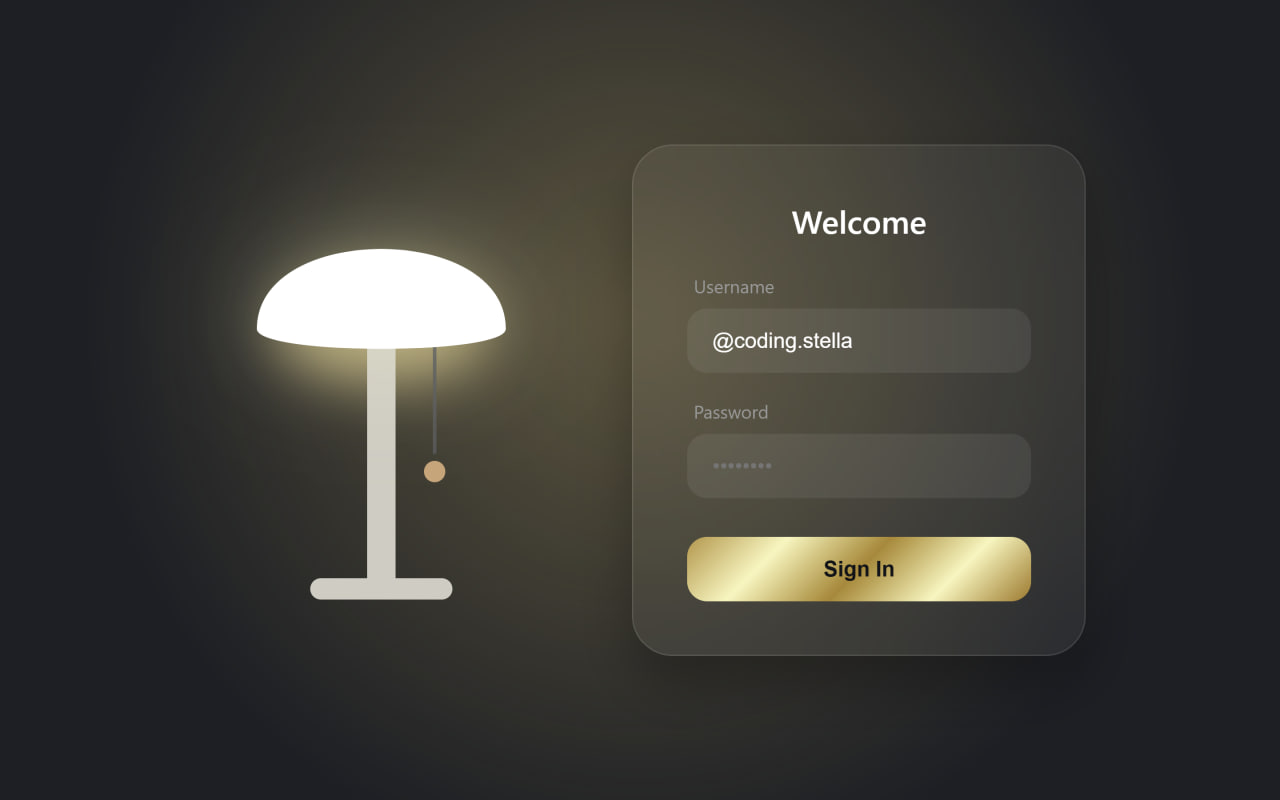
Let’s create a beautiful Lamp Login Animation using HTML, CSS, and JavaScript. In this project, we’ll build an interactive login page where users can pull a lamp cord to switch the light on and off. When the lamp lights up, the login form smoothly appears with elegant animations, creating a unique and engaging user experience.
We’ll use:
- HTML: To create the page structure, including the SVG lamp, pull cord, and login form with username, password, and sign-in button.
- CSS: To design the dark-themed interface, style the lamp, add realistic glow effects, glassmorphism for the login form, smooth transitions, and responsive layouts.
- JavaScript: To handle the pull-cord interaction using GSAP and Draggable, toggle the lamp’s light, play a click sound, animate the background lighting, and smoothly show or hide the login form based on the lamp’s state.
This project is perfect for learning SVG animations, GSAP Draggable, JavaScript event handling, DOM manipulation, CSS transitions, glassmorphism effects, interactive UI design, and creating creative login page animations with HTML, CSS, and JavaScript.
HTML :
HTML creates the structure of the webpage. It contains the SVG lamp, the pull cord, and the login form with username, password, and sign-in button. It also links the CSS file for styling and the JavaScript file for interactivity.
<!DOCTYPE html>
<html lang="en">
<head>
  <meta charset="UTF-8" />
  <meta name="viewport" content="width=device-width, initial-scale=1.0" />
  <title>Login Form Lamp | @coding.stella</title>
  <link rel="stylesheet" href="style.css">
</head>
<body data-on="false">

<div class="container">
  <div class="lamp-wrapper">
    <svg class="lamp-svg" viewBox="0 0 200 300" xmlns="http://www.w3.org/2000/svg">
      <ellipse class="inner-glow" cx="100" cy="110" rx="60" ry="30" />

      <rect class="lamp-base" x="92" y="100" width="16" height="160" rx="8" />

      <rect class="lamp-base" x="60" y="250" width="80" height="12" rx="6" />

      <g class="pull-cord">
        <line class="cord-line" x1="130" y1="110" x2="130" y2="180" />
        <circle class="cord-bead" cx="130" cy="190" r="6" />
        <circle class="cord-hit" cx="130" cy="190" r="25" fill="transparent" />
      </g>

      <path class="lamp-shade" d="M30 110 C 30 50, 170 50, 170 110 C 170 125, 30 125, 30 110 Z" />
    </svg>
  </div>

  <div class="login-form">
    <h2>Welcome</h2>

    <form onsubmit="return false;">
      <div class="form-group">
        <label>Username</label>
        <input type="text" placeholder="Enter name">
      </div>

      <div class="form-group">
        <label>Password</label>
        <input type="password" placeholder="Enter Password">
      </div>

      <button class="login-btn">Sign In</button>
    </form>
  </div>
</div>

<script src="https://unpkg.com/gsap@3/dist/gsap.min.js"></script>
<script src="https://unpkg.com/gsap@3/dist/Draggable.min.js"></script>
<script src="script.js"></script>

</body>
</html>
CSS :
CSS styles the webpage by designing the lamp, login form, colors, glow effect, and animations. It also hides the login form initially and smoothly displays it when the lamp is turned on.
:root {
  --bg-color: #121417;
  --lamp-matte: #e8e2d9;
  --lamp-shade: #f5f0e6;
  --lamp-base: #d1ccc2;
  --glow-color: rgba(255, 214, 110, 0.3);
  --accent-color: #d4a373;
  --on: 0;
  --transition: 0.5s cubic-bezier(0.4, 0, 0.2, 1);
}

* {
  margin: 0;
  padding: 0;
  box-sizing: border-box;
}

body {
  min-height: 100vh;
  display: grid;
  place-items: center;
  background: var(--bg-color);
  font-family: "Inter", system-ui, -apple-system, sans-serif;
  overflow: hidden;
  transition: background var(--transition);
}

body::before {
  content: "";
  position: absolute;
  inset: 0;
  background: radial-gradient(circle at 50% 40%, var(--glow-color), transparent 70%);
  opacity: var(--on);
  transition: opacity var(--transition);
  pointer-events: none;
}

.container {
  display: flex;
  align-items: center;
  justify-content: center;
  gap: 8vmin;
  flex-wrap: wrap;
  width: 100%;
  max-width: 1000px;
  z-index: 1;
}

/* Lamp */

.lamp-wrapper {
  position: relative;
  width: 280px;
  height: 400px;
  display: flex;
  justify-content: center;
}

.lamp-svg {
  width: 100%;
  height: 100%;
  overflow: visible;
}

.lamp-shade {
  fill: var(--lamp-shade);
  transition: fill var(--transition);
}

[data-on="true"] .lamp-shade {
  fill: #fff;
  filter: drop-shadow(0 0 30px rgba(255, 255, 200, 0.4));
}

.lamp-base {
  fill: var(--lamp-base);
}

.inner-glow {
  fill: #ffdb8a;
  opacity: 0;
  filter: blur(15px);
  transition: opacity var(--transition);
}

[data-on="true"] .inner-glow {
  opacity: 0.6;
}

.cord-line {
  stroke: #555;
  stroke-width: 2;
}

.cord-bead {
  fill: var(--accent-color);
}

.cord-hit {
  cursor: pointer;
}

/* Login Form */

.login-form {
  width: 340px;
  padding: 2.5rem;
  border-radius: 30px;
  background: rgba(255, 255, 255, 0.05);
  backdrop-filter: blur(20px);
  border: 1px solid rgba(255, 255, 255, 0.1);
  box-shadow: 0 20px 40px rgba(0, 0, 0, 0.3);

  opacity: 0;
  pointer-events: none;
  transform: translateY(30px);

  transition: all 0.7s cubic-bezier(0.175, 0.885, 0.32, 1.275);
}

.login-form.active {
  opacity: 1;
  transform: translateY(0);
  pointer-events: auto;
}

.login-form h2 {
  color: #fff;
  text-align: center;
  margin-bottom: 1.5rem;
  font-weight: 500;
  font-size: 1.5rem;
}

.form-group {
  margin-bottom: 1.2rem;
}

.form-group label {
  display: block;
  color: #999;
  margin-bottom: 0.5rem;
  margin-left: 5px;
  font-size: 0.85rem;
}

.form-group input {
  width: 100%;
  padding: 14px 18px;
  border: 1px solid transparent;
  border-radius: 15px;
  outline: none;
  color: #fff;
  background: rgba(255, 255, 255, 0.07);
  transition: 0.3s;
  font-size: 1rem;
}

.form-group input:focus {
  border-color: var(--accent-color);
  background: rgba(255, 255, 255, 0.12);
}

.login-btn {
  width: 100%;
  padding: 15px;
  margin-top: 10px;
  border: none;
  border-radius: 15px;
  cursor: pointer;
  font-size: 1rem;
  font-weight: 600;
  color: #121417;
  background: linear-gradient(
    135deg,
    #bf953f,
    #fcf6ba,
    #b38728,
    #fcf6ba,
    #aa771c
  );
  transition: 0.3s;
}

.login-btn:hover {
  transform: scale(1.02);
  background: var(--lamp-shade);
}
JS :
JavaScript adds interactivity to the page using GSAP and Draggable. It detects when the user pulls the lamp cord, plays a click sound, toggles the lamp on or off, changes the background lighting, and shows or hides the login form with smooth animations.
gsap.registerPlugin(Draggable);

const root = document.documentElement;
const body = document.body;
const loginForm = document.querySelector(".login-form");

const cordBead = document.querySelector(".cord-bead");
const cordLine = document.querySelector(".cord-line");
const hitArea = document.querySelector(".cord-hit");

let isOn = false;

const clickSound = new Audio(
  "https://assets.codepen.io/605876/click.mp3"
);

Draggable.create(hitArea, {
  type: "y",
  bounds: {
    minY: 0,
    maxY: 60,
  },

  onDrag() {
    gsap.set(cordBead, {
      y: this.y,
    });

    gsap.set(cordLine, {
      attr: {
        y2: 180 + this.y,
      },
    });
  },

  onRelease() {
    if (this.y > 30) {
      toggleLamp();
    }

    gsap.to([cordBead, hitArea], {
      y: 0,
      duration: 0.5,
      ease: "back.out(2.5)",
    });

    gsap.to(cordLine, {
      attr: {
        y2: 180,
      },
      duration: 0.5,
      ease: "back.out(2.5)",
    });
  },
});

function toggleLamp() {
  isOn = !isOn;

  clickSound.play();

  body.setAttribute("data-on", isOn);
  root.style.setProperty("--on", isOn ? 1 : 0);

  if (isOn) {
    loginForm.classList.add("active");

    gsap.to(body, {
      backgroundColor: "#1c1f24",
      duration: 0.6,
    });
  } else {
    loginForm.classList.remove("active");

    gsap.to(body, {
      backgroundColor: "#121417",
      duration: 0.6,
    });
  }
}
Conclusion
In this project, we created a creative Lamp Login Animation using HTML, CSS, and JavaScript. By combining SVG graphics, GSAP animations, and modern CSS effects, we built an interactive login page where pulling the lamp cord reveals the login form with smooth transitions. This project is a great way to practice animations, DOM manipulation, event handling, and creating engaging user interfaces.
If your project has problems, don’t worry. Just click to download the source code and face your coding challenges with excitement. Have fun coding!
