


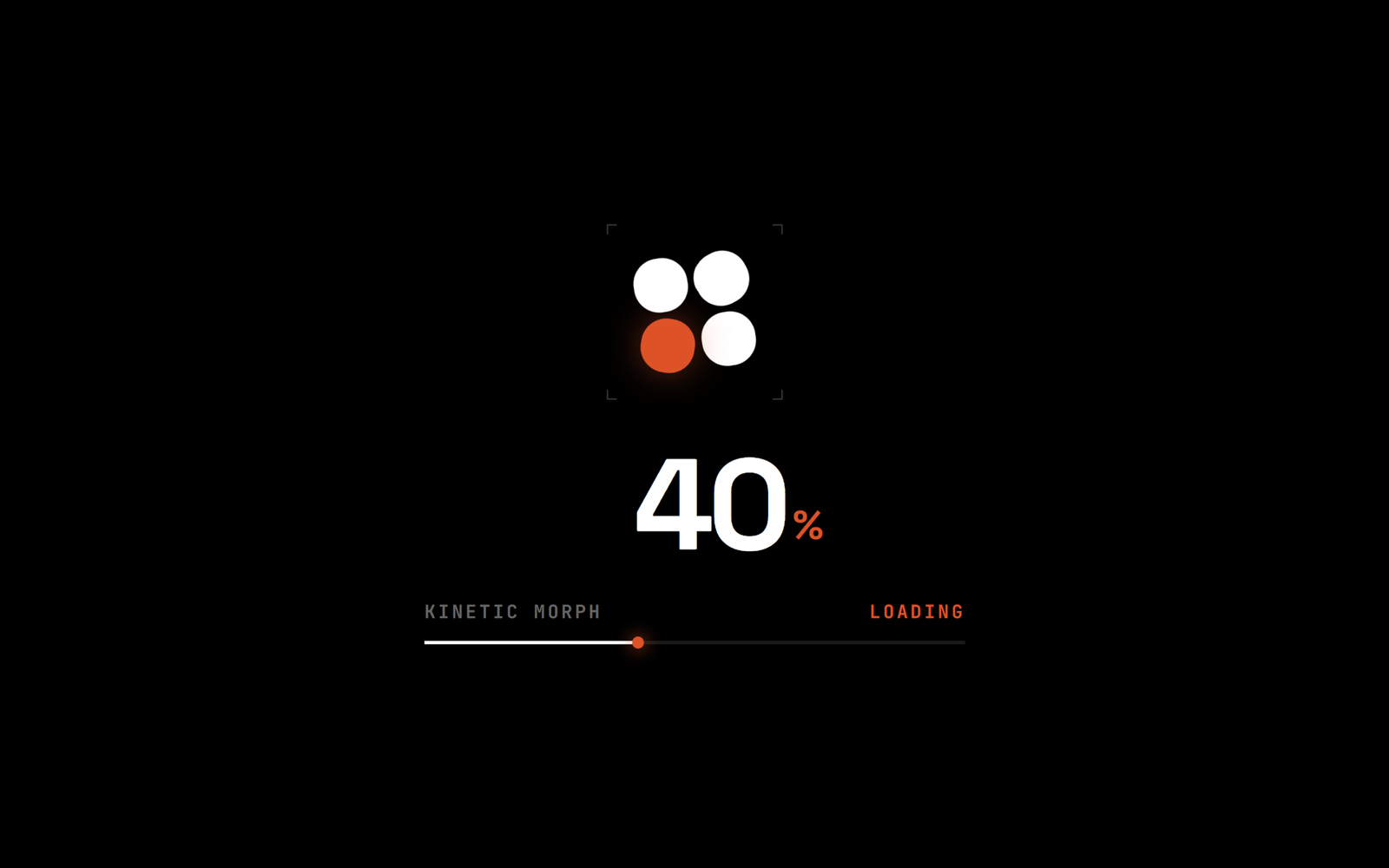
Let’s create a Kinetic Morph Loading Animation using HTML, CSS, and JavaScript – a modern preloader featuring four geometric tiles that rotate, move, and morph into different shapes while a percentage counter and progress bar smoothly track the loading progress.
- HTML: Create a preloader section containing four animated geometric tiles, a percentage counter, a progress bar, and dynamic loading status text. Also add a hidden white page with a greeting message that appears after loading completes.
- CSS: Style the preloader with a minimal black background, white and orange accents, custom fonts, and smooth animations. Use CSS keyframes to rotate and morph the four tiles, create a progress bar design, and add a circular reveal transition to display the final page.
- JavaScript: Control the loading animation for 4.5 seconds using
requestAnimationFrame, smoothly update the percentage counter and progress bar, change loading statuses, and reveal the final page once loading reaches 100%. Also allow users to replay the animation using the Space or R key.
This project teaches how to build a creative and modern preloader using HTML, CSS, and JavaScript by combining geometric animations, smooth progress tracking, dynamic text updates, and cinematic page reveal transitions.
HTML :
HTML: Creates the structure of the preloader, including the animated tiles, percentage counter, progress bar, loading status, and the final greeting message.
<!DOCTYPE html>
<html lang="en">

<head>
  <meta charset="UTF-8">
  <meta name="viewport" content="width=device-width, initial-scale=1.0">
  <title>Kinetic Morph Loading Animtion | @coding.stella</title>
  <link rel="stylesheet" href="style.css">
</head>

<body>

  <!-- Preloader -->
  <div id="km-preloader" role="progressbar" aria-label="Loading" aria-live="polite">
    <div class="km-container">
      <div class="km-stage-wrapper">
        <span class="km-reticle km-reticle-tl"></span>
        <span class="km-reticle km-reticle-tr"></span>
        <span class="km-reticle km-reticle-bl"></span>
        <span class="km-reticle km-reticle-br"></span>
        <div class="km-stage">
          <div class="km-tile km-tile-1"></div>
          <div class="km-tile km-tile-2"></div>
          <div class="km-tile km-tile-3"></div>
          <div class="km-tile km-tile-4"></div>
        </div>
      </div>

      <div class="km-counter-wrap">
        <span id="km-count" class="km-number">0</span>
        <span class="km-percent">%</span>
      </div>

      <div class="km-telemetry-box">
        <div class="km-meta-row">
          <span class="km-title-tag">KINETIC MORPH</span>
          <span id="km-status" class="km-status-tag">INITIALIZING</span>
        </div>
        <div class="km-track-line">
          <div id="km-fill" class="km-fill-line"></div>
        </div>
      </div>
    </div>
  </div>

  <!-- Revealed Page -->
  <main id="white-page" class="page">
    <h1 class="greeting">Hey</h1>
  </main>

  <script src="script.js"></script>
</body>

</html>
CSS :
CSS: Handles the complete visual design, including the black background, typography, colors, rotating and morphing tile animations, progress bar styling, and the circular reveal transition that displays the white page.
@import url('https://fonts.googleapis.com/css2?family=JetBrains+Mono:wght@500;700&family=Space+Grotesk:wght@600;700;800;900&display=swap');

*, *::before, *::after {
  box-sizing: border-box;
  margin: 0;
  padding: 0;
}

html, body {
  background-color: #000000;
  min-height: 100vh;
  overflow: hidden;
  font-family: -apple-system, BlinkMacSystemFont, "Segoe UI", Roboto, "Space Grotesk", sans-serif;
  -webkit-font-smoothing: antialiased;
  -moz-osx-font-smoothing: grayscale;
}

/* Preloader Overlay */
#km-preloader {
  position: fixed;
  inset: 0;
  z-index: 10;
  background-color: #000000;
  display: flex;
  align-items: center;
  justify-content: center;
  user-select: none;
}

.km-container {
  display: flex;
  flex-direction: column;
  align-items: center;
  justify-content: center;
  transition: opacity 0.35s cubic-bezier(0.16, 1, 0.3, 1),
              transform 0.35s cubic-bezier(0.16, 1, 0.3, 1);
}

#km-preloader.km-completing .km-container {
  opacity: 0;
  transform: scale(0.92);
}

/* Geometric Tiles */
.km-stage-wrapper {
  position: relative;
  padding: 16px;
  margin-bottom: 24px;
}

.km-reticle {
  position: absolute;
  width: 6px;
  height: 6px;
  border-color: rgba(255, 255, 255, 0.2);
  border-style: solid;
  pointer-events: none;
}

.km-reticle-tl { top: 0; left: 0; border-width: 1px 0 0 1px; }
.km-reticle-tr { top: 0; right: 0; border-width: 1px 1px 0 0; }
.km-reticle-bl { bottom: 0; left: 0; border-width: 0 0 1px 1px; }
.km-reticle-br { bottom: 0; right: 0; border-width: 0 1px 1px 0; }

.km-stage {
  position: relative;
  width: 72px;
  height: 72px;
}

.km-tile {
  position: absolute;
  width: 32px;
  height: 32px;
  will-change: transform, border-radius;
  backface-visibility: hidden;
}

.km-tile-1 {
  top: 0;
  left: 0;
  background-color: #ffffff;
  animation: km-morph-1 3.2s cubic-bezier(0.65, 0, 0.35, 1) infinite;
}

.km-tile-2 {
  top: 0;
  right: 0;
  background-color: #ff3e00;
  box-shadow: 0 0 20px rgba(255, 62, 0, 0.45);
  animation: km-morph-2 3.2s cubic-bezier(0.65, 0, 0.35, 1) infinite;
}

.km-tile-3 {
  bottom: 0;
  right: 0;
  background-color: #ffffff;
  animation: km-morph-3 3.2s cubic-bezier(0.65, 0, 0.35, 1) infinite;
}

.km-tile-4 {
  bottom: 0;
  left: 0;
  background-color: #ffffff;
  animation: km-morph-4 3.2s cubic-bezier(0.65, 0, 0.35, 1) infinite;
}

#km-preloader.km-completing .km-tile {
  animation-play-state: paused !important;
}

@keyframes km-morph-1 {
  0% { transform: translate3d(0, 0, 0) rotate(0deg); border-radius: 3px; }
  25% { transform: translate3d(-6px, -6px, 0) rotate(45deg); border-radius: 50%; }
  50% { transform: translate3d(40px, 0, 0) rotate(90deg); border-radius: 6px; }
  75% { transform: translate3d(40px, 40px, 0) rotate(180deg); border-radius: 50%; }
  100% { transform: translate3d(0, 0, 0) rotate(360deg); border-radius: 3px; }
}

@keyframes km-morph-2 {
  0% { transform: translate3d(0, 0, 0) rotate(0deg); border-radius: 3px; }
  25% { transform: translate3d(6px, -6px, 0) rotate(-45deg); border-radius: 50%; }
  50% { transform: translate3d(0, 40px, 0) rotate(-90deg); border-radius: 6px; }
  75% { transform: translate3d(-40px, 40px, 0) rotate(-180deg); border-radius: 50%; }
  100% { transform: translate3d(0, 0, 0) rotate(-360deg); border-radius: 3px; }
}

@keyframes km-morph-3 {
  0% { transform: translate3d(0, 0, 0) rotate(0deg); border-radius: 3px; }
  25% { transform: translate3d(6px, 6px, 0) rotate(45deg); border-radius: 50%; }
  50% { transform: translate3d(-40px, 0, 0) rotate(90deg); border-radius: 6px; }
  75% { transform: translate3d(-40px, -40px, 0) rotate(180deg); border-radius: 50%; }
  100% { transform: translate3d(0, 0, 0) rotate(360deg); border-radius: 3px; }
}

@keyframes km-morph-4 {
  0% { transform: translate3d(0, 0, 0) rotate(0deg); border-radius: 3px; }
  25% { transform: translate3d(-6px, 6px, 0) rotate(-45deg); border-radius: 50%; }
  50% { transform: translate3d(0, -40px, 0) rotate(-90deg); border-radius: 6px; }
  75% { transform: translate3d(40px, -40px, 0) rotate(180deg); border-radius: 50%; }
  100% { transform: translate3d(0, 0, 0) rotate(-360deg); border-radius: 3px; }
}

/* Tabular Counter & Progress Track */
.km-counter-wrap {
  display: flex;
  align-items: baseline;
  justify-content: center;
  font-family: 'Space Grotesk', -apple-system, sans-serif;
  line-height: 1;
  margin-bottom: 18px;
}

.km-number {
  font-size: 76px;
  font-weight: 800;
  color: #ffffff;
  letter-spacing: -2px;
  font-variant-numeric: tabular-nums;
  font-feature-settings: "tnum";
  display: inline-block;
  min-width: 130px;
  text-align: right;
}

.km-percent {
  font-size: 24px;
  font-weight: 700;
  color: #ff3e00;
  margin-left: 4px;
  transform: translateY(-6px);
}

.km-telemetry-box {
  width: 320px;
  max-width: 88vw;
  display: flex;
  flex-direction: column;
  gap: 10px;
}

.km-meta-row {
  display: flex;
  justify-content: space-between;
  align-items: center;
  font-family: 'JetBrains Mono', monospace;
  font-size: 11px;
  font-weight: 700;
  letter-spacing: 1.5px;
  text-transform: uppercase;
}

.km-title-tag { color: #666666; }
.km-status-tag { color: #ff3e00; transition: color 0.2s ease; }

.km-track-line {
  width: 100%;
  height: 2px;
  background-color: #1a1a1a;
  position: relative;
  overflow: visible;
}

.km-fill-line {
  position: absolute;
  top: 0;
  left: 0;
  height: 100%;
  width: 0%;
  background-color: #ffffff;
  will-change: width;
}

.km-fill-line::after {
  content: '';
  position: absolute;
  right: -2px;
  top: -2.5px;
  width: 7px;
  height: 7px;
  background-color: #ff3e00;
  border-radius: 50%;
  box-shadow: 0 0 10px #ff3e00;
}

/* White Page (Circular Iris Reveal) */
.page {
  position: fixed;
  inset: 0;
  z-index: 20;
  background-color: #ffffff;
  display: flex;
  align-items: center;
  justify-content: center;
  text-align: center;
  padding: 24px;
  clip-path: circle(0% at 50% 50%);
  pointer-events: none;
  will-change: clip-path;
}

/* Circular Iris Expansion */
.page.reveal {
  clip-path: circle(150% at 50% 50%);
  pointer-events: auto;
  transition: clip-path 1.05s cubic-bezier(0.85, 0, 0.15, 1);
}

/* "Hey" Typography with Delayed Fade-in */
.greeting {
  font-family: 'Space Grotesk', -apple-system, BlinkMacSystemFont, "Segoe UI", Roboto, sans-serif;
  font-size: clamp(80px, 18vw, 160px);
  font-weight: 900;
  color: #000000;
  letter-spacing: -4px;
  line-height: 1;
  user-select: none;
  opacity: 0;
  transform: translateY(16px);
  transition: opacity 1.1s cubic-bezier(0.16, 1, 0.3, 1),
              transform 1.1s cubic-bezier(0.16, 1, 0.3, 1);
}

.greeting.fade-in {
  opacity: 1;
  transform: translateY(0);
}
JavaScript:
JavaScript: Controls the loading animation for 4.5 seconds, smoothly updates the percentage and progress bar, changes loading statuses, and once loading reaches 100%, hides the preloader and reveals the final page with a fade-in greeting. It also allows replaying the animation using the Space or R key.
Is this conversation helpful so far?
(function initCircularIrisPreloader() {
  const preloader = document.getElementById('km-preloader');
  const countEl = document.getElementById('km-count');
  const fillEl = document.getElementById('km-fill');
  const statusEl = document.getElementById('km-status');
  const whitePage = document.getElementById('white-page');
  const greetingEl = document.querySelector('.greeting');

  if (!preloader || !countEl || !fillEl || !statusEl || !whitePage || !greetingEl) return;

  // Duration: 4.5s
  const DURATION = 4500;

  let currentProgress = 0;
  let targetProgress = 0;
  let startTime = performance.now();
  let lastFrameTime = performance.now();
  let animationId = null;
  let isRunning = false;

  // Frame loop with sub-pixel lerp
  function tick(now) {
    if (!isRunning) return;

    const dt = Math.min((now - lastFrameTime) / 1000, 0.1);
    lastFrameTime = now;

    const elapsed = now - startTime;
    const t = Math.min(elapsed / DURATION, 1);

    const easedT = t < 0.5
      ? 4 * t * t * t
      : 1 - Math.pow(-2 * t + 2, 3) / 2;

    targetProgress = easedT * 100;

    const lerpSpeed = 7.5;
    const lerpFactor = 1 - Math.exp(-lerpSpeed * dt);
    currentProgress += (targetProgress - currentProgress) * lerpFactor;

    if (t >= 1 && (100 - currentProgress) < 0.25) {
      currentProgress = 100;
      updateDisplay(100);
      finish();
      return;
    }

    updateDisplay(currentProgress);
    animationId = requestAnimationFrame(tick);
  }

  function updateDisplay(val) {
    const intVal = Math.min(Math.floor(val), 100);

    countEl.textContent = intVal;
    fillEl.style.width = `${val.toFixed(2)}%`;

    if (intVal < 25) {
      statusEl.textContent = 'INITIALIZING';
    } else if (intVal < 60) {
      statusEl.textContent = 'LOADING';
    } else if (intVal < 90) {
      statusEl.textContent = 'SYNCING';
    } else if (intVal < 100) {
      statusEl.textContent = 'FINALIZING';
    } else {
      statusEl.textContent = 'READY';
    }
  }

  function finish() {
    isRunning = false;
    preloader.classList.add('km-completing');

    setTimeout(() => {
      whitePage.classList.add('reveal');
    }, 200);

    setTimeout(() => {
      greetingEl.classList.add('fade-in');
      preloader.style.display = 'none';
    }, 1250);
  }

  function start() {
    isRunning = true;
    startTime = performance.now();
    lastFrameTime = performance.now();
    currentProgress = 0;
    targetProgress = 0;

    preloader.style.display = 'flex';
    preloader.classList.remove('km-completing');
    whitePage.classList.remove('reveal');
    greetingEl.classList.remove('fade-in');
    updateDisplay(0);

    if (animationId) cancelAnimationFrame(animationId);
    animationId = requestAnimationFrame(tick);
  }

  start();

  // Dev shortcut: Space or R to replay
  window.addEventListener('keydown', (e) => {
    if (e.code === 'Space' || e.key.toLowerCase() === 'r') {
      e.preventDefault();
      start();
    }
  });
})();
This project demonstrates how HTML, CSS, and JavaScript can work together to create a visually engaging loading experience. By combining CSS animations, JavaScript-controlled progress, and smooth transitions, we built a modern kinetic morph loader that makes waiting feel more interactive and enjoyable.
If your project has problems, don’t worry. Just click to download the source code and face your coding challenges with excitement. Have fun coding!
