


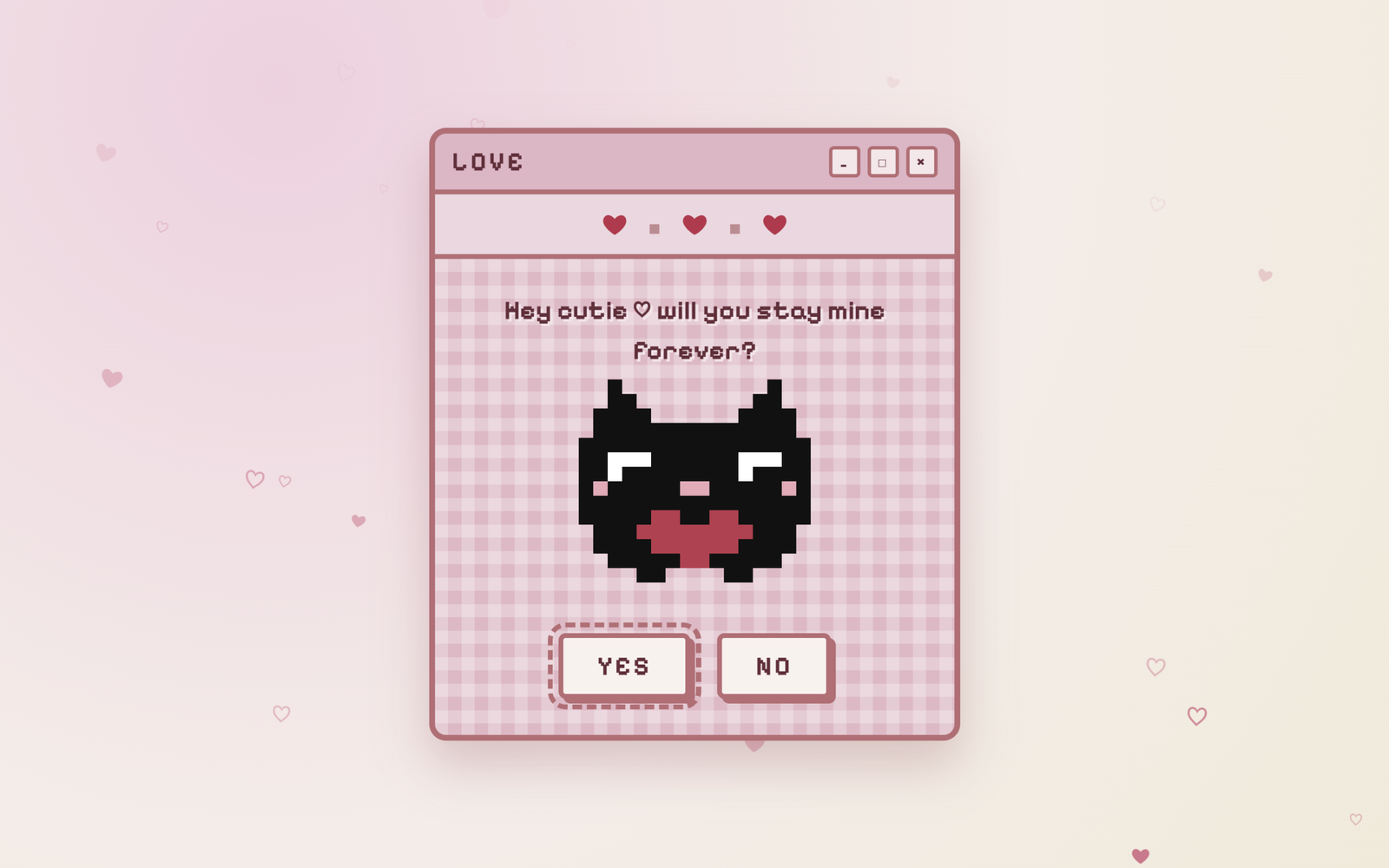
Let’s create a Love Letter Animation using HTML, CSS, and JavaScript – an interactive UI where a cute envelope opens into a love letter, includes playful button interactions (like a running “No” button), and ends with a sweet final message using smooth animations and transitions.
- HTML: Create two sections – an envelope screen and a hidden letter screen. Inside the letter, add a title, a cute image/GIF, Yes and No buttons, and a hidden final message.
- CSS: Style everything in the center with a Valentine background and custom font, add a pulsing animation to the envelope, and use smooth transitions to show the letter, style buttons, and control final state using classes.
- JavaScript: On clicking the envelope, show the letter with animation, make the “No” button move randomly on hover, and when “Yes” is clicked, change text, update the image, hide buttons, and display the final message.
This project teaches how to build a fun and interactive UI using HTML, CSS, and JavaScript by combining animations, transitions, and user interactions to create an engaging Valentine letter experience.
HTML :
This HTML code creates a cute Valentine-themed interactive webpage where the user first sees an envelope screen with a message, and when opened (handled via script.js), it reveals a letter asking “Will you be my Valentine?” along with a GIF image of a cat and two buttons (Yes and No); clicking these buttons will trigger actions defined in the JavaScript, such as showing a final message with a date plan, while styling, layout, and fonts are handled using an external CSS file and Google Fonts to make the page visually appealing and responsive on different devices.
<!DOCTYPE html>
<html lang="en">

<head>
  <meta charset="UTF-8">
  <meta name="viewport" content="width=device-width, initial-scale=1.0">
  <title>Love Letter Animation | @coding.stella</title>
  <link href="https://fonts.googleapis.com/css2?family=Pixelify+Sans:wght@400;600;700&display=swap" rel="stylesheet">
  <link rel="stylesheet" href="style.css">
</head>

<body>
  <div id="bg-hearts"></div>

  <div id="envelope-screen">
    <svg id="envelope" viewBox="0 0 240 170" aria-label="Letter">
      <defs>
        <clipPath id="env-clip">
          <rect x="6" y="6" width="228" height="150" rx="10" />
        </clipPath>
      </defs>
      <g clip-path="url(#env-clip)">
        <rect x="6" y="6" width="228" height="150" fill="#fbf5f1" />
        <!-- side folds -->
        <path d="M6 6 L112 88 L6 156 Z" fill="#f6ebe6" />
        <path d="M234 6 L128 88 L234 156 Z" fill="#f6ebe6" />
        <!-- bottom fold -->
        <path d="M6 156 L120 80 L234 156 Z" fill="#fdf8f5" stroke="#e7c3c6" stroke-width="4" stroke-linejoin="round" />
        <!-- top flap -->
        <path d="M6 6 L120 92 L234 6 Z" fill="#e8b6c4" stroke="#d99fae" stroke-width="3" stroke-linejoin="round" />
      </g>
      <rect x="6" y="6" width="228" height="150" rx="10" fill="none" stroke="#c46f78" stroke-width="7" />
      <!-- heart seal, centred on the flap tip -->
      <path d="M120 112 C102 99 96 88 101 80 C106 72 116 73 120 81 C124 73 134 72 139 80 C144 88 138 99 120 112 Z"
        fill="#cf4456" stroke="#b8344a" stroke-width="2" stroke-linejoin="round" />
      <ellipse cx="110" cy="84" rx="4" ry="2.5" fill="#fff" opacity=".45" transform="rotate(-30 110 84)" />
    </svg>
    <p class="label"><span class="red">❤</span> <span id="label-text"></span> <span class="red">❤</span></p>

    <div id="bow-area">
      <svg id="bow" viewBox="0 0 220 110">
        <path d="M14 70 Q110 0 206 70" stroke="#b07a3c" stroke-width="10" fill="none" stroke-linecap="round" />
        <polyline id="string" points="14,70 110,70 206,70" stroke="#8a5a2b" stroke-width="3" fill="none" />
        <rect x="94" y="28" width="32" height="16" rx="6" fill="#7a4f27" />
      </svg>
    </div>
    <p class="hint" id="hint"></p>
  </div>
  <div id="arrow"><span class="tip"></span><span class="shaft"></span><span class="fletch"></span></div>

  <div id="window" class="hidden">
    <div class="titlebar">
      <span>LOVE</span>
      <div class="ctrls"><i>_</i><i>□</i><i>×</i></div>
    </div>
    <div class="hearts-bar">❤ <b></b> ❤ <b></b> ❤</div>
    <div class="content">
      <h1 id="title"></h1>
      <div class="cat-wrap">
        <canvas id="cat" width="16" height="14"></canvas>
      </div>
      <div id="buttons">
        <button id="yes" class="btn">YES</button>
        <button id="no" class="btn">NO</button>
      </div>
      <p id="final" class="hidden"></p>
    </div>
  </div>

  <script src="script.js"></script>
</body>

</html>
CSS :
This CSS styles the Valentine webpage by centering everything on the screen with a heart background and custom font, creating an animated envelope that gently “pulses” to attract clicks, and hiding the letter section initially; when opened, the letter smoothly scales and fades in using transitions, displaying content inside a decorative window with a cat image and buttons, while additional styles control layout, spacing, and button behavior (like hover/interaction effects), adjust the cat size in the final state, and style the final message box to look soft and readable.
* { box-sizing: border-box; margin: 0; padding: 0; }

body {
  min-height: 100vh;
  display: grid;
  place-items: center;
  font-family: "Pixelify Sans", monospace;
  color: #6b2a3a;
  background: radial-gradient(circle at 20% 10%, #f6cfe0, #f7ece8 55%, #f3ead9);
  overflow: hidden;
}

.hidden { display: none !important; }

/* floating background hearts */
#bg-hearts { position: fixed; inset: 0; pointer-events: none; z-index: 0; }
.bg-heart {
  position: absolute;
  bottom: -30px;
  color: #d9567a;
  animation: floatUp linear forwards;
}
@keyframes floatUp {
  to { transform: translateY(-110vh) rotate(25deg); opacity: 0; }
}

/* envelope + bow */
#envelope-screen {
  position: relative; z-index: 1;
  height: 100vh; width: 100%;
  display: flex; flex-direction: column; align-items: center; justify-content: space-between;
  padding: 10vh 16px 6vh;
  text-align: center;
  user-select: none;
}
#envelope {
  width: min(240px, 60vw);
  filter: drop-shadow(8px 10px 0 rgba(180, 120, 120, .18));
  animation: pulse 1.6s ease-in-out infinite;
}
#envelope.hit { animation: shake .5s; }
.label { font-size: 24px; font-weight: 600; margin-top: -4vh; }
.hint { font-size: 18px; }
@keyframes pulse { 50% { transform: scale(1.05); } }
@keyframes shake {
  20% { transform: rotate(-8deg) scale(1.1); } 40% { transform: rotate(8deg) scale(1.1); }
  60% { transform: rotate(-5deg); } 80% { transform: rotate(5deg); }
}

#bow-area { touch-action: none; cursor: grab; padding: 20px; }
#bow-area:active { cursor: grabbing; }
#bow { width: 220px; transform-origin: 50% 63.6%; overflow: visible; }

#arrow {
  position: fixed; z-index: 3; pointer-events: none;
  width: 14px; height: 110px;
  transform-origin: 50% 0;
}
#arrow.hidden-arrow { display: none; }
#arrow .tip {
  position: absolute; top: 0; left: 0;
  border-left: 7px solid transparent; border-right: 7px solid transparent;
  border-bottom: 18px solid #cf4456;
}
#arrow .shaft { position: absolute; top: 16px; left: 5px; width: 4px; height: 80px; background: #a8673a; }
#arrow .fletch {
  position: absolute; bottom: 0; left: 0;
  border-left: 7px solid transparent; border-right: 7px solid transparent;
  border-top: 16px solid #f1a9bd;
}

/* window */
#window {
  position: relative; z-index: 1;
  width: min(440px, 92vw);
  background: #e7b4c6;
  border: 5px solid #c26a74;
  border-radius: 14px;
  box-shadow: 0 20px 40px rgba(150, 60, 80, .25);
  overflow: hidden;
  animation: popIn .5s cubic-bezier(.2, 1.4, .4, 1);
}
@keyframes popIn { from { transform: scale(.4) translateY(80px); opacity: 0; } }

.titlebar {
  display: flex; justify-content: space-between; align-items: center;
  padding: 10px 14px;
  font-size: 22px; font-weight: 700; letter-spacing: 2px;
  border-bottom: 4px solid #c26a74;
}
.ctrls { display: flex; gap: 6px; }
.ctrls i {
  font-style: normal; font-size: 13px;
  width: 26px; height: 26px; display: grid; place-items: center;
  background: #f7e6ea; border: 3px solid #c26a74; border-radius: 4px;
}
.hearts-bar {
  text-align: center; padding: 10px; font-size: 22px; color: #c8284a;
  background: #f1d6df; border-bottom: 4px solid #c26a74;
}
.hearts-bar b { display: inline-block; width: 8px; height: 8px; background: #c98a92; margin: 0 14px; vertical-align: middle; }

.content {
  padding: 26px 20px 30px;
  text-align: center;
  background-color: #e8b7c6;
  background-image:
    linear-gradient(90deg, rgba(255,255,255,.25) 50%, transparent 50%),
    linear-gradient(rgba(255,255,255,.25) 50%, transparent 50%);
  background-size: 22px 22px;
  min-height: 380px;
}
#title { font-size: 22px; line-height: 1.5; text-shadow: 2px 2px 0 #f7e3e9; }

.cat-wrap { position: relative; height: 190px; margin: 14px 0; }
#cat {
  width: 192px; height: 168px;
  image-rendering: pixelated;
  animation: bob 1.2s ease-in-out infinite;
}
@keyframes bob { 50% { transform: translateY(-6px); } }
#cat.dance { animation: dance .5s ease-in-out infinite; }
@keyframes dance { 0%,100% { transform: rotate(-8deg); } 50% { transform: rotate(8deg) translateY(-8px); } }

.btn {
  font-family: inherit; font-size: 22px; font-weight: 700; letter-spacing: 2px;
  color: #6b2a3a;
  padding: 10px 28px;
  background: #fbf2ef;
  border: 4px solid #c26a74;
  border-radius: 6px;
  box-shadow: 4px 4px 0 #c26a74;
  cursor: pointer;
  transition: transform .1s;
}
.btn:active { transform: translate(3px, 3px); box-shadow: 1px 1px 0 #c26a74; }
#buttons { display: flex; justify-content: center; gap: 22px; }
#yes { outline: 4px dashed #c26a74; outline-offset: 5px; transition: transform .25s; }
#no { transition: left .25s, top .25s; z-index: 2; }
#no.loose { position: absolute; }
.content { position: relative; }

#final { margin-top: 10px; font-size: 20px; line-height: 1.6; animation: popIn .6s; }
mark { background: #4a57d6; color: #fff; padding: 0 4px; }
.red { color: #c8284a; }

/* confetti hearts */
.confetti {
  position: fixed; z-index: 5; pointer-events: none;
  animation: burst 2.6s ease-out forwards;
}
@keyframes burst {
  to { transform: translate(var(--dx), var(--dy)) rotate(var(--r)); opacity: 0; }
}
JavaScript:
This JavaScript adds interactivity to the Valentine webpage by first selecting all important elements, then showing the letter screen with a smooth animation when the envelope is clicked, making the “No” button run away randomly when hovered so it’s hard to click, and handling the “Yes” button click to change the title text, swap the cat GIF to a dancing one, apply a final style, hide the buttons, and reveal the final message with the date plan.
const TEXT = {
  label: "A little arrow for you",
  hint: "Pull the bow back & let Cupid fly ❤",
  missHint: "Oops, missed! Try again ❤",
  question: "Hey cutie ♡ will you stay mine forever?",
  yesTitle: "Hehe, I knew it! ♡",
  final: "Every day with you is my favourite day. Here's to <mark>forever</mark> with you, my love ❤",
  noLines: ["NO", "Hmm?", "Wrong button!", "Try again 😼", "Can't catch me!", "Just say yes ♡"],
};

// ---- Pixel cat (drawn on canvas) ----

const CAT_SAD = [
  "..K..........K..",
  "..KK........KK..",
  ".KKKK......KKKK.",
  ".KKKKKKKKKKKKKK.",
  "KKKKKKKKKKKKKKKK",
  "KKWWWKKKKKKWWWKK",
  "KKWKKKKKKKKWKKKK",
  "KPKKKKKPPKKKKKPK",
  "KKKKKKKKKKKKKKKK",
  "KKKKKRRKKRRKKKKK",
  ".KKKRRRRRRRRKKK.",
  ".KKKKRRRRRRKKKK.",
  "..KKKKKRRKKKKK..",
  "....KK....KK....",
];
const CAT_HAPPY = CAT_SAD.slice();
CAT_HAPPY[5] = "KKWWKKKKKKKKWWKK";
CAT_HAPPY[6] = "KKKWWKKKKKKWWKKK";

const COLORS = { K: "#111", W: "#fff", P: "#f2a7b8", R: "#c8344d" };
const ctx = document.getElementById("cat").getContext("2d");
function drawCat(map) {
  ctx.clearRect(0, 0, 16, 14);
  map.forEach((row, y) => [...row].forEach((c, x) => {
    if (COLORS[c]) { ctx.fillStyle = COLORS[c]; ctx.fillRect(x, y, 1, 1); }
  }));
}
drawCat(CAT_SAD);

const $ = (id) => document.getElementById(id);
$("label-text").textContent = TEXT.label;
$("hint").textContent = TEXT.hint;
$("title").textContent = TEXT.question;
$("no").textContent = TEXT.noLines[0];

const bg = $("bg-hearts");
setInterval(() => {
  const h = document.createElement("span");
  h.className = "bg-heart";
  h.textContent = Math.random() < 0.5 ? "❤" : "♡";
  h.style.left = Math.random() * 100 + "vw";
  h.style.fontSize = 10 + Math.random() * 18 + "px";
  h.style.opacity = 0.3 + Math.random() * 0.6;
  h.style.animationDuration = 6 + Math.random() * 6 + "s";
  bg.appendChild(h);
  setTimeout(() => h.remove(), 12000);
}, 350);

const envScreen = $("envelope-screen");
const win = $("window");
const envelope = $("envelope");
const bowArea = $("bow-area");
const bow = $("bow");
const string = $("string");
const arrow = $("arrow");

const MAX_PULL = 70, MAX_ANGLE = 0.6;
let aiming = false, flying = false, angle = 0, pull = 0, start = null;

function nockPoint() {
  const r = bowArea.getBoundingClientRect();
  return { x: r.left + r.width / 2, y: r.top + 20 + (r.height - 40) * 0.636 };
}

function placeArrow(x, y, a) {
  arrow.style.left = x - 7 + "px";
  arrow.style.top = y + "px";
  arrow.style.transform = `rotate(${a}rad) translateY(${-arrow.offsetHeight}px)`;
}

function render() {
  const n = nockPoint();
  bow.style.transform = `rotate(${angle}rad)`;
  string.setAttribute("points", `14,70 110,${70 + pull} 206,70`);
  placeArrow(n.x - Math.sin(angle) * pull, n.y + Math.cos(angle) * pull, angle);
}

function aim(e) {
  const dx = e.clientX - start.x, dy = Math.max(0, e.clientY - start.y);
  pull = Math.min(MAX_PULL, Math.hypot(dx, dy) * 0.7);
  angle = pull < 8 ? 0 : Math.max(-MAX_ANGLE, Math.min(MAX_ANGLE, Math.atan2(-dx, dy + 1)));
  render();
}

bowArea.addEventListener("pointerdown", (e) => {
  if (flying) return;
  aiming = true;
  start = { x: e.clientX, y: e.clientY };
  bowArea.setPointerCapture(e.pointerId);
});
window.addEventListener("pointermove", (e) => aiming && aim(e));
window.addEventListener("pointerup", release);
window.addEventListener("pointercancel", release);
function release() {
  if (!aiming) return;
  aiming = false;
  if (pull < 15) { angle = 0; pull = 45; }
  shoot();
}

function shoot() {
  flying = true;
  const n = nockPoint();
  let x = n.x - Math.sin(angle) * pull, y = n.y + Math.cos(angle) * pull;
  let a = angle;
  const speed = 11 + pull / 5;
  pull = 0;
  string.setAttribute("points", "14,70 110,70 206,70");

  (function step() {
    const len = arrow.offsetHeight;
    const r = envelope.getBoundingClientRect();
    const tx = x + Math.sin(a) * len, ty = y - Math.cos(a) * len; // arrow tip
    // gentle aim assist: curve slightly toward the envelope while it's ahead
    if (ty > r.bottom) {
      const want = Math.atan2(r.left + r.width / 2 - tx, ty - (r.top + r.height / 2));
      if (Math.abs(want - a) < 0.5) a += (want - a) * 0.04;
    }
    x += Math.sin(a) * speed; y -= Math.cos(a) * speed;
    placeArrow(x, y, a);
    if (tx > r.left + 10 && tx < r.right - 10 && ty > r.top && ty < r.bottom - 30) return hit();
    if (ty < -150 || tx < -150 || tx > innerWidth + 150) return miss();
    requestAnimationFrame(step);
  })();
}

function miss() {
  flying = false;
  angle = 0;
  render();
  $("hint").textContent = TEXT.missHint;
  setTimeout(() => ($("hint").textContent = TEXT.hint), 1800);
}

function hit() {
  envelope.classList.add("hit");
  burst(innerWidth / 2, envelope.getBoundingClientRect().top + 80);
  setTimeout(() => {
    envScreen.classList.add("hidden");
    arrow.classList.add("hidden-arrow");
    win.classList.remove("hidden");
  }, 700);
}

window.addEventListener("resize", () => !flying && render());
requestAnimationFrame(render);

const no = $("no"), yes = $("yes"), content = win.querySelector(".content");
let noCount = 0;
function runAway() {
  const box = content.getBoundingClientRect();
  if (!box.width) return; // window not open yet
  const y = yes.getBoundingClientRect();
  const w = no.offsetWidth, h = no.offsetHeight;
  const cur = no.getBoundingClientRect();
  let left, top;

  for (let i = 0; i < 30; i++) {
    left = 10 + Math.random() * (box.width - w - 20);
    top = 10 + Math.random() * (box.height - h - 20);
    const L = box.left + left, T = box.top + top;
    const overYes = L < y.right + 10 && L + w > y.left - 10 && T < y.bottom + 10 && T + h > y.top - 10;
    const tooClose = Math.hypot(L - cur.left, T - cur.top) < 90;
    if (!overYes && !tooClose) break;
  }
  no.classList.add("loose");
  no.style.left = left + "px";
  no.style.top = top + "px";
  no.textContent = TEXT.noLines[++noCount % TEXT.noLines.length];
  yes.style.transform = `scale(${Math.min(1 + noCount * 0.08, 1.6)})`;
}
no.addEventListener("mouseenter", runAway);
no.addEventListener("click", runAway);
no.addEventListener("touchstart", (e) => { e.preventDefault(); runAway(); });

yes.addEventListener("click", (e) => {
  $("title").textContent = TEXT.yesTitle;
  $("buttons").classList.add("hidden");
  no.classList.add("hidden");
  $("cat").classList.add("dance");
  drawCat(CAT_HAPPY);
  burst(e.clientX, e.clientY);
  setTimeout(() => burst(innerWidth / 2, innerHeight / 2), 400);
  typeOut($("final"), TEXT.final);
});

function typeOut(el, html) {
  el.classList.remove("hidden");
  const plain = html.replace(/<[^>]+>/g, "");
  let i = 0;
  const t = setInterval(() => {
    el.textContent = plain.slice(0, ++i);
    if (i >= plain.length) { clearInterval(t); el.innerHTML = html; }
  }, 45);
}

function burst(x, y) {
  const colors = ["#e85a8a", "#f7a1c0", "#c8344d", "#f4c95d", "#b48ef0", "#ff9c7a"];
  for (let i = 0; i < 60; i++) {
    const c = document.createElement("span");
    c.className = "confetti";
    c.textContent = "❤";
    c.style.left = x + "px";
    c.style.top = y + "px";
    c.style.color = colors[i % colors.length];
    c.style.fontSize = 14 + Math.random() * 30 + "px";
    const a = Math.random() * Math.PI * 2, d = 120 + Math.random() * 380;
    c.style.setProperty("--dx", Math.cos(a) * d + "px");
    c.style.setProperty("--dy", Math.sin(a) * d + 200 + "px");
    c.style.setProperty("--r", Math.random() * 720 - 360 + "deg");
    document.body.appendChild(c);
    setTimeout(() => c.remove(), 2700);
  }
}
This project is a great way to understand how real-world interactive websites are built by combining HTML for structure, CSS for styling and smooth animations, and JavaScript for handling user interactions. Overall, this Valentine Letter Animation is not just a creative project but also a practical example of how to build delightful micro-interactions that can improve user engagement and make your web projects stand out.
If your project has problems, don’t worry. Just click to download the source code and face your coding challenges with excitement. Have fun coding!
