


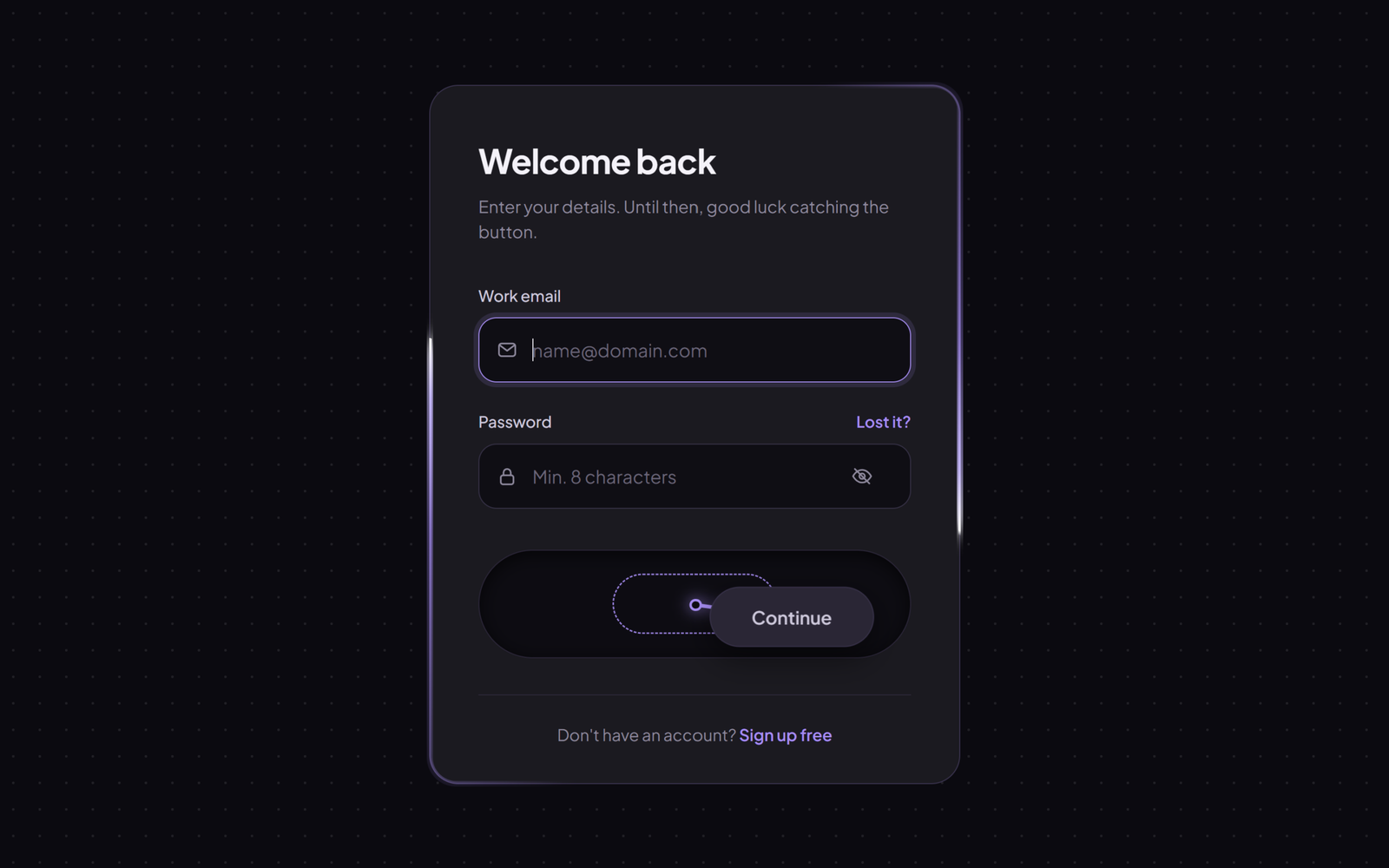
Let’s create an Impossible Login Form Button using HTML, CSS, and JavaScript – a dark login form with a runaway button that dodges your mouse until you fill in a valid email and password, then calms down, glows violet and lets you log in.
- HTML: Create the login card with a heading, email and password fields with icons and tick badges, a show password button, the dock that holds the runaway button with its dashed home spot and tether line, and a small sign up line.
- CSS: Style the card on a subtle dot grid background, with rounded inputs, focus rings and tick badges, the dashed home outline and glowing tether line, and two light beams that travel around the card border using
@propertyand a conic gradient. - JavaScript: Add the dodge logic that pushes the button away from the cursor, spring physics so it glides smoothly, live form checks, the tether line drawing, and the loading spinner and success state.
This project teaches how to build a playful, interactive login form using HTML, CSS, and JavaScript by combining mouse distance tracking, spring physics with velocity and damping, live form validation, and an animated conic gradient border.
HTML :
HTML: Creates the structure of the login card, including the email and password fields with their icons and tick badges, the show password button, and the dock with the dashed socket, the SVG tether line and the Continue button.
<!DOCTYPE html>
<html lang="en">
<head>
  <meta charset="UTF-8">
  <meta name="viewport" content="width=device-width, initial-scale=1.0">
  <title>Impossible Login Button | @coding.stella</title>
  <link rel="preconnect" href="https://fonts.googleapis.com">
  <link rel="preconnect" href="https://fonts.gstatic.com" crossorigin>
  <link href="https://fonts.googleapis.com/css2?family=Plus+Jakarta+Sans:wght@400;500;600;700&display=swap" rel="stylesheet">
  <link rel="stylesheet" href="style.css">
</head>
<body>
  <main class="page">
    <div class="card" id="card">
      <h2>Welcome back</h2>
      <p class="sub">Enter your details. Until then, good luck catching the button.</p>

      <form id="form" novalidate>
        <div class="field" id="emailField">
          <label for="email">Work email</label>
          <div class="control">
            <svg viewBox="0 0 24 24"><rect x="3" y="5" width="18" height="14" rx="3" /><path d="M4 7l8 6 8-6" /></svg>
            <input id="email" type="email" placeholder="name@domain.com" autocomplete="off">
            <span class="ok"><svg viewBox="0 0 24 24"><path d="M6 12.5l4 4 8-9" /></svg></span>
          </div>
        </div>

        <div class="field" id="passField">
          <div class="label-row">
            <label for="password">Password</label>
            <a href="#">Lost it?</a>
          </div>
          <div class="control">
            <svg viewBox="0 0 24 24"><rect x="5" y="11" width="14" height="10" rx="2.5" /><path d="M8 11V8a4 4 0 0 1 8 0v3" /></svg>
            <input id="password" type="password" placeholder="Min. 8 characters">
            <button class="eye" id="eye" type="button" aria-label="Show password">
              <svg viewBox="0 0 24 24"><path d="M2 12s3.6-7 10-7 10 7 10 7-3.6 7-10 7S2 12 2 12z" /><circle cx="12" cy="12" r="3" /><path class="slash" d="M4 4l16 16" /></svg>
            </button>
            <span class="ok"><svg viewBox="0 0 24 24"><path d="M6 12.5l4 4 8-9" /></svg></span>
          </div>
        </div>

        <div class="dock" id="dock">
          <span class="socket" id="socket"></span>
          <svg class="tether" id="tether">
            <line id="line" />
            <circle id="anchor" r="4" />
          </svg>
          <button class="cta" id="cta" type="submit">
            <span class="label" id="ctaLabel">Continue</span>
            <span class="spinner"></span>
          </button>
        </div>
      </form>

      <div class="foot">Don't have an account? <a href="#">Sign up free</a></div>
    </div>
  </main>

  <script src="script.js"></script>
</body>
</html>
CSS :
CSS: Styles the dot grid background, the card, the inputs and their valid and error states, the dock and the runaway button, and the animated border beams made with @property, a conic gradient and a mask, plus the spinner and success state.
* {
  margin: 0;
  padding: 0;
  box-sizing: border-box;
}

:root {
  --card: #1b1a21;
  --field: #0f0e15;
  --line: #2c2839;
  --line-2: #363047;
  --text: #f4f2fa;
  --soft: #cfc9de;
  --muted: #8e889e;
  --accent: #a78bfa;
  --accent-ink: #160f26;
  --red: #f87171;
  --spring: cubic-bezier(.34, 1.56, .64, 1);
}

body {
  min-height: 100vh;
  background:
    radial-gradient(rgba(255, 255, 255, 0.09) 1px, transparent 1.2px) 0 0 / 22px 22px,
    #0b0a10;
  color: var(--text);
  font-family: 'Plus Jakarta Sans', system-ui, sans-serif;
  -webkit-font-smoothing: antialiased;
}

svg {
  fill: none;
  stroke: currentColor;
  stroke-width: 1.8;
  stroke-linecap: round;
  stroke-linejoin: round;
}

a {
  color: var(--accent);
  text-decoration: none;
  font-weight: 600;
}

.page {
  min-height: 100vh;
  display: grid;
  place-items: center;
  padding: 32px 16px;
}

.card {
  position: relative;
  width: min(440px, 100%);
  padding: 44px 40px 32px;
  background: var(--card);
  border: 1px solid #3a3350;
  border-radius: 24px;
  transition: border-color 0.5s ease;
}

/* Animated border: two light beams travel around the card */
@property --angle {
  syntax: '<angle>';
  inherits: false;
  initial-value: 0deg;
}

.card::before,
.card::after {
  content: '';
  position: absolute;
  inset: -1px;
  padding: 2px;
  border-radius: inherit;
  background: conic-gradient(from var(--angle),
      transparent 0deg 90deg,
      rgba(167, 139, 250, 0.6) 140deg,
      #c4b5fd 168deg,
      #ffffff 180deg,
      transparent 181deg 270deg,
      rgba(167, 139, 250, 0.6) 320deg,
      #c4b5fd 348deg,
      #ffffff 360deg);
  -webkit-mask: linear-gradient(#000 0 0) content-box, linear-gradient(#000 0 0);
  -webkit-mask-composite: xor;
  mask: linear-gradient(#000 0 0) content-box exclude, linear-gradient(#000 0 0);
  animation: border-spin 5s linear infinite;
  pointer-events: none;
}

.card::before {
  inset: -3px;
  padding: 5px;
  filter: blur(8px);
}

.card.success {
  border-color: rgba(167, 139, 250, 0.7);
}

.card.success::before,
.card.success::after {
  animation-duration: 1.4s;
}

.card h2 {
  font-size: 28px;
  font-weight: 700;
  letter-spacing: -0.02em;
}

.sub {
  margin: 10px 0 34px;
  color: var(--muted);
  font-size: 14px;
  line-height: 1.5;
}

.field {
  margin-bottom: 24px;
}

.field label {
  display: block;
  margin-bottom: 10px;
  color: var(--soft);
  font-size: 13px;
  font-weight: 500;
}

.label-row {
  display: flex;
  justify-content: space-between;
  align-items: baseline;
}

.label-row a {
  font-size: 13px;
}

.control {
  display: flex;
  align-items: center;
  gap: 12px;
  height: 54px;
  padding: 0 14px;
  background: var(--field);
  border: 1px solid var(--line-2);
  border-radius: 15px;
  color: var(--muted);
  transition: border-color 0.25s ease, box-shadow 0.25s ease;
}

.control>svg {
  flex: none;
  width: 18px;
  height: 18px;
}

.control:focus-within {
  border-color: var(--accent);
  box-shadow: 0 0 0 4px rgba(167, 139, 250, 0.14);
}

.field.valid .control {
  border-color: rgba(167, 139, 250, 0.45);
}

.field.error .control {
  border-color: var(--red);
  box-shadow: 0 0 0 4px rgba(248, 113, 113, 0.12);
  animation: nudge 0.4s ease;
}

.control input {
  flex: 1;
  min-width: 0;
  height: 100%;
  background: none;
  border: 0;
  outline: none;
  color: var(--text);
  font: inherit;
  font-size: 15px;
}

.control input::placeholder {
  color: #6a6479;
}

.eye {
  flex: none;
  display: grid;
  place-items: center;
  width: 28px;
  height: 28px;
  background: none;
  border: 0;
  color: var(--muted);
  cursor: pointer;
}

.eye:hover {
  color: var(--text);
}

.eye svg {
  width: 18px;
  height: 18px;
}

.eye .slash {
  stroke-dasharray: 23;
  transition: stroke-dashoffset 0.3s ease;
}

.eye.on .slash {
  stroke-dashoffset: 23;
}

.ok {
  flex: none;
  display: grid;
  place-items: center;
  width: 0;
  height: 20px;
  border-radius: 50%;
  background: var(--accent);
  color: var(--accent-ink);
  scale: 0;
  transition: scale 0.4s var(--spring), width 0.3s ease;
}

.ok svg {
  width: 13px;
  height: 13px;
  stroke-width: 3;
}

.field.valid .ok {
  width: 20px;
  scale: 1;
}

/* Runaway button dock */
.dock {
  position: relative;
  height: 90px;
  margin: 34px 0 8px;
  background: #0d0c13;
  border: 1px solid #2a2538;
  border-radius: 999px;
  box-shadow: inset 0 3px 14px rgba(0, 0, 0, 0.65);
}

.socket {
  position: absolute;
  left: 50%;
  top: 50%;
  width: var(--w, 132px);
  height: 50px;
  translate: -50% -50%;
  border: 1.5px dashed var(--accent);
  border-radius: 999px;
  opacity: 0;
  pointer-events: none;
}

.tether {
  position: absolute;
  inset: 0;
  width: 100%;
  height: 100%;
  overflow: visible;
  pointer-events: none;
  opacity: 0;
  filter: drop-shadow(0 0 6px rgba(167, 139, 250, 0.8));
}

.tether line {
  stroke: var(--accent);
  stroke-width: 3;
}

.tether circle {
  fill: #0d0c13;
  stroke: var(--accent);
  stroke-width: 2;
}

.cta {
  position: absolute;
  left: 50%;
  top: 50%;
  z-index: 2;
  display: grid;
  place-items: center;
  min-width: 132px;
  height: 50px;
  padding: 0 34px;
  background: #2a2636;
  color: var(--soft);
  border: 1px solid #39324c;
  border-radius: 999px;
  font: inherit;
  font-size: 15px;
  font-weight: 600;
  cursor: pointer;
  box-shadow: 0 10px 24px rgba(0, 0, 0, 0.45);
  transform: translate(-50%, -50%);
  transition: background 0.4s ease, color 0.4s ease, border-color 0.4s ease, box-shadow 0.4s ease;
  will-change: transform;
}

.cta>* {
  grid-area: 1 / 1;
}

.cta.ready {
  background: var(--accent);
  color: var(--accent-ink);
  border-color: var(--accent);
  box-shadow: 0 0 0 6px rgba(167, 139, 250, 0.12), 0 12px 40px rgba(167, 139, 250, 0.45);
}

.cta.ready:hover {
  box-shadow: 0 0 0 8px rgba(167, 139, 250, 0.16), 0 14px 48px rgba(167, 139, 250, 0.6);
}

.cta:focus-visible {
  outline: 2px solid var(--text);
  outline-offset: 4px;
}

.cta .label {
  transition: opacity 0.2s ease;
}

.spinner {
  width: 20px;
  height: 20px;
  border: 2.5px solid currentColor;
  border-right-color: transparent;
  border-radius: 50%;
  opacity: 0;
}

.cta.loading .label {
  opacity: 0;
}

.cta.loading .spinner {
  opacity: 1;
  animation: spin 0.7s linear infinite;
}

.foot {
  margin-top: 30px;
  padding-top: 24px;
  border-top: 1px solid var(--line);
  text-align: center;
  color: var(--muted);
  font-size: 13.5px;
}

@keyframes border-spin {
  to {
    --angle: 360deg;
  }
}

@keyframes spin {
  to {
    rotate: 360deg;
  }
}

@keyframes nudge {
  25% {
    transform: translateX(-6px);
  }

  50% {
    transform: translateX(5px);
  }

  75% {
    transform: translateX(-3px);
  }
}
JavaScript:
JavaScript: Checks the email and password as you type, moves the button away from the cursor with spring physics and a speed limit, draws the tether back to its home spot, and runs the loading and success steps when the form is submitted.
const $ = (id) => document.getElementById(id);

const card = $('card');
const form = $('form');
const email = $('email');
const password = $('password');
const emailField = $('emailField');
const passField = $('passField');
const eye = $('eye');
const dock = $('dock');
const cta = $('cta');
const ctaLabel = $('ctaLabel');
const socket = $('socket');
const tether = $('tether');
const line = $('line');
const anchor = $('anchor');

const finePointer = matchMedia('(pointer: fine)').matches;

const valid = { email: false, password: false };
let state = 'idle';

const wait = (ms) => new Promise((r) => setTimeout(r, ms));
const clamp = (v, min, max) => Math.min(Math.max(v, min), max);
const validCount = () => valid.email + valid.password;

function check() {
  valid.email = /^\S+@\S+\.\S{2,}$/.test(email.value.trim());
  valid.password = password.value.length >= 8;
  emailField.classList.toggle('valid', valid.email);
  passField.classList.toggle('valid', valid.password);
  cta.classList.toggle('ready', validCount() === 2);
}

[email, password].forEach((input) => {
  input.addEventListener('input', () => {
    input.closest('.field').classList.remove('error');
    check();
  });
});

eye.addEventListener('click', () => {
  const show = password.type === 'password';
  password.type = show ? 'text' : 'password';
  eye.classList.toggle('on', show);
  password.focus();
});

form.addEventListener('submit', async (e) => {
  e.preventDefault();
  if (state !== 'idle') return;

  if (validCount() < 2) {
    [[valid.email, emailField], [valid.password, passField]].forEach(([ok, field]) => {
      if (ok) return;
      field.classList.remove('error');
      void field.offsetWidth;
      field.classList.add('error');
    });
    (valid.email ? password : email).focus();
    return;
  }

  state = 'loading';
  cta.classList.add('loading');
  await wait(1600);

  state = 'done';
  cta.classList.remove('loading');
  ctaLabel.textContent = 'Done!';
  card.classList.add('success');
  await wait(2800);

  email.value = '';
  password.value = '';
  password.type = 'password';
  eye.classList.remove('on');
  ctaLabel.textContent = 'Continue';
  card.classList.remove('success');
  state = 'idle';
  check();
});

// A mouse can never click it while the form is incomplete
cta.addEventListener('pointerdown', (e) => {
  if (finePointer && e.pointerType === 'mouse' && validCount() < 2) {
    e.preventDefault();
    escape();
  }
});
cta.addEventListener('click', (e) => {
  if (finePointer && e.detail > 0 && validCount() < 2) e.preventDefault();
});

const pos = { x: 0, y: 0 };
const vel = { x: 0, y: 0 };
const target = { x: 0, y: 0 };
let tilt = 0;
let mouse = null;
let lastEscape = 0;
let lastTime = performance.now();

addEventListener('pointermove', (e) => {
  if (e.pointerType === 'mouse') mouse = { x: e.clientX, y: e.clientY };
});
document.documentElement.addEventListener('pointerleave', () => (mouse = null));

function limits() {
  const d = dock.getBoundingClientRect();
  return {
    d,
    maxX: (d.width - cta.offsetWidth) / 2 - 8,
    maxY: (d.height - cta.offsetHeight) / 2 - 6,
  };
}

// Cornered? Dash to the other side of the dock
function escape() {
  const { maxX } = limits();
  target.x = pos.x > 0 ? -maxX : maxX;
  lastEscape = performance.now();
}

function frame(now) {
  const f = clamp((now - lastTime) / 16.667, 0, 2);
  lastTime = Math.max(lastTime, now);

  const n = validCount();
  const calm = n === 2 || state !== 'idle' || !finePointer;
  const { d, maxX, maxY } = limits();
  let near = false;

  // Push the button away from the cursor; it gets slower as fields become valid
  if (!calm && mouse) {
    const dx = d.left + d.width / 2 + pos.x - mouse.x;
    const dy = d.top + d.height / 2 + pos.y - mouse.y;
    const dist = Math.hypot(dx, dy) || 0.001;
    const R = n === 0 ? 160 : 120;
    const power = n === 0 ? 14 : 5;

    if (dist < R) {
      near = true;
      const t = (R - dist) / R;
      const push = t * t * (3 - 2 * t);
      target.x += (dx / dist) * push * power * f;
      target.y += (dy / dist) * push * power * 0.4 * f;

      const cx = clamp(target.x, -maxX, maxX);
      if (cx !== target.x && dist < R * 0.6 && now - lastEscape > 700) escape();
      else target.x = cx;
    }
  }

  target.x = clamp(target.x, -maxX, maxX);
  target.y = clamp(target.y, -maxY, maxY);

  if (!near) {
    const pull = 1 - Math.pow(1 - (calm ? 0.1 : 0.02), f);
    target.x -= target.x * pull;
    target.y -= target.y * pull;
  }

  // Spring physics for a smooth glide, with a speed limit
  const stiffness = calm ? 0.07 : n === 0 ? 0.09 : 0.045;
  const damping = Math.pow(calm ? 0.74 : 0.8, f);
  vel.x = (vel.x + (target.x - pos.x) * stiffness * f) * damping;
  vel.y = (vel.y + (target.y - pos.y) * stiffness * f) * damping;

  const speed = Math.hypot(vel.x, vel.y);
  if (speed > 11) {
    vel.x *= 11 / speed;
    vel.y *= 11 / speed;
  }

  pos.x = clamp(pos.x + vel.x * f, -maxX, maxX);
  pos.y = clamp(pos.y + vel.y * f, -maxY, maxY);

  const lean = clamp(vel.x * 1.6, -10, 10);
  tilt = clamp(tilt + (lean - tilt) * (1 - Math.pow(0.85, f)), -10, 10);
  cta.style.transform = `translate(-50%, -50%) translate(${pos.x.toFixed(2)}px, ${pos.y.toFixed(2)}px) rotate(${tilt.toFixed(2)}deg)`;

  // Tether line from the home spot to the button
  const show = clamp((Math.hypot(pos.x, pos.y) - 6) / 40, 0, 1);
  const cx = d.width / 2;
  const cy = d.height / 2;
  line.setAttribute('x1', cx);
  line.setAttribute('y1', cy);
  line.setAttribute('x2', cx + pos.x);
  line.setAttribute('y2', cy + pos.y);
  anchor.setAttribute('cx', cx);
  anchor.setAttribute('cy', cy);
  tether.style.opacity = show;
  socket.style.opacity = show * 0.9;
  socket.style.setProperty('--w', cta.offsetWidth + 'px');

  requestAnimationFrame(frame);
}

check();
requestAnimationFrame(frame);
This project demonstrates how HTML, CSS, and JavaScript can work together to turn a normal login form into a fun mini game. The impossible login button reacts to the mouse with smooth spring physics, slows down as each field becomes valid, and only stands still once the form is ready, while keyboard and touch users can still log in normally.
If your project has problems, don’t worry. Just click to download the source code and face your coding challenges with excitement. Have fun coding!
