


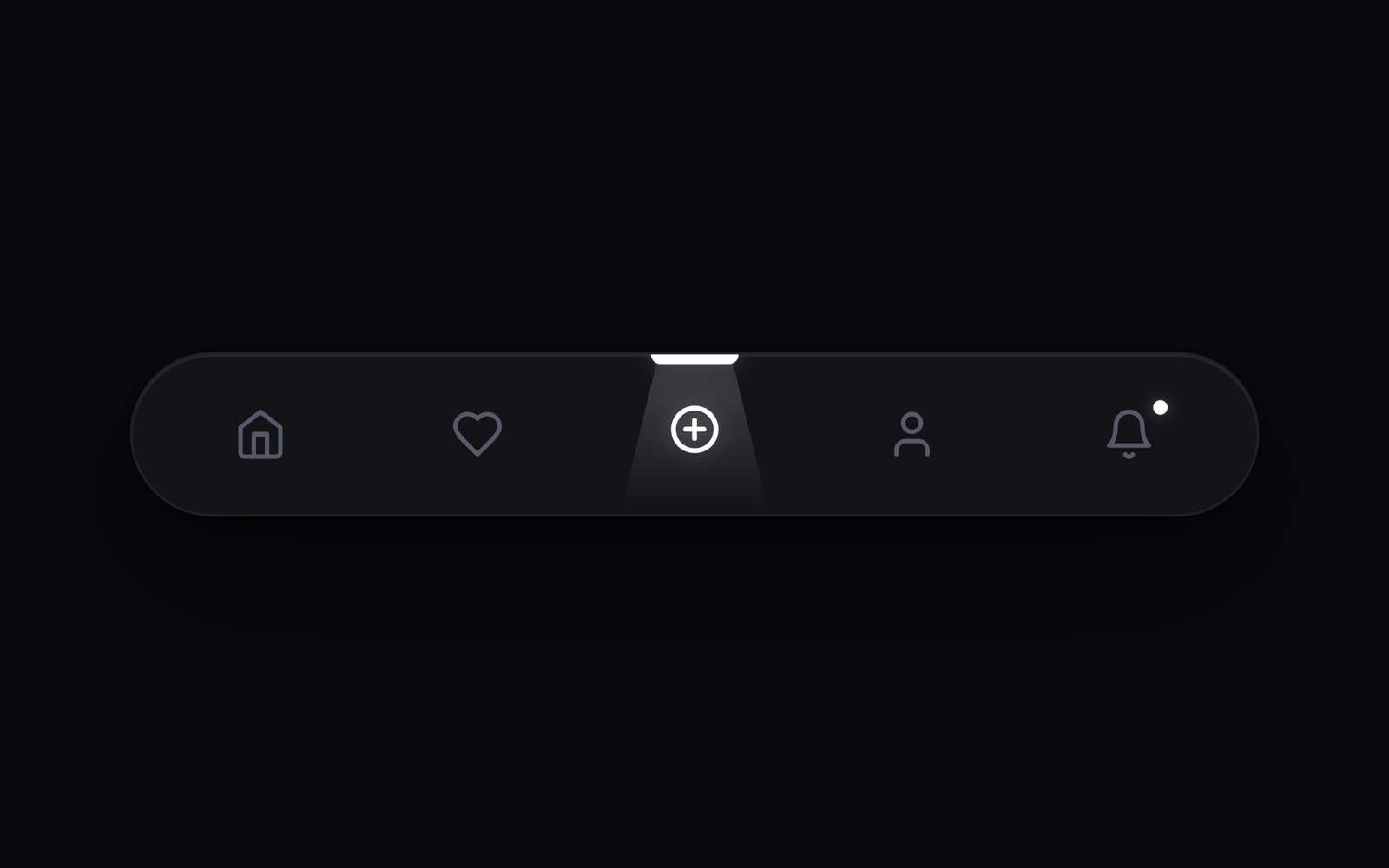
Hello coders! Today, we’re going to explore the Spotlight Navigation Tab Menu Vol. 1 using HTML, CSS, and JavaScript. No complex tools or external libraries needed, just simple code and creative vibes!
In this tutorial, we’ll create a stylish floating navigation menu featuring Home, Favorites, Add New, Profile, and Notifications tabs, with glowing spotlight effects and a cool laser scanning animation.
We’ll combine HTML for the structure, CSS for the design and animations, and JavaScript to make the tabs interactive. It’s a fun and simple project for beginners looking to add modern UI effects to their websites.
Ready to build this glowing navigation menu? Let’s dive into the code and start creating! 💻✨
HTML :
This HTML code creates a floating navigation menu with five tabs: Home, Favorites, Add New, Profile, and Notifications. Each tab contains an SVG icon and spotlight elements for lighting and laser effects. It also links the external CSS file for styling and the JavaScript file for functionality.
<!DOCTYPE html>
<html lang="en">
<head>
  <meta charset="UTF-8">
  <meta name="viewport" content="width=device-width, initial-scale=1.0">
  <title>Navigation Tab Menu Vol. 1 | @coding.stella</title>
  <link rel="stylesheet" href="style.css">
  <link rel="preconnect" href="https://fonts.googleapis.com">
  <link rel="preconnect" href="https://fonts.gstatic.com" crossorigin>
  <link href="https://fonts.googleapis.com/css2?family=Plus+Jakarta+Sans:wght@500;600;700&display=swap" rel="stylesheet">
</head>
<body>

  <!-- Floating Spotlight Tab Menu with Laser Scanner -->
  <nav class="spotlight-nav" id="spotlightNav" role="navigation" aria-label="Main Navigation">
    <ul class="nav-list">

      <!-- Tab 1: Home -->
      <li class="nav-item">
        <button class="nav-btn active" data-tab="home" aria-label="Home">
          <div class="spotlight-lamp" aria-hidden="true">
            <span class="indicator-bar"></span>
            <span class="spotlight-beam"></span>
            <span class="scan-line"></span>
          </div>
          <svg class="nav-icon icon-home" viewBox="0 0 24 24" width="22" height="22" stroke="currentColor" stroke-width="2" fill="none" stroke-linecap="round" stroke-linejoin="round">
            <path d="m3 9 9-7 9 7v11a2 2 0 0 1-2 2H5a2 2 0 0 1-2-2z"></path>
            <polyline points="9 22 9 12 15 12 15 22"></polyline>
          </svg>
        </button>
      </li>

      <!-- Tab 2: Favorites -->
      <li class="nav-item">
        <button class="nav-btn" data-tab="heart" aria-label="Favorites">
          <div class="spotlight-lamp" aria-hidden="true">
            <span class="indicator-bar"></span>
            <span class="spotlight-beam"></span>
            <span class="scan-line"></span>
          </div>
          <svg class="nav-icon icon-heart" viewBox="0 0 24 24" width="22" height="22" stroke="currentColor" stroke-width="2" fill="none" stroke-linecap="round" stroke-linejoin="round">
            <path d="M19 14c1.49-1.46 3-3.21 3-5.5A5.5 5.5 0 0 0 16.5 3c-1.76 0-3 .5-4.5 2-1.5-1.5-2.74-2-4.5-2A5.5 5.5 0 0 0 2 8.5c0 2.3 1.5 4.05 3 5.5l7 7Z"></path>
          </svg>
        </button>
      </li>

      <!-- Tab 3: Add New -->
      <li class="nav-item">
        <button class="nav-btn" data-tab="plus" aria-label="Add New">
          <div class="spotlight-lamp" aria-hidden="true">
            <span class="indicator-bar"></span>
            <span class="spotlight-beam"></span>
            <span class="scan-line"></span>
          </div>
          <svg class="nav-icon icon-plus" viewBox="0 0 24 24" width="22" height="22" stroke="currentColor" stroke-width="2" fill="none" stroke-linecap="round" stroke-linejoin="round">
            <circle cx="12" cy="12" r="9.5"></circle>
            <line x1="12" y1="8" x2="12" y2="16"></line>
            <line x1="8" y1="12" x2="16" y2="12"></line>
          </svg>
        </button>
      </li>

      <!-- Tab 4: Profile -->
      <li class="nav-item">
        <button class="nav-btn" data-tab="profile" aria-label="Profile">
          <div class="spotlight-lamp" aria-hidden="true">
            <span class="indicator-bar"></span>
            <span class="spotlight-beam"></span>
            <span class="scan-line"></span>
          </div>
          <svg class="nav-icon icon-profile" viewBox="0 0 24 24" width="22" height="22" stroke="currentColor" stroke-width="2" fill="none" stroke-linecap="round" stroke-linejoin="round">
            <path d="M19 21v-2a4 4 0 0 0-4-4H9a4 4 0 0 0-4 4v2"></path>
            <circle cx="12" cy="7" r="4"></circle>
          </svg>
        </button>
      </li>

      <!-- Tab 5: Notifications -->
      <li class="nav-item">
        <button class="nav-btn" data-tab="bell" aria-label="Notifications">
          <div class="spotlight-lamp" aria-hidden="true">
            <span class="indicator-bar"></span>
            <span class="spotlight-beam"></span>
            <span class="scan-line"></span>
          </div>
          <svg class="nav-icon icon-bell" viewBox="0 0 24 24" width="22" height="22" stroke="currentColor" stroke-width="2" fill="none" stroke-linecap="round" stroke-linejoin="round">
            <path d="M6 8a6 6 0 0 1 12 0c0 7 3 9 3 9H3s3-2 3-9"></path>
            <path d="M10.3 21a1.94 1.94 0 0 0 3.4 0"></path>
          </svg>
          <span class="badge-dot" aria-hidden="true"></span>
        </button>
      </li>

    </ul>
  </nav>

  <script src="script.js"></script>
</body>
</html>
CSS :
This CSS code styles the navigation menu with a dark background, rounded corners, glowing icons, and smooth animations. It highlights the active tab with a spotlight beam, indicator bar, and laser scanning effect. It also changes icon colors on hover and adjusts the menu size for mobile screens.
:root {
  --accent: #ffffff;
  --accent-light: rgba(255, 255, 255, 0.16);
  --accent-glow: rgba(255, 255, 255, 0.3);
  --bg-page: #08090c;
  --nav-bg: #121319;
  --nav-border: #1e202a;
  --icon-inactive: #55596b;
  --icon-hover: #8e93a6;
  --ease-smooth: cubic-bezier(0.16, 1, 0.3, 1);
  --heart-red: #be123c;
}

*, *::before, *::after {
  box-sizing: border-box;
  margin: 0;
  padding: 0;
}

body {
  font-family: 'Plus Jakarta Sans', -apple-system, BlinkMacSystemFont, sans-serif;
  background-color: var(--bg-page);
  min-height: 100vh;
  display: flex;
  align-items: center;
  justify-content: center;
  overflow: hidden;
  -webkit-font-smoothing: antialiased;
}

.spotlight-nav {
  position: relative;
  background-color: var(--nav-bg);
  border: 1px solid var(--nav-border);
  border-radius: 9999px;
  padding: 0 16px;
  box-shadow: inset 0 1px 0 0 rgba(255, 255, 255, 0.08),
              0 24px 50px -12px rgba(0, 0, 0, 0.8),
              0 2px 8px rgba(0, 0, 0, 0.5);
  user-select: none;
  overflow: hidden;
}

.nav-list {
  display: flex;
  align-items: center;
  list-style: none;
  gap: 16px;
}

.nav-item {
  position: relative;
}

.nav-btn {
  background: transparent;
  border: none;
  outline: none;
  width: 74px;
  height: 66px;
  display: flex;
  align-items: center;
  justify-content: center;
  cursor: pointer;
  position: relative;
  color: var(--icon-inactive);
  transition: color 0.35s ease, transform 0.22s var(--ease-smooth);
  -webkit-tap-highlight-color: transparent;
}

.nav-btn:hover {
  color: var(--icon-hover);
}

.nav-btn:active {
  transform: scale(0.94);
}

.nav-btn.active {
  color: var(--accent);
}

.nav-icon {
  display: block;
  position: relative;
  z-index: 3;
  transform-origin: center center;
  transition: color 0.4s ease,
              stroke 0.4s ease,
              transform 0.5s var(--ease-smooth),
              filter 0.4s ease,
              stroke-width 0.3s ease;
}

.nav-btn.active .nav-icon {
  stroke-width: 2.2;
  transform: translateY(-2px);
  filter: drop-shadow(0 0 5px var(--accent-glow));
}

/* Deep Natural Heart Crimson Border */
.nav-btn[data-tab="heart"].active .icon-heart {
  stroke: var(--heart-red);
  color: var(--heart-red);
  fill: none;
  filter: drop-shadow(0 0 5px rgba(190, 18, 60, 0.4));
}

.badge-dot {
  position: absolute;
  top: 19px;
  right: 21px;
  width: 6px;
  height: 6px;
  border-radius: 50%;
  background-color: var(--accent);
  box-shadow: 0 0 6px var(--accent-glow);
  z-index: 4;
}

.spotlight-lamp {
  position: absolute;
  top: 0;
  left: 0;
  width: 100%;
  height: 100%;
  pointer-events: none;
  z-index: 1;
}

.indicator-bar {
  position: absolute;
  top: 0;
  left: 50%;
  width: 36px;
  height: 4px;
  border-bottom-left-radius: 4px;
  border-bottom-right-radius: 4px;
  background-color: var(--accent);
  box-shadow: 0 0 8px var(--accent-glow);
  opacity: 0;
  transform: translate(-50%, -6px);
  transition: opacity 0.35s ease, transform 0.5s var(--ease-smooth);
}

.nav-btn.active .indicator-bar {
  opacity: 1;
  transform: translate(-50%, 0);
  transition: opacity 0.4s ease, transform 0.6s var(--ease-smooth);
}

.spotlight-beam {
  position: absolute;
  top: 4px;
  left: 50%;
  width: 66px;
  height: 60px;
  background-color: var(--accent-light);
  clip-path: polygon(26% 0%, 74% 0%, 96% 100%, 4% 100%);
  filter: blur(4px);
  -webkit-mask-image: linear-gradient(to bottom, rgba(0, 0, 0, 1) 20%, rgba(0, 0, 0, 0) 100%);
  mask-image: linear-gradient(to bottom, rgba(0, 0, 0, 1) 20%, rgba(0, 0, 0, 0) 100%);
  transform-origin: top center;
  opacity: 0;
  transform: translateX(-50%) scaleY(0.1);
  transition: opacity 0.35s ease, transform 0.5s var(--ease-smooth);
}

.nav-btn.active .spotlight-beam {
  opacity: 0.95;
  transform: translateX(-50%) scaleY(1);
  transition: opacity 0.5s ease, transform 0.85s var(--ease-smooth);
}

.scan-line {
  position: absolute;
  top: 4px;
  left: 50%;
  transform: translateX(-50%);
  width: 46px;
  height: 2px;
  border-radius: 999px;
  background-color: var(--accent);
  box-shadow: 0 0 8px 1px rgba(255, 255, 255, 0.7);
  opacity: 0;
  pointer-events: none;
  z-index: 2;
}

.nav-btn.active .scan-line {
  animation: laserScanOnce 1.15s var(--ease-smooth) 1 forwards;
}

@keyframes laserScanOnce {
  0% {
    top: 4px;
    opacity: 0;
    transform: translateX(-50%) scaleX(0.4);
  }
  20% {
    opacity: 0.95;
    transform: translateX(-50%) scaleX(0.85);
  }
  65% {
    opacity: 0.8;
    transform: translateX(-50%) scaleX(1);
  }
  100% {
    top: calc(100% - 6px);
    opacity: 0;
    transform: translateX(-50%) scaleX(0.5);
  }
}

@media (max-width: 480px) {
  .spotlight-nav {
    padding: 0 10px;
  }
  .nav-list {
    gap: 8px;
  }
  .nav-btn {
    width: 60px;
    height: 58px;
  }
  .indicator-bar {
    width: 30px;
  }
  .spotlight-beam {
    width: 56px;
    height: 53px;
  }
  .scan-line {
    width: 40px;
  }
}
JavaScript:
This JavaScript code makes the navigation tabs interactive. When a user clicks a tab, it becomes active and triggers the laser scanning animation. Users can also switch between tabs using the left and right arrow keys, while the active tab updates automatically.
document.addEventListener('DOMContentLoaded', () => {
  const navBtns = Array.from(document.querySelectorAll('.nav-btn'));
  let currentIndex = 0;

  function activateTab(btn, index) {
    if (btn.classList.contains('active') && index === currentIndex) {
      const scan = btn.querySelector('.scan-line');
      if (scan) {
        scan.style.animation = 'none';
        void scan.offsetWidth;
        scan.style.animation = '';
      }
      return;
    }

    navBtns.forEach(b => b.classList.remove('active'));
    btn.classList.add('active');
    currentIndex = index;

    const scan = btn.querySelector('.scan-line');
    if (scan) {
      scan.style.animation = 'none';
      void scan.offsetWidth;
      scan.style.animation = '';
    }
  }

  navBtns.forEach((btn, index) => {
    btn.addEventListener('click', (e) => {
      e.preventDefault();
      activateTab(btn, index);
    });
  });

  window.addEventListener('keydown', (e) => {
    if (e.key === 'ArrowRight') {
      const nextIndex = (currentIndex + 1) % navBtns.length;
      activateTab(navBtns[nextIndex], nextIndex);
    } else if (e.key === 'ArrowLeft') {
      const prevIndex = (currentIndex - 1 + navBtns.length) % navBtns.length;
      activateTab(navBtns[prevIndex], prevIndex);
    }
  });

  const initialActive = document.querySelector('.nav-btn.active') || navBtns[0];
  if (initialActive) {
    const initIdx = navBtns.indexOf(initialActive);
    activateTab(initialActive, initIdx !== -1 ? initIdx : 0);
  }
});
In a nutshell, we’ve successfully built Magic Navigation Menu 2 in this blog post. Using HTML, CSS, and a bit of JavaScript, we created a simple yet magical navigation experience. Whether you’re a beginner or an experienced coder, this tutorial aimed to keep things easy and charming. Now, armed with our new skills, let’s sprinkle a bit of magic on our websites.
If you face any issues with your project, don’t worry! You can grab the source code for this project by clicking the Download button. Ready to kick off your coding journey? Happy coding!
