


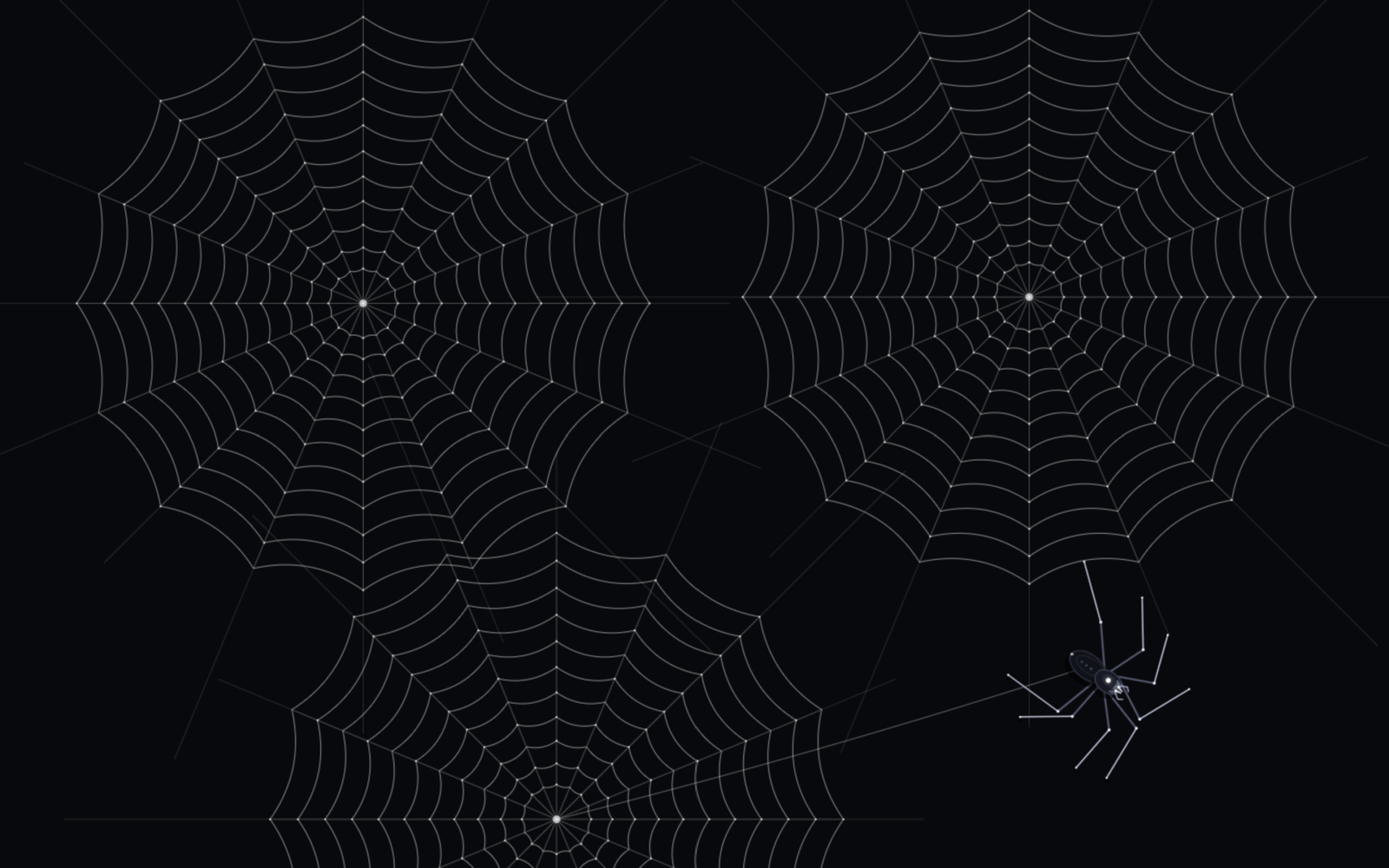
Let’s create a stunning Interactive Spider Cursor Animation using HTML, CSS, and JavaScript! 🕷️ In this project, we’ll build a unique interactive experience featuring a realistic animated spider that follows the user’s cursor. The spider moves its legs naturally, creates beautiful geometric spider webs when users click or press the Space key, and reacts to web strands with subtle vibrations and realistic sound effects.
We’ll use:
- HTML: To create the page structure with a full-screen canvas for rendering the animated spider, interactive spider webs, and a minimal footer hint displaying keyboard and mouse controls.
- CSS: To create a sleek dark-themed interface with a full-screen canvas, a hidden default cursor on desktop, subtle glowing effects, and a minimalist glassmorphism-style instruction badge that smoothly fades away when users interact.
- JavaScript: To bring the experience to life by drawing a detailed spider with eight animated legs, smooth cursor-following movement, realistic leg-walking mechanics, dynamically generated spiral spider webs, vibrating web strands, glowing details, and procedural sound effects for crawling, web creation, and string plucking.
This project is perfect for learning HTML Canvas, JavaScript animation loops, object-oriented programming, inverse kinematics, trigonometry, mouse and keyboard events, procedural graphics, physics-based motion, Web Audio API, and interactive animation development. It’s a creative way to combine realistic movement, generative visuals, and immersive sound design to build a unique spider cursor experience using HTML, CSS, and JavaScript! 🕸️
HTML :
Creates the basic structure of the page using a canvas for the interactive spider animation and a footer hint that tells users to move the cursor or press Space to create a spider web. It also connects the CSS and JavaScript files.
<!DOCTYPE html>
<html lang="en">
<head>
<meta charset="UTF-8">
<meta name="viewport" content="width=device-width, initial-scale=1.0, maximum-scale=1.0, user-scalable=no">
<title>Spider Interactive Cursor | Made by @coding.stella</title>
<link rel="preconnect" href="https://fonts.googleapis.com">
<link rel="preconnect" href="https://fonts.gstatic.com" crossorigin>
<link href="https://fonts.googleapis.com/css2?family=Space+Grotesk:wght@400;600&display=swap" rel="stylesheet">
<link rel="stylesheet" href="style.css">
</head>
<body>
<canvas id="canvas"></canvas>
<div class="footer-hint" id="footerHint">
<span>Move cursor to guide • Press <kbd>SPACE</kbd> or click to weave web</span>
</div>
<script src="script.js"></script>
</body>
</html>
CSS :
Styles the page with a dark background, removes default spacing and scrolling, and makes the canvas cover the entire screen. It also designs the footer hint with a blurred background, rounded edges, and a fade-out effect.
*, *::before, *::after {
  box-sizing: border-box;
  margin: 0;
  padding: 0;
}

html, body {
  width: 100%;
  height: 100%;
  overflow: hidden;
  background-color: #08090C;
  color: #FFFFFF;
  font-family: 'Space Grotesk', -apple-system, BlinkMacSystemFont, sans-serif;
  touch-action: none;
  user-select: none;
  -webkit-user-select: none;
}

@media (hover: hover) and (pointer: fine) {
  body {
    cursor: none;
  }
}

canvas {
  position: fixed;
  inset: 0;
  width: 100vw;
  height: 100vh;
  display: block;
}

/* Elegant minimalist footer badge */
.footer-hint {
  position: fixed;
  bottom: 24px;
  left: 50%;
  transform: translateX(-50%);
  display: flex;
  align-items: center;
  padding: 8px 18px;
  background: rgba(18, 20, 28, 0.6);
  border: 1px solid rgba(255, 255, 255, 0.1);
  border-radius: 999px;
  backdrop-filter: blur(12px);
  -webkit-backdrop-filter: blur(12px);
  color: rgba(255, 255, 255, 0.6);
  font-size: 13px;
  font-weight: 400;
  letter-spacing: 0.02em;
  pointer-events: none;
  transition: opacity 1.2s ease;
  white-space: nowrap;
}

.footer-hint.fade-out {
  opacity: 0;
}

kbd {
  display: inline-block;
  padding: 1px 6px;
  margin: 0 4px;
  font-family: inherit;
  font-size: 11px;
  font-weight: 600;
  color: #FFFFFF;
  background: rgba(255, 255, 255, 0.12);
  border: 1px solid rgba(255, 255, 255, 0.2);
  border-radius: 4px;
}
JS :
Creates an animated spider that follows the cursor, moves its legs naturally, and produces crawling sounds. When users click or press Space, it draws a geometric spider web with interactive vibrating threads and sound effects.
(function () {
  'use strict';

  const canvas = document.getElementById('canvas');
  const ctx = canvas.getContext('2d');
  const footerHint = document.getElementById('footerHint');

  let width = (canvas.width = window.innerWidth);
  let height = (canvas.height = window.innerHeight);

  const mouse = {
    x: width / 2,
    y: height / 2,
    vx: 0,
    vy: 0,
    prevX: width / 2,
    prevY: height / 2,
    hasMoved: false
  };

  class SoundEngine {
    constructor() {
      this.ctx = null;
      this.lastStepTime = 0;
    }

    init() {
      if (this.ctx) return;
      const AudioCtx = window.AudioContext || window.webkitAudioContext;
      if (AudioCtx) {
        this.ctx = new AudioCtx();
      }
    }

    unlock() {
      this.init();
      if (this.ctx && this.ctx.state === 'suspended') {
        this.ctx.resume();
      }
    }

    // Realistic chitinous leg tap / crawling skitter sound
    playCrawlingStep(speedRatio = 1.0) {
      this.unlock();
      if (!this.ctx) return;

      const now = this.ctx.currentTime;
      // Prevent overlapping audio buffer flood
      if (now - this.lastStepTime < 0.038) return;
      this.lastStepTime = now;

      // 1. High frequency micro-click (chitin claw tapping surface)
      const bufferSize = Math.floor(this.ctx.sampleRate * 0.012);
      const buffer = this.ctx.createBuffer(1, bufferSize, this.ctx.sampleRate);
      const data = buffer.getChannelData(0);
      for (let i = 0; i < bufferSize; i++) {
        data[i] = (Math.random() * 2 - 1) * Math.exp(-i / (bufferSize * 0.28));
      }

      const noise = this.ctx.createBufferSource();
      noise.buffer = buffer;

      const bandpass = this.ctx.createBiquadFilter();
      bandpass.type = 'bandpass';
      const pitch = 3800 + Math.random() * 1600;
      bandpass.frequency.setValueAtTime(pitch, now);
      bandpass.Q.setValueAtTime(4.5, now);

      const gain = this.ctx.createGain();
      const stepVolume = Math.min(0.12, 0.04 + speedRatio * 0.06);
      gain.gain.setValueAtTime(stepVolume, now);
      gain.gain.exponentialRampToValueAtTime(0.0001, now + 0.018);

      noise.connect(bandpass);
      bandpass.connect(gain);
      gain.connect(this.ctx.destination);

      noise.start(now);
      noise.stop(now + 0.02);

      // 2. Subtle low-end resonance thud
      const osc = this.ctx.createOscillator();
      const oscGain = this.ctx.createGain();
      osc.type = 'sine';
      osc.frequency.setValueAtTime(140 + Math.random() * 40, now);
      osc.frequency.exponentialRampToValueAtTime(40, now + 0.025);

      oscGain.gain.setValueAtTime(0.025, now);
      oscGain.gain.exponentialRampToValueAtTime(0.0001, now + 0.025);

      osc.connect(oscGain);
      oscGain.connect(this.ctx.destination);

      osc.start(now);
      osc.stop(now + 0.028);
    }

    // Ethereal silk whispering sound when web weaves
    playWeb() {
      this.unlock();
      if (!this.ctx) return;

      const now = this.ctx.currentTime;
      const osc = this.ctx.createOscillator();
      const gain = this.ctx.createGain();
      osc.type = 'sine';
      osc.frequency.setValueAtTime(1600, now);
      osc.frequency.exponentialRampToValueAtTime(340, now + 0.42);

      gain.gain.setValueAtTime(0.09, now);
      gain.gain.exponentialRampToValueAtTime(0.001, now + 0.42);

      osc.connect(gain);
      gain.connect(this.ctx.destination);

      osc.start(now);
      osc.stop(now + 0.44);
    }

    // Pluck vibration sound when cursor touches web
    playPluck() {
      this.unlock();
      if (!this.ctx) return;

      const now = this.ctx.currentTime;
      const osc = this.ctx.createOscillator();
      const gain = this.ctx.createGain();
      osc.type = 'sine';
      osc.frequency.setValueAtTime(880 + Math.random() * 200, now);
      osc.frequency.exponentialRampToValueAtTime(220, now + 0.15);

      gain.gain.setValueAtTime(0.03, now);
      gain.gain.exponentialRampToValueAtTime(0.0001, now + 0.15);

      osc.connect(gain);
      gain.connect(this.ctx.destination);

      osc.start(now);
      osc.stop(now + 0.16);
    }
  }

  const sound = new SoundEngine();

  class SpiralWeb {
    constructor(x, y) {
      this.x = x;
      this.y = y;
      this.spokesCount = 16;
      this.ringsCount = 11;
      this.maxRadius = Math.min(width, height) * 0.33;
      this.progress = 0; // 0 to 1
      this.alpha = 1.0;
      this.time = 0;

      // Spoke angles with subtle organic tension
      this.angles = [];
      for (let i = 0; i < this.spokesCount; i++) {
        this.angles.push((i * Math.PI * 2) / this.spokesCount);
      }

      // Outer anchor rays extending into darkness
      this.anchors = [];
      for (let i = 0; i < this.spokesCount; i++) {
        const a = this.angles[i];
        const dist = this.maxRadius * (1.28 + (i % 3) * 0.22);
        this.anchors.push({
          x: this.x + Math.cos(a) * dist,
          y: this.y + Math.sin(a) * dist
        });
      }

      // Spoke vibration springs
      this.vibrations = new Float32Array(this.spokesCount);
      this.vibrationVel = new Float32Array(this.spokesCount);

      sound.playWeb();
    }

    pluckNear(mx, my) {
      const dx = mx - this.x;
      const dy = my - this.y;
      const dist = Math.hypot(dx, dy);

      if (dist > 15 && dist < this.maxRadius * 1.1) {
        let cursorAngle = Math.atan2(dy, dx);
        if (cursorAngle < 0) cursorAngle += Math.PI * 2;

        for (let i = 0; i < this.spokesCount; i++) {
          let diff = Math.abs(this.angles[i] - cursorAngle);
          if (diff > Math.PI) diff = Math.PI * 2 - diff;
          if (diff < 0.2) {
            this.vibrationVel[i] += 4.5;
            sound.playPluck();
          }
        }
      }
    }

    update() {
      // Smooth dynamic weave expansion
      if (this.progress < 1.0) {
        this.progress += 0.042;
        if (this.progress > 1.0) this.progress = 1.0;
      }
      this.time += 0.03;

      // Update spring vibrations
      for (let i = 0; i < this.spokesCount; i++) {
        const force = -0.25 * this.vibrations[i];
        this.vibrationVel[i] = (this.vibrationVel[i] + force) * 0.88;
        this.vibrations[i] += this.vibrationVel[i];
      }
    }

    render(ctx) {
      const p = this.progress;
      const currentR = this.maxRadius * Math.min(1.0, p * 1.12);

      ctx.save();

      // 1. Structural Radial Spokes
      ctx.lineWidth = 0.85;
      ctx.strokeStyle = `rgba(255, 255, 255, ${0.32 * this.alpha})`;

      const spokePoints = [];

      for (let i = 0; i < this.spokesCount; i++) {
        const a = this.angles[i] + this.vibrations[i] * 0.008;
        const spokeProgress = Math.min(1.0, p * 1.4);
        const endX = this.x + Math.cos(a) * (this.maxRadius * spokeProgress);
        const endY = this.y + Math.sin(a) * (this.maxRadius * spokeProgress);

        ctx.beginPath();
        ctx.moveTo(this.x, this.y);
        ctx.lineTo(endX, endY);
        ctx.stroke();

        spokePoints.push({ x: endX, y: endY, angle: a });

        // Outer anchor lines
        if (p > 0.35) {
          const anchorP = (p - 0.35) / 0.65;
          const ax = endX + (this.anchors[i].x - endX) * anchorP;
          const ay = endY + (this.anchors[i].y - endY) * anchorP;
          ctx.strokeStyle = `rgba(255, 255, 255, ${0.14 * this.alpha})`;
          ctx.beginPath();
          ctx.moveTo(endX, endY);
          ctx.lineTo(ax, ay);
          ctx.stroke();
          ctx.strokeStyle = `rgba(255, 255, 255, ${0.32 * this.alpha})`;
        }
      }

      // 2. Concentric Spiral Threads with delicate catenary droop
      ctx.lineWidth = 0.95;
      ctx.strokeStyle = `rgba(255, 255, 255, ${0.52 * this.alpha})`;

      for (let r = 1; r <= this.ringsCount; r++) {
        const ringFrac = r / this.ringsCount;
        const ringR = 18 + (this.maxRadius - 18) * Math.pow(ringFrac, 1.14);
        if (ringR > currentR) continue;

        for (let i = 0; i < this.spokesCount; i++) {
          const nextIdx = (i + 1) % this.spokesCount;
          const a1 = spokePoints[i].angle;
          const a2 = spokePoints[nextIdx].angle;

          const vib1 = this.vibrations[i] * 0.5;
          const vib2 = this.vibrations[nextIdx] * 0.5;

          const p1x = this.x + Math.cos(a1) * (ringR + vib1);
          const p1y = this.y + Math.sin(a1) * (ringR + vib1);
          const p2x = this.x + Math.cos(a2) * (ringR + vib2);
          const p2y = this.y + Math.sin(a2) * (ringR + vib2);

          // Catenary sag droop towards hub center
          const midX = (p1x + p2x) / 2;
          const midY = (p1y + p2y) / 2;
          const sagFactor = 0.088;
          const sagX = midX + (this.x - midX) * sagFactor;
          const sagY = midY + (this.y - midY) * sagFactor;

          ctx.beginPath();
          ctx.moveTo(p1x, p1y);
          ctx.quadraticCurveTo(sagX, sagY, p2x, p2y);
          ctx.stroke();

          // Luminous micro dew droplets at junctions
          if (r % 2 === 0 || i % 2 === 0) {
            ctx.fillStyle = `rgba(255, 255, 255, ${0.75 * this.alpha})`;
            ctx.beginPath();
            ctx.arc(p1x, p1y, 1.0, 0, Math.PI * 2);
            ctx.fill();
          }
        }
      }

      // 3. Central Web Hub
      ctx.beginPath();
      ctx.arc(this.x, this.y, 4, 0, Math.PI * 2);
      ctx.fillStyle = `rgba(255, 255, 255, ${0.65 * this.alpha})`;
      ctx.fill();

      ctx.restore();
    }
  }

  const webs = [];

  function addWeb(x, y) {
    webs.push(new SpiralWeb(x, y));
    if (webs.length > 3) webs.shift();
  }

  /* ==========================================================================
     3. Sleek Procedural Spider (Exact Match to Current Look)
     ========================================================================== */
  class SpiderLeg {
    constructor(spider, side, index) {
      this.spider = spider;
      this.side = side; // -1: Left, +1: Right
      this.index = index; // 0 (front) to 3 (rear)

      const segmentSpecs = [
        { l1: 46, l2: 60, restAngle: -0.85, restDist: 100 },
        { l1: 42, l2: 52, restAngle: -0.32, restDist: 92 },
        { l1: 42, l2: 54, restAngle: 0.35, restDist: 94 },
        { l1: 48, l2: 64, restAngle: 0.95, restDist: 108 }
      ];

      const spec = segmentSpecs[index];
      this.l1 = spec.l1;
      this.l2 = spec.l2;
      this.restAngle = (Math.PI / 2) * this.side + spec.restAngle * this.side;
      this.restDist = spec.restDist;

      this.rootOffsetAngle = (Math.PI / 2) * this.side;
      this.rootForwardOffset = 8 - index * 6.5;
      this.rootLateralOffset = 9;

      this.foot = { x: spider.x, y: spider.y, z: 0 };
      this.target = { x: spider.x, y: spider.y };
      this.start = { x: spider.x, y: spider.y };
      this.progress = 1.0;

      this.gaitGroup = (index + (side === 1 ? 1 : 0)) % 2;
    }

    getRootPosition() {
      const heading = this.spider.angle;
      const cosH = Math.cos(heading);
      const sinH = Math.sin(heading);

      const normX = -sinH * this.side;
      const normY = cosH * this.side;

      return {
        x: this.spider.x + cosH * this.rootForwardOffset + normX * this.rootLateralOffset,
        y: this.spider.y + sinH * this.rootForwardOffset + normY * this.rootLateralOffset
      };
    }

    getIdealFootPosition() {
      const heading = this.spider.angle;
      const angle = heading + this.restAngle;

      const leadFactor = 6.0;
      const leadX = Math.cos(heading) * this.spider.speed * leadFactor;
      const leadY = Math.sin(heading) * this.spider.speed * leadFactor;

      return {
        x: this.spider.x + Math.cos(angle) * this.restDist + leadX,
        y: this.spider.y + Math.sin(angle) * this.restDist + leadY
      };
    }

    update(activeGaitGroup) {
      const ideal = this.getIdealFootPosition();
      const dist = Math.hypot(this.foot.x - ideal.x, this.foot.y - ideal.y);

      const stepTriggerDist = 26;
      if (this.progress >= 1.0 && dist > stepTriggerDist && this.gaitGroup === activeGaitGroup) {
        this.progress = 0.0;
        this.start.x = this.foot.x;
        this.start.y = this.foot.y;
        this.target.x = ideal.x;
        this.target.y = ideal.y;
        // Trigger realistic crawling step audio
        sound.playCrawlingStep(this.spider.speed / 10);
      }

      if (this.progress < 1.0) {
        this.progress += 0.24;
        if (this.progress >= 1.0) {
          this.progress = 1.0;
          this.foot.x = this.target.x;
          this.foot.y = this.target.y;
          this.foot.z = 0;
          sound.playCrawlingStep(this.spider.speed / 10);
        } else {
          const t = this.progress;
          const ease = t * t * (3 - 2 * t);
          this.foot.x = this.start.x + (this.target.x - this.start.x) * ease;
          this.foot.y = this.start.y + (this.target.y - this.start.y) * ease;
          this.foot.z = Math.sin(t * Math.PI) * 18;
        }
      }
    }

    solveIK(rootX, rootY) {
      const dx = this.foot.x - rootX;
      const dy = this.foot.y - rootY;
      const dist = Math.max(1, Math.min(this.l1 + this.l2 - 0.5, Math.hypot(dx, dy)));
      const baseAngle = Math.atan2(dy, dx);

      const cosKnee = (this.l1 * this.l1 + dist * dist - this.l2 * this.l2) / (2 * this.l1 * dist);
      const kneeAngleOffset = Math.acos(Math.max(-1, Math.min(1, cosKnee)));

      const bendSign = this.side === 1 ? -1 : 1;
      const femurAngle = baseAngle + kneeAngleOffset * bendSign;

      const kneeX = rootX + Math.cos(femurAngle) * this.l1;
      const kneeY = rootY + Math.sin(femurAngle) * this.l1;

      return {
        root: { x: rootX, y: rootY },
        knee: { x: kneeX, y: kneeY },
        foot: { x: this.foot.x, y: this.foot.y, z: this.foot.z }
      };
    }

    render(ctx) {
      const root = this.getRootPosition();
      const ik = this.solveIK(root.x, root.y);

      ctx.save();

      // Soft contact shadow under foot
      const shadowDist = 4 + ik.foot.z * 0.8;
      const shadowAlpha = Math.max(0.1, 0.45 - ik.foot.z * 0.015);
      ctx.beginPath();
      ctx.ellipse(ik.foot.x, ik.foot.y + shadowDist, 3, 1.8, 0, 0, Math.PI * 2);
      ctx.fillStyle = `rgba(0, 0, 0, ${shadowAlpha})`;
      ctx.fill();

      // Segment 1: Coxa/Femur
      ctx.beginPath();
      ctx.moveTo(ik.root.x, ik.root.y);
      ctx.lineTo(ik.knee.x, ik.knee.y);
      ctx.strokeStyle = '#323746';
      ctx.lineWidth = 2.4;
      ctx.lineCap = 'round';
      ctx.stroke();

      // Metallic highlight
      ctx.beginPath();
      ctx.moveTo(ik.root.x, ik.root.y);
      ctx.lineTo(ik.knee.x, ik.knee.y);
      ctx.strokeStyle = '#5E6782';
      ctx.lineWidth = 1.0;
      ctx.stroke();

      // Segment 2: Tibia/Tarsus
      ctx.beginPath();
      ctx.moveTo(ik.knee.x, ik.knee.y);
      ctx.lineTo(ik.foot.x, ik.foot.y);
      ctx.strokeStyle = '#B8C2D8';
      ctx.lineWidth = 1.5;
      ctx.stroke();

      // Knee joint
      ctx.beginPath();
      ctx.arc(ik.knee.x, ik.knee.y, 1.5, 0, Math.PI * 2);
      ctx.fillStyle = '#E8EDF8';
      ctx.fill();

      // Sharp foot claw tip
      ctx.beginPath();
      ctx.arc(ik.foot.x, ik.foot.y, 1.0, 0, Math.PI * 2);
      ctx.fillStyle = '#FFFFFF';
      ctx.fill();

      ctx.restore();
    }
  }

  class Spider {
    constructor(x, y) {
      this.x = x;
      this.y = y;
      this.angle = 0;
      this.speed = 0;
      this.breath = 0;

      this.abdomenX = x - 26;
      this.abdomenY = y;
      this.abdomenAngle = 0;

      this.legs = [];
      for (let i = 0; i < 4; i++) {
        this.legs.push(new SpiderLeg(this, -1, i));
        this.legs.push(new SpiderLeg(this, 1, i));
      }

      this.activeGait = 0;
      this.gaitTimer = 0;
    }

    update(targetX, targetY) {
      const dx = targetX - this.x;
      const dy = targetY - this.y;
      const dist = Math.hypot(dx, dy);

      if (dist > 8) {
        const targetAngle = Math.atan2(dy, dx);
        let diff = (targetAngle - this.angle) % (Math.PI * 2);
        if (diff < -Math.PI) diff += Math.PI * 2;
        if (diff > Math.PI) diff -= Math.PI * 2;

        this.angle += diff * 0.14;

        const targetSpeed = Math.min(10.5, dist * 0.12);
        this.speed += (targetSpeed - this.speed) * 0.18;
      } else {
        this.speed *= 0.72;
      }

      this.x += Math.cos(this.angle) * this.speed;
      this.y += Math.sin(this.angle) * this.speed;

      const abdoTargetX = this.x - Math.cos(this.angle) * 26;
      const abdoTargetY = this.y - Math.sin(this.angle) * 26;
      this.abdomenX += (abdoTargetX - this.abdomenX) * 0.2;
      this.abdomenY += (abdoTargetY - this.abdomenY) * 0.2;
      this.abdomenAngle = Math.atan2(this.y - this.abdomenY, this.x - this.abdomenX);

      this.gaitTimer += Math.max(0.12, this.speed * 0.08);
      if (this.gaitTimer >= 1.0) {
        this.gaitTimer = 0;
        this.activeGait = 1 - this.activeGait;
      }

      this.legs.forEach(leg => leg.update(this.activeGait));
      this.breath += 0.04;
    }

    render(ctx) {
      this.legs.forEach(leg => leg.render(ctx));

      ctx.save();

      // Abdomen
      const breathScale = 1 + Math.sin(this.breath) * 0.025;
      ctx.save();
      ctx.translate(this.abdomenX, this.abdomenY);
      ctx.rotate(this.abdomenAngle);

      ctx.beginPath();
      ctx.ellipse(-2, 7, 22 * breathScale, 13 * breathScale, 0, 0, Math.PI * 2);
      ctx.fillStyle = 'rgba(0, 0, 0, 0.55)';
      ctx.fill();

      ctx.beginPath();
      ctx.ellipse(0, 0, 22 * breathScale, 13 * breathScale, 0, 0, Math.PI * 2);
      ctx.fillStyle = '#0F121A';
      ctx.strokeStyle = '#272C3D';
      ctx.lineWidth = 1.4;
      ctx.fill();
      ctx.stroke();

      ctx.beginPath();
      ctx.ellipse(2, -2, 17 * breathScale, 8 * breathScale, -0.1, 0, Math.PI * 2);
      ctx.strokeStyle = 'rgba(255, 255, 255, 0.08)';
      ctx.lineWidth = 1.0;
      ctx.stroke();

      ctx.fillStyle = '#3A4259';
      for (let d = -8; d <= 8; d += 6) {
        ctx.beginPath();
        ctx.arc(d, 0, 1.2, 0, Math.PI * 2);
        ctx.fill();
      }

      ctx.fillStyle = 'rgba(255, 255, 255, 0.9)';
      ctx.beginPath();
      ctx.arc(-21, 0, 1.2, 0, Math.PI * 2);
      ctx.fill();

      ctx.restore();

      // Pedicel
      ctx.save();
      const pedicelX = (this.x + this.abdomenX) / 2;
      const pedicelY = (this.y + this.abdomenY) / 2;
      ctx.beginPath();
      ctx.arc(pedicelX, pedicelY, 3.5, 0, Math.PI * 2);
      ctx.fillStyle = '#0B0D13';
      ctx.fill();
      ctx.restore();

      // Cephalothorax
      ctx.save();
      ctx.translate(this.x, this.y);
      ctx.rotate(this.angle);

      ctx.beginPath();
      ctx.ellipse(0, 6, 15, 11, 0, 0, Math.PI * 2);
      ctx.fillStyle = 'rgba(0, 0, 0, 0.55)';
      ctx.fill();

      ctx.beginPath();
      ctx.ellipse(0, 0, 15, 11, 0, 0, Math.PI * 2);
      ctx.fillStyle = '#141824';
      ctx.strokeStyle = '#32394E';
      ctx.lineWidth = 1.4;
      ctx.fill();
      ctx.stroke();

      ctx.beginPath();
      ctx.ellipse(1, -2, 10, 6, 0, 0, Math.PI * 2);
      ctx.fillStyle = 'rgba(255, 255, 255, 0.04)';
      ctx.fill();

      // Eyes
      ctx.fillStyle = '#FFFFFF';
      ctx.shadowBlur = 5;
      ctx.shadowColor = '#FFFFFF';
      ctx.beginPath();
      ctx.arc(12, -2.5, 1.6, 0, Math.PI * 2);
      ctx.arc(12, 2.5, 1.6, 0, Math.PI * 2);
      ctx.fill();

      ctx.shadowBlur = 0;
      ctx.fillStyle = '#7E8BA8';
      ctx.beginPath();
      ctx.arc(9.5, -5.5, 1.0, 0, Math.PI * 2);
      ctx.arc(9.5, 5.5, 1.0, 0, Math.PI * 2);
      ctx.arc(7.5, -6.5, 0.8, 0, Math.PI * 2);
      ctx.arc(7.5, 6.5, 0.8, 0, Math.PI * 2);
      ctx.fill();

      // Pedipalps
      ctx.strokeStyle = '#9AA6C2';
      ctx.lineWidth = 1.3;
      ctx.lineCap = 'round';
      ctx.beginPath();
      ctx.moveTo(12, -4);
      ctx.lineTo(19, -8);
      ctx.lineTo(23, -5);
      ctx.moveTo(12, 4);
      ctx.lineTo(19, 8);
      ctx.lineTo(23, 5);
      ctx.stroke();

      // Chelicerae
      ctx.strokeStyle = '#E2E8F5';
      ctx.lineWidth = 1.4;
      ctx.beginPath();
      ctx.moveTo(13, -2);
      ctx.lineTo(17.5, -1);
      ctx.moveTo(13, 2);
      ctx.lineTo(17.5, 1);
      ctx.stroke();

      ctx.restore();
      ctx.restore();
    }
  }

  /* ==========================================================================
     4. Setup & Main Render Loop
     ========================================================================== */
  const spider = new Spider(width / 2, height / 2);

  window.addEventListener('resize', () => {
    width = canvas.width = window.innerWidth;
    height = canvas.height = window.innerHeight;
  }, { passive: true });

  window.addEventListener('pointermove', (e) => {
    sound.unlock();
    mouse.prevX = mouse.x;
    mouse.prevY = mouse.y;
    mouse.x = e.clientX;
    mouse.y = e.clientY;
    mouse.vx = mouse.x - mouse.prevX;
    mouse.vy = mouse.y - mouse.prevY;

    // Pluck nearest strands as cursor glides past
    for (let i = 0; i < webs.length; i++) {
      webs[i].pluckNear(mouse.x, mouse.y);
    }

    if (!mouse.hasMoved) {
      mouse.hasMoved = true;
      footerHint.classList.add('fade-out');
    }
  }, { passive: true });

  // Spacebar triggers geometric spiral web at cursor
  window.addEventListener('keydown', (e) => {
    sound.unlock();
    if (e.code === 'Space') {
      e.preventDefault();
      addWeb(mouse.x, mouse.y);
    }
  });

  // Pointer Click / Tap triggers web
  window.addEventListener('pointerdown', (e) => {
    sound.unlock();
    addWeb(e.clientX, e.clientY);
    if (!mouse.hasMoved) {
      mouse.hasMoved = true;
      footerHint.classList.add('fade-out');
    }
  });

  function loop() {
    ctx.clearRect(0, 0, width, height);

    // 1. Render active geometric spiral webs
    for (let i = 0; i < webs.length; i++) {
      webs[i].update();
      webs[i].render(ctx);
    }

    // 2. Silk tether from spider spinneret to active web center
    if (webs.length > 0) {
      const latest = webs[webs.length - 1];
      ctx.save();
      ctx.beginPath();
      ctx.moveTo(spider.abdomenX, spider.abdomenY);
      const midX = (spider.abdomenX + latest.x) / 2;
      const midY = (spider.abdomenY + latest.y) / 2 + 10;
      ctx.quadraticCurveTo(midX, midY, latest.x, latest.y);
      ctx.strokeStyle = 'rgba(255, 255, 255, 0.35)';
      ctx.lineWidth = 1.0;
      ctx.stroke();
      ctx.restore();
    }

    // 3. Update & render spider
    spider.update(mouse.x, mouse.y);
    spider.render(ctx);

    // 4. Clean, minimal cursor point on desktop
    if (window.matchMedia('(hover: hover) and (pointer: fine)').matches) {
      ctx.save();
      ctx.beginPath();
      ctx.arc(mouse.x, mouse.y, 2.5, 0, Math.PI * 2);
      ctx.fillStyle = '#FFFFFF';
      ctx.shadowBlur = 4;
      ctx.shadowColor = '#FFFFFF';
      ctx.fill();
      ctx.restore();
    }

    requestAnimationFrame(loop);
  }

  requestAnimationFrame(loop);
})();
Conclusion
In this project, we created a creative Lamp Login Animation using HTML, CSS, and JavaScript. By combining SVG graphics, GSAP animations, and modern CSS effects, we built an interactive login page where pulling the lamp cord reveals the login form with smooth transitions. This project is a great way to practice animations, DOM manipulation, event handling, and creating engaging user interfaces.
If your project has problems, don’t worry. Just click to download the source code and face your coding challenges with excitement. Have fun coding!
