


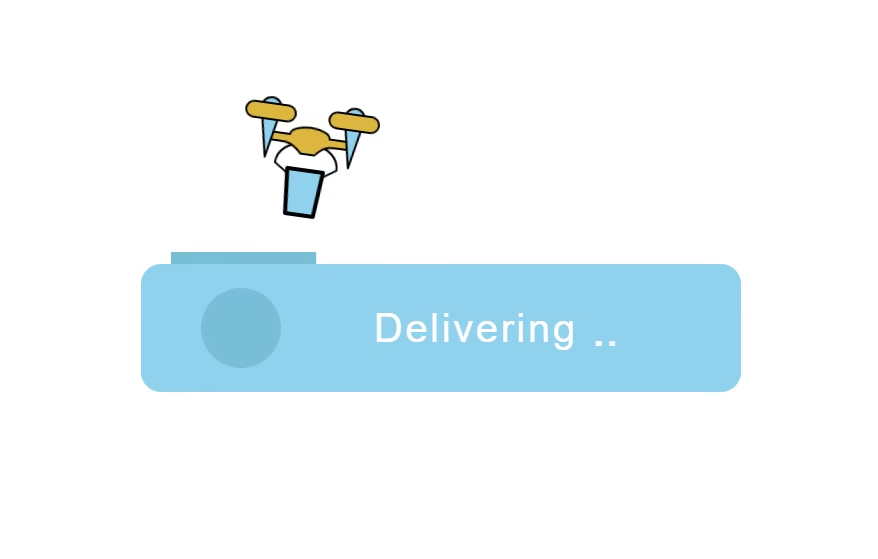
Let’s create a Drone Delivery Button using HTML, CSS, and JavaScript. This fun and interactive button will trigger a drone animation when clicked, giving a cool tech feel to your UI.
We’ll use:
- HTML to build the button and drone structure.
- CSS to style the button, create the drone look, and add smooth flying animations.
- JavaScript to trigger the drone takeoff and delivery animation when the button is clicked.
Whether you’re a beginner or an experienced developer, this project is a great way to practice animation, interactivity, and creative UI design. Let’s get started and make your button fly like a drone! 🚁✨
HTML :
This code creates an animated drone delivery button. The HTML builds a layered structure where the drone SVG sits inside multiple wrapper divs that control animations like takeoff, shifting, and landing. The circular loader shows progress with a package icon and a progress path. Text elements switch between stages like Checkout, Processing, Delivering, and Delivered. When the button is clicked, the linked CSS and JS animate the drone taking off, carrying a package, updating progress, and showing delivery status, giving a full interactive delivery animation effect.
<!DOCTYPE html>
<html lang="en">

<head>
  <meta charset="UTF-8">
  <title>Drone Delivery Button | @coding.stella</title>
  <link rel="stylesheet" href="./style.css">
</head>

<body>
  <div class="demo">
    <div class="demo__drone-cont demo__drone-cont--takeoff">
      <div class="demo__drone-cont demo__drone-cont--shift-x">
        <div class="demo__drone-cont demo__drone-cont--landing">
          <svg viewBox="0 0 136 112" class="demo__drone">
            <g class="demo__drone-leaving">
              <path class="demo__drone-arm" d="M52,46 c0,0 -15,5 -15,20 l15,10" />
              <path class="demo__drone-arm demo__drone-arm--2" d="M52,46 c0,0 -15,5 -15,20 l15,10" />
              <path class="demo__drone-yellow"
                d="M28,36 l20,0 a20,9 0,0,1 40,0 l20,0 l0,8 l-10,0 c-10,0 -15,0 -23,10 l-14,0 c-10,-10 -15,-10 -23,-10 l-10,0z" />
              <path class="demo__drone-green" d="M16,12 a10,10 0,0,1 20,0 l-10,50z" />
              <path class="demo__drone-green" d="M100,12 a10,10 0,0,1 20,0 l-10,50z" />
              <path class="demo__drone-yellow" d="M9,8 l34,0 a8,8 0,0,1 0,16 l-34,0 a8,8 0,0,1 0,-16z" />
              <path class="demo__drone-yellow" d="M93,8 l34,0 a8,8 0,0,1 0,16 l-34,0 a8,8 0,0,1 0,-16z" />
            </g>
            <path class="demo__drone-package demo__drone-green" d="M50,70 l36,0 l-4,45 l-28,0z" />
          </svg>
        </div>
      </div>
    </div>
    <div class="demo__circle">
      <div class="demo__circle-inner">
        <svg viewBox="0 0 16 20" class="demo__circle-package">
          <path d="M0,0 16,0 13,20 3,20z" />
        </svg>
        <div class="demo__circle-grabbers"></div>
      </div>
      <svg viewBox="0 0 40 40" class="demo__circle-progress">
        <path class="demo__circle-progress-line" d="M20,0 a20,20 0 0,1 0,40 a20,20 0 0,1 0,-40" />
        <path class="demo__circle-progress-checkmark" d="M14,19 19,24 29,14" />
      </svg>
    </div>
    <div class="demo__text-fields">
      <div class="demo__text demo__text--step-0">Checkout</div>
      <div class="demo__text demo__text--step-1">
        Processing
        <span class="demo__text-dots"><span>.</span></span>
      </div>
      <div class="demo__text demo__text--step-2">
        Delivering
        <span class="demo__text-dots"><span>.</span></span>
      </div>
      <div class="demo__text demo__text--step-3">It's on the way</div>
      <div class="demo__text demo__text--step-4">Delivered</div>
    </div>
    <div class="demo__revert-line"></div>
  </div>

  <script src="./script.js"></script>

</body>
</html>
CSS :
This CSS makes the whole drone button animation work. It controls the button color changes, moves the drone up, forward, and down, animates the drone arms, shows the package being picked and dropped, and runs the circular loading progress. It also switches the text from Checkout to Delivered with smooth fade and slide effects. All animations run automatically when the button enters the processing or reverting state.
*,
*:before,
*:after {
  box-sizing: border-box;
  margin: 0;
  padding: 0;
}

body {
  font-family: "Roboto", Helvetica, Arial, sans-serif;
  overflow: hidden;
  display: flex;
  justify-content: center;
  align-items: center;
  height: 100vh;
}

.demo {
  position: relative;
  width: 300px;
  height: 64px;
  padding-left: 70px;
  padding-right: 15px;
  border-radius: 10px;
  background: #61d4f1;
  transition: background-color 1s;
  cursor: pointer;
}

.demo:before,
.demo:after {
  content: "";
  position: absolute;
  left: 5%;
  bottom: 100%;
  width: 14%;
  height: 6px;
  background: #3dc1da;
  transform: scaleX(0);
  transform-origin: 0 100%;
}

.demo:after {
  left: 19%;
  width: 66%;
}

.demo.s--processing {
  background-color: #53e2c2;
  transition-delay: 4.6s;
}

.demo.s--processing:before,
.demo.s--processing:after {
  transform: scaleX(1);
  background-color: #36d09d;
}

.demo.s--processing:before {
  transition: transform 0.6s 1.4s, background-color 1s 4.6s;
}

.demo.s--processing:after {
  transition: transform 2.4169014085s 2.4s, background-color 1s 4.6s;
}

.demo.s--reverting {
  background-color: #61d4f1;
  transition: background-color 0.5s 0.96s;
}

.demo.s--reverting:before,
.demo.s--reverting:after {
  opacity: 0;
}

.demo svg {
  overflow: visible;
  fill: none;
  stroke-linejoin: round;
}

.demo-transitionend-listener {
  transition: opacity 6.6s;
}

.demo.s--processing .demo-transitionend-listener {
  opacity: 0;
}

.demo__revert-line {
  position: absolute;
  left: 5%;
  bottom: 100%;
  width: 80%;
  height: 6px;
  background: #53e2c2;
  transform-origin: 0 50%;
  opacity: 0;
}

.demo.s--reverting .demo__revert-line {
  opacity: 1;
  transform: scaleX(0);
  transition: transform 0.864s;
}

.demo__drone-cont {
  position: absolute;
  left: 0;
  top: 0;
  width: 100%;
  height: 100%;
}

.demo__drone-cont--takeoff {
  z-index: -1;
  opacity: 0;
}

.demo.s--processing .demo__drone-cont--takeoff {
  opacity: 1;
  transform: translateY(-70px);
  transition: transform 0.8s, opacity 0.2s;
  transition-delay: 1.2s;
}

.demo.s--processing .demo__drone-cont--shift-x {
  transition: transform 2.6s 2.4s;
  transform: translateX(213px);
}

.demo.s--processing .demo__drone-cont--landing {
  transform: translateY(24px);
  transition: transform 0.3s 5s;
}

.demo__drone {
  position: absolute;
  left: 16px;
  top: -12px;
  width: 68px;
  height: 56px;
  stroke: #000;
  stroke-width: 2px;
  fill: none;
}

@-webkit-keyframes tiltAnim {

  8%,
  24% {
    transform: rotate(0);
  }

  35%,
  70% {
    transform: rotate(8deg);
  }

  85% {
    transform: rotate(-4deg);
  }

  95%,
  100% {
    transform: rotate(0);
  }
}

@keyframes tiltAnim {

  8%,
  24% {
    transform: rotate(0);
  }

  35%,
  70% {
    transform: rotate(8deg);
  }

  85% {
    transform: rotate(-4deg);
  }

  95%,
  100% {
    transform: rotate(0);
  }
}

.demo.s--processing .demo__drone {
  transform-origin: 50% 100%;
  -webkit-animation: tiltAnim 3.8s 1.2s;
  animation: tiltAnim 3.8s 1.2s;
}

.demo.s--processing .demo__drone-leaving {
  transform: translate(150px, -150px) rotate(20deg) scale(0.3);
  opacity: 0;
  transition: transform 1.1s 5.5s, opacity 0.55s 6.05s;
}

.demo__drone-arm {
  --rotation: 0deg;
  transform-origin: 68px 56px;
  transform: rotate(var(--rotation));
}

.demo__drone-arm--2 {
  transform: scaleX(-1) rotate(var(--rotation));
}

.demo.s--processing .demo__drone-arm {
  --rotation: 25deg;
  transition: transform 0.3s 5.2s;
}

.demo__drone-green {
  fill: #61d4f1;
}

.demo.s--processing .demo__drone-green {
  fill: #53e2c2;
  transition: fill 1s 4.6s;
}

.demo__drone-yellow {
  fill: #ecb400;
}

.demo__drone-package {
  stroke-width: 4px;
}

@-webkit-keyframes revertAnim {

  40%,
  45% {
    transform: translate(-426px, 0);
  }

  75% {
    transform: translate(-426px, -100px);
  }

  100% {
    transform: translate(-426px, 100px);
  }
}

@keyframes revertAnim {

  40%,
  45% {
    transform: translate(-426px, 0);
  }

  75% {
    transform: translate(-426px, -100px);
  }

  100% {
    transform: translate(-426px, 100px);
  }
}

.demo.s--reverting .demo__drone-package {
  opacity: 0;
  transition: opacity 0s 2s;
  -webkit-animation: revertAnim 2s;
  animation: revertAnim 2s;
}

.demo__circle {
  position: absolute;
  left: 30px;
  top: 50%;
  width: 40px;
  height: 40px;
  margin-top: -20px;
  border-radius: 50%;
  background: #3dc1da;
}

.demo.s--processing .demo__circle {
  background-color: #53e2c2;
  transition: background-color 1s;
  transition-delay: 4.6s;
}

.demo.s--reverting .demo__circle {
  background-color: #3dc1da;
  transition: background-color 0.5s 0.96s;
}

.demo__circle-inner {
  overflow: hidden;
  position: absolute;
  left: 0;
  top: 0;
  display: flex;
  justify-content: center;
  align-items: center;
  width: 100%;
  height: 100%;
  border-radius: inherit;
}

.demo__circle-package {
  width: 14px;
  height: 18px;
  stroke: #fff;
  stroke-width: 3px;
  stroke-linecap: round;
}

.demo.s--processing .demo__circle-package {
  transform: translateY(-70px);
  transition: transform 0.8s 1.2s;
}

.demo.s--reverting .demo__circle-package {
  transform: translateY(0);
  transition: transform 0.16s 1.6s;
}

.demo__circle-grabbers {
  --grabY: 0px;
  --grabRotate: 0;
  position: absolute;
  left: 0;
  top: 0;
  width: 100%;
  height: 100%;
}

.demo__circle-grabbers:before,
.demo__circle-grabbers:after {
  content: "";
  position: absolute;
  right: 5px;
  top: -12px;
  width: 14px;
  height: 8px;
  border: 2px solid #000;
  border-left: none;
  border-bottom: none;
  transform: translateY(var(--grabY)) rotate(var(--grabRotate));
  transition: transform 0.8s;
}

.demo__circle-grabbers:before {
  right: auto;
  left: 5px;
  transform: translateY(var(--grabY)) scaleX(-1) rotate(var(--grabRotate));
}

@-webkit-keyframes grabAnim {

  40%,
  59.999% {
    --grabY: 15px;
    --grabRotate: 55deg;
  }

  60%,
  100% {
    --grabY: -55px;
    --grabRotate: 55deg;
  }
}

@keyframes grabAnim {

  40%,
  59.999% {
    --grabY: 15px;
    --grabRotate: 55deg;
  }

  60%,
  100% {
    --grabY: -55px;
    --grabRotate: 55deg;
  }
}

.demo.s--processing .demo__circle-grabbers {
  -webkit-animation: grabAnim 2s forwards;
  animation: grabAnim 2s forwards;
}

.demo__circle-progress {
  position: absolute;
  left: 0;
  top: 0;
  width: 100%;
  height: 100%;
  stroke: #fff;
  stroke-width: 2px;
}

.demo__circle-progress-line {
  stroke-dasharray: 125.6813812256, 125.6813812256;
  stroke-dashoffset: 125.6813812256;
}

.demo.s--processing .demo__circle-progress-line {
  stroke-dashoffset: 0;
  transition: all 0.5s 4.9s;
}

.demo.s--reverting .demo__circle-progress-line {
  stroke-dashoffset: 125.6813812256;
  transition: all 0.5s 0.96s;
}

.demo__circle-progress-checkmark {
  stroke-dasharray: 21.2132034302, 21.2132034302;
  stroke-dashoffset: 21.2132034302;
}

.demo.s--processing .demo__circle-progress-checkmark {
  stroke-dashoffset: 0;
  transition: all 0.5s 4.9s;
}

.demo.s--reverting .demo__circle-progress-checkmark {
  stroke-dashoffset: 21.2132034302;
  transition: all 0.5s 0.96s;
}

.demo__text-fields {
  position: relative;
  width: 100%;
  height: 100%;
  color: #fff;
  font-size: 20px;
  letter-spacing: 1.3px;
}

.demo__text {
  position: absolute;
  left: 0;
  top: 0;
  display: flex;
  justify-content: center;
  align-items: center;
  width: 100%;
  height: 100%;
  opacity: 0;
  transform: translateY(20px);
  will-change: opacity, transform;
  pointer-events: none;
}

@-webkit-keyframes textAnimation {

  20%,
  80% {
    opacity: 1;
    transform: translateY(0);
  }

  100% {
    opacity: 0;
    transform: translateY(-20px);
  }
}

@keyframes textAnimation {

  20%,
  80% {
    opacity: 1;
    transform: translateY(0);
  }

  100% {
    opacity: 0;
    transform: translateY(-20px);
  }
}

.demo__text--step-0 {
  opacity: 1;
  transform: translateY(0);
}

.demo.s--processing .demo__text {
  transition: all 0.4s;
}

.demo.s--processing .demo__text--step-0 {
  opacity: 0;
  transform: translateY(-20px);
}

.demo.s--processing .demo__text--step-1 {
  -webkit-animation: textAnimation 2s 0s;
  animation: textAnimation 2s 0s;
}

.demo.s--processing .demo__text--step-2 {
  -webkit-animation: textAnimation 2s 1.6s;
  animation: textAnimation 2s 1.6s;
}

.demo.s--processing .demo__text--step-3 {
  -webkit-animation: textAnimation 2s 3.2s;
  animation: textAnimation 2s 3.2s;
}

.demo.s--processing .demo__text--step-4 {
  transition-delay: 4.8s;
  transform: translateY(0);
  opacity: 1;
}

.demo.s--reverting .demo__text--step-0 {
  opacity: 1;
  transform: translateY(0);
  transition: all 0.4s 1s;
}

.demo.s--reverting .demo__text--step-4 {
  opacity: 0;
  transform: translateY(20px);
  transition: all 0.4s 0.8s;
}

.demo__text-dots {
  letter-spacing: -0.5px;
  font-size: 26px;
}

@-webkit-keyframes dotAnimation {

  10%,
  90% {
    opacity: 0;
  }

  40%,
  60% {
    opacity: 1;
  }
}

@keyframes dotAnimation {

  10%,
  90% {
    opacity: 0;
  }

  40%,
  60% {
    opacity: 1;
  }
}

.demo__text-dots span {
  opacity: 0;
  -webkit-animation: dotAnimation 1.2s 0.4s infinite;
  animation: dotAnimation 1.2s 0.4s infinite;
}

.demo__text-dots:before,
.demo__text-dots:after {
  content: ".";
  opacity: 0;
}

.demo__text-dots:before {
  -webkit-animation: dotAnimation 1.2s infinite;
  animation: dotAnimation 1.2s infinite;
}

.demo__text-dots:after {
  -webkit-animation: dotAnimation 1.2s 0.8s infinite;
  animation: dotAnimation 1.2s 0.8s infinite;
}
JavaScript:
This JavaScript runs the button animation when you click it. When clicked, it prevents multiple clicks, adds a hidden listener element, and triggers the processing animation by adding a class. When the animation finishes, it switches to the reverting animation. After 10 seconds, it cleans everything up, removes the extra classes, resets the button, and allows it to be clicked again.
const $demo = document.querySelector('.demo');
let processing = false;

$demo.addEventListener('click', () => {
  if (processing) return;
  let reverting = false;
  processing = true;
  const $endListener = document.createElement('div');
  $endListener.classList.add('demo-transitionend-listener');
  $demo.appendChild($endListener);
  const layoutTrigger = $demo.offsetTop;
  $demo.classList.add('s--processing');

  $endListener.addEventListener('transitionend', () => {
    if (reverting) return;
    reverting = true;
    $demo.classList.add('s--reverting');
  });

  setTimeout(() => {
    $demo.removeChild($endListener);
    $demo.classList.remove('s--processing', 's--reverting');
    processing = false;
  }, 10000);
});
In conclusion, making a Drone Delivery Button with HTML, CSS, and JavaScript is a fun and creative way to learn interactive animations. With simple structure, clean styling, and a bit of JS, you can build a button that comes alive with motion 🚀
If you run into any problems with your project, worry not. The remedy is just a click away – Download the source code and confront your coding challenges with enthusiasm. Enjoy your coding adventure!
