


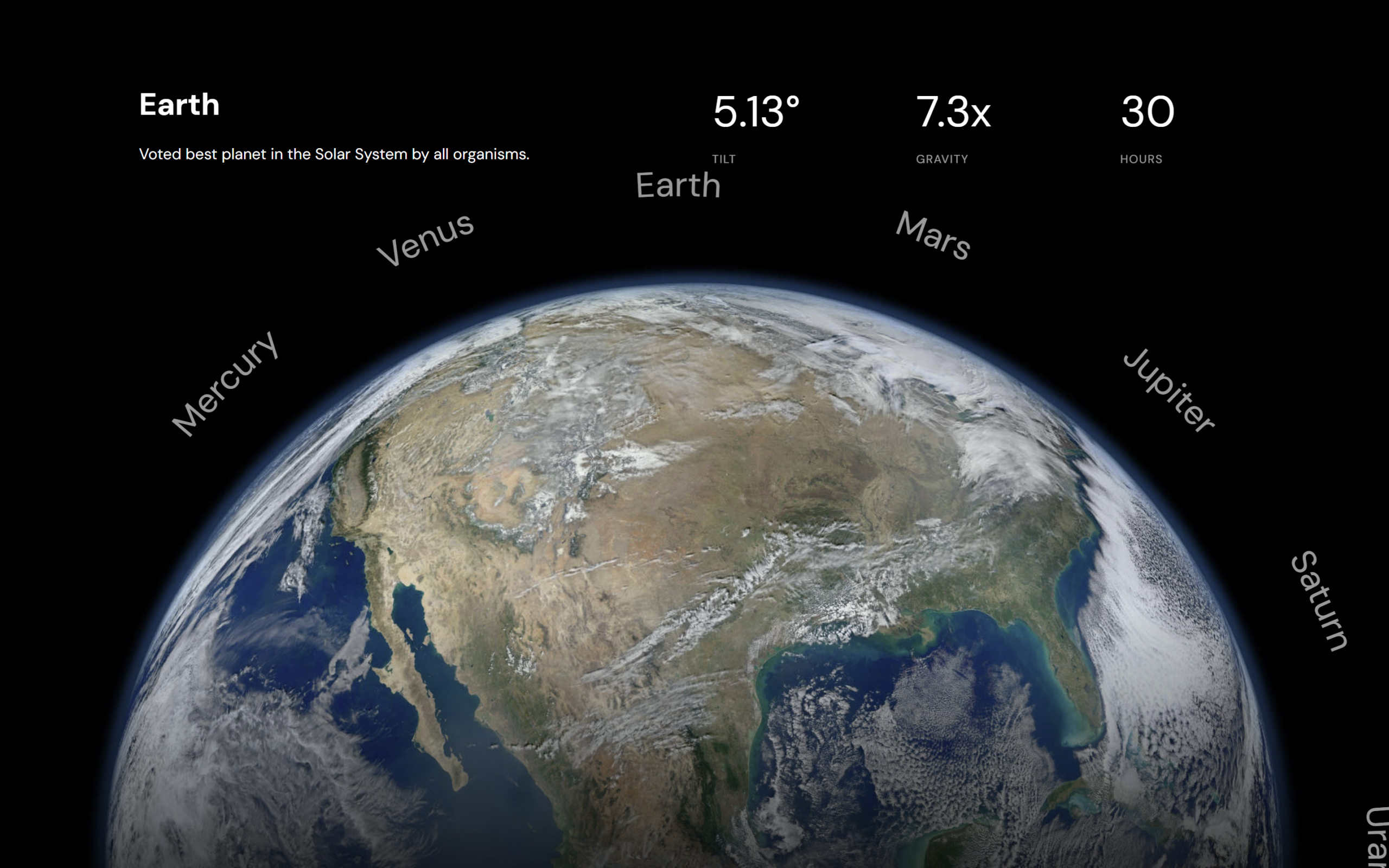
Let’s create a Solar System Planet Picker Animation using HTML, CSS, and JavaScript. This project builds an interactive UI where users can switch between planets with smooth animations, dynamic data updates, and a rotating navigation system – perfect for making your UI feel futuristic and engaging.
We’ll use:
- HTML to structure each planet section with title, description, details (tilt, gravity, hours), and images, along with an SVG-based curved navigation for selecting planets.
- CSS to design the full-screen layout, position elements using grid, and create smooth animations like text reveal, fading images, and transitions when switching planets.
- JavaScript to handle planet switching, update active states, animate values dynamically, rotate the navigation based on selection, and add interactive click events.
This project is a great way to understand advanced UI animations, DOM manipulation, and smooth transitions while building a visually impressive solar system experience. 🚀
HTML :
The HTML defines the structure of the app with multiple .planet sections (each having title, description, details, and image) and an SVG curved navigation bar listing planet names; each planet has data-planet and data-detail attributes used by JS to identify and update content, with one planet active by default, making it a dynamic solar system selector UI.
<!DOCTYPE html>
<html lang="en">

<head>
  <meta charset="UTF-8">
  <title>Solar System Planet Picker Keyframe Animation | @coding.stella</title>
  <link rel="stylesheet" href="https://public.codepenassets.com/css/normalize-5.0.0.min.css">
  <link rel='stylesheet' href='https://unpkg.com/splitting@1.0.6/dist/splitting.css'>
  <link rel="stylesheet" href="./style.css">

</head>

<body>
  <div id="app" data-current-planet="mercury">

    <nav class="planet-nav">
      <svg viewBox="0 20 400 400" xmlns="http://www.w3.org/2000/svg">

        <!--       <defs> -->
        <path id="navPath" d="M10,200 C30,-28 370,-28 390,200" fill="none" />
        <!--       </defs> -->

        <text>
          <textPath href="#navPath" startOffset="0" font-size="10">
            <tspan>Mercury</tspan>
            <tspan>Venus</tspan>
            <tspan>Earth</tspan>
            <tspan>Mars</tspan>
            <tspan>Jupiter</tspan>
            <tspan>Saturn</tspan>
            <tspan>Uranus</tspan>
            <tspan>Neptune</tspan>
          </textPath>
        </text>

      </svg>
    </nav>

    <div class="planet" data-planet="mercury" data-active>
      <div class="planet-title">
        <h1>Mercury</h1>
        <p class="planet-description">Tiny and close to the sun.</p>
      </div>

      <div class="planet-details">
        <div class="detail" data-detail="tilt" data-postfix="°">
          3.13
        </div>
        <div class="detail" data-detail="gravity" data-postfix="𝗑">
          0.9
        </div>
        <div class="detail" data-detail="hours">
          10
        </div>
      </div>

      <figure class="planet-figure">
        <img src="https://s3-us-west-2.amazonaws.com/s.cdpn.io/t-1188/1_mercury.jpg" />
      </figure>
    </div>

    <div class="planet" data-planet="venus">
      <div class="planet-title">
        <h1>Venus</h1>
        <p class="planet-description">A planet of razors and tennis players.</p>
      </div>

      <div class="planet-details">
        <div class="detail" data-detail="tilt" data-postfix="°">
          4.13
        </div>
        <div class="detail" data-detail="gravity" data-postfix="𝗑">
          0.2
        </div>
        <div class="detail" data-detail="hours">
          20
        </div>
      </div>

      <figure class="planet-figure">
        <img src="https://s3-us-west-2.amazonaws.com/s.cdpn.io/t-1188/2_venus.jpg" />
      </figure>
    </div>

    <div class="planet" data-planet="earth">
      <div class="planet-title">
        <h1>Earth</h1>
        <p class="planet-description">Voted best planet in the Solar System by all organisms.</p>
      </div>

      <div class="planet-details">
        <div class="detail" data-detail="tilt" data-postfix="°">
          5.13
        </div>
        <div class="detail" data-detail="gravity" data-postfix="𝗑">
          7.3
        </div>
        <div class="detail" data-detail="hours">
          30
        </div>
      </div>

      <figure class="planet-figure">
        <img src="https://s3-us-west-2.amazonaws.com/s.cdpn.io/t-1188/3_earth.jpg" />
      </figure>
    </div>

    <div class="planet" data-planet="mars">
      <div class="planet-title">
        <h1>Mars</h1>
        <p class="planet-description">Future Site of Elon Musk's AirBnB.</p>
      </div>

      <div class="planet-details">
        <div class="detail" data-detail="tilt" data-postfix="°">
          6.13
        </div>
        <div class="detail" data-detail="gravity" data-postfix="𝗑">
          1.1
        </div>
        <div class="detail" data-detail="hours">
          40
        </div>
      </div>

      <figure class="planet-figure">
        <img src="https://s3-us-west-2.amazonaws.com/s.cdpn.io/t-1188/4_mars.jpg" />
      </figure>
    </div>

    <div class="planet" data-planet="jupiter">
      <div class="planet-title">
        <h1>Jupiter</h1>
        <p class="planet-description">Twice as massive as the other planets combined.</p>
      </div>

      <div class="planet-details">
        <div class="detail" data-detail="tilt" data-postfix="°">
          11.13
        </div>
        <div class="detail" data-detail="gravity" data-postfix="𝗑">
          1.8
        </div>
        <div class="detail" data-detail="hours">
          50
        </div>
      </div>

      <figure class="planet-figure">
        <img src="https://s3-us-west-2.amazonaws.com/s.cdpn.io/t-1188/5_jupiter.jpg" />
      </figure>
    </div>

    <div class="planet" data-planet="saturn">
      <div class="planet-title">
        <h1>Saturn</h1>
        <p class="planet-description">This planet sponsored by Zales.</p>
      </div>

      <div class="planet-details">
        <div class="detail" data-detail="tilt" data-postfix="°">
          9.13
        </div>
        <div class="detail" data-detail="gravity" data-postfix="𝗑">
          7.3
        </div>
        <div class="detail" data-detail="hours">
          60
        </div>
      </div>

      <figure class="planet-figure">
        <img src="https://s3-us-west-2.amazonaws.com/s.cdpn.io/t-1188/6_saturn.jpg" />
      </figure>
    </div>

    <div class="planet" data-planet="uranus">
      <div class="planet-title">
        <h1>Uranus</h1>
        <p class="planet-description">Hey, stop laughing. It's not funny.</p>
      </div>

      <div class="planet-details">
        <div class="detail" data-detail="tilt" data-postfix="°">
          11.13
        </div>
        <div class="detail" data-detail="gravity" data-postfix="𝗑">
          1.8
        </div>
        <div class="detail" data-detail="hours">
          50
        </div>
      </div>

      <figure class="planet-figure">
        <img src="https://s3-us-west-2.amazonaws.com/s.cdpn.io/t-1188/7_uranus.jpg" />
      </figure>
    </div>


    <div class="planet" data-planet="neptune">
      <div class="planet-title">
        <h1>Neptune</h1>
        <p class="planet-description">A planet for pirates; just narrowly made the cut when scientists decided nine
          planets was too many.</p>
      </div>

      <div class="planet-details">
        <div class="detail" data-detail="tilt" data-postfix="°">
          31.03 </div>
        <div class="detail" data-detail="gravity" data-postfix="𝗑">
          8.9 </div>
        <div class="detail" data-detail="hours">
          10
        </div>
      </div>

      <figure class="planet-figure">
        <img src="https://s3-us-west-2.amazonaws.com/s.cdpn.io/t-1188/8_neptune.jpg" />
      </figure>
    </div>
  </div>
  <script src='https://unpkg.com/splitting@1.0.6/dist/splitting.min.js'></script>
  <script src="./script.js"></script>

</body>

</html>
CSS :
This CSS sets up a full-screen dark UI using grid layout where each .planet section is positioned and styled with titles, images, and details; it uses custom variables for smooth animations and transitions like sliding text (.char) and fading content when a planet becomes active (data-active), while also styling small info blocks (tilt, gravity, hours) and an SVG-based navigation at the bottom that rotates based on the selected planet.
@import url("https://fonts.googleapis.com/css?family=DM+Sans:400,700&display=swap");
:root {
  --duration: .8s;
  --half-duraiton: calc( var(--duration) / 2 );
  --ease: cubic-bezier(.7, 0, .3, 1);
}

*, *:before, *:after {
  box-sizing: border-box;
  position: relative;
}

html, body {
  height: 100%;
  width: 100%;
  margin: 0;
  padding: 0;
}

body {
  background: black;
  color: white;
  font-family: "DM Sans", sans-serif;
}

img {
  max-width: 100%;
}

#app {
  height: 100%;
  width: 100%;
  display: grid;
  grid-template-columns: 1;
  grid-template-rows: 1fr 1fr;
}

.planet {
  grid-column: 1;
  grid-row: 1/-1;
  overflow: hidden;
  height: 100%;
  width: 100%;
  display: grid;
  grid-template-columns: 10% 40% 40% 10%;
  grid-template-rows: 10% 1fr 1fr;
  grid-template-areas: "header header header header" "x title details y" "x planet photos photos";
}
.planet > .planet-title {
  display: block;
  grid-area: title;
}
.planet > .planet-figure {
  grid-column: 1/-1;
  grid-row: planet;
  padding: 0;
  margin: 0 auto;
  position: relative;
}
.planet > .planet-figure img {
  margin-bottom: -50%;
}
.planet > .planet-figure::after {
  content: "";
  position: fixed;
  bottom: 0%;
  top: 0%;
  width: 100%;
  left: 0;
  background: linear-gradient(to top, rgba(0, 0, 0, 0.7) 0%, transparent 30%);
  z-index: 2;
}
.planet > .planet-details {
  grid-area: details;
  display: flex;
  flex-direction: row;
  justify-content: space-between;
}

.detail {
  font-size: 5vmin;
  width: 3em;
  font-weight: 400;
  display: flex;
  margin-left: 0.4em;
  flex-shrink: 0;
  align-self: start;
}
.detail:after {
  content: attr(data-postfix);
}
.detail:before {
  display: block;
  position: absolute;
  top: 100%;
  margin-top: 1rem;
  font-size: 0.75rem;
  text-transform: uppercase;
  opacity: 0.6;
  letter-spacing: 1px;
}
.detail[data-detail=hours]:before {
  content: "Hours";
}
.detail[data-detail=gravity]:before {
  content: "gravity";
}
.detail[data-detail=tilt]:before {
  content: "tilt";
}

h1, h2 {
  margin: 0;
}

/* ---------------------------------- */
.planet {
  visibility: hidden;
  transition: visibility 0.01s linear var(--duration);
  /* ---------------------------------- */
  /* ---------------------------------- */
  /* ---------------------------------- */
}
.planet[data-active] {
  visibility: visible;
  opacity: 1;
  transition-delay: 0s;
}
.planet .planet-title .word {
  overflow: hidden;
}
.planet .planet-title .char {
  transform: translateY(100%);
  transition: transform var(--duration) var(--ease);
  transition-delay: calc( var(--char-index) * .1s );
}
.planet[data-active] .planet-title .char {
  transform: translateY(0%);
  transition-delay: calc( (var(--duration)/2) + (var(--char-index) * .1s) );
}
.planet .planet-description {
  visibility: hidden;
  opacity: 0;
  transform: translateY(1em);
  transition: transform var(--duration) var(--ease), opacity var(--duration) linear, visibility 0.01s linear var(--duration);
}
.planet[data-active] .planet-description {
  opacity: 1;
  transform: translateY(0);
  visibility: visible;
  transition-delay: var(--duration), var(--duration), 0s;
}
.planet .planet-details {
  visibility: hidden;
}
.planet[data-active] .planet-details {
  opacity: 1;
  transform: translateY(0);
  visibility: visible;
  transition-delay: 0s;
}
.planet .planet-figure {
  opacity: 0;
  transition: opacity var(--duration) var(--ease);
}
.planet[data-active] .planet-figure {
  opacity: 1;
}

/* ---------------------------------- */
#app {
  overflow: hidden;
}

.planet-nav {
  grid-column: 1;
  grid-row: 2;
  pointer-events: none;
  z-index: 10;
  display: flex;
  position: absolute;
  left: 0;
  right: 0;
  bottom: 0;
}
.planet-nav svg {
  display: block;
  width: auto;
  height: auto;
  min-width: 100%;
  max-width: none;
  min-height: 100vh;
  margin-bottom: -50%;
}
@media (max-width: 600px) {
  .planet-nav svg {
    margin-bottom: -55%;
  }
}
.planet-nav tspan {
  cursor: pointer;
  fill: #FFF;
  pointer-events: auto;
  opacity: 0;
  transition: opacity var(--duration) linear;
}
.planet-nav tspan[x] {
  opacity: 0.6;
}
.planet-nav tspan:hover, .planet-nav tspan:focus {
  opacity: 1;
}
.planet-nav svg {
  transform-origin: center center;
  --length: 7;
  --range: 160deg;
  transform: rotate(calc( (var(--active,0) / var(--length)) * (-1 * var(--range)) + (var(--range) / 2) ));
  transition: transform var(--duration) var(--ease);
}
.planet-nav tspan {
  cursor: pointer;
}
JavaScript:
The JS controls planet switching by storing all planets in an object, tracking the current one, and updating UI when a new planet is selected; it uses Splitting.js to animate text characters, custom animate() functions to smoothly change numbers (hours, tilt, gravity), and event listeners on SVG text (tspan) so clicking a planet name updates the active planet, rotates the nav, and animates values dynamically.
console.clear();

Splitting({ target: '.planet-title h1', by: 'chars' });

const elApp = document.querySelector('#app');

const elPlanets = Array.from(document.querySelectorAll('[data-planet]')).
  reduce((acc, el) => {
    const planet = el.dataset.planet;

    acc[planet] = el;

    return acc;
  }, {});

const planetKeys = Object.keys(elPlanets);

function getDetails(planet) {
  // tilt, gravity, hours
  const details = Array.from(elPlanets[planet].
    querySelectorAll(`[data-detail]`)).
    reduce((acc, el) => {
      acc[el.dataset.detail] = el.innerHTML.trim();

      return acc;
    }, { planet });

  return details;
}

// ...........

let currentPlanetIndex = 0;
let currentPlanet = getDetails('mercury');

function selectPlanet(planet) {
  const prevPlanet = currentPlanet;
  const elActive = document.querySelector('[data-active]');

  delete elActive.dataset.active;

  const elPlanet = elPlanets[planet];

  elPlanet.dataset.active = true;
  currentPlanet = getDetails(elPlanet.dataset.planet);

  console.log(prevPlanet, currentPlanet);

  const elHoursDetail = elPlanet.querySelector('[data-detail="hours"]');
  animate.fromTo({
    from: +prevPlanet.hours,
    to: +currentPlanet.hours
  },
    value => {
      elHoursDetail.innerHTML = Math.round(value);
    });

  const elTiltDetail = elPlanet.querySelector('[data-detail="tilt"]');
  animate.fromTo({
    from: +prevPlanet.tilt,
    to: +currentPlanet.tilt
  },
    value => {
      elTiltDetail.innerHTML = value.toFixed(2);
    });

  const elGravityDetail = elPlanet.querySelector('[data-detail="gravity"]');

  animate.fromTo({
    from: +prevPlanet.gravity,
    to: +currentPlanet.gravity
  },
    value => {
      elGravityDetail.innerHTML = value.toFixed(1);
    });
}

function selectPlanetByIndex(i) {
  currentPlanetIndex = i;
  elApp.style.setProperty('--active', i);
  selectPlanet(planetKeys[i]);
}

// document.body.addEventListener('click', () => {
//   currentPlanetIndex = (currentPlanetIndex + 1) % planetKeys.length;

//   selectPlanet(planetKeys[currentPlanetIndex]);
// });


/* ---------------------------------- */

function animate(duration, fn) {
  const start = performance.now();
  const ticks = Math.ceil(duration / 16.666667);
  let progress = 0; // between 0 and 1, +/-

  function tick(now) {
    if (progress >= 1) {
      fn(1);
      return;
    }

    const elapsed = now - start;
    progress = elapsed / duration;

    // callback
    fn(progress); // number between 0 and 1

    requestAnimationFrame(tick); // every 16.6666667 ms
  }

  tick(start);
}

function easing(progress) {
  return (1 - Math.cos(progress * Math.PI)) / 2;
}

const animationDefaults = {
  duration: 1000,
  easing
};


animate.fromTo = ({
  from,
  to,
  easing,
  duration },
  fn) => {
  easing = easing || animationDefaults.easing;
  duration = duration || animationDefaults.duration;

  const delta = +to - +from;

  return animate(duration, progress => fn(from + easing(progress) * delta));
};


/* ---------------------------------- */

const svgNS = 'http://www.w3.org/2000/svg';
const elSvgNav = document.querySelector('.planet-nav svg');

const elTspans = [...document.querySelectorAll('tspan')];;
const length = elTspans.length - 1;

elSvgNav.style.setProperty('--length', length);

// Getting the length for distributing the text along the path
const elNavPath = document.querySelector('#navPath');
const elLastTspan = elTspans[length];
const navPathLength = elNavPath.getTotalLength() - elLastTspan.getComputedTextLength();

elTspans.forEach((tspan, i) => {
  let percent = i / length;

  tspan.setAttribute('x', percent * navPathLength);
  tspan.setAttributeNS(svgNS, 'x', percent * navPathLength);

  tspan.addEventListener('click', e => {
    e.preventDefault();
    selectPlanetByIndex(i);
  });

});
In conclusion, this Solar System Planet Picker Animation helps you understand how to combine HTML, CSS, and JavaScript to create a highly interactive and visually engaging UI. You learn how to structure dynamic content, use animations and transitions for smooth user experience, and control everything with JavaScript logic like state management and event handling 🚀
If your project has problems, don’t worry. Just click to download the source code and face your coding challenges with excitement. Have fun coding!
