


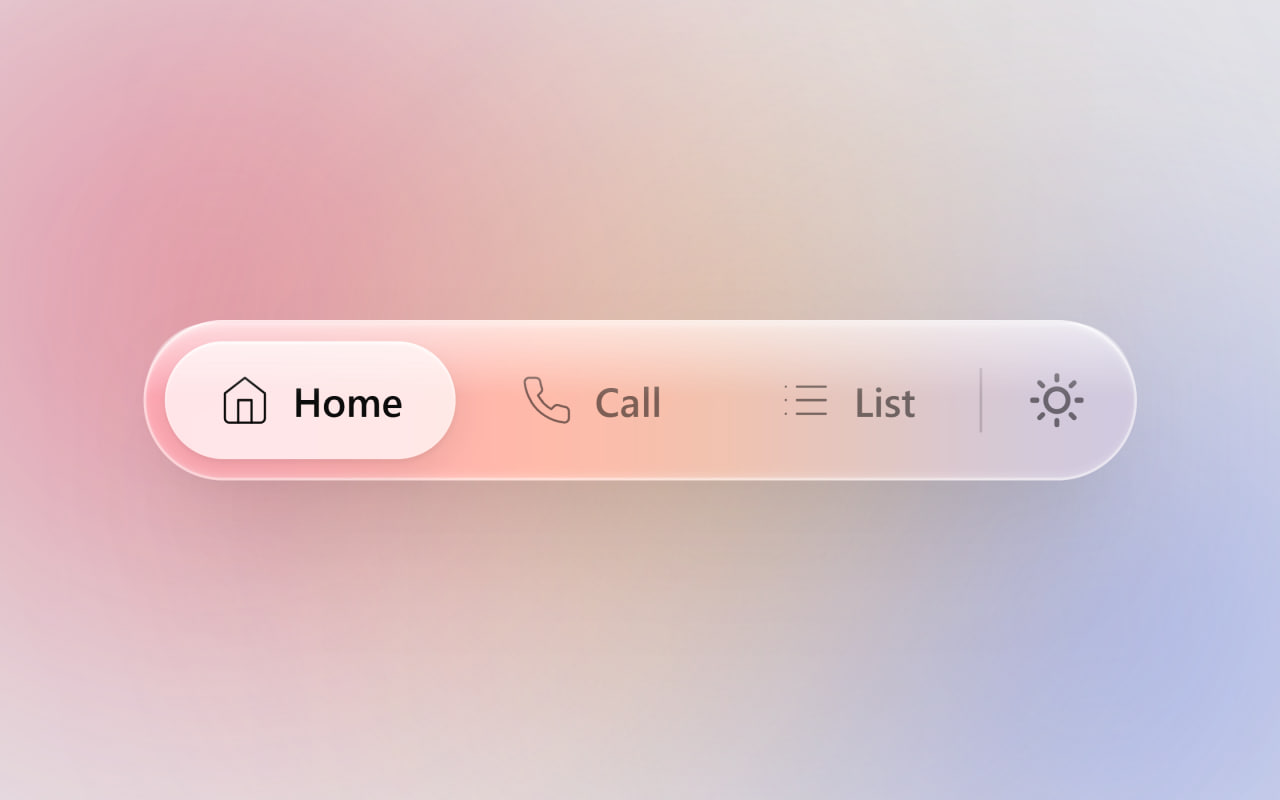
Let’s create an Apple Liquid Glass Navigation Bar using HTML, CSS, and JavaScript to build a modern and interactive navigation menu with a beautiful glass effect. In this project, we’ll create a floating navigation bar with smooth animations, a moving active tab indicator, dark/light mode support, and realistic glass-style visuals inspired by Apple’s design.
We’ll use:
- HTML: To create the navigation bar structure, buttons, icons, active indicator, and theme toggle button.
- CSS: To design the liquid glass effect using transparency, blur, shadows, animations, responsive layouts, and dark/light mode styles.
- JavaScript: To add interactivity such as switching active tabs, moving the slider indicator, toggling dark/light mode, and creating a mouse-following glare effect.
This project is perfect for learning modern UI design, glassmorphism effects, CSS animations, JavaScript DOM manipulation, and building premium-looking navigation components for websites.
HTML :
The HTML is responsible for the page structure. It creates the animated background, the glass navigation bar, navigation buttons (Home, Call, List), the active slider pill, and the dark/light mode button with sun and moon icons. It only defines what elements appear on the page and their hierarchy.
<!DOCTYPE html>
<html lang="de" data-theme="light">

<head>
    <meta charset="UTF-8">
    <meta name="viewport" content="width=device-width, initial-scale=1.0">
    <title>Apple Liquid Navigation Bar | @coding.stella</title>
    <link rel="stylesheet" href="style.css">
</head>

<body>
    <div class="bg-mesh">
        <div class="blob blob-1"></div>
        <div class="blob blob-2"></div>
        <div class="blob blob-3"></div>
    </div>

    <nav class="liquid-nav" id="nav">
        <div class="liquid-glare-container">
            <div class="liquid-glare" id="glare"></div>
        </div>

        <div class="nav-items">
            <div class="active-pill" id="active-pill"></div>

            <button class="nav-btn active">
                <div class="btn-content">
                    <svg width="20" height="20" viewBox="0 0 24 24" fill="none" stroke="currentColor"
                        stroke-linecap="round" stroke-linejoin="round">
                        <path d="M3 9l9-7 9 7v11a2 2 0 0 1-2 2H5a2 2 0 0 1-2-2z"></path>
                        <polyline points="9 22 9 12 15 12 15 22"></polyline>
                    </svg>
                    <span>Home</span>
                </div>
            </button>

            <button class="nav-btn">
                <div class="btn-content">
                    <svg width="20" height="20" viewBox="0 0 24 24" fill="none" stroke="currentColor"
                        stroke-linecap="round" stroke-linejoin="round">
                        <path
                            d="M22 16.92v3a2 2 0 0 1-2.18 2 19.79 19.79 0 0 1-8.63-3.07 19.5 19.5 0 0 1-6-6 19.79 19.79 0 0 1-3.07-8.67A2 2 0 0 1 4.11 2h3a2 2 0 0 1 2 1.72 12.84 12.84 0 0 0 .7 2.81 2 2 0 0 1-.45 2.11L8.09 9.91a16 16 0 0 0 6 6l1.27-1.27a2 2 0 0 1 2.11-.45 12.84 12.84 0 0 0 2.81.7A2 2 0 0 1 22 16.92z">
                        </path>
                    </svg>
                    <span>Call</span>
                </div>
            </button>

            <button class="nav-btn">
                <div class="btn-content">
                    <svg width="20" height="20" viewBox="0 0 24 24" fill="none" stroke="currentColor"
                        stroke-linecap="round" stroke-linejoin="round">
                        <line x1="8" y1="6" x2="21" y2="6"></line>
                        <line x1="8" y1="12" x2="21" y2="12"></line>
                        <line x1="8" y1="18" x2="21" y2="18"></line>
                        <line x1="3" y1="6" x2="3.01" y2="6"></line>
                        <line x1="3" y1="12" x2="3.01" y2="12"></line>
                        <line x1="3" y1="18" x2="3.01" y2="18"></line>
                    </svg>
                    <span>List</span>
                </div>
            </button>
        </div>

        <div class="divider"></div>

        <button class="theme-btn" id="theme-btn" aria-label="Dark Mode Toggle">
            <div class="theme-icon-wrapper">
                <svg class="sun" width="20" height="20" viewBox="0 0 24 24" fill="none" stroke="currentColor"
                    stroke-linecap="round" stroke-linejoin="round">
                    <circle cx="12" cy="12" r="5"></circle>
                    <line x1="12" y1="1" x2="12" y2="3"></line>
                    <line x1="12" y1="21" x2="12" y2="23"></line>
                    <line x1="4.22" y1="4.22" x2="5.64" y2="5.64"></line>
                    <line x1="18.36" y1="18.36" x2="19.78" y2="19.78"></line>
                    <line x1="1" y1="12" x2="3" y2="12"></line>
                    <line x1="21" y1="12" x2="23" y2="12"></line>
                    <line x1="4.22" y1="19.78" x2="5.64" y2="18.36"></line>
                    <line x1="18.36" y1="5.64" x2="19.78" y2="4.22"></line>
                </svg>
                <svg class="moon" width="20" height="20" viewBox="0 0 24 24" fill="none" stroke="currentColor"
                    stroke-linecap="round" stroke-linejoin="round">
                    <path d="M21 12.79A9 9 0 1 1 11.21 3 7 7 0 0 0 21 12.79z"></path>
                </svg>
            </div>
        </button>
    </nav>

    <script src="script.js"></script>
</body>

</html>
CSS :
The CSS is responsible for the design and animations. It creates the Apple-style liquid glass effect using transparency, blur, shadows, borders, and reflections. It also styles the buttons, active slider, dark/light themes, moving background blobs, hover effects, click animations, and all transitions that make the interface look smooth and modern.
:root {
    /* Hintergrund & Ambient Light Blobs */
    --bg-color: #e5e5ea;
    --blob-1: #ff2a5f;
    --blob-2: #007aff;
    --blob-3: #ff9500;
    --blob-opacity: 0.7;

    /* Echtes Liquid Glass - Light Mode */
    --glass-bg: rgba(255, 255, 255, 0.15);
    --glass-border: rgba(255, 255, 255, 0.4);
    --glass-shadow: rgba(0, 0, 0, 0.1);
    --glass-highlight: rgba(255, 255, 255, 0.8);
    /* Obere Lichtkante */
    --glass-caustic: rgba(255, 255, 255, 0.4);
    /* Untere Lichtbrechung */
    --reflection-start: rgba(255, 255, 255, 0.6);
    /* Der Nässe-Effekt */
    --reflection-end: rgba(255, 255, 255, 0.0);
    --glare-color: rgba(255, 255, 255, 0.5);

    /* Slider Pill & Icons */
    --pill-bg: rgba(255, 255, 255, 0.7);
    --pill-shadow: 0 4px 12px rgba(0, 0, 0, 0.08), 0 1px 2px rgba(0, 0, 0, 0.05), inset 0 1px 1px rgba(255, 255, 255, 0.8);
    --icon-color: rgba(0, 0, 0, 0.5);
    --icon-active: rgba(0, 0, 0, 0.95);
    --divider: rgba(0, 0, 0, 0.15);
}

[data-theme="dark"] {
    /* Hintergrund & Ambient Light Blobs */
    --bg-color: #000000;
    --blob-1: #bf5af2;
    --blob-2: #0a84ff;
    --blob-3: #ff375f;
    --blob-opacity: 0.5;

    /* Echtes Liquid Glass - Dark Mode */
    --glass-bg: rgba(30, 30, 35, 0.45);
    --glass-border: rgba(255, 255, 255, 0.15);
    --glass-shadow: rgba(0, 0, 0, 0.8);
    --glass-highlight: rgba(255, 255, 255, 0.25);
    --glass-caustic: rgba(255, 255, 255, 0.05);
    --reflection-start: rgba(255, 255, 255, 0.15);
    --reflection-end: rgba(255, 255, 255, 0.0);
    --glare-color: rgba(255, 255, 255, 0.15);

    /* Slider Pill & Icons */
    --pill-bg: rgba(60, 60, 65, 0.8);
    --pill-shadow: 0 4px 12px rgba(0, 0, 0, 0.4), 0 1px 2px rgba(0, 0, 0, 0.2), inset 0 1px 1px rgba(255, 255, 255, 0.2);
    --icon-color: rgba(255, 255, 255, 0.5);
    --icon-active: #ffffff;
    --divider: rgba(255, 255, 255, 0.15);
}

/* =========================================
           2. GLOBALES SETUP & HINTERGRUND
           ========================================= */
* {
    box-sizing: border-box;
    margin: 0;
    padding: 0;
}

body {
    height: 100vh;
    display: flex;
    justify-content: center;
    align-items: center;
    font-family: -apple-system, BlinkMacSystemFont, "SF Pro Display", "SF Pro Text", "Segoe UI", Roboto, Helvetica, Arial, sans-serif;
    background: transparent;
    -webkit-font-smoothing: antialiased;
    overflow: hidden;
}

/* Der farbige Mesh-Hintergrund (Ohne Hintergrund keine schöne Lichtbrechung im Glas!) */
.bg-mesh {
    position: absolute;
    inset: 0;
    z-index: -1;
    background: var(--bg-color);
    transition: background 0.8s ease;
    overflow: hidden;
}

.blob {
    position: absolute;
    border-radius: 50%;
    filter: blur(90px);
    opacity: var(--blob-opacity);
    animation: float 20s infinite alternate cubic-bezier(0.45, 0.05, 0.55, 0.95);
    will-change: transform;
    transition: background 0.8s ease, opacity 0.8s ease;
}

.blob-1 {
    width: 50vw;
    height: 50vw;
    top: -10%;
    left: -10%;
    background: var(--blob-1);
    animation-delay: 0s;
}

.blob-2 {
    width: 45vw;
    height: 45vw;
    bottom: -10%;
    right: -10%;
    background: var(--blob-2);
    animation-delay: -5s;
}

.blob-3 {
    width: 35vw;
    height: 35vw;
    top: 30%;
    left: 40%;
    background: var(--blob-3);
    animation-delay: -10s;
}

@keyframes float {
    0% {
        transform: translate(0, 0) scale(1) rotate(0deg);
    }

    33% {
        transform: translate(5%, 10%) scale(1.05) rotate(5deg);
    }

    66% {
        transform: translate(-5%, 5%) scale(0.95) rotate(-5deg);
    }

    100% {
        transform: translate(0, -10%) scale(1.1) rotate(0deg);
    }
}

/* =========================================
           3. DAS LIQUID GLASS GEHÄUSE
           ========================================= */
.liquid-nav {
    position: relative;
    display: flex;
    align-items: center;
    padding: 8px;
    border-radius: 99px;

    /* Extrem tiefer Blur für das Apple-Gefühl */
    background: var(--glass-bg);
    backdrop-filter: blur(50px) saturate(200%);
    -webkit-backdrop-filter: blur(50px) saturate(200%);

    /* Multi-Layer Schatten für echtes 3D-Volumen */
    box-shadow:
        0 40px 80px -20px var(--glass-shadow),
        0 10px 30px -10px var(--glass-shadow),
        inset 0 2px 3px -1px var(--glass-highlight),
        /* Harte Kante oben */
        inset 0 -2px 4px -1px var(--glass-caustic),
        /* Lichtbrechung unten */
        inset 0 0 0 1px var(--glass-border);
    /* Außenhülle */

    transition: all 0.5s ease;
    z-index: 10;
}

/* Die klassische gebogene Aqua-Spiegelung (Macht es 'nass') */
.liquid-nav::before {
    content: '';
    position: absolute;
    top: 1px;
    left: 1px;
    right: 1px;
    height: 46%;
    /* Tropfenförmige Wölbung an den Rändern */
    border-radius: 99px 99px 24px 24px / 99px 99px 12px 12px;
    background: linear-gradient(180deg, var(--reflection-start) 0%, var(--reflection-end) 100%);
    pointer-events: none;
    z-index: 6;
    transition: background 0.5s ease;
}

/* Interaktiver 3D Lichtkegel der der Maus folgt */
.liquid-glare-container {
    position: absolute;
    inset: 0;
    border-radius: 99px;
    overflow: hidden;
    pointer-events: none;
    z-index: 5;
    /* Unter der Spiegelung, über dem Hintergrund */
}

.liquid-glare {
    position: absolute;
    inset: 0;
    opacity: 0;
    transition: opacity 0.3s ease;
    background: radial-gradient(circle 90px at var(--x, 50%) var(--y, 50%), var(--glare-color) 0%, transparent 100%);
    mix-blend-mode: overlay;
}

.liquid-nav:hover .liquid-glare {
    opacity: 1;
}

/* =========================================
           4. NAVIGATION BUTTONS & SLIDER
           ========================================= */
.nav-items {
    position: relative;
    display: flex;
    gap: 4px;
    z-index: 3;
}

/* Die sanfte Pille, die hinter den Buttons rutscht */
.active-pill {
    position: absolute;
    top: 0;
    left: 0;
    height: 44px;
    background: var(--pill-bg);
    border-radius: 99px;
    box-shadow: var(--pill-shadow);

    /* Apple Bouncy Spring Animationskurve */
    transition: transform 0.5s cubic-bezier(0.34, 1.2, 0.64, 1),
        width 0.5s cubic-bezier(0.34, 1.2, 0.64, 1),
        background 0.5s ease, box-shadow 0.5s ease;
    z-index: 1;
}

.nav-btn {
    position: relative;
    background: transparent;
    border: none;
    padding: 0 20px;
    height: 44px;
    /* Exakte Höhe für den Slider */
    border-radius: 99px;
    font-family: inherit;
    font-size: 15px;
    font-weight: 600;
    color: var(--icon-color);
    cursor: pointer;
    -webkit-tap-highlight-color: transparent;
    transition: color 0.3s ease;
    outline: none;
    z-index: 2;
    /* Über der Pille */
}

.btn-content {
    display: flex;
    align-items: center;
    gap: 8px;
    pointer-events: none;
    /* Physisches Reindrücken beim Klicken */
    transition: transform 0.2s cubic-bezier(0.32, 0.72, 0, 1);
}

.nav-btn:active .btn-content {
    transform: scale(0.92);
}

.nav-btn.active {
    color: var(--icon-active);
}

/* =========================================
           5. DIVIDER & DARK MODE THEME BUTTON
           ========================================= */
.divider {
    width: 1px;
    height: 24px;
    background: var(--divider);
    margin: 0 4px;
    z-index: 3;
    transition: background 0.5s ease;
}

.theme-btn {
    position: relative;
    background: transparent;
    border: none;
    width: 44px;
    height: 44px;
    border-radius: 50%;
    color: var(--icon-color);
    cursor: pointer;
    -webkit-tap-highlight-color: transparent;
    z-index: 3;
    outline: none;
    margin-left: 2px;
    display: flex;
    align-items: center;
    justify-content: center;
    transition: color 0.3s ease;
}

.theme-btn:hover,
.theme-btn:active {
    color: var(--icon-active);
}

.theme-icon-wrapper {
    position: relative;
    width: 20px;
    height: 20px;
    pointer-events: none;
    transition: transform 0.2s cubic-bezier(0.32, 0.72, 0, 1);
}

.theme-btn:active .theme-icon-wrapper {
    transform: scale(0.8);
}

.theme-icon-wrapper svg {
    position: absolute;
    top: 0;
    left: 0;
    transition: transform 0.5s cubic-bezier(0.34, 1.2, 0.64, 1), opacity 0.4s ease;
    stroke-width: 2.2;
}

/* Sonne & Mond Animations-Wechsel */
.sun {
    opacity: 1;
    transform: rotate(0deg) scale(1);
}

.moon {
    opacity: 0;
    transform: rotate(-90deg) scale(0);
}

[data-theme="dark"] .sun {
    opacity: 0;
    transform: rotate(90deg) scale(0);
}

[data-theme="dark"] .moon {
    opacity: 1;
    transform: rotate(0deg) scale(1);
}
JavaScript:
The JavaScript adds interactivity to the navigation bar. It moves the active pill when a button is clicked, switches between dark and light mode, updates the slider position when the window is resized, and creates the interactive glare effect that follows the mouse across the glass navigation bar. Without JavaScript, the navigation would be static and non-interactive.
document.addEventListener("DOMContentLoaded", () => {
    const navButtons = document.querySelectorAll(".nav-btn");
    const activePill = document.getElementById("active-pill");
    const themeBtn = document.getElementById("theme-btn");
    const nav = document.getElementById("nav");
    const glare = document.getElementById("glare");

    function updatePill(btn, smooth = true) {
        if (!btn) return;

        activePill.style.transition = smooth
            ? "transform .5s cubic-bezier(.34,1.2,.64,1), width .5s cubic-bezier(.34,1.2,.64,1)"
            : "none";

        activePill.style.width = `${btn.offsetWidth}px`;
        activePill.style.transform = `translateX(${btn.offsetLeft}px)`;
    }

    const initialActive = document.querySelector(".nav-btn.active");

    if (initialActive) {
        setTimeout(() => {
            updatePill(initialActive, false);
            void activePill.offsetWidth;
        }, 50);
    }

    navButtons.forEach(btn => {
        btn.addEventListener("click", () => {
            navButtons.forEach(b => b.classList.remove("active"));
            btn.classList.add("active");
            updatePill(btn);
        });
    });

    themeBtn.addEventListener("click", () => {
        const root = document.documentElement;
        const isDark = root.getAttribute("data-theme") === "dark";

        root.setAttribute(
            "data-theme",
            isDark ? "light" : "dark"
        );

        setTimeout(() => {
            const active = document.querySelector(".nav-btn.active");
            if (active) updatePill(active);
        }, 100);
    });

    window.addEventListener("resize", () => {
        const active = document.querySelector(".nav-btn.active");
        if (active) updatePill(active, false);
    });

    nav.addEventListener("mousemove", e => {
        const rect = nav.getBoundingClientRect();

        glare.style.setProperty("--x", `${e.clientX - rect.left}px`);
        glare.style.setProperty("--y", `${e.clientY - rect.top}px`);
    });
});
In this project, we built an Apple Liquid Glass Navigation Bar using HTML, CSS, and JavaScript. We created a modern glassmorphism design with smooth animations, an active tab slider, dark/light mode switching, and interactive hover effects. This project helped us understand how to combine styling, animations, and JavaScript interactions to create a premium user interface.
If your project has problems, don’t worry. Just click to download the source code and face your coding challenges with excitement. Have fun coding!
