


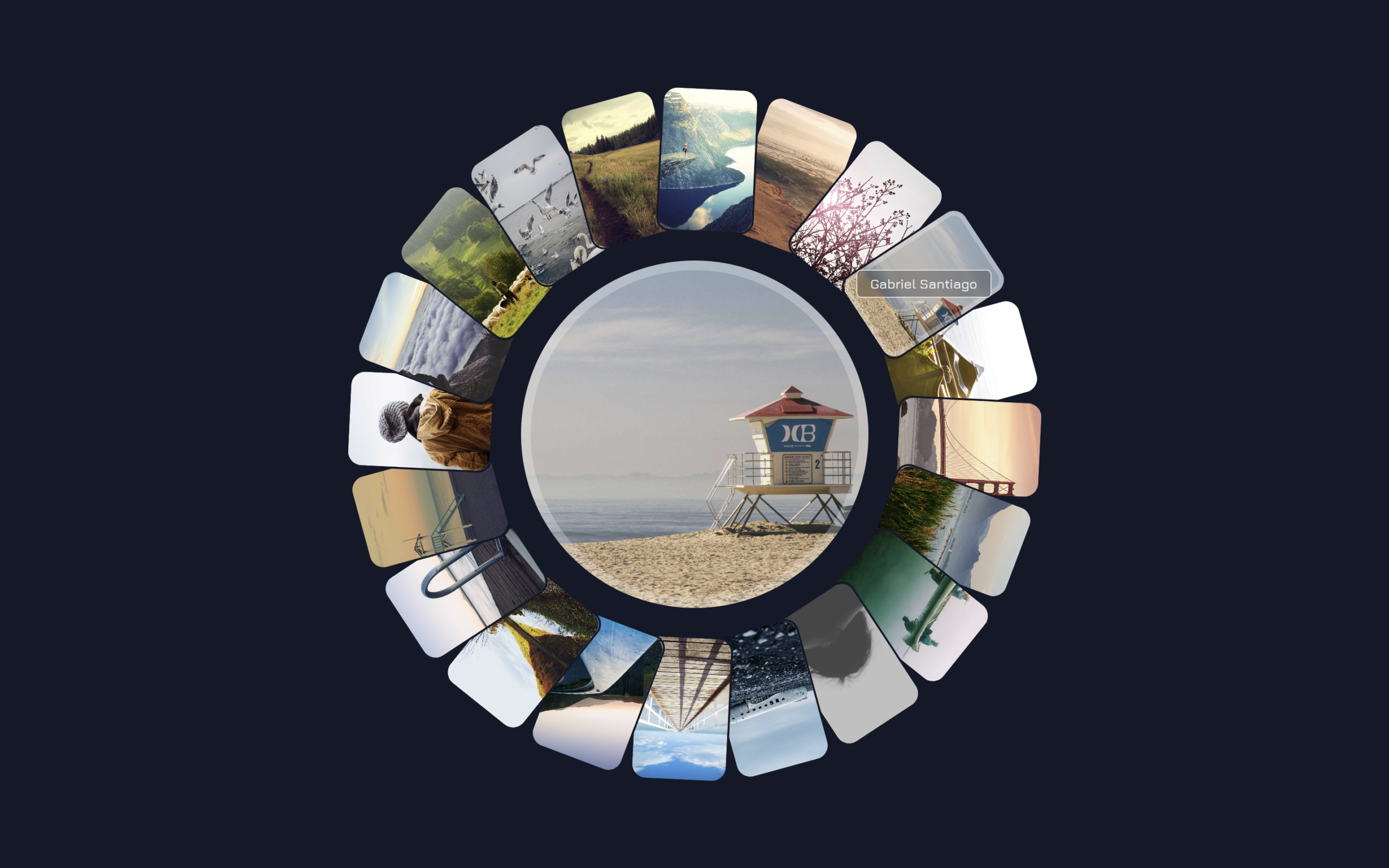
Let’s create an Animated Circular Gallery using HTML and CSS. In this project, we build a beautiful image gallery where photos are arranged in a circle and animate smoothly when hovered or clicked.
We’ll use:
- HTML to create the gallery structure by adding image cards, titles, and links inside a wrapper container.
- CSS to place the images in a circular layout, add smooth animations, show image titles on hover, and display a larger preview image in the center when an image is selected.
This project is perfect for beginners who want to learn modern CSS animations, hover effects, circular layouts, and interactive UI design using only HTML and CSS. Let’s build an awesome Circular Gallery! 🚀
HTML :
This HTML creates the structure of an animated circular image gallery. A wrapper section contains 20 image cards, where each card is stored inside a <div> with a unique ID, title, position number (--i), and background image URL (--bg-img). Each card contains a clickable image wrapped inside an anchor tag that links to its own ID, allowing CSS to detect the selected image. The repeated card structure makes it easy to add multiple images, while the final <h1> element displays the “Circular Gallery” title in the center of the layout.
<!DOCTYPE html>
<html lang="en">

<head>
	<meta charset="UTF-8">
	<title>Animated Circular Gallery | @coding.stella</title>
	<link rel="stylesheet" href="./style.css">
</head>

<body>
	<section class="wrapper">
		<div id="item-1" data-title="Yoni Kaplan-Nadel"
			style="--i:1; --bg-img:url(https://picsum.photos/id/27/1200/1200)">
			<a href="#item-1"><img src="https://picsum.photos/id/27/1200/1200"></a>
		</div>

		<div id="item-2" data-title="Alejandro Escamilla"
			style="--i:2; --bg-img:url(https://picsum.photos/id/25/1200/1200)">
			<a href="#item-2"><img src="https://picsum.photos/id/25/1200/1200"></a>
		</div>

		<div id="item-3" data-title="Gabriel Santiago"
			style="--i:3; --bg-img:url(https://picsum.photos/id/372/1200/1200)">
			<a href="#item-3"><img src="https://picsum.photos/id/372/1200/1200"></a>
		</div>

		<div id="item-4" data-title="Michael Quinn" style="--i:4; --bg-img:url(https://picsum.photos/id/380/1200/1200)">
			<a href="#item-4"><img src="https://picsum.photos/id/380/1200/1200"></a>
		</div>

		<div id="item-5" data-title="Chris Brignola"
			style="--i:5; --bg-img:url(https://picsum.photos/id/392/1200/1200)">
			<a href="#item-5"><img src="https://picsum.photos/id/392/1200/1200"></a>
		</div>

		<div id="item-6" data-title="Matteo Minelli"
			style="--i:6; --bg-img:url(https://picsum.photos/id/456/1200/1200)">
			<a href="#item-6"><img src="https://picsum.photos/id/456/1200/1200"></a>
		</div>

		<div id="item-7" data-title="Matthew Clark" style="--i:7; --bg-img:url(https://picsum.photos/id/469/1200/1200)">
			<a href="#item-7"><img src="https://picsum.photos/id/469/1200/1200"></a>
		</div>

		<div id="item-8" data-title="Volkan Olmez" style="--i:8; --bg-img:url(https://picsum.photos/id/497/1200/1200)">
			<a href="#item-8"><img src="https://picsum.photos/id/497/1200/1200"></a>
		</div>

		<div id="item-9" data-title="Jeff Sheldon" style="--i:9; --bg-img:url(https://picsum.photos/id/515/1200/1200)">
			<a href="#item-9"><img src="https://picsum.photos/id/515/1200/1200"></a>
		</div>

		<div id="item-10" data-title="Christian Holzinger"
			style="--i:10; --bg-img:url(https://picsum.photos/id/521/1200/1200)">
			<a href="#item-10"><img src="https://picsum.photos/id/521/1200/1200"></a>
		</div>

		<div id="item-11" data-title="Artur Pokusin"
			style="--i:11; --bg-img:url(https://picsum.photos/id/549/1200/1200)">
			<a href="#item-11"><img src="https://picsum.photos/id/549/1200/1200"></a>
		</div>

		<div id="item-12" data-title="Sam Wheeler" style="--i:12; --bg-img:url(https://picsum.photos/id/569/1200/1200)">
			<a href="#item-12"><img src="https://picsum.photos/id/569/1200/1200"></a>
		</div>

		<div id="item-13" data-title="Griffin Keller"
			style="--i:13; --bg-img:url(https://picsum.photos/id/637/1200/1200)">
			<a href="#item-13"><img src="https://picsum.photos/id/637/1200/1200"></a>
		</div>

		<div id="item-14" data-title="Fré Sonneveld"
			style="--i:14; --bg-img:url(https://picsum.photos/id/641/1200/1200)">
			<a href="#item-14"><img src="https://picsum.photos/id/641/1200/1200"></a>
		</div>

		<div id="item-15" data-title="Luke Pamer" style="--i:15; --bg-img:url(https://picsum.photos/id/669/1200/1200)">
			<a href="#item-15"><img src="https://picsum.photos/id/669/1200/1200"></a>
		</div>

		<div id="item-16" data-title="Joshua Earle"
			style="--i:16; --bg-img:url(https://picsum.photos/id/685/1200/1200)">
			<a href="#item-16"><img src="https://picsum.photos/id/685/1200/1200"></a>
		</div>

		<div id="item-17" data-title="lee Scott" style="--i:17; --bg-img:url(https://picsum.photos/id/699/1200/1200)">
			<a href="#item-17"><img src="https://picsum.photos/id/699/1200/1200"></a>
		</div>

		<div id="item-18" data-title="Biegun Wschodni"
			style="--i:18; --bg-img:url(https://picsum.photos/id/611/1200/1200)">
			<a href="#item-18"><img src="https://picsum.photos/id/611/1200/1200"></a>
		</div>

		<div id="item-19" data-title="Drew Geraets"
			style="--i:19; --bg-img:url(https://picsum.photos/id/480/1200/1200)">
			<a href="#item-19"><img src="https://picsum.photos/id/480/1200/1200"></a>
		</div>

		<div id="item-20" data-title="Julia Caesar"
			style="--i:20; --bg-img:url(https://picsum.photos/id/773/1200/1200)">
			<a href="#item-20"><img src="https://picsum.photos/id/773/1200/1200"></a>
		</div>
		<h1>Circular Gallery</h1>
	</section>

</body>
</html>
CSS :
This CSS transforms the image cards into an interactive circular gallery by using modern CSS features like offset-path, :has(), CSS variables, custom properties, and anchor positioning. The .wrapper acts as the circular container, while each image card is positioned around a circular path based on its index number. When a user hovers over or clicks an image, the card displays its title, highlights the thumbnail, and shows a large preview image in the center of the circle. Smooth transitions, scaling effects, outlines, and sibling interactions create a dynamic animation where nearby cards slightly shift position, making the gallery feel more interactive and visually appealing. The root variables also define the dark theme colors, typography, spacing, and overall styling of the page.
@import url(https://fonts.bunny.net/css?family=jura:300,500);

@layer base, demo;

@layer demo {
	body {
		font-family: "Jura", sans-serif;
		height: 100svh;
	}

	@property --rotation {
		syntax: "<angle>";
		inherits: true;
		initial-value: 0;
	}

	input {
		z-index: 190;
		position: absolute;
		top: 1rem;
		left: 1rem;
	}

	.wrapper {
		--card-trans-duration: 1000ms;
		--card-trans-easing: linear(0, 0.01 0.8%, 0.038 1.6%, 0.154 3.4%, 0.781 9.7%, 1.01 12.5%, 1.089 13.8%, 1.153 15.2%, 1.195 16.6%, 1.219 18%, 1.224 19.7%, 1.208 21.6%, 1.172 23.6%, 1.057 28.6%, 1.007 31.2%, 0.969 34.1%, 0.951 37.1%, 0.953 40.9%, 0.998 50.4%, 1.011 56%, 0.998 74.7%, 1);

		--card-width: clamp(40px, 7vw, 120px);
		--card-border-radius: 1vw;

		--radius: 40vmin;
		--cards: sibling-count();
		--arc-size: .95;
		/* essentially the distance between cards */
		--arc-center: 0.275;
		/* start at bottom to last card will be at the top */
		--arc-start: calc(var(--arc-center) - var(--arc-size) / 2);

		--arc-shift-delta: 0.0075;


		anchor-name: --center;

		position: fixed;
		inset: 0;
		margin: auto;
		width: var(--radius);
		height: var(--radius);
		aspect-ratio: 1;
		transform: rotate(var(--rotation));
		transition: transform 700ms linear;
		display: grid;
		place-content: center;

		h1 {
			margin: 0;
			text-align: center;
			font-size: clamp(1.2rem, 3.5vw + 0.045rem, 3rem);
		}

		div {
			--card-i: var(--i);
			--arc-step: calc(var(--arc-size) / (20 - 1));
			--arc-shift: calc(var(--arc-shift-delta) * var(--d, 1));

			--card-offset-distance: calc((var(--arc-start) + (var(--card-i) - 1) * var(--arc-step) + var(--arc-shift)) * 100%);


			&:has(a:hover),
			&:target {
				--title-opacity: 1;
			}

			&:target {
				--zindex: 2;
				--center-opacity: 1;
				--center-scale: 1;
				--image-outline-color: var(--clr-lines);
			}

			&::before,
			&::after {
				content: '';
				position: fixed;
				position-anchor: --center;
				transform: rotate(calc(var(--rotation) * -1));
				transition-timing-function: ease-in-out;

			}

			/* large image  in center of wrapper */
			&::before {
				position-area: span-all;
				width: calc(var(--radius));
				aspect-ratio: 1;
				border-radius: 9in;
				background: var(--bg-img);
				box-sizing: border-box;

				outline: 10px solid var(--clr-lines);
				outline-offset: -10px;
				background-size: cover;
				background-repeat: no-repeat;
				background-attachment: fixed;
				opacity: var(--center-opacity, 0);
				scale: var(--center-scale, 0);
				pointer-events: none;
				transition-property: scale, opacity;
				transition-duration: 300ms, 150ms;

			}

			/* image title - over thumb */
			&::after {
				content: attr(data-title);
				position-anchor: --card;
				position-area: center span-all;
				z-index: 2;
				pointer-events: none;
				opacity: var(--title-opacity, 0);
				transition-property: opacity, transform;
				transition-duration: 150ms;
				border: 1px solid rgb(255 255 255 / .75);
				background: rgb(0 0 0 / .25);
				backdrop-filter: blur(3px);
				padding: .25em 1em;
				border-radius: 5px;
				font-size: clamp(.6rem, 1vw + .045rem, .85rem);

				@starting-style {
					opacity: 0;
				}
			}

			/* links with images are placed in a circle */
			a {
				position: absolute;
				display: block;
				width: var(--card-width);
				aspect-ratio: 4/6;
				border-radius: var(--card-border-radius);
				border: 2px solid var(--clr-bg);
				offset-path: circle(var(--radius) at 50% 50%);
				offset-distance: var(--card-offset-distance);
				offset-rotate: auto;
				offset-anchor: 50% 0%;
				transition: offset var(--card-trans-duration) var(--card-trans-easing);
				z-index: var(--zindex, 1);
				anchor-name: --card;

				img {
					width: 100%;
					height: 100%;
					object-fit: cover;
					display: block;
					border-radius: inherit;
					outline: 5px solid var(--image-outline-color, transparent);
					outline-offset: -5px;
					transition: outline 300ms ease-in-out;
				}
			}
		}
	}

	/* ============================================================
   FORWARD siblings (clockwise / +)
   ============================================================ */
	/* +1 */
	.wrapper:has(> *:hover)>*:hover+*,
	.wrapper:has(> :last-child:hover)> :nth-child(1) {
		--d: 3;
	}

	/* +2 */
	.wrapper:has(> *:hover)>*:hover+*+*,
	.wrapper:has(> :last-child:hover)> :nth-child(2),
	.wrapper:has(> :nth-last-child(2):hover)> :nth-child(1) {
		--d: 2;
	}

	/* +3 */
	.wrapper:has(> *:hover)>*:hover+*+*+*,
	.wrapper:has(> :last-child:hover)> :nth-child(3),
	.wrapper:has(> :nth-last-child(2):hover)> :nth-child(2),
	.wrapper:has(> :nth-last-child(3):hover)> :nth-child(1) {
		--d: 1;
	}

	/* +4 */
	.wrapper:has(> *:hover)>*:hover+*+*+*+*,
	.wrapper:has(> :last-child:hover)> :nth-child(4),
	.wrapper:has(> :nth-last-child(2):hover)> :nth-child(3),
	.wrapper:has(> :nth-last-child(3):hover)> :nth-child(2),
	.wrapper:has(> :nth-last-child(4):hover)> :nth-child(1) {
		--d: .5;
	}

	/* ============================================================
   BACKWARD siblings (counter-clockwise / −)
   ============================================================ */
	/* −1 */
	.wrapper *:has(+ *:hover),
	.wrapper:has(> :nth-child(1):hover) :nth-last-child(1) {
		--d: -3;
	}

	/* −2 */
	.wrapper *:has(+ * + *:hover),
	.wrapper:has(> :nth-child(1):hover) :nth-last-child(2),
	.wrapper:has(> :nth-child(2):hover) :nth-last-child(1) {
		--d: -2;
	}

	/* −3 */
	.wrapper *:has(+ * + * + *:hover),
	.wrapper:has(> :nth-child(1):hover) :nth-last-child(3),
	.wrapper:has(> :nth-child(2):hover) :nth-last-child(2),
	.wrapper:has(> :nth-child(3):hover) :nth-last-child(1) {
		--d: -1;
	}

	/* −4 */
	.wrapper *:has(+ * + * + * + *:hover),
	.wrapper:has(> :nth-child(1):hover) :nth-last-child(4),
	.wrapper:has(> :nth-child(2):hover) :nth-last-child(3),
	.wrapper:has(> :nth-child(3):hover) :nth-last-child(2),
	.wrapper:has(> :nth-child(4):hover) :nth-last-child(1) {
		--d: -.5;
	}

}


/* general styling not relevant for this demo */
@layer base {

	*,
	::before,
	::after {
		box-sizing: border-box;
	}

	:root {
		color-scheme: light dark;
		--bg-dark: rgb(16, 24, 40);
		--bg-light: rgb(248, 244, 238);
		--txt-light: rgb(10, 10, 10);
		--txt-dark: rgb(245, 245, 245);
		);
		--line-light: rgba(0 0 0 / .25);
		--line-dark: rgba(255 255 255 / .25);

		--clr-bg: light-dark(var(--bg-light), var(--bg-dark));
		--clr-txt: light-dark(var(--txt-light), var(--txt-dark));
		--clr-lines: light-dark(var(--line-light), var(--line-dark));
	}

	body {
		background-color: var(--clr-bg);
		color: var(--clr-txt);
		min-height: 100svh;
		margin: 0;
		padding: 2rem;
		font-family: "Jura", sans-serif;
		font-size: 1rem;
		line-height: 1.5;
		display: grid;
		place-items: center;
		gap: 2rem;

		&>* {
			/*outline: 1px dashed red;*/
		}
	}

	h1 {
		margin: 0;
		font-size: 1.2rem;
	}


}
In conclusion, this project demonstrates how HTML and CSS can be used to create an interactive Circular Gallery without JavaScript. By combining circular image positioning, smooth animations, hover effects, and image previews, we can build a visually appealing and engaging user interface. It is a great project for learning modern CSS techniques and creating creative web designs. 🚀
If your project has problems, don’t worry. Just click to download the source code and face your coding challenges with excitement. Have fun coding!
