


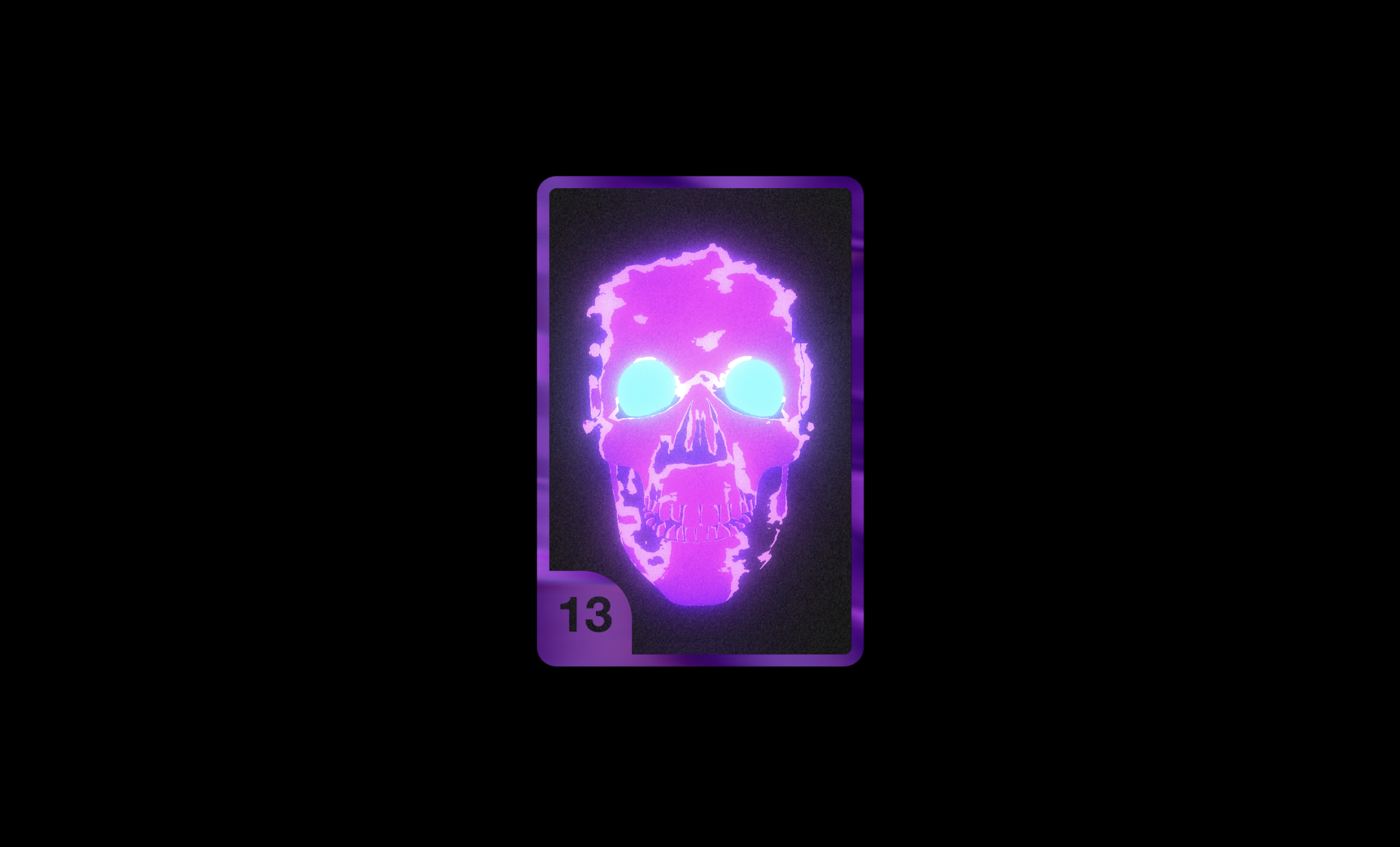
Let’s create a 3D Ghost Skull Card using HTML, CSS, and JavaScript to build an interactive holographic-style card directly in the browser. In this project, we’ll create a stunning 3D card featuring a glowing ghost skull model, dynamic lighting effects, custom shaders, and smooth animations that respond to user interaction.
We’ll use:
- HTML: To create the basic webpage structure and a container where the 3D card will be rendered.
- CSS: To style the page layout, center the canvas, create a dark background, and enhance the overall visual presentation of the 3D scene.
- JavaScript: To handle the 3D rendering using Three.js, load the skull model and textures, create custom shader effects, add bloom and glow effects, control animations, manage camera movement, and provide interactive controls for customizing colors and visual effects in real time.
This project is perfect for learning Three.js, WebGL, 3D model rendering, custom shaders, post-processing effects, bloom lighting, camera controls, and building visually impressive interactive experiences using HTML, CSS, and JavaScript
HTML :
This HTML creates the basic structure of the webpage. It adds a <div id="world"> container where the 3D scene will be displayed. It also loads the Three.js library for 3D graphics, Dat.GUI for controls, and the script.js file that contains all the logic for creating and animating the 3D ghost skull card.
<!DOCTYPE html>
<html lang="en">

<head>
  <meta charset="UTF-8">
  <title>3D Ghost skull Card | @coding.stella</title>
  <link rel="stylesheet" href="./style.css">
</head>
<body>

  <div id="world"></div>

  <script src='https://cdnjs.cloudflare.com/ajax/libs/three.js/r121/three.min.js'></script>
  <script src='https://cdnjs.cloudflare.com/ajax/libs/dat-gui/0.7.7/dat.gui.min.js'></script>
  <script type="module" src="./script.js"></script>

</body>
</html>
CSS :
This CSS removes default spacing from all elements using margin: 0 and padding: 0. The #world container is set to take the full screen height (100vh) with a black background. The canvas generated by Three.js is positioned in the center of the screen using position: absolute and left: calc(50% - 325px).
* {
      margin: 0;
      padding: 0;
      box-sizing: border-box;
      /*       background: black; */
      /*       text-align: center; */
      outline: none;
}

#world {
      width: 100%;
      height: 100vh;
      background: black;
}

canvas {
      left: calc(50% - 325px);
      position: absolute;

}
JavaScript:
This JavaScript uses Three.js to create an interactive 3D ghost skull card. It loads textures, a skull 3D model (.obj), and custom shaders to create glowing, holographic, and bloom effects. Dat.GUI allows users to change colors, bloom intensity, and animation settings in real time. The script creates a front and back card, places the skull model with glowing eyes inside it, and continuously renders the scene using an animation loop. OrbitControls let users rotate the card, while shaders generate special visual effects such as noise, Fresnel glow, and color gradients to make the card look dynamic and realistic.
import { EffectComposer } from "https://unpkg.com/three@0.120.0/examples/jsm/postprocessing/EffectComposer.js";
import { RenderPass } from "https://unpkg.com/three@0.120.0/examples/jsm/postprocessing/RenderPass.js";
import { UnrealBloomPass } from "https://unpkg.com/three@0.120.0/examples/jsm/postprocessing/UnrealBloomPass.js";
import { OBJLoader } from "https://unpkg.com/three@0.120.0/examples/jsm/loaders/OBJLoader";
import { OrbitControls } from "https://unpkg.com/three@0.120.0/examples/jsm/controls/OrbitControls";
var cardtemplate = "https://raw.githubusercontent.com/pizza3/asset/master/cardtemplate3.png";
var cardtemplateback = "https://raw.githubusercontent.com/pizza3/asset/master/cardtemplateback4.png";
var flower = "https://raw.githubusercontent.com/pizza3/asset/master/flower3.png";
var noise2 = "https://raw.githubusercontent.com/pizza3/asset/master/noise2.png";
var color11 = "https://raw.githubusercontent.com/pizza3/asset/master/color11.png";
var backtexture = "https://raw.githubusercontent.com/pizza3/asset/master/color3.jpg";
var skullmodel = "https://raw.githubusercontent.com/pizza3/asset/master/skull5.obj";
var voronoi = "https://raw.githubusercontent.com/pizza3/asset/master/rgbnoise2.png";


var scene,
  sceneRTT,
  camera,
  cameraRTT,
  renderer,
  container,
  width = 1301,
  height = window.innerHeight,
  frontmaterial,
  backmaterial,
  controls,
  bloomPass,
  composer,
  frontcard,
  backcard;
var options = {
  exposure: 2.8,
  bloomStrength: 0.8,
  bloomThreshold: 0,
  bloomRadius: 1.29,
  color0: [197, 81, 245],
  color1: [65, 0, 170],
  color2: [0, 150, 255],
  isanimate: false,
};

var gui = new dat.GUI();

var bloom = gui.addFolder("Bloom");
bloom.add(options, "bloomStrength", 0.0, 5.0).name("bloomStrength").listen();
bloom.add(options, "bloomRadius", 0.1, 2.0).name("bloomRadius").listen();
bloom.open();
var color = gui.addFolder("Colors");
color.addColor(options, "color0").name("Border");
color.addColor(options, "color1").name("Base");
color.addColor(options, "color2").name("Eye");
color.open();
var isanim = gui.addFolder("Animate");
isanim.add(options, "isanimate").name("Animate");
isanim.open();

gui.close()
const vert = `
  varying vec2 vUv;
  varying vec3 camPos;
  varying vec3 eyeVector;
  varying vec3 vNormal;

  void main() {
    vUv = uv;
    camPos = cameraPosition;
    vNormal = normal;
    vec4 worldPosition = modelViewMatrix * vec4( position, 1.0);
    eyeVector = normalize(worldPosition.xyz - abs(cameraPosition));
    gl_Position = projectionMatrix * modelViewMatrix * vec4( position, 1.0 );
  }
`;

const fragPlane = `
	varying vec2 vUv;
  uniform sampler2D skullrender;
  uniform sampler2D cardtemplate;
  uniform sampler2D backtexture;
  uniform sampler2D noiseTex;
  uniform sampler2D color;
  uniform sampler2D noise;
  uniform vec4 resolution;
  varying vec3 camPos;
  varying vec3 eyeVector;
  varying vec3 vNormal;

  float Fresnel(vec3 eyeVector, vec3 worldNormal) {
    return pow( 1.0 + dot( eyeVector, worldNormal), 1.80 );
  }

  void main() {
    vec2 uv = gl_FragCoord.xy/resolution.xy ;
    vec4 temptex = texture2D( cardtemplate, vUv);
    vec4 skulltex = texture2D( skullrender, uv - 0.5 );
    gl_FragColor = temptex;
    float f = Fresnel(eyeVector, vNormal);
    vec4 noisetex = texture2D( noise, mod(vUv*2.,1.));
    if(gl_FragColor.g >= .5 && gl_FragColor.r < 0.6){
      gl_FragColor = f + skulltex;
      gl_FragColor += noisetex/5.;

    } else {
      vec4 bactex = texture2D( backtexture, vUv);
      float tone = pow(dot(normalize(camPos), normalize(bactex.rgb)), 1.);
      vec4 colortex = texture2D( color, vec2(tone,0.));

      //sparkle code, dont touch this!
      vec2 uv2 = vUv;
      vec3 pixeltex = texture2D(noiseTex,mod(uv*5.,1.)).rgb;
      float iTime = 1.*0.004;
      uv.y += iTime / 10.0;
      uv.x -= (sin(iTime/10.0)/2.0);
      uv2.y += iTime / 14.0;
      uv2.x += (sin(iTime/10.0)/9.0);
      float result = 0.0;
      result += texture2D(noiseTex, mod(uv*4.,1.) * 0.6 + vec2(iTime*-0.003)).r;
      result *= texture2D(noiseTex, mod(uv2*4.,1.) * 0.9 + vec2(iTime*+0.002)).b;
      result = pow(result, 10.0);
      gl_FragColor *= colortex;
      gl_FragColor += vec4(sin((tone + vUv.x + vUv.y/10.)*10.))/8.;
      // gl_FragColor += vec4(108.0)*result;

    }

    gl_FragColor.a = temptex.a;
  }
`;

const fragPlaneback = `
	varying vec2 vUv;
  uniform sampler2D skullrender;
  uniform sampler2D cardtemplate;
  uniform sampler2D backtexture;
  uniform sampler2D noiseTex;
  uniform sampler2D color;
  uniform sampler2D noise;
  uniform vec4 resolution;
  varying vec3 camPos;
  varying vec3 eyeVector;
  varying vec3 vNormal;

  float Fresnel(vec3 eyeVector, vec3 worldNormal) {
    return pow( 1.0 + dot( eyeVector, worldNormal), 1.80 );
  }

  void main() {
    vec2 uv = gl_FragCoord.xy/resolution.xy ;
    vec4 temptex = texture2D( cardtemplate, vUv);
    vec4 skulltex = texture2D( skullrender, vUv );
    gl_FragColor = temptex;
    vec4 noisetex = texture2D( noise, mod(vUv*2.,1.));
    float f = Fresnel(eyeVector, vNormal);

    vec2 uv2 = vUv;
    vec3 pixeltex = texture2D(noiseTex,mod(uv*5.,1.)).rgb;
    float iTime = 1.*0.004;
    uv.y += iTime / 10.0;
    uv.x -= (sin(iTime/10.0)/2.0);
    uv2.y += iTime / 14.0;
    uv2.x += (sin(iTime/10.0)/9.0);
    float result = 0.0;
    result += texture2D(noiseTex, mod(uv*4.,1.) * 0.6 + vec2(iTime*-0.003)).r;
    result *= texture2D(noiseTex, mod(uv2*4.,1.) * 0.9 + vec2(iTime*+0.002)).b;
    result = pow(result, 10.0);


    vec4 bactex = texture2D( backtexture, vUv);
    float tone = pow(dot(normalize(camPos), normalize(bactex.rgb)), 1.);
    vec4 colortex = texture2D( color, vec2(tone,0.));
    if(gl_FragColor.g >= .5 && gl_FragColor.r < 0.6){
      float tone = pow(dot(normalize(camPos), normalize(skulltex.rgb)), 1.);
      vec4 colortex2 = texture2D( color, vec2(tone,0.));
      if(skulltex.a > 0.2){
        gl_FragColor = colortex;
        // gl_FragColor += vec4(108.0)*result;
        // gl_FragColor += vec4(sin((tone + vUv.x + vUv.y/10.)*10.))/8.;
      } else {
        gl_FragColor = vec4(0.) + f;
        gl_FragColor += noisetex/5.;
      }
      gl_FragColor += noisetex/5.;

    } else {
      //sparkle code, dont touch this!
      gl_FragColor *= colortex;
      gl_FragColor += vec4(sin((tone + vUv.x + vUv.y/10.)*10.))/8.;
    }

  }
`;
const vertskull = `
      varying vec3 vNormal;
      varying vec3 camPos;
      varying vec3 vPosition;
      varying vec2 vUv;
      varying vec3 eyeVector;

      void main() {
        vNormal = normal;
        vUv = uv;
        camPos = cameraPosition;
        vPosition = position;
        vec4 worldPosition = modelViewMatrix * vec4( position, 1.0);
        eyeVector = normalize(worldPosition.xyz - cameraPosition);
        gl_Position = projectionMatrix * modelViewMatrix * vec4( position, 1.0 );
      }
`;
const fragskull = `
      #define NUM_OCTAVES 5
      uniform vec4 resolution;
      varying vec3 vNormal;
      varying vec3 vPosition;
      uniform float time;
      varying vec3 camPos;
      varying vec2 vUv;
      uniform vec3 color1;
      uniform vec3 color0;
      varying vec3 eyeVector;


      float rand(vec2 n) {
        return fract(sin(dot(n, vec2(12.9898, 4.1414))) * 43758.5453);
      }

      float noise(vec2 p){
        vec2 ip = floor(p);
        vec2 u = fract(p);
        u = u*u*(3.0-2.0*u);

        float res = mix(
          mix(rand(ip),rand(ip+vec2(1.0,0.0)),u.x),
          mix(rand(ip+vec2(0.0,1.0)),rand(ip+vec2(1.0,1.0)),u.x),u.y);
        return res*res;
      }

      float fbm(vec2 x) {
        float v = 0.0;
        float a = 0.5;
        vec2 shift = vec2(100);
        // Rotate to reduce axial bias
        mat2 rot = mat2(cos(0.5), sin(0.5), -sin(0.5), cos(0.50));
        for (int i = 0; i < NUM_OCTAVES; ++i) {
          v += a * noise(x);
          x = rot * x * 2.0 + shift;
          a *= 0.5;
        }
        return v;
      }

      float setOpacity(float r, float g, float b) {
        float tone = (r + g + b) / 3.0;
        float alpha = 1.0;
        if(tone<0.69) {
          alpha = 0.0;
        }
        return alpha;
      }

      vec3 rgbcol(float r, float g, float b) {
        return vec3(r/255.0,g/255.0,b/255.0);
      }

      float Fresnel(vec3 eyeVector, vec3 worldNormal) {
        return pow( 1.0 + dot( eyeVector, worldNormal), 3.0 );
      }

      void main() {
        vec2 olduv = gl_FragCoord.xy/resolution.xy ;
        float f = Fresnel(eyeVector, vNormal);
        float gradient2 = (f)*(.3 - vPosition.y) ;
        float scale = 8.;
        // olduv *= 0.5;
        // olduv.y -= 0.5;
        olduv.y = olduv.y - time;
        vec2 p = olduv*scale;
        float noise = fbm( p + time );

        vec2 uv = gl_FragCoord.xy/resolution.xy ;
        //  uv = normalize( vNormal ).xy ;


        vec3 newCam = vec3(0.,5.,10.);
        float gradient = dot(.0 -  normalize( newCam ), normalize( vNormal )) ;

        vec3 viewDirectionW = normalize(camPos - vPosition);
        float fresnelTerm = dot(viewDirectionW, vNormal);
        fresnelTerm = clamp( 1. - fresnelTerm, 0., 1.) ;

        vec3 color = vec3(noise) + gradient;
        vec3 color2 = color - 0.2;


        float noisetone = setOpacity(color.r,color.g,color.b);
        float noisetone2 = setOpacity(color2.r,color2.g,color2.b);


        vec4 backColor = vec4(color, 1.);
        backColor.rgb = rgbcol(color0.r,color0.g,color0.b)*noisetone;
        // backColor.a = noisetone;

        vec4 frontColor = vec4(color2, 1.);
        frontColor.rgb = rgbcol(color1.r,color1.g,color1.b)*noisetone;
        // frontColor.a = noisetone2;

        if(noisetone2>0.0){
          // show first color
          gl_FragColor = frontColor;
        } else {
          // show 2nd color
          gl_FragColor = backColor;
        }
      }

`;
function init() {
  container = document.getElementById("world");

  camera = new THREE.PerspectiveCamera(
    30,
    1301 / 2 / window.innerHeight,
    1,
    10000
  );
  camera.position.z = 100;
  cameraRTT = new THREE.PerspectiveCamera(
    30,
    1301 / 2 / window.innerHeight,
    1,
    10000
  );
  // cameraRTT.position.z = 70;
  // cameraRTT.position.y = -14.5;
  cameraRTT.position.z = 30;
  cameraRTT.position.y = -3.5;

  scene = new THREE.Scene();
  sceneRTT = new THREE.Scene();
  renderer = new THREE.WebGLRenderer({ antialias: true, autoSize: true });
  renderer.setPixelRatio(2);
  renderer.setSize(1301 / 2, window.innerHeight);
  renderer.autoClear = false;
  renderer.shadowMap.type = THREE.PCFSoftShadowMap;
  renderer.interpolateneMapping = THREE.ACESFilmicToneMapping;
  renderer.outputEncoding = THREE.sRGBEncoding;
  controls = new OrbitControls(camera, renderer.domElement);
  controls.enableZoom = false;
  controls.update();
  document.getElementById("world").appendChild(renderer.domElement);
  //
  var renderScene = new RenderPass(sceneRTT, cameraRTT);
  bloomPass = new UnrealBloomPass(
    new THREE.Vector2(1301, window.innerHeight),
    0.7,
    0.4,
    0.85
  );
  composer = new EffectComposer(renderer);
  composer.renderToScreen = false;
  composer.addPass(renderScene);
  composer.addPass(bloomPass);
  //
  plane();
  planeback();
  loadskull();
  animate();
}

function plane() {
  var geometry = new THREE.PlaneGeometry(20, 30);
  frontmaterial = new THREE.ShaderMaterial({
    uniforms: {
      cardtemplate: {
        type: "t",
        value: new THREE.TextureLoader().load(cardtemplate),
      },
      backtexture: {
        type: "t",
        value: new THREE.TextureLoader().load(backtexture),
      },
      noise: {
        type: "t",
        value: new THREE.TextureLoader().load(noise2),
      },
      skullrender: {
        type: "t",
        value: composer.readBuffer.texture,
      },
      resolution: {
        value: new THREE.Vector2(1301 / 2, window.innerHeight),
      },
      noiseTex: {
        type: "t",
        value: new THREE.TextureLoader().load(voronoi),
      },
      color: {
        type: "t",
        value: new THREE.TextureLoader().load(color11),
      },
    },
    fragmentShader: fragPlane,
    vertexShader: vert,
    transparent: true,
    depthWrite: false,
  });

  frontcard = new THREE.Mesh(geometry, frontmaterial);
  scene.add(frontcard);
}

function planeback() {
  var geometry = new THREE.PlaneGeometry(20, 30);
  backmaterial = new THREE.ShaderMaterial({
    uniforms: {
      cardtemplate: {
        type: "t",
        value: new THREE.TextureLoader().load(cardtemplateback),
      },
      backtexture: {
        type: "t",
        value: new THREE.TextureLoader().load(backtexture),
      },
      noise: {
        type: "t",
        value: new THREE.TextureLoader().load(noise2),
      },
      skullrender: {
        type: "t",
        value: new THREE.TextureLoader().load(flower),
      },
      resolution: {
        value: new THREE.Vector2(1301 / 2, window.innerHeight),
      },
      noiseTex: {
        type: "t",
        value: new THREE.TextureLoader().load(voronoi),
      },
      color: {
        type: "t",
        value: new THREE.TextureLoader().load(color11),
      },
    },
    fragmentShader: fragPlaneback,
    vertexShader: vert,
    transparent: true,
    depthWrite: false,
  });
  backcard = new THREE.Mesh(geometry, backmaterial);
  backcard.rotation.set(0, Math.PI, 0);
  scene.add(backcard);
}
var eye,
  eye2,
  basicmat,
  skullmaterial,
  modelgroup = new THREE.Group();

function loadskull() {
  skullmaterial = new THREE.ShaderMaterial({
    uniforms: {
      time: {
        type: "f",
        value: 0.0,
      },
      color1: {
        value: new THREE.Vector3(...options.color1),
      },
      color0: {
        value: new THREE.Vector3(...options.color0),
      },
      resolution: {
        value: new THREE.Vector2(1301, window.innerHeight),
      },
    },
    fragmentShader: fragskull,
    vertexShader: vertskull,
    // depthWrite: false,
  });

  var spheregeo = new THREE.SphereGeometry(1.5, 32, 32);
  basicmat = new THREE.MeshBasicMaterial();
  basicmat.color.setRGB(...options.color2);
  eye = new THREE.Mesh(spheregeo, basicmat);
  eye2 = new THREE.Mesh(spheregeo, basicmat);
  eye.position.set(-2.2, -2.2, -6.6);
  eye2.position.set(2.2, -2.2, -6.6);
  modelgroup = new THREE.Object3D();
  modelgroup.add(eye);
  modelgroup.add(eye2);
  var objloader = new OBJLoader();
  objloader.load(skullmodel, function (object) {
    var mesh2 = object.clone();
    mesh2.position.set(0, 0, -10);
    mesh2.rotation.set(Math.PI, 0, Math.PI);

    mesh2.children.forEach((val, key) => {
      val.traverse(function (child) {
        child.geometry = new THREE.Geometry().fromBufferGeometry(
          child.geometry
        );
        child.geometry.mergeVertices();
        child.material = skullmaterial;
        child.verticesNeedUpdate = true;
        child.normalsNeedUpdate = true;
        child.uvsNeedUpdate = true;
        child.material.flatShading = THREE.SmoothShading;
        child.geometry.computeVertexNormals();
      });
      mesh2.scale.set(8, 8, 8);

      modelgroup.add(mesh2);
      sceneRTT.add(modelgroup);
    });
  });
}
var matrix = new THREE.Matrix4();
var period = 5;
var clock = new THREE.Clock();

function updateDraw(deltaTime) {
  modelgroup.rotation.set(-camera.rotation._x, -camera.rotation._y, 0);
  if (options.isanimate) {
    matrix.makeRotationY((clock.getDelta() * 0.7 * Math.PI) / period);
    camera.position.applyMatrix4(matrix);
    camera.lookAt(frontcard.position);
  }

  bloomPass.threshold = options.bloomThreshold;
  bloomPass.strength = options.bloomStrength;
  bloomPass.radius = options.bloomRadius;

  if (skullmaterial) {
    skullmaterial.uniforms.time.value = deltaTime / 4000;
    skullmaterial.uniforms.color1.value = new THREE.Vector3(...options.color1);
    skullmaterial.uniforms.color0.value = new THREE.Vector3(...options.color0);
    eye2.material.color.setRGB(...options.color2);
    eye.material.color.setRGB(...options.color2);
  }
}

function animate(deltaTime) {
  requestAnimationFrame(animate);
  updateDraw(deltaTime);
  composer.render();
  renderer.render(scene, camera);
}
function handleResize() {
  camera.aspect = 1301 / 2 / window.innerHeight;
  camera.updateProjectionMatrix();
  frontcard.material.uniforms.resolution.value = new THREE.Vector2(
    1301 / 2,
    window.innerHeight
  );
  skullmaterial.uniforms.resolution.value = new THREE.Vector2(
    1301,
    window.innerHeight
  );
  renderer.setPixelRatio(2);
  renderer.setSize(1301 / 2, window.innerHeight);
}
window.addEventListener("load", init, false);
window.addEventListener("resize", handleResize, false);
In this project, we successfully created a 3D Ghost Skull Card using HTML, CSS, and JavaScript. By combining Three.js, custom shaders, 3D models, and visual effects like bloom and glow, we built an interactive and visually appealing card experience. This project helps in understanding 3D graphics, animations, lighting effects, and real-time rendering in the browser, making it a great way to explore modern web-based 3D development.
If your project has problems, don’t worry. Just click to download the source code and face your coding challenges with excitement. Have fun coding!
