


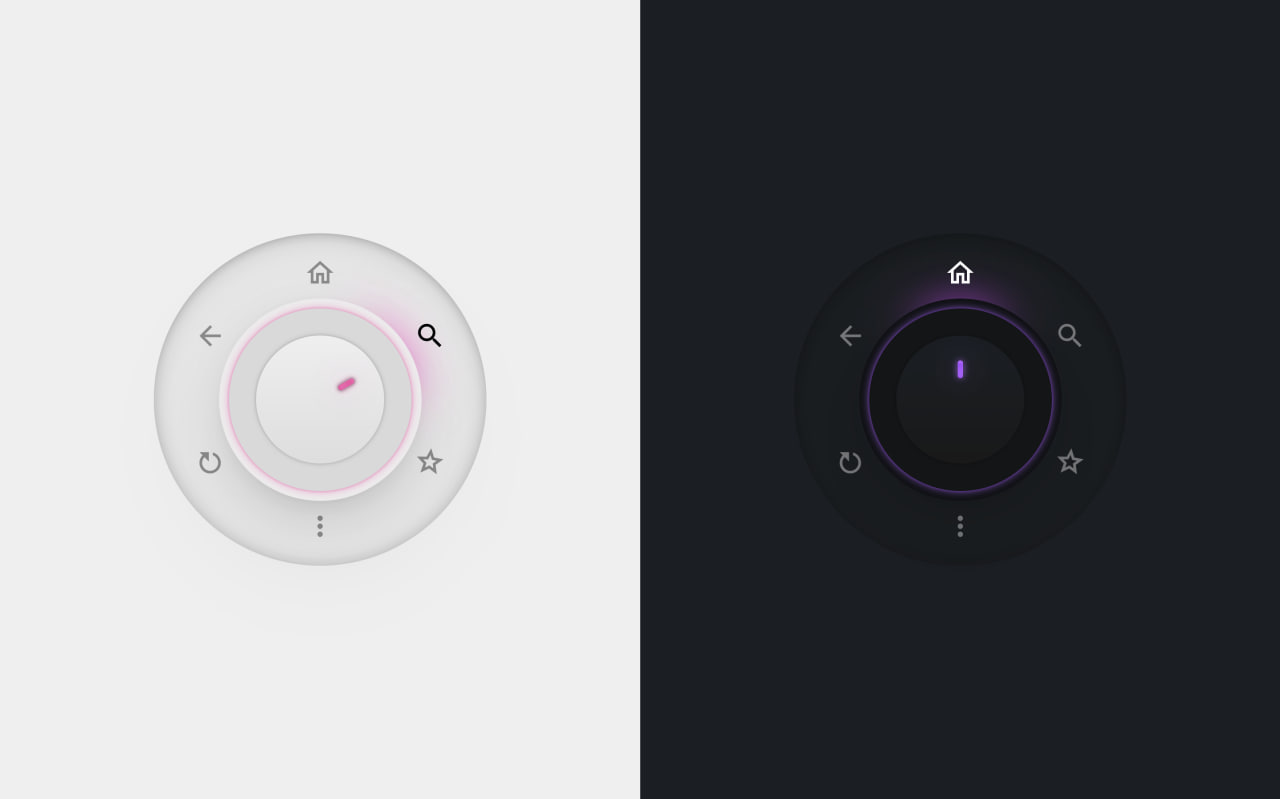
Let’s create a Futuristic Menu Button using HTML, CSS, and JavaScript – an interactive circular UI where you tap a knob to expand a rotating menu, select options with smooth motion, glowing effects, and dynamic color transitions.
- HTML: Create the structure with a circular selector, a center knob, and multiple menu options using radio inputs for selection.
- CSS: Style the circular layout, position items in a radial form, add rotation animations, glowing highlights, smooth transitions, and dynamic color changes based on selection.
- JavaScript: Handle the click on the knob to open/close the menu, toggle active state, and reset selection when the menu closes.
This project teaches how to build a modern futuristic UI using HTML, CSS, and JavaScript by combining radial layouts, advanced CSS selectors, animations, and minimal JavaScript for interaction.
HTML :
This HTML builds a circular dial UI. The main container <main> holds two versions of the same component, one normal and one dark mode using data-theme="dark". Inside each, there’s a .selector which is the circular control. It contains a .knob (the rotating dial) and a <ul> list of options like Back, Home, Search, etc. Each option is a <li> with a hidden radio input. These radio buttons are used to track which item is selected without needing complex JavaScript. So overall, HTML is just setting up the structure: a dial + selectable items.
<!DOCTYPE html>
<html lang="en">

<head>
  <meta charset="UTF-8">
  <title>Futuristic Menu Button | @coding.stella</title>
  <link rel="stylesheet" href="https://public.codepenassets.com/css/normalize-5.0.0.min.css">
  <link rel='stylesheet' href='https://codepen.io/LukyVj/pen/JjavKEX/ca2344eb8511404c494dd71d1ca8f1a7.css'>
  <link rel="stylesheet" href="./style.css">
</head>

<body>
  <main>
    <div>
      <div class="selector">
        <div class="knob"></div>
        <ul>
          <li>
            <span>Back</span>
            <input type="radio" name="choice-a" checked />
          </li>
          <li>
            <span>Home</span>
            <input type="radio" name="choice-a" />
          </li>
          <li>
            <span>Search</span>
            <input type="radio" name="choice-a" />
          </li>
          <li>
            <span>Star</span>
            <input type="radio" name="choice-a" />
          </li>
          <li>
            <span>More</span>
            <input type="radio" name="choice-a" />
          </li>
          <li>
            <span>Refresh</span>
            <input type="radio" name="choice-a" />
          </li>
        </ul>
      </div>
    </div>

    <div data-theme="dark">
      <div class="selector">
        <div class="knob"></div>
        <ul>
          <li>
            <span>Back</span>
            <input type=radio name=choice checked />
          </li>
          <li>
            <span>Home</span>
            <input type=radio name=choice />
          </li>
          <li>
            <span>Search</span>
            <input type=radio name=choice />
          </li>
          <li>
            <span>Star</span>
            <input type=radio name=choice />
          </li>
          <li>
            <span>More</span>
            <input type=radio name=choice />
          </li>
          <li>
            <span>Refresh</span>
            <input type=radio name=choice />
          </li>
        </ul>
      </div>
    </div>
  </main>

  <script src='https://codepen.io/LukyVj/pen/JjavKEX/ca2344eb8511404c494dd71d1ca8f1a7.js'></script>
  <script src="./script.js"></script>

</body>

</html>
CSS :
CSS does all the heavy lifting. It creates the circular layout, animations, and futuristic look. The :root defines a lot of custom properties (variables) like colors, angles, shadows, and icons. Each menu item is positioned in a circle using transform: rotate(...). When the .selector gets the active class, CSS expands the menu, shows icons, and animates them outward. The :has() selector is used to detect which radio button is checked and rotate the knob accordingly. Colors also change dynamically using HSL values tied to rotation, which gives that glowing effect. Basically, CSS controls everything visual: layout, rotation, glow, hover effects, and transitions.
@font-face{ font-display:swap;
  font-family: "Mona Sans";
  src: url("https://assets.codepen.io/64/Mona-Sans.woff2") format("woff2 supports variations"), url("https://assets.codepen.io/64/Mona-Sans.woff2") format("woff2-variations");
  font-weight: 100 1000;
 }

@layer properties {
  @property --angle {
    syntax: "<number>";
    initial-value: -90deg;
    inherits: true;
  }

  @property --icon-offset {
    syntax: "<number>";
    initial-value: 0;
    inherits: true;
  }

  @property --shadow-width {
    syntax: "<number>";
    initial-value: 0px;
    inherits: true;
  }

  @property --selector-width {
    syntax: "<number>";
    initial-value: 100;
    inherits: true;
  }

  @property --border-width {
    syntax: "<number>";
    initial-value: 0;
    inherits: true;
  }

  @property --item-opacity {
    syntax: "<number>";
    initial-value: 0;
    inherits: true;
  }

  @property --is-selected {
    syntax: "<number>";
    initial-value: 0;
    inherits: true;
  }

  @property --color-accent-on {
    syntax: "<color>";
    initial-value: black;
    inherits: true;
  }

  @property --color-accent-on-darker {
    syntax: "<color>";
    initial-value: black;
    inherits: true;
  }

  @property --color-shadow {
    syntax: "<color>";
    initial-value: black;
    inherits: true;
  }

  @property --color-shadow-darker {
    syntax: "<color>";
    initial-value: black;
    inherits: true;
  }
}

:root {
  --icon-search: url("data:image/svg+xml,%3Csvg xmlns='http://www.w3.org/2000/svg' viewBox='0 0 24 24'%3E%3Cpath d='M15.5 14h-.79l-.28-.27A6.471 6.471 0 0 0 16 9.5 6.5 6.5 0 1 0 9.5 16c1.61 0 3.09-.59 4.23-1.57l.27.28v.79l5 4.99L20.49 19l-4.99-5zm-6 0C7.01 14 5 11.99 5 9.5S7.01 5 9.5 5 14 7.01 14 9.5 11.99 14 9.5 14z'/%3E%3C/svg%3E");
  --icon-star: url("data:image/svg+xml,%3Csvg xmlns='http://www.w3.org/2000/svg' viewBox='0 0 24 24'%3E%3Cpath d='m12 7.13.97 2.29.47 1.11 1.2.1 2.47.21-1.88 1.63-.91.79.27 1.18.56 2.41-2.12-1.28-1.03-.64-1.03.62-2.12 1.28.56-2.41.27-1.18-.91-.79-1.88-1.63 2.47-.21 1.2-.1.47-1.11.97-2.27M12 2 9.19 8.63 2 9.24l5.46 4.73L5.82 21 12 17.27 18.18 21l-1.64-7.03L22 9.24l-7.19-.61L12 2z'/%3E%3C/svg%3E");
  --icon-more: url("data:image/svg+xml,%3Csvg xmlns='http://www.w3.org/2000/svg' viewBox='0 0 24 24' %3E%3Cpath d='M12 8c1.1 0 2-.9 2-2s-.9-2-2-2-2 .9-2 2 .9 2 2 2zm0 2c-1.1 0-2 .9-2 2s.9 2 2 2 2-.9 2-2-.9-2-2-2zm0 6c-1.1 0-2 .9-2 2s.9 2 2 2 2-.9 2-2-.9-2-2-2z'%3E%3C/path%3E%3C/svg%3E");
  --icon-refresh: url("data:image/svg+xml,%3Csvg xmlns='http://www.w3.org/2000/svg' viewBox='0 0 24 24'%3E%3Cpath d='M17.65 6.35C16.2 4.9 14.21 4 12 4c-4.42 0-7.99 3.58-7.99 8s3.57 8 7.99 8c3.73 0 6.84-2.55 7.73-6h-2.08c-.82 2.33-3.04 4-5.65 4-3.31 0-6-2.69-6-6s2.69-6 6-6c1.66 0 3.14.69 4.22 1.78L13 11h7V4l-2.35 2.35z'%3E%3C/path%3E%3C/svg%3E");
  --icon-back: url("data:image/svg+xml,%3Csvg xmlns='http://www.w3.org/2000/svg' viewBox='0 0 24 24'%3E%3Cpath d='M20 11H7.83l5.59-5.59L12 4l-8 8 8 8 1.41-1.41L7.83 13H20v-2z'%3E%3C/path%3E%3C/svg%3E");
  --icon-house: url("data:image/svg+xml,%3Csvg xmlns='http://www.w3.org/2000/svg' viewBox='0 0 24 24'%3E%3Cpath d='M12 5.69l5 4.5V18h-2v-6H9v6H7v-7.81l5-4.5M12 3L2 12h3v8h6v-6h2v6h6v-8h3L12 3z'%3E%3C/path%3E%3C/svg%3E");
  --icon-1: var(--icon-house);
  --icon-2: var(--icon-search);
  --icon-3: var(--icon-star);
  --icon-4: var(--icon-more);
  --icon-5: var(--icon-refresh);
  --icon-6: var(--icon-back);
  --button-active: -1;
  --debug: 0;
  --color-accent-off: hsl(267 16% 43%);
  --color-accent-off-darker: hsl(258 29% 39%);
  --color-accent-on-code: var(--angle) 100% 72%;
  --color-accent-on-darker-code: var(--angle) 98% 61%;
  --color-accent-on: hsl(var(--color-accent-on-code) / 1);
  --color-accent-on-darker: hsl(var(--color-accent-on-darker-code) / 1);
  --inner-bg: hsl(0deg 0% 90.98%);
  --outer-bg: hsl(223.81 0% 93%);
  --border-bg: hsl(0deg 0% 85%);
  --invert: 0%;
  --color-grey: hsl(0 0% 87%);
  --color-dark-grey: hsl(0 0% 95.69%);
  --angle: -90deg;
  --rotation: 0;
  --angle-offset: 90deg;
  --is-active: 0;
  --icon-offset: 100;
  --shadow: rgba(0, 0, 0, 0.125) 0px 0px 2px -0.5px,
    rgba(0, 0, 0, 0.125) 0px 1px 5px -1px,
    rgba(0, 0, 0, 0.125) 0px 4px 12px -1.5px,
    rgba(0, 0, 0, 0.125) 0px 9px 28px -2px,
    rgba(0, 0, 0, 0.125) 0px 24px 72px -2.5px;
  --icon-opacity: 0.4;
  --item-opacity: 0;
  --cubic-bezier: cubic-bezier(0.44, -0.9, 0.31, 1.55);
}

*,
*:before,
*:after {
  box-sizing: border-box;
  -webkit-font-smoothing: antialiased;
  -moz-osx-font-smoothing: grayscale;
  outline: calc(var(--debug) * 1px) dotted hsl(calc(var(--debug) * 10 * 1deg), 60%, 60%);
}

html,
body {
  width: 100%;
  height: 100%;
  margin: 0;
  padding: 0;
}

body {
  font-family: "Mona Sans", sans-serif;
}

main {
  --col-height: 100vh;
  --col-num: 1;
  --radius: 120px;
  width: 100%;
  height: 100%;
  display: grid;
  grid-template-columns: repeat(var(--col-num), 1fr);
  --scene-bg: hsl(307deg 4% 94%);
}

@media (min-width: 500px) {
  main {
    --col-height: 50vh;
  }
}

@media (min-width: 780px) {
  main {
    --col-height: 100vh;
    --col-num: 2;
    --radius: clamp(5vw, 150px, 10vw);
  }
}

main [data-theme=dark] {
  --scene-bg: hsl(207deg 20% 12%);
  --color-grey: hsl(0 0% 10%);
  --inner-bg: hsl(200deg 15% 10.98%);
  --outer-bg: hsl(200deg 19% 6%);
  --border-bg: hsl(200deg 10% 8%);
  --invert: 100%;
}

main>div {
  width: 100%;
  height: var(--col-height);
  display: grid;
  place-items: center;
  background: var(--scene-bg);
}

.selector {
  --shadow-width: calc(var(--radius) / 13);
  --knob-color: linear-gradient(to bottom,
      var(--color-accent-off),
      var(--color-accent-off-darker));
  width: var(--radius);
  aspect-ratio: 1/1;
  position: relative;
  border-radius: 100000px;
  background: var(--color-dark-grey);
  box-shadow: inset rgba(0, 0, 0, 0.13) 0px 0px 2px -1px, inset rgba(0, 0, 0, 0.13) 0px 2px 8px -2px, inset rgba(0, 0, 0, 0.13) 0px 8px 34px -2px;
}

.selector .knob {
  position: absolute;
  width: 100%;
  height: 100%;
  display: grid;
  place-items: center;
  transform: rotate(calc(var(--angle) + var(--angle-offset)));
  transition: transform 0.4s var(--cubic-bezier);
  z-index: 2;
  cursor: pointer;
  border-radius: 100000px;
  /* Let's make the knob */
}

.selector .knob:before,
.selector .knob:after {
  content: "";
  display: block;
  position: absolute;
}

.selector .knob:after {
  width: 4%;
  height: 14%;
  background: var(--knob-color);
  box-shadow: 0 0 1px rgba(0, 0, 0, 0.4), 0 0 2px 1px rgba(0, 0, 0, 0.2), inset 0 1px 2px var(--color-accent-on), inset 0 -1px 2px var(--color-accent-on-darker), 0 0 calc(var(--is-active)*4px) var(--color-accent-on), 0 0 calc(var(--is-active)*16px) hsl(var(--color-accent-on-code)/0.5);
  top: 16px;
  border-radius: 100000px;
}

.selector .knob:active:after {
  transform: scale(0.95);
}

.selector .knob:hover {
  --knob-color: linear-gradient(to top,
      var(--color-accent-on),
      var(--color-accent-on-darker));
}

.selector:has(.knob:active):after {
  transform: scale(0.95);
}

.selector.active {
  --is-active: 1;
  transition: --color-accent-on 0.3s ease 0.2s, --color-accent-on-darker 0.3s ease 0.2s, --color-accent-on-code 0.3s ease 0.2s, --color-accent-on-darker-code 0.3s ease 0.2s;
}

.selector.active .knob {
  --knob-color: linear-gradient(to top,
      var(--color-accent-on),
      var(--color-accent-on-darker));
}

.selector.active ul {
  --selector-width: 260;
  --border-width: 13;
  --rotation: 0;
  --icon-offset: 7;
  --item-opacity: 1;
}

.selector.active ul:before {
  box-shadow: inset 0 0 10px rgba(0, 0, 0, 0.2), rgba(0, 0, 0, 0.18) 0px 0px 1px -1px inset, rgba(0, 0, 0, 0.16) 0px 2px 5px -2px inset, rgba(0, 0, 0, 0.063) 0px 8px 24px -4px inset;
}

.selector.active ul li {
  --is-selected: 0;
}

.selector.active ul li:nth-child(0) {
  transform: rotate(-60deg);
  transition: transform 0.5s ease 0s, --icon-offset 0.5s ease, --item-opacity 0.5s ease 0.2s;
}

.selector.active ul li:nth-child(1) {
  transform: rotate(0deg);
  transition: transform 0.5s ease 0.05s, --icon-offset 0.5s ease, --item-opacity 0.5s ease 0.2s;
}

.selector.active ul li:nth-child(2) {
  transform: rotate(60deg);
  transition: transform 0.5s ease 0.1s, --icon-offset 0.5s ease, --item-opacity 0.5s ease 0.2s;
}

.selector.active ul li:nth-child(3) {
  transform: rotate(120deg);
  transition: transform 0.5s ease 0.15s, --icon-offset 0.5s ease, --item-opacity 0.5s ease 0.2s;
}

.selector.active ul li:nth-child(4) {
  transform: rotate(180deg);
  transition: transform 0.5s ease 0.2s, --icon-offset 0.5s ease, --item-opacity 0.5s ease 0.2s;
}

.selector.active ul li:nth-child(5) {
  transform: rotate(240deg);
  transition: transform 0.5s ease 0.25s, --icon-offset 0.5s ease, --item-opacity 0.5s ease 0.2s;
}

.selector.active ul li:nth-child(6) {
  transform: rotate(300deg);
  transition: transform 0.5s ease 0.3s, --icon-offset 0.5s ease, --item-opacity 0.5s ease 0.2s;
}

.selector:after {
  content: "";
  display: block;
  position: absolute;
  width: calc(100%);
  height: calc(100%);
  border-radius: 100000px;
  background-image: linear-gradient(to bottom, var(--scene-bg), var(--color-grey));
  box-shadow: 0 0 calc(var(--radius) / 30) rgba(0, 0, 0, 0.3);
  transition: background-image 0.2s ease, transform 0.15s ease;
  transform: scale(1);
}

.selector ul {
  --selector-width: 90;
  --border-width: 0;
  position: absolute;
  width: 100%;
  height: 100%;
  padding: 0;
  margin: 0;
  list-style: none;
  display: flex;
  align-items: center;
  justify-content: center;
}

.selector ul:before,
.selector ul:after {
  content: "";
  display: block;
  position: absolute;
}

.selector ul:before {
  transition: --selector-width 0.3s ease, --color-accent-on-code 0.3s ease, --color-accent-on-darker-code 0.3s ease;
  width: calc(var(--selector-width) * 1%);
  height: calc(var(--selector-width) * 1%);
  border-radius: 100000px;
  box-shadow: var(--shadow), 0 calc(var(--radius) / -10) 120px calc(var(--radius) / 5) rgba(0, 0, 0, 0.05);
  background: var(--inner-bg);
}

.selector ul:after {
  --color-shadow: hsl(var(--color-accent-on-code)/0.6);
  --color-shadow-darker: hsl(var(--color-accent-on-darker-code)/0.6);
  --shadow-width: calc(var(--is-active) * calc(var(--radius) / 13));
  transition: --border-width 0.35s var(--cubic-bezier) 0.2s, box-shadow 0.35s var(--cubic-bezier) 0.2s, --color-accent-on 0.2s ease, --color-accent-on-darker 0.2s ease;
  width: calc(calc(100% + calc(var(--radius) / 9)) + calc(calc(var(--border-width) * 2) * 1px));
  height: calc(calc(100% + calc(var(--radius) / 9)) + calc(calc(var(--border-width) * 2) * 1px));
  border-radius: 100000px;
  box-shadow: 0 0 calc(var(--is-active)*2px) var(--color-shadow-darker), 0 0 calc(var(--is-active)*6px) var(--color-shadow), 0 0 0 var(--shadow-width) var(--outer-bg), var(--shadow);
  background: var(--border-bg);
}

.selector ul li {
  position: absolute;
  width: 25%;
  height: 120%;
  left: 0;
  right: 0;
  top: -70%;
  margin: auto;
  transform-origin: bottom center;
  display: flex;
  align-items: start;
  justify-content: center;
  opacity: var(--item-opacity);
}

.selector ul li>span {
  display: none;
}

.selector ul li>input[type=radio] {
  all: unset;
  position: absolute;
  width: 100%;
  aspect-ratio: 1/1;
  cursor: pointer;
  top: 0;
  left: 0;
}

.selector ul li:before,
.selector ul li:after {
  content: "";
  display: block;
  position: absolute;
}

.selector ul li:before {
  --op: opacity(var(--is-selected));
  width: 100%;
  aspect-ratio: 1/1;
  background: var(--color-accent-on);
  box-shadow: 0 0 6px var(--color-accent-on-darker);
  transform: translateY(175%) scaleX(1.5);
  filter: blur(12px) var(--op) saturate(2);
  transition: --is-selected 0.2s ease 0.2s;
}

.selector ul li:after {
  --iv: invert(var(--invert));
  width: 100%;
  aspect-ratio: 1/1;
  pointer-events: none;
  opacity: var(--icon-opacity);
  filter: var(--iv);
}

.selector ul li:nth-child(0):after {
  background: var(--icon-0) no-repeat center top 15%/contain;
}

.selector ul li:nth-child(1):after {
  background: var(--icon-1) no-repeat center top 15%/contain;
}

.selector ul li:nth-child(2):after {
  background: var(--icon-2) no-repeat center top 15%/contain;
}

.selector ul li:nth-child(3):after {
  background: var(--icon-3) no-repeat center top 15%/contain;
}

.selector ul li:nth-child(4):after {
  background: var(--icon-4) no-repeat center top 15%/contain;
}

.selector ul li:nth-child(5):after {
  background: var(--icon-5) no-repeat center top 15%/contain;
}

.selector ul li:nth-child(6):after {
  background: var(--icon-6) no-repeat center top 15%/contain;
}

.selector ul li:after,
.selector ul li>input[type=radio] {
  top: calc(var(--icon-offset) * 1%);
}

.selector ul li:nth-child(2):after {
  transform: rotate(300deg);
}

.selector ul li:nth-child(3):after,
.selector ul li:nth-child(5):after {
  transform: rotate(30deg);
}

.selector ul li:nth-child(6):after {
  transform: rotate(60deg);
}

.selector ul li:nth-child(0) {
  transition-delay: 0.1s;
}

.selector ul li:nth-child(1) {
  transition-delay: 0.2s;
}

.selector ul li:nth-child(2) {
  transition-delay: 0.3s;
}

.selector ul li:nth-child(3) {
  transition-delay: 0.4s;
}

.selector ul li:nth-child(4) {
  transition-delay: 0.5s;
}

.selector ul li:nth-child(5) {
  transition-delay: 0.6s;
}

.selector ul li:nth-child(6) {
  transition-delay: 0.7s;
}

.selector:has(li:nth-child(1) input[type=radio]:checked) {
  --angle: calc(calc((360deg / 6) * 0) - var(--angle-offset));
  --color-accent-on-code: var(--angle) 100% 72%;
  --color-accent-on-darker-code: var(--angle) 98% 61%;
  --color-accent-on: hsl(var(--color-accent-on-code) / 1);
  --color-accent-on-darker: hsl(var(--color-accent-on-darker-code) / 1);
}

.selector:has(li:nth-child(1) input[type=radio]:checked) li:nth-child(1) {
  --icon-opacity: 1;
  --is-selected: 1;
}

.selector:has(li:nth-child(2) input[type=radio]:checked) {
  --angle: calc(calc((360deg / 6) * 1) - var(--angle-offset));
  --color-accent-on-code: var(--angle) 100% 72%;
  --color-accent-on-darker-code: var(--angle) 98% 61%;
  --color-accent-on: hsl(var(--color-accent-on-code) / 1);
  --color-accent-on-darker: hsl(var(--color-accent-on-darker-code) / 1);
}

.selector:has(li:nth-child(2) input[type=radio]:checked) li:nth-child(2) {
  --icon-opacity: 1;
  --is-selected: 1;
}

.selector:has(li:nth-child(3) input[type=radio]:checked) {
  --angle: calc(calc((360deg / 6) * 2) - var(--angle-offset));
  --color-accent-on-code: var(--angle) 100% 72%;
  --color-accent-on-darker-code: var(--angle) 98% 61%;
  --color-accent-on: hsl(var(--color-accent-on-code) / 1);
  --color-accent-on-darker: hsl(var(--color-accent-on-darker-code) / 1);
}

.selector:has(li:nth-child(3) input[type=radio]:checked) li:nth-child(3) {
  --icon-opacity: 1;
  --is-selected: 1;
}

.selector:has(li:nth-child(4) input[type=radio]:checked) {
  --angle: calc(calc((360deg / 6) * 3) - var(--angle-offset));
  --color-accent-on-code: var(--angle) 100% 72%;
  --color-accent-on-darker-code: var(--angle) 98% 61%;
  --color-accent-on: hsl(var(--color-accent-on-code) / 1);
  --color-accent-on-darker: hsl(var(--color-accent-on-darker-code) / 1);
}

.selector:has(li:nth-child(4) input[type=radio]:checked) li:nth-child(4) {
  --icon-opacity: 1;
  --is-selected: 1;
}

.selector:has(li:nth-child(5) input[type=radio]:checked) {
  --angle: calc(calc((360deg / 6) * 4) - var(--angle-offset));
  --color-accent-on-code: var(--angle) 100% 72%;
  --color-accent-on-darker-code: var(--angle) 98% 61%;
  --color-accent-on: hsl(var(--color-accent-on-code) / 1);
  --color-accent-on-darker: hsl(var(--color-accent-on-darker-code) / 1);
}

.selector:has(li:nth-child(5) input[type=radio]:checked) li:nth-child(5) {
  --icon-opacity: 1;
  --is-selected: 1;
}

.selector:has(li:nth-child(6) input[type=radio]:checked) {
  --angle: calc(calc((360deg / 6) * 5) - var(--angle-offset));
  --color-accent-on-code: var(--angle) 100% 72%;
  --color-accent-on-darker-code: var(--angle) 98% 61%;
  --color-accent-on: hsl(var(--color-accent-on-code) / 1);
  --color-accent-on-darker: hsl(var(--color-accent-on-darker-code) / 1);
}

.selector:has(li:nth-child(6) input[type=radio]:checked) li:nth-child(6) {
  --icon-opacity: 1;
  --is-selected: 1;
}
JavaScript:
JavaScript is very minimal and only handles clicks. It selects all .selector elements and adds a click event to the .knob. When you click the knob, it toggles the active class. If active, the menu opens with animation. If closed, it resets the dial back to the default position and selects the first option again. It also resets all radio buttons except the first one when closing. So JS is just controlling state (open/close), while CSS handles the actual animation and visuals.
const selectors = document.querySelectorAll(".selector");

selectors.forEach((selector) => {
  const knob = selector.querySelector(".knob");
  const ul = selector.querySelector("ul");
  const radios = selector.querySelectorAll('input[type="radio"]');

  function handleClick() {
    selector.classList.toggle("active");

    if (selector.classList.contains("active")) {
      selector.style.removeProperty("--angle");
    } else {
      selector.style.setProperty("--angle", "-90deg");

      // Check the first one on close
      radios.forEach((radio, index) => {
        if (index !== 0) {
          radio.checked = false;
        } else {
          radio.checked = true;
        }
      });
    }
  }

  knob.addEventListener("click", handleClick);
});
This project shows how powerful CSS can be for creating complex, futuristic UI without heavy JavaScript. By combining radial layouts, smooth animations, and minimal logic, you can build interactive components that feel modern, responsive, and visually impressive.
If your project has problems, don’t worry. Just click to download the source code and face your coding challenges with excitement. Have fun coding!
