


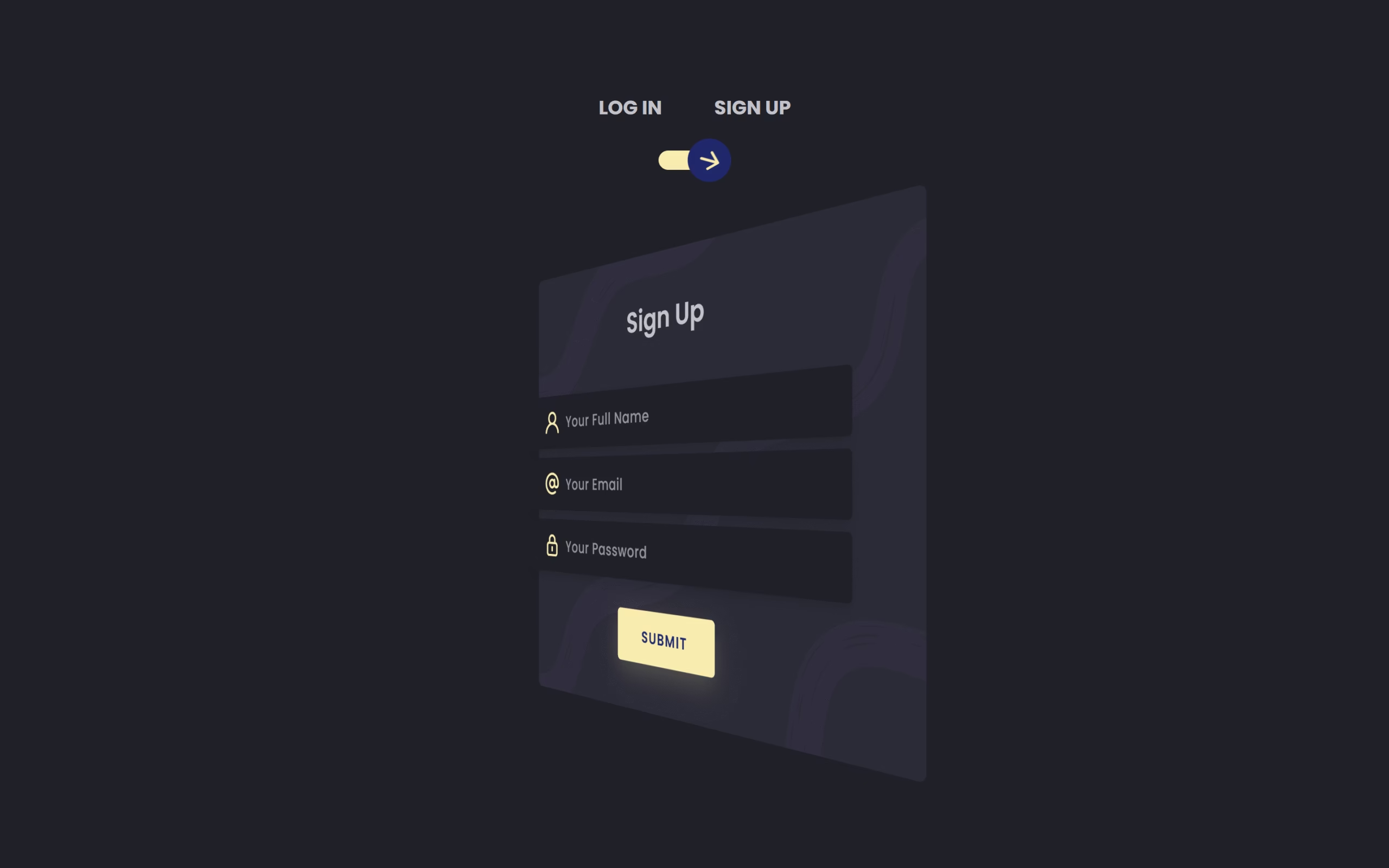
Let’s create a 3D Login and Sign Up Form using HTML and CSS. This project will feature a stylish 3D flip animation that switches between the login and sign-up forms, making it both functional and visually impressive.
We’ll use:
- HTML to structure the login and sign-up forms.
- CSS to style them with 3D transformations, smooth transitions, and modern UI effects.
This project is perfect for anyone looking to add a creative and professional touch to their authentication pages. Let’s get started and bring some 3D magic to your web design! ✨🔐
HTML :
This HTML code creates a 3D login and sign-up form that flips between two sides using a checkbox toggle. The front side contains a login form with email and password fields, while the back side has a sign-up form with name, email, and password inputs. It uses Bootstrap for layout, Unicons for icons, and external CSS and JS files (style.css, script.js) for the 3D flip effect and styling. The checkbox (id="reg-log") controls the rotation between login and signup views, making the form interactive and visually appealing.
<!DOCTYPE html>
<html lang="en">

<head>
	<meta charset="UTF-8">
	<title>3D Login and Sign Up Form | @coding.stella</title>
	<link rel='stylesheet' href='https://cdnjs.cloudflare.com/ajax/libs/twitter-bootstrap/4.5.0/css/bootstrap.min.css'>
	<link rel='stylesheet' href='https://unicons.iconscout.com/release/v2.1.9/css/unicons.css'>
	<link rel="stylesheet" href="./style.css">

</head>

<body>

	<div class="section">
		<div class="container">
			<div class="row full-height justify-content-center">
				<div class="col-12 text-center align-self-center py-5">
					<div class="section pb-5 pt-5 pt-sm-2 text-center">
						<h6 class="mb-0 pb-3"><span>Log In </span><span>Sign Up</span></h6>
						<input class="checkbox" type="checkbox" id="reg-log" name="reg-log" />
						<label for="reg-log"></label>
						<div class="card-3d-wrap mx-auto">
							<div class="card-3d-wrapper">
								<div class="card-front">
									<div class="center-wrap">
										<div class="section text-center">
											<h4 class="mb-4 pb-3">Log In</h4>
											<div class="form-group">
												<input type="email" name="logemail" class="form-style"
													placeholder="Your Email" id="logemail" autocomplete="off">
												<i class="input-icon uil uil-at"></i>
											</div>
											<div class="form-group mt-2">
												<input type="password" name="logpass" class="form-style"
													placeholder="Your Password" id="logpass" autocomplete="off">
												<i class="input-icon uil uil-lock-alt"></i>
											</div>
											<a href="#" class="btn mt-4">submit</a>
											<p class="mb-0 mt-4 text-center"><a href="#0" class="link">Forgot your
													password?</a></p>
										</div>
									</div>
								</div>
								<div class="card-back">
									<div class="center-wrap">
										<div class="section text-center">
											<h4 class="mb-4 pb-3">Sign Up</h4>
											<div class="form-group">
												<input type="text" name="logname" class="form-style"
													placeholder="Your Full Name" id="logname" autocomplete="off">
												<i class="input-icon uil uil-user"></i>
											</div>
											<div class="form-group mt-2">
												<input type="email" name="logemail" class="form-style"
													placeholder="Your Email" id="logemail" autocomplete="off">
												<i class="input-icon uil uil-at"></i>
											</div>
											<div class="form-group mt-2">
												<input type="password" name="logpass" class="form-style"
													placeholder="Your Password" id="logpass" autocomplete="off">
												<i class="input-icon uil uil-lock-alt"></i>
											</div>
											<a href="#" class="btn mt-4">submit</a>
										</div>
									</div>
								</div>
							</div>
						</div>
					</div>
				</div>
			</div>
		</div>
	</div>
	<script src="./script.js"></script>

</body>

</html>
CSS :
This CSS file styles the 3D login and sign-up form with a modern dark theme using the Poppins font. It sets smooth transitions, rounded buttons, and glowing input fields. The form flips between login and signup using a hidden checkbox and 3D card rotation (rotateY). The .card-front and .card-back have stylish backgrounds, and the .btn and input icons change color when hovered or focused. Overall, it creates a clean, animated, and responsive 3D UI with soft shadows, gold highlights (#ffeba7), and blue accents (#102770).
@import url('https://fonts.googleapis.com/css?family=Poppins:400,500,600,700,800,900');

body{
	font-family: 'Poppins', sans-serif;
	font-weight: 300;
	font-size: 15px;
	line-height: 1.7;
	color: #c4c3ca;
	background-color: #1f2029;
	overflow-x: hidden;
}
a {
	cursor: pointer;
  transition: all 200ms linear;
}
a:hover {
	text-decoration: none;
}
.link {
  color: #c4c3ca;
}
.link:hover {
  color: #ffeba7;
}
p {
  font-weight: 500;
  font-size: 14px;
  line-height: 1.7;
}
h4 {
  font-weight: 600;
}
h6 span{
  padding: 0 20px;
  text-transform: uppercase;
  font-weight: 700;
}
.section{
  position: relative;
  width: 100%;
  display: block;
}
.full-height{
  min-height: 100vh;
}
[type="checkbox"]:checked,
[type="checkbox"]:not(:checked){
  position: absolute;
  left: -9999px;
}
.checkbox:checked + label,
.checkbox:not(:checked) + label{
  position: relative;
  display: block;
  text-align: center;
  width: 60px;
  height: 16px;
  border-radius: 8px;
  padding: 0;
  margin: 10px auto;
  cursor: pointer;
  background-color: #ffeba7;
}
.checkbox:checked + label:before,
.checkbox:not(:checked) + label:before{
  position: absolute;
  display: block;
  width: 36px;
  height: 36px;
  border-radius: 50%;
  color: #ffeba7;
  background-color: #102770;
  font-family: 'unicons';
  content: '\eb4f';
  z-index: 20;
  top: -10px;
  left: -10px;
  line-height: 36px;
  text-align: center;
  font-size: 24px;
  transition: all 0.5s ease;
}
.checkbox:checked + label:before {
  transform: translateX(44px) rotate(-270deg);
}


.card-3d-wrap {
  position: relative;
  width: 440px;
  max-width: 100%;
  height: 400px;
  -webkit-transform-style: preserve-3d;
  transform-style: preserve-3d;
  perspective: 800px;
  margin-top: 60px;
}
.card-3d-wrapper {
  width: 100%;
  height: 100%;
  position:absolute;
  top: 0;
  left: 0;
  -webkit-transform-style: preserve-3d;
  transform-style: preserve-3d;
  transition: all 600ms ease-out;
}
.card-front, .card-back {
  width: 100%;
  height: 100%;
  background-color: #2a2b38;
  background-image: url('/bg.svg');
  background-position: bottom center;
  background-repeat: no-repeat;
  background-size: 300%;
  position: absolute;
  border-radius: 6px;
  left: 0;
  top: 0;
  -webkit-transform-style: preserve-3d;
  transform-style: preserve-3d;
  -webkit-backface-visibility: hidden;
  -moz-backface-visibility: hidden;
  -o-backface-visibility: hidden;
  backface-visibility: hidden;
}
.card-back {
  transform: rotateY(180deg);
}
.checkbox:checked ~ .card-3d-wrap .card-3d-wrapper {
  transform: rotateY(180deg);
}
.center-wrap{
  position: absolute;
  width: 100%;
  padding: 0 35px;
  top: 50%;
  left: 0;
  transform: translate3d(0, -50%, 35px) perspective(100px);
  z-index: 20;
  display: block;
}


.form-group{
  position: relative;
  display: block;
    margin: 0;
    padding: 0;
}
.form-style {
  padding: 13px 20px;
  padding-left: 55px;
  height: 48px;
  width: 100%;
  font-weight: 500;
  border-radius: 4px;
  font-size: 14px;
  line-height: 22px;
  letter-spacing: 0.5px;
  outline: none;
  color: #c4c3ca;
  background-color: #1f2029;
  border: none;
  -webkit-transition: all 200ms linear;
  transition: all 200ms linear;
  box-shadow: 0 4px 8px 0 rgba(21,21,21,.2);
}
.form-style:focus,
.form-style:active {
  border: none;
  outline: none;
  box-shadow: 0 4px 8px 0 rgba(21,21,21,.2);
}
.input-icon {
  position: absolute;
  top: 0;
  left: 18px;
  height: 48px;
  font-size: 24px;
  line-height: 48px;
  text-align: left;
  color: #ffeba7;
  -webkit-transition: all 200ms linear;
    transition: all 200ms linear;
}

.form-group input:-ms-input-placeholder  {
  color: #c4c3ca;
  opacity: 0.7;
  -webkit-transition: all 200ms linear;
    transition: all 200ms linear;
}
.form-group input::-moz-placeholder  {
  color: #c4c3ca;
  opacity: 0.7;
  -webkit-transition: all 200ms linear;
    transition: all 200ms linear;
}
.form-group input:-moz-placeholder  {
  color: #c4c3ca;
  opacity: 0.7;
  -webkit-transition: all 200ms linear;
    transition: all 200ms linear;
}
.form-group input::-webkit-input-placeholder  {
  color: #c4c3ca;
  opacity: 0.7;
  -webkit-transition: all 200ms linear;
    transition: all 200ms linear;
}
.form-group input:focus:-ms-input-placeholder  {
  opacity: 0;
  -webkit-transition: all 200ms linear;
    transition: all 200ms linear;
}
.form-group input:focus::-moz-placeholder  {
  opacity: 0;
  -webkit-transition: all 200ms linear;
    transition: all 200ms linear;
}
.form-group input:focus:-moz-placeholder  {
  opacity: 0;
  -webkit-transition: all 200ms linear;
    transition: all 200ms linear;
}
.form-group input:focus::-webkit-input-placeholder  {
  opacity: 0;
  -webkit-transition: all 200ms linear;
    transition: all 200ms linear;
}

.btn{
  border-radius: 4px;
  height: 44px;
  font-size: 13px;
  font-weight: 600;
  text-transform: uppercase;
  -webkit-transition : all 200ms linear;
  transition: all 200ms linear;
  padding: 0 30px;
  letter-spacing: 1px;
  display: -webkit-inline-flex;
  display: -ms-inline-flexbox;
  display: inline-flex;
  -webkit-align-items: center;
  -moz-align-items: center;
  -ms-align-items: center;
  align-items: center;
  -webkit-justify-content: center;
  -moz-justify-content: center;
  -ms-justify-content: center;
  justify-content: center;
  -ms-flex-pack: center;
  text-align: center;
  border: none;
  background-color: #ffeba7;
  color: #102770;
  box-shadow: 0 8px 24px 0 rgba(255,235,167,.2);
}
.btn:active,
.btn:focus{
  background-color: #102770;
  color: #ffeba7;
  box-shadow: 0 8px 24px 0 rgba(16,39,112,.2);
}
.btn:hover{
  background-color: #102770;
  color: #ffeba7;
  box-shadow: 0 8px 24px 0 rgba(16,39,112,.2);
}
In conclusion, building a 3D Login and Sign Up Form using HTML and CSS is a fun and creative way to enhance your web design skills. With clean structure and CSS 3D effects, we’ve created a sleek and interactive form that’s both eye-catching and user-friendly.
If your project hits a snag, no worries! Access the source code effortlessly. Click the Download button to kickstart your coding expedition. May your coding be filled with joy!
