


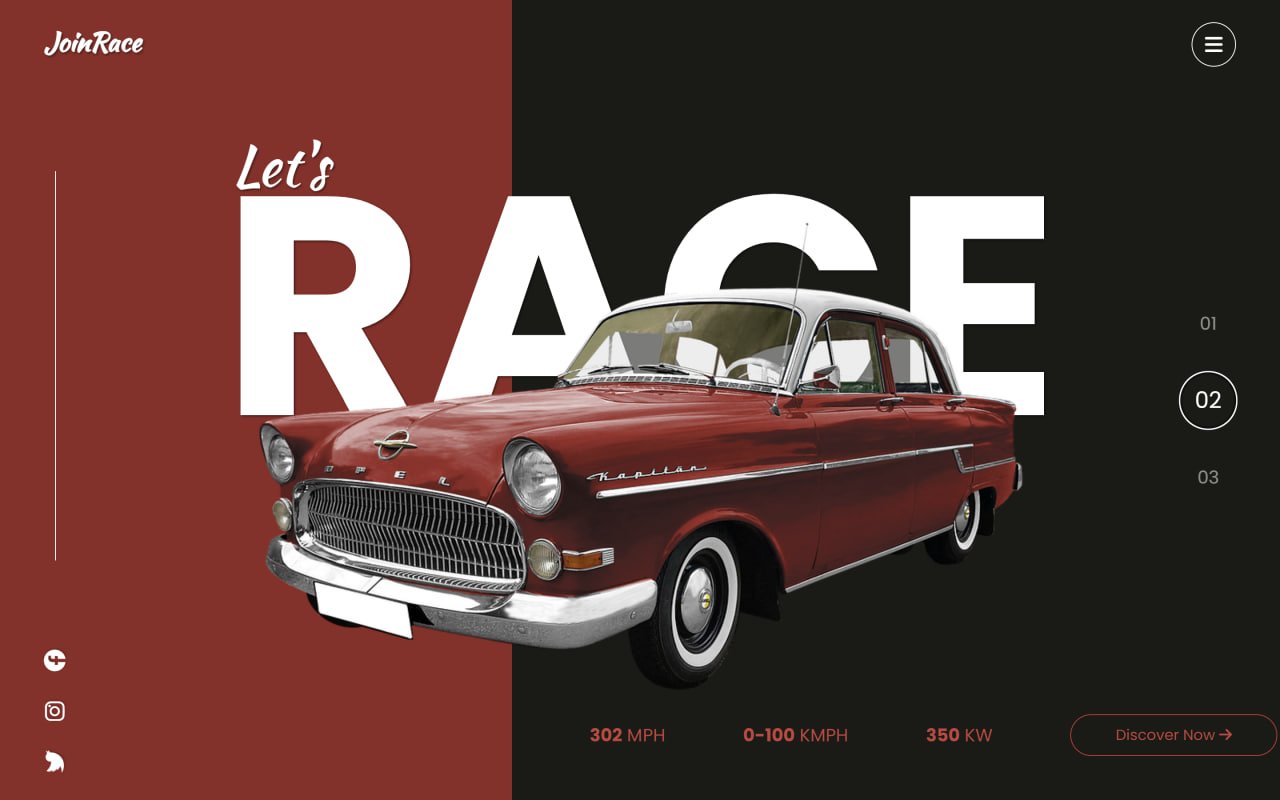
Create a fun and interactive Car Slider UI using HTML, CSS, and JavaScript! 🚗✨ This creative UI features a stylish car showcase where users can scroll through different cars with smooth transitions, animated text, car specifications, and interactive navigation.
We’ll use:
- HTML to build the car slider structure, including car images, titles, specifications, social icons, and navigation.
- CSS to style the cars, colorful backgrounds, typography, buttons, and responsive layout.
- JavaScript with Swiper.js and GSAP to create smooth slide transitions, mouse-wheel navigation, and eye-catching entrance animations.
This project is perfect for beginners looking to improve their CSS animations and UI design skills or developers who want to create unique car showcases, product sliders, landing pages, or modern web interfaces. Let’s build this stylish Car Slider UI from scratch! 🚗🔥
HTML :
This HTML creates a car racing slider webpage. It uses Swiper.js to create vertical slides for different cars, Font Awesome for icons, and GSAP for smooth entrance animations. Each slide contains a car image, title, speed specifications, and a button, while the JavaScript controls the slider, mouse-wheel navigation, pagination, and animations.
<!DOCTYPE html>
<html lang="en">
  <head>
    <meta charset="utf-8" />
    <title>Car Slider | @coding.stella</title>
    <meta
      name="viewport"
      content="width=device-width, initial-scale=1, minimum-scale=1, maximum-scale=1"
    />
    <link
      rel="stylesheet"
      href="https://cdnjs.cloudflare.com/ajax/libs/font-awesome/6.4.2/css/all.min.css"
      integrity="sha512-z3gLpd7yknf1YoNbCzqRKc4qyor8gaKU1qmn+CShxbuBusANI9QpRohGBreCFkKxLhei6S9CQXFEbbKuqLg0DA=="
      crossorigin="anonymous"
      referrerpolicy="no-referrer"
    />
    <link
      rel="stylesheet"
      href="https://cdn.jsdelivr.net/npm/swiper@10/swiper-bundle.min.css"
    />
    <script
      src="https://cdnjs.cloudflare.com/ajax/libs/gsap/3.12.2/gsap.min.js"
      integrity="sha512-16esztaSRplJROstbIIdwX3N97V1+pZvV33ABoG1H2OyTttBxEGkTsoIVsiP1iaTtM8b3+hu2kB6pQ4Clr5yug=="
      crossorigin="anonymous"
      referrerpolicy="no-referrer"
    ></script>
    <link rel="stylesheet" href="style.css" />
  </head>

  <body>
    <main>
      <div class="logo">JoinRace</div>
      <div class="social">
        <div class="bar"></div>
        <a href=""><i class="fab fa-facebook"></i></a>
        <a href=""><i class="fab fa-instagram"></i></a>
        <a href=""><i class="fab fa-twitter"></i></a>
      </div>
      <div class="menu">
        <i class="fas fa-bars"></i>
      </div>
      <div class="swiper">
        <div class="swiper-wrapper">
          <div class="swiper-slide first">
            <div class="yellow"></div>
            <div class="black"></div>
            <div class="content">
              <div class="title">
                <div class="small">Let's</div>
                <div class="big">
                  <span>R</span><span>A</span><span>C</span><span>E</span>
                </div>
              </div>
              <div class="image">
                <img src="images/img-1.png" alt="" />
              </div>
              <div class="specs">
                <span><b>302</b> MPH</span>
                <span><b>0-100</b> KMPH</span>
                <span><b>350</b> KW</span>
                <button>Discover Now <i class="fas fa-arrow-right"></i></button>
              </div>
            </div>
          </div>
          <div class="swiper-slide">
            <div class="red"></div>
            <div class="black"></div>
            <div class="content">
              <div class="title">
                <div class="small">Let's</div>
                <div class="big">RACE</div>
              </div>
              <div class="image">
                <img src="images/img-2.png" alt="" />
              </div>
              <div class="specs red-c">
                <span><b>302</b> MPH</span>
                <span><b>0-100</b> KMPH</span>
                <span><b>350</b> KW</span>
                <button class="red-c">
                  Discover Now <i class="fas fa-arrow-right"></i>
                </button>
              </div>
            </div>
          </div>
          <div class="swiper-slide">
            <div class="blue"></div>
            <div class="black"></div>
            <div class="content">
              <div class="title">
                <div class="small">Let's</div>
                <div class="big">RACE</div>
              </div>
              <div class="image">
                <img src="images/img-3.png" alt="" />
              </div>
              <div class="specs blue-c">
                <span><b>302</b> MPH</span>
                <span><b>0-100</b> KMPH</span>
                <span><b>350</b> KW</span>
                <button class="blue-c">
                  Discover Now <i class="fas fa-arrow-right"></i>
                </button>
              </div>
            </div>
          </div>
        </div>
        <div class="swiper-pagination"></div>
      </div>
    </main>

    <!-- Swiper JS -->
    <script src="https://cdn.jsdelivr.net/npm/swiper@10/swiper-bundle.min.js"></script>

    <!-- Initialize Swiper -->
    <script>
      var swiper = new Swiper(".swiper", {
        direction: "vertical",
        slidesPerView: 1,
        spaceBetween: 30,
        mousewheel: true,
        effect: "coverflow",
        speed: 2000,
        coverflowEffect: {
          rotate: 50,
          stretch: 0,
          depth: 100,
          modifier: 1,
          slideShadows: true,
        },

        pagination: {
          el: ".swiper-pagination",
          clickable: true,
          renderBullet: function (index, className) {
            return (
              '<span class="' +
              className +
              '"> <span>' +
              String(index + 1).padStart(2, "0") +
              "</span></span>"
            );
          },
        },
      });

      gsap.from(".first .yellow", {
        y: -1000,
        duration: 2,
      });
      gsap.from(".first .black", {
        y: 1000,
        duration: 2,
      });
      gsap.from(".first img", {
        x: 1000,
        duration: 2,
      });
      gsap.from(".first .small", {
        y: 100,
        opacity: 0,
        delay: 2.1,
      });
      gsap.from(".first .big span", {
        y: 100,
        opacity: 0,
        stagger: 0.2,
        delay: 2.1,
      });
    </script>
  </body>
</html>
CSS :
This CSS styles the car slider webpage by setting fonts, removing default spacing, creating the dark and colored backgrounds, positioning the car images and text, and designing the logo, social icons, menu, specifications, button, and Swiper pagination. It also makes the layout fill the entire screen and gives the slider its modern racing-style look and animations-ready structure.
@import url('https://fonts.googleapis.com/css2?family=Kaushan+Script&family=Poppins:wght@400;500;600;700;800;900&display=swap');

* {
    margin: 0;
    padding: 0;
    box-sizing: border-box;
}

body {
    height: 100vh;
    width: 100vw;
    font-family: "Poppins", sans-serif;
}

.logo {
    font-family: "Kaushan Script", sans-serif;
    font-weight: bolder;
}

main {
    width: 100%;
    height: 100%;
    position: relative;
    overflow: hidden;
}

.swiper {
    width: 100%;
    height: 100%;
}

.swiper-slide {
    width: 100%;
    height: 100%;
}

.content {
    width: 100%;
    height: 100%;
    display: flex;
    justify-content: center;
    align-items: center;
    position: relative;
}

.content .image {
    height: 60%;
    width: 60%;
    margin-top: 100px;
}

.content .image img {
    width: 100%;
    height: 100%;
    object-fit: contain;
}

.yellow,
.blue,
.red {
    position: absolute;
    top: 0;
    height: 100%;
    bottom: 0;
    width: 40%;
    background: #EFCA29;
    z-index: -1;
}

.blue {
    background: #00D2FA;
}

.blue-c {
    color: #00D2FA !important;
    border-color: #00D2FA !important;
}

.red {
    background: #972826;
}

.red-c {
    color: #d23f3d !important;
    border-color: #ca3634 !important;
}


.black {
    position: absolute;
    top: 0;
    height: 100%;
    bottom: 0;
    right: 0;
    width: 60%;
    background: #1A1A15;
    z-index: -1;
}

.title {
    position: absolute;
    color: #fff;
    padding-bottom: 170px;
    text-shadow: 1px 1px 2px rgba(0, 0, 0, 0.5);
}

.big {
    font-weight: bold;
    font-size: 280px;
    z-index: -1;
    position: relative;
}

.big span {
    display: inline-block;
}

.small {
    position: absolute;
    font-size: 50px;
    font-family: "Kaushan Script";
    top: 8%;
    left: 10px;
}

.logo {
    position: absolute;
    top: 20px;
    left: 40px;
    z-index: 10;
    font-size: 24px;
    color: #fff;
    text-shadow: 1px 1px 2px rgba(0, 0, 0, 0.5);
}


.social {
    position: absolute;
    bottom: 20px;
    left: 40px;
    z-index: 10;
    font-size: 20px;
    color: #fff;
    text-shadow: 1px 1px 2px rgba(0, 0, 0, 0.2);
    display: flex;
    flex-direction: column;
    justify-content: center;
    align-items: center;
    gap: 15px;
}

.social .bar {
    width: 1px;
    height: 350px;
    background: #fff;
    margin-bottom: 60px;
}

.social a {
    color: #fff;
    transform: rotate(-90deg);
}

.specs {
    position: absolute;
    bottom: 40px;
    left: 40%;
    color: #EFCA29;
    font-size: 16px;
    display: flex;
    align-items: center;
    width: 100%;
}


.specs span {
    margin-left: 70px;
}


.specs button {
    margin-left: 70px;
    padding: 8px 40px;
    border-radius: 100px;
    border: 1px solid #EFCA29;
    background: none;
    font-family: "Poppins", sans-serif;
    color: #EFCA29;
    cursor: pointer;
}


.menu {
    position: absolute;
    top: 20px;
    right: 40px;
    z-index: 10;
    font-size: 18px;
    color: #fff;
    height: 40px;
    width: 40px;
    display: grid;
    place-content: center;
    border-radius: 50%;
    border: 1px solid #fff;
}

.swiper-pagination {
    position: absolute;
    right: 40px !important;
    height: 200px;
    display: flex;
    flex-direction: column;
    justify-content: space-between;
}

.swiper-pagination-bullet {
    width: 50px;
    height: 50px;
    background: none;
    color: #fff;
    font-family: "Poppins", sans-serif;
    opacity: 0.5;
    display: grid !important;
    place-content: center;
}


.swiper-pagination-bullet-active {
    opacity: 1;
    font-size: 20px;
    border: 1px solid #fff;
}
Conclusion:
And that’s it! 🎉 We successfully created an Interactive Login Bag Form using HTML and CSS. By combining creative design, smooth animations, and interactive effects, you can turn a simple login page into a fun and engaging user experience. Feel free to customize the colors, shapes, animations, and layout to match your own style or brand. Happy coding! 🚀
If your project has problems, don’t worry. Just click to download the source code and face your coding challenges with excitement. Have fun coding!
