


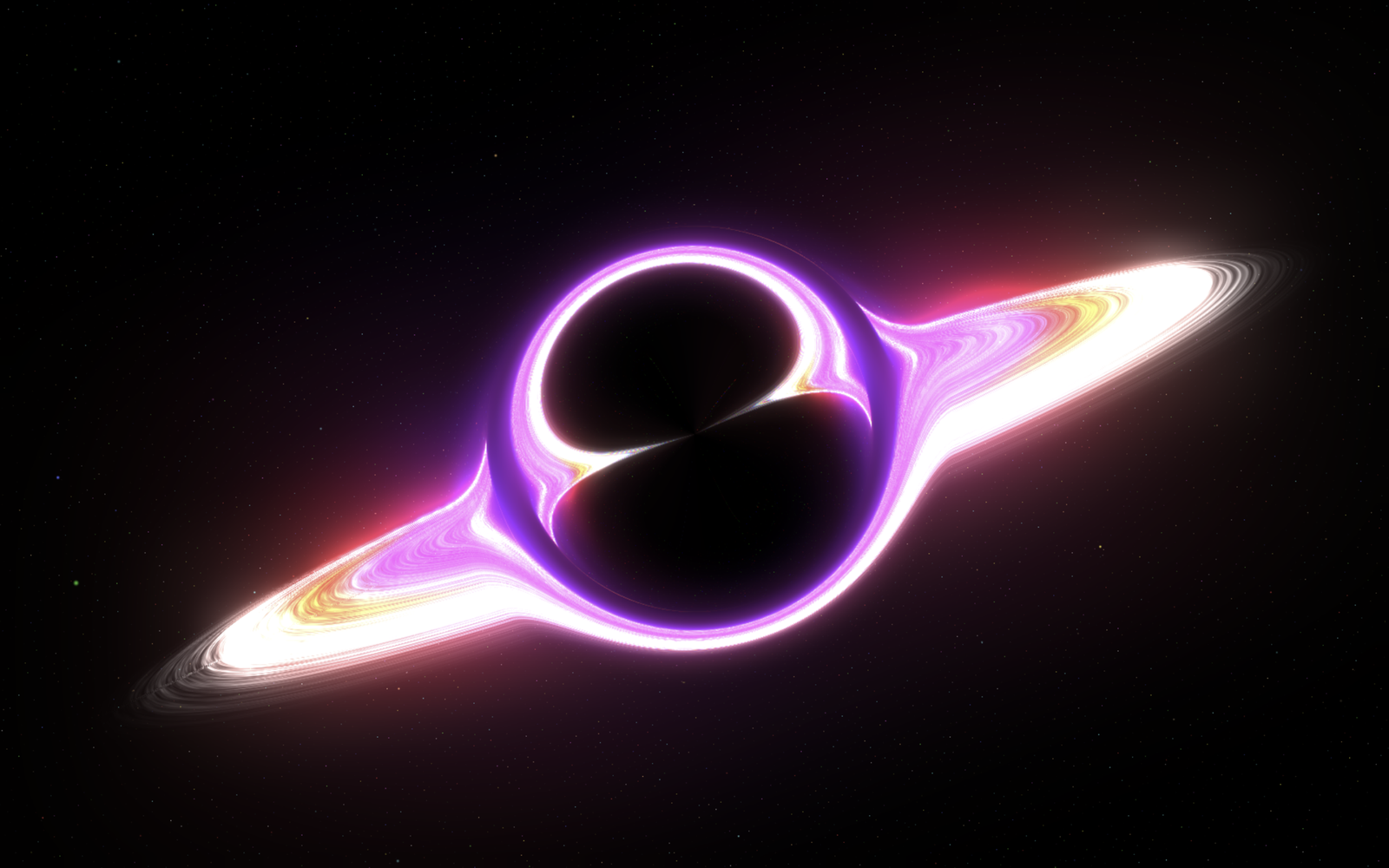
Let’s create a 3D Black Hole using HTML CSS and JavaScript. This project will feature a stunning cosmic black hole that distorts light and glows dynamically with real-time shader effects, adding a modern and interactive touch to a space simulation.
We’ll use:
- HTML to structure the canvas and overlay information elements.
- CSS to style the layout with dark space gradients and clean, responsive UI styling.
- JavaScript (Three.js) to render the 3D scene, gravitational lensing effects, glowing accretion disk, and a twinkling starfield that reacts to user interactions.
Whether you’re a beginner or an experienced developer, this project is a fun and practical way to learn how to combine 3D graphics with creative front-end design. Let’s get started and make your space simulation come alive with a breathtaking galactic touch! 🌌🕳️✨
HTML :
The HTML file sets up the core webpage structure by loading Google Fonts, linking the external style.css stylesheet, and defining an import map so the browser can directly fetch the Three.js library from a CDN. It creates an overlay text container with user instructions and imports script.js as an ES module to execute the 3D graphics logic.
<!DOCTYPE html>
<html lang="en">
<head>
    <meta charset="UTF-8">
    <meta name="viewport" content="width=device-width, initial-scale=1.0">
    <title>Three.js Black Hole Visualization</title>
    <link href="https://fonts.googleapis.com/css2?family=Inter:wght@300;400;500;600;700&display=swap" rel="stylesheet">
    <link rel="stylesheet" href="style.css">
    <script type="importmap">
    {
      "imports": {
        "three": "https://cdn.jsdelivr.net/npm/three@0.163.0/build/three.module.js",
        "three/addons/": "https://cdn.jsdelivr.net/npm/three@0.163.0/examples/jsm/"
      }
    }
    </script>
</head>
<body>
    <div id="info">
        Black Hole<br>
        <span style="font-size: 14px; opacity: 0.8;">Click and drag to rotate view</span>
    </div>

    <script type="module" src="script.js"></script>
</body>
</html>
CSS :
The CSS file handles the overall visual presentation by setting a full-screen dark space radial gradient background, removing page scrollbars, and forcing the WebGL 3D canvas to fill 100% of the viewport. It also styles the overlay title with custom typography, glowing text shadows, fade-out transitions, and responsive adjustments for mobile screens.
body {
    margin: 0;
    overflow: hidden;
    background: radial-gradient(ellipse at center, #0a0a1a 0%, #000002 70%);
    color: #e0e0ff;
    font-family: 'Inter', sans-serif;
}
canvas {
    display: block;
    width: 100%;
    height: 100%;
}
#info {
    position: absolute;
    top: 20px;
    width: 100%;
    text-align: center;
    color: rgba(220, 220, 255, 0.9);
    font-size: 18px;
    letter-spacing: 0.5px;
    pointer-events: none;
    z-index: 100;
    text-shadow: 0 1px 5px rgba(0, 0, 0, 0.7);
    transition: opacity 2s ease-in-out 1s;
}

@media (max-width: 640px) {
    #info { font-size: 16px; top: 15px; }
    #info span { font-size: 12px; }
}
JavaScript:
The JavaScript file builds the interactive 3D universe using Three.js, rendering a central black hole with custom GLSL shaders for gravitational light lensing, an event horizon glow, and a glowing accretion disk powered by procedural noise. It generates a surrounding galaxy of 150,000 twinkling stars, enables drag-to-rotate camera controls, auto-adjusts on window resize, and continuously updates the scene inside an animation loop.
import * as THREE from 'three';
import { OrbitControls } from 'three/addons/controls/OrbitControls.js';
import { EffectComposer } from 'three/addons/postprocessing/EffectComposer.js';
import { RenderPass } from 'three/addons/postprocessing/RenderPass.js';
import { UnrealBloomPass } from 'three/addons/postprocessing/UnrealBloomPass.js';
import { ShaderPass } from 'three/addons/postprocessing/ShaderPass.js';

const BLACK_HOLE_RADIUS = 1.3;
const DISK_INNER_RADIUS = BLACK_HOLE_RADIUS + 0.2;
const DISK_OUTER_RADIUS = 8.0;
const DISK_TILT_ANGLE = Math.PI / 3.0;

const scene = new THREE.Scene();
scene.fog = new THREE.FogExp2(0x020104, 0.025);

const camera = new THREE.PerspectiveCamera(60, window.innerWidth / window.innerHeight, 0.1, 4000);
camera.position.set(-6.5, 5.0, 6.5);

const renderer = new THREE.WebGLRenderer({ antialias: true, powerPreference: "high-performance" });
renderer.setSize(window.innerWidth, window.innerHeight);
renderer.setPixelRatio(Math.min(window.devicePixelRatio, 1.5));
renderer.outputColorSpace = THREE.SRGBColorSpace;
renderer.toneMapping = THREE.ACESFilmicToneMapping;
renderer.toneMappingExposure = 1.2;
document.body.appendChild(renderer.domElement);

const composer = new EffectComposer(renderer);
composer.addPass(new RenderPass(scene, camera));

const bloomPass = new UnrealBloomPass(
    new THREE.Vector2(window.innerWidth, window.innerHeight),
    0.8, 0.7, 0.8
);
composer.addPass(bloomPass);

const lensingShader = {
    uniforms: {
        "tDiffuse": { value: null },
        "blackHoleScreenPos": { value: new THREE.Vector2(0.5, 0.5) },
        "lensingStrength": { value: 0.12 },
        "lensingRadius": { value: 0.3 },
        "aspectRatio": { value: window.innerWidth / window.innerHeight },
        "chromaticAberration": { value: 0.005 }
    },
    vertexShader: `varying vec2 vUv; void main() { vUv = uv; gl_Position = projectionMatrix * modelViewMatrix * vec4(position, 1.0); }`,
    fragmentShader: `
        uniform sampler2D tDiffuse;
        uniform vec2 blackHoleScreenPos;
        uniform float lensingStrength;
        uniform float lensingRadius;
        uniform float aspectRatio;
        uniform float chromaticAberration;
        varying vec2 vUv;

        void main() {
            vec2 screenPos = vUv;
            vec2 toCenter = screenPos - blackHoleScreenPos;
            toCenter.x *= aspectRatio;
            float dist = length(toCenter);

            float distortionAmount = lensingStrength / (dist * dist + 0.003);
            distortionAmount = clamp(distortionAmount, 0.0, 0.7);
            float falloff = smoothstep(lensingRadius, lensingRadius * 0.3, dist);
            distortionAmount *= falloff;

            vec2 offset = normalize(toCenter) * distortionAmount;
            offset.x /= aspectRatio;

            vec2 distortedUvR = screenPos - offset * (1.0 + chromaticAberration);
            vec2 distortedUvG = screenPos - offset;
            vec2 distortedUvB = screenPos - offset * (1.0 - chromaticAberration);

            float r = texture2D(tDiffuse, distortedUvR).r;
            float g = texture2D(tDiffuse, distortedUvG).g;
            float b = texture2D(tDiffuse, distortedUvB).b;

            gl_FragColor = vec4(r, g, b, 1.0);
        }`
};
const lensingPass = new ShaderPass(lensingShader);
composer.addPass(lensingPass);

const controls = new OrbitControls(camera, renderer.domElement);
controls.enableDamping = true;
controls.dampingFactor = 0.035;
controls.rotateSpeed = 0.4;
controls.target.set(0, 0, 0);
controls.minDistance = 2.5;
controls.maxDistance = 100;
controls.enablePan = false;
controls.update();

const starGeometry = new THREE.BufferGeometry();
const starCount = 150000;
const starPositions = new Float32Array(starCount * 3);
const starColors = new Float32Array(starCount * 3);
const starSizes = new Float32Array(starCount);
const starTwinkle = new Float32Array(starCount);
const starFieldRadius = 2000;
const starPalette = [
    new THREE.Color(0x88aaff), new THREE.Color(0xffaaff), new THREE.Color(0xaaffff),
    new THREE.Color(0xffddaa), new THREE.Color(0xffeecc), new THREE.Color(0xffffff),
    new THREE.Color(0xff8888), new THREE.Color(0x88ff88), new THREE.Color(0xffff88),
    new THREE.Color(0x88ffff)
];

for (let i = 0; i < starCount; i++) {
    const i3 = i * 3;
    const phi = Math.acos(-1 + (2 * i) / starCount);
    const theta = Math.sqrt(starCount * Math.PI) * phi;
    const radius = Math.cbrt(Math.random()) * starFieldRadius + 100;

    starPositions[i3] = radius * Math.sin(phi) * Math.cos(theta);
    starPositions[i3 + 1] = radius * Math.sin(phi) * Math.sin(theta);
    starPositions[i3 + 2] = radius * Math.cos(phi);

    const starColor = starPalette[Math.floor(Math.random() * starPalette.length)].clone();
    starColor.multiplyScalar(Math.random() * 0.7 + 0.3);
    starColors[i3] = starColor.r; starColors[i3 + 1] = starColor.g; starColors[i3 + 2] = starColor.b;
    starSizes[i] = THREE.MathUtils.randFloat(0.6, 3.0);
    starTwinkle[i] = Math.random() * Math.PI * 2;
}
starGeometry.setAttribute('position', new THREE.BufferAttribute(starPositions, 3));
starGeometry.setAttribute('color', new THREE.BufferAttribute(starColors, 3));
starGeometry.setAttribute('size', new THREE.BufferAttribute(starSizes, 1));
starGeometry.setAttribute('twinkle', new THREE.BufferAttribute(starTwinkle, 1));

const starMaterial = new THREE.ShaderMaterial({
    uniforms: {
        uTime: { value: 0 },
        uPixelRatio: { value: renderer.getPixelRatio() }
    },
    vertexShader: `
        uniform float uTime;
        uniform float uPixelRatio;
        attribute float size;
        attribute float twinkle;
        varying vec3 vColor;
        varying float vTwinkle;

        void main() {
            vColor = color;
            vTwinkle = sin(uTime * 2.5 + twinkle) * 0.5 + 0.5;

            vec4 mvPosition = modelViewMatrix * vec4(position, 1.0);
            gl_PointSize = size * uPixelRatio * (300.0 / -mvPosition.z);
            gl_Position = projectionMatrix * mvPosition;
        }
    `,
    fragmentShader: `
        varying vec3 vColor;
        varying float vTwinkle;

        void main() {
            float dist = distance(gl_PointCoord, vec2(0.5));
            if (dist > 0.5) discard;

            float alpha = 1.0 - smoothstep(0.0, 0.5, dist);
            alpha *= (0.2 + vTwinkle * 0.8);

            gl_FragColor = vec4(vColor, alpha);
        }
    `,
    transparent: true,
    vertexColors: true,
    blending: THREE.AdditiveBlending,
    depthWrite: false
});

const stars = new THREE.Points(starGeometry, starMaterial);
scene.add(stars);

const eventHorizonGeom = new THREE.SphereGeometry(BLACK_HOLE_RADIUS * 1.05, 128, 64);
const eventHorizonMat = new THREE.ShaderMaterial({
    uniforms: {
        uTime: { value: 0 },
        uCameraPosition: { value: camera.position }
    },
    vertexShader: `
        varying vec3 vNormal;
        varying vec3 vPosition;
        void main() {
            vNormal = normalize(normalMatrix * normal);
            vPosition = position;
            gl_Position = projectionMatrix * modelViewMatrix * vec4(position, 1.0);
        }
    `,
    fragmentShader: `
        uniform float uTime;
        uniform vec3 uCameraPosition;
        varying vec3 vNormal;
        varying vec3 vPosition;

        void main() {
            vec3 viewDirection = normalize(uCameraPosition - vPosition);
            float fresnel = 1.0 - abs(dot(vNormal, viewDirection));
            fresnel = pow(fresnel, 2.5);

            vec3 glowColor = vec3(1.0, 0.4, 0.1);
            float pulse = sin(uTime * 2.5) * 0.15 + 0.85;

            gl_FragColor = vec4(glowColor * fresnel * pulse, fresnel * 0.4);
        }
    `,
    transparent: true,
    blending: THREE.AdditiveBlending,
    side: THREE.BackSide
});

const eventHorizon = new THREE.Mesh(eventHorizonGeom, eventHorizonMat);
scene.add(eventHorizon);

const blackHoleGeom = new THREE.SphereGeometry(BLACK_HOLE_RADIUS, 128, 64);
const blackHoleMat = new THREE.MeshBasicMaterial({ color: 0x000000 });
const blackHoleMesh = new THREE.Mesh(blackHoleGeom, blackHoleMat);
blackHoleMesh.renderOrder = 0;
scene.add(blackHoleMesh);

const diskGeometry = new THREE.RingGeometry(DISK_INNER_RADIUS, DISK_OUTER_RADIUS, 256, 128);
const diskMaterial = new THREE.ShaderMaterial({
    uniforms: {
        uTime: { value: 0.0 },
        uColorHot: { value: new THREE.Color(0xffffff) },
        uColorMid1: { value: new THREE.Color(0xff7733) },
        uColorMid2: { value: new THREE.Color(0xff4477) },
        uColorMid3: { value: new THREE.Color(0x7744ff) },
        uColorOuter: { value: new THREE.Color(0x4477ff) },
        uNoiseScale: { value: 2.5 },
        uFlowSpeed: { value: 0.22 },
        uDensity: { value: 1.3 }
    },
    vertexShader: `
        varying vec2 vUv;
        varying float vRadius;
        varying float vAngle;
        void main() {
            vUv = uv;
            vRadius = length(position.xy);
            vAngle = atan(position.y, position.x);
            gl_Position = projectionMatrix * modelViewMatrix * vec4(position, 1.0);
        }
    `,
    fragmentShader: `
        uniform float uTime;
        uniform vec3 uColorHot;
        uniform vec3 uColorMid1;
        uniform vec3 uColorMid2;
        uniform vec3 uColorMid3;
        uniform vec3 uColorOuter;
        uniform float uNoiseScale;
        uniform float uFlowSpeed;
        uniform float uDensity;

        varying vec2 vUv;
        varying float vRadius;
        varying float vAngle;

        vec3 mod289(vec3 x) { return x - floor(x * (1.0 / 289.0)) * 289.0; }
        vec4 mod289(vec4 x) { return x - floor(x * (1.0 / 289.0)) * 289.0; }
        vec4 permute(vec4 x) { return mod289(((x*34.0)+1.0)*x); }
        vec4 taylorInvSqrt(vec4 r) { return 1.79284291400159 - 0.85373472095314 * r; }

        float snoise(vec3 v) {
            const vec2 C = vec2(1.0/6.0, 1.0/3.0);
            const vec4 D = vec4(0.0, 0.5, 1.0, 2.0);
            vec3 i  = floor(v + dot(v, C.yyy) );
            vec3 x0 = v - i + dot(i, C.xxx) ;
            vec3 g = step(x0.yzx, x0.xyz);
            vec3 l = 1.0 - g;
            vec3 i1 = min( g.xyz, l.zxy );
            vec3 i2 = max( g.xyz, l.zxy );
            vec3 x1 = x0 - i1 + C.xxx;
            vec3 x2 = x0 - i2 + C.yyy;
            vec3 x3 = x0 - D.yyy;
            i = mod289(i);
            vec4 p = permute( permute( permute(
                     i.z + vec4(0.0, i1.z, i2.z, 1.0 ))
                   + i.y + vec4(0.0, i1.y, i2.y, 1.0 ))
                   + i.x + vec4(0.0, i1.x, i2.x, 1.0 ));
            float n_ = 0.142857142857;
            vec3  ns = n_ * D.wyz - D.xzx;
            vec4 j = p - 49.0 * floor(p * ns.z * ns.z);
            vec4 x_ = floor(j * ns.z);
            vec4 y_ = floor(j - 7.0 * x_ );
            vec4 x = x_ *ns.x + ns.yyyy;
            vec4 y = y_ *ns.x + ns.yyyy;
            vec4 h = 1.0 - abs(x) - abs(y);
            vec4 b0 = vec4( x.xy, y.xy );
            vec4 b1 = vec4( x.zw, y.zw );
            vec4 s0 = floor(b0)*2.0 + 1.0;
            vec4 s1 = floor(b1)*2.0 + 1.0;
            vec4 sh = -step(h, vec4(0.0));
            vec4 a0 = b0.xzyw + s0.xzyw*sh.xxyy ;
            vec4 a1 = b1.xzyw + s1.xzyw*sh.zzww ;
            vec3 p0 = vec3(a0.xy,h.x);
            vec3 p1 = vec3(a0.zw,h.y);
            vec3 p2 = vec3(a1.xy,h.z);
            vec3 p3 = vec3(a1.zw,h.w);
            vec4 norm = taylorInvSqrt(vec4(dot(p0,p0), dot(p1,p1), dot(p2,p2), dot(p3,p3)));
            p0 *= norm.x; p1 *= norm.y; p2 *= norm.z; p3 *= norm.w;
            vec4 m = max(0.6 - vec4(dot(x0,x0), dot(x1,x1), dot(x2,x2), dot(x3,x3)), 0.0);
            m = m * m;
            return 42.0 * dot( m*m, vec4( dot(p0,x0), dot(p1,x1), dot(p2,x2), dot(p3,x3) ) );
        }

        void main() {
            float normalizedRadius = smoothstep(1.50, 8.00, vRadius);

            float spiral = vAngle * 3.0 - (1.0 / (normalizedRadius + 0.1)) * 2.0;
            vec2 noiseUv = vec2(vUv.x + uTime * uFlowSpeed * (2.0 / (vRadius * 0.3 + 1.0)) + sin(spiral) * 0.1, vUv.y * 0.8 + cos(spiral) * 0.1);
            float noiseVal1 = snoise(vec3(noiseUv * uNoiseScale, uTime * 0.15));
            float noiseVal2 = snoise(vec3(noiseUv * uNoiseScale * 3.0 + 0.8, uTime * 0.22));
            float noiseVal3 = snoise(vec3(noiseUv * uNoiseScale * 6.0 + 1.5, uTime * 0.3));

            float noiseVal = (noiseVal1 * 0.45 + noiseVal2 * 0.35 + noiseVal3 * 0.2);
            noiseVal = (noiseVal + 1.0) * 0.5;

            vec3 color = uColorOuter;
            color = mix(color, uColorMid3, smoothstep(0.0, 0.25, normalizedRadius));
            color = mix(color, uColorMid2, smoothstep(0.2, 0.55, normalizedRadius));
            color = mix(color, uColorMid1, smoothstep(0.5, 0.75, normalizedRadius));
            color = mix(color, uColorHot, smoothstep(0.7, 0.95, normalizedRadius));

            color *= (0.5 + noiseVal * 1.0);
            float brightness = pow(1.0 - normalizedRadius, 1.0) * 3.5 + 0.5;
            brightness *= (0.3 + noiseVal * 2.2);

            float pulse = sin(uTime * 1.8 + normalizedRadius * 12.0 + vAngle * 2.0) * 0.15 + 0.85;
            brightness *= pulse;

            float alpha = uDensity * (0.2 + noiseVal * 0.9);
            alpha *= smoothstep(0.0, 0.15, normalizedRadius);
            alpha *= (1.0 - smoothstep(0.85, 1.0, normalizedRadius));
            alpha = clamp(alpha, 0.0, 1.0);

            gl_FragColor = vec4(color * brightness, alpha);
        }
    `,
    transparent: true,
    side: THREE.DoubleSide,
    depthWrite: false,
    blending: THREE.AdditiveBlending
});

const accretionDisk = new THREE.Mesh(diskGeometry, diskMaterial);
accretionDisk.rotation.x = DISK_TILT_ANGLE;
accretionDisk.renderOrder = 1;
scene.add(accretionDisk);

setTimeout(() => { const info = document.getElementById('info'); if (info) info.style.opacity = '0'; }, 5000);

let resizeTimeout;
window.addEventListener('resize', () => {
    clearTimeout(resizeTimeout);
    resizeTimeout = setTimeout(() => {
        camera.aspect = window.innerWidth / window.innerHeight;
        camera.updateProjectionMatrix();
        renderer.setSize(window.innerWidth, window.innerHeight);
        composer.setSize(window.innerWidth, window.innerHeight);
        bloomPass.resolution.set(window.innerWidth, window.innerHeight);
        lensingPass.uniforms.aspectRatio.value = window.innerWidth / window.innerHeight;
        renderer.setPixelRatio(Math.min(window.devicePixelRatio, 1.5));
    }, 150);
});

const clock = new THREE.Clock();
const blackHoleScreenPosVec3 = new THREE.Vector3();

function animate() {
    requestAnimationFrame(animate);
    const elapsedTime = clock.getElapsedTime();
    const deltaTime = clock.getDelta();

    diskMaterial.uniforms.uTime.value = elapsedTime;
    starMaterial.uniforms.uTime.value = elapsedTime;
    eventHorizonMat.uniforms.uTime.value = elapsedTime;
    eventHorizonMat.uniforms.uCameraPosition.value.copy(camera.position);

    blackHoleScreenPosVec3.copy(blackHoleMesh.position).project(camera);
    lensingPass.uniforms.blackHoleScreenPos.value.set(
        (blackHoleScreenPosVec3.x + 1) / 2,
        (blackHoleScreenPosVec3.y + 1) / 2
    );

    controls.update();

    stars.rotation.y += deltaTime * 0.003;
    stars.rotation.x += deltaTime * 0.001;

    accretionDisk.rotation.z += deltaTime * 0.005;

    composer.render(deltaTime);
}

animate();
In conclusion, creating a Password Input Light using HTML, CSS, and JavaScript is a great way to make forms more interactive and visually appealing. By combining structure, styling, and simple logic, we’ve built a glowing input field that enhances the user experience ✨
🚀 Why Build a 3D Black Hole using HTML CSS and JavaScript?
Building interactive WebGL projects in the browser is one of the best ways to advance your front-end skills. By leveraging open-source libraries like Three.js Official Documentation alongside custom GLSL shaders, you can simulate complex astrophysics phenomena – like gravitational light bending and glowing plasma accretion disks – directly in your code.
🛠️ Key Features of this Project
- Gravitational Lensing Shader: Distorts background starlight around the event horizon.
- Procedural Accretion Disk: Uses GLSL simplex noise to simulate realistic glowing plasma flow.
- Interactive Orbit Controls: Click and drag to orbit around the singularity in real-time.
- Responsive Full-Screen Layout: Built with lightweight styling for smooth performance across desktop and mobile devices.
If you run into any problems with your project, worry not. The remedy is just a click away – Download the source code and confront your coding challenges with enthusiasm. Enjoy your coding adventure!
