


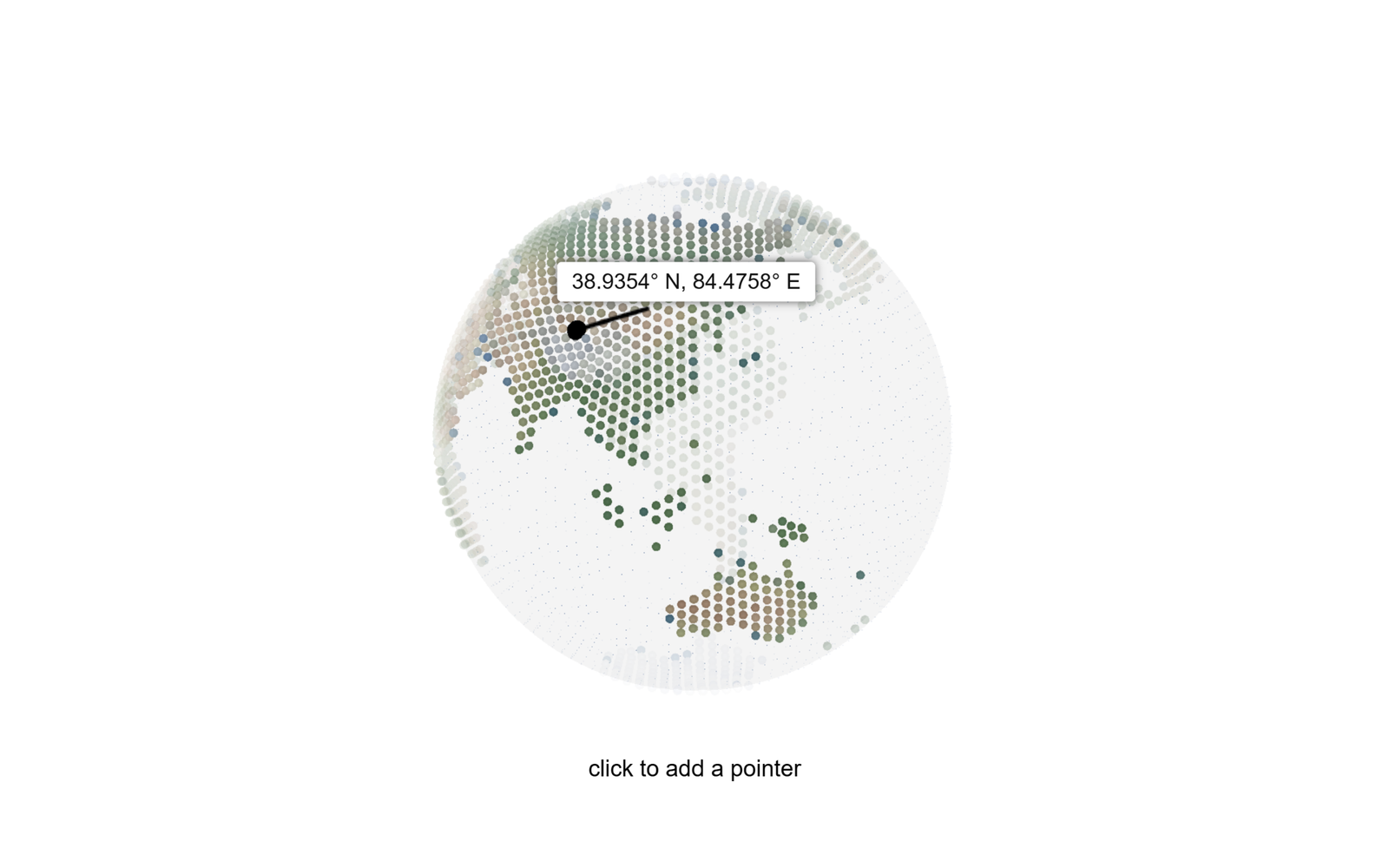
Let’s build an interactive 3D Globe with Location Pointer using HTML, CSS, and JavaScript. This project features a rotating Earth, clickable locations, animated pointers, latitude and longitude coordinates, and smooth visual effects.
- HTML: Creates the 3D globe structure using HTML canvases, location popups, and custom shaders to render the globe.
- CSS: Styles the globe layout, positions the canvas and location popup, and creates a clean, responsive interface.
- JavaScript: Uses Three.js to render the interactive 3D Earth, GSAP for smooth animations, and calculates latitude and longitude when users click a location on the globe.
The globe rotates smoothly and allows users to select locations by clicking on the Earth. Each selection displays a location pointer with its latitude and longitude, while animated effects create a dynamic and engaging experience.
This HTML, CSS, and JavaScript project is a great way to learn 3D web development, interactive canvas rendering, animation techniques, and coordinate calculations while building a visually appealing globe for your frontend portfolio.
HTML :
Creates the structure of the interactive 3D globe using HTML canvases, location popups, and custom shaders.
<!DOCTYPE html>
<html lang="en">

  <head>
    <meta charset="UTF-8">
    <title>3D Globe Three.js with location pointer</title>
    <link rel="stylesheet" href="./style.css">

  </head>

  <body>
  <div class="page">
	 <div class="title">click to add a pointer</div>
    <div class="globe-wrapper">
        <canvas id="globe-3d"></canvas>
        <canvas id="globe-2d-overlay"></canvas>
        <div id="globe-popup-overlay">
            <div class="globe-popup"></div>
        </div>
    </div>
</div>

<script type="x-shader/x-fragment" id="fragment-shader-map">
    uniform sampler2D u_map_tex;

    varying float vOpacity;
    varying vec2 vUv;

    void main() {
        vec3 color = texture2D(u_map_tex, vUv).rgb;
        color -= .2 * length(gl_PointCoord.xy - vec2(.5));
        float dot = 1. - smoothstep(.38, .4, length(gl_PointCoord.xy - vec2(.5)));
        if (dot < 0.5) discard;
        gl_FragColor = vec4(color, dot * vOpacity);
    }
</script>

<script type="x-shader/x-vertex" id="vertex-shader-map">
    uniform sampler2D u_map_tex;
    uniform float u_dot_size;
    uniform float u_time_since_click;
    uniform vec3 u_pointer;

    #define PI 3.14159265359

    varying float vOpacity;
    varying vec2 vUv;

    void main() {

        vUv = uv;

        // mask with world map
        float visibility = step(.2, texture2D(u_map_tex, uv).r);
        gl_PointSize = visibility * u_dot_size;

        // make back dots semi-transparent
        vec4 mvPosition = modelViewMatrix * vec4(position, 1.0);
        vOpacity = (1. / length(mvPosition.xyz) - .7);
        vOpacity = clamp(vOpacity, .03, 1.);

        // add ripple
        float t = u_time_since_click - .1;
        t = max(0., t);
        float max_amp = .15;
        float dist = 1. - .5 * length(position - u_pointer); // 0 .. 1
        float damping = 1. / (1. + 20. * t); // 1 .. 0
        float delta = max_amp * damping * sin(5. * t * (1. + 2. * dist) - PI);
        delta *= 1. - smoothstep(.8, 1., dist);
        vec3 pos = position;
        pos *= (1. + delta);

        gl_Position = projectionMatrix * modelViewMatrix * vec4(pos, 1.);
    }
</script>
    <script src='https://unpkg.com/gsap@3/dist/gsap.min.js'></script><script type="module" src="./script.js"></script>

  </body>

</html>
CSS :
Styles the 3D globe layout, centers the canvas, and designs the location popup for a clean, responsive interface.
body {
    padding: 0;
    margin: 0;
    overflow: hidden;
}

.page {
    width: 100%;
    height: 100vh;
    display: flex;
    justify-content: center;
    align-items: center;
}

.title {
	 position: fixed;
	 bottom: 10%;
	 left: 0;
	 width: 100%;
	 text-align: center;
	 font-family: sans-serif;
}

#globe-3d, #globe-2d-overlay, #globe-popup-overlay, .globe-popup {
    display: block;
    position: absolute;
}

#globe-2d-overlay, #globe-popup-overlay {
    pointer-events: none;
}

.globe-popup {
    top: 0;
    left: 0;
    background-color: white;
    opacity: 0;
    color: #111;
    font-family: sans-serif;
    padding: 5px 10px;
    font-size: 15px;
    border-radius: 3px;
    filter: drop-shadow(0px 0px 3px #555555);
}
JavaScript:
Uses Three.js to render an interactive 3D Earth, GSAP for smooth animations, and calculates latitude and longitude when users click a location on the globe.
import * as THREE from "https://esm.sh/three@0.133.1/build/three.module";
import {OrbitControls} from "https://esm.sh/three@0.133.1/examples/jsm/controls/OrbitControls";
const containerEl = document.querySelector(".globe-wrapper");
const canvas3D = containerEl.querySelector("#globe-3d");
const canvas2D = containerEl.querySelector("#globe-2d-overlay");
const popupEl = containerEl.querySelector(".globe-popup");
let renderer, scene, camera, rayCaster, controls, group;
let overlayCtx = canvas2D.getContext("2d");
let coordinates2D = [0, 0];
let pointerPos;
let clock, mouse, pointer, globe, globeMesh;
let popupVisible;
let earthTexture, mapMaterial;
let popupOpenTl, popupCloseTl;
let dragged = false;
initScene();
window.addEventListener("resize", updateSize);
function initScene() {
renderer = new THREE.WebGLRenderer({canvas: canvas3D, alpha: true});
renderer.setPixelRatio(2);
scene = new THREE.Scene();
camera = new THREE.OrthographicCamera(-1.1, 1.1, 1.1, -1.1, 0, 3);
camera.position.z = 1.1;
rayCaster = new THREE.Raycaster();
rayCaster.far = 1.15;
mouse = new THREE.Vector2(-1, -1);
clock = new THREE.Clock();
createOrbitControls();
popupVisible = false;
new THREE.TextureLoader().load(
"https://ksenia-k.com/img/earth-map-colored.png",
(mapTex) => {
earthTexture = mapTex;
earthTexture.repeat.set(1, 1);
createGlobe();
createPointer();
createPopupTimelines();
addCanvasEvents();
updateSize();
render();
});
}
function createOrbitControls() {
controls = new OrbitControls(camera, canvas3D);
controls.enablePan = false;
controls.enableZoom = false;
controls.enableDamping = true;
controls.minPolarAngle = .4 * Math.PI;
controls.maxPolarAngle = .4 * Math.PI;
controls.autoRotate = true;
let timestamp;
controls.addEventListener("start", () => {
timestamp = Date.now();
});
controls.addEventListener("end", () => {
dragged = (Date.now() - timestamp) > 600;
});
}
function createGlobe() {
const globeGeometry = new THREE.IcosahedronGeometry(1, 22);
mapMaterial = new THREE.ShaderMaterial({
vertexShader: document.getElementById("vertex-shader-map").textContent,
fragmentShader: document.getElementById("fragment-shader-map").textContent,
uniforms: {
u_map_tex: {type: "t", value: earthTexture},
u_dot_size: {type: "f", value: 0},
u_pointer: {type: "v3", value: new THREE.Vector3(.0, .0, 1.)},
u_time_since_click: {value: 0},
},
alphaTest: false,
transparent: true
});
globe = new THREE.Points(globeGeometry, mapMaterial);
scene.add(globe);
globeMesh = new THREE.Mesh(globeGeometry, new THREE.MeshBasicMaterial({
color: 0x222222,
transparent: true,
opacity: .05
}));
scene.add(globeMesh);
}
function createPointer() {
const geometry = new THREE.SphereGeometry(.04, 16, 16);
const material = new THREE.MeshBasicMaterial({
color: 0x00000,
transparent: true,
opacity: 0
});
pointer = new THREE.Mesh(geometry, material);
scene.add(pointer);
}
function updateOverlayGraphic() {
let activePointPosition = pointer.position.clone();
activePointPosition.applyMatrix4(globe.matrixWorld);
const activePointPositionProjected = activePointPosition.clone();
activePointPositionProjected.project(camera);
coordinates2D[0] = (activePointPositionProjected.x + 1) * containerEl.offsetWidth * .5;
coordinates2D[1] = (1 - activePointPositionProjected.y) * containerEl.offsetHeight * .5;
const matrixWorldInverse = controls.object.matrixWorldInverse;
activePointPosition.applyMatrix4(matrixWorldInverse);
if (activePointPosition.z > -1) {
if (popupVisible === false) {
popupVisible = true;
showPopupAnimation(false);
}
let popupX = coordinates2D[0];
popupX -= (activePointPositionProjected.x * containerEl.offsetWidth * .3);
let popupY = coordinates2D[1];
const upDown = (activePointPositionProjected.y > .6);
popupY += (upDown ? 20 : -20);
gsap.set(popupEl, {
x: popupX,
y: popupY,
xPercent: -35,
yPercent: upDown ? 0 : -100
});
popupY += (upDown ? -5 : 5);
const curveMidX = popupX + activePointPositionProjected.x * 100;
const curveMidY = popupY + (upDown ? -.5 : .1) * coordinates2D[1];
drawPopupConnector(coordinates2D[0], coordinates2D[1], curveMidX, curveMidY, popupX, popupY);
} else {
if (popupVisible) {
popupOpenTl.pause(0);
popupCloseTl.play(0);
}
popupVisible = false;
}
}
function addCanvasEvents() {
containerEl.addEventListener("mousemove", (e) => {
updateMousePosition(e.clientX, e.clientY);
});
containerEl.addEventListener("click", (e) => {
if (!dragged) {
updateMousePosition(
e.targetTouches ? e.targetTouches[0].pageX : e.clientX,
e.targetTouches ? e.targetTouches[0].pageY : e.clientY,
);
const res = checkIntersects();
if (res.length) {
pointerPos = res[0].face.normal.clone();
pointer.position.set(res[0].face.normal.x, res[0].face.normal.y, res[0].face.normal.z);
mapMaterial.uniforms.u_pointer.value = res[0].face.normal;
popupEl.innerHTML = cartesianToLatLong();
showPopupAnimation(true);
clock.start()
}
}
});
function updateMousePosition(eX, eY) {
mouse.x = (eX - containerEl.offsetLeft) / containerEl.offsetWidth * 2 - 1;
mouse.y = -((eY - containerEl.offsetTop) / containerEl.offsetHeight) * 2 + 1;
}
}
function checkIntersects() {
rayCaster.setFromCamera(mouse, camera);
const intersects = rayCaster.intersectObject(globeMesh);
if (intersects.length) {
document.body.style.cursor = "pointer";
} else {
document.body.style.cursor = "auto";
}
return intersects;
}
function render() {
mapMaterial.uniforms.u_time_since_click.value = clock.getElapsedTime();
checkIntersects();
if (pointer) {
updateOverlayGraphic();
}
controls.update();
renderer.render(scene, camera);
requestAnimationFrame(render);
}
function updateSize() {
const minSide = .65 * Math.min(window.innerWidth, window.innerHeight);
containerEl.style.width = minSide + "px";
containerEl.style.height = minSide + "px";
renderer.setSize(minSide, minSide);
canvas2D.width = canvas2D.height = minSide;
mapMaterial.uniforms.u_dot_size.value = .04 * minSide;
}
// ---------------------------------------
// HELPERS
// popup content
function cartesianToLatLong() {
const pos = pointer.position;
const lat = 90 - Math.acos(pos.y) * 180 / Math.PI;
const lng = (270 + Math.atan2(pos.x, pos.z) * 180 / Math.PI) % 360 - 180;
return formatCoordinate(lat, 'N', 'S') + ", " + formatCoordinate(lng, 'E', 'W');
}
function formatCoordinate(coordinate, positiveDirection, negativeDirection) {
const direction = coordinate >= 0 ? positiveDirection : negativeDirection;
return `${Math.abs(coordinate).toFixed(4)}° ${direction}`;
}
// popup show / hide logic
function createPopupTimelines() {
popupOpenTl = gsap.timeline({
paused: true
})
.to(pointer.material, {
duration: .2,
opacity: 1,
}, 0)
.fromTo(canvas2D, {
opacity: 0
}, {
duration: .3,
opacity: 1
}, .15)
.fromTo(popupEl, {
opacity: 0,
scale: .9,
transformOrigin: "center bottom"
}, {
duration: .1,
opacity: 1,
scale: 1,
}, .15 + .1);
popupCloseTl = gsap.timeline({
paused: true
})
.to(pointer.material, {
duration: .3,
opacity: .2,
}, 0)
.to(canvas2D, {
duration: .3,
opacity: 0
}, 0)
.to(popupEl, {
duration: 0.3,
opacity: 0,
scale: 0.9,
transformOrigin: "center bottom"
}, 0);
}
function showPopupAnimation(lifted) {
if (lifted) {
let positionLifted = pointer.position.clone();
positionLifted.multiplyScalar(1.3);
gsap.from(pointer.position, {
duration: .25,
x: positionLifted.x,
y: positionLifted.y,
z: positionLifted.z,
ease: "power3.out"
});
}
popupCloseTl.pause(0);
popupOpenTl.play(0);
}
// overlay (line between pointer and popup)
function drawPopupConnector(startX, startY, midX, midY, endX, endY) {
overlayCtx.strokeStyle = "#000000";
overlayCtx.lineWidth = 3;
overlayCtx.lineCap = "round";
overlayCtx.clearRect(0, 0, containerEl.offsetWidth, containerEl.offsetHeight);
overlayCtx.beginPath();
overlayCtx.moveTo(startX, startY);
overlayCtx.quadraticCurveTo(midX, midY, endX, endY);
overlayCtx.stroke();
}
This project is a simple and practical way to understand how HTML, CSS, and JavaScript work together to create an interactive and visually engaging web interface.
If you face any issues with your project, don’t worry! You can grab the source code for this project by clicking the Download button. Ready to kick off your coding journey? Happy coding!
