


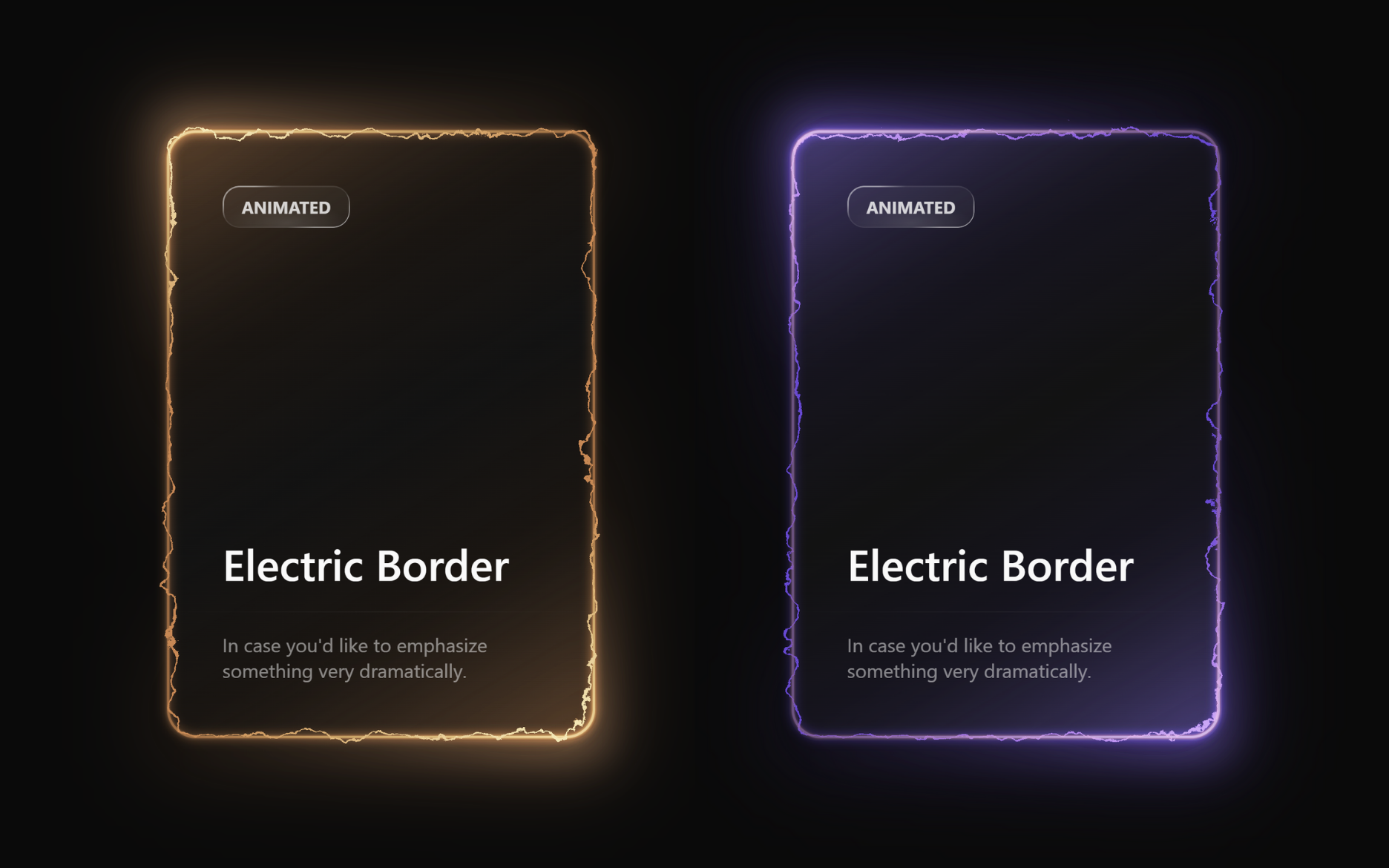
Let’s create an Animated Electric Card using HTML and CSS. ⚡
This project will feature a glowing, electric-style border animation that gives your card a modern and energetic look – perfect for tech or futuristic-themed websites.
We’ll use:
- HTML to structure the electric card.
- CSS to create the glowing electric animation using keyframes, gradients, and blur effects.
Whether you’re a beginner or an experienced developer, this project is a fun way to practice creative CSS animations and make your web elements stand out with a stunning electric glow. Let’s spark some energy into our design! ⚡💡
HTML :
This HTML creates a centered animated electric card using SVG filters for glowing, wavy border effects. The <filter> with multiple <feTurbulence> and <feOffset> elements generates moving noise that makes the card border look like live electricity. The card structure (.card-container) includes layers for glow, overlays, and background light for depth. Inside, there’s text content styled as a glass-like badge (“Animated”), a title (“Electric Border”), and a short description – all combining to form a modern, glowing 3D-style card animation.
<!DOCTYPE html>
<html lang="en">

<head>
  <meta charset="UTF-8">
  <title>Animated Electric Card | @coding.stella</title>
  <link rel="stylesheet" href="./style.css">
</head>

<body>
<main class="main-container">
  <svg class="svg-container">
    <defs>
      <filter id="turbulent-displace" colorInterpolationFilters="sRGB" x="-20%" y="-20%" width="140%" height="140%">
        <feTurbulence type="turbulence" baseFrequency="0.02" numOctaves="10" result="noise1" seed="1" />
        <feOffset in="noise1" dx="0" dy="0" result="offsetNoise1">
          <animate attributeName="dy" values="700; 0" dur="6s" repeatCount="indefinite" calcMode="linear" />
        </feOffset>

        <feTurbulence type="turbulence" baseFrequency="0.02" numOctaves="10" result="noise2" seed="1" />
        <feOffset in="noise2" dx="0" dy="0" result="offsetNoise2">
          <animate attributeName="dy" values="0; -700" dur="6s" repeatCount="indefinite" calcMode="linear" />
        </feOffset>

        <feTurbulence type="turbulence" baseFrequency="0.02" numOctaves="10" result="noise1" seed="2" />
        <feOffset in="noise1" dx="0" dy="0" result="offsetNoise3">
          <animate attributeName="dx" values="490; 0" dur="6s" repeatCount="indefinite" calcMode="linear" />
        </feOffset>

        <feTurbulence type="turbulence" baseFrequency="0.02" numOctaves="10" result="noise2" seed="2" />
        <feOffset in="noise2" dx="0" dy="0" result="offsetNoise4">
          <animate attributeName="dx" values="0; -490" dur="6s" repeatCount="indefinite" calcMode="linear" />
        </feOffset>

        <feComposite in="offsetNoise1" in2="offsetNoise2" result="part1" />
        <feComposite in="offsetNoise3" in2="offsetNoise4" result="part2" />
        <feBlend in="part1" in2="part2" mode="color-dodge" result="combinedNoise" />

        <feDisplacementMap in="SourceGraphic" in2="combinedNoise" scale="30" xChannelSelector="R" yChannelSelector="B" />
      </filter>
    </defs>
  </svg>

  <div class="card-container">
    <div class="inner-container">
      <div class="border-outer">
        <div class="main-card"></div>
      </div>
      <div class="glow-layer-1"></div>
      <div class="glow-layer-2"></div>
    </div>

    <div class="overlay-1"></div>
    <div class="overlay-2"></div>
    <div class="background-glow"></div>

    <div class="content-container">
      <div class="content-top">
        <div class="scrollbar-glass">Animated</div>
        <p class="title">Electric Border</p>
      </div>

      <hr class="divider" />

      <div class="content-bottom">
        <p class="description">
          In case you'd like to emphasize something very dramatically.
        </p>
      </div>
    </div>
  </div>
</main>

</body>
</html>
CSS :
This CSS creates a glowing electric-style animated card with multiple layered effects. It defines color variables using the oklch() color model for precise lighting, applies gradient borders, and adds blurred glow layers to make the card look illuminated. The layout is centered using flexbox, while overlays and background glows add depth and shine. Elements like .scrollbar-glass use transparent gradients and reflections to give a glassmorphism effect, and typography plus dividers make the content clean and modern.
:root {
  --electric-border-color: #6348dd;
  --electric-light-color: oklch(from var(--electric-border-color) l c h);
  --gradient-color: oklch(
    from var(--electric-border-color) 0.3 calc(c / 2) h / 0.4
  );
  --color-neutral-900: oklch(0.185 0 0);
}

* {
  margin: 0;
  padding: 0;
  box-sizing: border-box;
}

body {
  font-family: system-ui, -apple-system, sans-serif;
  background-color: oklch(0.145 0 0);
  color: oklch(0.985 0 0);
  height: 100vh;
  overflow: hidden;
}

/* Main container */
.main-container {
  display: flex;
  flex-direction: column;
  align-items: center;
  justify-content: center;
  height: 100vh;
}

/* SVG positioning */
.svg-container {
  position: absolute;
}

/* Card container */
.card-container {
  padding: 2px;
  border-radius: 24px;
  position: relative;
  background: linear-gradient(
      -30deg,
      var(--gradient-color),
      transparent,
      var(--gradient-color)
    ),
    linear-gradient(
      to bottom,
      var(--color-neutral-900),
      var(--color-neutral-900)
    );
}

/* Inner container */
.inner-container {
  position: relative;
}

/* Border layers */
.border-outer {
  border: 2px solid rgba(72, 87, 221, 0.5);
  border-radius: 24px;
  padding-right: 4px;
  padding-bottom: 4px;
}

.main-card {
  width: 350px;
  height: 500px;
  border-radius: 24px;
  border: 2px solid var(--electric-border-color);
  margin-top: -4px;
  margin-left: -4px;
  filter: url(#turbulent-displace);
}

/* Glow effects */
.glow-layer-1 {
  border: 2px solid rgba(221, 132, 72, 0.6);
  border-radius: 24px;
  width: 100%;
  height: 100%;
  position: absolute;
  top: 0;
  left: 0;
  right: 0;
  bottom: 0;
  filter: blur(1px);
}

.glow-layer-2 {
  border: 2px solid var(--electric-light-color);
  border-radius: 24px;
  width: 100%;
  height: 100%;
  position: absolute;
  top: 0;
  left: 0;
  right: 0;
  bottom: 0;
  filter: blur(4px);
}

/* Overlay effects */
.overlay-1 {
  position: absolute;
  width: 100%;
  height: 100%;
  top: 0;
  left: 0;
  right: 0;
  bottom: 0;
  border-radius: 24px;
  opacity: 1;
  mix-blend-mode: overlay;
  transform: scale(1.1);
  filter: blur(16px);
  background: linear-gradient(
    -30deg,
    white,
    transparent 30%,
    transparent 70%,
    white
  );
}

.overlay-2 {
  position: absolute;
  width: 100%;
  height: 100%;
  top: 0;
  left: 0;
  right: 0;
  bottom: 0;
  border-radius: 24px;
  opacity: 0.5;
  mix-blend-mode: overlay;
  transform: scale(1.1);
  filter: blur(16px);
  background: linear-gradient(
    -30deg,
    white,
    transparent 30%,
    transparent 70%,
    white
  );
}

/* Background glow */
.background-glow {
  position: absolute;
  width: 100%;
  height: 100%;
  top: 0;
  left: 0;
  right: 0;
  bottom: 0;
  border-radius: 24px;
  filter: blur(32px);
  transform: scale(1.1);
  opacity: 0.3;
  z-index: -1;
  background: linear-gradient(
    -30deg,
    var(--electric-light-color),
    transparent,
    var(--electric-border-color)
  );
}

/* Content container */
.content-container {
  position: absolute;
  top: 0;
  left: 0;
  right: 0;
  bottom: 0;
  width: 100%;
  height: 100%;
  display: flex;
  flex-direction: column;
}

/* Content sections */
.content-top {
  display: flex;
  flex-direction: column;
  padding: 48px;
  padding-bottom: 16px;
  height: 100%;
}

.content-bottom {
  display: flex;
  flex-direction: column;
  padding: 48px;
  padding-top: 16px;
}

/* Scrollbar glass component */
.scrollbar-glass {
  background: radial-gradient(
      47.2% 50% at 50.39% 88.37%,
      rgba(255, 255, 255, 0.12) 0%,
      rgba(255, 255, 255, 0) 100%
    ),
    rgba(255, 255, 255, 0.04);
  position: relative;
  transition: background 0.3s ease;
  border-radius: 14px;
  width: fit-content;
  height: fit-content;
  padding: 8px 16px;
  text-transform: uppercase;
  font-weight: bold;
  font-size: 14px;
  color: rgba(255, 255, 255, 0.8);
}

.scrollbar-glass:hover {
  background: radial-gradient(
      47.2% 50% at 50.39% 88.37%,
      rgba(255, 255, 255, 0.12) 0%,
      rgba(255, 255, 255, 0) 100%
    ),
    rgba(255, 255, 255, 0.08);
}

.scrollbar-glass::before {
  content: "";
  position: absolute;
  top: 0;
  left: 0;
  right: 0;
  bottom: 0;
  padding: 1px;
  background: linear-gradient(
    150deg,
    rgba(255, 255, 255, 0.48) 16.73%,
    rgba(255, 255, 255, 0.08) 30.2%,
    rgba(255, 255, 255, 0.08) 68.2%,
    rgba(255, 255, 255, 0.6) 81.89%
  );
  border-radius: inherit;
  mask: linear-gradient(#fff 0 0) content-box, linear-gradient(#fff 0 0);
  mask-composite: xor;
  -webkit-mask-composite: xor;
  pointer-events: none;
}

/* Typography */
.title {
  font-size: 36px;
  font-weight: 500;
  margin-top: auto;
}

.description {
  opacity: 0.5;
}

/* Divider */
.divider {
  margin-top: auto;
  border: none;
  height: 1px;
  background-color: currentColor;
  opacity: 0.1;
  mask-image: linear-gradient(to right, transparent, black, transparent);
  -webkit-mask-image: linear-gradient(
    to right,
    transparent,
    black,
    transparent
  );
}
In conclusion, creating an Animated Electric Card using HTML and CSS is an exciting and creative way to explore CSS animations. By combining gradients, glowing effects, and smooth transitions, we’ve built a visually striking card that grabs attention instantly ⚡💫
If your project has problems, don’t worry. Just click to download the source code and face your coding challenges with excitement. Have fun coding!
