


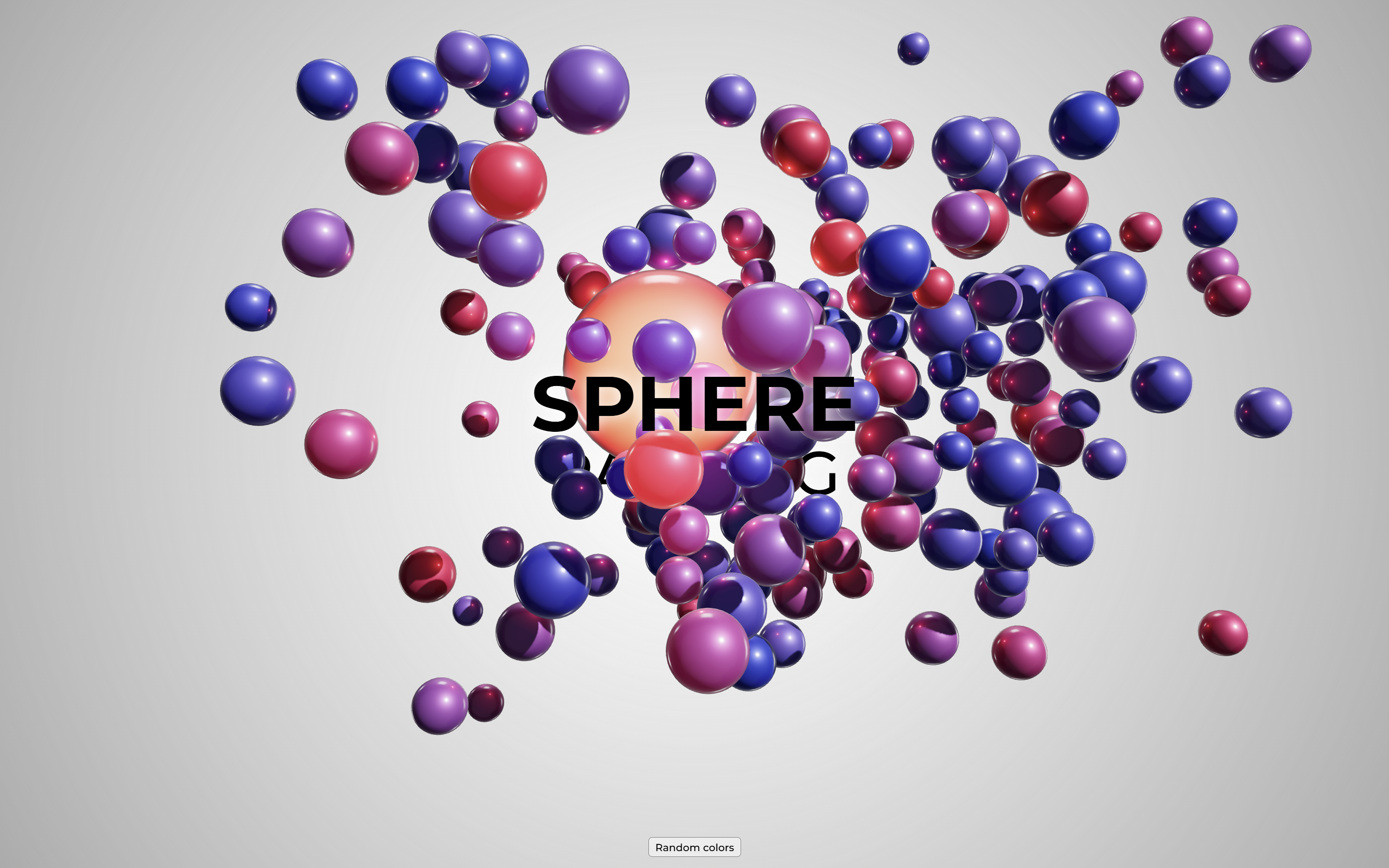
Let’s create a Sphere Packing Animation using HTML, CSS, and JavaScript. This project will feature dynamically packed spheres that animate beautifully across the screen, providing a mesmerizing visual effect.
We’ll use HTML to structure the canvas, CSS for styling, and JavaScript to handle the sphere-packing logic and animations.
Let’s dive into building the Sphere Packing Animation. Whether you’re a beginner or an experienced developer, this project is a fun way to enhance your skills while creating an engaging and visually stunning effect. Let’s bring these spheres to life!
HTML :
This HTML sets up a sphere animation page with a centered title, a button to randomize sphere colors, and a WebGL canvas for the animation.
<!DOCTYPE html>
<html lang="en" >
<head>
<meta charset="UTF-8">
<title>Sphere Packing Animation | @coding.stella</title>
<link rel='stylesheet' href='https://fonts.googleapis.com/css2?family=Montserrat:wght@500;700&display=swap'>
<link rel="stylesheet" href="./style.css">
</head>
<body>
<div id="app">
<div class="hero">
<h1>Sphere</h1>
<h2>Packing</h2>
</div>
<div class="buttons">
<button type="button" id="colors-btn">
Random colors
</button>
</div>
<canvas id="webgl-canvas"></canvas>
</div>
<script type="module" src="./script.js"></script>
</body>
</html>
CSS :
This CSS creates a fullscreen layout with a radial gradient background, a centered “hero” section for bold titles, and fixed buttons at the bottom. It ensures a clean and responsive design.
body, html, #app {
  margin: 0;
  width: 100%;
  height: 100%;
  background: radial-gradient(circle, rgba(255,255,255,1) 0%, rgba(0,0,0,0.5) 200%);
}

#app {
  position: relative;
  height: 100%;
  font-family: "Montserrat", serif;
}

.hero {
  height: 100%;
  display: flex;
  flex-direction: column;
  align-items: center;
  justify-content: center;
}

h1, h2 {
  margin: 0;
  padding: 0;
  color: black;
  text-transform: uppercase;
  text-shadow: 0 0 20px rgba(255, 255, 255, 1);
  line-height: 100%;
  user-select: none;
}

h1 {
  position: relative;
  z-index: 2;
  font-size: 100px;
  font-weight: 700;
}

h2 {
  font-size: 80px;
  font-weight: 500;
}

#webgl-canvas {
  position: fixed;
  top: 0;
  right: 0;
  bottom: 0;
  left: 0;
  overflow: hidden;
  z-index: 1;
}

.buttons {
  position: fixed;
  width: 100%;
  bottom: 15px;
  z-index: 2;

  display: flex;
  justify-content: center;
  align-items: center;
  gap: 15px;
}

button {
  font-family: "Montserrat", serif;
  background: rgba(255, 255, 255, 0.5);
  border-radius: 5px;
  border: 1px solid grey;
  padding: 4px 8px;
}
JavaScript:
This code creates a dynamic 3D background with floating spheres using Three.js. It initializes the background with 200 spheres of random colors and sizes. Clicking anywhere on the webpage toggles the animation pause, while clicking the “colors-btn” button changes the spheres’ colors and light randomly.
import Spheres2Background from 'https://cdn.jsdelivr.net/npm/threejs-components@0.0.8/build/backgrounds/spheres2.cdn.min.js'

const bg = Spheres2Background(document.getElementById('webgl-canvas'), {
  count: 200,
  colors: [0xff0000, 0x0, 0xffffff],
  minSize: 0.5,
  maxSize: 1
})

const button1 = document.getElementById('colors-btn')

document.body.addEventListener('click', (ev) => {
  if (ev.target !== button1) bg.togglePause()
})

button1.addEventListener('click', () => {
  bg.spheres.setColors([0xffffff * Math.random(), 0xffffff * Math.random(), 0xffffff * Math.random()])
  bg.spheres.light1.color.set(0xffffff * Math.random())
})
In conclusion, creating a Sphere Packing Animation using HTML, CSS, and JavaScript has been a visually exciting and educational project. By combining these technologies, we’ve crafted a dynamic and captivating animation that showcases the beauty of geometric packing and smooth motion.
If your project has problems, don’t worry. Just click to download the source code and face your coding challenges with excitement. Have fun coding!
