


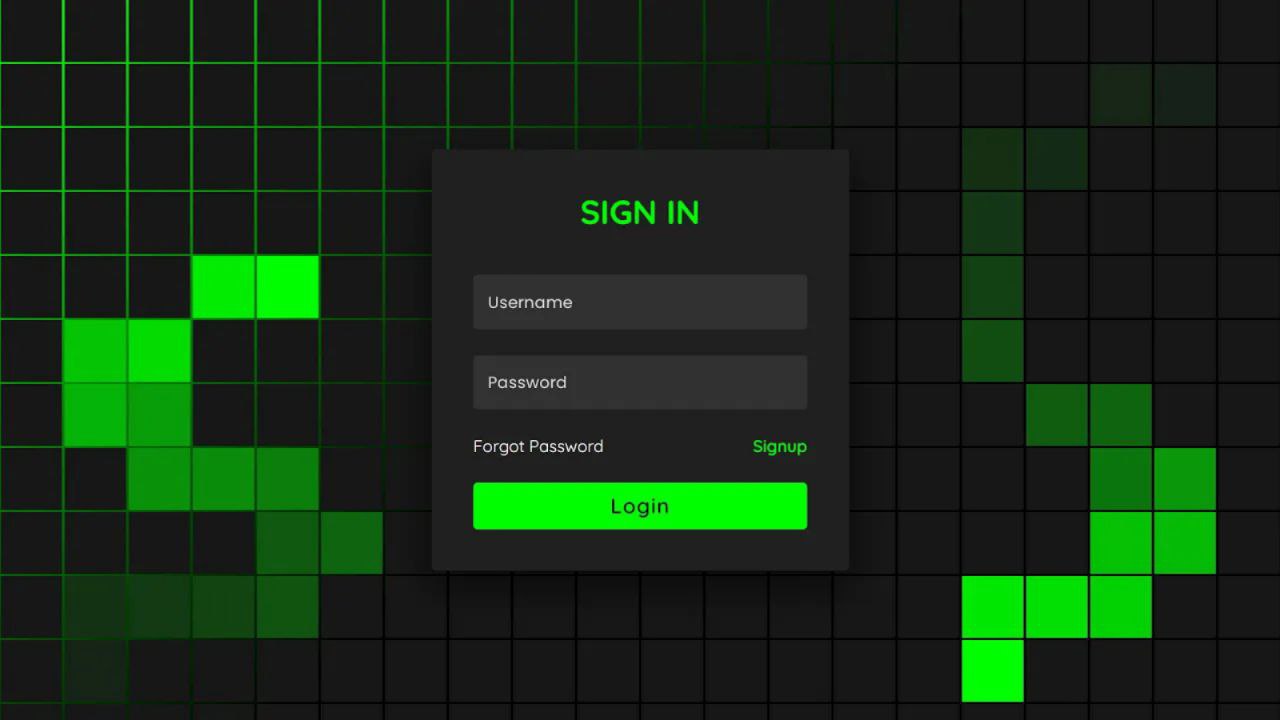
Let’s create a Hacker-Style Login Form using HTML and CSS. This cool project will give your website a cyberpunk feel with neon text, dark backgrounds, and glowing effects that look straight out of a hacker’s terminal.
We’ll use:
- HTML to structure the login form.
- CSS to style it with neon colors, glowing borders, and a dark hacker-theme design.
This project is perfect if you want to add a futuristic login interface to your site or just have fun practicing creative CSS designs. Let’s dive in and build a stylish hacker-style login form! 👨💻💻
HTML :
This HTML code creates a hacker-themed login form. It features a shadowed background with multiple animated span elements. The sign-in section includes input boxes for username and password, along with links for password recovery and signup. The form has a simple and sleek design with a dark color scheme.
<!DOCTYPE html>
<html lang="en" >
<head>
  <meta charset="UTF-8">
  <title>Hacker Login Form | CodingStella </title>
  <link rel="stylesheet" href="./style.css">

</head>
<body>
<!-- partial:index.partial.html -->
<section>

    <span></span>
    <span></span>
    <span></span>
    <span></span>
    <span></span>
    <span></span>
    <span></span>
    <span></span>
    <span></span>
    <span></span>
    <span></span>
    <span></span>
    <span></span>
    <span></span>
    <span></span>
    <span></span>
    <span></span>
    <span></span>
    <span></span>
    <span></span>
    <span></span>
    <span></span>
    <span></span>
    <span></span>
    <span></span>
    <span></span>
    <span></span>
    <span></span>
    <span></span>
    <span></span>
    <span></span>
    <span></span>
    <span></span>
    <span></span>
    <span></span>
    <span></span>
    <span></span>
    <span></span>
    <span></span>
    <span></span>
    <span></span>
    <span></span>
    <span></span>
    <span></span>
    <span></span>
    <span></span>
    <span></span>
    <span></span>
    <span></span>
    <span></span>
    <span></span>
    <span></span>
    <span></span>
    <span></span>
    <span></span>
    <span></span>
    <span></span>
    <span></span>
    <span></span>
    <span></span>
    <span></span>
    <span></span>
    <span></span>
    <span></span>
    <span></span>
    <span></span>
    <span></span>
    <span></span>
    <span></span>
    <span></span>
    <span></span>
    <span></span>
    <span></span>
    <span></span>
    <span></span>
    <span></span>
    <span></span>
    <span></span>
    <span></span>
    <span></span>
    <span></span>
    <span></span>
    <span></span>
    <span></span>
    <span></span>
    <span></span>
    <span></span>
    <span></span>
    <span></span>
    <span></span>
    <span></span>
    <span></span>
    <span></span>
    <span></span>
    <span></span>
    <span></span>
    <span></span>
    <span></span>
    <span></span>
    <span></span>
    <span></span>
    <span></span>
    <span></span>
    <span></span>
    <span></span>
    <span></span>
    <span></span>
    <span></span>
    <span></span>
    <span></span>
    <span></span>
    <span></span>
    <span></span>
    <span></span>
    <span></span>
    <span></span>
    <span></span>
    <span></span>
    <span></span>
    <span></span>
    <span></span>
    <span></span>
    <span></span>
    <span></span>
    <span></span>
    <span></span>
    <span></span>
    <span></span>
    <span></span>
    <span></span>
    <span></span>
    <span></span>
    <span></span>
    <span></span>
    <span></span>
    <span></span>
    <span></span>
    <span></span>
    <span></span>
    <span></span>
    <span></span>
    <span></span>
    <span></span>
    <span></span>
    <span></span>
    <span></span>
    <span></span>
    <span></span>
    <span></span>
    <span></span>
    <span></span>
    <span></span>
    <span></span>
    <span></span>
    <span></span>
    <span></span>
    <span></span>
    <span></span>
    <span></span>
    <span></span>
    <span></span>
    <span></span>
    <span></span>
    <span></span>
    <span></span>
    <span></span>
    <span></span>
    <span></span>
    <span></span>
    <span></span>
    <span></span>
    <span></span>
    <span></span>
    <span></span>
    <span></span>
    <span></span>
    <span></span>
    <span></span>
    <span></span>
    <span></span>
    <span></span>
    <span></span>
    <span></span>
    <span></span>
    <span></span>
    <span></span>
    <span></span>
    <span></span>
    <span></span>
    <span></span>
    <span></span>
    <span></span>
    <span></span>
    <span></span>
    <span></span>
    <span></span>
    <span></span>
    <span></span>
    <span></span>
    <span></span>
    <span></span>
    <span></span>
    <span></span>
    <span></span>
    <span></span>
    <span></span>
    <span></span>
    <span></span>
    <span></span>
    <span></span>
    <span></span>
    <span></span>
    <span></span>
    <span></span>
    <span></span>
    <span></span>
    <span></span>
    <span></span>
    <span></span>
    <span></span>
    <span></span>
    <span></span>
    <span></span>
    <span></span>
    <span></span>
    <span></span>
    <span></span>
    <span></span>
    <span></span>
    <span></span>
    <span></span>
    <span></span>
    <span></span>
    <span></span>
    <span></span>
    <span></span>
    <span></span>
    <span></span>
    <span></span>
    <span></span>
    <span></span>
    <span></span>
    <span></span>
    <span></span>
    <span></span>
    <span></span>
    <span></span>
    <span></span>
    <span></span>
    <span></span>
    <span></span>
    <span></span>
    <span></span>
    <span></span>
    <span></span>
    <span></span>
    <span></span>
    <span></span>
    <span></span>
    <span></span>

    <div class="signin">
      <div class="content">
        <h2>Sign In</h2>
        <div class="form">
          <div class="inputBox">
            <input type="text" required>
            <i>Username</i>
          </div>
          <div class="inputBox">
            <input type="password" required>
            <i>Password</i>
          </div>
          <div class="links">
            <a href="#">Forgot Password</a>
            <a href="#">Signup</a>
          </div>
          <div class="inputBox">
            <input type="submit" value="Login">
          </div>
        </div>
      </div>
    </div>
  </section>
<!-- partial -->

</body>
</html>
CSS :
This CSS code creates a stylish webpage with an animated neon-themed background. It features colorful blocks that change to green on hover. The page includes a centered sign-in form with a dark background, styled input boxes, and a vibrant submit button.
The design is responsive, adapting for various screen sizes. The use of the Quicksand font from Google Fonts adds a modern touch.
/* Font import and global reset */
@import url('https://fonts.googleapis.com/css2?family=Quicksand:wght@300;400;500;600;700&display=swap');

/* Global reset */
* {
	margin: 0;
	padding: 0;
	box-sizing: border-box;
	font-family: 'Quicksand', sans-serif;
}

/* Body styling */
body {
	display: flex;
	justify-content: center;
	align-items: center;
	min-height: 100vh;
	background: #000;
}

/* Section styles */
section {
	position: absolute;
	width: 100vw;
	height: 100vh;
	display: flex;
	justify-content: center;
	align-items: center;
	gap: 2px;
	flex-wrap: wrap;
	overflow: hidden;
}

/* Animated gradient effect */
section::before {
	content: '';
	position: absolute;
	width: 100%;
	height: 100%;
	background: linear-gradient(#000, #0f0, #000);
	animation: animate 5s linear infinite;
}

/* Animation keyframes */
@keyframes animate {
	0% {
		transform: translateY(-100%);
	}
	100% {
		transform: translateY(100%);
	}
}

/* Styling for individual spans */
section span {
	position: relative;
	display: block;
	width: calc(6.25vw - 2px);
	height: calc(6.25vw - 2px);
	background: #181818;
	z-index: 2;
	transition: 1.5s;
}

section span:hover {
	background: #0f0;
	transition: 0s;
}

/* Sign-in form styles */
.signin {
	position: absolute;
	width: 400px;
	background: #222;
	z-index: 1000;
	display: flex;
	justify-content: center;
	align-items: center;
	padding: 40px;
	border-radius: 4px;
	box-shadow: 0 15px 35px rgba(0, 0, 0, 0.9);
}

.signin .content {
	position: relative;
	width: 100%;
	display: flex;
	justify-content: center;
	align-items: center;
	flex-direction: column;
	gap: 40px;
}

.signin .content h2 {
	font-size: 2em;
	color: #0f0;
	text-transform: uppercase;
}

.signin .content .form {
	width: 100%;
	display: flex;
	flex-direction: column;
	gap: 25px;
}

.signin .content .form .inputBox {
	position: relative;
	width: 100%;
}

.signin .content .form .inputBox input {
	position: relative;
	width: 100%;
	background: #333;
	border: none;
	outline: none;
	padding: 25px 10px 7.5px;
	border-radius: 4px;
	color: #fff;
	font-weight: 500;
	font-size: 1em;
}

.signin .content .form .inputBox i {
	position: absolute;
	left: 0;
	padding: 15px 10px;
	font-style: normal;
	color: #aaa;
	transition: 0.5s;
	pointer-events: none;
}

.signin .content .form .inputBox input:focus ~ i,
.signin .content .form .inputBox input:valid ~ i {
	transform: translateY(-7.5px);
	font-size: 0.8em;
	color: #fff;
}

.signin .content .form .links {
	position: relative;
	width: 100%;
	display: flex;
	justify-content: space-between;
}

.signin .content .form .links a {
	color: #fff;
	text-decoration: none;
}

.signin .content .form .links a:nth-child(2) {
	color: #0f0;
	font-weight: 600;
}

.signin .content .form .inputBox input[type="submit"] {
	padding: 10px;
	background: #0f0;
	color: #000;
	font-weight: 600;
	font-size: 1.35em;
	letter-spacing: 0.05em;
	cursor: pointer;
}

input[type="submit"]:active {
	opacity: 0.6;
}

/* Media queries for responsive design */
@media (max-width: 900px) {
	section span {
		width: calc(10vw - 2px);
		height: calc(10vw - 2px);
	}
}

@media (max-width: 600px) {
	section span {
		width: calc(20vw - 2px);
		height: calc(20vw - 2px);
	}
}
Great job, coders! We’ve successfully built a Hacker-style Login Form with HTML and CSS. Now, your login page has that cool, techy vibe. Well done on completing this coding journey! Keep coding, stay curious, and get ready for more adventures ahead!
If your project hits a snag, no worries! Access the source code effortlessly. Click the Download button to kickstart your coding expedition. May your coding be filled with joy!
