


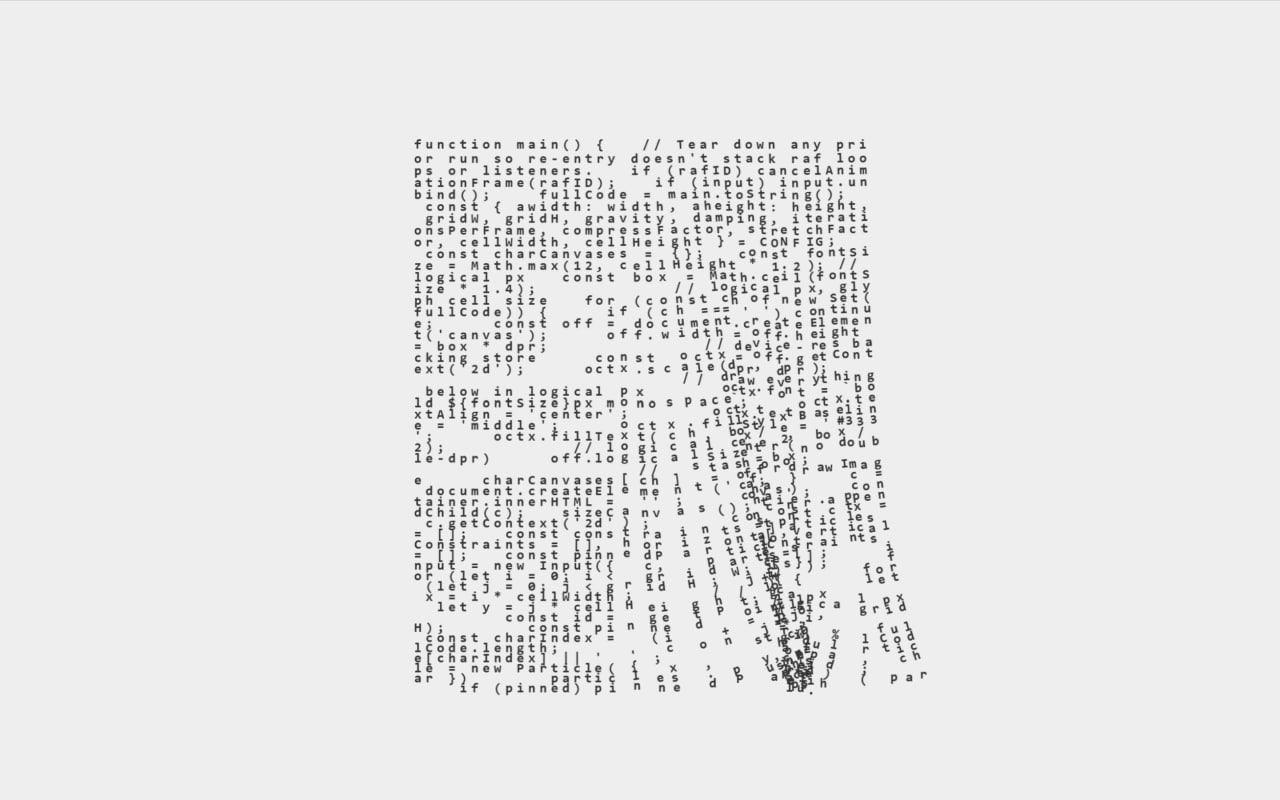
Let’s create an Interactive Code Strings Animation using HTML, CSS, and JavaScript. This project transforms lines of code into a dynamic, cloth-like animation where every character moves realistically and reacts to your mouse, creating a unique interactive visual effect.
We’ll use:
- HTML to set up the container where the animation will be displayed.
- CSS to center the layout, style the canvas, and create a clean modern interface.
- JavaScript to generate the code characters, simulate realistic string physics, and make the animation respond to mouse movements and dragging.
This project is perfect for learning Canvas API, physics-based animations, and interactive UI effects, while creating an eye-catching project that stands out in your portfolio. Let’s get started and bring your code to life! 🚀✨
HTML :
This HTML file creates the basic structure of the webpage. It sets the page language to English, adds the page title, links the external CSS file for styling, and includes a <div> with the ID container where the JavaScript will dynamically create and display the canvas animation. Finally, it loads the script.js file as a module to run the interactive effect.
<!DOCTYPE html>
<html lang="en">

  <head>
    <meta charset="UTF-8">
    <title>Strings</title>
    <link rel="stylesheet" href="./style.css">

  </head>

  <body>
  <div id="container"></div>
    <script type="module" src="./script.js"></script>

  </body>

</html>
CSS :
This CSS styles the webpage by centering the content both horizontally and vertically on a light gray background. It makes the canvas responsive so it fits within the screen, adds a subtle shadow and border around the container, and imports the Rubik font from Google Fonts for text styling. The touch-action: none property also disables default touch gestures, allowing smooth user interaction with the animation.
@import url("https://fonts.googleapis.com/css2?family=Rubik:ital,wght@0,300..900;1,300..900&display=swap");
body {
  background: #EEE;
  margin: 0;
  display: flex;
  min-height: 100vh;
  align-items: center;
  justify-content: center;
  overflow: hidden;
}
canvas {
  max-height: 100vh;
  max-width: 100vw;
  height: auto;
  width: auto;
  /*   border: 1px solid silver; */
}

#container {
  box-shadow: 0 0 20px rgba(0,0,0,.05);
  border: 1px solid rgba(0,0,0,.1);
  position: relative;
  display: flex;
  align-items: center;
  justify-content: center;
  touch-action: none;
  }
h1 {
  font-family: Rubik;
  font-size: 100px;
  font-weight: 800;
  line-height: 1em;
  position: absolute;
  color: #fff;
}
JavaScript:
This JavaScript creates an interactive cloth-like animation made of characters from its own source code. It generates a grid of particles connected by constraints, simulates realistic physics like gravity and movement, draws each character on a canvas, and continuously updates the animation using requestAnimationFrame. Users can also click, drag, or move the mouse to interact with the cloth, making the code characters move naturally like a flexible hanging fabric.
import {
  lerp,
  getPointsForGridId,
  getEdgeIdsForGridId,
  getPointID,
  hash,
  smoothstep
} from "https://codepen.io/shubniggurath/pen/OPyPdmm.js";

console.clear();

let fullCode = '';

const w = Math.min(400, window.innerWidth - 100), h = Math.min(400, window.innerHeight - 100);

// DPR - Cap at 2 to protect fill-rate on 3x screens; drop the cap for max sharpness.
const dpr = Math.min(window.devicePixelRatio || 1, 2);

const CONFIG = {
  awidth: w,
  aheight: h,
  gridW: Math.min(50, Math.floor(w / 10)), // arbitrary something something
  gridH: Math.min(50, Math.floor(w / 5)),
  gravity: .2,
  damping: .99,
  iterationsPerFrame: 5,
  compressFactor: .02,
  stretchFactor: 1.1,
  mouseSize: 5000,
  mouseStrength: 4,
  contain: false,
  randomSolve: false,
  preset: ''
};
CONFIG.cellWidth = CONFIG.awidth / (CONFIG.gridW - 1)
CONFIG.cellHeight = CONFIG.aheight / (CONFIG.gridH - 1);

function sizeCanvas() {
  if (!c) return;
  c.style.width = window.innerWidth + 'px';
  c.style.height = window.innerHeight + 'px';
  c.width = Math.round(window.innerWidth * dpr);
  c.height = Math.round(window.innerHeight * dpr);
}

window.addEventListener('resize', () => {
  if (c && c.width) {
    sizeCanvas();
    CONFIG.awidth = Math.min(400, window.innerWidth - 100);
    CONFIG.aheight = Math.min(400, window.innerHeight - 100);
    CONFIG.cellWidth = CONFIG.awidth / (CONFIG.gridW - 1);
    CONFIG.cellHeight = CONFIG.aheight / (CONFIG.gridH - 1);
  }
})

let rafID, input, c;
function main() {
  // Tear down any prior run so re-entry doesn't stack raf loops or listeners.
  if (rafID) cancelAnimationFrame(rafID);
  if (input) input.unbind();

  fullCode = main.toString();
  const { awidth: width, aheight: height, gridW, gridH, gravity, damping, iterationsPerFrame, compressFactor, stretchFactor, cellWidth, cellHeight } = CONFIG;

  const charCanvases = {};
  const fontSize = Math.max(12, cellHeight * 1.2); // logical px
  const box = Math.ceil(fontSize * 1.4);           // logical px, glyph cell size
  for (const ch of new Set(fullCode)) {
    if (ch === ' ') continue;
    const off = document.createElement('canvas');
    off.width = off.height = box * dpr;            // device-res backing store
    const octx = off.getContext('2d');
    octx.scale(dpr, dpr);                          // draw everything below in logical px
    octx.font = `bold ${fontSize}px monospace`;
    octx.textAlign = 'center';
    octx.textBaseline = 'middle';
    octx.fillStyle = '#333';
    octx.fillText(ch, box / 2, box / 2);           // logical center (no double-dpr)
    off.logicalSize = box;                         // stash for drawImage
    charCanvases[ch] = off;
  }

  c = document.createElement('canvas');
  container.innerHTML = '';
  container.appendChild(c);
  sizeCanvas();
  const ctx = c.getContext('2d');

  const particles = [];
  const constraints = [], verticalConstraints = [], horizontalConstraints = [];
  const pinnedParticles = [];

  input = new Input({ c, particles });

  for (let i = 0; i < gridW; i++) {
    for (let j = 0; j < gridH; j++) {
      let x = i * cellWidth;   // logical px
      let y = j * cellHeight;  // logical px

      const id = getPointID(j, i, gridH);
      const pinned = j === 0;

      const charIndex = (i + j * gridW) % fullCode.length;
      const char = fullCode[charIndex] || ' ';

      const particle = new Particle({ x, y, pinned, id, char })
      particles.push(particle);
      if (pinned) pinnedParticles.push(particle);
    }
  }

  for (let i = 0; i < gridW; i++) {
    for (let j = 0; j < gridH; j++) {
      const id = getPointID(j, i, gridH);
      const p = particles[id];

      if (j < gridH - 1) {
        const bottomP = particles[getPointID(j + 1, i, gridH)];
        const c = new Constraint({ p1: p, p2: bottomP, length: cellHeight, id: id + gridW * gridH, compressFactor, stretchFactor });
        constraints.push(c);
        p.downConstraint = c; // Cache the down ref directly on the particle
      }
      // Horizontal constraints, used to give the curtain a cohesive appearance
      if (i < gridW - 1) {
        const rightP = particles[getPointID(j, i + 1, gridH)];

        const hc = new Constraint({
          p1: p,
          p2: rightP,
          length: cellWidth,
          id: id + gridW * gridH * 2,
          compressFactor: 0.6,
          stretchFactor: 4,
          isSpacer: true
        });

        constraints.push(hc);
        horizontalConstraints.push(hc);
      }
    }
  }

  function drawParticles() {
    particles.forEach(p => {
      ctx.beginPath();
      ctx.arc(...p.pos, CONFIG.pointRadius, 0, Math.PI * 2);
      ctx.fill();
      ctx.stroke();
    });
  }

  function drawCode() {
    const offsetX = (c.width / dpr - width) / 2;      // logical px
    const offsetY = (c.height / dpr - height) / 2 - 30; // logical px

    particles.forEach(p => {
      if (!p.char || p.char === ' ') return;
      const img = charCanvases[p.char];
      if (!img) return;

      let cos = 1, sin = 0;
      const constraint = p.downConstraint;
      if (constraint) {
        const dx = constraint.p2.pos.x - constraint.p1.pos.x;
        const dy = constraint.p2.pos.y - constraint.p1.pos.y;
        const angle = Math.atan2(dy, dx) - Math.PI / 2;
        cos = Math.cos(angle);
        sin = Math.sin(angle);
      }

      const tx = p.pos.x + offsetX;
      const ty = p.pos.y + offsetY;
      // scale(dpr) . translate(tx,ty) . rotate, collapsed into one matrix
      ctx.setTransform(dpr * cos, dpr * sin, -dpr * sin, dpr * cos, dpr * tx, dpr * ty);

      const half = img.logicalSize / 2;
      // Explicit w/h downscales the hi-res atlas back to logical size.
      ctx.drawImage(img, -half, -half, img.logicalSize, img.logicalSize);
    });

    ctx.setTransform(1, 0, 0, 1, 0, 0);
  }

  function shuffleArray(array) {
    for (let i = array.length - 1; i > 0; i--) {
      const j = Math.floor(Math.random() * (i + 1));
      [array[i], array[j]] = [array[j], array[i]];
    }
  }

  let lastDelta = 0;
  function runloop(delta) {
    rafID = requestAnimationFrame(runloop);

    ctx.save();
    ctx.clearRect(0, 0, c.width, c.height); // device space; transform is identity here

    particles.forEach(p => p.update(delta - lastDelta));
    lastDelta = delta;

    if (CONFIG.randomSolve) shuffleArray(constraints)
    for (let i = 0; i < iterationsPerFrame; i++) {
      for (let j = 0; j < constraints.length; j++) constraints[j].solve();
    }

    if (CONFIG.contain) particles.forEach(p => p.contain());

    drawCode();

    ctx.restore();
  }
  rafID = requestAnimationFrame(runloop);
}

class Input {
  constructor({ c, particles }) {
    this.c = c, this.particles = particles;
    this.mousePos = new Vec2();
    this.grabRadius = 20; // logical px
    this.grabbed;
    this.bind()
  }
  // Maps a client event into the same logical grid space the particles live in.
  setMouse(e) {
    const rect = this.c.getBoundingClientRect();
    const cssX = e.clientX - rect.left;  // canvas CSS size == logical size
    const cssY = e.clientY - rect.top;
    const offsetX = (this.c.width / dpr - CONFIG.awidth) / 2;
    const offsetY = (this.c.height / dpr - CONFIG.aheight) / 2 - 30;
    this.mousePos.x = cssX - offsetX;
    this.mousePos.y = cssY - offsetY;
  }
  pointerdown(e) {
    this.setMouse(e);

    for (const p of this.particles) {
      if (this.mousePos.subtractNew(p.pos).length < this.grabRadius) {
        this.grabbedParticle = p;
        this.grabbedParticle.originalPinnedState = this.grabbedParticle.pinned;
        this.grabbedParticle.pinned = true;
        break;
      }
    }
    if (!this.grabbedParticle) {
      this.pointerIsDown = true
    }
  }
  pointerup(e) {
    if (this.grabbedParticle) {
      this.grabbedParticle.pinned = this.grabbedParticle.originalPinnedState;
      this.grabbedParticle = null;
    }
    clearTimeout(this.pointerUpTimer)
    this.pointerUpTimer = setTimeout(() => {
      this.pointerIsDown = false
    }, 1000)
  }
  pointermove(e) {
    this.setMouse(e);

    if (this.grabbedParticle) {
      this.grabbedParticle.pos.reset(this.mousePos.x, this.mousePos.y);
      this.grabbedParticle.oldPos.reset(this.mousePos.x, this.mousePos.y);
    }
    for (const p of this.particles) {
      const diff = this.mousePos.subtractNew(p.pos);
      const ls = diff.lengthSquared
      if (ls < CONFIG.mouseSize) {
        const a = diff.angle - Math.PI;
        const strength = smoothstep(CONFIG.mouseSize, -2000, ls) * CONFIG.mouseStrength / 300;

        const force = new Vec2(Math.cos(a) * strength, Math.sin(a) * strength);
        p.applyForce(force)
      }
    }
  }
  contextmenu(e) {
    e.preventDefault();
  }
  get rect() {
    const rect = this.c.getBoundingClientRect();
    rect.scale = rect.width / this.c.width;
    return rect;
  }
  bind() {
    this.pointerdown = this.pointerdown.bind(this)
    this.pointerup = this.pointerup.bind(this)
    this.pointermove = this.pointermove.bind(this)
    this.contextmenu = this.contextmenu.bind(this)
    document.addEventListener('pointerdown', this.pointerdown)
    document.addEventListener('pointerup', this.pointerup)
    document.addEventListener('pointermove', this.pointermove)
    document.addEventListener('contextmenu', this.contextmenu)
  }
  unbind() {
    document.removeEventListener('pointerdown', this.pointerdown)
    document.removeEventListener('pointerup', this.pointerup)
    document.removeEventListener('pointermove', this.pointermove)
    document.removeEventListener('contextmenu', this.contextmenu)
  }
}

class Vec2 {
  constructor(x = 0, y = 0) {
    this.reset(x, y)
  }
  zero() {
    this.reset(0, 0)
  }
  reset(x = 0, y = 0) {
    this.x = x;
    this.y = y;
  }
  clone() {
    return new Vec2(this.x, this.y);
  }
  add(v) {
    this.x += v.x;
    this.y += v.y;
    return this;
  }
  addNew(v) {
    return this.clone().add(v);
  }
  subtract(v) {
    this.x -= v.x;
    this.y -= v.y;
    return this;
  }
  subtractNew(v) {
    return this.clone().subtract(v);
  }
  multiply(v) {
    this.x *= v.x;
    this.y *= v.y;
    return this;
  }
  multiplyNew(v) {
    return this.clone().multiply(v);
  }
  scale(scalar) {
    this.x *= scalar;
    this.y *= scalar;
    return this;
  }
  scaleNew(scalar) {
    return this.clone().scale(scalar);
  }

  get array() {
    return [this.x, this.y];
  }
  get lengthSquared() {
    return this.x ** 2 + this.y ** 2;
  }
  get length() {
    return Math.hypot(this.x, this.y);
  }
  get angle() {
    return Math.atan2(this.y, this.x);
  }

  [Symbol.iterator]() {
    let values = this.array;
    let i = 0;
    return {
      next() {
        if (i < values.length) {
          let value = values[i];
          i++;
          return { value, done: false }
        } else return { done: true }
      }
    }
  }
}

class Particle {
  // Added 'char' to the constructor
  constructor({ x, y, pinned, id, char } = {}) {
    this.pos = new Vec2(x, y);
    this.oldPos = new Vec2(x, y);
    this.velocity = new Vec2()
    this.acceleration = new Vec2();
    this.pinned = pinned;
    this.id = id;
    this.char = char;
    this.gravityVec = new Vec2();
  }
  contain() {
    if (this.pinned) return;
    const radius = 5;

    if (this.pos.x < radius) {
      this.pos.x = radius;
      this.oldPos.x = this.pos.x + Math.abs(this.oldPos.x - this.pos.x) * 0.8;
    } else if (this.pos.x > CONFIG.awidth - radius) {
      this.pos.x = CONFIG.awidth - radius;
      this.oldPos.x = this.pos.x - Math.abs(this.oldPos.x - this.pos.x) * 0.8;
    }
    if (this.pos.y < radius) {
      this.pos.y = radius;
      this.oldPos.y = this.pos.y + Math.abs(this.oldPos.y - this.pos.y) * 0.8;
    } else if (this.pos.y > CONFIG.aheight - radius) {
      this.pos.y = CONFIG.aheight - radius;
      this.oldPos.y = this.pos.y - Math.abs(this.oldPos.y - this.pos.y) * 0.8;
    }
  }
  update(delta) {
    if (this.pinned) {
      this.acceleration.zero();
      return;
    }

    this.velocity.reset(
      (this.pos.x - this.oldPos.x) * CONFIG.damping,
      (this.pos.y - this.oldPos.y) * CONFIG.damping
    );

    this.oldPos.reset(...this.pos);

    const dd = delta ** 2;
    this.gravityVec.reset(0, CONFIG.gravity / dd)

    this.applyForce(this.gravityVec)

    this.pos.x += this.velocity.x + this.acceleration.x * dd;
    this.pos.y += this.velocity.y + this.acceleration.y * dd;

    this.acceleration.reset();
  }
  applyForce(v) {
    this.acceleration.add(v);
  }
}

class Constraint {
  constructor({ p1, p2, length, id, compressFactor, stretchFactor, isSpacer }) {
    this.p1 = p1;
    this.p2 = p2;
    this.length = length;
    this.id = id;
    this.isSpacer = isSpacer;
    this.minLength = length * compressFactor;
    this.maxLength = length * stretchFactor;

    c.addEventListener("update", (e) => {
      this.minLength = this.length * (this.isSpacer ? compressFactor : e.detail.compressFactor);
      this.maxLength = this.length * (this.isSpacer ? stretchFactor : e.detail.stretchFactor);
    })
  }
  solve() {
    // Inline the vector math to avoid thrash
    const dx = this.p2.pos.x - this.p1.pos.x;
    const dy = this.p2.pos.y - this.p1.pos.y;
    const distance = Math.hypot(dx, dy);

    if (distance == 0) return;

    let targetLength = this.length;
    if (distance < this.minLength) targetLength = this.minLength;
    else if (distance > this.maxLength) targetLength = this.maxLength;
    else return;

    const difference = targetLength - distance;
    const percent = difference / distance / 2;

    const offsetX = dx * percent;
    const offsetY = dy * percent;

    if (!this.p1.pinned) {
      this.p1.pos.x -= offsetX;
      this.p1.pos.y -= offsetY;
    }
    if (!this.p2.pinned) {
      this.p2.pos.x += offsetX;
      this.p2.pos.y += offsetY;
    }
  }
}

setTimeout(() => main(), 500);
And that’s it! 🎉 You’ve successfully built an Interactive Code Strings Animation using HTML, CSS, and JavaScript. Along the way, you learned how to work with the Canvas API, create physics-based animations, and make elements respond smoothly to user interactions. This project is a great addition to your portfolio and a fun way to explore creative web animations. Feel free to customize the colors, effects, or physics to make it uniquely yours. Happy coding! 🚀
If your project has problems, don’t worry. Just click to download the source code and face your coding challenges with excitement. Have fun coding!
