


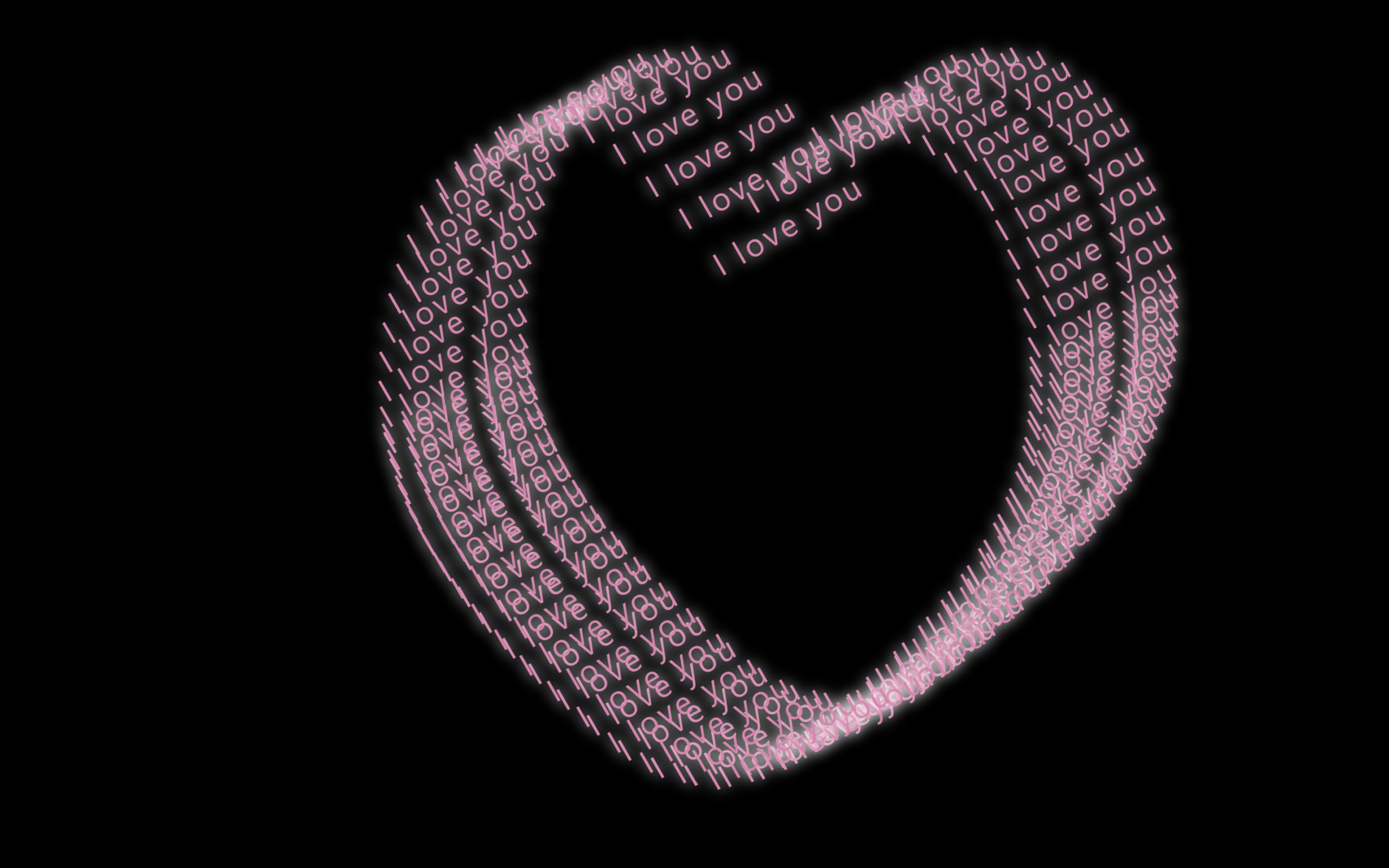
Let’s create an I Love You Heart Animation using HTML, CSS, and JavaScript. This project displays multiple glowing “I Love You” texts that move together to form a beautiful animated heart shape, creating a romantic and eye-catching visual effect.
We’ll use:
- HTML to create a simple container that holds the animated text elements.
- CSS to style the page with a dark background, glowing pink text, and smooth keyframe animations for the heart effect.
- JavaScript to dynamically generate multiple “I Love You” text elements, position them, and control their movement to create the animated heart shape.
This project is perfect for learning DOM manipulation, CSS animations, and creative text effects, while building a visually appealing animation that adds a unique touch to your web development portfolio. Let’s get started and create this beautiful heart animation! ❤️✨
HTML :
The HTML creates a simple page structure with a single <div> container (#ui) where all the “I love you” text elements are dynamically added by JavaScript.
<!DOCTYPE html>
<html lang="en">
<head>
  <meta charset="UTF-8">
  <meta name="viewport" content="width=device-width, initial-scale=1.0">
  <title>I Love You Heart Animation | @coding.stella</title>

  <link rel="stylesheet" href="style.css">
</head>
<body>

  <div id="ui"></div>

  <script src="script.js"></script>
</body>
</html>
CSS :
The CSS styles the page with a black background, pink glowing text, and uses keyframe animations to move each text horizontally and vertically, creating the animated heart effect.
body {
  margin: 0;
  height: 100vh;
  overflow: hidden;
  background: #000;
  font-family: system-ui, -apple-system, "Segoe UI", Roboto, Arial, sans-serif;
}

#ui .love {
  position: absolute;
  top: 50%;
  left: 50%;
  margin: -225px 0 0 -225px;
  --i: 1;
}

#ui .love_word {
  color: #ea80b0;
  font-size: 1.4rem;
  letter-spacing: 2px;
  white-space: nowrap;
  text-shadow: 0 0 10px #fff;
  transform: translateY(-100%) rotate(-30deg);
}

#ui .love_horizontal {
  animation: horizontal 10s infinite alternate ease-in-out;
  animation-delay: calc(var(--i) * -300ms);
}

#ui .love_vertical {
  animation: vertical 20s infinite linear;
  animation-delay: calc(var(--i) * -300ms);
}

@keyframes horizontal {
  from {
    transform: translateX(0);
  }

  to {
    transform: translateX(450px);
  }
}

@keyframes vertical {
  0% {
    transform: translateY(180px);
  }

  10% {
    transform: translateY(45px);
  }

  15% {
    transform: translateY(4.5px);
  }

  18% {
    transform: translateY(0);
  }

  20% {
    transform: translateY(4.5px);
  }

  22% {
    transform: translateY(34.61538px);
  }

  24% {
    transform: translateY(64.28571px);
  }

  25% {
    transform: translateY(112.5px);
  }

  26% {
    transform: translateY(64.28571px);
  }

  28% {
    transform: translateY(34.61538px);
  }

  30% {
    transform: translateY(4.5px);
  }

  32% {
    transform: translateY(0);
  }

  35% {
    transform: translateY(4.5px);
  }

  40% {
    transform: translateY(45px);
  }

  50% {
    transform: translateY(180px);
  }

  71% {
    transform: translateY(428.57143px);
  }

  72.5% {
    transform: translateY(441.17647px);
  }

  75% {
    transform: translateY(450px);
  }

  77.5% {
    transform: translateY(441.17647px);
  }

  79% {
    transform: translateY(428.57143px);
  }

  100% {
    transform: translateY(180px);
  }
}
JavaScript:
The JavaScript generates multiple “I love you” text elements, places them inside the container, and assigns animation delays to each one, making them move together to form the heart-shaped animation.
const ui = document.getElementById("ui");
const totalItems = 100;

for (let i = 1; i <= totalItems; i++) {
  const love = document.createElement("div");
  love.className = "love";
  love.style.setProperty("--i", i);

  love.innerHTML = `
    <div class="love_horizontal">
      <div class="love_vertical">
        <div class="love_word">I love you</div>
      </div>
    </div>
  `;

  ui.appendChild(love);
}
In this project, we created a beautiful I Love You Heart Animation using HTML, CSS, and JavaScript. By combining dynamic text generation with smooth CSS animations, we produced a glowing heart-shaped effect that is both creative and visually appealing. This project is a great way to practice DOM manipulation, CSS keyframe animations, and JavaScript fundamentals, making it a fun addition to your web development portfolio. ❤️✨
If your project has problems, don’t worry. Just click to download the source code and face your coding challenges with excitement. Have fun coding!
