


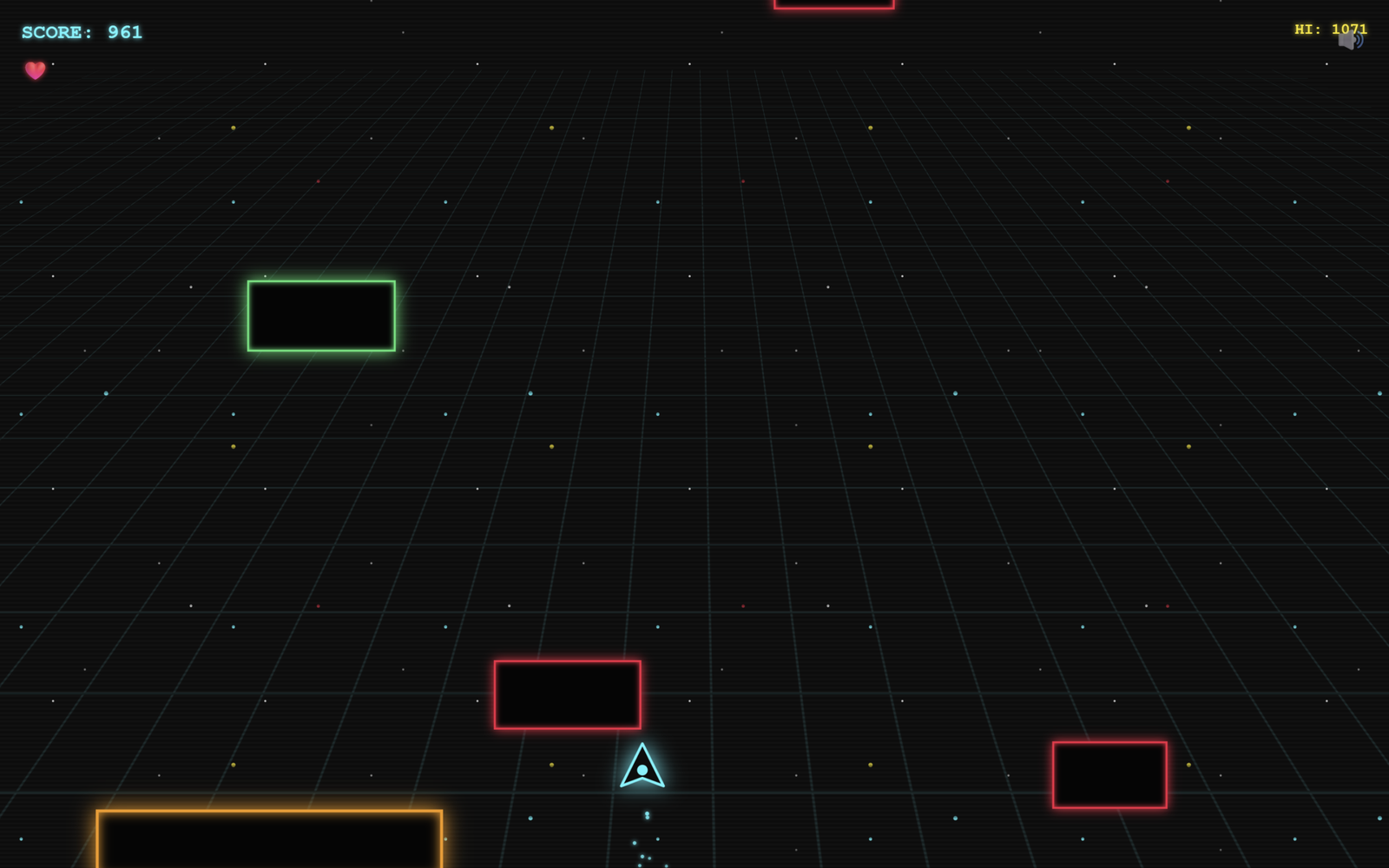
Let’s create an intense, arcade-style “Cyber Dodge” game using React, HTML, CSS, and JavaScript. It will feature neon-glowing graphics, falling geometric hazards, smooth 60FPS physics, and a modern cyberpunk aesthetic.
We’ll use:
- React to structure the app, manage UI screens (like the Main Menu and Game Over screens), and handle the Web Audio sound effects.
- CSS to create the retro 3D cyber-grid, parallax starfield background, CRT scanline effects, and vibrant neon glowing animations.
- JavaScript to build a high-performance
requestAnimationFramegame engine using React Refs, handle precise collision detection, and spawn obstacles and power-ups dynamically.
The player controls a glowing neon spaceship to dodge an endless rain of colorful blocks, collect cyan combo orbs, and grab powerful abilities like Shields and Time Slows, all while the difficulty automatically scales up over time.
This project is an awesome way to learn how to break out of standard React state limitations and build a highly performant, fully responsive browser game from scratch!
App.jsx :
import { useState, useEffect, useRef } from 'react';
import GameEngine from './GameEngine';
import './index.css';


class AudioSystem {
  constructor() {
    this.ctx = new (window.AudioContext || window.webkitAudioContext)();
    this.muted = false;
  }

  playTone(freq, type, duration, vol = 0.1) {
    if (this.muted || !this.ctx) return;
    if (this.ctx.state === 'suspended') this.ctx.resume();

    const osc = this.ctx.createOscillator();
    const gain = this.ctx.createGain();

    osc.type = type;
    osc.frequency.setValueAtTime(freq, this.ctx.currentTime);

    gain.gain.setValueAtTime(vol, this.ctx.currentTime);
    gain.gain.exponentialRampToValueAtTime(0.01, this.ctx.currentTime + duration);

    osc.connect(gain);
    gain.connect(this.ctx.destination);

    osc.start();
    osc.stop(this.ctx.currentTime + duration);
  }

  playOrb() { this.playTone(800, 'sine', 0.1, 0.1); this.playTone(1200, 'sine', 0.2, 0.1); }
  playHit() { this.playTone(100, 'sawtooth', 0.3, 0.2); this.playTone(50, 'square', 0.5, 0.2); }
  playPowerup() { this.playTone(400, 'square', 0.1, 0.1); this.playTone(600, 'square', 0.1, 0.1); this.playTone(800, 'square', 0.3, 0.1); }
  playGameOver() { this.playTone(200, 'sawtooth', 0.5, 0.2); this.playTone(150, 'sawtooth', 0.8, 0.2); this.playTone(100, 'sawtooth', 1.2, 0.2); }
  playClick() { this.playTone(600, 'sine', 0.1, 0.05); }

  toggleMute() { this.muted = !this.muted; return this.muted; }
}

export const audio = new AudioSystem();

function App() {
  const [screen, setScreen] = useState('START');
  const [score, setScore] = useState(0);
  const [combo, setCombo] = useState(0);
  const [highScore, setHighScore] = useState(parseInt(localStorage.getItem('cyberDodgeHighScore') || '0'));
  const [isMuted, setIsMuted] = useState(false);

  const startGame = () => {
    audio.playClick();
    setScore(0);
    setCombo(0);
    setScreen('PLAYING');
  };

  const gameOver = (finalScore, maxCombo) => {
    audio.playGameOver();
    setScore(finalScore);
    setCombo(maxCombo);
    if (finalScore > highScore) {
      setHighScore(finalScore);
      localStorage.setItem('cyberDodgeHighScore', finalScore.toString());
    }
    setScreen('GAME_OVER');
  };

  const toggleMute = () => {
    setIsMuted(audio.toggleMute());
  };

  return (
    <div className="app-container">
      <div className="stars"></div>
      <div className="stars2"></div>
      <div className="stars3"></div>
      <div className="cyber-grid-container">
        <div className="cyber-grid"></div>
      </div>
      <div className="scanlines"></div>

      <button className="mute-btn" onClick={toggleMute}>
        {isMuted ? '🔇' : '🔊'}
      </button>

      {screen === 'START' && (
        <div className="screen">
          <h1>CYBER DODGE</h1>
          <div className="subtitle">Survive. Dodge. Dominate.</div>
          <button className="btn" onClick={startGame}>PLAY</button>
          <button className="btn" onClick={() => { audio.playClick(); setScreen('TUTORIAL'); }}>HOW TO PLAY</button>
        </div>
      )}

      {screen === 'TUTORIAL' && (
        <div className="screen screen-bg" style={{ overflowY: 'auto', padding: '40px 20px' }}>
          <h1 style={{ fontSize: '2.5rem', marginBottom: '20px' }}>HOW TO PLAY</h1>
          <div className="stats-panel" style={{ textAlign: 'left', lineHeight: '1.6', maxWidth: '600px', margin: '0 auto', fontSize: '1rem' }}>

            <h3 style={{ color: 'var(--cyan)', borderBottom: '1px solid var(--cyan)', paddingBottom: '5px' }}>🎮 CONTROLS</h3>
            <p><strong>Desktop:</strong> Left / Right Arrow Keys or A / D</p>
            <p><strong>Mobile:</strong> Tap the left or right side of the screen</p>

            <h3 style={{ color: '#ff5252', borderBottom: '1px solid #ff5252', paddingBottom: '5px', marginTop: '20px' }}>⚠️ HAZARDS (AVOID)</h3>
            <p>The longer you survive, the faster they fall. Watch out for variants!</p>
            <ul style={{ paddingLeft: '20px', marginTop: '5px' }}>
              <li><strong style={{ color: '#ff5252' }}>Red Blocks:</strong> Standard dropping hazards.</li>
              <li><strong style={{ color: '#bb86fc' }}>Purple Blocks:</strong> Lightning fast dropping speed.</li>
              <li><strong style={{ color: '#ff9800' }}>Orange Blocks:</strong> Massive size, hard to dodge.</li>
              <li><strong style={{ color: '#00e676' }}>Green Blocks:</strong> Sweeps from side to side!</li>
            </ul>

            <h3 style={{ color: 'var(--cyan)', borderBottom: '1px solid var(--cyan)', paddingBottom: '5px', marginTop: '20px' }}>💎 COLLECTIBLES (GRAB)</h3>
            <p><strong style={{ color: 'var(--cyan)' }}>Cyan Orbs:</strong> Grants points and builds your COMBO. The higher your combo, the more points everything is worth!</p>
            <p style={{ marginTop: '10px' }}><strong style={{ color: 'var(--yellow)' }}>Yellow Power-Ups:</strong> Grants a random temporary boost (5 seconds):</p>
            <ul style={{ paddingLeft: '20px', marginTop: '5px' }}>
              <li><strong>🛡️ SHIELD:</strong> Absorbs exactly one collision.</li>
              <li><strong>⏱️ SLOW:</strong> Cuts the falling speed of all blocks in half.</li>
              <li><strong>2️⃣ DOUBLE:</strong> Doubles all points earned while active.</li>
            </ul>

          </div>
          <button className="btn" style={{ marginTop: '30px' }} onClick={() => { audio.playClick(); setScreen('START'); }}>BACK TO MENU</button>
        </div>
      )}

      {screen === 'PLAYING' && (
        <GameEngine
          highScore={highScore}
          onGameOver={gameOver}
        />
      )}

      {screen === 'GAME_OVER' && (
        <div className="screen">
          <h1>GAME OVER</h1>
          <div className="stats-panel">
            <div className="stat-row">
              <span className="stat-label">FINAL SCORE</span>
              <span className="stat-value">{score}</span>
            </div>
            <div className="stat-row">
              <span className="stat-label">HIGH SCORE</span>
              <span className="stat-value">{highScore}</span>
            </div>
            <div className="stat-row">
              <span className="stat-label">BEST COMBO</span>
              <span className="stat-value">x{combo}</span>
            </div>
          </div>
          <button className="btn" onClick={startGame}>PLAY AGAIN</button>
        </div>
      )}
    </div>
  );
}

export default App;
Instructions to run the game:
- Extract the
.zipfile into a folder. - Open that folder in your terminal (or VS Code).
- Run the following two commands:
npm install(this downloads the required React packages)npm run dev(this starts the local server to play the game)
If you face any issues with your project, don’t worry! You can grab the source code for this project by clicking the Download button. Ready to kick off your coding journey? Happy coding!
